

Best Practices zur Absicherung von K-12-Schulnetzwerken mit NAC
Dieser technische Leitfaden bietet umsetzbare Strategien für IT-Verantwortliche zur Architektur, Bereitstellung und Verwaltung von Network Access Control (NAC) in K-12-Schulumgebungen. Er behandelt wesentliche Themen von der 802.1X-Authentifizierung und VLAN-Segmentierung bis zur Handhabung von IoT-Geräten mit MAB und MPSK, um einen robusten Schutz und Compliance zu gewährleisten.
Listen to this guide
View podcast transcript
Zusammenfassung für Führungskräfte
Die Absicherung eines K-12-Schulnetzwerks ist im Wesentlichen eine Übung in Risikominderung, Identitätsmanagement und Compliance. IT-Verantwortliche stehen vor der komplexen Herausforderung, einem sehr heterogenen Nutzerkreis – Personal, Schüler, Besucher und Auftragnehmer – nahtlosen Zugang zu ermöglichen und gleichzeitig eine ständig wachsende Anzahl von IoT-Geräten wie Smartboards und Überwachungskameras zu sichern. Network Access Control (NAC), basierend auf IEEE 802.1X, bietet die architektonische Grundlage für eine robuste Netzwerksegmentierung, die sicherstellt, dass Geräte authentifiziert, autorisiert und angemessen isoliert werden, bevor ihnen Netzwerkzugriff gewährt wird.
Dieser Leitfaden bietet einen umfassenden technischen Rahmen für die Bereitstellung von NAC in Bildungseinrichtungen. Er beschreibt Best Practices für die RADIUS-Integration, VLAN-Architektur, Endpunkt-Posture-Prüfung und sicheres Guest Onboarding. Durch die Implementierung dieser Strategien können Betriebsleiter und Netzwerkarchitekten ihre Angriffsfläche erheblich reduzieren, sensible Schutzdaten sichern und die strikte Einhaltung von regulatorischen Standards wie GDPR und CIPA gewährleisten, ohne die betriebliche Effizienz der Schule zu beeinträchtigen.
Technischer Einblick
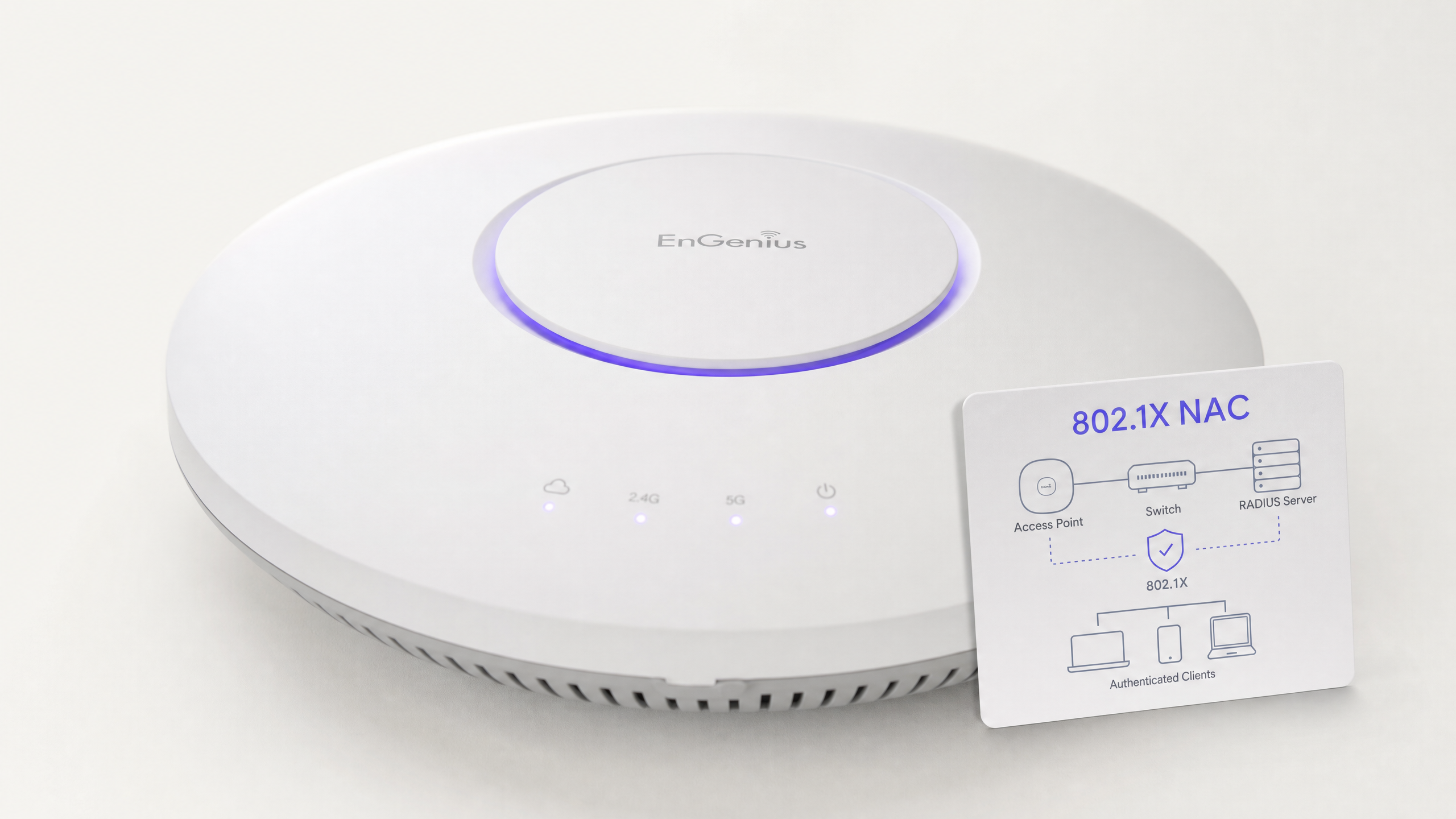
Im Kern basiert NAC auf dem Prinzip des Zero Trust am Netzwerkrand. Wenn ein Gerät (der Supplikant) sich mit einem Access Switch oder Wireless Access Point (dem Authentifikator) verbindet, wird es in einen eingeschränkten Zustand versetzt. Der Authentifikator leitet die Anmeldeinformationen über das 802.1X-Protokoll an einen Authentifizierungsserver (typischerweise einen RADIUS-Server) weiter. Erst nach erfolgreicher Authentifizierung und Richtlinienprüfung wird das Gerät dem entsprechenden VLAN mit spezifischen Zugriffssteuerungslisten (ACLs) zugewiesen.
Das 802.1X-Protokoll und EAP-Methoden
Das Extensible Authentication Protocol (EAP)-Framework bietet den Transportmechanismus für verschiedene Authentifizierungsmethoden innerhalb von 802.1X. In einer K-12-Umgebung sind die gängigsten Implementierungen:
- PEAP-MSCHAPv2: Wird oft für Personal- und Schülergeräte verwendet, die sich mit Active Directory-Anmeldeinformationen authentifizieren. Obwohl einfacher bereitzustellen, ist es anfällig für den Diebstahl von Anmeldeinformationen, wenn das Serverzertifikat vom Client nicht streng validiert wird.
- EAP-TLS: Der Goldstandard für Unternehmenssicherheit. Es basiert auf gegenseitiger zertifikatsbasierter Authentifizierung, wodurch Passwörter vollständig überflüssig werden. Dies wird dringend für verwaltete Geräte (wie von der Schule ausgegebene Chromebooks oder Laptops für Mitarbeiter) empfohlen, bei denen eine Public Key Infrastructure (PKI) oder Mobile Device Management (MDM)-Lösung die erforderlichen Zertifikate automatisch bereitstellen kann.
Wireless-Sicherheitsstandards: WPA3-Enterprise
Für Wireless-Netzwerke ist WPA3-Enterprise der aktuelle Maßstab. Es schreibt die Verwendung von Protected Management Frames (PMF) vor, um Deauthentifizierungsangriffe zu verhindern, und bietet einen 192-Bit-Sicherheitsmodus für hochsensible Umgebungen (z. B. das Personal-/Admin-Netzwerk). Für Schülernetzwerke, bei denen WPA3-Enterprise für BYOD-Szenarien zu komplex sein könnte, bietet WPA3-Personal mit Simultaneous Authentication of Equals (SAE) einen robusten Schutz vor Offline-Wörterbuchangriffen, eine deutliche Verbesserung gegenüber dem älteren WPA2-PSK-Standard.
Architektur der Netzwerksegmentierung
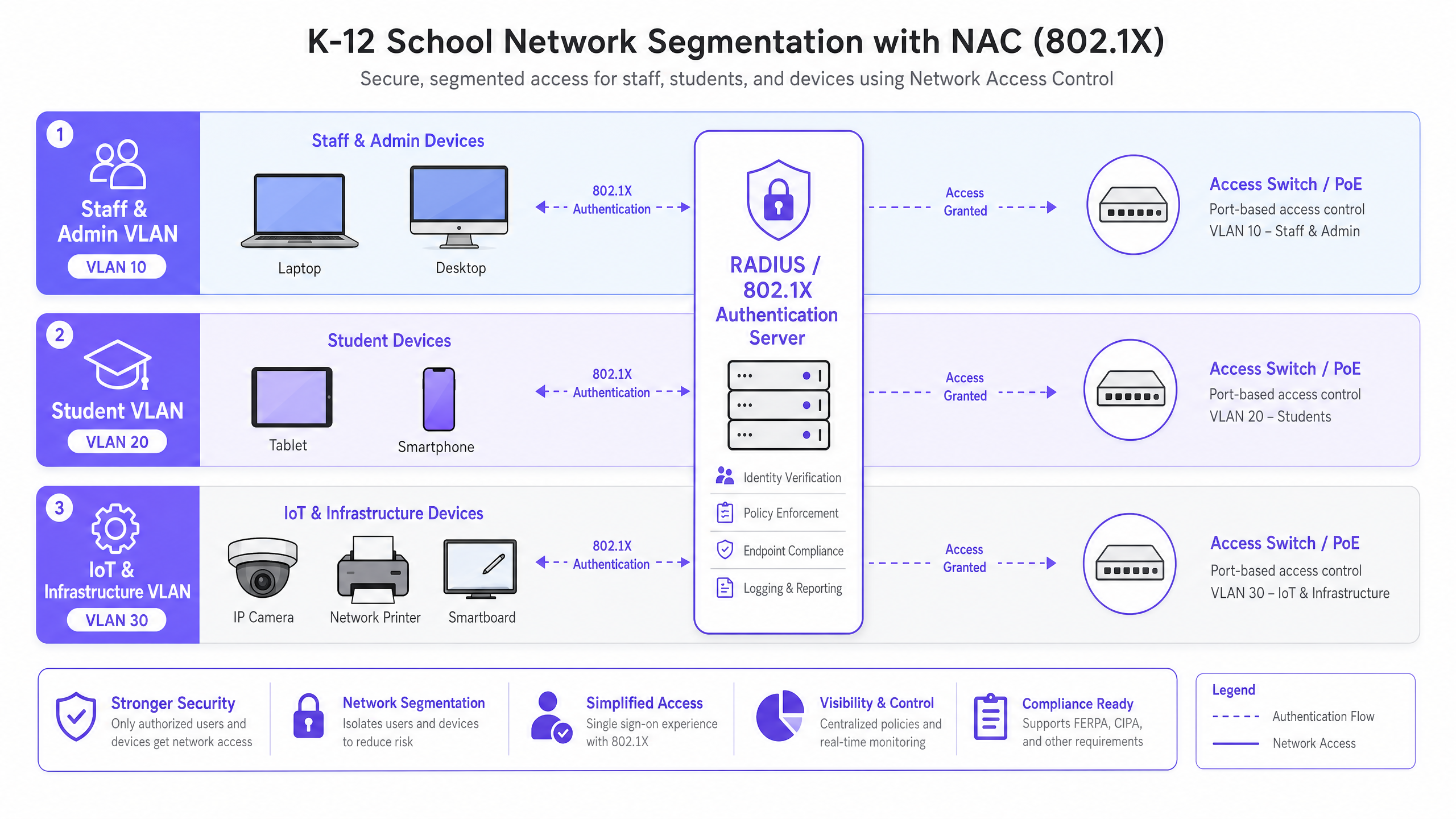
Effektives NAC basiert auf einer strengen Netzwerksegmentierung. Eine flache Netzwerkarchitektur ist eine kritische Schwachstelle. Eine Standard-K-12-Bereitstellung sollte mindestens die folgende VLAN-Struktur implementieren:
- Personal- & Admin-VLAN: Voller Zugriff auf interne Ressourcen, MIS-Systeme und das Internet. Stark eingeschränkte laterale Bewegung von anderen VLANs.
- Schüler-VLAN: Gefilterter Internetzugang mit strenger Inhaltsfilterung. Kein Zugriff auf Personalressourcen oder Verwaltungsschnittstellen.
- IoT- & Infrastruktur-VLAN: Beherbergt Smartboards, IP-Kameras und Gebäudemanagementsysteme. Dieses VLAN sollte keinen ausgehenden Internetzugang haben, es sei denn, dies wird explizit von einem bestimmten Gerät benötigt, und sollte von Benutzer-VLANs isoliert sein.
- Gast-VLAN: Nur Internetzugang, isoliert von allen internen Netzwerken, typischerweise über ein Captive Portal für die Annahme von Bedingungen und die Erfassung der Identität.
Implementierungsleitfaden
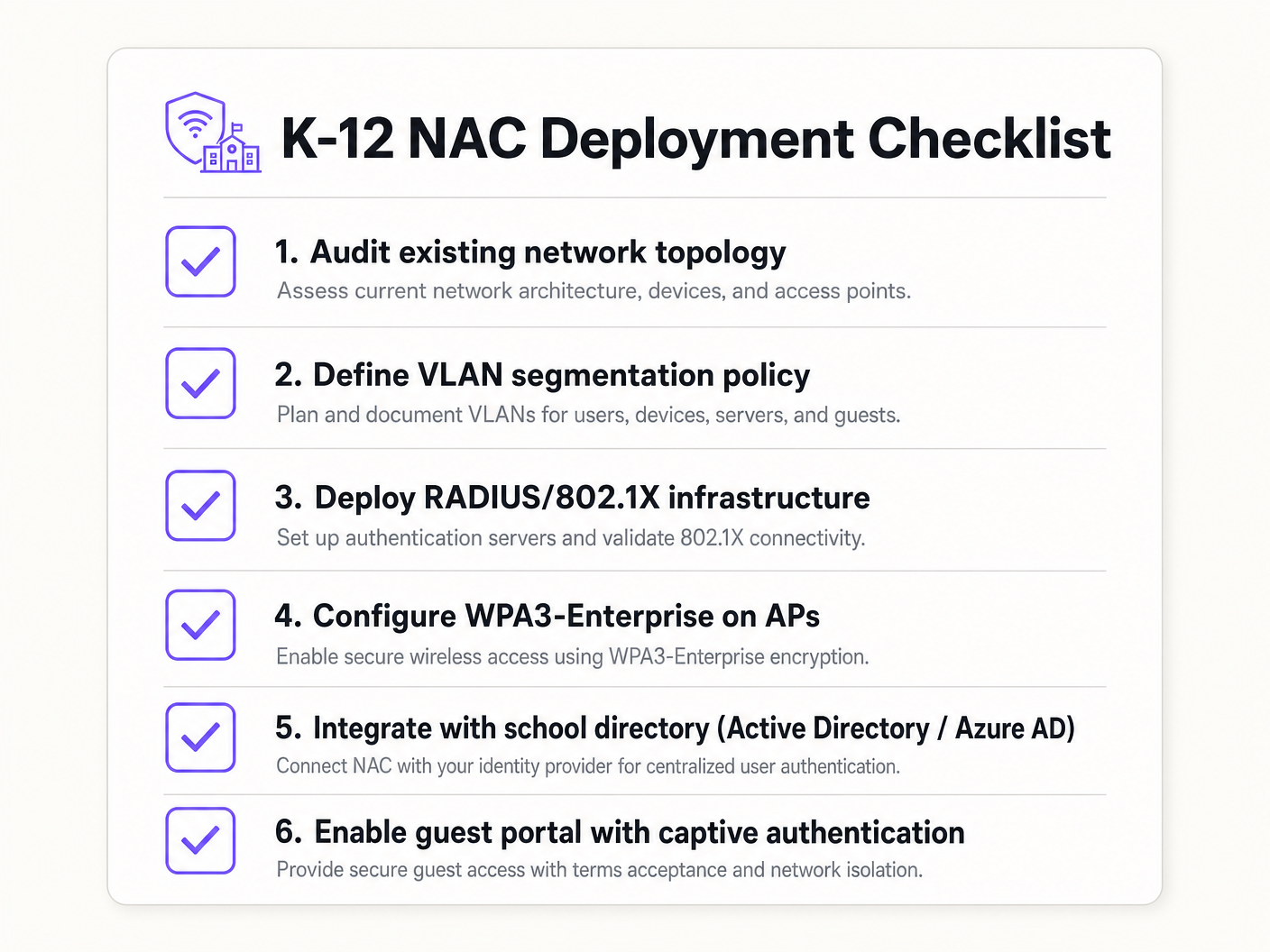
Die Bereitstellung von NAC erfordert einen schrittweisen, methodischen Ansatz, um Störungen des Bildungsbetriebs zu vermeiden.
Phase 1: Erkennung und Audit
Führen Sie vor der Implementierung jeglicher Durchsetzung ein umfassendes Netzwerkaudit durch. Verwenden Sie Tools, um alle verbundenen Geräte zu erkennen, Schatten-IT (nicht autorisierte Switches oder Access Points) zu identifizieren und den aktuellen Zustand des Netzwerks zu dokumentieren. Diese Phase ist entscheidend für die Erstellung präziser MAC Authentication Bypass (MAB)-Whitelists für ältere Geräte.
Phase 2: Bereitstellung der RADIUS-Infrastruktur
Stellen Sie Ihre RADIUS-Infrastruktur bereit. Bei Verwendung von lokalem Active Directory ist der Network Policy Server (NPS) eine gängige Wahl. Für Cloud-zentrierte Umgebungen (Azure AD, Google Workspace) bieten Cloud-RADIUS-Lösungen eine optimierte Integration. Stellen Sie sicher, dass der RADIUS-Server korrekt für die Kommunikation mit Ihrem Verzeichnisdienst konfiguriert ist und dass Firewall-Regeln den LDAP/LDAPS-Verkehr zulassen.
Phase 3: Überwachungsmodus
Aktivieren Sie 802.1X auf Access Switches und Wireless Controllern im Überwachungsmodus (manchmal auch als offener Modus bezeichnet). In diesem Zustand bewertet der Authentifikator die 802.1X-Anmeldeinformationen und protokolliert das Ergebnis, blockiert den Zugriff jedoch nicht, wenn die Authentifizierung fehlschlägt. Dies ermöglicht es IT-Teams, falsch konfigurierte Geräte, fehlende Zertifikate oder ältere Geräte, die MAB erfordern, zu identifizieren, ohne Netzwerkausfälle zu verursachen.
Phase 4: Durchsetzung und Segmentierung
Sobald die Protokolle des Überwachungsmodus eine hohe Erfolgsrate aufweisen und alle Ausnahmen berücksichtigt wurden, beginnen Sie mit der Durchsetzung von 802.1X-Authentifizierung. Führen Sie dies phasenweise ein – beginnend mit einer Pilotgruppe (z. B. der IT-Abteilung), dann auf Mitarbeiter und schließlich auf Schüler ausweiten. Implementieren Sie eine dynamische VLAN-Zuweisung über RADIUS-Attribute (Tunnel-Type, Tunnel-Medium-Type, Tunnel-Private-Group-ID), um sicherzustellen, dass Benutzer basierend auf ihrer Verzeichnisgruppenmitgliedschaft im richtigen Netzwerksegment platziert werden.
Best Practices
- MAB und MPSK für IoT implementieren: Legacy-Geräte und Headless-IoT-Endpunkte verfügen oft nicht über 802.1X-Supplicants. Verwenden Sie MAC Authentication Bypass (MAB) für ältere Geräte, bevorzugen Sie jedoch Multi-PSK (MPSK) für moderne IoT-Geräte. MPSK weist jedem Gerät einen eindeutigen Pre-Shared Key zu, wodurch sichergestellt wird, dass bei Kompromittierung eines Schlüssels der Rest des Netzwerks sicher bleibt. Eine detaillierte Konfigurationsanleitung finden Sie im Leitfaden Managing IoT Device Security with NAC and MPSK .
- Endpoint Posture Checking durchsetzen: Gehen Sie über die einfache Authentifizierung hinaus, indem Sie Posture Checks integrieren. Bevor der Zugriff gewährt wird, sollte die NAC-Lösung überprüfen, ob der Endpunkt über eine aktive Antivirensoftware verfügt, vollständig gepatcht ist und die Festplattenverschlüsselung aktiviert ist. Nicht-konforme Geräte sollten in einem Remediation-VLAN platziert werden.
- Gastzugang mit Analysen integrieren: Gastnetzwerke müssen isoliert und konform sein. Die Integration einer Plattform wie Guest WiFi stellt sicher, dass der Besucherzugang sicher und GDPR-konform ist und wertvolle WiFi Analytics liefert, um die Nutzung des Veranstaltungsortes und die Besucherfrequenz zu verstehen.
- Zertifikatsbasierte Authentifizierung (EAP-TLS) wo möglich verwenden: Für verwaltete Geräte eliminiert EAP-TLS die Abhängigkeit von Passwörtern und reduziert das Risiko von Anmeldedaten-Diebstahl und Phishing-Angriffen erheblich.
Fehlerbehebung & Risikominderung
Häufige Fehlerursachen
- Zertifikatsvertrauensfehler: Wenn BYOD-Benutzer während der PEAP-Authentifizierung aufgefordert werden, ein nicht vertrauenswürdiges Serverzertifikat zu akzeptieren, werden sie dazu erzogen, Sicherheitswarnungen zu ignorieren, was eine massive Phishing-Schwachstelle schafft. Minderung: Verwenden Sie immer ein von einer öffentlich vertrauenswürdigen Zertifizierungsstelle (CA) signiertes Zertifikat für den RADIUS-Server oder stellen Sie sicher, dass das interne CA-Root-Zertifikat über MDM an alle verwalteten Geräte verteilt wird.
- Fehler bei der Verzeichnisintegration: Die RADIUS-Authentifizierung schlägt fehl, wenn der Server nicht mit dem Verzeichnisdienst kommunizieren kann (z. B. AD-Domänencontroller nicht erreichbar sind oder das Dienstkontopasswort abgelaufen ist). Minderung: Implementieren Sie redundante RADIUS-Server und überwachen Sie kontinuierlich den Zustand der Verzeichnisintegration.
- Das 'Druckerproblem' (Sperrung von Legacy-Geräten): Die Durchsetzung von 802.1X ohne eine vollständige MAB-Whitelist führt zur sofortigen Trennung von älteren Druckern, AV-Geräten und älteren Smartboards. Minderung: Die Monitor-Modus-Phase ist entscheidend. Gehen Sie erst zur Durchsetzung über, wenn alle nicht-authentifizierenden Geräte identifiziert und profiliert wurden.
ROI & Geschäftsauswirkungen
Obwohl NAC primär eine Investition in Sicherheit und Compliance ist, liefert es messbaren Geschäftswert:
- Risikominderung: Die finanziellen und reputativen Kosten einer Datenschutzverletzung, die Schülerdaten betrifft, sind katastrophal. NAC reduziert die Angriffsfläche drastisch und verhindert laterale Bewegungen, wodurch potenzielle Verstöße eingedämmt werden.
- Operative Effizienz: Die dynamische VLAN-Zuweisung reduziert den administrativen Aufwand der manuellen Konfiguration von Switch-Ports. IT-Mitarbeiter verbringen weniger Zeit mit der Verwaltung von VLANs und mehr Zeit mit strategischen Initiativen.
- Compliance-Sicherheit: Eine robuste NAC-Implementierung bietet die Audit-Trails und Zugriffskontrollen, die erforderlich sind, um die Einhaltung von GDPR, CIPA und lokalen Schutzbestimmungen nachzuweisen, wodurch Audits vereinfacht und das rechtliche Risiko reduziert werden.
Key Definitions
Network Access Control (NAC)
A security architecture that enforces policy on devices attempting to access a network, ensuring only authenticated and compliant devices are granted entry.
Essential for IT teams to prevent unauthorized access and segment network traffic based on user roles (e.g., staff vs. student).
IEEE 802.1X
The IEEE standard for port-based Network Access Control, providing an authentication mechanism to devices wishing to attach to a LAN or WLAN.
The foundational protocol that allows switches and access points to verify user identity before granting network access.
RADIUS (Remote Authentication Dial-In User Service)
A networking protocol that provides centralized Authentication, Authorization, and Accounting (AAA) management for users who connect and use a network service.
The 'brain' of the NAC deployment, responsible for verifying credentials against a directory (like Active Directory) and assigning VLANs.
MAC Authentication Bypass (MAB)
A technique used to authenticate devices that do not support 802.1X by using their MAC address as the credential against a pre-approved whitelist.
Crucial for allowing legacy devices like older printers and smartboards onto the network without compromising the 802.1X requirement for modern devices.
Multi-PSK (MPSK)
A wireless security feature that allows multiple unique Pre-Shared Keys to be used on a single SSID, with each key assigning specific network policies or VLANs.
The best practice for securing modern IoT devices that cannot perform 802.1X authentication, isolating them securely.
Dynamic VLAN Assignment
The process where a RADIUS server instructs the switch or access point to place an authenticated user into a specific VLAN based on their directory group membership.
Reduces administrative overhead by allowing a single SSID or switch port configuration to serve multiple user types securely.
EAP-TLS (Extensible Authentication Protocol - Transport Layer Security)
An 802.1X authentication method that requires mutual certificate authentication between the client and the server, eliminating the use of passwords.
The most secure authentication method, highly recommended for school-issued managed devices to prevent credential theft.
Endpoint Posture Checking
The process of evaluating a device's security state (e.g., antivirus status, OS patch level) before granting it network access.
Ensures that even authenticated users cannot introduce malware into the network via compromised or unpatched devices.
Worked Examples
A 1500-student secondary school needs to deploy 200 new wireless environmental sensors across the campus. These sensors only support WPA2-Personal and do not have an 802.1X supplicant. How should the network architect secure these devices without compromising the main network?
The architect should deploy a dedicated hidden SSID for IoT devices and implement Multi-PSK (MPSK). Each sensor (or group of sensors) is assigned a unique, complex pre-shared key. The wireless controller or RADIUS server is configured to map these specific keys to the isolated 'IoT & Infrastructure VLAN'. This VLAN must have strict ACLs applied, denying all access to the Staff and Student VLANs, and restricting outbound internet access only to the specific cloud endpoints required by the environmental sensors.
During the rollout of 802.1X (PEAP-MSCHAPv2) for BYOD student devices, the IT helpdesk is overwhelmed with tickets from students reporting that their devices are warning them about an 'untrusted network certificate'. How should this be resolved?
The issue occurs because the RADIUS server is using a certificate signed by the school's internal, private Certificate Authority (CA), which the BYOD devices do not natively trust. The immediate fix is to replace the RADIUS server's certificate with one issued by a widely recognized public CA (e.g., DigiCert, Let's Encrypt). Long-term, the school should implement an onboarding portal that securely configures the supplicant and installs the necessary trust anchors before the device attempts to connect.
Practice Questions
Q1. A school district is migrating its directory services entirely to Google Workspace and phasing out on-premises Active Directory. They currently use NPS for RADIUS. What architectural change is required to maintain 802.1X authentication for their fleet of managed Chromebooks?
Hint: Consider how Chromebooks authenticate natively and what infrastructure is needed when AD is removed.
View model answer
The district should migrate to a cloud RADIUS provider (e.g., SecureW2, Foxpass) that integrates natively with Google Workspace, or utilize Google's own Cloud RADIUS capabilities if available in their licensing tier. They should configure the Chromebooks via the Google Admin Console to use EAP-TLS, leveraging device certificates automatically provisioned by Google's certificate management, completely removing the reliance on passwords and on-premises NPS servers.
Q2. During a network audit, the IT team discovers a consumer-grade wireless router plugged into a classroom wall port, broadcasting a hidden SSID. How does a properly configured NAC solution prevent this shadow IT from compromising the network?
Hint: Think about what happens at the switch port level when an unmanaged device is connected.
View model answer
With 802.1X enforced on the wired switch ports, the consumer router will fail authentication because it lacks valid credentials or a certificate. The switch port will either remain in an unauthorized state (blocking all traffic) or dynamically assign the port to an isolated remediation VLAN. Additionally, enterprise NAC solutions can detect the presence of NAT or multiple MAC addresses behind a single port, triggering an automatic port shutdown to isolate the rogue device.
Q3. A venue operations director at a large educational campus wants to provide seamless WiFi access for visiting parents during a sports tournament, but the IT team is concerned about GDPR compliance and network security. What is the recommended approach?
Hint: Consider the balance between ease of access and the legal requirements for capturing user data.
View model answer
The IT team should provision a dedicated Guest VLAN that is strictly isolated from all internal resources and has internet-only access. They should deploy a captive portal solution, such as Purple's Guest WiFi platform, to handle onboarding. This ensures that visitors must accept the terms and conditions and provide explicit consent for data processing before gaining access, satisfying GDPR requirements while keeping the core network secure.