

Blockieren von Malware und Phishing am Netzwerkrand
Dieser technische Leitfaden beschreibt die Architektur, Implementierung und die geschäftlichen Auswirkungen der Einführung eines netzwerkweiten Bedrohungsschutzes zur Sicherung unmanaged Guest- und IoT-Geräte am Netzwerkrand. Er bietet IT-Führungskräften umsetzbare Anleitungen, um Malware und Phishing proaktiv zu blockieren.
Diesen Leitfaden anhören
Podcast-Transkript ansehen
Zusammenfassung für Führungskräfte
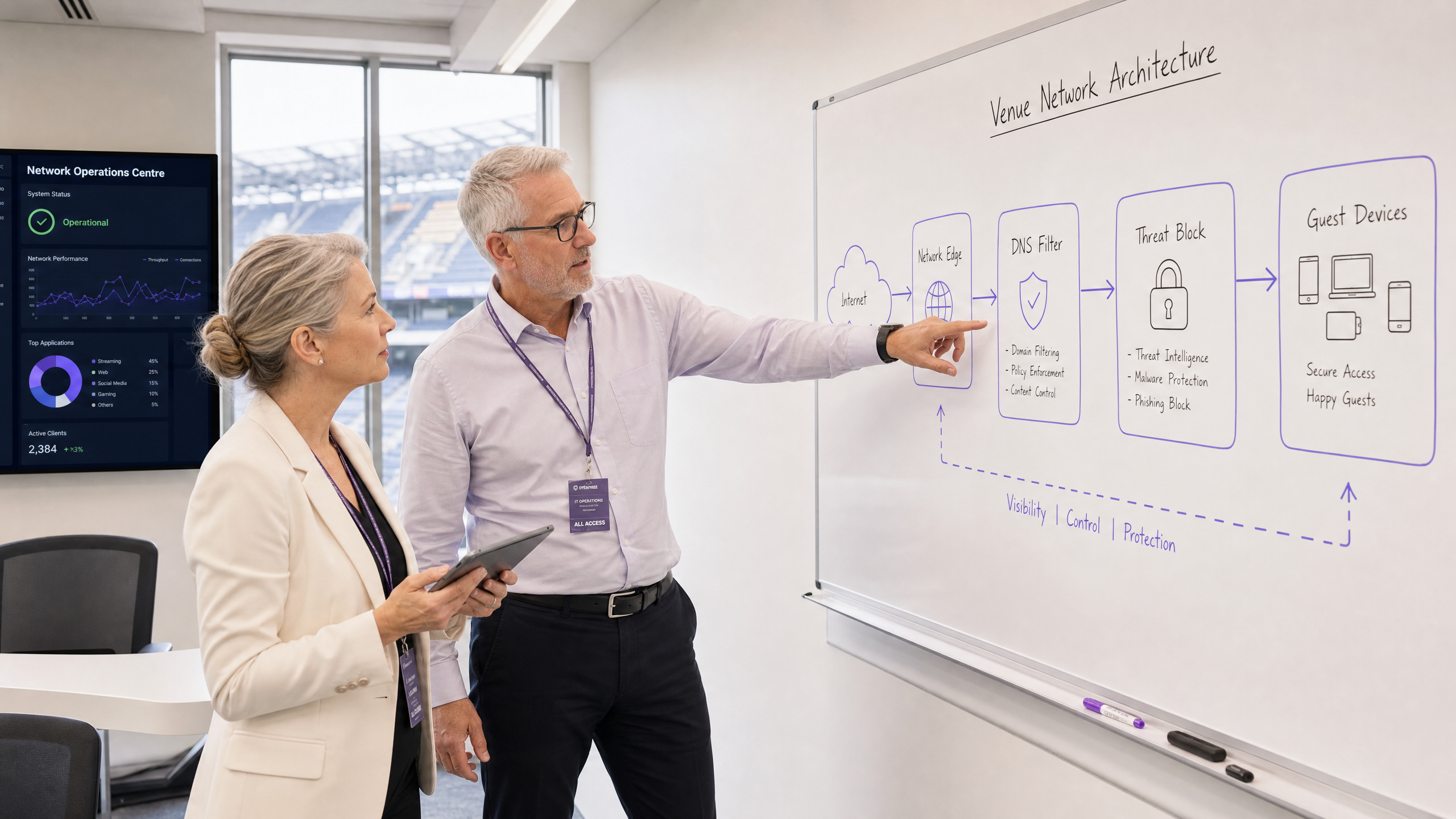
Für CTOs und Netzwerkarchitekten, die stark frequentierte Standorte verwalten, ist die Sicherung unmanaged Geräte eine kritische betriebliche Herausforderung. Sie können keine Endpoint-Agenten auf Gast-Smartphones bereitstellen, noch können Sie sich darauf verlassen, dass Benutzer bösartige Links vermeiden. Dieser Leitfaden beschreibt, wie die Implementierung eines netzwerkweiten Bedrohungsschutzes Malware und Phishing am Netzwerkrand stoppt, bevor sie Gastgeräte erreichen. Durch die Durchsetzung von Sicherheitsrichtlinien am Gateway mittels DNS-Filterung und Threat-Intelligence-Integration können Standorte BYOD-, IoT- und Gast-Traffic proaktiv sichern. Dieser Ansatz reduziert den Aufwand für die Reaktion auf Vorfälle, gewährleistet die Einhaltung von Standards wie GDPR und PCI DSS und sorgt für eine sichere Umgebung für Guest WiFi -Benutzer in den Sektoren Gastgewerbe , Einzelhandel und Transport .
Technischer Einblick
Die Architektur des Netzwerkrandschutzes
Der Netzwerkrandschutz gegen Malware verlagert den Punkt der Sicherheitsdurchsetzung vom Endpoint zum Gateway. Wenn ein Gerät sich mit einem Standortnetzwerk verbindet und versucht, eine Domain aufzulösen, wird die DNS-Abfrage vom Edge-Gateway abgefangen. Anstelle einer Standardauflösung wird die Abfrage anhand kontinuierlich aktualisierter Threat-Intelligence-Feeds bewertet.
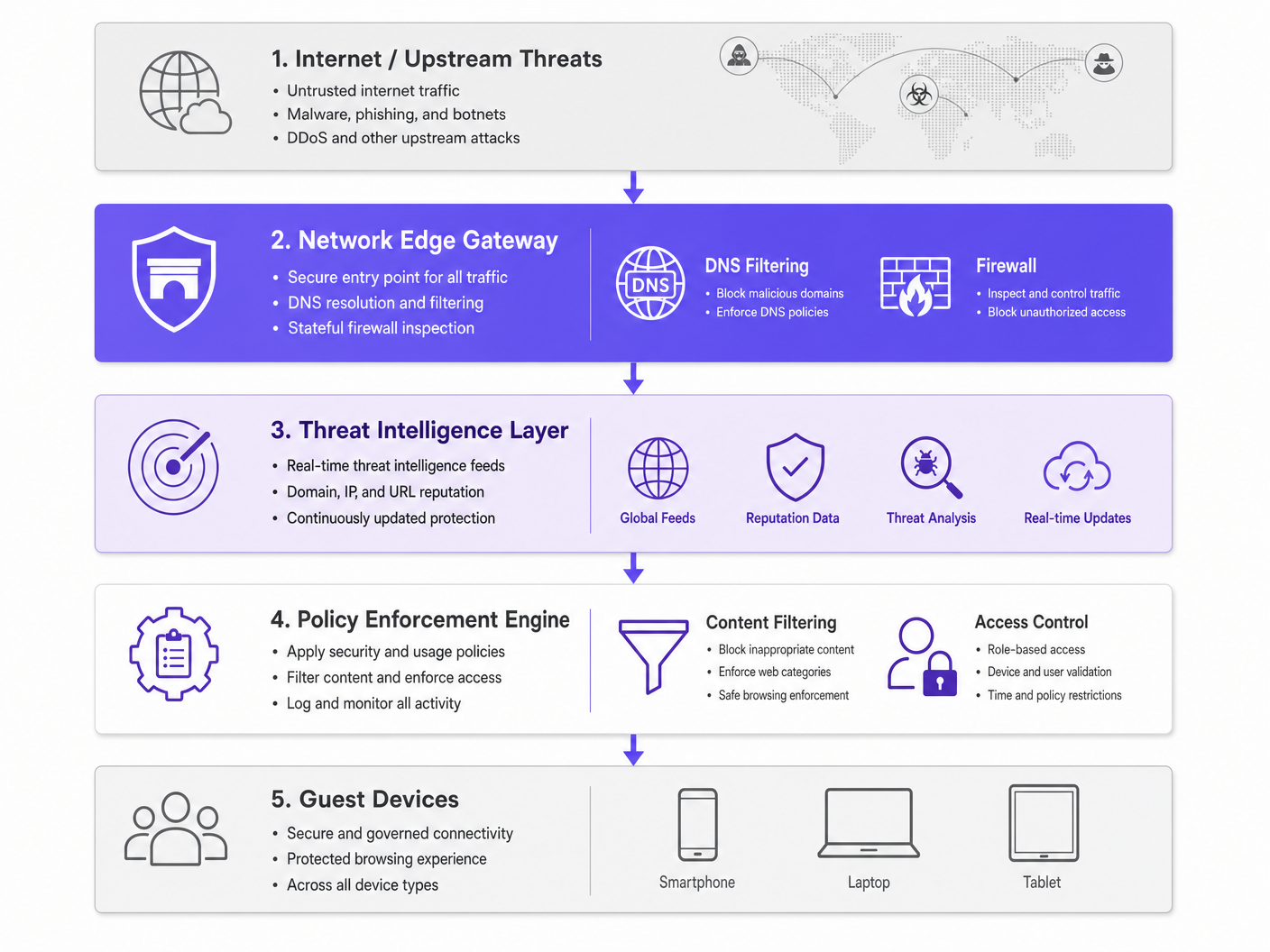
Ist die Domain mit Malware-Verteilung, Phishing-Kampagnen oder Botnet-Command-and-Control (C2)-Infrastruktur verbunden, wird die DNS-Anfrage gesinkholed. Die Verbindung wird getrennt, bevor die bösartige Payload heruntergeladen werden kann. Diese proaktive Blockierung verhindert laterale Bewegungen und schützt die IP-Reputation des Standorts.
Schlüsselkomponenten
- DNS Filtering Engine: Überprüft alle ausgehenden DNS-Anfragen. Es ist entscheidend, diese Engine so zu konfigurieren, dass bekannte öffentliche DoH (DNS over HTTPS)-Resolver blockiert werden, um zu verhindern, dass Benutzer das sichere DNS des Standorts umgehen.
- Threat Intelligence Integration: Abonniert globale Feeds, die Domains in Echtzeit basierend auf Reputation, Status neu registrierter Domains und bekannter bösartiger Aktivitäten kategorisieren.
- Richtliniendurchsetzung: Wendet granulare Regeln basierend auf Benutzerrollen (z. B. Personal vs. Gast) und Inhaltskategorien an und gewährleistet die IWF Compliance for Public WiFi Networks in the UK .
Implementierungsleitfaden
Die Bereitstellung des Netzwerkrandschutzes erfordert einen schrittweisen Ansatz, um Störungen zu minimieren und gleichzeitig die Sicherheitsabdeckung zu maximieren.
Schritt 1: Netzwerksegmentierung
Stellen Sie sicher, dass Ihr Netzwerk mithilfe von VLANs ordnungsgemäß segmentiert ist. Gast-Traffic, Unternehmensmitarbeiter, IoT-Geräte und POS-Systeme müssen sich auf isolierten Segmenten befinden. Dies begrenzt den Explosionsradius, falls ein Gerät vor dem Beitritt zum Netzwerk kompromittiert wird.
Schritt 2: Gateway-Konfiguration
Konfigurieren Sie Ihre Edge-Router oder Firewalls so, dass der gesamte DNS-Traffic an den sicheren DNS-Filterdienst weitergeleitet wird. Implementieren Sie Firewall-Regeln, um ausgehenden Traffic auf Port 53 (DNS) und Port 853 (DoT) zu jedem anderen Ziel als den genehmigten sicheren Resolvern zu blockieren. Weitere Informationen zur modernen Netzwerkoptimierung finden Sie unter Office Wi Fi: Optimize Your Modern Office Wi-Fi Network .
Schritt 3: Richtliniendefinition
Legen Sie Basisrichtlinien fest. Blockieren Sie bekannte bösartige Kategorien global. Für die Inhaltsfilterung wenden Sie spezifische Richtlinien basierend auf dem Standorttyp an – zum Beispiel strengere Filterung in Gesundheitswesen -Umgebungen im Vergleich zum allgemeinen Einzelhandel.
Best Practices
- Granulare Richtlinienanwendung: Vermeiden Sie pauschale Blockierungen, die Helpdesk-Tickets generieren. Verwenden Sie rollenbasierte Zugriffskontrolle (RBAC), die in Ihren Identitätsanbieter integriert ist (z. B. Purple's Connect license).
- Umfassende Protokollierung: Führen Sie einen vollständigen audit trail von DNS-Abfragen und blockierten Bedrohungen. Dies ist unerlässlich für die Reaktion auf Vorfälle und die Compliance-Berichterstattung. Detaillierte Anforderungen finden Sie unter Explain what is audit trail for IT Security in 2026 .
- Kontinuierliche Überwachung: Nutzen Sie WiFi Analytics , um die Netzwerkleistung und Sicherheitsereignisse in Echtzeit zu überwachen.
Fehlerbehebung & Risikominderung
Umgang mit verschlüsseltem DNS
Moderne Betriebssysteme verwenden zunehmend DoH und DoT, die DNS-Abfragen verschlüsseln und traditionelle Edge-Filterung umgehen können. Um dies zu mindern, pflegen Sie eine aktualisierte Blockliste bekannter öffentlicher DoH-Resolver (z. B. 8.8.8.8, 1.1.1.1), um Geräte zu zwingen, auf das vom Standort bereitgestellte sichere DNS über den Standard-Port 53 zurückzugreifen.
Übermäßige Blockierung von legitimen Traffic
Aggressive Threat-Intelligence-Feeds können gelegentlich legitime Domains fälschlicherweise als bösartig kennzeichnen, insbesondere neu registrierte, die für Marketingkampagnen verwendet werden. Etablieren Sie einen schnellen Allowlisting-Prozess und befähigen Sie das IT-Betriebsteam, Fehlalarme schnell zu beheben.
ROI & Geschäftliche Auswirkungen
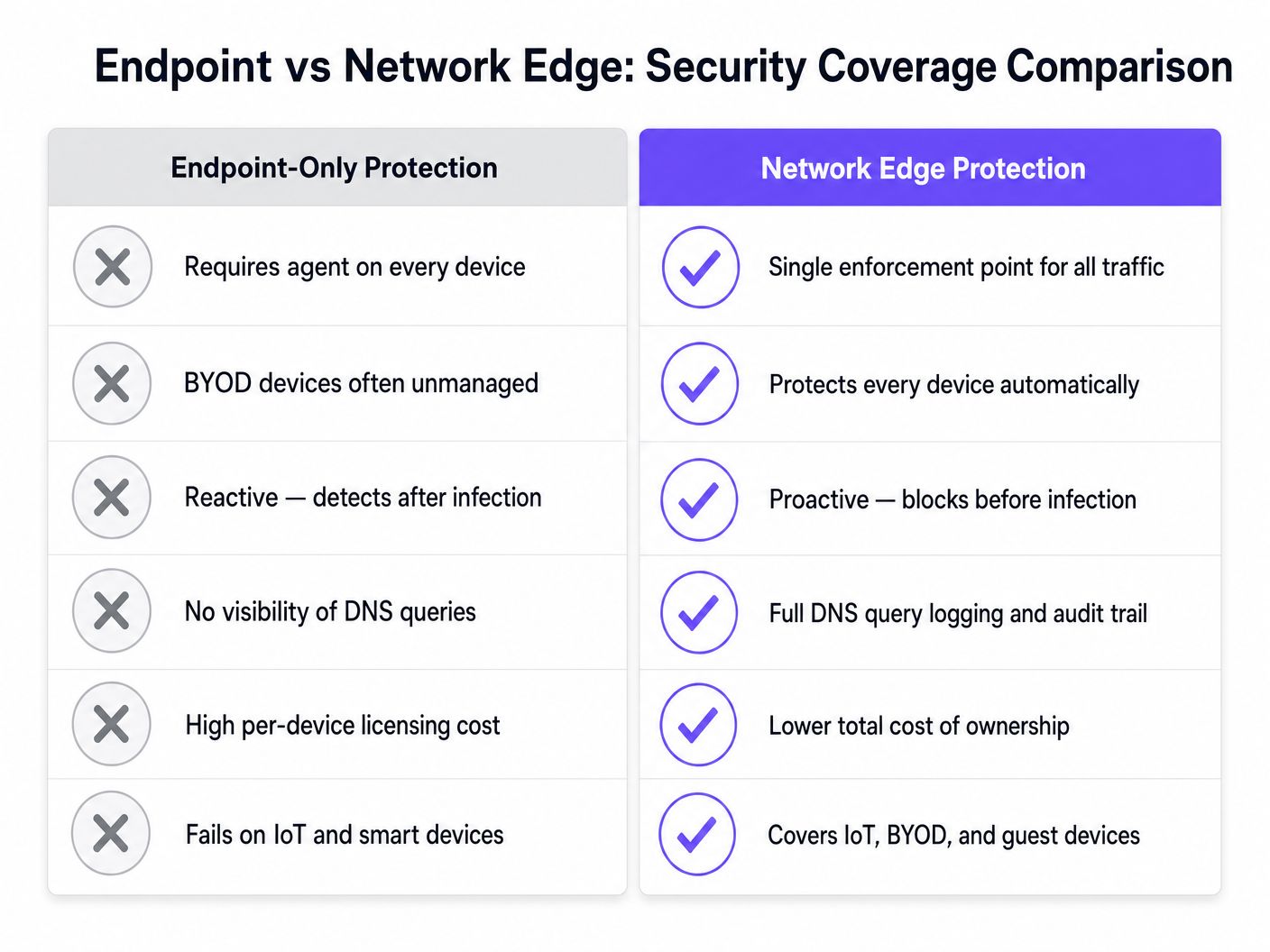
Der Business Case für den Netzwerkrandschutz gegen Malware basiert auf Risikominderung und operativer Effizienz. Durch das Blockieren von Bedrohungen am Gateway eliminieren Standorte die gerätebezogenen Lizenzkosten, die mit der Endpoint-Sicherheit für BYOD- und Gastgeräte verbunden sind. Darüber hinaus reduziert es drastisch die IT-Helpdesk-Stunden, die für die Untersuchung kompromittierter Geräte oder den Umgang mit auf Blacklists stehenden IP-Adressen aufgewendet werden. Die daraus resultierende sichere, zuverlässige Konnektivität verbessert das Gasterlebnis und schützt den Markenruf des Standorts.
Schlüsseldefinitionen
Network Edge
The boundary where a local network connects to the internet, typically managed by a router, firewall, or gateway.
This is the optimal location to deploy security controls for unmanaged devices, as all traffic must pass through it.
DNS Filtering
The process of blocking access to certain websites or IP addresses by intercepting DNS queries and evaluating them against a policy or threat feed.
Used to proactively stop devices from connecting to malicious domains before any data is transferred.
Sinkholing
Redirecting malicious traffic to a safe, controlled IP address instead of its intended destination.
When a guest device tries to reach a malware server, the edge gateway sinkholes the request, preventing infection.
Threat Intelligence Feed
A continuously updated stream of data regarding potential or current cyber threats, including known malicious domains and IP addresses.
Edge gateways use these feeds to make real-time decisions on whether to allow or block traffic.
DoH (DNS over HTTPS)
A protocol for performing remote Domain Name System resolution via the HTTPS protocol, encrypting the data.
While good for privacy, DoH can bypass corporate edge filtering unless known DoH resolvers are explicitly blocked.
VLAN Segmentation
Dividing a single physical network into multiple logical networks to isolate traffic.
Essential for separating untrusted guest traffic from sensitive corporate or POS systems.
BYOD (Bring Your Own Device)
The practice of allowing employees or guests to use their personal devices on the organisation's network.
BYOD devices are typically unmanaged, making endpoint security impossible and necessitating network edge protection.
Audit Trail
A chronological record of system activities, including DNS queries and blocked connections.
Required for compliance with frameworks like PCI DSS and GDPR to prove security controls are active.
Ausgearbeitete Beispiele
A 500-room hotel needs to secure guest WiFi while ensuring IoT devices (smart TVs, room controls) are protected from external command-and-control servers.
Deploy a network edge gateway with DNS filtering. Segment the network into Guest, IoT, and Corporate VLANs. Configure the gateway to intercept all DNS queries from the IoT and Guest VLANs, forwarding them to the secure DNS service. Apply a strict policy for the IoT VLAN that only allows resolution of known, required domains (allowlisting), while applying a standard threat-blocking policy for the Guest VLAN.
A large retail chain experiences frequent IP blacklisting due to guest devices sending spam while connected to the in-store WiFi.
Implement network edge malware protection with active threat intelligence feeds. Configure the firewall to block outbound SMTP (port 25) for all guest traffic. Enable DNS filtering to sinkhole requests to known botnet and spam-distribution domains.
Übungsfragen
Q1. A stadium network administrator notices that while DNS filtering is enabled, some guest devices are still reaching known malicious domains. What is the most likely cause and how should it be addressed?
Hinweis: Consider modern protocols that might bypass standard port 53 filtering.
Musterlösung anzeigen
The devices are likely using encrypted DNS protocols like DNS over HTTPS (DoH) or DNS over TLS (DoT), which bypass standard port 53 filtering. The administrator should update firewall rules to block known public DoH/DoT resolvers and block outbound traffic on port 853, forcing devices to fall back to the venue's secure DNS.
Q2. When deploying network edge protection in a hospital environment, how should the policies differ between the guest WiFi and the medical IoT device VLAN?
Hinweis: Think about the concept of least privilege and predictable behavior.
Musterlösung anzeigen
The guest WiFi should use a standard threat-blocking policy (blocking malware, phishing, and inappropriate content per IWF guidelines) but generally allow internet access. The medical IoT VLAN should use a strict 'default deny' policy with an allowlist, permitting communication only with specific, required vendor servers. IoT devices have predictable traffic patterns, making allowlisting highly effective.
Q3. A retail client wants to implement edge filtering but is concerned about blocking legitimate marketing campaign domains that are newly registered. What process should be implemented?
Hinweis: Focus on operational workflows and balancing security with business needs.
Musterlösung anzeigen
Implement a rapid allowlisting workflow. While 'Newly Registered Domains' is a common threat category, the IT team should have a process to quickly verify and allowlist domains provided by the marketing team before campaigns launch, ensuring security does not impede business operations.