
Café WiFi: Einrichten, Sichern und Monetarisieren Ihres Gastnetzwerks
Eine umfassende technische Referenz für IT-Manager und Betreiber von Veranstaltungsorten zur Planung, Sicherung und Monetarisierung von Café WiFi-Netzwerken. Sie behandelt wesentliche Netzwerksegmentierung, die Bereitstellung von Wi-Fi 6-Hardware, GDPR-konforme Captive Portals und Marketing-Automatisierung zur Erzielung eines messbaren ROI.
Diesen Leitfaden anhören
Podcast-Transkript ansehen
Zusammenfassung für die Geschäftsleitung
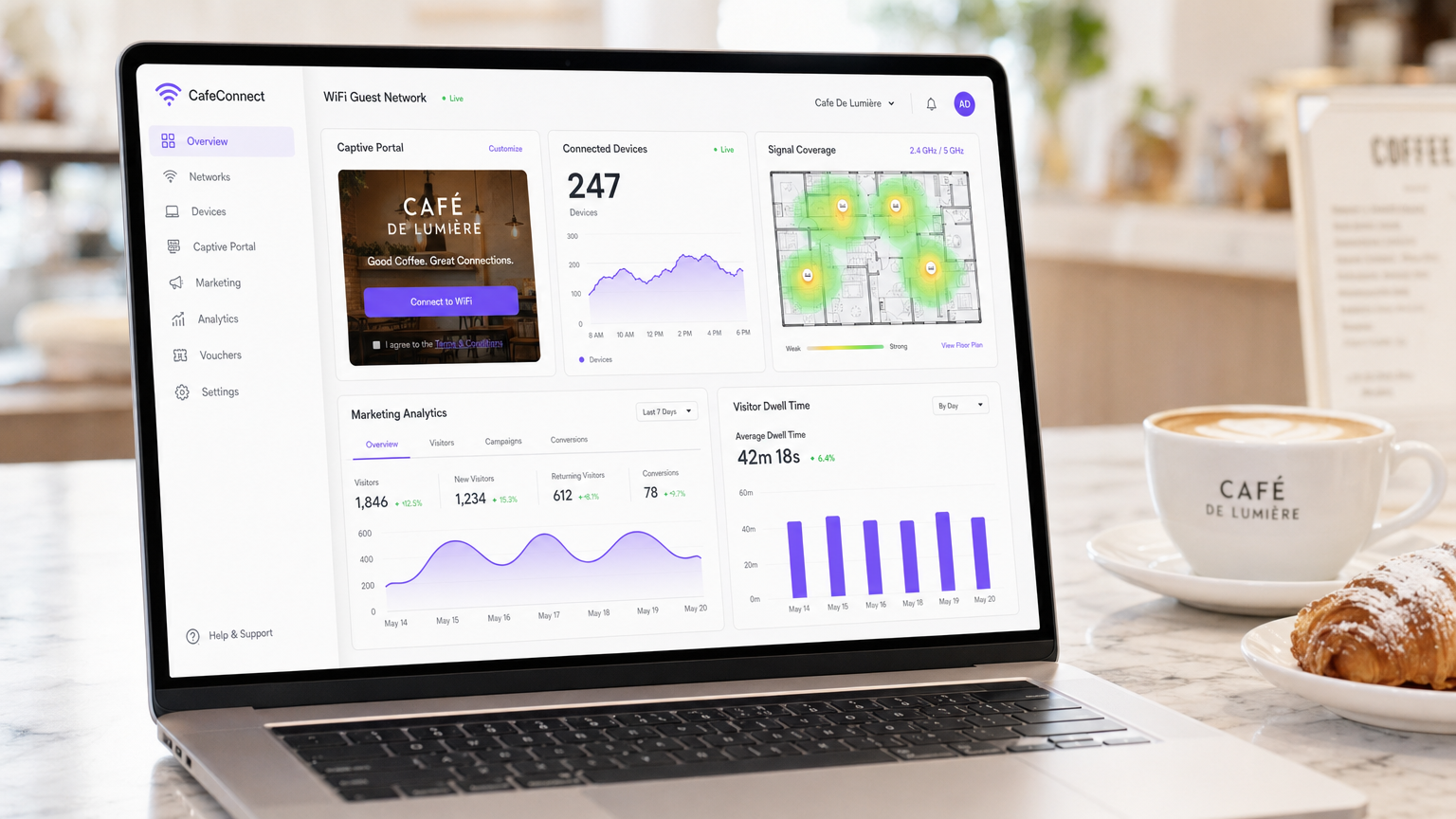
Für moderne Gastronomiebetriebe ist Café WiFi nicht länger nur ein operatives Hilfsmittel – es ist ein entscheidender First-Party-Datenbestand, ein Marketing-Automatisierungskanal und eine strenge Compliance-Verpflichtung. Dieser technische Leitfaden bietet IT-Managern, Netzwerkarchitekten und Betriebsleitern von Veranstaltungsorten einen umfassenden Rahmen für die Planung, Bereitstellung und Monetarisierung von Gastnetzwerken.
Von unabhängigen Cafés bis hin zu unternehmensweiten Filialketten bleiben die architektonischen Prinzipien konsistent. Sie müssen eine strikte Netzwerksegmentierung durchsetzen, um die PCI DSS-Konformität zu gewährleisten, geschäftstaugliche 802.11ax (Wi-Fi 6)-Hardware für Umgebungen mit hoher Client-Dichte bereitstellen und ein robustes Captive Portal implementieren, um eine explizite, GDPR-konforme Marketing-Einwilligung zu erfassen.
Durch den Übergang von unmanaged Consumer-Routern zu einer Guest WiFi -Plattform für Unternehmen können Veranstaltungsorte einen Kostenfaktor in einen messbaren Umsatztreiber verwandeln. Dieser Leitfaden beschreibt die genauen Hardwarespezifikationen, Sicherheitsstandards, Bandbreitenberechnungen und Marketing-Automatisierungs-Workflows, die für den Aufbau eines resilienten, profitablen Gastnetzwerks erforderlich sind.
Technischer Einblick
Netzwerkarchitektur und Segmentierung
Das grundlegende Prinzip jedes öffentlich zugänglichen Netzwerks ist die absolute logische Trennung von der operativen Infrastruktur. Die Bereitstellung eines einzigen, flachen Netzwerks, das sowohl Ihre Point-of-Sale (POS)-Systeme als auch Ihren Gastverkehr hostet, ist ein kritischer Fehler sowohl in Bezug auf Sicherheit als auch Compliance.
VLAN-Implementierung: Ihre Routing- und Switching-Infrastruktur muss IEEE 802.1Q VLAN-Tagging unterstützen. Eine Standardbereitstellung erfordert mindestens zwei Virtual Local Area Networks:
- VLAN 10 (Operativ): Dediziert für POS-Terminals, Back-Office-PCs und IoT-Geräte.
- VLAN 20 (Gast): Exklusiv für das Café WiFi-Gastnetzwerk.
Der Datenverkehr zwischen diesen VLANs muss auf Firewall-Ebene blockiert werden. Access Points (APs) senden unterschiedliche Service Set Identifiers (SSIDs), die direkt ihren jeweiligen VLANs zugeordnet sind. Diese Isolation ist eine nicht verhandelbare Anforderung für die PCI DSS-Konformität, die sicherstellt, dass die Umgebung für Kartendaten (CDE) nicht durch böswillige Akteure, die mit dem Gastnetzwerk verbunden sind, kompromittiert werden kann.
WLAN-Standards und Hardwareauswahl
In Umgebungen mit hoher Gerätedichte – wie einem belebten Café, in dem 40-80 Clients gleichzeitig streamen, surfen und synchronisieren können – wird Consumer-Hardware schnell an Leistung verlieren.
802.11ax (Wi-Fi 6) Anforderungen: Moderne Implementierungen sollten ausschließlich Wi-Fi 6 Access Points verwenden. Der entscheidende Vorteil von Wi-Fi 6 in Gastronomieumgebungen ist Orthogonal Frequency-Division Multiple Access (OFDMA). Im Gegensatz zu älteren Standards, die Clients sequenziell bedienen, ermöglicht OFDMA einem einzelnen AP, gleichzeitig mit mehreren Geräten zu kommunizieren, indem Kanäle in kleinere Unterträger aufgeteilt werden. Dies reduziert die Latenz drastisch und verbessert den Durchsatz in überlasteten Umgebungen.
Hardware-Dimensionierung:
- Einzelstandort (50-150 qm): 1-2 deckenmontierte Wi-Fi 6 APs, ein PoE+ Managed Switch und eine Business-Firewall/Router.
- Multi-Site-Bereitstellungen: Eine Cloud-managed Infrastruktur ist obligatorisch für zentrale Transparenz, Firmware-Management und Remote-Fehlerbehebung über verteilte Einzelhandelsstandorte hinweg.
Sicherheitsprotokolle
Die Ära des offenen, unverschlüsselten öffentlichen WiFi geht zu Ende. Während WPA2-Personal weiterhin verbreitet ist, sollten neue Implementierungen WPA3 nutzen.
Für Gastnetzwerke, die ein Captive Portal nutzen, sollte die zugrunde liegende drahtlose Übertragung weiterhin verschlüsselt sein. WPA3-SAE (Simultaneous Authentication of Equals) bietet Forward Secrecy und mindert Offline-Wörterbuchangriffe. Wenn ein offenes Netzwerk mit einem Captive Portal bereitgestellt wird (oft zur Maximierung der Kompatibilität), stellen Sie sicher, dass die Client-Isolation auf AP-Ebene aktiviert ist, damit Geräte nicht über das lokale Subnetz miteinander kommunizieren können.
Implementierungsleitfaden
Die Bereitstellung eines sicheren, monetarisierten Café WiFi-Netzwerks erfordert einen strukturierten Ansatz. Befolgen Sie diese herstellerneutrale Bereitstellungssequenz:
Schritt 1: Standortanalyse und Bandbreitenplanung
Vor dem Kauf von Hardware führen Sie eine physische Standortanalyse durch, um HF-Interferenzen (z. B. Mikrowellen, Baustahl) zu identifizieren und die optimale AP-Platzierung zu bestimmen.
Berechnen Sie Ihren Bandbreitenbedarf. Eine Faustregel ist die Bereitstellung von 2 Mbit/s pro gleichzeitigem Benutzer für allgemeines Surfen und 5 Mbit/s, wenn Video-Streaming üblich ist. Für ein Café, das 50 gleichzeitige Benutzer erwartet, wird eine symmetrische Verbindung von mindestens 100 Mbit/s empfohlen. Wenn Ihr Veranstaltungsort Geschäftsveranstaltungen beherbergt oder eine garantierte Betriebszeit erfordert, lesen Sie unseren Leitfaden zu Was ist eine Standleitung? Dediziertes Business Internet für Unternehmenskonnektivitätsoptionen. Detaillierte Bandbreitenberechnungen finden Sie in unserem Leitfaden Hotel WiFi-Geschwindigkeit: Was Gäste erwarten und wie Sie es liefern .
Schritt 2: Infrastrukturkonfiguration
Installieren Sie Ihren Router, Managed Switch und Access Points. Konfigurieren Sie Ihre VLANs und Firewall-Regeln, bevor Sie die APs anschließen. Stellen Sie sicher, dass die DHCP-Pools für das Gast-VLAN angemessen dimensioniert sind (z. B. ein /23-Subnetz, das 510 IP-Adressen bereitstellt) mit kurzen Lease-Zeiten (z. B. 2 Stunden), um eine IP-Erschöpfung während Zeiten hoher Besucherfrequenz zu verhindern.
Schritt 3: Captive Portal-Bereitstellung
Das Captive Portal ist die kritische Schnittstelle zwischen Ihrem Netzwerk und Ihrer Marketing-Datenbank.
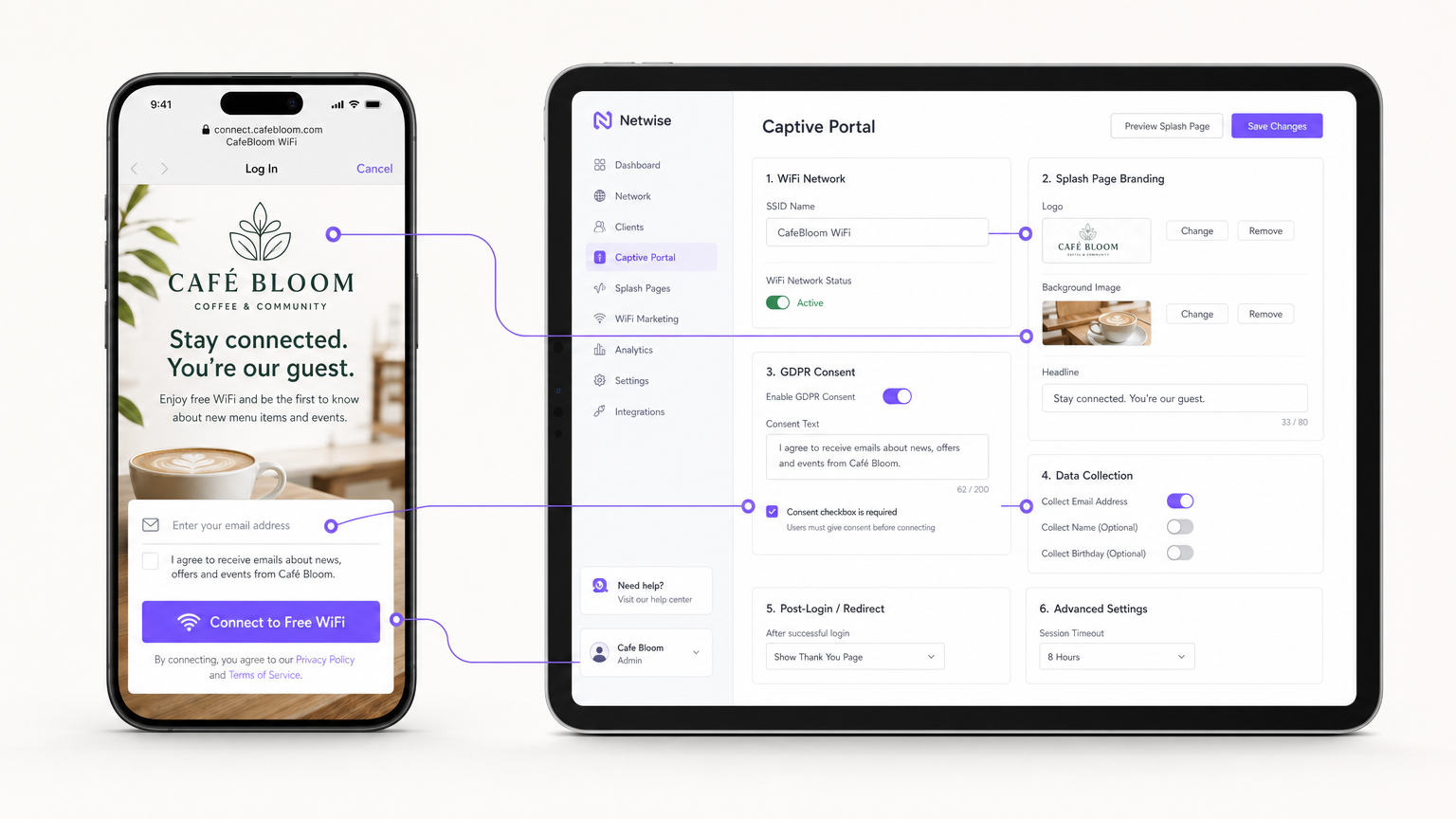
Anstatt Portal-Server vor Ort zu hosten, integrieren Sie Ihr APs (via RADIUS oder API) mit einer cloudbasierten Guest WiFi -Plattform wie Purple. Konfigurieren Sie die Splash Page mit dem Branding Ihres Standorts und richten Sie die Authentifizierungsmethoden ein (z. B. E-Mail, Social Login oder nahtlose profilbasierte Authentifizierung wie OpenRoaming).
Schritt 4: Compliance und Einwilligungsmanagement
Konfigurieren Sie die Datenerfassungsfelder. Gemäß GDPR muss die Marketing-Einwilligung explizit, informiert und eindeutig sein. Stellen Sie sicher, dass Ihr Captive Portal ein nicht angekreuztes Kontrollkästchen für Marketing-Opt-ins enthält. Die Plattform muss den Zeitstempel, die IP-Adresse, die MAC-Adresse und die genaue dem Benutzer angezeigte Einwilligungssprache protokollieren, um einen überprüfbaren Audit-Trail zu gewährleisten.
Schritt 5: Integration der Marketing-Automatisierung
Verbinden Sie die WiFi-Plattform mit Ihrem CRM oder nutzen Sie die nativen WiFi Analytics -Tools der Plattform, um automatisierte Kampagnen zu erstellen. Richten Sie Trigger ein für:
- Erstbesucher: Willkommens-E-Mail mit einem Treuerabatt.
- Wiederkehrende Besucher (nach Pause): Reaktivierungsangebot nach 30 Tagen Abwesenheit.
- Häufige Besucher: Einladung zum VIP-Programm.
Best Practices
- Client-Isolation aktivieren: Aktivieren Sie immer die Layer-2-Client-Isolation auf der Guest SSID. Dies verhindert, dass verbundene Geräte sich gegenseitig sehen oder miteinander kommunizieren, wodurch das Risiko einer lateralen Malware-Verbreitung oder von Packet Sniffing gemindert wird.
- Quality of Service (QoS) implementieren: Konfigurieren Sie QoS-Regeln auf Ihrem Router, um den operativen Datenverkehr (POS, VoIP) gegenüber dem Gastdatenverkehr zu priorisieren. Implementieren Sie Bandbreitenbegrenzungen pro Client (z. B. Begrenzung der Gäste auf 5 Mbit/s Down/Up), um zu verhindern, dass ein einzelner Benutzer die WAN-Verbindung überlastet.
- DHCP-Lease-Zeiten verkürzen: In Umgebungen mit hoher Fluktuation wie Cafés sollten die DHCP-Lease-Zeiten auf 1-2 Stunden statt der standardmäßigen 24 Stunden eingestellt werden, um eine Erschöpfung des IP-Pools zu verhindern.
- Profilbasierte Authentifizierung nutzen: Für Multi-Site-Ketten oder Retail -Umgebungen implementieren Sie nahtlose Authentifizierungsprotokolle (wie Passpoint/OpenRoaming), um wiederkehrenden Benutzern die automatische Verbindung ohne erneute Authentifizierung am Portal zu ermöglichen, was die Benutzererfahrung erheblich verbessert und gleichzeitig die Datenverfolgung aufrechterhält.
Fehlerbehebung & Risikominderung
| Fehlermodus | Grundursache | Minderungsstrategie |
|---|---|---|
| IP-Erschöpfung | Gäste können sich nicht verbinden, da der DHCP-Server keine verfügbaren IP-Adressen mehr hat. | Erweitern Sie die Subnetzmaske (z. B. von /24 auf /23) und reduzieren Sie die DHCP-Lease-Zeiten auf 1-2 Stunden. |
| Co-Channel-Interferenz | Mehrere APs senden auf demselben Kanal, was zu hoher Latenz und Paketverlust führt. | Implementieren Sie eine dynamische Kanalzuweisung auf dem Wireless Controller; vermeiden Sie 2.4GHz-Kanäle außer 1, 6 und 11. |
| Captive Portal-Umgehung | Geräte verbinden sich, lösen aber keine Weiterleitung zur Splash Page aus, wodurch Benutzer offline bleiben. | Stellen Sie sicher, dass die Firewall DNS- und HTTP/HTTPS-Verkehr zu den Walled Garden IP-Adressen des Portals vor der Authentifizierung zulässt. |
| Compliance-Verstoß | Sammeln von E-Mails über ein offenes Formular ohne explizite Einwilligungsprotokollierung. | Verwenden Sie eine zertifizierte Captive Portal-Plattform, die nativ die GDPR-Einwilligungsprotokollierung und Datenaufbewahrungsrichtlinien handhabt. |
ROI & Geschäftsauswirkungen
Der Übergang von unmanaged WiFi zu einem Unternehmens-Gastnetzwerk verwandelt die IT-Infrastruktur von einer versunkenen Investition in ein messbares Marketing-Asset.
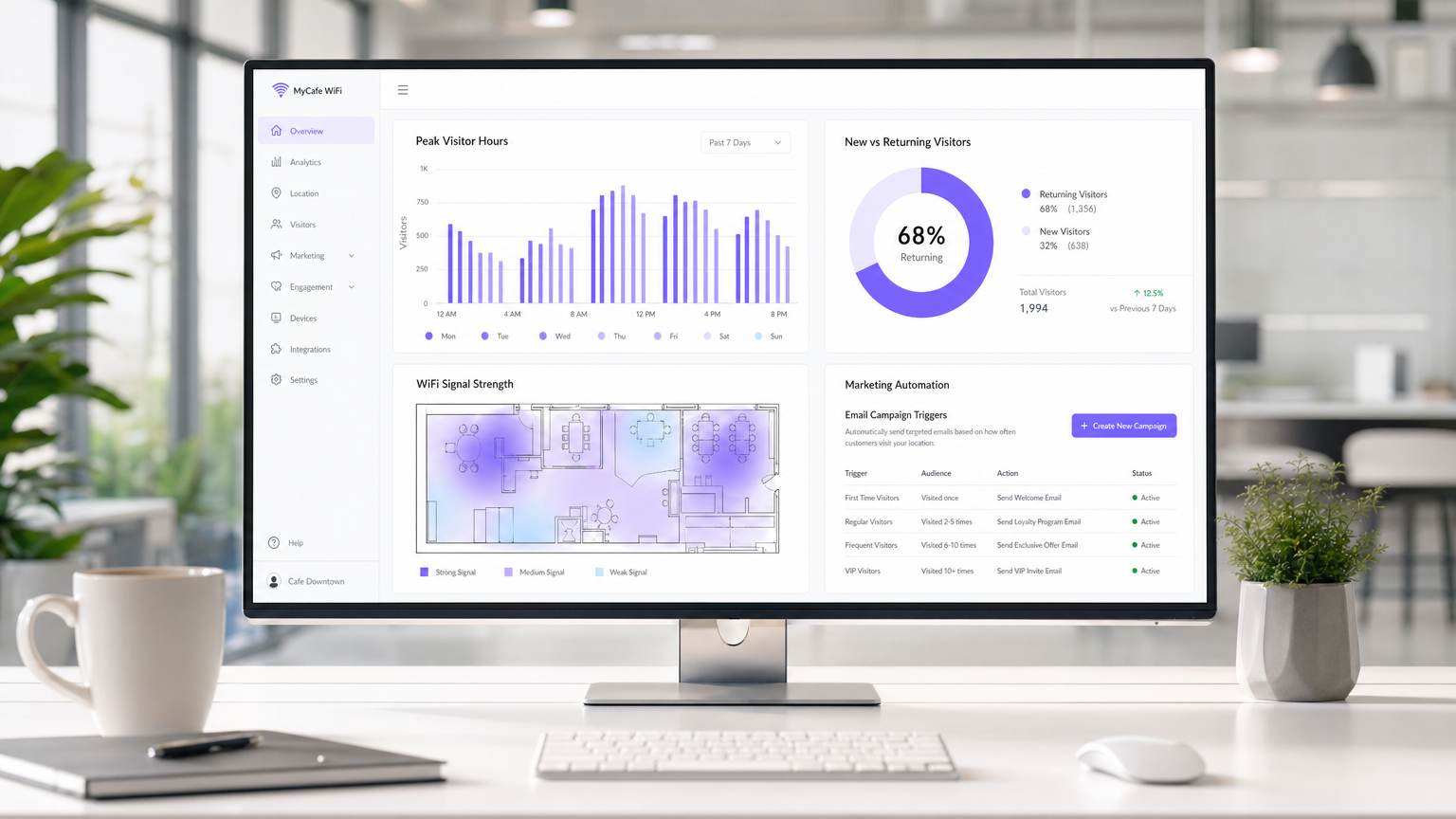
Erfolgsmessung: Der ROI einer Café WiFi-Bereitstellung wird anhand von drei primären Metriken berechnet:
- Datenerfassungsrate: Der Prozentsatz der verbundenen Benutzer, die Marketingmitteilungen zustimmen. Ein gut optimiertes Portal sollte eine Erfassungsrate von 30-40% erreichen.
- Kampagnenkonversion: Die Besucherfrequenz, die durch automatisierte E-Mail-/SMS-Kampagnen generiert wird, die von der WiFi-Plattform ausgelöst werden. Zum Beispiel die Verfolgung, wie viele Benutzer innerhalb von 7 Tagen nach Erhalt eines "Wir vermissen Sie"-Angebots zurückkehren.
- Optimierung der Verweildauer: Nutzung von Analysen, um die Verweildauer der Besucher mit dem durchschnittlichen Transaktionswert zu korrelieren, wodurch Betriebsteams die Sitzplatzgestaltung und Servicegeschwindigkeit optimieren können.
Durch die Erfassung von Erstanbieterdaten und die Förderung wiederholter Besuche durch gezieltes Marketing erzielt eine verwaltete Guest WiFi-Lösung typischerweise einen ROI innerhalb von 3-6 Monaten nach der Bereitstellung, insbesondere in wettbewerbsintensiven Hospitality -Umgebungen.
Schlüsseldefinitionen
VLAN (Virtual Local Area Network)
A logical subnetwork that groups a collection of devices from different physical LANs. Used to securely separate guest traffic from operational traffic.
Essential for maintaining PCI DSS compliance and preventing guests from accessing back-office systems.
Captive Portal
A web page that the user of a public-access network is obliged to view and interact with before access is granted.
The primary mechanism for capturing user data, presenting terms of service, and securing GDPR marketing consent.
Client Isolation
A wireless security feature that prevents devices connected to the same AP from communicating with each other.
Crucial for public networks to prevent malicious users from scanning or attacking other guests' devices.
OFDMA (Orthogonal Frequency-Division Multiple Access)
A feature of Wi-Fi 6 that allows an AP to subdivide a channel to communicate with multiple devices simultaneously.
Solves the 'latency' problem in dense café environments where dozens of devices are competing for airtime.
PCI DSS
Payment Card Industry Data Security Standard. A set of security standards designed to ensure that all companies that accept, process, store or transmit credit card information maintain a secure environment.
The regulatory reason why network segmentation between POS and guest WiFi is legally required.
First-Party Data
Information a company collects directly from its customers and owns entirely.
The core asset generated by a guest WiFi platform, insulating venues from the deprecation of third-party cookies.
QoS (Quality of Service)
Technologies that manage data traffic to reduce packet loss, latency and jitter on the network.
Used to prioritize critical business traffic (like payment processing) over guest Netflix streaming.
Walled Garden
A restricted environment that controls user access to web content and services.
Required configuration on the firewall to allow unauthenticated users to access the captive portal and its associated resources (like social login APIs) before granting full internet access.
Ausgearbeitete Beispiele
A growing independent café chain with 3 locations is experiencing network dropouts during peak hours. Their POS terminals frequently disconnect, and guests complain about slow speeds. They are currently using consumer-grade routers provided by their ISP, broadcasting a single SSID for both staff and guests.
- Replace consumer routers with a cloud-managed business gateway and Wi-Fi 6 access points at each location.
- Implement VLAN tagging: VLAN 10 for POS/Staff, VLAN 20 for Guests.
- Configure firewall rules to block inter-VLAN routing, securing the POS network.
- Set up QoS to prioritize VLAN 10 traffic over VLAN 20, and implement a 5 Mbps per-client bandwidth cap on the guest network.
- Deploy a centralized captive portal to manage guest access and collect GDPR-compliant marketing data.
A large conference centre café needs to provide seamless WiFi for returning delegates without forcing them to log in via the captive portal every day, while still tracking their presence for analytics.
Deploy a profile-based authentication system utilizing Passpoint (Hotspot 2.0) or OpenRoaming. Guests authenticate via the captive portal on their first visit, downloading a secure profile to their device. On subsequent visits, their device authenticates automatically via WPA2/3-Enterprise using EAP-TTLS, bypassing the splash page while still registering their MAC address and presence in the analytics dashboard.
Übungsfragen
Q1. A retail café chain wants to implement a guest WiFi network. The marketing director insists on making email collection mandatory for access to maximize database growth. The IT director is concerned about compliance. What is the correct architectural approach?
Hinweis: Consider the specific requirements of GDPR regarding 'freely given' consent.
Musterlösung anzeigen
Under GDPR, consent for marketing cannot be a precondition for service. The captive portal must allow users to access the WiFi without opting into marketing emails. The correct approach is to offer a clear, unticked checkbox for marketing consent, while allowing users to connect simply by accepting the terms and conditions. The marketing team should instead incentivize opt-ins by offering a clear value exchange (e.g., 'Sign up for 10% off your next coffee').
Q2. During peak hours (12:00 PM - 2:00 PM), guests at a busy city-centre café report that they can see the WiFi network with strong signal, but cannot connect or obtain an IP address. The network works perfectly in the morning and evening. What is the most likely cause and solution?
Hinweis: Think about the lifecycle of a connection in a high-turnover environment.
Musterlösung anzeigen
The most likely cause is DHCP IP pool exhaustion. Because the café has high footfall but short dwell times, the default 24-hour DHCP leases are tying up IP addresses long after the guests have left. The solution is to reduce the DHCP lease time for the guest VLAN to 1 or 2 hours, and potentially expand the subnet from a /24 (254 addresses) to a /23 (510 addresses).
Q3. A venue operator wants to deploy a single unified network for both their EPOS systems and guest WiFi to save on hardware costs, using a standard consumer broadband router. What are the specific technical and business risks of this approach?
Hinweis: Evaluate the scenario against PCI DSS requirements and wireless performance standards.
Musterlösung anzeigen
- Compliance Failure: A flat network violates PCI DSS requirements for isolating the Cardholder Data Environment, risking heavy fines and loss of card processing abilities. 2. Security Risk: Without client isolation and VLANs, guests can potentially access or attack the EPOS systems. 3. Performance Degradation: Consumer routers lack QoS to prioritize EPOS traffic, meaning guest streaming could cause payment processing to time out. 4. Device Limitations: Consumer routers cannot handle the concurrent connections typical in a café, leading to network crashes.
Weiterlesen in dieser Reihe
Was ist eine Probe Request? Verstehen, wie Geräte Netzwerke entdecken
Dieser technische Leitfaden bietet einen tiefen Einblick in IEEE 802.11 Probe Requests, aktives versus passives Scannen und die Auswirkungen der MAC randomisation auf Standortanalysen. Er liefert umsetzbare Implementierungsstrategien für Netzwerkarchitekten zur Optimierung von High-Density-Bereitstellungen, zur Minderung von Probe Storms und zur Sicherstellung einer genauen, GDPR-konformen Datenerfassung mithilfe authentifizierter Identitätsschichten.
Wie man langsames WiFi behebt, ohne Ihr Internetpaket zu aktualisieren
Ein umfassender technischer Leitfaden für IT-Manager und Netzwerkarchitekten zur Optimierung der Unternehmens-WiFi-Leistung, ohne die ISP-Bandbreite zu erhöhen. Behandelt HF-Tuning, Client-Dichte-Management, QoS-Implementierung und wie man WiFi-Analysen nutzt, um Engpässe zu diagnostizieren und zu beheben.
Die Checkliste für die Migration von Legacy NAC zu Cloud-Native NAC
Dieser maßgebliche technische Leitfaden bietet eine strukturierte, dreiphasige Checkliste für die Migration von der traditionellen Netzwerkzugriffskontrolle (NAC) zu einer Cloud-nativen Architektur. Er stattet IT-Manager und Netzwerkarchitekten mit umsetzbaren Strategien aus, um die Identitätsintegration, Richtlinienkonsistenz und Compliance zu gewährleisten, ohne den Veranstaltungsbetrieb zu stören.