

Cloud-basiertes vs. On-Premise Captive Portal: Was ist das Richtige für Ihr Unternehmen?
Ein umfassender technischer Vergleich von cloud-basierten und On-Premise Captive Portal Architekturen. Dieser Leitfaden bewertet die Bereitstellungsgeschwindigkeit, Kostenstrukturen, Skalierbarkeit und Compliance-Auswirkungen, um IT-Führungskräften fundierte Infrastrukturentscheidungen zu ermöglichen.
🎧 Diesen Leitfaden anhören
Transkript anzeigen
Executive Summary
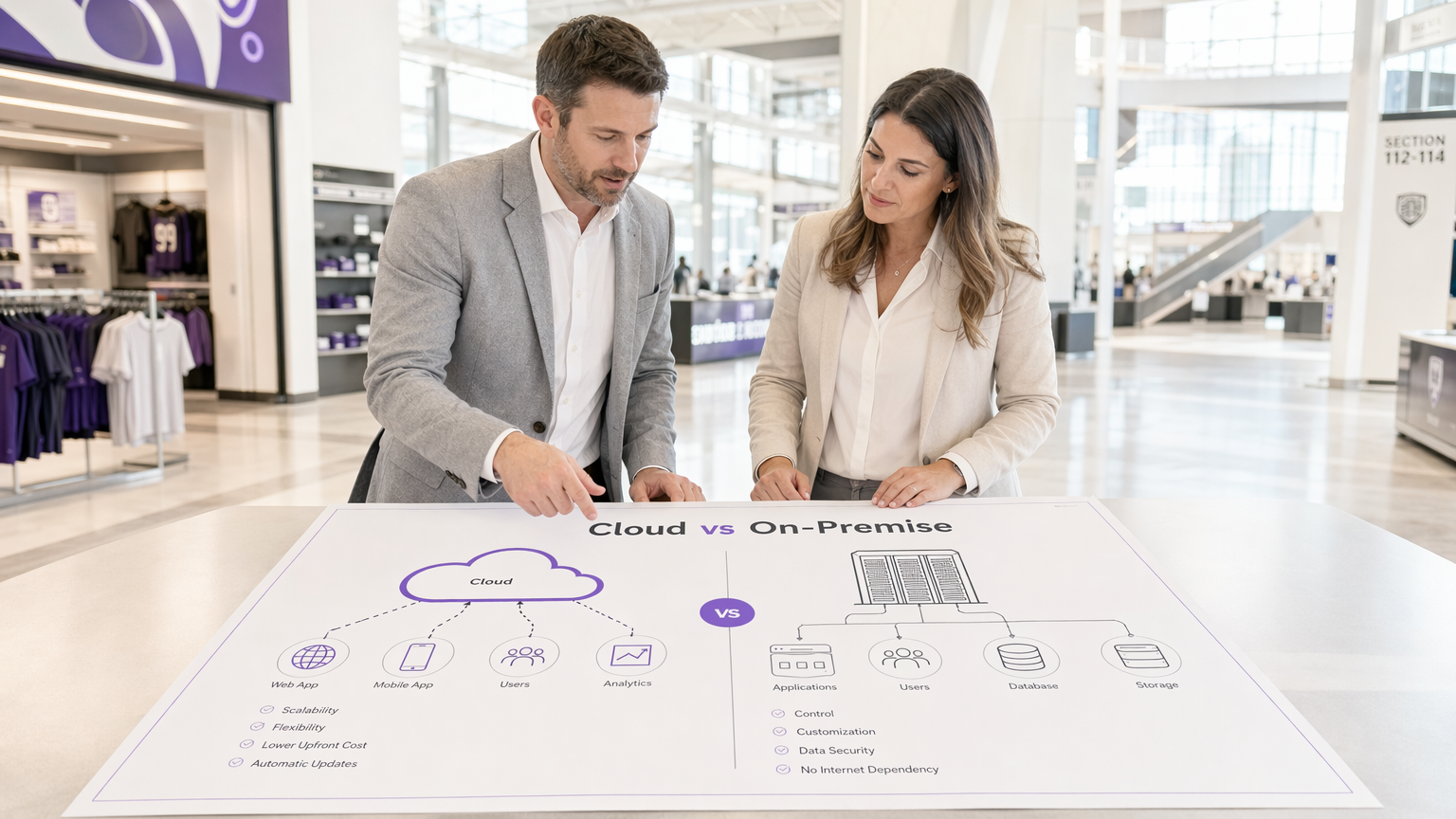
Bei der Gestaltung einer Gast-WiFi-Architektur bestimmt die Wahl zwischen einem cloud-basierten Captive Portal und einem On-Premise Captive Portal Server Ihre Infrastrukturkosten, den Betriebsaufwand und die Compliance-Position für den gesamten Lebenszyklus der Bereitstellung. Für IT-Manager, Netzwerkarchitekten und CTOs ist dies nicht nur eine Software-Präferenz, sondern eine grundlegende architektonische Entscheidung.
Ein cloud-basiertes Captive Portal verlagert die Authentifizierungs- und Portal-Rendering-Workloads in eine vom Anbieter verwaltete Umgebung, was elastische Skalierbarkeit und deutlich reduzierten Wartungsaufwand bietet. Umgekehrt behält ein On-Premise Captive Portal System alle Daten und Authentifizierungslogik innerhalb Ihres lokalen Netzwerkperimeters, was absolute Kontrolle auf Kosten höherer Investitionsausgaben und operativer Belastung ermöglicht.
Dieser Leitfaden bietet einen rigorosen technischen Vergleich beider Bereitstellungsmodelle. Wir werden die Architektur untersuchen, die Gesamtbetriebskosten bewerten und spezifische Implementierungsszenarien skizzieren, um Ihnen bei der Entscheidung zu helfen, welche Captive Portal Software Ihren Geschäftszielen und regulatorischen Anforderungen entspricht.
Technical Deep-Dive: Architecture and Authentication Flows
Um den Unterschied zwischen einem gehosteten Captive Portal und einer On-Premise-Lösung zu verstehen, müssen der Authentifizierungsfluss und der Ausführungsort der zugrunde liegenden Prozesse untersucht werden.
The Cloud-Based Captive Portal Architecture
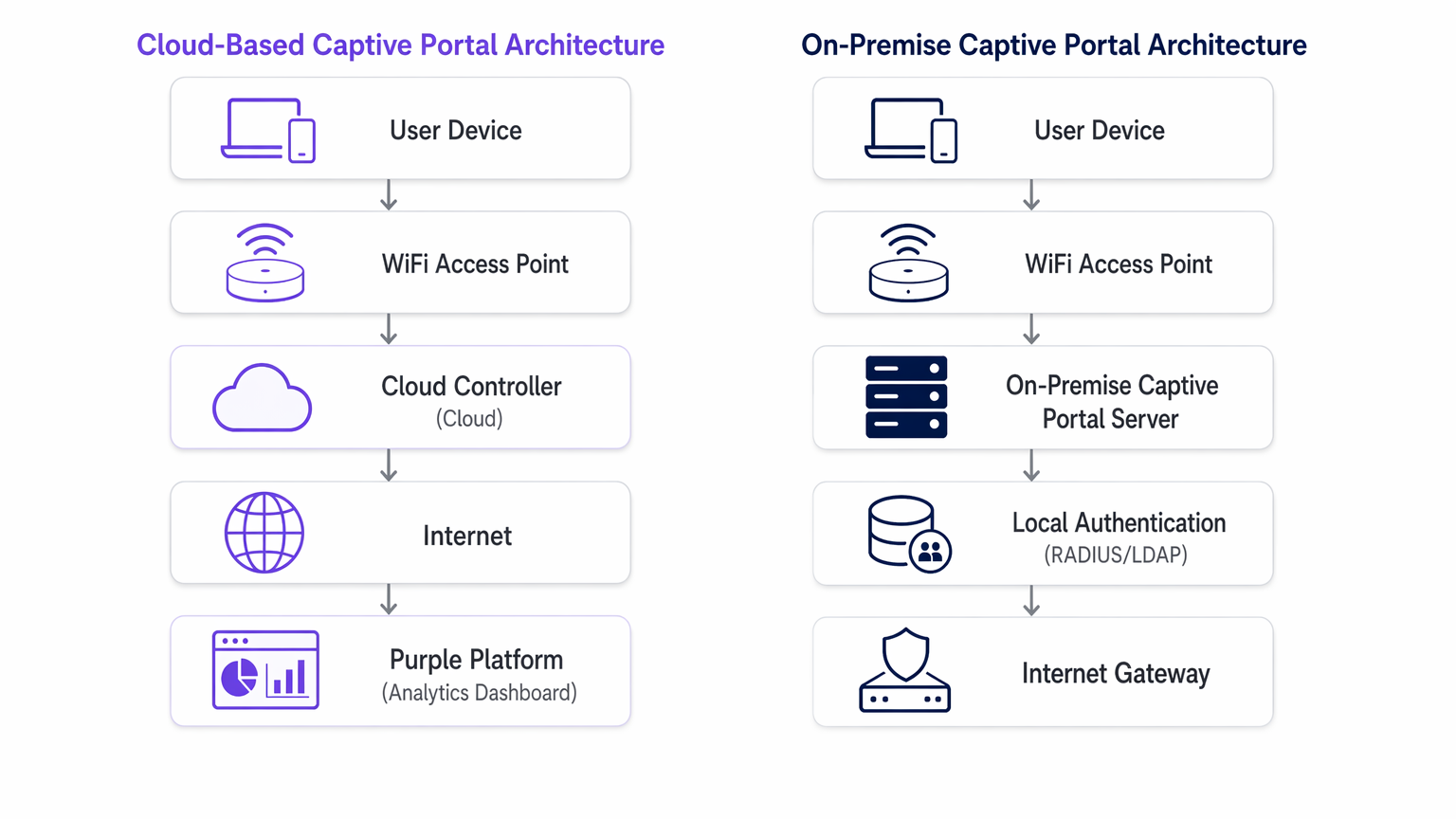
In einem cloud-basierten Modell befinden sich die Captive Portal Logik, RADIUS-Authentifizierung und Datenerfassungsdatenbanken auf der Infrastruktur Dritter (z.B. AWS, Azure, GCP), die von einem Anbieter wie Purple verwaltet wird.
Wenn sich ein Client-Gerät mit der Gast-SSID verbindet, fängt der lokale Access Point (AP) oder Wireless LAN Controller (WLC) die anfängliche HTTP/HTTPS-Anfrage ab. Da das Gerät nicht authentifiziert ist, leitet der Controller den Browser zu einer cloud-gehosteten URL um. Der Benutzer interagiert mit dem Portal – akzeptiert Bedingungen, authentifiziert sich über Social Login oder füllt ein Formular aus. Nach erfolgreicher Authentifizierung kommuniziert die Cloud-Plattform zurück an den lokalen Controller (oft über RADIUS oder eine anbieterspezifische API), um die MAC address des Clients zu autorisieren und Internetzugang zu gewähren.
Diese Architektur ist hochgradig elastisch. Bei Spitzenlasten – wie der Halbzeit in einem Stadion oder einem großen Verkauf im Einzelhandel – skaliert die Cloud-Infrastruktur automatisch, um Tausende gleichzeitiger Authentifizierungsanfragen zu verarbeiten, ohne lokale Hardware-Upgrades zu erfordern. Darüber hinaus bieten Plattformen wie Purple Gast-WiFi -Analysen und fungieren als kostenloser Identitätsanbieter für Dienste wie OpenRoaming unter der Connect license, was einen erheblichen Mehrwert über die grundlegende Zugangskontrolle hinaus bietet.
The On-Premise Captive Portal Server Architecture
Ein On-Premise Captive Portal Server erfordert die Bereitstellung dedizierter Hardware oder virtueller Maschinen (VMs) innerhalb Ihrer lokalen Netzwerkinfrastruktur. Der Portal-Webserver, der RADIUS-Server (z.B. FreeRADIUS, Microsoft NPS) und die Benutzerdatenbank werden alle lokal von Ihrem IT-Team gewartet.
Der Umleitungsprozess ist ähnlich, aber der Client wird auf eine interne IP-Adresse anstatt auf eine öffentliche URL geleitet. Die Authentifizierungstransaktion findet vollständig innerhalb des lokalen Netzwerks (LAN) statt. Dieses Modell stellt sicher, dass während der Authentifizierungsphase keine Gastdaten das öffentliche Internet durchqueren, was oft eine strenge Anforderung für Gesundheitseinrichtungen oder Regierungseinrichtungen ist, die strengen Datensouveränitätsrichtlinien unterliegen.
Die Durchsatzleistung eines On-Premise-Systems ist jedoch streng durch die bereitgestellte Hardware begrenzt. Die Kapazitätsplanung muss Spitzenwerte gleichzeitiger Sitzungen berücksichtigen, was oft zu einer erheblichen Überdimensionierung führt. Darüber hinaus übernimmt das IT-Team die volle Verantwortung für OS-Patching, SSL-Zertifikatserneuerung, Datenbankwartung und die Konfiguration von Hochverfügbarkeits-Failover-Paaren.
Implementation Guide: Vendor-Neutral Recommendations
Die Auswahl der geeigneten Architektur hängt von Ihren spezifischen betrieblichen Einschränkungen ab.
When to Choose a Cloud-Based Captive Portal
- Multi-Site-Bereitstellungen: Wenn Sie ein verteiltes Portfolio verwalten, wie z.B. eine Hotelkette oder ein Netzwerk von Verkehrsknotenpunkten , bietet ein cloud-basiertes Captive Portal eine zentrale Verwaltung. Sie können Portal-Updates, Branding-Änderungen und Richtlinienanpassungen gleichzeitig auf Hunderten von Standorten verteilen.
- Schlanke IT-Operationen: Wenn Ihr Netzwerkteam sich auf die Kerninfrastruktur statt auf die Anwendungsverwaltung konzentriert, reduziert die Auslagerung des Captive Portal Systems an einen SaaS-Anbieter den Betriebsaufwand.
- Marketing- und Analyseintegration: Cloud-Plattformen erleichtern von Natur aus die Datenaggregation. Wenn Ihr Ziel darin besteht, WiFi Analytics zur Steigerung der Kundenbindung zu nutzen, bietet ein gehostetes Captive Portal die notwendigen Integrationen sofort einsatzbereit.
When to Choose an On-Premise Captive Portal
- Strenge Datensouveränität: Wenn regulatorische Rahmenbedingungen die Übertragung von Gastdaten außerhalb Ihrer physischen Räumlichkeiten oder nationalen Grenzen verbieten, ist eine On-Premise-Bereitstellung zwingend erforderlich.
- Air-Gapped- oder Hochlatenz-Umgebungen: Standorte mit unzuverlässigen Internet-Uplinks können sich nicht auf ein Cloud-Authentifizierungs-Gateway verlassen. Wenn die WAN-Verbindung ausfällt, fällt ein Cloud-Portal aus; ein On-Premise-Portal kann Benutzer weiterhin für den lokalen Netzwerkzugriff authentifizieren.
- Deep Benutzerdefinierte Integration: Wenn das Portal direkt mit älteren, lokal gehosteten Property Management Systemen (PMS) über proprietäre APIs verbunden werden muss, die nicht dem Internet ausgesetzt werden können.
Best Practices für die Captive Portal Bereitstellung
Unabhängig vom Bereitstellungsmodell ist die Einhaltung von Industriestandards entscheidend für Sicherheit und Benutzererfahrung.
- VLAN-Segmentierung: Isolieren Sie das Gast-WiFi-Netzwerk immer auf einem dedizierten VLAN, vollständig getrennt von Unternehmensressourcen.
- SSL/TLS-Zertifikatsverwaltung: Ein Captive Portal muss seine Seiten über HTTPS bereitstellen. Abgelaufene Zertifikate lösen schwerwiegende Browserwarnungen aus und unterbrechen den Authentifizierungsfluss. Für On-Premise-Bereitstellungen automatisieren Sie die Zertifikatserneuerung mithilfe von Protokollen wie ACME (z. B. Let's Encrypt). Cloud-Anbieter verwalten dies automatisch.
- WPA3- und 802.1X-Überlegungen: Während WPA3-Enterprise mit 802.1X der Goldstandard für Unternehmensgeräte ist, ist es für Gastnetzwerke, in denen Sie keine Zertifikate an nicht verwaltete Geräte verteilen können, unpraktisch. Daher bleibt ein offenes Netzwerk mit einem Captive Portal oder WPA3-Personal (Opportunistic Wireless Encryption - OWE) der Standard für den öffentlichen Zugang.
- Datenverarbeitungsvereinbarungen (DPA): Bei der Nutzung eines gehosteten Captive Portal überprüfen Sie die DPA des Anbieters sorgfältig. Stellen Sie sicher, dass sie GDPR, PCI DSS einhalten und ihre Unterauftragsverarbeiter sowie die Standorte der Datenresidenz klar definieren.
Fehlerbehebung & Risikominderung
Häufige Fehlerursachen unterscheiden sich erheblich zwischen den beiden Architekturen.
Cloud-basierte Risiken
- WAN-Ausfälle: Das primäre Risiko ist ein Verlust der Internetverbindung. Ohne Uplink kann der Cloud-Controller nicht erreicht werden, und die Authentifizierung schlägt fehl. Mindern Sie dies durch redundante WAN-Verbindungen (z. B. primäre Glasfaser, sekundäres 5G/LTE) oder ziehen Sie Die wichtigsten SD-WAN-Vorteile für moderne Unternehmen in Betracht, um eine hohe Verfügbarkeit zu gewährleisten.
- DNS-Auflösungsfehler: Wenn der lokale DNS-Server die Cloud-Portal-URL nicht auflösen kann, bricht die Umleitung ab. Sorgen Sie für eine robuste lokale DNS-Infrastruktur.
On-Premise-Risiken
- Hardwarefehler: Ein einzelner Captive Portal-Server ist ein Single Point of Failure. Sie müssen ihn in einem Aktiv-Passiv- oder Aktiv-Aktiv-Cluster bereitstellen, um eine hohe Verfügbarkeit zu gewährleisten.
- Kapazitätserschöpfung: Unerwartete Spitzen bei der Benutzerdichte können den lokalen RADIUS-Server oder Webserver überlasten und zu Timeouts führen. Überwachen Sie CPU, Arbeitsspeicher und Metriken für gleichzeitige Sitzungen rigoros.
- Patch-Management: Ungepatchte Portal-Server sind Hauptziele für Exploits. Implementieren Sie strenge Zeitpläne für das Schwachstellenmanagement und die Patch-Bereitstellung.
Für Szenarien, in denen das Portal mehr Reibung als Wert verursacht, konsultieren Sie So entfernen Sie einen Captive Portal-Login (und wann Sie sollten) .
ROI & Geschäftsauswirkungen
Die Finanzmodelle für diese Architekturen sind grundlegend unterschiedlich.
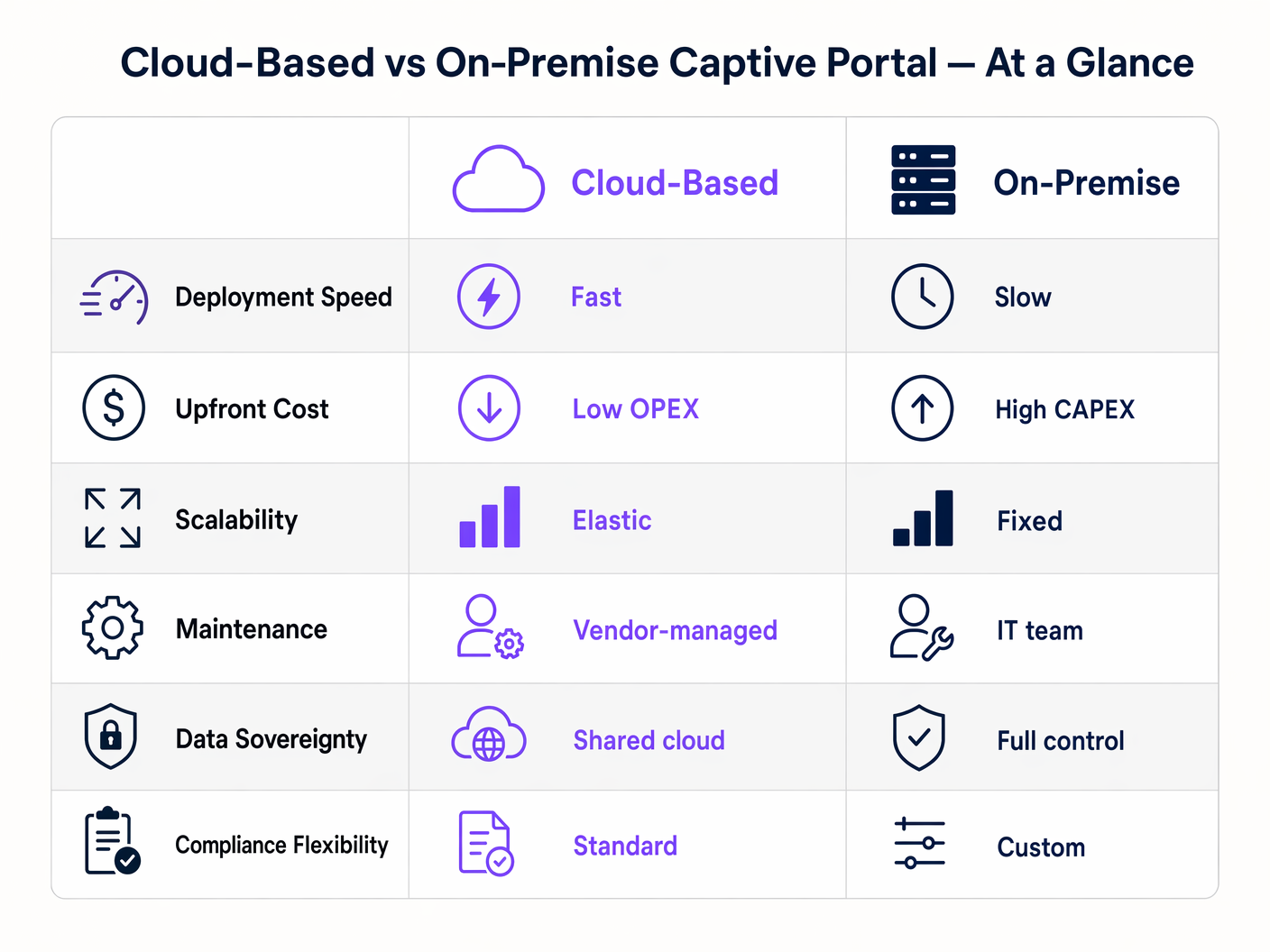
Eine On-Premise Captive Portal Software-Bereitstellung ist ein Investitionsausgabenmodell (CAPEX). Sie entstehen erhebliche Vorabkosten für Hardware, Hypervisor-Lizenzierung und redundante Infrastruktur. Die laufenden Kosten sind in den Betriebsausgaben (OPEX) der Zeit Ihres IT-Teams versteckt, die für Wartung und Fehlerbehebung aufgewendet wird.
Ein Cloud-basiertes Captive Portal arbeitet nach einem OPEX-Modell. Die Vorabkosten sind minimal und beschränken sich auf die Access Points und die Erstkonfiguration. Sie zahlen eine vorhersehbare, wiederkehrende Abonnementgebühr. Der ROI einer Cloud-Plattform wird oft durch die Reduzierung des IT-Arbeitsaufwands und die Monetarisierung der erfassten Daten über erweiterte Analysen und Marketingintegrationen realisiert, wodurch Gast-WiFi von einem Kostenfaktor zu einem umsatzgenerierenden Asset wird.
Schlüsselbegriffe & Definitionen
Captive Portal
A web page that a user of a public access network is obliged to view and interact with before access is granted.
The primary mechanism for authenticating guests and capturing marketing consent on public WiFi networks.
RADIUS (Remote Authentication Dial-In User Service)
A networking protocol that provides centralized Authentication, Authorization, and Accounting (AAA) management for users who connect and use a network service.
The backend protocol used by both cloud and on-premise portals to signal the access point that a user is authorized.
Data Sovereignty
The concept that data is subject to the laws and governance structures within the nation it is collected.
A critical deciding factor for government and healthcare venues evaluating cloud vs. on-premise architectures.
MAC Address Authorization
The process of using a device's Media Access Control address to identify it and grant network access after initial authentication.
How the network controller remembers a device so the user doesn't have to log in every time they roam between access points.
WPA3-Enterprise
The latest Wi-Fi security standard requiring 802.1X authentication and a RADIUS server, providing individualized encryption.
The standard for corporate networks, which operates separately from the open/OWE guest network where the captive portal resides.
VLAN Segmentation
The practice of dividing a physical network into multiple logical networks.
Essential for security, ensuring guest WiFi traffic (and the captive portal) is isolated from internal corporate data.
Data Processing Agreement (DPA)
A legally binding contract that states the rights and obligations of each party concerning the protection of personal data.
Mandatory documentation when utilizing a hosted captive portal to ensure GDPR compliance.
OpenRoaming
A federation of Wi-Fi networks that allows users to automatically and securely connect to participating networks without manual login.
An advanced authentication method supported by platforms like Purple, offering a frictionless alternative to traditional captive portals.
Fallstudien
A national retail chain with 400 locations needs to deploy a standardized guest WiFi experience. Their IT team consists of 5 network engineers based at headquarters. They require detailed analytics on customer dwell time and visit frequency to integrate with their CRM.
Deploy a cloud-based captive portal system. The lean IT team cannot manage 400 on-premise portal servers or complex VPN routing back to a centralized on-premise data center. A hosted captive portal allows centralized policy management, immediate scalability, and native API integration for CRM data syncing.
A large NHS hospital trust requires guest WiFi across its campus. Strict patient data confidentiality policies dictate that no MAC addresses, device identifiers, or user information can be stored on servers outside the UK, and all authentication traffic must remain within the hospital's private network.
Deploy an on-premise captive portal server. The hospital must provision a high-availability cluster of portal servers within their local data center, integrated with their local Active Directory or a dedicated FreeRADIUS instance for guest accounts.
Szenarioanalyse
Q1. A hotel chain is experiencing frequent authentication timeouts during large conferences because their local captive portal server reaches maximum CPU utilization. What is the most operationally efficient architectural solution?
💡 Hinweis:Consider which deployment model handles elastic scaling automatically.
Empfohlenen Ansatz anzeigen
Migrate to a cloud-based captive portal system. Cloud architectures provide elastic scalability, automatically absorbing authentication spikes without requiring the local IT team to provision, configure, or maintain additional hardware.
Q2. A government facility must deploy guest WiFi but has a strict policy that no external DNS resolution or outbound internet traffic is permitted from the management VLAN. Which captive portal architecture must be deployed?
💡 Hinweis:Evaluate how a cloud portal redirects clients.
Empfohlenen Ansatz anzeigen
An on-premise captive portal server must be deployed. A cloud-based portal requires the client to resolve and reach an external URL for authentication. Without outbound internet access from the management/guest VLAN, the redirection will fail. The authentication process must be handled entirely locally.
Q3. You are calculating the total cost of ownership (TCO) for an on-premise captive portal deployment. Beyond the initial server hardware and software licensing, what critical infrastructure component must be included to ensure network resilience?
💡 Hinweis:Consider the impact of a single server failure.
Empfohlenen Ansatz anzeigen
You must include the cost of a secondary server configured for high availability (active-passive or active-active failover). Relying on a single on-premise server creates a single point of failure; if it goes offline, the entire guest network becomes inaccessible.




