

Der ultimative Leitfaden zu WiFi-Kanälen: 2.4GHz vs 5GHz erklärt
Dieser maßgebliche Leitfaden erläutert die entscheidenden Unterschiede zwischen 2.4GHz- und 5GHz-WiFi-Kanälen für Unternehmensumgebungen. Er bietet IT-Managern und Netzwerkarchitekten umsetzbare Strategien für die Kanalplanung, die Minderung von Interferenzen und die Optimierung von Bereitstellungen in Umgebungen mit hoher Dichte, um den ROI zu steigern.
Diesen Leitfaden anhören
Podcast-Transkript ansehen
Executive Summary
Für IT-Manager und Netzwerkarchitekten, die drahtlose Infrastrukturen mit hoher Dichte bereitstellen, ist die Wahl zwischen 2.4GHz und 5GHz nicht länger eine einfache binäre Entscheidung zwischen Reichweite und Geschwindigkeit. In modernen Unternehmensumgebungen – von Hotels mit 500 Zimmern bis hin zu weitläufigen Einzelhandelsflächen – ist die Kanalauswahl die grundlegende Architektur-Entscheidung, die den Netzwerkdurchsatz, die Client-Erfahrung und die Sicherheitslage bestimmt. Dieser Leitfaden bietet einen definitiven technischen Deep-Dive in den besten Kanal für 5GHz WiFi, die Minderung von Co-Channel-Interferenzen auf 2.4GHz und die Strukturierung eines skalierbaren Kanalplans.
Durch die Standardisierung auf 5GHz für den primären Client-Zugriff, während 2.4GHz für ältere IoT-Geräte reserviert wird, können Betreiber von Veranstaltungsorten die aggregierte Netzwerkkapazität drastisch erhöhen. In Kombination mit Guest WiFi und robusten WiFi Analytics verwandelt ein sauberer Kanalplan ein Kosten-Center in einen zuverlässigen Motor für Datenerfassung und Kundenbindung.
Technischer Deep-Dive: Frequenzbänder und Kanäle verstehen
Um ein resilientes Netzwerk zu entwerfen, müssen wir zwischen Frequenzbändern und den darin enthaltenen Kanälen unterscheiden. Ein Frequenzband repräsentiert das breite Funkspektrum, das für die drahtlose Kommunikation zugewiesen ist, während Kanäle die spezifischen Unterteilungen sind, in denen Access Points (APs) und Client-Geräte Verbindungen aushandeln.
Das 2.4GHz-Band: Einschränkungen durch ältere Technologien und Interferenzen
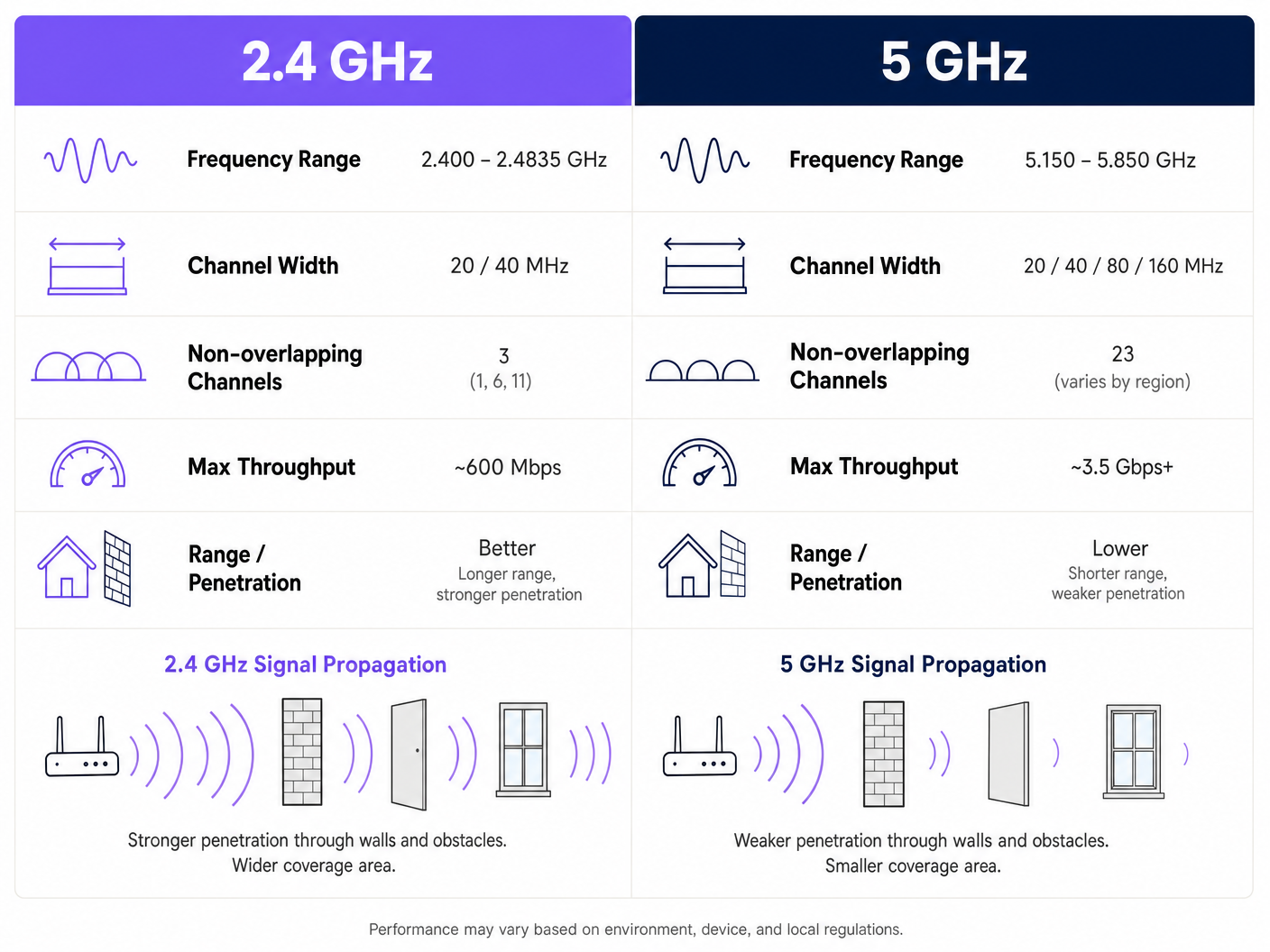
Das 2.4GHz-Band (2.400 – 2.4835 GHz) ist das bewährte Arbeitspferd der drahtlosen Vernetzung. Sein Hauptvorteil ist die Signalausbreitung; Wellen niedrigerer Frequenz durchdringen Wände, Türen und Böden effektiver als höhere Frequenzen. Diese Reichweite geht jedoch mit einem schwerwiegenden architektonischen Nachteil bei Bereitstellungen mit hoher Dichte einher.
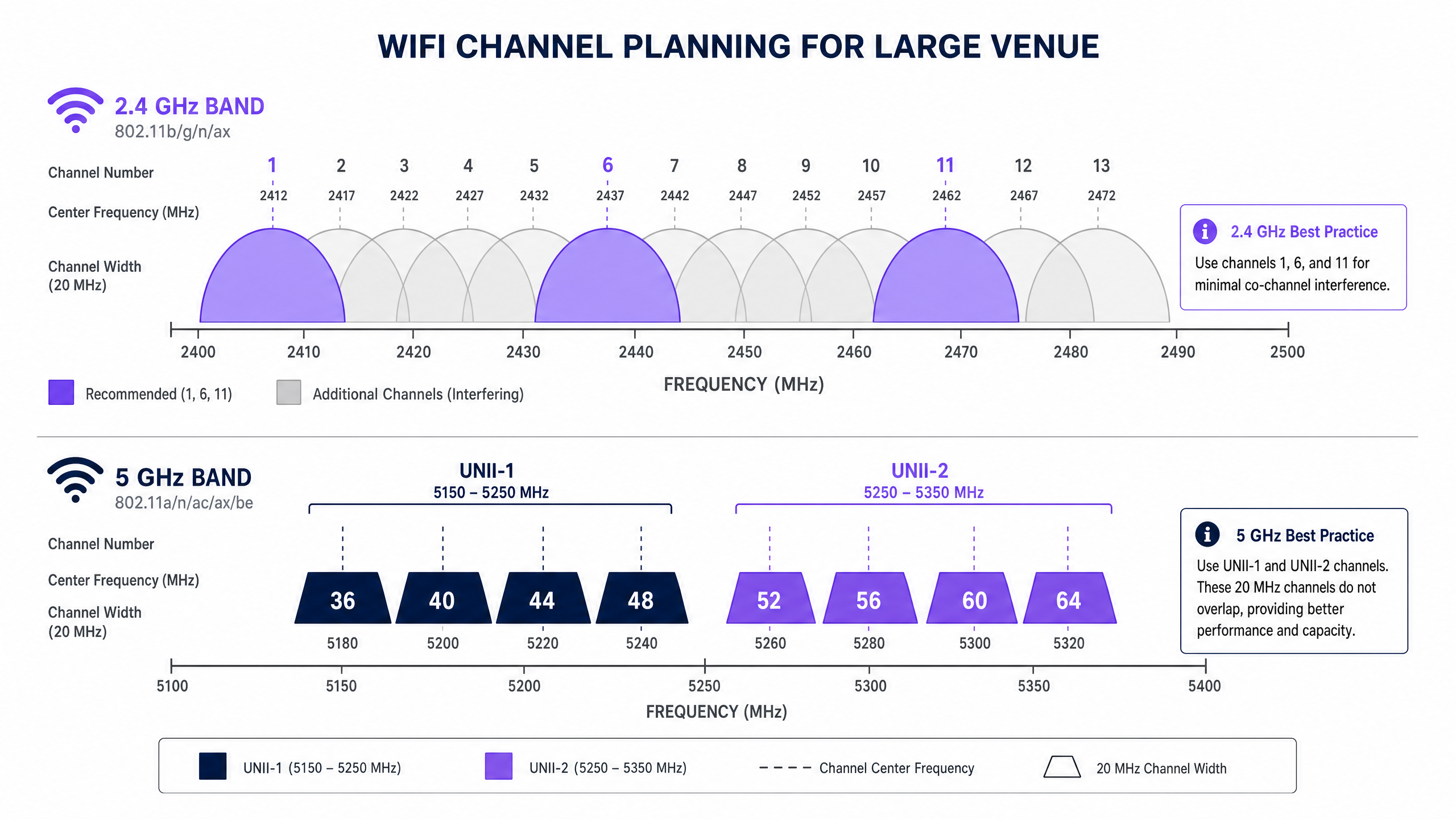
In Großbritannien und Europa bietet das 2.4GHz-Band 13 Kanäle. Jeder Kanal ist 20MHz breit, aber sie sind nur 5MHz voneinander entfernt. Diese strukturelle Überlappung bedeutet, dass nur drei Kanäle – 1, 6 und 11 – wirklich nicht überlappend sind. In einer dichten Umgebung, wie einem Hospitality -Veranstaltungsort mit APs, die in jedem zweiten Raum bereitgestellt werden, führt das Erzwingen von Hunderten von Geräten auf drei Kanäle unweigerlich zu schweren Co-Channel-Interferenzen (CCI). Darüber hinaus ist das 2.4GHz-Spektrum stark durch Nicht-WiFi-Störer verschmutzt, darunter Mikrowellenherde, Bluetooth-Geräte und DECT-Telefone.
Das 5GHz-Band: Kapazität und die DFS-Herausforderung
Das 5GHz-Band (5.150 – 5.850 GHz) verändert die Kapazitätsgleichung grundlegend. Es bietet deutlich mehr nutzbares Spektrum, was breitere Kanäle und höhere Datenraten ermöglicht. In Großbritannien ist das 5GHz-Band in Unlicensed National Information Infrastructure (UNII)-Unterbänder segmentiert und bietet bis zu 19 nicht überlappende 20MHz-Kanäle.
Bei der Bestimmung des besten Kanals für 5GHz WiFi müssen Netzwerkarchitekten Dynamic Frequency Selection (DFS) navigieren. DFS ist eine regulatorische Anforderung, die verhindern soll, dass WiFi-Netzwerke Radarsysteme, wie Wetter- und Militärradar, stören.
- UNII-1 (Kanäle 36, 40, 44, 48): Diese Kanäle erfordern kein DFS. Sie sind der Goldstandard für Unternehmensbereitstellungen, da APs nicht plötzlich die Kanäle wechseln, wenn Radar erkannt wird, was eine stabile Client-Konnektivität gewährleistet.
- UNII-2A und UNII-2C (Kanäle 52-144): Dies sind DFS-Kanäle. Wenn ein AP eine Radarsignatur auf seinem Betriebskanal erkennt, muss er diesen Kanal sofort verlassen und zu einem anderen wechseln, wodurch aktive Client-Sitzungen möglicherweise unterbrochen werden.
- UNII-3 (Kanäle 149-165): Die Verfügbarkeit variiert je nach Region, aber dies sind im Allgemeinen nicht-DFS-Kanäle, wo dies zulässig ist.
Implementierungsleitfaden: Den Kanalplan erstellen
Eine erfolgreiche Bereitstellung erfordert einen herstellerneutralen, datengesteuerten Ansatz zur Kanalplanung. Ob Sie in einer Retail -Umgebung bereitstellen oder einen Transport -Hub aufrüsten, diese Schritte bilden die Grundlage für ein Hochleistungsnetzwerk.
1. Eine aktive RF-Standortuntersuchung durchführen
Verlassen Sie sich niemals ausschließlich auf prädiktive Modellierung. Führen Sie eine aktive Untersuchung mit einem Spektrumanalysator durch, um die bestehende RF-Umgebung zu kartieren. Identifizieren Sie Rogue-APs, Nicht-WiFi-Interferenzen und benachbarte Netzwerke. Diese empirischen Daten sind unerlässlich für die Zuweisung von Kanälen, die bestehende Überlastungen vermeiden.
2. Kanalbreiten konservativ definieren
Der Instinkt, den Durchsatz durch Kanalbündelung (z. B. die Verwendung von 80MHz- oder 160MHz-Breiten) zu maximieren, ist ein häufiger Architekturfehler in dichten Umgebungen.
- Auf 5GHz: Standardisieren Sie auf 20MHz- oder 40MHz-Kanalbreiten. Während die Spitzen-Geschwindigkeiten pro Client niedriger sind als bei 80MHz-Kanälen, erhöht sich der aggregierte Durchsatz des Netzwerks, da Sie mehr nicht überlappende Kanäle erhalten und dadurch CCI reduzieren.
- Auf 2.4GHz: Erzwingen Sie strikt 20MHz-Kanalbreiten. Die Verwendung von 40MHz auf 2.4GHz in einer Unternehmensumgebung garantiert schwere Interferenzen.
3. Band Steering implementieren
Moderne Unternehmens-APs unterstützen Band Steering, eine Funktion, die Dual-Band-fähige Clients dazu ermutigt, sich mit dem 5GHz-Band zu verbinden. Dies räumt das 2.4GHz-Spektrum für ältere Geräte und IoT-Sensoren frei, wie sie in unserem Leitfaden zu BLE Low Energy Explained for Enterprise besprochen werden.
4. Sendeleistung optimieren
Hohe Sendeleistung bedeutet nicht bessere Leistung; sie bedeutet einen größeren Interferenzbereich. In einer Bereitstellung mit hoher Dichte senken Sie die Sendeleistung der 2.4GHz-Radios (z. B. 8-11 dBm), um die Zellengröße zu reduzieren und CCI zu begrenzen. 5GHz-Funkgeräte können mit etwas höherer Leistung (z. B. 14-17 dBm) betrieben werden, um ihre geringere Durchdringungsfähigkeit zu kompensieren.
Best Practices & Industriestandards
Um Compliance und operative Exzellenz zu gewährleisten, halten Sie sich an diese branchenüblichen Empfehlungen:
- Standardisieren Sie UNII-1 für kritische Infrastrukturen: Verwenden Sie die Kanäle 36, 40, 44 und 48 für Bereiche, die absolute Stabilität erfordern, wie z. B. Vorstandsetagen oder Point-of-Sale (POS)-Cluster.
- Nutzen Sie Analysen für dynamische Optimierung: Verwenden Sie Plattformen wie Purple, um die HF-Umgebung kontinuierlich zu überwachen. Wenn ein benachbarter Mieter einen Rogue AP einsetzt, sollten Ihre Analysen die erhöhte Kanalnutzung erkennen und eine automatische oder manuelle Kanalanpassung auslösen. Für Einblicke in die Optimierung von Büroumgebungen, lesen Sie Büro Wi Fi: Optimieren Sie Ihr modernes Büro Wi-Fi Netzwerk .
- Überprüfen Sie das DFS-Verhalten vor dem Go-Live: Wenn Sie UNII-2-Kanäle verwenden, führen Sie strenge Tests durch, um zu überwachen, wie oft APs DFS-Ereignisse auslösen. Wenn die Radardetektion häufig ist (z. B. in der Nähe eines Flughafens), entfernen Sie diese spezifischen Kanäle aus der Liste der zulässigen Kanäle des APs.
- Bereiten Sie sich auf Wi-Fi 6E vor: Wenn Sie eine Hardware-Aktualisierung vornehmen, evaluieren Sie Wi-Fi 6E (802.11ax, das im 6GHz-Band arbeitet). Das 6GHz-Spektrum bietet in Großbritannien bis zu 500MHz zusätzliche, störungsfreie Bandbreite und löst damit effektiv das Problem der hohen Dichte. Lesen Sie mehr in Wi Fi Frequenzen: Ein Leitfaden zu Wi-Fi Frequenzen im Jahr 2026 .
Fehlerbehebung & Risikominderung
Selbst bei sorgfältiger Planung sind HF-Umgebungen dynamisch. Häufige Fehlerursachen sind:
- Das „Sticky Client“-Problem: Clients, die sich weigern, zu einem näheren AP zu wechseln, und eine schwache Verbindung aufrechterhalten, die die Gesamtleistung der Zelle beeinträchtigt. Abhilfe: Implementieren Sie minimale RSSI-Schwellenwerte und nutzen Sie 802.11k/v/r-Protokolle, um nahtloses Roaming zu ermöglichen.
- Auto-Kanal-Katastrophen: Controller-basierte Auto-Kanal-Algorithmen konvergieren oft auf denselben wenigen Kanälen, was zu weit verbreiteter CCI führt. Abhilfe: Verwenden Sie Auto-Kanal-Funktionen nur während der Ersteinrichtung oder geplanter Wartungsfenster. Für den kontinuierlichen Betrieb verlassen Sie sich auf eine statische, sorgfältig geplante Kanalbelegung, die durch Analysen validiert wurde.
- Verschlechterung der Sicherheitslage: Eine schlechte Kanalplanung kann das Vorhandensein von Rogue APs oder Evil Twin-Angriffen verschleiern. Abhilfe: Eine saubere HF-Umgebung macht die Anomalieerkennung deutlich zuverlässiger. Stellen Sie sicher, dass Ihre Architektur mit modernen Sicherheitsframeworks übereinstimmt, wie in La lista de verificación para migrar de NAC heredado a NAC nativo de la nube und A Lista de Verificação para Migrar de NAC Legado para NAC Nativo da Nuvem beschrieben.
ROI & Geschäftsauswirkungen
Die geschäftlichen Auswirkungen eines korrekt konzipierten drahtlosen Netzwerks gehen weit über die Reduzierung von IT-Helpdesk-Tickets hinaus. Im Einzelhandel und Gastgewerbe ist das WiFi-Netzwerk der primäre Kanal für die Gästeinteraktion und Datenerfassung.
Wenn Gleichkanalinterferenzen eliminiert und Clients erfolgreich auf saubere 5GHz-Kanäle geleitet werden, kann das Netzwerk höhere Client-Dichten ohne Leistungseinbußen unterstützen. Diese Zuverlässigkeit stellt sicher, dass Captive Portals sofort geladen werden, was die Konversionsrate von Guest WiFi-Anmeldungen erhöht. Die daraus resultierende Erfassung von Erstanbieterdaten treibt gezielte Marketingkampagnen voran und wirkt sich direkt auf das Geschäftsergebnis aus.
Hören Sie unser vollständiges technisches Briefing zu diesem Thema:
Schlüsseldefinitionen
Co-Channel Interference (CCI)
Interference caused when two or more access points operate on the exact same channel and their coverage areas overlap.
CCI forces devices to wait their turn to transmit, drastically reducing network throughput in dense deployments.
Dynamic Frequency Selection (DFS)
A regulatory mandate requiring WiFi devices operating in certain 5GHz bands to detect and avoid incumbent radar systems.
If an AP detects radar on a DFS channel, it must immediately switch channels, causing brief connectivity drops for connected clients.
Band Steering
A feature on enterprise APs that detects dual-band capable clients and actively encourages them to connect to the 5GHz band rather than 2.4GHz.
Essential for preserving the limited 2.4GHz spectrum for legacy IoT devices and ensuring high-performance clients get optimal speeds.
Channel Bonding
The practice of combining two or more adjacent 20MHz channels into a single wider channel (e.g., 40MHz, 80MHz) to increase data throughput.
While it increases speed, it reduces the total number of non-overlapping channels available, making it dangerous in high-density environments.
UNII-1 Band
The lower segment of the 5GHz spectrum (channels 36, 40, 44, 48) that does not require DFS compliance.
The most stable and reliable channels for mission-critical enterprise wireless traffic.
Adjacent Channel Interference (ACI)
Interference caused by transmissions on overlapping but not identical frequencies (e.g., using channel 3 and channel 6 in 2.4GHz).
ACI is more destructive than CCI because devices cannot properly decode the overlapping signals, leading to high packet loss.
RSSI (Received Signal Strength Indicator)
A measurement of the power present in a received radio signal.
Used by network administrators to set minimum connection thresholds, forcing 'sticky clients' to roam to closer access points.
BSS Coloring
A feature introduced in Wi-Fi 6 (802.11ax) that adds a 'color' identifier to transmissions, allowing APs on the same channel to ignore each other's traffic if the color doesn't match.
Significantly mitigates the impact of co-channel interference in extremely dense deployments like stadiums.
Ausgearbeitete Beispiele
A 400-room hotel in a dense urban environment is experiencing widespread guest complaints regarding WiFi speeds during the evening peak (7 PM - 10 PM). The current deployment uses dual-band APs in every other room, with auto-channel selection enabled and 80MHz channel widths on 5GHz.
- Disable auto-channel selection to prevent continuous channel thrashing. 2. Reduce 5GHz channel width from 80MHz to 20MHz to increase the number of available non-overlapping channels and eliminate co-channel interference. 3. Statically assign 5GHz channels, prioritizing UNII-1 (36, 40, 44, 48) and clean UNII-2 channels. 4. Reduce 2.4GHz transmit power to 8dBm and restrict to channels 1, 6, and 11 to minimize cell overlap.
A large retail chain is deploying a new point-of-sale (POS) system that relies on wireless connectivity. The store is located in a shopping centre with dozens of neighboring retail WiFi networks visible. The POS vendor recommends using 2.4GHz for 'better range'.
- Reject the vendor's 2.4GHz recommendation for critical infrastructure. 2. Configure a dedicated SSID for the POS system operating exclusively on the 5GHz band. 3. Assign this SSID to UNII-1 channels (36, 40, 44, 48) to avoid any potential DFS radar disruptions. 4. Implement band steering on the public Guest WiFi SSID to keep consumer devices off the 2.4GHz spectrum as much as possible.
Übungsfragen
Q1. You are deploying WiFi in a hospital where life-critical telemetry equipment operates on 2.4GHz. The hospital also wants to offer high-speed Guest WiFi in the waiting areas. How do you architect the channel plan?
Hinweis: Consider physical separation and band dedication.
Musterlösung anzeigen
- Dedicate the 2.4GHz band entirely to the telemetry equipment, statically assigning channels 1, 6, and 11. 2. Disable the Guest WiFi SSID on the 2.4GHz radios completely. 3. Broadcast the Guest WiFi exclusively on the 5GHz band using UNII-1 and UNII-2 channels. This ensures the life-critical 2.4GHz spectrum remains uncontended while providing high capacity for guests.
Q2. A stadium deployment is suffering from massive interference on 5GHz, despite using 20MHz channels. The APs are mounted very high up and are 'hearing' each other across the bowl. What configuration change is required?
Hinweis: Think about how far the signal is traveling and how APs decide when the channel is clear.
Musterlösung anzeigen
- Significantly reduce the transmit (Tx) power on the 5GHz radios to shrink the cell size. 2. Increase the RX-SOP (Receive Start of Packet) threshold, which makes the AP 'deaf' to weak signals from distant APs across the stadium bowl, allowing it to transmit simultaneously without triggering carrier sense mechanisms.
Q3. Your corporate office is located less than 2 miles from a major commercial airport. You are currently using channels 36, 40, 44, 48, 52, 56, 60, and 64. Users are complaining of random, brief disconnects. What is the likely cause and solution?
Hinweis: Consider the regulatory requirements for specific 5GHz channels.
Musterlösung anzeigen
The disconnects are caused by DFS (Dynamic Frequency Selection) events. The APs on channels 52-64 are detecting airport radar and vacating the channel. The solution is to remove the UNII-2 DFS channels (52-64) from the allowed channel list and rely solely on the non-DFS UNII-1 channels (36-48), or upgrade to Wi-Fi 6E to utilize the non-DFS 6GHz band.