
DNS Over HTTPS (DoH): Auswirkungen auf die Inhaltsfilterung im öffentlichen WiFi
Dieser technische Leitfaden erklärt, wie DNS over HTTPS (DoH) die traditionelle Inhaltsfilterung über Port 53 in öffentlichen WiFi-Netzwerken umgeht. Er bietet herstellerneutrale, praxisnahe Strategien zur Schadensbegrenzung für Netzwerkarchitekten und IT-Manager, um die Transparenz wiederherzustellen, Compliance durchzusetzen und den Gastzugang in Unternehmensumgebungen abzusichern.
Video overview
Diesen Leitfaden anhören
Podcast-Transkript ansehen
Teil unserer Kernserie: Enterprise WiFi Security Guide →
Executive Summary
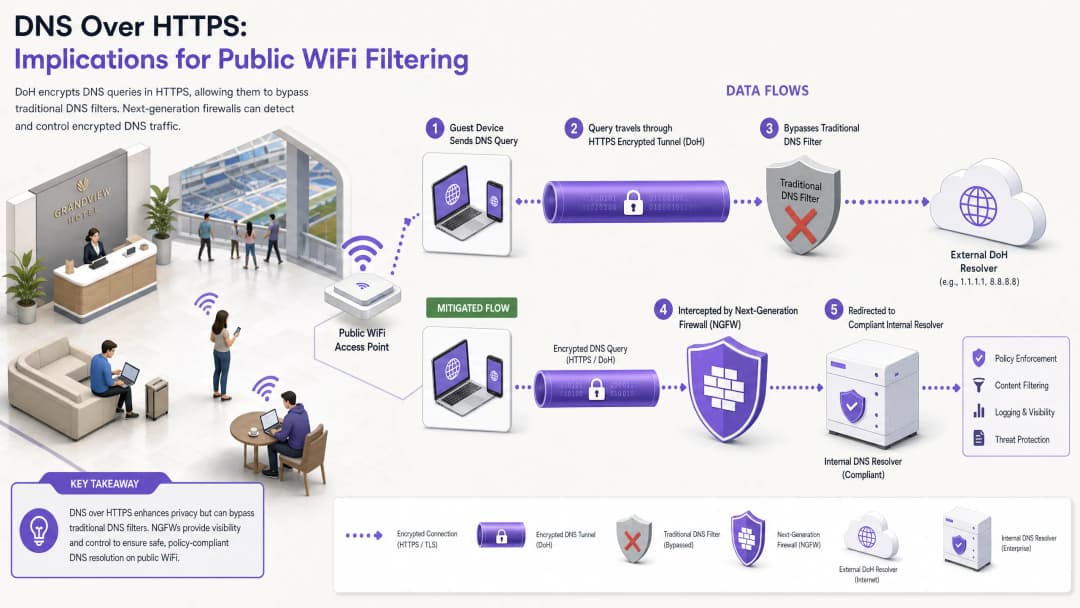
Seit fast einem Jahrzehnt dient die traditionelle DNS-Filterung auf Port 53 als primärer Mechanismus zur Durchsetzung von Inhaltsrichtlinien und zur Abwehr von Malware-Bedrohungen in öffentlichen WiFi Netzen. Die weitreichende Einführung von DNS over HTTPS (DoH) durch gängige Browser und Betriebssysteme stellt dieses Modell jedoch grundlegend auf den Kopf. Durch die Kapselung von DNS-Anfragen in Standard-HTTPS-Verkehr auf Port 443 macht DoH diese Anfragen für herkömmliche Abfangtechniken im Netzwerk unsichtbar.
Für IT-Manager in Unternehmen und Netzwerkarchitekten, die das Gäste-WiFi in der Hotellerie, im Einzelhandel, in Stadien und im öffentlichen Sektor verwalten, entsteht dadurch eine erhebliche Compliance- und Sicherheitslücke. Wenn Gastgeräte die zugewiesenen DNS-Resolver des Standorts unbemerkt umgehen, greifen die sorgfältig ausgearbeiteten Richtlinien zur akzeptablen Nutzung nicht mehr, was das Netzwerk für Command-and-Control (C2) Malware-Verkehr und ungeeignete Inhalte anfällig macht. Dieser Leitfaden beschreibt die Funktionsweise des DoH-Bypass-Vektors im Detail und bietet eine mehrschichtige Defence-in-Depth-Architektur, um die Netzwerksichtbarkeit wiederherzustellen, die Einhaltung gesetzlicher Vorschriften zu gewährleisten und eine robuste Sicherheit für das Gäste-WiFi aufrechtzuerhalten.
Technische Vertiefung: DoH-Bypass-Mechanismen
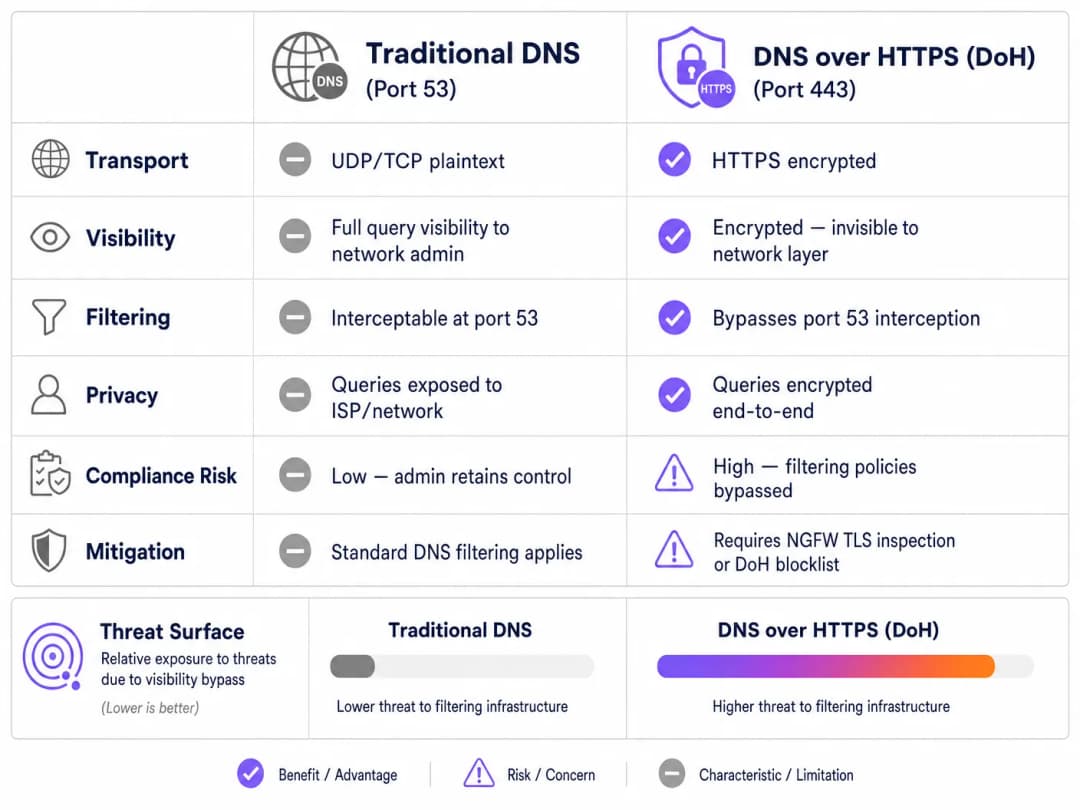
Um den DoH-Bedrohungsvektor zu verstehen, muss man zunächst die grundlegende Architektur der traditionellen DNS-Filterung betrachten. Bisher wurde eine Anfrage im Klartext über UDP oder TCP-Port 53 übertragen, wenn sich ein Gastgerät mit einem öffentlichen Netzwerk verband und eine Domain anforderte. Netzwerkadministratoren konnten diesen Datenverkehr an der Firewall oder dem Wireless Controller problemlos abfangen und an einen konformen DNS-Resolver umleiten, der die angeforderte Domain mit Threat-Intelligence-Feeds und Inhaltskategorisierungsrichtlinien abglich.
DNS over HTTPS umgeht diese gesamte Steuerungsebene. Systembedingt verschlüsselt DoH die DNS-Anfrage und überträgt sie über eine Standard-TLS-Verschlüsselung auf Port 443 an einen externen Resolver (wie 1.1.1.1 von Cloudflare oder 8.8.8.8 von Google). Aus Sicht der Netzwerkinfrastruktur des Standorts ist eine DoH-Anfrage nicht von einem Benutzer zu unterscheiden, der eine sichere Website aufruft oder ein Video streamt.
Implementierungsmuster: DoH auf Anwendungs- vs Betriebssystemebene
Die Herausforderungen für Netzwerkadministratoren werden durch die Art und Weise, wie DoH auf verschiedenen Plattformen implementiert wird, zusätzlich verschärft. Es gibt zwei primäre Bereitstellungsmuster:
- DoH auf Anwendungsebene: Bei diesem Modell verwaltet die Anwendung ihre eigene DoH-Konfiguration unabhängig vom Host-Betriebssystem. Mozilla Firefox ist ein klassisches Beispiel; wenn DoH aktiviert ist, ignoriert Firefox die per DHCP zugewiesenen DNS-Server und leitet alle Anfragen an seinen bevorzugten DoH-Anbieter weiter. Die Abfangregeln des Standorts für Port 53 werden vollständig umgangen.
- Dienst auf OS-Ebene (Opportunistisches DoH): Moderne Betriebssysteme, einschließlich Windows 11 und Android, nutzen opportunistisches DoH. Das Betriebssystem prüft, ob der über DHCP zugewiesene DNS-Resolver einen bekannten DoH-Endpunkt besitzt. Wenn eine Übereinstimmung gefunden wird, aktualisiert das Betriebssystem die Verbindung automatisch auf DoH. Dies bewahrt zwar die Wahl des Resolvers durch den Administrator, verlagert den Datenverkehr jedoch auf Port 443, wodurch herkömmliche Monitoring-Tools, die Datenverkehr auf Port 53 erwarten, umgangen werden können.
Darüber hinaus müssen Administratoren DNS over TLS (DoT) berücksichtigen, das auf Port 853 läuft. Obwohl DoT aufgrund seines dedizierten Ports einfacher zu blockieren ist, ist es der Standard für die Funktion "Privates DNS" unter Android und stellt ein ähnliches Umgehungsrisiko dar, wenn Port 853 im Gast-VLAN offen bleibt.
Implementierungsleitfaden: Eine Defence-in-Depth-Architektur
Die Wiedererlangung der Kontrolle über die DNS-Auflösung erfordert eine mehrschichtige Eindämmungsstrategie. Sich auf einen einzigen Kontrollpunkt zu verlassen, reicht gegen moderne, verschlüsselte Protokolle nicht aus. Um den Gastzugang zu sichern und die Einhaltung von Standards wie PCI-DSS und GDPR zu gewährleisten, sollten Netzwerkarchitekten die folgende Architektur implementieren.
Ebene 1: Bekannte DoH-Resolver-Endpunkte blockieren
Die unmittelbarste und effektivste Maßnahme ist das Blockieren des ausgehenden HTTPS-Datenverkehrs zu bekannten öffentlichen DoH-Resolvern am Netzwerkrand. Obwohl DoH-Datenverkehr mit Standard-HTTPS-Verkehr verschmilzt, sind die Ziel-IP-Adressen und -Domains der großen DoH-Anbieter bekannt.
Durch die Konfiguration von Next-Generation Firewalls (NGFWs) zum Verwerfen von Verbindungen zu diesen spezifischen Endpunkten (z. B. dns.google, cloudflare-dns.com) zwingen Administratoren das DoH des Client-Geräts zum Abbruch. In den meisten Implementierungen fällt der Client bei einem DoH-Fehler automatisch auf traditionelles, unverschlüsseltes DNS auf Port 53 zurück, das dann abgefangen und gefiltert werden kann.
Implementierungshinweis: Dieser Ansatz erfordert die Pflege einer aktuellen Blockliste. Anbieter von Enterprise-Firewalls stellen häufig dynamische Bedrohungs-Feeds bereit, die bekannte DoH-Endpunkte automatisch aktualisieren und so den administrativen Aufwand erheblich reduzieren.
Ebene 2: Abfangen und Umleiten von Port 53 erzwingen
Das Blockieren von DoH ist nur dann effektiv, wenn der zurückfallende Datenverkehr korrekt verwaltet wird. Das Netzwerk muss so konfiguriert sein, dass es den gesamten ausgehenden UDP- und TCP-Datenverkehr auf Port 53 abfängt, der aus dem Gast-VLAN stammt. Dieser Datenverkehr muss (über NAT- bzw. Port-Weiterleitungsregeln) erzwungenermaßen an den autorisierten, konformen DNS-Resolver des Standorts umgeleitet werden.
Dieser Schritt ist von entscheidender Bedeutung, da viele Geräte oder schädliche Anwendungen öffentliche DNS-Server (wie 8.8.8.8) fest in ihren Netzwerk-Stacks codiert haben und über DHCP bereitgestellte Einstellungen ignorieren. Ohne erzwungenes Abfangen können diese Geräte die Filterrichtlinien des Standorts erfolgreich umgehen, selbst wenn DoH blockiert ist.
Ebene 3: Port 853 blockieren (DNS over TLS)
Um den DoT-Bypass-Vektor zu adressieren, müssen Administratoren ausgehenden Datenverkehr auf TCP-Port 853 aus dem Gastnetzwerk explizit blockieren. Ähnlich wie bei der DoH-Mitigation zwingt das Blockieren von DoT Android-Geräte und andere DoT-fähige Clients dazu, auf den Standard-DNS-Port 53 zurückzugreifen.

Haben Sie Fragen zu Ihrem spezifischen Setup?
Unser Team arbeitet mit Standortbetreibern, IT-Managern und Netzwerktechnikern an über 80.000 Standorten zusammen. Buchen Sie ein 20-minütiges Gespräch und wir zeigen Ihnen, wie andere diese Herausforderungen gelöst haben.
Best Practices und Compliance-Überlegungen
Die Implementierung von DoH-Mitigation ist nicht nur eine technische Aufgabe; sie ist eine grundlegende Voraussetzung zur Aufrechterhaltung der gesetzlichen Compliance und zur Durchsetzung von Richtlinien zur angemessenen Nutzung.
- Richtliniendokumentation: Stellen Sie sicher, dass die Allgemeinen Geschäftsbedingungen des Captive Portal des Standorts explizit darauf hinweisen, dass die DNS-Filterung aus Sicherheits- und Compliance-Gründen aktiv ist. Dies bietet eine rechtliche Absicherung unter der GDPR und dem Online Safety Act des Vereinigten Königreichs, wenn verschlüsselte DNS-Protokolle blockiert werden.
- Netzwerksegmentierung: Isolieren Sie das Gast-WiFi mithilfe von VLANs und Firewall-Regeln streng von Unternehmens- und Zahlungsnetzwerken. Dies ist eine Kernanforderung von PCI-DSS v4.0, die auch eine robuste Überwachung des Netzwerkverkehrs vorschreibt - eine Überwachung, die unmöglich wird, wenn DoH die Sicherheitskontrollen umgehen kann.
- Kontinuierliche Überwachung: Nutzen Sie die Berichtsfunktionen Ihres Enterprise-DNS-Filterdienstes, um das Abfragevolumen zu überwachen und anomale Muster zu erkennen. Ein plötzlicher Abfall des Datenverkehrs auf Port 53 aus einem bestimmten Subnetz weist oft darauf hin, dass Client-Geräte einen neuen, nicht blockierten DoH-Resolver verwenden.
- Integration mit Analysen: Berücksichtigen Sie bei der Implementierung eines sicheren Gastzugangs, wie sich Authentifizierungsabläufe in umfassendere Geschäftsziele integrieren lassen. Die Verwendung eines WiFi Assistant für eine sichere, profilbasierte Authentifizierung stellt sicher, dass sich Benutzer sicher verbinden, und hilft dem Standort gleichzeitig, Besucherzahlen und Verweilzeiten mithilfe von WiFi Analytics zu verstehen, so wie auch der Offline Maps Mode das Besuchererlebnis verbessert.
Fehlerbehebung und Risikominderung
Bei der Bereitstellung von DoH-Mitigation stoßen Netzwerkteams häufig auf spezifische Fehlerszenarien. Das Antizipieren dieser Probleme minimiert Ausfallzeiten und Unannehmlichkeiten für Gäste.
Unvollständige Interzeptionsregeln
Der häufigste Fehler bei der Bereitstellung ist eine unvollständige Interzeption von Port 53. Administratoren konfigurieren möglicherweise den DHCP-Server so, dass er die korrekten DNS-IPs bereitstellt, versäumen es jedoch, die erforderlichen Firewall-NAT-Regeln zu implementieren, um fest einprogrammierte DNS-Anfragen abzufangen. Abhilfe: Testen Sie die Bereitstellung immer, indem Sie ein Client-Gerät mit einem statischen, externen DNS-Server (z. B. 9.9.9.9) konfigurieren und überprüfen Sie, ob Anfragen immer noch erfolgreich an den Filterdienst des Standorts weitergeleitet werden.
IPv6-Versäumnis
Da Netzwerke auf Dual-Stack-Konfigurationen umgestellt werden, werden Firewall-Regeln oft ausschließlich für IPv4 geschrieben. Wenn DoH-Sperrlisten und Port-53-Interzeptionsregeln IPv6 nicht abdecken, umgehen moderne Geräte die IPv4-Kontrollen nahtlos über ihren IPv6-Stack. Mitigierung: Stellen Sie sicher, dass alle DoH-Sperrlisten, Port-53-Umleitungsregeln und Port-853-Drop-Regeln gleichermaßen auf IPv4- und IPv6-Routingtabellen angewendet werden.
Funktionsstörungen bei Anwendungen
Aggressives DoH-Blockieren kann gelegentlich bestimmte mobile Anwendungen beeinträchtigen, die sich ausschließlich auf ihre eigenen DoH-Implementierungen verlassen und einen Fallback auf Standard-DNS verweigern. Mitigierung: Pflegen Sie einen dokumentierten Ausnahmeprozess. Wenn eine geschäftskritische Anwendung ausfällt, sollten Sie DoH nicht global freigeben, sondern eine TLS-Inspektion (falls auf der NGFW verfügbar) nutzen, um den DoH-Datenverkehr selektiv für den Resolver dieser spezifischen Anwendung zuzulassen.
ROI und geschäftliche Auswirkungen
Das geschäftliche Argument für eine robuste DoH-Mitigierung basiert auf Risikovermeidung und Compliance-Sicherung. Ein einziger Vorfall - wie eine behördliche Untersuchung, weil ein Gast auf illegale Inhalte zugegriffen hat, oder ein kompromittiertes IoT-Gerät, das eine C2-Verbindung über DoH herstellt - kann Kosten verursachen, die den für die Implementierung geeigneter Kontrollen erforderlichen Engineering-Aufwand bei Weitem übersteigen.
Für ein Unternehmen, das an mehreren Standorten tätig ist, gewährleistet die Standardisierung der DoH-Mitigierungsarchitektur eine konsistente Richtliniendurchsetzung. Diese Standardisierung reduziert die Betriebslast für IT-Service-Desks, da Missbrauchsmeldungen von ISPs gegen Null gehen und die Netzwerkleistung durch das Blockieren von ungeeigneten Inhalten mit hoher Bandbreite aufrechterhalten wird. Letztendlich stellt die Sicherung der DNS-Ebene sicher, dass die Investition des Standorts in Guest WiFi ein sicherer, regelkonformer Vermögenswert bleibt und nicht zu einer Haftungsquelle wird.
Schlüsseldefinitionen
DNS over HTTPS (DoH)
Ein Protokoll zur Durchführung einer Remote-Auflösung des Domain Name System (DNS) über das HTTPS-Protokoll, welches die Daten zwischen dem DoH-Client und dem DoH-basierten DNS-Resolver verschlüsselt.
Wenn IT-Teams eine Inhaltsfilterung einrichten, fungiert DoH als Umgehungsmechanismus, der DNS-Abfragen im standardmäßigen verschlüsselten Webverkehr verbirgt.
DNS over TLS (DoT)
Ein Sicherheitsprotokoll zur Verschlüsselung und Verpackung von DNS-Abfragen und -Antworten über das Transport Layer Security (TLS)-Protokoll, das auf einem dedizierten Port (853) arbeitet.
DoT ist auf modernen Android-Geräten oft standardmäßig aktiviert (privates DNS) und muss an der Firewall blockiert werden, um sicherzustellen, dass Abfragen auf das gefilterte DNS des Standorts zurückgreifen.
Opportunistisches DoH
Ein Verhalten, bei dem ein Betriebssystem oder Browser Standard-DNS-Abfragen automatisch auf DoH aktualisiert, wenn erkannt wird, dass des konfigurierte DNS-Resolver das verschlüsselte Protokoll unterstützt.
Diese Funktion, die in Windows 11 und Chrome üblich ist, führt dazu, dass der Datenverkehr selbst dann, wenn ein Standort eine Standard-DNS-IP zuweist, auf den verschlüsselten Port 443 ausweichen kann, wodurch eine veraltete Überwachung umgangen wird.
Port 53 Intercepting
Eine Netzwerk-Firewall-Konfiguration, die den gesamten ausgehenden Datenverkehr auf den UDP/TCP-Ports 53 abfängt und zwangsweise an einen bestimmten DNS-Resolver weiterleitet, unabhängig von der vom Client angeforderten Ziel-IP.
Unerlässlich, um DNS-Abfragen von Geräten mit fest codierten DNS-Einstellungen abzufangen oder von Geräten, die nach einer fehlgeschlagenen DoH-Verbindung darauf zurückgefallen sind.
Next-Generation Firewall (NGFW)
Ein Netzwerksicherheitsgerät, das über die Funktionen einer herkömmlichen, Stateful Firewall hinausgeht, einschließlich Deep Packet Inspection, Anwendungserkennung und TLS/SSL-Entschlüsselung.
NGFWs sind für die DoH-Mitigation von entscheidender Bedeutung, da sie DoH-Datenverkehr anhand von Anwendungssignaturen und nicht nur anhand von IP-Adressen identifizieren und blockieren können.
Fallback-Verhalten
Die programmierte Reaktion eines Client-Geräts, wenn die Verbindung über sein bevorzugtes verschlüsseltes DNS-Protokoll (DoH oder DoT) fehlschlägt, was in der Regel dazu führt, dass das Gerät auf standardmäßiges, unverschlüsseltes DNS zurückgreift.
Netzwerkarchitekten verlassen sich auf dieses Verhalten - indem sie DoH/DoT-Verbindungen absichtlich unterbrechen, zwingen sie das Gerät, den abfangbaren Port 53 zu verwenden.
Command-and-Control (C2)
Die von Angreifern genutzte Infrastruktur zur Kommunikation mit kompromittierten Geräten (Malware/Botnets) innerhalb eines Zielnetzwerks.
Moderne Malware nutzt zunehmend DoH, um die C2-Kommunikation vor Systemen zur Überwachung von Unternehmensnetzwerken zu verbergen, was die DoH-Mitigation zu einer kritischen Sicherheitsanforderung macht.
Captive Portal
Eine Webseite, die der Benutzer eines öffentlich zugänglichen Netzwerks aufrufen und mit der er interagieren muss, bevor ihm der Zugriff gewährt wird.
Das Captive Portal ist der rechtlich angemessene Ort, um Benutzer darüber zu informieren, dass ihr DNS-Datenverkehr gefiltert wird und verschlüsselte DNS-Protokolle blockiert sind.
Ausgearbeitete Beispiele
Ein Hotel mit 400 Zimmern hat vor Kurzem einen cloudbasierten DNS-Filterdienst eingeführt, um Markenstandards für familienfreundliche Inhalte zu erfüllen. Der IT-Manager stellt jedoch fest, dass ein erheblicher Teil des Gastdatenverkehrs weiterhin Websites mit jugendgefährdenden Inhalten erreicht und das Dashboard zur DNS-Filterung ein geringeres Abfragevolumen als erwartet anzeigt. Wie sollte der Netzwerkarchitekt diese Umgehung beheben?
- Firewall-Regeln überprüfen: Der Architekt muss zunächst sicherstellen, dass ausgehender TCP/UDP-Port 53 abgefangen und per NAT-Weiterleitung an den Cloud-DNS-Dienst geleitet wird.
- DoH-Resolver blockieren: Implementieren Sie eine NGFW-Sperrliste, um ausgehenden HTTPS-Verkehr (Port 443) zu bekannten DoH-Anbietern (z. B. Cloudflare, Google, Quad9) zu verwerfen.
- DoT blockieren: Fügen Sie eine Firewall-Regel hinzu, um den gesamten ausgehenden TCP-Port 853-Verkehr zu verwerfen, um die Umgehung durch privates DNS unter Android zu verhindern.
- IPv6 überprüfen: Stellen Sie sicher, dass alle oben genannten Regeln sowohl für IPv4- als auch für IPv6-Verkehr gelten.
Eine Einzelhandelskette mit 150 Standorten muss eine DNS-Filterung implementieren, um Malware und Phishing in ihrem Gast-WiFi zu blockieren. Sie nutzen einfache Branch-Firewalls ohne fortschrittliche TLS-Überprüfungsfunktionen. Wie können sie DoH effektiv eindämmen, ohne ihre Hardware aufzurüsten?
Ohne TLS-Überprüfung muss sich die Kette auf robustes Routing und Sperrlisten verlassen.
- Richten Sie eine dynamische DoH-IP/Domain-Sperrliste auf den Branch-Firewalls ein, die so konfiguriert ist, dass sie automatisch über einen externen Bedrohungs-Feed aktualisiert wird.
- Implementieren Sie eine strikte NAT-Weiterleitung von Port 53 an den Enterprise-DNS-Filter.
- Blockieren Sie Port 853 vollständig.
- Aktualisieren Sie die Nutzungsbedingungen des Captive Portal, um explizit darauf hinzuweisen, dass verschlüsselte DNS-Protokolle blockiert werden, um die Sicherheitsrichtlinien des Netzwerks durchzusetzen.
Übungsfragen
Q1. Ein Netzwerktechniker in einem Stadion konfiguriert den DHCP-Server so, dass er die IP-Adresse seines sicheren, gefilterten DNS-Dienstes an alle Gastgeräte verteilt. Tests zeigen jedoch, dass Geräte mit manuell konfigurierten DNS-Einstellungen (z. B. 8.8.8.8) den Filter erfolgreich umgehen. Was ist die am besten geeignete architektonische Lösung?
Hinweis: Berücksichtigen Sie den Unterschied zwischen der Empfehlung einer Route und der Durchsetzung einer Route am Netzwerkrand.
Musterlösung anzeigen
Der Techniker muss eine NAT-Portweiterleitungsregel auf der Firewall des Stadions einrichten. Diese Regel sollte den gesamten ausgehenden UDP- und TCP-Datenverkehr auf Port 53, der aus dem Gast-VLAN stammt, abfangen und die Ziel-IP zwangsweise in die IP-Adresse des sicheren DNS-Dienstes übersetzen. Dadurch wird sichergestellt, dass der Datenverkehr unabhängig von der lokalen Konfiguration des Clients über die Filterrichtlinie geleitet wird.
Q2. Nach der Implementierung einer strengen DoH-Sperrliste erhält der IT-Helpdesk eines Konferenzzentrums Berichte, dass eine bestimmte, maßgeschneiderte Event-Management-App bei Teilnehmern nicht geladen werden kann. Paketanalysen zeigen, dass die App versucht, ihren eigenen fest codierten DoH-Resolver zu verwenden, der blockiert wird, und die App verweigert den Rückfall auf Standard-DNS. Wie sollte dies gelöst werden?
Hinweis: Wägen Sie Sicherheitsrichtlinien und Geschäftskontinuität gegeneinander ab. Kann die Firewall zwischen allgemeinem DoH-Datenverkehr und Datenverkehr zu einem bestimmten, genehmigten Endpunkt unterscheiden?
Musterlösung anzeigen
Der Administrator sollte eine Ausnahme in der NGFW-Richtlinie erstellen. Anstatt die DoH-Sperrliste global zu deaktivieren, sollte er die spezifische IP-Adresse oder Domäne des von der Event-Management-App verwendeten DoH-Resolvers identifizieren und auf die Whitelist setzen. Wenn die Firewall eine Überprüfung auf Anwendungsebene (Layer 7) unterstützt, besteht eine robustere Lösung darin, eine Richtlinie zu erstellen, die DoH-Datenverkehr nur dann zulässt, wenn das Ziel mit der Infrastruktur der zugelassenen Anwendung übereinstimmt, um sicherzustellen, dass allgemeine DoH-Umgehungsversuche blockiert bleiben.
Q3. Eine Organisation des öffentlichen Sektors überprüft die Konformität ihres Gast-WiFi. Sie hat Port 853 (DoT) erfolgreich blockiert und das Abfangen von Port 53 implementiert. Es fehlt jedoch das Budget für eine NGFW mit erweiterter TLS-Überprüfung oder dynamischen DoH-Sperrlisten. Was ist die effektivste verbleibende Strategie zur DoH-Mitigation?
Hinweis: Wenn keine dynamischen Listen verfügbar sind, wie können Sie dann die überwiegende Mehrheit des opportunistischen DoH-Datenverkehrs blockieren?
Musterlösung anzeigen
Die Organisation sollte eine statische Blockliste auf ihrer bestehenden Firewall implementieren, die auf die IP-Adressen und Domains der gängigsten öffentlichen DoH-Anbieter (z. B. Cloudflare, Google, Quad9) abzielt. Dies erfordert zwar eine manuelle Pflege und erfasst keine unbekannten DoH-Resolver, aber Untersuchungen zeigen, dass die überwiegende Mehrheit des DoH-Traffics standardmäßig über eine Handvoll großer Anbieter läuft. Dies bietet eine äußerst effektive "80/20"-Lösung im Rahmen ihrer Budgetbeschränkungen.
Weiterlesen in dieser Reihe
Haftung bei öffentlichem WiFi: Warum Inhaltsfilterung zwingend erforderlich ist
Dieser technische Leitfaden beschreibt die rechtlichen und betrieblichen Risiken bei der Bereitstellung von ungefiltertem öffentlichem WiFi und erläutert, warum eine Inhaltsfilterung eine zwingende Implementierungsanforderung für Betreiber von Veranstaltungsorten ist. Er bietet praktische Architekturstrategien, Implementierungsschritte und Taktiken zur Risikominderung, um Netzwerke vor illegalen Aktivitäten, Urheberrechtsverletzungen und der Nichteinhaltung gesetzlicher Vorschriften zu schützen. Betreiber und CTOs finden hier konkrete Fallstudien, Entscheidungsrahmen und Konfigurationsanleitungen zur Implementierung einer vertretbaren, konformen Guest WiFi-Umgebung.
Blockieren von Malware und Phishing am Network Edge
Dieser technische Leitfaden beschreibt die Architektur, Bereitstellung und die geschäftlichen Auswirkungen der Implementierung von Bedrohungsschutz auf Netzwerkebene zur Absicherung von nicht verwalteten Gast- und IoT-Geräten am Network Edge. Er bietet IT-Verantwortlichen praxisnahe Anleitungen zur proaktiven Abwehr von Malware und Phishing.
IWF-Compliance für öffentliche WiFi-Netzwerke in Großbritannien
Dieser maßgebliche Leitfaden beschreibt die technischen Anforderungen, die Architektur und die Implementierungsstrategien für die Bereitstellung IWF-konformer öffentlicher WiFi-Netzwerke an britischen Standorten. Er bietet IT-Verantwortlichen praxistaugliche Konzepte zur Reduzierung rechtlicher Risiken bei gleichzeitiger Aufrechterhaltung eines leistungsstarken Netzwerkzugangs.
Haben Sie Fragen zu Ihrem spezifischen Setup?
Unser Team arbeitet mit Standortbetreibern, IT-Managern und Netzwerktechnikern an über 80.000 Standorten zusammen. Buchen Sie ein 20-minütiges Gespräch und wir zeigen Ihnen, wie andere diese Herausforderungen gelöst haben.