
DNS Over HTTPS (DoH): Implications for Public WiFi Filtering
This technical reference guide explains how DNS over HTTPS (DoH) bypasses traditional port 53 content filtering on public WiFi networks. It provides actionable, vendor-neutral mitigation strategies for network architects and IT managers to regain visibility, enforce compliance, and secure guest access in enterprise environments.
Video overview
Listen to this guide
View podcast transcript
Part of our core series: Enterprise WiFi Security Guide →
Executive Summary
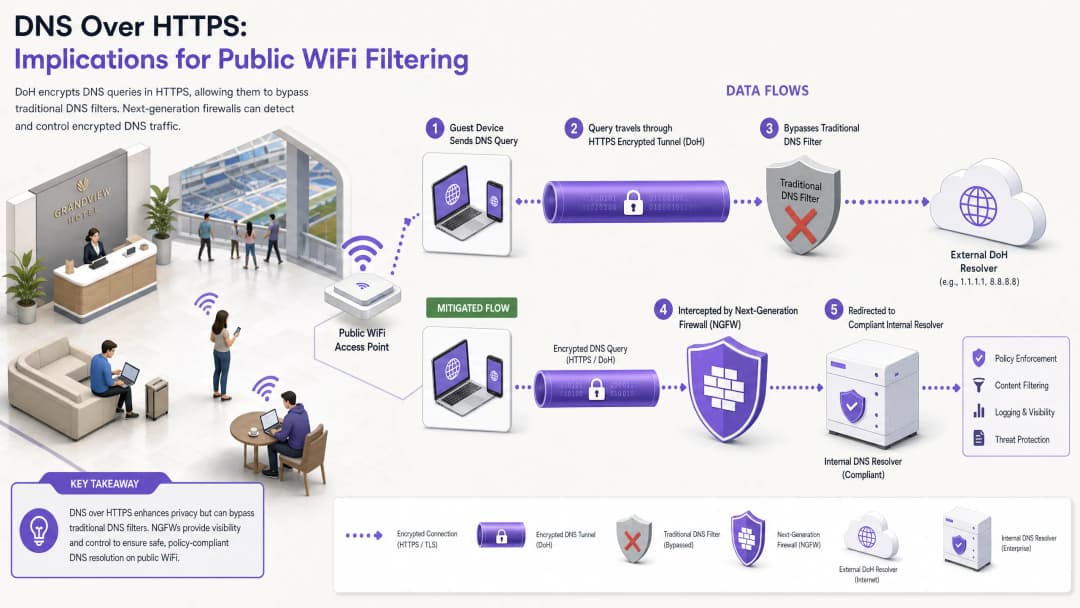
For nearly a decade, traditional DNS filtering on port 53 has served as the primary mechanism for enforcing content policies and mitigating malware threats on public WiFi networks. However, the widespread adoption of DNS over HTTPS (DoH) by mainstream browsers and operating systems fundamentally disrupts this model. By encapsulating DNS queries within standard HTTPS traffic on port 443, DoH makes these queries invisible to traditional network interception techniques.
For enterprise IT managers and network architects who manage guest WiFi in Hospitality, Retail, stadiums, and public-sector venues, this creates a significant compliance and security gap. When guest devices silently bypass the venue's designated DNS resolvers, carefully crafted acceptable use policies fail, exposing the network to command-and-control (C2) malware traffic and inappropriate content. This guide details the mechanics of the DoH bypass vector and provides a layered, defense-in-depth architecture to restore network visibility, ensure regulatory compliance, and maintain robust Guest WiFi security.
Technical Deep-Dive: DoH Bypass Mechanisms
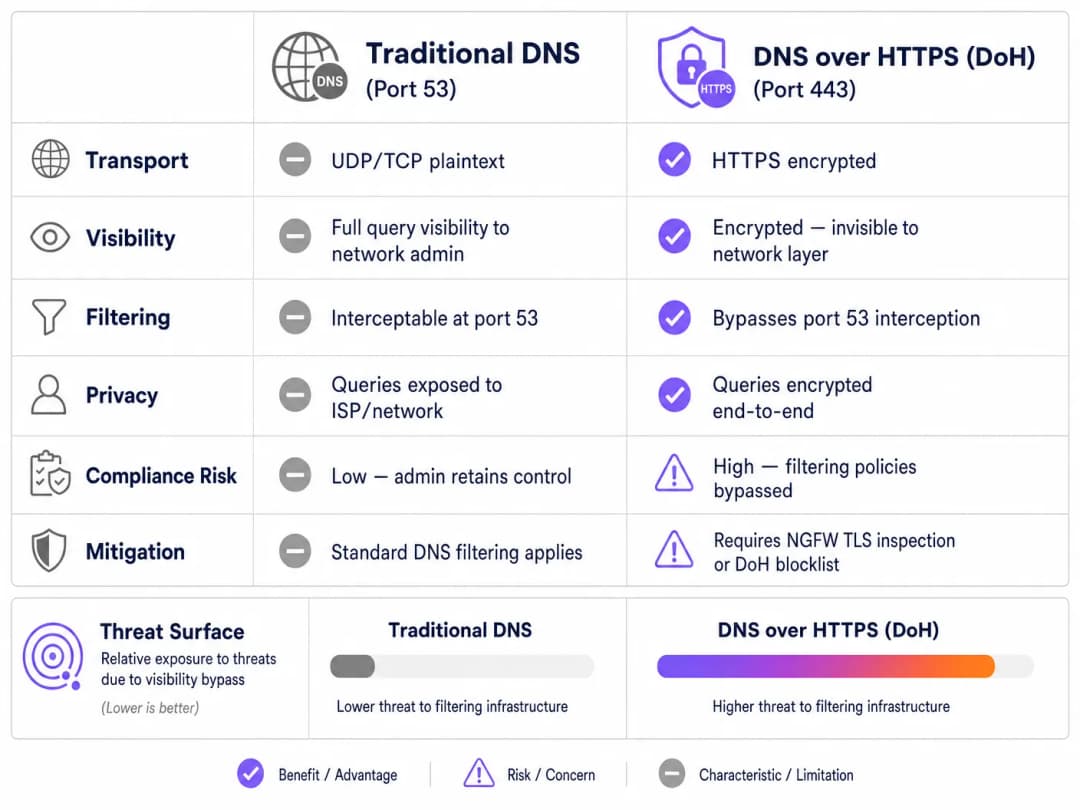
To understand the DoH threat vector, one must first examine the baseline architecture of traditional DNS filtering. Historically, when a guest device connected to a public network and requested a domain, the query was transmitted in plaintext via UDP or TCP port 53. Network administrators could easily intercept this traffic at the firewall or wireless controller and redirect it to a compliant DNS resolver, which checked the requested domain against threat intelligence feeds and content categorization policies.
DNS over HTTPS bypasses this entire control plane. By design, DoH encrypts the DNS query and transmits it to an external resolver (such as Cloudflare's 1.1.1.1 or Google's 8.8.8.8) using standard TLS encryption on port 443. From the perspective of the venue's network infrastructure, a DoH query is indistinguishable from a user browsing a secure website or streaming video.
Implementation Patterns: Application vs OS-Level DoH
The challenges for network administrators are further compounded by how DoH is implemented across different platforms. There are two primary deployment patterns:
- Application-level DoH: In this model, the application maintains its own DoH configuration independently of the host operating system. Mozilla Firefox is a classic example; when DoH is enabled, Firefox ignores DHCP-assigned DNS servers and routes all queries to its preferred DoH provider. The venue's port 53 interception rules are completely bypassed.
- OS-level (Opportunistic) DoH: Modern operating systems, including Windows 11 and Android, use opportunistic DoH. The OS checks whether the DHCP-assigned DNS resolver has a known DoH endpoint. If a match is found, the OS automatically upgrades the connection to DoH. While this preserves the administrator's choice of resolver, it shifts the traffic to port 443, which can bypass legacy monitoring tools expecting traffic on port 53.
Furthermore, administrators must consider DNS over TLS (DoT), which operates on port 853. Although DoT is easier to block due to its dedicated port, it is the default standard for Android's "Private DNS" feature and poses a similar bypass risk if port 853 remains open on the guest VLAN.
Implementation Guide: A Defense-in-Depth Architecture
Regaining control over DNS resolution requires a multi-layered mitigation strategy. Relying on a single control point is insufficient against modern, encrypted protocols. To secure guest access and ensure compliance with frameworks like PCI-DSS and CCPA/CPRA, network architects should implement the following architecture.
Layer 1: Block Known DoH Resolver Endpoints
The most immediate and effective mitigation is to block outbound HTTPS traffic to known public DoH resolvers at the network edge. Although DoH traffic blends in with standard HTTPS, the destination IP addresses and domains of major DoH providers are well known.
By configuring next-generation firewalls (NGFWs) to drop connections to these specific endpoints (e.g., dns.google, cloudflare-dns.com), administrators force the client device's DoH resolution to fail. In most implementations, when DoH fails, the client will naturally fall back to traditional, unencrypted DNS on port 53, which can then be intercepted and filtered.
Implementation Note: This approach requires maintaining an updated blocklist. Enterprise firewall vendors often provide dynamic threat feeds that automatically update known DoH endpoints, significantly reducing operational overhead.
Layer 2: Enforce Port 53 Interception and Redirection
Blocking DoH is only effective if fallback traffic is managed correctly. The network must be configured to intercept all outbound UDP and TCP traffic on port 53 originating from the guest VLAN. This traffic must be forcefully redirected (via NAT/port forwarding rules) to the venue's authorized, compliant DNS resolver.
This step is crucial because many devices or malicious applications hardcode public DNS servers (such as 8.8.8.8) into their network stacks, ignoring DHCP-provided settings. Without forced interception, these devices will successfully bypass the venue's filtering policies even if DoH is blocked.
Layer 3: Block Port 853 (DNS over TLS)
To address the DoT bypass vector, administrators must explicitly block outbound traffic on TCP port 853 from the guest network. Similar to DoH mitigation, blocking DoT forces Android devices and other DoT-enabled clients to fall back to standard port 53 DNS.

Got questions about your specific setup?
Our team works with venue operators, IT managers, and network engineers across 80,000 venues. Book a 20-minute call and we will show you how others like you solved it.
Best Practices and Compliance Considerations
Implementing DoH mitigation is not merely a technical task; it is a fundamental requirement for maintaining regulatory compliance and enforcing acceptable use policies.
- Policy Documentation: Ensure that the venue's Captive Portal terms and conditions explicitly state that DNS filtering is active for security and compliance purposes. This provides legal backing under CCPA/CPRA and the FTC and state attorneys general when blocking encrypted DNS protocols.
- Network Segmentation: Strictly isolate guest WiFi from corporate and payment networks using VLANs and firewall rules. This is a core requirement of PCI-DSS v4.0, which also mandates robust monitoring of network traffic - monitoring that becomes impossible if DoH is allowed to bypass security controls.
- Continuous Monitoring: Leverage the reporting capabilities of your enterprise DNS filtering service to monitor query volumes and detect anomalous patterns. A sudden drop in port 53 traffic from a specific subnet often indicates that client devices are utilizing a new, unblocked DoH resolver.
- Integration with Analytics: When implementing secure guest access, consider how authentication flows integrate with broader business objectives. Using a WiFi Assistant for secure, profile-based authentication ensures users connect safely, while helping the venue understand footfall and dwell times using WiFi Analytics, just as Offline Maps Mode enhances the visitor experience.
Troubleshooting and Risk Mitigation
When deploying DoH mitigation, network teams often encounter specific failure modes. Anticipating these issues minimizes downtime and guest inconvenience.
Incomplete Interception Rules
The most common deployment failure is incomplete port 53 interception. Administrators may configure the DHCP server to provide the correct DNS IPs but fail to implement the necessary firewall NAT rules to catch hardcoded DNS requests. Mitigation: Always test the deployment by configuring a client device with a static, external DNS server (e.g., 9.9.9.9) and verify that requests are still successfully routed to the venue's filtering service.
IPv6 Oversight
As networks transition to dual-stack configurations, firewall rules are often written exclusively for IPv4. If DoH blocklists and port 53 interception rules do not cover IPv6, modern devices will seamlessly bypass IPv4 controls using their IPv6 stack. Mitigation: Ensure that all DoH blocklists, port 53 redirect rules, and port 853 drop rules are applied equally across both IPv4 and IPv6 routing tables.
Application Breakage
Aggressive DoH blocking can occasionally break specific mobile applications that rely exclusively on their own DoH implementations and refuse to fall back to standard DNS. Mitigation: Maintain a documented exception process. If a business-critical application breaks, rather than opening DoH globally, use TLS inspection (if available on the NGFW) to selectively allow DoH traffic for that specific application's resolver.
ROI and Business Impact
The business case for robust DoH mitigation is built on risk avoidance and compliance assurance. A single incident - such as a regulatory inquiry resulting from a guest accessing illegal content, or a compromised IoT device establishing a C2 connection via DoH - can incur costs that far exceed the engineering time required to implement proper controls.
For an enterprise operating across multiple venues, standardizing the DoH mitigation architecture ensures consistent policy enforcement. This standardization reduces the operational burden on IT service desks, as abuse notices from ISPs drop to zero and network performance is maintained by blocking high-bandwidth inappropriate content. Ultimately, securing the DNS layer ensures that the venue's investment in Guest WiFi remains a secure, compliant asset rather than a liability.
Key Definitions
DNS over HTTPS (DoH)
A protocol for performing remote Domain Name System (DNS) resolution via the HTTPS protocol, encrypting the data between the DoH client and the DoH-based DNS resolver.
When IT teams deploy content filtering, DoH acts as a bypass mechanism, hiding DNS queries within standard encrypted web traffic.
DNS over TLS (DoT)
A security protocol for encrypting and wrapping DNS queries and answers via the Transport Layer Security (TLS) protocol, operating on a dedicated port (853).
Often enabled by default on modern Android devices (Private DNS), DoT must be blocked at the firewall to ensure queries fall back to the venue's filtered DNS.
Opportunistic DoH
A behavior where an operating system or browser automatically upgrades standard DNS queries to DoH if it detects that the configured DNS resolver supports the encrypted protocol.
This feature, common in Windows 11 and Chrome, means that even if a venue assigns a standard DNS IP, the traffic may still shift to encrypted port 443, bypassing legacy monitoring.
Port 53 Interception
A network firewall configuration that captures all outbound traffic on UDP/TCP port 53 and forcibly redirects it to a designated DNS resolver, regardless of the destination IP requested by the client.
Essential for capturing DNS queries from devices with hardcoded DNS settings or those that have fallen back from a failed DoH connection.
Next-Generation Firewall (NGFW)
A network security device that provides capabilities beyond a traditional, stateful firewall, including deep packet inspection, application awareness, and TLS/SSL decryption.
NGFWs are critical for DoH mitigation as they can identify and block DoH traffic based on application signatures rather than just IP addresses.
Fallback Behavior
The programmed response of a client device when its preferred encrypted DNS protocol (DoH or DoT) fails to connect, typically resulting in the device reverting to standard, unencrypted DNS.
Network architects rely on this behavior; by intentionally breaking DoH/DoT connections, they force the device to use the interceptable port 53.
Command-and-Control (C2)
The infrastructure used by attackers to communicate with compromised devices (malware/botnets) within a target network.
Modern malware increasingly uses DoH to hide C2 communications from enterprise network monitors, making DoH mitigation a critical security requirement.
Captive Portal
A web page that the user of a public-access network is obliged to view and interact with before access is granted.
The Captive Portal is the legally appropriate location to inform users that their DNS traffic is being filtered and that encrypted DNS protocols are blocked.
Worked Examples
A 400-room hotel recently deployed a cloud-based DNS filtering service to comply with brand standards regarding family-friendly content. However, the IT manager notices that a significant portion of guest traffic is still reaching adult content sites, and the DNS filtering dashboard shows lower-than-expected query volumes. How should the network architect remediate this bypass?
- Audit Firewall Rules: The architect must first verify that outbound TCP/UDP port 53 is being intercepted and NAT-redirected to the cloud DNS service.
- Block DoH Resolvers: Implement an NGFW blocklist to drop outbound HTTPS (port 443) traffic destined for known DoH providers (e.g., Cloudflare, Google, Quad9).
- Block DoT: Add a firewall rule to drop all outbound TCP port 853 traffic to prevent Android Private DNS bypass.
- Verify IPv6: Ensure all the above rules are applied to both IPv4 and IPv6 traffic.
A retail chain with 150 locations needs to implement DNS filtering to block malware and phishing on their guest WiFi. They use basic branch firewalls without advanced TLS inspection capabilities. How can they effectively mitigate DoH without upgrading their hardware?
Without TLS inspection, the chain must rely on robust routing and blocklists.
- Deploy a dynamic DoH IP/Domain blocklist on the branch firewalls, configured to update automatically via an external threat feed.
- Implement strict port 53 NAT redirection to the enterprise DNS filter.
- Block port 853 entirely.
- Update the Captive Portal Terms of Service to explicitly state that encrypted DNS protocols are blocked to enforce network security policies.
Practice Questions
Q1. A stadium network engineer configures the DHCP server to provide the IP address of their secure, filtered DNS service to all guest devices. However, testing reveals that devices with manually configured DNS settings (e.g., 8.8.8.8) are successfully bypassing the filter. What is the most appropriate architectural fix?
Hint: Consider the difference between suggesting a route and enforcing a route at the network edge.
View model answer
The engineer must implement a NAT port forwarding rule on the stadium's firewall. This rule should intercept all outbound UDP and TCP traffic on port 53 originating from the guest VLAN and forcibly translate the destination IP to the secure DNS service's IP address. This ensures that regardless of the client's local configuration, the traffic is routed through the filtering policy.
Q2. Following the implementation of a strict DoH blocklist, the IT help desk at a conference center receives reports that a specific, bespoke event management app is failing to load for attendees. Packet capture shows the app is attempting to use its own hardcoded DoH resolver, which is being blocked, and the app refuses to fall back to standard DNS. How should this be resolved?
Hint: Balance security policy with business continuity. Can the firewall distinguish between general DoH traffic and traffic to a specific, approved endpoint?
View model answer
The administrator should create an exception in the NGFW policy. Rather than disabling the DoH blocklist globally, they should identify the specific IP address or domain of the DoH resolver used by the event management app and whitelist it. If the firewall supports application-layer (Layer 7) inspection, a more robust solution is to create a policy that permits DoH traffic only if the destination matches the approved application's infrastructure, ensuring general DoH bypass attempts remain blocked.
Q3. A public sector organization is auditing its guest WiFi compliance. They have successfully blocked port 853 (DoT) and implemented port 53 interception. However, they lack the budget for an NGFW with advanced TLS inspection or dynamic DoH blocklists. What is the most effective remaining strategy to mitigate DoH?
Hint: If dynamic lists aren't available, how can you address the vast majority of opportunistic DoH traffic?
View model answer
The organization should implement a static blocklist on their existing firewall, targeting the IP addresses and domains of the most common public DoH providers (e.g., Cloudflare, Google, Quad9). While this requires manual maintenance and won't catch obscure DoH resolvers, research shows that the vast majority of DoH traffic defaults to a handful of major providers. This provides a highly effective '80/20' solution within their budget constraints.
Continue reading in this series
Public WiFi Liability: Why Content Filtering is Mandatory
This technical reference guide outlines the legal and operational risks of providing unfiltered public WiFi, detailing why content filtering is a mandatory deployment requirement for venue operators. It provides actionable architecture strategies, implementation steps, and risk mitigation tactics to protect networks from illegal activity, copyright infringement, and regulatory non-compliance. Venue operators and CTOs will find concrete case studies, decision frameworks, and configuration guidance to implement a defensible, compliant Guest WiFi environment.
Blocking Malware and Phishing at the Network Edge
This technical reference guide outlines the architecture, deployment, and business impact of implementing network-level threat protection to secure unmanaged guest and IoT devices at the network edge. It provides actionable guidance for IT leaders to block malware and phishing proactively.
IWF Compliance for Public WiFi Networks in the US
This authoritative guide details the technical requirements, architecture, and deployment strategies for implementing IWF-compliant public WiFi networks across US venues. It provides IT leaders with actionable frameworks to mitigate legal risks while maintaining high-performance network access.
Got questions about your specific setup?
Our team works with venue operators, IT managers, and network engineers across 80,000 venues. Book a 20-minute call and we will show you how others like you solved it.