
Einrichten eines RADIUS-Servers für die WiFi-Authentifizierung
Dieser maßgebliche Leitfaden bietet IT-Führungskräften und Netzwerkarchitekten einen umfassenden Plan für die Bereitstellung eines RADIUS-Servers zur WiFi-Authentifizierung in Unternehmen. Er behandelt die architektonischen Kompromisse zwischen On-Premise- und Cloud-basierten Bereitstellungen, die Auswahl der EAP-Methode, die Active Directory-Integration und die dynamische VLAN-Zuweisung. Betreiber von Veranstaltungsorten und IT-Teams finden umsetzbare Implementierungsschritte, reale Fallstudien und Strategien zur Risikominderung, um in diesem Quartal von einer unsicheren PSK-Umgebung zu einer robusten 802.1X-Infrastruktur überzugehen.
Diesen Leitfaden anhören
Podcast-Transkript ansehen
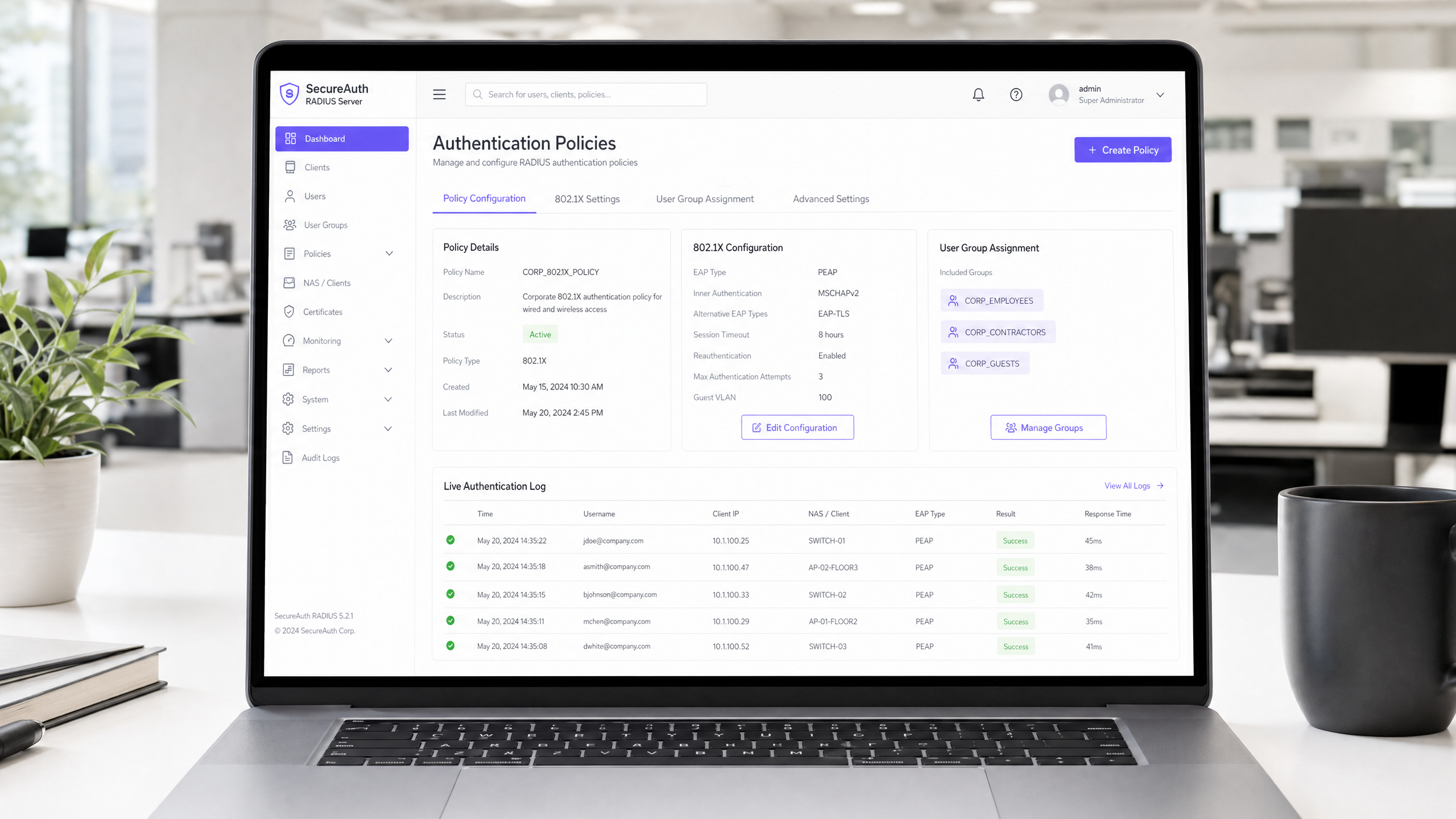
Zusammenfassung für die Geschäftsleitung
Für Unternehmensumgebungen – sei es ein weitläufiger Universitätscampus, ein Stadion mit hoher Dichte oder eine verteilte Einzelhandelskette – stellt die Nutzung eines Pre-Shared Key (PSK) für den WiFi-Zugang ein erhebliches Sicherheitsrisiko dar. Ein einziges kompromittiertes Zugangsdatum legt das gesamte Netzwerk offen, und der Entzug des Zugangs erfordert eine Änderung des Passworts für jedes Gerät im Bestand. Die Implementierung der 802.1X-Authentifizierung über einen RADIUS (Remote Authentication Dial-In User Service) Server eliminiert dieses Problem vollständig: Jeder Benutzer authentifiziert sich individuell, der Zugang kann sofort entzogen werden und die Netzwerksegmentierung wird dynamisch durchgesetzt.
Dieser Leitfaden bietet IT-Managern und Netzwerkarchitekten einen definitiven Fahrplan zur Bereitstellung der RADIUS-Authentifizierung. Wir behandeln die architektonischen Kompromisse zwischen On-Premise- und Cloud-basierten Bereitstellungen, die Konfiguration von Extensible Authentication Protocol (EAP)-Methoden und die Integration mit Verzeichnisdiensten wie Active Directory. Wir zeigen auch, wie eine robuste Authentifizierungsschicht mit Guest WiFi -Lösungen integriert wird, um Besuchern nahtlosen Zugang zu ermöglichen und gleichzeitig die WiFi Analytics zu erfassen, die Ihr Netzwerk in einen Business-Intelligence-Asset verwandeln.
Technischer Deep-Dive
Die 802.1X-Architektur
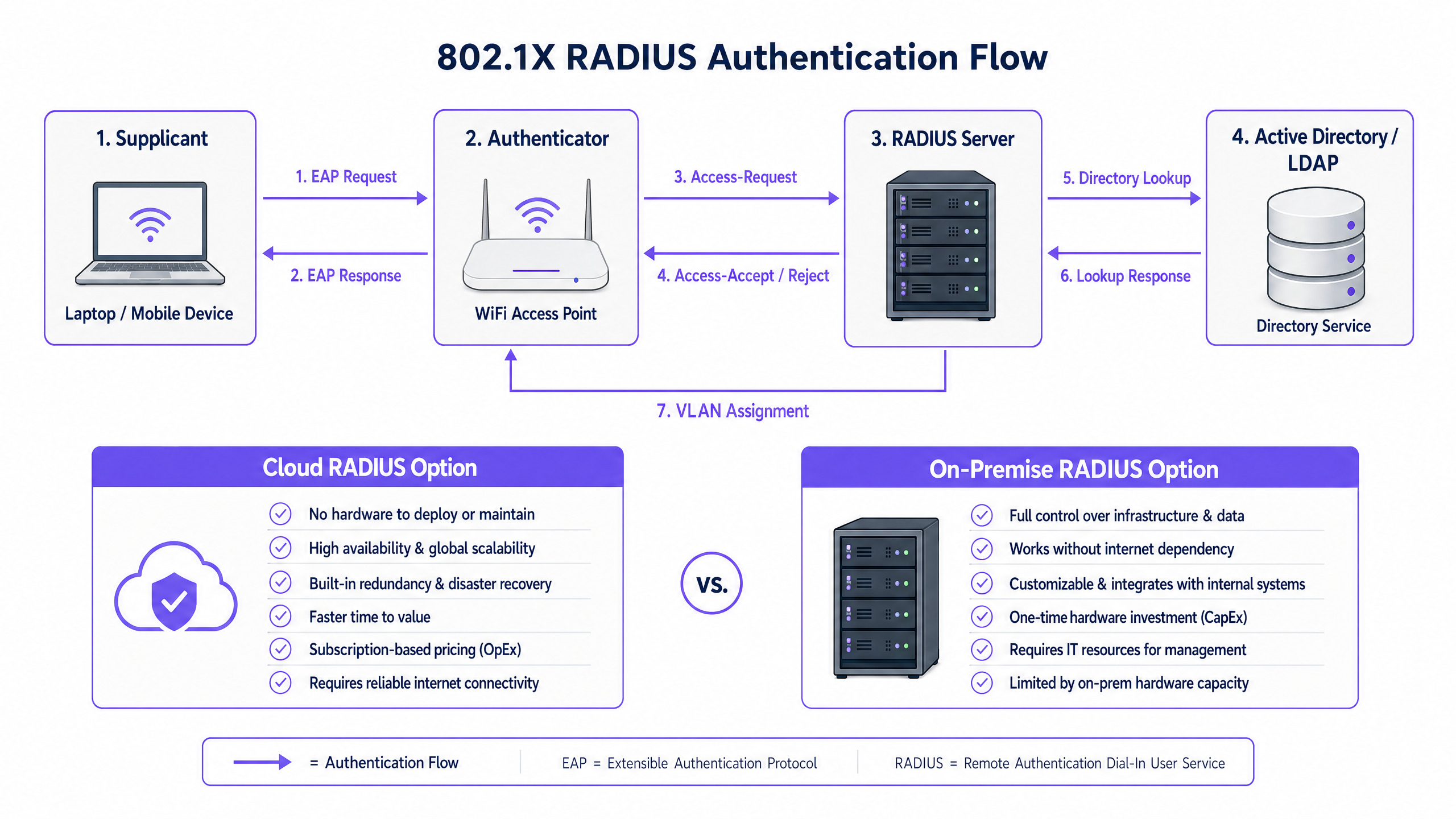
Der IEEE 802.1X-Standard definiert die portbasierte Netzwerkzugriffskontrolle (PNAC). Im drahtlosen Kontext sind drei primäre Rollen im Zusammenspiel beteiligt:
| Rolle | Komponente | Verantwortlichkeit |
|---|---|---|
| Supplikant | Client-Gerät (Laptop, Smartphone) | Legt Anmeldeinformationen vor, um Netzwerkzugriff anzufordern |
| Authentifikator | WiFi Access Point oder Controller | Setzt Zugriffskontrolle durch; leitet EAP-Nachrichten weiter |
| Authentifizierungsserver | RADIUS Server | Validiert Anmeldeinformationen; gibt Annahme/Ablehnung und Richtlinienattribute zurück |
Wenn sich ein Supplikant mit einem Access Point verbindet, blockiert der AP den gesamten Datenverkehr außer EAP (Extensible Authentication Protocol)-Nachrichten. Der AP kapselt diese EAP-Nachrichten in RADIUS-Pakete und leitet sie an den RADIUS Server weiter. Der Server überprüft die Anmeldeinformationen anhand einer Backend-Datenbank – typischerweise LDAP oder Active Directory – und gibt eine Access-Accept- oder Access-Reject-Nachricht zurück. Bei Annahme entblockt der AP den Port und der Client-Verkehr fließt frei.
Auswahl einer EAP-Methode
Die Sicherheit Ihrer RADIUS-Bereitstellung hängt stark von der gewählten EAP-Methode ab. Die beiden am weitesten verbreiteten in Unternehmensbereitstellungen sind:
EAP-TLS (Transport Layer Security) ist der Goldstandard. Es erfordert digitale Zertifikate sowohl auf dem RADIUS Server als auch auf jedem Client-Gerät, wodurch Passwörter vollständig eliminiert werden. Selbst wenn ein Angreifer den gesamten Authentifizierungsaustausch abfängt, gibt es keine Anmeldeinformationen zum Extrahieren. Der Kompromiss ist der administrative Aufwand: Die Bereitstellung und Verwaltung von Client-Zertifikaten erfordert eine funktionierende Public Key Infrastructure (PKI) und eine MDM-Lösung (z. B. Microsoft Intune, Jamf) zur Verteilung von Zertifikaten an Endpunkte.
PEAP-MSCHAPv2 (Protected EAP) ist die in der Praxis am weitesten verbreitete Methode. Sie verwendet ein serverseitiges Zertifikat, um einen verschlüsselten TLS-Tunnel aufzubauen, innerhalb dessen sich der Client mit einem Benutzernamen und Passwort authentifiziert. Dies ist erheblich einfacher bereitzustellen als EAP-TLS, da nur ein Zertifikat – das des Servers – verwaltet werden muss. Es birgt jedoch eine entscheidende Einschränkung: Wenn Client-Geräte nicht explizit zur Validierung des RADIUS Servers-Zertifikats konfiguriert sind, sind sie anfällig für Man-in-the-Middle (MitM)-Angriffe über Rogue Access Points.
> Wichtiger Sicherheitshinweis: Das Versäumnis, eine strikte Zertifikatsvalidierung auf Client-Geräten durchzusetzen, macht die Sicherheitsvorteile von PEAP-MSCHAPv2 praktisch zunichte. Ein Angreifer kann einen Rogue AP bereitstellen, ein betrügerisches Zertifikat präsentieren und Benutzeranmeldeinformationen im Klartext abfangen. Dies ist kein theoretisches Risiko – es ist ein gut dokumentierter Angriffsvektor, der in realen Umgebungen ausgenutzt wurde.
Implementierungsleitfaden
Schritt 1: Architekturentscheidung — On-Premise vs. Cloud RADIUS
Die erste Entscheidung ist, wo die RADIUS-Infrastruktur gehostet werden soll. Dies ist primär eine Betriebs- und Kostenfrage, keine Sicherheitsfrage – beide Modelle können sicher bereitgestellt werden.
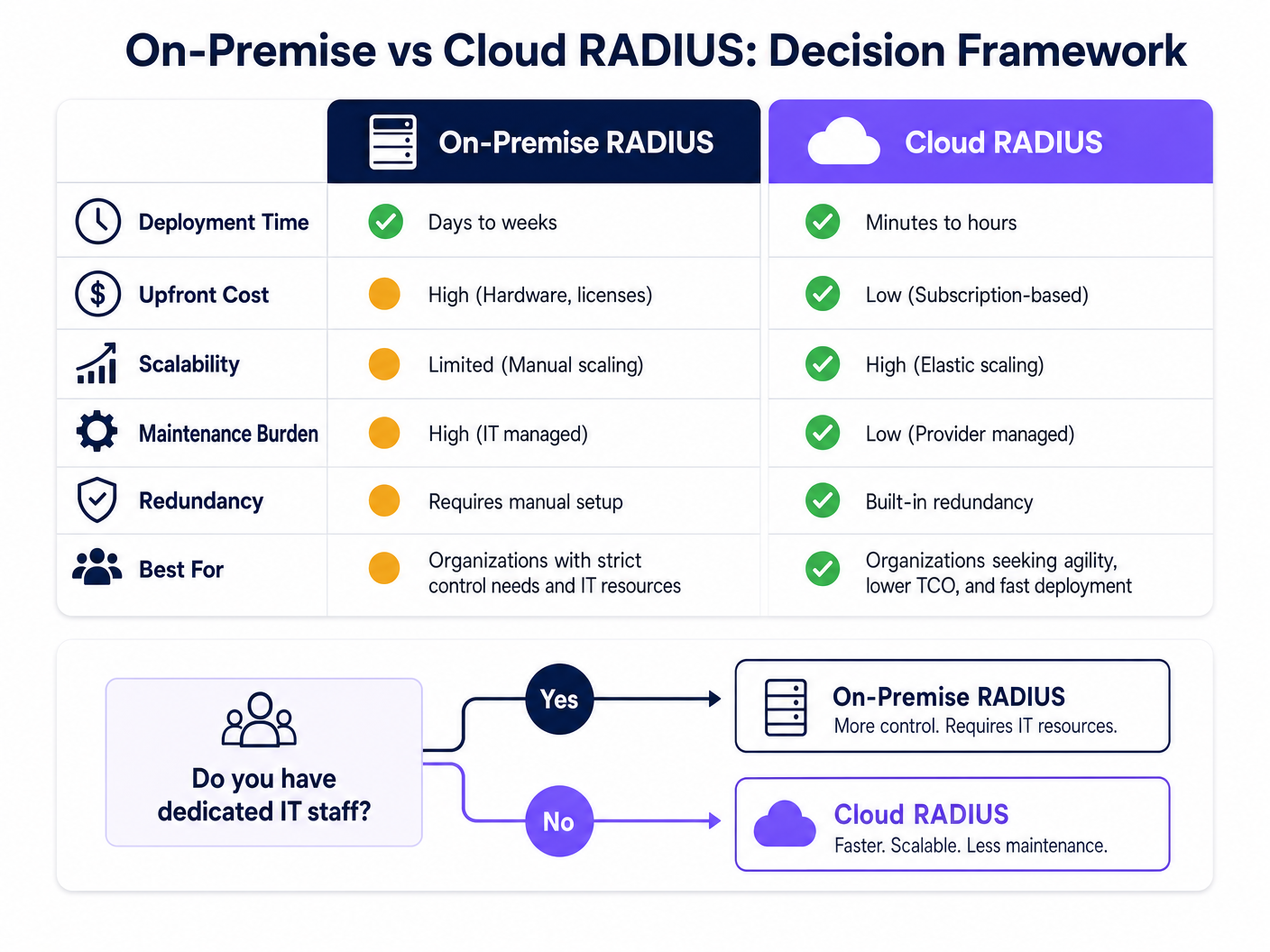
On-Premise RADIUS (z. B. Microsoft NPS, FreeRADIUS, Cisco ISE) eignet sich für Organisationen mit dediziertem IT-Personal, bestehender On-Premise-Verzeichnisinfrastruktur und strengen Anforderungen an Datensouveränität oder Compliance. Es ist für die Authentifizierung nicht von der Internetverbindung abhängig, was ein wichtiger Vorteil für Umgebungen ist, in denen die Internetverfügbarkeit nicht garantiert werden kann.
Cloud RADIUS ist zunehmend das bevorzugte Modell für verteilte Umgebungen – Retail -Ketten, Hospitality -Gruppen und Transport -Hubs, wo die Bereitstellung von Servern an jedem Standort betrieblich unpraktisch ist. Cloud RADIUS integriert sich nativ mit Cloud-Identitätsanbietern (Azure AD, Google Workspace, Okta) und bietet integrierte Hochverfügbarkeit und globale Skalierbarkeit.
Schritt 2: RADIUS Server installieren und konfigurieren
Für eine On-Premise-Bereitstellung mit Microsoft NPS (die häufigste Wahl in Windows-zentrierten Umgebungen):
- Installieren Sie die Rolle des Netzwerkrichtlinienservers über den Server-Manager.
- Registrieren Sie den NPS-Server in Active Directory, damit er die Einwahleigenschaften der Benutzer lesen kann.
- Erstellen Sie einen RADIUS-Client-Eintrag für jeden Access Point oder Wireless Controller, wobei die IP-Adresse des APs and ein starkes, einzigartiges Shared Secret.
- Konfigurieren Sie eine Netzwerkrichtlinie, die die Bedingungen (z. B. Benutzergruppenmitgliedschaft) und Einschränkungen (z. B. EAP-Methode, Sitzungs-Timeout) für den Zugriff definiert.
- Konfigurieren Sie die Verbindungsanforderungsrichtlinie, um Anfragen lokal zu verarbeiten.
Für FreeRADIUS unter Linux:
- Installation über den Paketmanager:
sudo apt-get install freeradius freeradius-ldap. - Konfigurieren Sie
/etc/freeradius/3.0/clients.conf, um RADIUS-Clients (APs) und deren Shared Secrets zu definieren. - Konfigurieren Sie das LDAP-Modul in
/etc/freeradius/3.0/mods-available/ldap, um auf Ihren Active Directory- oder LDAP-Server zu verweisen. - Aktivieren Sie das LDAP-Modul:
sudo ln -s /etc/freeradius/3.0/mods-available/ldap /etc/freeradius/3.0/mods-enabled/. - Definieren Sie EAP-Methoden in
/etc/freeradius/3.0/mods-available/eap.
Schritt 3: Access Points konfigurieren
Auf Ihrem Wireless Controller oder einzelnen Access Points:
- Definieren Sie die IP-Adresse(n) des RADIUS-Servers und den Authentifizierungsport (Standard: UDP 1812).
- Konfigurieren Sie das Shared Secret – verwenden Sie mindestens 22 Zeichen, eine Mischung aus alphanumerischen und Sonderzeichen. Verwenden Sie ein einzigartiges Secret pro Standort oder AP-Gruppe.
- Konfigurieren Sie die SSID für die Verwendung des Sicherheitsmodus WPA2-Enterprise oder WPA3-Enterprise mit 802.1X-Schlüsselverwaltung.
- Konfigurieren Sie einen sekundären RADIUS-Server für Failover.
Schritt 4: Verzeichnisintegration
Für die lokale AD-Integration muss der RADIUS-Server der Domäne beigetreten sein oder über LDAP-Lesezugriff verfügen. Stellen Sie sicher, dass Dienstkonten, die für die LDAP-Bindung verwendet werden, die mindestens erforderlichen Berechtigungen haben. Für Cloud RADIUS konfigurieren Sie die API-basierte Synchronisierung oder SAML/OIDC-Integration mit Ihrem IdP.
Definieren Sie klare Benutzergruppen in Ihrem Verzeichnis, da diese die Autorisierungsrichtlinien steuern. Empfohlene Gruppenstruktur:
| Gruppe | VLAN | Zugriffsebene |
|---|---|---|
Corp_Staff |
VLAN 10 | Vollständiges internes Netzwerk |
Corp_Contractors |
VLAN 20 | Internet + spezifische interne Ressourcen |
Corp_IoT |
VLAN 30 | Isoliert, nur gerätespezifische Ports |
Corp_Guests |
VLAN 100 | Nur Internet über Captive Portal |
Schritt 5: Client-Konfiguration und Zertifikatsvalidierung
Dies ist der betrieblich kritischste Schritt. Verwenden Sie Gruppenrichtlinien (GPO) für Windows und MDM-Profile für macOS/iOS/Android, um WiFi-Konfigurationen stillschweigend auf verwaltete Geräte zu übertragen. Das Profil muss Folgendes angeben:
- Die Root CA, die das Zertifikat des RADIUS-Servers ausgestellt hat.
- Der erwartete Servername (CN oder SAN des Serverzertifikats).
- Die EAP-Methode und das interne Authentifizierungsprotokoll.
Für nicht verwaltete BYOD-Geräte stellen Sie klare Self-Service-Onboarding-Anweisungen bereit, idealerweise über ein Network Access Control (NAC)-Portal.
Schritt 6: Dynamische VLAN-Zuweisung implementieren
Konfigurieren Sie den RADIUS-Server so, dass er VLAN-Zuweisungsattribute in der Access-Accept-Antwort zurückgibt:
Tunnel-Type=VLAN(13)Tunnel-Medium-Type=IEEE-802(6)Tunnel-Private-Group-Id= ``
Der Access Point liest diese Attribute und platziert den authentifizierten Client im angegebenen VLAN – keine manuelle Neukonfiguration erforderlich, wenn Benutzer Rollen oder Standorte wechseln.
Best Practices
Redundanz ist nicht verhandelbar. Stellen Sie mindestens zwei RADIUS-Server (primär und sekundär) bereit und konfigurieren Sie alle Access Points für ein automatisches Failover. Bei lokalen Bereitstellungen sollten Sie den sekundären Server an einem anderen physischen Standort oder in einer anderen Verfügbarkeitszone platzieren. Ein RADIUS-Ausfall bedeutet, dass sich niemand authentifizieren kann, was einen vollständigen Netzwerkausfall für 802.1X-geschützte SSIDs darstellt.
Zertifikatsablauf proaktiv überwachen. Ein ablaufendes RADIUS-Serverzertifikat ist eine der häufigsten Ursachen für plötzliche, weit verbreitete Authentifizierungsfehler. Implementieren Sie eine Überwachung, um Administratoren mindestens 30 Tage vor dem Ablauf zu benachrichtigen. Dies gilt sowohl für das Serverzertifikat als auch für alle Zwischen-CA-Zertifikate in der Kette.
Behandeln Sie das Shared Secret als kritische Anmeldeinformation. Das Shared Secret zwischen dem AP und dem RADIUS-Server verschlüsselt RADIUS-Pakete. Verwenden Sie einzigartige Secrets pro Standort oder AP-Gruppe, speichern Sie sie in einem Secrets Manager und rotieren Sie sie regelmäßig. Weitere Empfehlungen zur Netzwerksicherheitshygiene finden Sie in unserem Leitfaden Schützen Sie Ihr Netzwerk mit starkem DNS und Sicherheit .
An Compliance-Frameworks ausrichten. Für Umgebungen, die PCI DSS unterliegen (z. B. Einzelhandels-Zahlungsnetzwerke), unterstützt die 802.1X-Authentifizierung direkt die Anforderungen an die Netzwerzugriffskontrolle und die Audit-Protokollierung. Für die GDPR-Konformität liefern RADIUS-Accounting-Logs (Port 1813) einen detaillierten Audit-Trail darüber, wer wann und von wo auf das Netzwerk zugegriffen hat – wertvoll für die Reaktion auf Vorfälle. Für Healthcare -Umgebungen unterstützt die Netzwerksegmentierung über dynamische VLAN-Zuweisung die HIPAA-Anforderungen zum Schutz elektronischer geschützter Gesundheitsinformationen (ePHI).
Fehlerbehebung & Risikominderung
| Fehlermodus | Symptom | Lösung |
|---|---|---|
| Zertifikatsablauf | Plötzliche Massenauthentifizierungsfehler | Ablauf überwachen; Zertifikat erneuern und neu bereitstellen |
| NTP-Desynchronisation | Intermittierende EAP-TLS-Fehler | Sicherstellen, dass RADIUS-Server und DCs mit derselben NTP-Quelle synchronisiert sind |
| LDAP-Konnektivitätsverlust | Authentifizierung schlägt fehl, wenn AD nicht erreichbar ist | Redundante DCs bereitstellen; RADIUS so konfigurieren, dass aktuelle Authentifizierungen zwischengespeichert werden |
| Falsches Shared Secret | AP-Protokolle zeigen RADIUS timeout oder Bad authenticator |
Überprüfen, ob das Secret auf AP und RADIUS-Server übereinstimmt |
| Client-Zertifikatskonflikt | EAP-TLS-Fehler für bestimmte Geräte | Überprüfen, ob Client-Zertifikat von vertrauenswürdiger CA ausgestellt wurde; Gültigkeitsdauer des Zertifikats prüfen |
| VLAN nicht zugewiesen | Benutzer authentifiziert, aber im falschen Netzwerksegment | Überprüfen, ob RADIUS-Attribute korrekt zurückgegeben werden; AP-VLAN-Konfiguration prüfen |
Für einen tieferen Einblick in den 802.1X-Konfigurationsprozess selbst bietet der Leitfaden zur Konfiguration der 802.1X WiFi-Authentifizierung: Eine Schritt-für-Schritt-Anleitung detaillierte, herstellerspezifische Konfigurationsanleitungen.
ROI & Geschäftsauswirkungen
Der Übergang von PSK zu REin RADIUS-gestütztes 802.1X erfordert eine Anfangsinvestition in die Konfiguration und potenziell Lizenzen für Cloud-Lösungen oder Hardware für On-Premise-Bereitstellungen. Der ROI-Fall ist eindeutig:
Risikominderung: Die durchschnittlichen Kosten einer Datenschutzverletzung im Vereinigten Königreich belaufen sich auf über 3 Millionen Pfund (IBM Cost of a Data Breach Report). Ein kompromittierter PSK kann das gesamte Netzwerk offenlegen. 802.1X begrenzt den Schaden auf ein einzelnes kompromittiertes Benutzerkonto, das innerhalb von Sekunden über das Verzeichnis deaktiviert werden kann.
Operative Effizienz: Die dynamische VLAN-Zuweisung eliminiert die manuelle Netzwerkkonfiguration, wenn Mitarbeiter ihre Rollen wechseln. Die Einarbeitung eines neuen Mitarbeiters bedeutet, ihn der richtigen AD-Gruppe hinzuzufügen – der Netzwerkzugriff erfolgt automatisch.
Compliance-Haltung: Für Organisationen, die PCI DSS, ISO 27001 oder Cyber Essentials Plus unterliegen, ist 802.1X eine direkte Kontrolle, die Auditoren erwarten. Der Einsatz stärkt Ihre Compliance-Haltung und reduziert die Kosten für die Behebung von Audit-Mängeln.
Gästeerlebnis und Analysen: Für Veranstaltungsbetreiber schafft die Integration von RADIUS für die Mitarbeiterauthentifizierung mit der Guest WiFi -Plattform von Purple für den Besucherzugang ein einheitliches, gestaffeltes Zugangsmodell. Mitarbeiter authentifizieren sich stillschweigend über 802.1X; Gäste verbinden sich über ein gebrandetes Captive Portal. Die WiFi Analytics -Plattform von Purple bietet dann Echtzeit-Einblicke in die Verweildauer von Besuchern, Wiederbesuchsraten und Engagement-Metriken – Daten, die direkt Marketingausgaben und Entscheidungen zum Veranstaltungsbetrieb beeinflussen.
Für weitere Informationen siehe Como Configurar a Autenticação 802.1X WiFi: Um Guia Passo a Passo für Implementierungsanleitungen in portugiesischer Sprache und What Is a Leased Line? Dedicated Business Internet für Anleitungen zur Sicherstellung, dass die zugrunde liegende Konnektivität den Unternehmensanforderungen entspricht.
Schlüsseldefinitionen
RADIUS (Remote Authentication Dial-In User Service)
A networking protocol providing centralised Authentication, Authorization, and Accounting (AAA) management for users connecting to a network service. Defined in RFC 2865.
The core server component that validates user credentials against a directory before granting WiFi access. Every enterprise WiFi deployment using 802.1X requires a RADIUS server.
802.1X
An IEEE Standard for port-based Network Access Control (PNAC). It provides an authentication mechanism to devices wishing to attach to a LAN or WLAN, blocking all non-EAP traffic until authentication succeeds.
The overarching framework standard that defines how the Supplicant, Authenticator, and Authentication Server communicate. When IT teams refer to 'enterprise WiFi security', they typically mean WPA2/WPA3-Enterprise with 802.1X.
Supplicant
The client device — or more precisely, the 802.1X software stack on that device — that initiates the authentication process by presenting credentials to the network.
On Windows, the built-in supplicant is the Wireless AutoConfig service. On macOS and iOS, it is native to the OS. Ensuring the supplicant is correctly configured (especially for certificate validation) is the most common source of deployment issues.
Authenticator
The network device — typically a WiFi access point or wireless controller — that acts as an intermediary between the Supplicant and the RADIUS server, enforcing access control based on the authentication result.
The AP blocks all data traffic on the port until it receives an Access-Accept from the RADIUS server. It also reads RADIUS attributes (e.g., VLAN assignment) from the Access-Accept response and applies them to the session.
EAP (Extensible Authentication Protocol)
An authentication framework defined in RFC 3748 that provides a standardised transport mechanism for various authentication methods (TLS, PEAP, TTLS, etc.) between the Supplicant and the Authentication Server.
EAP is the 'language' spoken between the client and the RADIUS server. The choice of EAP method (EAP-TLS vs PEAP) determines the security strength and deployment complexity of the authentication system.
PEAP (Protected EAP)
An EAP method that first establishes a TLS tunnel using the server's certificate, then performs a secondary authentication (typically MSCHAPv2 with username/password) inside that encrypted tunnel.
The most common enterprise WiFi authentication method due to its balance of security and deployment simplicity. Requires only a server-side certificate, making it far easier to roll out than EAP-TLS.
Dynamic VLAN Assignment
A RADIUS feature where the server includes VLAN-specific attributes (Tunnel-Type, Tunnel-Medium-Type, Tunnel-Private-Group-Id) in the Access-Accept response, instructing the AP to place the authenticated client on a specific VLAN.
Enables a single SSID to serve multiple user populations with different security requirements. Eliminates the need to broadcast multiple SSIDs for different user groups, reducing RF overhead and simplifying the user experience.
Shared Secret
A pre-configured text string known only to the Authenticator (AP) and the RADIUS server, used to sign and encrypt RADIUS packets, ensuring the integrity and authenticity of the communication.
A critical security configuration element. If the shared secret is weak or compromised, an attacker could forge RADIUS Access-Accept responses, granting unauthorised network access. Use unique secrets per location and store them in a secrets manager.
MAC Authentication Bypass (MAB)
A fallback authentication mechanism where a device's MAC address is used as its identity credential, enabling network access for devices that do not support 802.1X supplicants.
Used for headless devices (printers, IoT sensors, IP cameras). Because MAC addresses are publicly visible and easily spoofed, MAB provides device identification rather than strong authentication. Always pair with restrictive VLAN assignment.
Ausgearbeitete Beispiele
A national retail chain with 500 locations needs to implement secure WiFi for store managers' tablets and POS terminals. They currently use a single PSK across all stores, which is frequently shared with unauthorized staff and contractors. They use Azure AD for identity management and have no dedicated IT staff at branch locations.
Deploy a Cloud RADIUS solution integrated directly with Azure AD. This eliminates the need to deploy and manage on-premise RADIUS servers at 500 locations. The IT team uses Microsoft Intune to push a WiFi profile to all store managers' tablets and POS terminals configured for PEAP-MSCHAPv2, strictly enforcing validation of the Cloud RADIUS server's certificate. The Cloud RADIUS policy checks the user's Azure AD group membership before granting access: 'Store_Managers' group receives VLAN 10 (full POS and back-office access), 'Contractors' group receives VLAN 20 (internet-only). When a contractor's engagement ends, removing them from the Azure AD group immediately revokes their WiFi access across all 500 locations simultaneously — no PSK change required.
A 400-room city-centre hotel needs to provide secure WiFi for both staff (front desk, housekeeping, management) and guests. Staff require access to the property management system (PMS) and internal servers. Guests require internet access only. The hotel has a single on-premise Windows Server environment.
Deploy Microsoft NPS on a dedicated Windows Server VM. Configure two SSIDs on the wireless infrastructure: 'Hotel_Staff' (WPA2-Enterprise, 802.1X) and 'Hotel_Guest' (open or WPA2-Personal, redirecting to a captive portal). For the staff SSID, NPS validates credentials against Active Directory and returns dynamic VLAN assignments: 'Management' AD group → VLAN 10 (full access), 'FrontDesk' → VLAN 20 (PMS access), 'Housekeeping' → VLAN 30 (internet + scheduling app only). For guests, integrate the captive portal with Purple's Guest WiFi platform to provide a branded login experience, collect first-party data (email, marketing consent), and gain analytics on dwell time and repeat visits. The two-SSID model keeps staff and guest traffic completely separated at the network layer.
Übungsfragen
Q1. Your organisation is migrating 2,000 Windows laptops from a shared PSK to 802.1X with PEAP-MSCHAPv2. Your security team flags that PEAP is vulnerable to credential harvesting via rogue access points. What is the single most important configuration step to mitigate this risk, and how do you deploy it at scale?
Hinweis: Consider what prevents a client from trusting a fraudulent RADIUS server presenting a self-signed certificate.
Musterlösung anzeigen
The critical step is enforcing strict server certificate validation on every client device. Using Group Policy Objects (GPO), push a WiFi profile to all 2,000 laptops that specifies: (1) the exact Root CA certificate that issued the RADIUS server's certificate, (2) the expected server name (CN/SAN), and (3) that the client must not prompt the user to trust new certificates. This ensures that even if an attacker deploys a rogue AP with a fraudulent certificate, the client will reject the TLS handshake and refuse to send credentials. Without this configuration, PEAP provides no meaningful protection against rogue AP attacks.
Q2. A hospital IT director needs to provide network access for 300 medical IoT devices (infusion pumps, monitoring equipment) that do not support 802.1X. These devices sit alongside staff workstations on the same wireless infrastructure. How should the RADIUS infrastructure handle these devices, and what network controls must be in place?
Hinweis: Think about the authentication method available for headless devices and how to compensate for its inherent weakness.
Musterlösung anzeigen
Configure MAC Authentication Bypass (MAB) on the RADIUS server for these specific devices. Register each device's MAC address in a dedicated Active Directory group or RADIUS database. Because MAC addresses are easily spoofed, the RADIUS server must use Dynamic VLAN Assignment to place all MAB-authenticated devices onto a dedicated, highly restricted VLAN (e.g., VLAN 30 - IoT). This VLAN should be firewalled to allow communication only with specific medical server IP addresses and block all other traffic, including internet access and lateral movement to staff VLANs. Staff workstations authenticate via 802.1X and are placed on a separate VLAN. This architecture satisfies HIPAA network segmentation requirements for ePHI-adjacent devices.
Q3. You are the network architect for a 50-venue restaurant chain. Authentication is working correctly at 49 venues using Cloud RADIUS, but one specific venue reports that all devices fail to authenticate. The Cloud RADIUS management portal shows zero authentication requests arriving from that venue. What is your diagnostic approach?
Hinweis: If the RADIUS server is receiving no requests at all, the problem is in the communication path between the Authenticator and the server — not in the authentication logic itself.
Musterlösung anzeigen
Since the RADIUS server is receiving zero requests from this venue, the fault lies between the access points and the cloud RADIUS server. Diagnostic steps in order: (1) Verify the RADIUS server IP address and port (UDP 1812) configured on the venue's APs or wireless controller — a typo here is the most common cause. (2) Check the local firewall or router rules at that venue to confirm outbound UDP 1812 traffic is permitted to the cloud RADIUS IP range. (3) Verify the Shared Secret configured on the APs matches the secret configured for that venue in the Cloud RADIUS portal — a mismatch causes the RADIUS server to silently discard packets. (4) Check if the venue's internet connection is functioning — cloud RADIUS requires reliable internet connectivity. Running a packet capture on the AP or upstream router will confirm whether RADIUS packets are being sent and whether responses are being received.
Weiterlesen in dieser Reihe
Per-Device PSK nach Anbieter: iPSK, DPSK, MPSK und PPSK im Vergleich (und WPA3-Unterstützung)
Ein umfassender Vergleich von Per-Device-PSK-Implementierungen bei Cisco Meraki, HPE Aruba, Ruckus, Juniper Mist, Extreme, Fortinet und Ubiquiti UniFi. Erfahren Sie, wie sich WPA3-SAE auf Per-Device-Key-Strategien auswirkt und wann Sie Übergangsmodi implementieren sollten, anstatt auf 802.1X umzusteigen.
Was ist MAC-Adressauthentifizierung? Wann man sie nutzen und wann man sie vermeiden sollte
Dieser maßgebliche technische Leitfaden behandelt die MAC-Adressauthentifizierung in Unternehmens-WiFi-Umgebungen – wie RADIUS-basierte MAC-Authentifizierung auf Layer 2 funktioniert, ihre inhärenten Sicherheitslücken (einschließlich MAC-Spoofing und die Auswirkungen der MAC-Randomisierung auf OS-Ebene) und die genauen operativen Kontexte, in denen sie ein gültiges Werkzeug zur Verwaltung von IoT- und kopflosen Geräten bleibt. Er bietet umsetzbare Bereitstellungsanleitungen für IT-Manager und Netzwerkarchitekten in den Bereichen Gastgewerbe, Einzelhandel, Gesundheitswesen und öffentlicher Sektor, mit realen Fallbeispielen, Entscheidungsrahmen und Integrationskontext für die Gast-WiFi- und Analyseplattform von Purple.
Einrichtung von Enterprise WiFi auf iOS und macOS mit 802.1X
Dieser maßgebliche Leitfaden bietet leitenden IT-Führungskräften umsetzbare Schritte für die Bereitstellung von 802.1X Enterprise WiFi auf iOS- und macOS-Geräten. Er behandelt die zertifikatbasierte Authentifizierung (EAP-TLS), MDM-Konfigurationsprofile und die Architekturintegration zur Sicherung von Unternehmensnetzwerken bei gleichzeitiger Unterstützung von BYOD-Initiativen.