
Einrichtung von Enterprise WiFi auf Android-Geräten mit EAP-TLS
Dieser technische Leitfaden bietet erfahrenen IT-Führungskräften einen umfassenden Plan für die Bereitstellung der 802.1X EAP-TLS-Authentifizierung auf Android-Geräten. Er behandelt die architektonischen Mechanismen, manuelle und MDM-gesteuerte Implementierungsstrategien sowie Fehlerbehebungsmethoden, die zur Sicherung von Unternehmens-WLAN-Netzwerken erforderlich sind.
Diesen Leitfaden anhören
Podcast-Transkript ansehen

Zusammenfassung für Führungskräfte
Die Sicherung von Unternehmens-WLAN-Netzwerken gegen den Diebstahl von Anmeldeinformationen und unbefugten Zugriff erfordert mehr als nur geteilte Passwörter. Für Android-Geräteflotten in Unternehmensumgebungen stellt 802.1X EAP-TLS (Extensible Authentication Protocol mit Transport Layer Security) den definitiven Sicherheitsstandard dar. Durch die Nutzung der gegenseitigen zertifikatbasierten Authentifizierung eliminiert EAP-TLS die Risiken, die mit Passwortmüdigkeit, Phishing und schwachen Anmeldeinformationen verbunden sind.
Dieser technische Leitfaden bietet Netzwerkarchitekten, IT-Managern und CTOs umsetzbare Strategien für die Bereitstellung von EAP-TLS auf Android-Geräten. Ob bei der Verwaltung von Kassenterminals im Einzelhandel , klinischen Geräten im Gesundheitswesen oder Back-of-House-Operationen im Gastgewerbe – die Beherrschung dieser Bereitstellung gewährleistet eine robuste Sicherheitskonformität (PCI DSS, GDPR, ISO 27001) und bietet gleichzeitig ein nahtloses Verbindungserlebnis für Endbenutzer. Wir behandeln sowohl die manuelle Konfiguration für BYOD-Umgebungen als auch die Zero-Touch-MDM-Bereitstellung für unternehmenseigene Flotten.
Hören Sie sich das Briefing an
Technischer Tiefgang
Die 802.1X-Architektur und EAP-TLS-Mechanismen
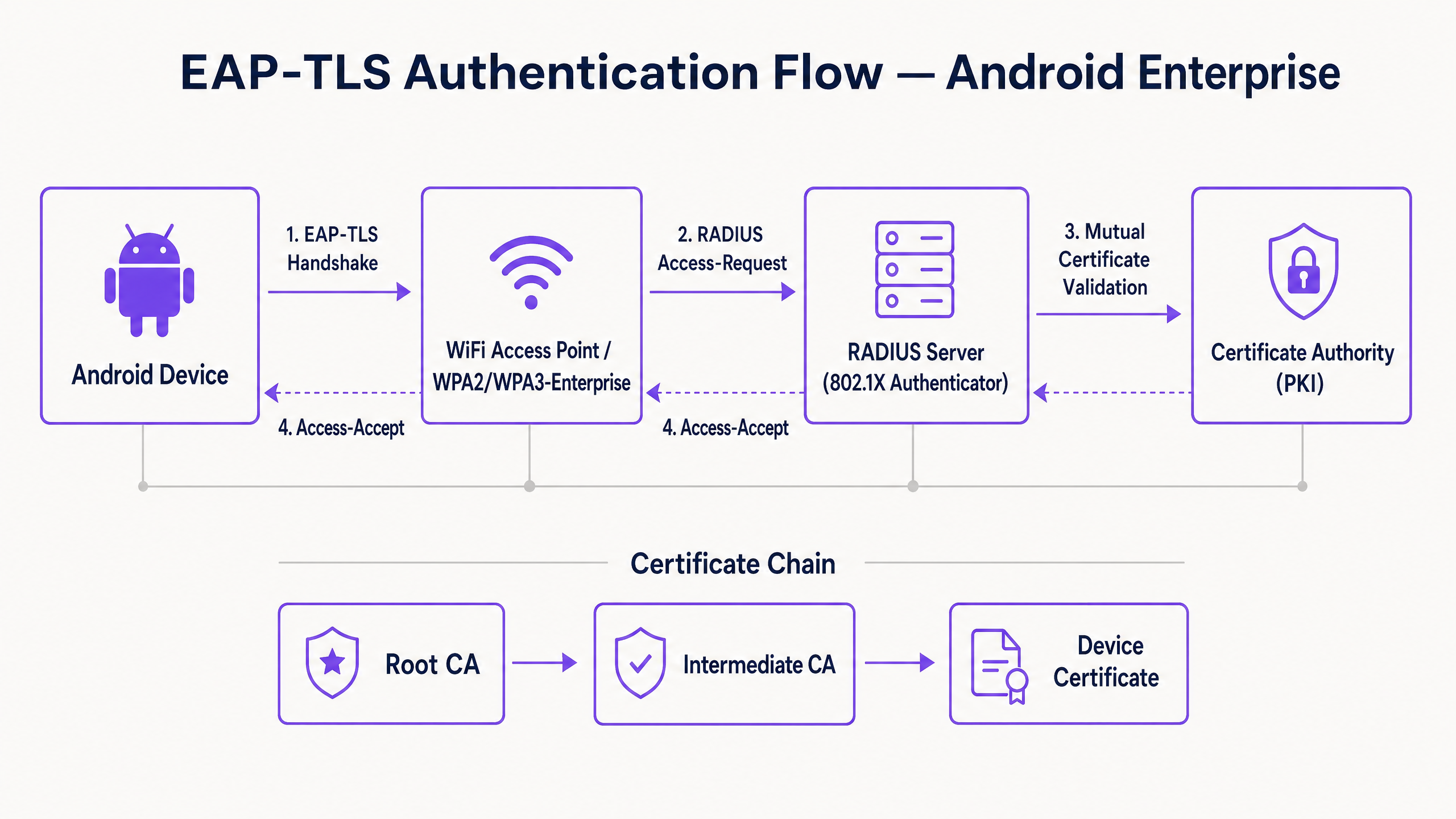
Im Kern ist 802.1X ein IEEE-Standard für die portbasierte Netzwerkzugriffskontrolle. Im WLAN-Kontext fungiert der Access Point als Authentifikator und erleichtert die Kommunikation zwischen dem Android-Gerät (dem Supplicant) und dem RADIUS-Server (dem Authentifizierungsserver).
Im Gegensatz zu PEAP oder TTLS, die die ältere Passwortauthentifizierung innerhalb von TLS tunneln, basiert EAP-TLS vollständig auf X.509-Zertifikaten. Dies schafft ein Paradigma der gegenseitigen Authentifizierung:
- Der RADIUS-Server präsentiert sein Zertifikat dem Android-Gerät, um die Legitimität des Netzwerks zu beweisen.
- Das Android-Gerät präsentiert sein einzigartiges Client-Zertifikat dem RADIUS-Server, um zu beweisen, dass es ein autorisierter Endpunkt ist.
Android-spezifische Zertifikatsanforderungen
Die Bereitstellung auf Android führt zu spezifischen Einschränkungen, insbesondere ab Android 11. Google hat die Option "Nicht validieren" für Serverzertifikate eingestellt, um Man-in-the-Middle (MitM)-Angriffe zu mindern. Folglich muss das Android-Gerät das Root-CA-Zertifikat besitzen, das das Zertifikat des RADIUS-Servers signiert hat.
Darüber hinaus muss das RADIUS-Serverzertifikat die korrekten Extended Key Usage (EKU)-Attribute enthalten – insbesondere Server Authentication (OID 1.3.6.1.5.5.7.3.1). Ohne dies wird der Android-Supplicant den TLS-Handshake stillschweigend abbrechen.
Für die Client-Seite erfordert Android, dass der private Schlüssel und das Zertifikat gebündelt sind, typischerweise im PKCS#12-Format (.p12 oder .pfx).
Integration in das Purple-Ökosystem
Während EAP-TLS Ihre Unternehmensgeräte und die Betriebsinfrastruktur sichert, müssen Betreiber von Veranstaltungsorten auch den Besucherzugang verwalten. Hier wird eine Dual-SSID-Strategie entscheidend. Ihre Unternehmens-SSID nutzt 802.1X EAP-TLS, während Ihre öffentliche SSID die Guest WiFi -Plattform von Purple nutzt. Diese Trennung gewährleistet die Betriebssicherheit und ermöglicht es dem Marketingteam, WiFi Analytics im Gastnetzwerk zu nutzen. Für eine umfassendere Ansicht zur Sicherung der physischen Infrastruktur siehe Access Point Security: Ihr Enterprise-Leitfaden 2026 .
Implementierungsleitfaden
Die Bereitstellung von EAP-TLS auf Android kann manuell für kleine BYOD-Bereitstellungen oder über Mobile Device Management (MDM) für den Unternehmenseinsatz erfolgen.
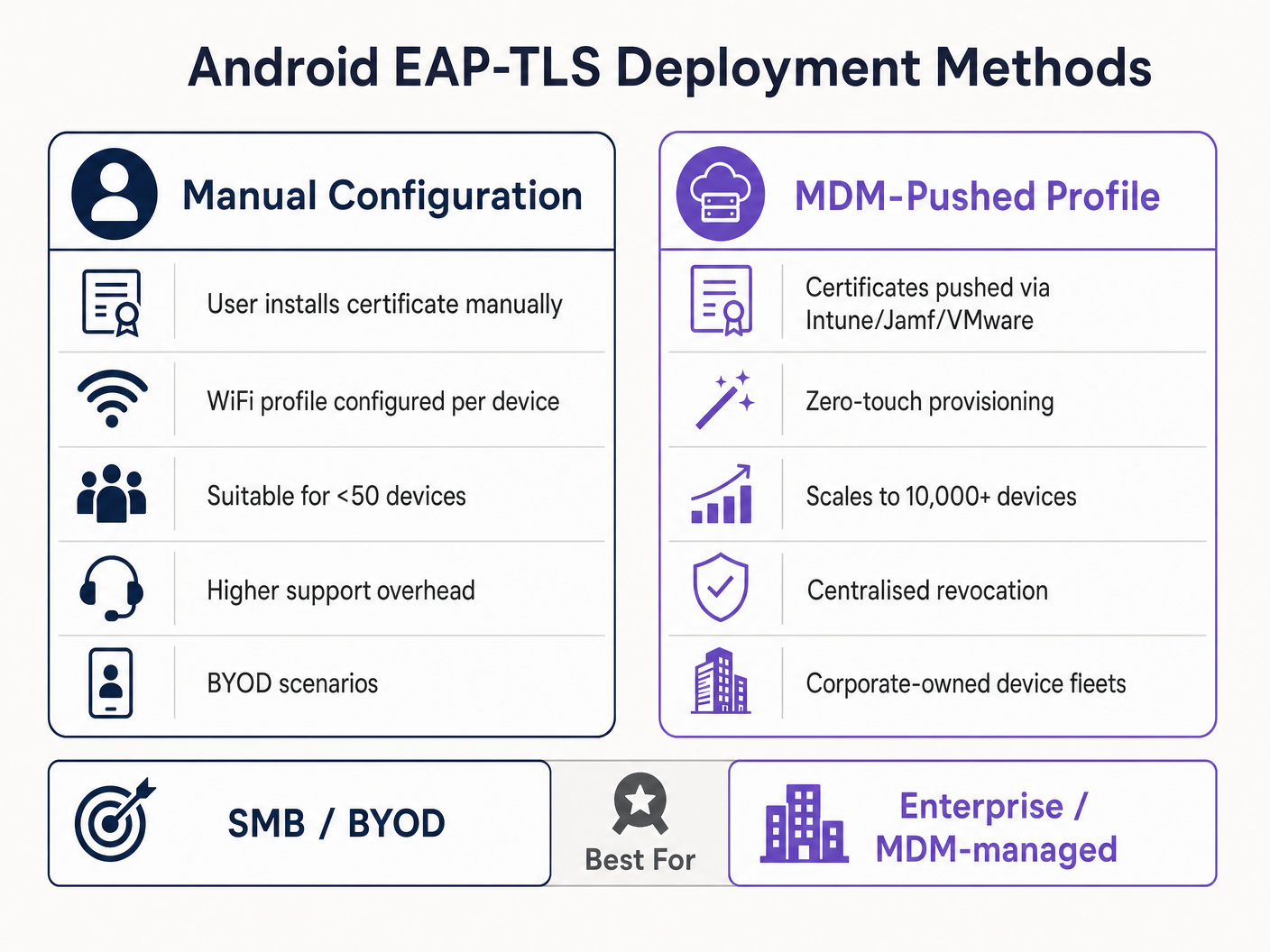
Methode 1: Manuelle Konfiguration (BYOD / Kleinere Umgebungen)
Diese Methode ist supportintensiv und wird nur für begrenzte Rollouts oder Tests empfohlen.
- Zertifikatsbereitstellung: Übertragen Sie das
.p12-Client-Zertifikat und die Root-CA-.cer-Datei sicher auf das Android-Gerät (z. B. über ein sicheres Portal oder verschlüsselte E-Mail). - Installation:
- Navigieren Sie zu Einstellungen > Sicherheit > Verschlüsselung & Anmeldeinformationen > Zertifikat installieren.
- Installieren Sie die Root-CA als "Wi-Fi-Zertifikat".
- Installieren Sie die
.p12-Datei und geben Sie das Extraktionspasswort ein, wenn Sie dazu aufgefordert werden.
- Netzwerkkonfiguration:
- Gehen Sie zu Einstellungen > Netzwerk & Internet > Wi-Fi und wählen Sie "Netzwerk hinzufügen".
- Geben Sie die SSID ein.
- Setzen Sie die Sicherheit auf WPA/WPA2/WPA3-Enterprise.
- Setzen Sie die EAP-Methode auf TLS.
- Setzen Sie das CA-Zertifikat auf die installierte Root-CA.
- Setzen Sie den Online-Zertifikatsstatus auf Zertifikatsstatus anfordern.
- Setzen Sie die Domäne so, dass sie dem Subject Alternative Name (SAN) des RADIUS-Serverzertifikats entspricht.
- Wählen Sie das installierte Client-Zertifikat aus.
- Geben Sie die Identität ein (normalerweise der UPN des Benutzers oder die MAC-Adresse des Geräts).
Methode 2: MDM-gesteuertes Profil (Unternehmensgröße)
Für große Umgebungen, wie einen Universitätscampus oder ein Logistikzentrum im Transportwesen , ist MDM obligatorisch. Dies bietet Zero-Touch-Bereitstellung und Lifecycle-Management.
- PKI-Integration: Verbinden Sie Ihr MDM (Intune, Workspace ONE, Jamf) mit Ihrer Zertifizierungsstelle über SCEP oder NDES.
- Zertifikatsprofil: Erstellen Sie ein Konfigurationsprofil, um die Root-CA in den Vertrauensspeicher des Geräts zu übertragen. Erstellen Sie ein zweites Profil (SCEP), um das einzigartige Client-Zertifikat automatisch anzufordern und zu installieren.
- WiFi-Profil: Erstellen Sie ein Wi-Fi-Konfigurationsprofil, das die bereitgestellten Zertifikates.
- Sicherheitstyp: WPA2/WPA3 Enterprise
- EAP Type: EAP-TLS
- Authentifizierungsmethode: Certificate
- Server-Vertrauen: Geben Sie die Root CA und den genauen Server-Domainnamen an.
Für detaillierte Microsoft-spezifische Anweisungen konsultieren Sie unseren Leitfaden: So verwenden Sie Microsoft Intune, um WiFi-Zertifikate auf Geräte zu übertragen .
Best Practices
- WPA3-Enterprise erzwingen: Wo die Hardware dies unterstützt, ist WPA3-Enterprise zu erzwingen. Die 192-Bit-Sicherheitssuite erfordert explizit EAP-TLS und gewährleistet höchste kryptografische Standards.
- Zertifikatslebenszyklus automatisieren: Client-Zertifikate laufen ab. Wenn Sie sich auf manuelle Verlängerungen verlassen, werden Sie mit massiven Ausfällen konfrontiert. Implementieren Sie SCEP/NDES, um Zertifikate 30 Tage vor Ablauf automatisch zu erneuern.
- Robustes DNS implementieren: Prüfungen der Zertifikatsperrliste (CRL) und OCSP erfordern eine zuverlässige DNS-Auflösung vom Edge. Lesen Sie mehr in Schützen Sie Ihr Netzwerk mit starkem DNS und Sicherheit .
- VLAN-Segmentierung: Ordnen Sie die EAP-TLS-authentifizierten Sitzungen bestimmten VLANs zu, basierend auf den Zertifikatsattributen (z. B. Trennung von POS-Terminals von Manager-Tablets) unter Verwendung von RADIUS-Attributen wie
Tunnel-Private-Group-Id.
Fehlerbehebung & Risikominderung
Wenn Android-Geräte keine Verbindung über EAP-TLS herstellen können, liegt das Problem fast immer in der Zertifikatskette oder der RADIUS-Konfiguration.
- Symptom: Android 11+-Geräte trennen die Verbindung sofort oder zeigen "Authentifizierungsfehler" an, ohne den Benutzer aufzufordern.
- Grundursache: Das Gerät vertraut dem RADIUS-Serverzertifikat nicht. Das Feld "Domain" im WiFi-Profil muss exakt dem SAN des Serverzertifikats entsprechen, und die Root CA muss installiert sein.
- Symptom: Die Verbindung bricht während des TLS-Handshakes ab (Timeout).
- Grundursache: Der RADIUS-Server kann den CRL-Verteilungspunkt nicht erreichen, um den Widerrufsstatus des Client-Zertifikats zu überprüfen. Stellen Sie sicher, dass Ihr RADIUS-Server ausgehenden HTTP-Zugriff auf die CRL-Endpunkte Ihrer PKI hat.
- Symptom: Windows-Geräte stellen eine Verbindung her, aber Android-Geräte schlagen fehl.
- Grundursache: Fehlende
Server AuthenticationEKU auf dem RADIUS-Zertifikat, oder der Android-Supplikant versucht, eine nicht unterstützte Cipher Suite zu verwenden. Überprüfen Sie die RADIUS-Protokolle auf TLS-Verhandlungsfehler.
- Grundursache: Fehlende
ROI & Geschäftsauswirkungen
Der Übergang zu EAP-TLS erfordert eine Vorabinvestition in PKI- und MDM-Infrastruktur, aber der Return on Investment ist für leitende IT-Führungskräfte erheblich.
- Reduzierung der Helpdesk-Kosten: Passwort-Resets machen 20-30 % der IT-Helpdesk-Tickets aus. Die zertifikatbasierte Authentifizierung eliminiert Passwort-Rotationsrichtlinien für den Netzwerkzugriff und reduziert den Supportaufwand drastisch.
- Risikominderung: EAP-TLS bietet Immunität gegen Credential Harvesting und Offline-Wörterbuchangriffe. Die Kosten einer einzelnen Sicherheitsverletzung in einer regulierten Branche wie Gesundheitswesen übersteigen die Bereitstellungskosten einer PKI bei Weitem.
- Operative Kontinuität: Die automatisierte Zertifikatsbereitstellung stellt sicher, dass kritische Betriebsgeräte – von Lagerscannern bis hin zu Einzelhandels-POS-Systemen – aufgrund abgelaufener Anmeldeinformationen niemals vom Netzwerk getrennt werden. Während Purple seine Reichweite weiter ausbaut, unterstrichen durch jüngste strategische Schritte wie Purple Signals Higher Education Ambitions with Appointment of VP Education Tim Peers , wird eine robuste grundlegende Konnektivität zum Wegbereiter für fortschrittliche Analysen und Engagement.
Schlüsseldefinitionen
802.1X
An IEEE standard for port-based Network Access Control (PNAC) that provides an authentication mechanism to devices wishing to attach to a LAN or WLAN.
The foundational framework that prevents unauthorised devices from accessing the corporate network at the edge.
EAP-TLS
Extensible Authentication Protocol with Transport Layer Security. An authentication framework that uses X.509 certificates for mutual authentication between the client and the server.
Considered the most secure EAP type, it eliminates password reliance, making it essential for high-security environments.
RADIUS
Remote Authentication Dial-In User Service. A networking protocol that provides centralised Authentication, Authorization, and Accounting (AAA) management.
The server component (e.g., Cisco ISE, Microsoft NPS) that validates the Android device's certificate against the PKI.
Supplicant
The client device (in this case, the Android smartphone or tablet) that is requesting access to the network.
Understanding the supplicant's specific OS constraints (like Android 11's strict validation) is key to a successful deployment.
Authenticator
The network device (the WiFi Access Point) that facilitates the authentication process between the Supplicant and the RADIUS server.
The AP does not make the decision; it merely enforces the port control based on the RADIUS server's response.
PKI
Public Key Infrastructure. A set of roles, policies, hardware, software, and procedures needed to create, manage, distribute, use, store, and revoke digital certificates.
The backbone of EAP-TLS. Without a robust PKI, certificate-based authentication is impossible.
SCEP
Simple Certificate Enrollment Protocol. A protocol designed to make the issuing and revocation of digital certificates as scalable as possible.
Used by MDM platforms to automatically provision client certificates to Android devices without user intervention.
SAN
Subject Alternative Name. An extension to X.509 that allows various values to be associated with a security certificate.
Android 11+ requires the 'Domain' field in the WiFi profile to match the SAN of the RADIUS server's certificate.
Ausgearbeitete Beispiele
A national retail chain needs to deploy 5,000 Android-based point-of-sale (POS) tablets. The security team mandates that these devices must not use shared passwords and must be immune to credential phishing. How should the infrastructure team approach this deployment?
The team must deploy a Mobile Device Management (MDM) solution integrated with their internal Public Key Infrastructure (PKI) via SCEP. The MDM will push a configuration profile containing the Root CA certificate, automatically request a unique client certificate for each POS tablet, and configure the WPA3-Enterprise WiFi profile to use EAP-TLS. The RADIUS server will be configured to assign these devices to an isolated POS VLAN based on successful certificate validation.
A hospital IT manager is upgrading the wireless network. Following the upgrade, older Android 9 devices connect successfully to the EAP-TLS network, but newly procured Android 12 devices fail to authenticate, citing a trust error.
The IT manager must update the WiFi configuration profile pushed to the devices. Android 11+ enforces strict server certificate validation. The profile must be updated to explicitly define the Root CA certificate to trust and specify the exact 'Domain' (matching the RADIUS server's SAN) to prevent MitM attacks.
Übungsfragen
Q1. Your organisation is migrating from PEAP-MSCHAPv2 to EAP-TLS. During the pilot phase, several Android 13 devices fail to connect. The RADIUS logs show that the TLS handshake is initiated but dropped by the client before the client certificate is sent. What is the most likely configuration error?
Hinweis: Consider the strict validation requirements introduced in recent Android versions regarding the server's identity.
Musterlösung anzeigen
The most likely error is that the WiFi profile pushed to the Android 13 devices does not correctly specify the 'Domain' suffix match, or the Root CA is not properly linked in the profile. Android drops the connection to prevent a Man-in-the-Middle attack because it cannot validate the RADIUS server's certificate.
Q2. You are designing the architecture for a large stadium deployment. The client wants to use EAP-TLS for all staff devices. What specific infrastructure component must be scaled up compared to a standard WPA2-PSK network, and why?
Hinweis: EAP-TLS involves complex cryptographic operations during the connection phase.
Musterlösung anzeigen
The RADIUS server infrastructure must be significantly scaled up. EAP-TLS requires full mutual certificate validation (asymmetric cryptography), which is computationally expensive. In a stadium environment with thousands of devices potentially roaming or authenticating simultaneously, an undersized RADIUS deployment will cause authentication timeouts and connection failures.
Q3. A client certificate is compromised on a lost Android tablet. What is the exact mechanism by which the network prevents this device from connecting via EAP-TLS?
Hinweis: How does the RADIUS server know the certificate is no longer valid before its expiration date?
Musterlösung anzeigen
The IT administrator revokes the client certificate in the PKI. The PKI updates its Certificate Revocation List (CRL) or OCSP responder. When the lost tablet attempts to connect, the RADIUS server checks the client certificate against the CRL/OCSP. Seeing it is revoked, the RADIUS server rejects the authentication request.
Weiterlesen in dieser Reihe
Per-Device PSK nach Anbieter: iPSK, DPSK, MPSK und PPSK im Vergleich (und WPA3-Unterstützung)
Ein umfassender Vergleich von Per-Device-PSK-Implementierungen bei Cisco Meraki, HPE Aruba, Ruckus, Juniper Mist, Extreme, Fortinet und Ubiquiti UniFi. Erfahren Sie, wie sich WPA3-SAE auf Per-Device-Key-Strategien auswirkt und wann Sie Übergangsmodi implementieren sollten, anstatt auf 802.1X umzusteigen.
Was ist MAC-Adressauthentifizierung? Wann man sie nutzen und wann man sie vermeiden sollte
Dieser maßgebliche technische Leitfaden behandelt die MAC-Adressauthentifizierung in Unternehmens-WiFi-Umgebungen – wie RADIUS-basierte MAC-Authentifizierung auf Layer 2 funktioniert, ihre inhärenten Sicherheitslücken (einschließlich MAC-Spoofing und die Auswirkungen der MAC-Randomisierung auf OS-Ebene) und die genauen operativen Kontexte, in denen sie ein gültiges Werkzeug zur Verwaltung von IoT- und kopflosen Geräten bleibt. Er bietet umsetzbare Bereitstellungsanleitungen für IT-Manager und Netzwerkarchitekten in den Bereichen Gastgewerbe, Einzelhandel, Gesundheitswesen und öffentlicher Sektor, mit realen Fallbeispielen, Entscheidungsrahmen und Integrationskontext für die Gast-WiFi- und Analyseplattform von Purple.
Einrichtung von Enterprise WiFi auf iOS und macOS mit 802.1X
Dieser maßgebliche Leitfaden bietet leitenden IT-Führungskräften umsetzbare Schritte für die Bereitstellung von 802.1X Enterprise WiFi auf iOS- und macOS-Geräten. Er behandelt die zertifikatbasierte Authentifizierung (EAP-TLS), MDM-Konfigurationsprofile und die Architekturintegration zur Sicherung von Unternehmensnetzwerken bei gleichzeitiger Unterstützung von BYOD-Initiativen.