
Event WiFi: Planung und Bereitstellung temporärer drahtloser Netzwerke
Dieser Leitfaden bietet IT-Managern, Netzwerkarchitekten und Leitern des Veranstaltungsbetriebs eine vollständige technische Referenz für die Planung und Bereitstellung temporärer WiFi-Netzwerke bei Veranstaltungen jeder Größenordnung. Er umfasst die Kapazitätsplanung, die Hardware-Auswahl, die VLAN-Architektur, die Integration von Captive Portals, die GDPR-Konformität und Post-Event-Analysen - mit konkreten Fallstudien aus dem Gastgewerbe und großen Konferenzumgebungen. Für Event-Produzenten und AV-Unternehmen bildet er den gesamten Lebenszyklus eines Event-WiFi-Projekts von der ersten Standortbegehung bis zum Abbau und der Berichterstattung ab.
Video overview
Diesen Leitfaden anhören
Podcast-Transkript ansehen
Teil unserer Kernserie: Leitfaden für Gast-WiFi →
Management-Zusammenfassung
Event WiFi ist eine eigenständige technische Disziplin. Im Gegensatz zu permanenten Unternehmensinstallationen müssen temporäre drahtlose Netzwerke eine extreme Client-Dichte in kürzester Zeit bewältigen, auf gemieteter oder geliehener Infrastruktur laufen und Compliance-Vorgaben erfüllen - und das alles bei einer nahtlosen User Experience, die sich direkt auf die Marke des Events auswirkt. Ein Netzwerkausfall auf einer Konferenz mit 3.000 Personen ist keine Unannehmlichkeit, sondern ein Reputations- und Geschäftsschaden.
Dieser Leitfaden behandelt den gesamten Bereitstellungs-Lebenszyklus: Kapazitätsmodellierung, Hardware-Miete, Backhaul-Bereitstellung, VLAN-Architektur, Captive Portal-Design und On-Site-Management. Er richtet sich an IT-Experten, die in diesem Quartal Beschaffungs- und Architekturentscheidungen treffen müssen, und bietet keinen theoretischen Überblick über Funkstandards. Wo die Guest WiFi und WiFi Analytics Plattform von Purple spezifischen Mehrwert bietet - insbesondere bei der Captive Portal-Verwaltung, der GDPR-konformen Datenerfassung und dem Post-Event-Reporting - werden diese Integrationspunkte explizit hervorgehoben.
Technische Details im Detail
Warum Event WiFi anders ist
Die grundlegende Herausforderung bei Event WiFi ist die Dichte in Kombination mit Gleichzeitigkeit. In einer Standard-Büroumgebung haben Sie vielleicht 100 Geräte auf einer Fläche von 1.000 Quadratmetern mit gestaffelten Verbindungszeiten über den Arbeitstag verteilt. Bei einer Keynote auf einer Konferenz versuchen möglicherweise 2.000 Geräte innerhalb eines Zeitfensters von fünf Minuten eine Verbindung aufzubauen, während die Teilnehmer in den Saal strömen. Die HF-Umgebung, die DHCP-Infrastruktur und das Authentifizierungs-Backend müssen alle auf diese Spitzenlast ausgelegt sein - nicht auf den Durchschnitt.
Drei Variablen bestimmen jede architektonische Entscheidung bei einer Event-Bereitstellung: Anzahl der Clients, Durchsatzanforderung pro Benutzer und Event-Dauer. Wenn Sie diese in der Planungsphase falsch einschätzen, kann auch die beste Fehlerbehebung vor Ort die Situation nicht mehr retten.
Kapazitätsplanung: Die Zahlen, auf die es ankommt
Der Branchenstandard für High-Density WiFi liegt bei einem Access Point pro 25 bis 50 gleichzeitigen Nutzern, aber diese Zahl erfordert eine erhebliche Differenzierung. Das Verhältnis hängt von den Funkfunktionen des APs, dem erwarteten Mix aus 2,4 GHz- und 5 GHz-Clients und der Frage ab, ob die Veranstaltung eine intensive Mediennutzung (Live-Streaming, Videoanrufe) oder eher leichteren Browsing- und Messaging-Verkehr mit sich bringt.
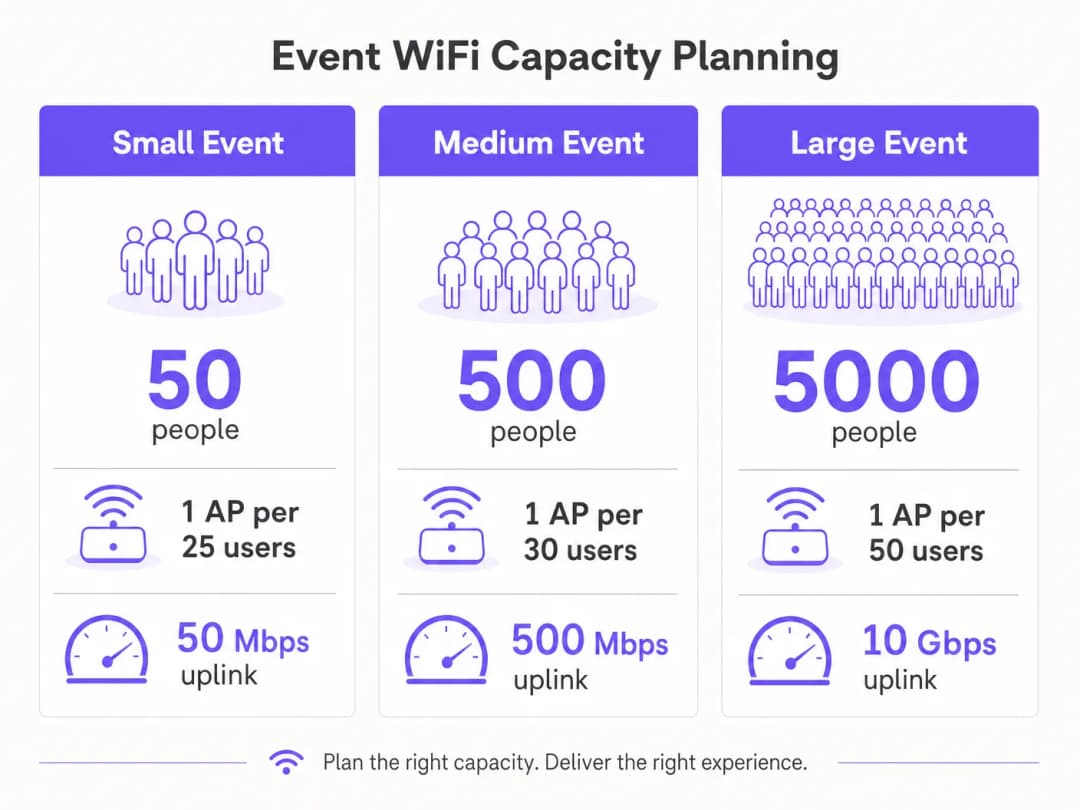
Für die Durchsatzplanung ist ein vorsichtiger Schätzwert von 1 - 2 Mbps pro aktivem Nutzer für die allgemeine Nutzung bei Konferenzen oder Messen angemessen. Für Events mit Live-Streaming oder Videoanforderungen in Broadcast-Qualität - wie Produktvorstellungen oder Presseveranstaltungen - sollten Sie 5 - 10 Mbps pro aktivem Nutzer im Produktions-VLAN einplanen. Ihr Uplink muss so dimensioniert sein, dass er die Summe aller VLANs gleichzeitig aufnehmen kann, mit mindestens 20 % Spielraum.
| Event-Größe | Teilnehmer | Empfohlene APs | Mindest-Uplink | DHCP-Bereich |
|---|---|---|---|---|
| Klein | Bis zu 100 | 4 - 6 | 50 Mbps | /24 |
| Mittel | 100 - 500 | 15 - 25 | 200 - 500 Mbps | /23 |
| Groß | 500 - 2.000 | 50 - 100 | 1 - 2 Gbps | /21 |
| Enterprise | 2.000+ | 100+ | 5 - 10 Gbps | /20 oder größer |
Backhaul: Das unverhandelbare Fundament
Selbst die am besten konzipierte Wireless-Infrastruktur kann einen unzureichenden Backhaul nicht kompensieren. Für Events mit mehr als 200 Teilnehmern ist eine dedizierte Standleitung die einzige angemessene Uplink-Lösung. Eine Standleitung bietet eine synchrone, ungeteilte Verbindung mit einer garantierten SLA - in der Regel 99,95 % Verfügbarkeit - was sich grundlegend von dem gemeinsam genutzten, asymmetrischen Breitband unterscheidet, das die meisten Veranstaltungsorte für ihren eigenen Betrieb installiert haben.
Die Bereitstellung einer Standleitung erfordert in der Regel eine Vorlaufzeit von vier bis sechs Wochen. Dies ist der häufigste Planungsfehler bei Event WiFi Implementierungen: Teams, die zwei Wochen vor einer Veranstaltung mit dem Netzwerkdesign beginnen und feststellen, dass sie nicht rechtzeitig eine dedizierte Leitung erhalten können. Für Veranstaltungen, bei denen eine Standleitung absolut unpraktisch ist - wie Festivals im Freien oder temporäre Bauten -, bietet eine gebündelte 4G/5G-Lösung mit mehreren SIM-Karten verschiedener Mobilfunkanbieter eine praktikable Alternative, wenn auch mit geringerem garantierten Durchsatz und höherer Latenz.
Netzwerkarchitektur und VLAN Design
Eine strikte Netzwerksegmentierung ist sowohl eine Leistungs- als auch eine Compliance-Anforderung. Die empfohlene Mindestarchitektur für jede Event-Bereitstellung sieht drei VLANs vor:

VLAN 10 - Guest WiFi: Der gesamte öffentlich zugängliche Datenverkehr der Teilnehmer. Dieses VLAN stellt die Verbindung zum Captive Portal für die Authentifizierung und Datenerfassung her. Die Client-Isolierung muss aktiviert sein, um eine laterale Bewegung zwischen Geräten zu verhindern. Ein DNS-Filter sollte angewendet werden, um bösartige Domänen zu blockieren - weitere Details zur Implementierung finden Sie im Leitfaden von Purple über den Schutz Ihres Netzwerks mit starkem DNS und Sicherheit.
VLAN 20 - Personal und Point of Sale: Betrieblicher Datenverkehr für Event-Mitarbeiter, Ticketingsysteme und Kartenzahlungsterminals. Wenn Kartenzahlungen über dieses VLAN abgewickelt werden, gilt der PCI-DSS Geltungsbereich, und das VLAN muss vollständig vom Gastnetzwerk isoliert sein, ohne dass ein Routing zwischen ihnen stattfindet.
VLAN 30 - AV und Produktion: Reserviert für Übertragungsgeräte, Präsentationssysteme und die Produktionscrew. Dieses VLAN erfordert in der Regel den höchsten garantierten Durchsatz und die geringste Latenz und sollte mit QoS-Richtlinien ausgestattet werden, die es gegenüber dem Gastdatenverkehr priorisieren.
Bei größeren Veranstaltungen sind zusätzliche VLANs für Aussteller, Presse und Sicherheitssysteme üblich. Jede SSID sollte einem einzelnen VLAN zugewiesen werden, und das Inter-VLAN-Routing sollte am Core-Switch deaktiviert werden, sofern es nicht ausdrücklich erforderlich ist.
Funkfrequenzplanung
In Umgebungen mit hoher Dichte ist das Standardverhalten der meisten Enterprise APs - automatische Kanalwahl und maximale Sendeleistung - absolut kontraproduktiv. Gleichkanalstörungen zwischen benachbarten APs auf demselben Kanal beeinträchtigen die Leistung weitaus mehr als eine geringfügige Verringerung des Abdeckungsbereichs.
Der richtige Ansatz besteht darin, Kanäle manuell zuzuweisen und die Sendeleistung zu reduzieren. Verwenden Sie im 5-GHz-Band die überschneidungsfreien Kanäle, die in den Bändern UNII-1 (36, 40, 44, 48), UNII-2 (52-64) und UNII-3 (149-165) verfügbar sind. Reduzieren Sie die AP-Sendeleistung in dichten Bereitstellungen auf 8-12 dBm. Dies schafft kleinere, sauberere Zellen mit weniger Interferenzen, was den Gesamtdurchsatz am Veranstaltungsort verbessert.
Band steering sollte auf allen APs aktiviert sein, um 5-GHz-fähige Clients - was die überwiegende Mehrheit der modernen Smartphones und Laptops ist - vom überlasteten 2,4-GHz-Spektrum wegzulenken. Reservieren Sie 2,4 GHz für ältere IoT-Geräte und Barrierefreiheitsgeräte, die keine Verbindung zu 5 GHz herstellen können.
Bei Outdoor-Veranstaltungen ist die HF-Umgebung grundlegend anders. Ohne Wände und Decken, die das Signal eindämmen, sind die Abdeckungszellen größer, und Interferenzen durch benachbarte Installationen oder private Hotspots sind schwerer zu kontrollieren. Richtantennen sind in Außenbereichen gegenüber Rundstrahl-APs vorzuziehen, da Sie mit ihnen die Abdeckung auf bestimmte Zonen fokussieren können - den Hauptbühnenbereich, den Gastronomiebereich, die Registrierungsschlange - anstatt wahllos zu senden. Alle Outdoor-Hardware muss mindestens die Schutzklasse IP55 aufweisen; für Festivals oder ungeschützte Umgebungen ist IP67 vorzuziehen.
Captive Portal Architektur und GDPR Compliance
Das Captive Portal ist die erste Interaktion des Benutzers mit Ihrem Veranstaltungsnetzwerk und Ihr primärer Mechanismus sowohl für die Compliance als auch für die Datenerfassung. Ein schlecht gestaltetes Portal, das Zeitüberschreitungen aufweist, unter iOS nicht korrekt weiterleitet oder einen unklaren Einwilligungs-Workflow darstellt, führt zu einer unverhältnismäßig hohen Anzahl von Support-Anfragen und untergräbt das Vertrauen der Teilnehmer in das Netzwerk.
Aus Sicht der GDPR erfordert jede Erfassung personenbezogener Daten - E-Mail-Adressen, Social-Login-Token oder Gerätekennungen - eine Rechtsgrundlage, eine klare Datenschutzerklärung und eine ausdrückliche Einwilligung für jegliche Marketingnutzung. Die Einwilligung muss granular sein: Die Einwilligung zur Nutzung des WiFi ist nicht gleichbedeutend mit der Einwilligung zum Erhalt von Marketing-Kommunikation. Die Guest WiFi Plattform von Purple verarbeitet diesen Einwilligungs-Workflow nativ, stellt konforme Opt-In-Prozesse dar und speichert Einwilligungseinträge mit Zeitstempeln und IP-Adressen, wie in Artikel 7 der GDPR gefordert.
Die technische Architektur des Captive Portal ist für die Leistung von Bedeutung. Ein in der Cloud gehostetes Portal, das Authentifizierungsanfragen an einen externen Server weiterleitet, führt zu Latenzzeiten im Login-Prozess. Bei Spitzenlast - wenn sich Hunderte von Benutzern gleichzeitig authentifizieren - kann diese Latenz zu Zeitüberschreitungen und fehlgeschlagenen Logins führen. Die Plattform von Purple ist genau für diesen Anwendungsfall konzipiert und verfügt über eine automatisch skalierende Infrastruktur, die stoßartige Authentifizierungslasten ohne Leistungseinbußen bewältigt.
Haben Sie Fragen zu Ihrem spezifischen Setup?
Unser Team arbeitet mit Standortbetreibern, IT-Managern und Netzwerktechnikern an über 80.000 Standorten zusammen. Buchen Sie ein 20-minütiges Gespräch und wir zeigen Ihnen, wie andere diese Herausforderungen gelöst haben.
Implementierungsleitfaden
Phase 1: Standortbegehung und Kapazitätsmodellierung (8 Wochen vor der Veranstaltung)
Beginnen Sie mit einer physischen Standortbegehung. Gehen Sie jeden Bereich ab, in dem sich Teilnehmer aufhalten werden, und dokumentieren Sie Deckenhöhen, Wandmaterialien, bauliche Hindernisse und vorhandene Infrastruktur (Kabelkanäle, Steckdosen, Datenanschlüsse). Verwenden Sie ein WiFi-Vermessungstool - Ekahau Site Survey oder iBwave sind die Industriestandards - um die prognostizierte Abdeckung zu modellieren und Funklöcher zu identifizieren, bevor Hardware bestellt wird.
Bestätigen Sie gleichzeitig die vorhandene Netzwerkinfrastruktur des Veranstaltungsorts. Identifizieren Sie verfügbare Datenports, den Standort des Hauptverteilers und die Kapazität vorhandener Switches. Prüfen Sie, ob die vorhandene Verkabelung des Veranstaltungsorts PoE+ (802.3at) für die geplanten APs unterstützt oder ob Sie eigene PoE-Switches und Kabel mitbringen müssen.
Finalisieren Sie Ihr Kapazitätsmodell basierend auf der erwarteten Teilnehmerzahl, dem Veranstaltungsprogramm (eine Keynote erzeugt ein völlig anderes Lastprofil als ein Networking-Empfang) und den Durchsatzanforderungen aller Produktionssysteme.
Phase 2: Hardware-Beschaffung und Backhaul-Bestellung (6–8 Wochen vor dem Event)
Bestellen Sie Ihre Standleitung direkt nach der Standortbegehung. Das Bereitstellungsfenster von vier bis sechs Wochen ist der kritische Pfad für das gesamte Projekt. Falls der Veranstaltungsort bereits über eine Standleitung verfügt, vereinbaren Sie eine dedizierte Bandbreitenzuweisung mit dem IT-Team des Veranstaltungsorts - gehen Sie nicht davon aus, dass die vorhandene Infrastruktur automatisch zur Verfügung gestellt wird.
Bei der Hardware hängt die Entscheidung zwischen Kauf und Miete von der Häufigkeit Ihrer Veranstaltungen ab. Für Organisationen, die mehr als viermal im Jahr Event WiFi bereitstellen, ist der Besitz eines tragbaren Kits - bestehend aus Enterprise APs, einem Managed PoE-Switch, einem Rack-Router und Verkabelung - kostengünstiger als wiederholte Mieten. Für einmalige Events bieten spezialisierte Event WiFi Vermieter vorkonfigurierte Hardware inklusive On-Site-Support, was das Installationsrisiko erheblich minimiert.
Priorisieren Sie bei der Auswahl von APs zur Miete oder zum Kauf WiFi 6 (802.11ax) Hardware für alle Bereitstellungen mit mehr als 200 Benutzern. Die Funktionen OFDMA und BSS-Coloring von WiFi 6 bieten in Umgebungen mit hoher Dichte im Vergleich zu WiFi 5 (802.11ac) signifikante Leistungssteigerungen.
Phase 3: Konfiguration und Tests vor dem Event (1–2 Wochen vor dem Event)
Konfigurieren Sie alle Netzwerkgeräte in einer Staging-Umgebung, bevor Sie vor Ort eintreffen. Dies umfasst die VLAN-Konfiguration auf dem Core-Switch, das SSID-zu-VLAN-Mapping auf dem Wireless-Controller, die Konfiguration des DHCP-Bereichs sowie die Integration des Captive Portal. Das Testen in einer Staging-Umgebung ist weitaus effizienter als die Fehlersuche am Tag der Veranstaltung selbst.
Integrieren Sie für die Captive Portal Konfiguration in dieser Phase die Plattform von Purple. Konfigurieren Sie die gebrandete Splash Page, die Authentifizierungsmethode (E-Mail, Social Login oder SMS), den Einwilligungs-Workflow und jede Weiterleitung nach der Authentifizierung. Testen Sie den gesamten User Journey auf verschiedenen Gerätetypen - iOS, Android, Windows und macOS verarbeiten die Erkennung von Captive Portal unterschiedlich und stellen jeweils spezifische Anforderungen an die korrekte Funktion des Weiterleitungsmechanismus.
Führen Sie einen Lasttest mit einem WiFi-Clientsimulator durch, um sicherzustellen, dass der DHCP-Bereich, das Authentifizierungs-Backend und der Uplink die erwartete Spitzenlast bewältigen können. Tools wie Spirent oder Ixia können zu diesem Zweck Hunderte von gleichzeitigen WiFi-Clients simulieren.
Phase 4: Bereitstellung vor Ort (Tag vor dem Event)
Kommen Sie rechtzeitig vor Ort an, um die Installation und die Tests abzuschließen, bevor der Veranstaltungsort für die Besucher öffnet. Montieren Sie die APs gemäß dem Plan der Standortanalyse - eine Deckenmontage wird für eine omnidirektionale Abdeckung bevorzugt; eine Wandmontage ist zulässig, wenn kein Deckenzugang verfügbar ist. Verlegen und beschriften Sie alle Kabel und dokumentieren Sie den physischen Standort jedes APs mit einem Foto und einer Anmerkung auf dem Etagenplan.
Sobald die gesamte Hardware installiert ist, führen Sie eine Post-Installations-Analyse mit einem Laptop oder einem speziellen Messgerät durch, um die Abdeckung zu validieren. Gehen Sie den gesamten Besucherbereich ab und bestätigen Sie eine Signalstärke von -65 dBm oder besser im gesamten Bereich. Identifizieren und beheben Sie alle Abdeckungslücken, bevor die Veranstaltung beginnt.
Testen Sie den gesamten User Journey: Verbinden Sie ein Testgerät mit jeder SSID, schließen Sie die Authentifizierung über das Captive Portal ab und überprüfen Sie, ob der Internetzugang verfügbar ist. Testen Sie Kartenzahlungsterminals im VLAN für das Personal. Bestätigen Sie, dass AV-Geräte im Produktions-VLAN alle erforderlichen Ziele erreichen können.
Phase 5: Vor-Ort-Management und Monitoring
Überwachen Sie das Netzwerk während der Veranstaltung in Echtzeit über das Management-Dashboard des Wireless-Controllers. Die wichtigsten Kennzahlen, die es zu beobachten gilt, sind: AP-Assoziationszahlen (markieren Sie jeden AP, der 80 % seiner empfohlenen Client-Kapazität überschreitet), Kanalauslastung, DHCP-Pool-Auslastung und Uplink-Durchsatz. Die WiFi Analytics-Plattform von Purple bietet eine zusätzliche Ebene der Transparenz in Bezug auf das Nutzerverhalten - Verweildauer, Spitzenverbindungszeiten und Portal-Konversionsraten - was sowohl für das Echtzeit-Management als auch für das Post-Event-Reporting wertvoll ist.
Richten Sie einen klaren Eskalationsprozess für Netzwerkprobleme ein. Bestimmen Sie einen einzigen Ansprechpartner für alle netzwerkbezogenen Supportanfragen des Veranstaltungspersonals und stellen Sie sicher, dass der Netzwerkingenieur vor Ort über eine Out-of-Band-Management-Verbindung, die unabhängig vom Gastnetzwerk ist, Remote-Zugriff auf alle Geräte hat.
Best Practices
Die folgenden Empfehlungen repräsentieren herstellerneutrale Best Practices, die aus groß angelegten Bereitstellungen bei Veranstaltungen in den Bereichen Gastgewerbe, Einzelhandel und Konferenzen abgeleitet wurden.
Deaktivieren Sie die SSID-Übertragung für Personal- und Produktionsnetzwerke. Es gibt keinen betrieblichen Grund, warum diese SSIDs für Besucher sichtbar sein sollten. Das Ausblenden verringert die Angriffsfläche und verhindert versehentliche Verbindungen.
Legen Sie aggressive DHCP-Lease-Zeiten im Gast-VLAN fest. Eine Lease-Zeit von 30 - 60 Minuten stellt sicher, dass IP-Adressen von getrennten Geräten umgehend zurückgefordert werden. Dies ist besonders wichtig bei mehrtägigen Veranstaltungen, bei denen sich das Besucherpublikum zwischen den Sitzungen stark verändert.
Implementieren Sie die 802.1X-Authentifizierung in Personal- und Produktions-VLANs. WPA3-Enterprise mit 802.1X bietet eine Authentifizierung pro Benutzer und eliminiert das Risiko, dass ein gemeinsam genutzter Pre-Shared Key kompromittiert wird. Für Gastnetzwerke ist WPA3-Personal oder ein offenes Netzwerk mit einem Captive Portal der Standardansatz. Nutzen Sie DNS-over-HTTPS oder DNS-Filterung auf dem Gäste-VLAN. Öffentliche Event-Netzwerke sind ein beliebtes Ziel für DNS-Hijacking und Phishing-Angriffe. Die Implementierung einer DNS-Filterung - entweder über Ihren vorgeschalteten Provider oder über einen dedizierten DNS-Sicherheitsdienst - bietet einen wichtigen Schutz für die Teilnehmer. Die Plattform von Purple lässt sich in DNS-Sicherheitsanbieter integrieren, um diese Filterung direkt auf der Ebene des Captive Portal anzuwenden.
Dokumentieren Sie alles. Erstellen Sie vor der Ankunft vor Ort ein Netzwerkdiagramm, einen Verkabelungsplan und eine AP-Platzierungskarte. Diese Dokumentation ist für die Fehlerbehebung während der Veranstaltung und für die Planung zukünftiger Implementierungen am selben Veranstaltungsort von unschätzbarem Wert.
Für Implementierungen an Flughäfen und Verkehrsknotenpunkten gelten zusätzliche Sicherheitsanforderungen - der Leitfaden von Purple über Sicherheit von Flughafen-WiFi behandelt das spezifische Bedrohungsmodell und die entsprechenden Maßnahmen zur Risikominderung in hochfrequentierten öffentlichen Bereichen.
Fehlerbehebung und Risikominderung
Erschöpfung des DHCP-Pools
Dies ist die häufigste Fehlerursache bei Event-WiFi. Zu den Symptomen gehört, dass Geräte zwar eine Verbindung zum WiFi herstellen, aber keine IP-Adresse beziehen können oder eine APIPA-Adresse (169.254.x.x) erhalten. Die Lösung besteht darin, den DHCP-Bereich zu vergrößern und die Lease-Time zu verkürzen. Die Vorbeugung ist einfach: Dimensionieren Sie Ihren DHCP-Bereich auf mindestens das Doppelte der erwarteten maximalen Client-Anzahl und stellen Sie die Lease-Time auf 30 bis 60 Minuten ein.
Überlastung des Authentifizierungsservers
Bei Spitzenlasten kann eine große Anzahl gleichzeitiger Authentifizierungsanfragen einen lokalen RADIUS-Server oder das Captive Portal-Backend überlasten. Dies äußert sich in langsamen oder fehlgeschlagenen Anmeldungen. Cloud-basierte Plattformen wie Purple skalieren automatisch, um Lastspitzen abzufangen, was bei Event-Anwendungsfällen einen erheblichen architektonischen Vorteil gegenüber lokalen Installationen darstellt.
Co-Kanal-Interferenz
Wenn mehrere APs in unmittelbarer Nähe auf demselben Kanal betrieben werden, führt dies zu erheblichen Leistungseinbußen. Zu den Symptomen gehören ein geringer Durchsatz trotz guter Signalstärke und eine hohe Anzahl von Wiederholungsversuchen (Retry Rates), die im Wireless Controller sichtbar sind. Die Lösung besteht darin, die Kanalbelegung zu überprüfen und sicherzustellen, dass benachbarte APs auf überschneidungsfreien Kanälen arbeiten. Die Reduzierung der Sendeleistung hilft ebenfalls, indem sie den Störradius des jeweiligen APs verringert.
Fehler bei der Captive Portal-Weiterleitung
Verschiedene Betriebssysteme verwenden unterschiedliche Mechanismen zur Erkennung von Captive Portals. iOS verwendet einen dedizierten CNA (Captive Network Assistant), der HTTP-Anfragen an bestimmte Apple-URLs sendet. Android nutzt ein ähnliches Verfahren mit den Konnektivitätsprüfservern von Google. Wenn Ihr Captive Portal nicht korrekt auf diese Abfragen reagiert, öffnet sich das Portal nicht automatisch, und die Benutzer müssen die Portal-URL manuell aufrufen. Stellen Sie sicher, dass Ihr Captive Portal so konfiguriert ist, dass es diese spezifischen Testanfragen abfängt und beantwortet.
Ausfall des Uplinks
Ein einziger Ausfallpunkt auf dem Uplink ist das Risiko mit den größten Auswirkungen bei einer Event-Bereitstellung. Minimieren Sie dies, indem Sie eine 4G/5G-Backup-Verbindung bereitstellen, die sich automatisch aktiviert, wenn die primäre Standleitung ausfällt. Die meisten Enterprise-Router unterstützen ein Dual-WAN-Failover mit Umschaltzeiten im Subsekundenbereich. Testen Sie den Failover-Mechanismus während der Einrichtung vor dem Event, nicht erst während der Veranstaltung selbst.
-
ROI und geschäftlicher Nutzen
Event WiFi wird zunehmend nicht mehr nur als reine Dienstleistung, sondern als wertvolles Daten-Asset wahrgenommen. Jeder Teilnehmer, der sich mit Ihrem Event-Netzwerk verbindet und sich über ein Captive Portal authentifiziert, liefert First-Party-Daten - E-Mail-Adresse, demografische Informationen und Verhaltensdaten - die für Event-Veranstalter, Veranstaltungsorte und Sponsoren von erheblichem kommerziellem Wert sind.
Die WiFi Analytics-Plattform von Purple quantifiziert diesen Wert direkt. Berichte nach dem Event liefern Daten über die gesamten eindeutigen Verbindungen, Spitzenwerte bei gleichzeitigen Nutzern, die durchschnittliche Sitzungsdauer, Portal-Konversionsraten und Opt-In-Raten für die Marketingkommunikation. Bei einer Konferenz mit 2.000 Teilnehmern und einer Portal-Opt-In-Rate von 70 % entspricht dies 1.400 neuen, mit Einwilligung erfassten Marketingkontakten, die bei einer einzigen Veranstaltung gewonnen wurden - ein Cost-per-Acquisition, der über keinen anderen Kanal so leicht zu erreichen ist.
Für Betreiber von Veranstaltungsorten im Gastgewerbe bietet die Analyseebene zusätzlichen Nutzen durch Besucherstromanalysen und die Erfassung der Verweildauer. Zu verstehen, welche Bereiche eines Veranstaltungsorts die meiste Aufmerksamkeit auf sich ziehen - und wie lange - liefert wertvolle Erkenntnisse für Layout-Entscheidungen, die Platzierung von Speisen und Getränken sowie die Positionierung von Sponsoren für zukünftige Events.
Die ROI-Berechnung für Investitionen in Event WiFi sollte drei Kategorien von Erträgen berücksichtigen: operativ (reduzierte Supportkosten durch ein gut konzipiertes Netzwerk im Vergleich zu einer Ad-hoc-Lösung), kommerziell (Erfassung von First-Party-Daten und Marketing-Opt-Ins) und reputationsbezogen (der Markenwert eines zuverlässigen, schnellen Netzwerks, das das Erlebnis der Teilnehmer verbessert). Bei Großveranstaltungen rechtfertigt allein der kommerzielle Ertrag die Infrastrukturinvestition in der Regel bereits innerhalb von zwei oder drei Events.
Schlüsseldefinitionen
Access Point (AP)
Ein Hardwaregerät, das ein drahtloses lokales Netzwerk (WLAN) durch das Senden und Empfangen von WiFi-Signalen aufbaut. Bei Event-Bereitstellungen werden APs der Enterprise-Klasse anstelle von Consumer-Geräten verwendet, da sie mehrere SSIDs, VLAN-Tagging, zentralisiertes Management und eine höhere Anzahl gleichzeitiger Clients unterstützen.
IT-Teams stoßen bei der Dimensionierung einer Bereitstellung auf AP-Spezifikationen. Wichtige Parameter sind die maximale Anzahl gleichzeitiger Clients (typischerweise 100 bis 200 bei Enterprise-APs), der unterstützte WiFi-Standard (802.11ax/WiFi 6 ist der aktuelle Best Practice) und die Schutzklasse (IP55+ für den Außeneinsatz).
VLAN (Virtual Local Area Network)
Ein logisches Netzwerksegment, das innerhalb einer physischen Netzwerkinfrastruktur mittels IEEE 802.1Q-Tagging erstellt wird. VLANs ermöglichen es mehreren isolierten Netzwerken, dieselben physischen Switches und Verkabelungen zu nutzen, wobei der Verkehr zwischen den VLANs durch Routing-Richtlinien gesteuert wird.
VLANs sind der primäre Mechanismus für die Netzwerksegmentierung bei Event-Bereitstellungen. Die Trennung von Gast-, Personal- und Produktionsverkehr in verschiedene VLANs ist sowohl ein Best Practice für die Leistung als auch eine PCI-DSS-Compliance-Anforderung, wenn Kartenzahlungen involviert sind.
Captive Portal
Eine Webseite, die Benutzern angezeigt wird, wenn sie sich zum ersten Mal mit einem WiFi-Netzwerk verbinden und die eine Authentifizierung oder die Zustimmung zu den Nutzungsbedingungen erfordert, bevor der Internetzugang gewährt wird. Captive Portale sind der Standardmechanismus für die Zugriffskontrolle bei Gäste-WiFi, die Erfassung von DSGVO-Einwilligungen und die First-Party-Datenerfassung.
Das Captive Portal ist die erste Interaktion des Benutzers mit dem Event-Netzwerk. Seine Leistung unter Last - insbesondere bei Spitzen-Authentifizierungs-Wellen - wirkt sich direkt auf das Teilnehmererlebnis aus. In der Cloud gehostete Portale wie die Plattform von Purple skalieren automatisch, um solche Lastspitzen zu bewältigen.
DHCP (Dynamic Host Configuration Protocol)
Ein Netzwerkprotokoll, das Geräten beim Herstellen einer Netzwerkverbindung automatisch IP-Adressen zuweist. Der DHCP-Server verwaltet einen Pool verfügbarer Adressen (den Adressbereich) und weist diese den Clients für einen definierten Zeitraum (die Lease-Dauer) zu.
Die Erschöpfung des DHCP-Pools - wenn alle verfügbaren IP-Adressen belegt sind und neue Geräte keine Verbindung herstellen können - ist die häufigste Fehlerquelle bei Event-WiFi. Eine korrekte Dimensionierung des Adressbereichs und die Konfiguration der Lease-Dauer sind entscheidende Planungsschritte.
Leased Line
Eine dedizierte, synchrone und exklusive Datenverbindung zwischen zwei Punkten, die von einem Telekommunikationsanbieter mit einer garantierten Service-Level-Vereinbarung (SLA) bereitgestellt wird. Im Gegensatz zu Breitbandanschlüssen bietet eine Leased Line identische Upload- und Download-Geschwindigkeiten und wird nicht mit anderen Kunden geteilt.
Eine Leased Line ist die empfohlene Uplink-Verbindung für Event-WiFi-Installationen mit mehr als 200 Teilnehmern. Das Hauptunterscheidungsmerkmal zu Breitbandanschlüssen ist die SLA-Garantie und der exklusive Charakter der Verbindung. Die Bereitstellung dauert in der Regel 4 - 6 Wochen.
802.11ax (WiFi 6)
Der WiFi-Standard der aktuellen Generation, der OFDMA (Orthogonal Frequency Division Multiple Access) und MU-MIMO (Multi-User Multiple Input Multiple Output) einführt, um die Leistung in Umgebungen mit hoher Dichte zu verbessern. WiFi 6 ermöglicht es einem AP, mehrere Clients gleichzeitig auf demselben Kanal zu bedienen, statt nacheinander.
WiFi 6 ist der empfohlene Standard für Event-Installationen mit mehr als 200 Benutzern. Die Leistungsverbesserungen bei hoher Dichte im Vergleich zu WiFi 5 (802.11ac) machen sich besonders in genau der Art von Umgebung bemerkbar, die durch Event-WiFi entsteht: viele Clients, hohe Kanalauslastung und gemischte Gerätetypen.
GDPR (General Data Protection Regulation)
EU-Verordnung (2016/679) zur Regelung der Erhebung, Verarbeitung und Speicherung personenbezogener Daten. Für Event-WiFi erfordert die GDPR eine rechtmäßige Grundlage für die Datenerfassung, eine klare Datenschutzerklärung, eine ausdrückliche und granulare Einwilligung für die Marketingnutzung sowie die Möglichkeit, die Einhaltung durch Einwilligungsprotokolle nachzuweisen.
Jede Event-WiFi-Bereitstellung, die personenbezogene Daten sammelt - wie E-Mail-Adressen, Social-Login-Tokens oder Geräte-IDs - muss mit der GDPR konform sein. Das Captive Portal ist der primäre Kontrollpunkt für diese Einhaltung. Die Einwilligung für den WiFi-Zugang und die Einwilligung für Marketingkommunikation müssen separate, granulare Opt-Ins sein.
PCI DSS (Payment Card Industry Data Security Standard)
Ein Sicherheitsstandard, der vorschreibt, wie Organisationen, die Kartenzahlungsdaten verarbeiten, speichern oder übertragen, diese Daten schützen müssen. PCI DSS verlangt, dass Karteninhaber-Datenumgebungen netzwerkseitig von allen öffentlich zugänglichen Systemen segmentiert sind.
Jede Veranstaltung, bei der Kartenzahlungen verarbeitet werden - Ticketverkauf, Gastronomie, Merchandise - muss sicherstellen, dass die Zahlungssysteme in einem Netzwerksegment liegen, das vollständig vom Gäste-WiFi isoliert ist. Die Platzierung von Zahlungsterminals im selben VLAN wie das öffentliche WiFi stellt einen Verstoß gegen die PCI DSS dar.
Band Steering
Eine drahtlose Netzwerkfunktion, die Dualband-fähige Client-Geräte aktiv dazu anregt, sich mit dem 5-GHz-Band anstelle von 2,4 GHz zu verbinden, indem Verbindungsanfragen auf 2,4 GHz von Clients, die 5-GHz-fähig sind, verzögert oder abgelehnt werden.
In hochfrequentierten Event-Umgebungen ist das 2,4-GHz-Spektrum schnell überlastet. Band Steering ist eine Standardkonfiguration auf Enterprise-APs, die die Überlastung im 2,4-GHz-Bereich reduziert, indem sie fähige Clients auf das weniger ausgelastete 5-GHz-Band leitet.
QoS (Quality of Service)
Techniken zur Steuerung des Netzwerkverkehrs, die bestimmte Arten von Datenverkehr gegenüber anderen priorisieren, um sicherzustellen, dass Anwendungen mit hoher Priorität die erforderliche Bandbreite und Latenz erhalten, selbst wenn das Netzwerk überlastet ist.
QoS wird bei Event-Bereitstellungen eingesetzt, um die Bandbreite für Produktions- und Presse-VLANs zu garantieren und den Durchsatz pro Benutzer im Gäste-VLAN zu begrenzen, um zu verhindern, dass einzelne Power-User das Erlebnis für alle Teilnehmer beeinträchtigen.
Ausgearbeitete Beispiele
Ein Konferenzzentrum mit 3.000 Sitzplätzen veranstaltet einen zweitägigen Technologie-Gipfel. Die Veranstaltung umfasst einen Keynote-Saal für 2.500 Personen, 12 Breakout-Räume für jeweils 50 bis 150 Personen, eine Ausstellungsfläche mit 80 Ausstellerständen und einen Presseraum mit 30 Journalisten, die eine zuverlässige Verbindung mit hohem Durchsatz benötigen. Der Veranstaltungsort verfügt über eine vorhandene Cat6-Verkabelung im gesamten Gebäude, aber nur über eine gemeinsam genutzte 200-Mbps-Breitbandverbindung. Wie sollte das Netzwerk konzipiert werden?
Die erste Priorität ist das Backhaul. Eine gemeinsam genutzte Breitbandverbindung mit 200 Mbps ist für diese Veranstaltung völlig unzureichend. Es sollte unverzüglich eine dedizierte Standleitung von mindestens 2 Gbps bestellt werden - dies ist der kritische Pfad mit einer Vorlaufzeit von 4 bis 6 Wochen. Als Ausfallsicherung sollte ein gebündeltes 4G/5G-Backup bereitgestellt werden.
Bei der Wireless-Architektur erfordert der Keynote-Saal die sorgfältigste Planung. Planen Sie bei 2.500 potenziellen gleichzeitigen Nutzern allein für den Saal 60 bis 80 APs ein, die mit hoher Dichte, reduzierter Sendeleistung (8 bis 10 dBm) und manuell zugewiesenen Kanälen bereitgestellt werden. WiFi 6 APs sind bei dieser Größenordnung unerlässlich.
VLAN-Design: VLAN 10 (Gast/Teilnehmer), VLAN 20 (Personal/Registrierung), VLAN 30 (Aussteller), VLAN 40 (Presse/Produktion), VLAN 50 (AV/Übertragung). Dem Presse-VLAN sollte eine garantierte Bandbreite über QoS zugewiesen werden - planen Sie 5 Mbps pro Journalist für die Video-Upload-Kapazität ein.
Stellen Sie für Aussteller ein separates SSID auf VLAN 30 mit WPA2-PSK und einem eindeutigen Passwort pro Stand bereit, das bei der Registrierung verteilt wird. Dies verhindert, dass Aussteller auf die Netzwerke der anderen zugreifen, während der Bereitstellungsprozess überschaubar bleibt.
DHCP: Verwenden Sie einen /20-Bereich für das Gast-VLAN (4.094 nutzbare Adressen) und einen /24-Bereich für jedes betriebliche VLAN. Setzen Sie die Lease-Zeit für Gäste auf 30 Minuten.
Captive Portal: Implementieren Sie die Guest WiFi-Plattform von Purple auf dem Teilnehmer-VLAN mit Authentifizierung per E-Mail oder Social Login, einer gebrandeten Splash-Page und einer ausdrücklichen GDPR-Einwilligung für das Marketing nach der Veranstaltung. Der geschätzte Opt-in-Ertrag liegt bei 65 bis 70%: ca. 1.600 bis 1.750 zugestimmte Marketingkontakte.
Eine große Einzelhandelskette veranstaltet ein dreitägiges Outdoor-Pop-up-Event auf einem Innenstadtplatz. Der erwartete Besucherstrom liegt bei 500 bis 800 Besuchern pro Tag. Die Veranstaltung umfasst einen Produktvorführbereich, einen Zahlungskiosk und eine Social-Media-Aktivierungszone, in der die Besucher aufgefordert werden, Inhalte zu teilen. Es gibt keine feste Infrastruktur - keine Verkabelung, keinen Strom, kein vorhandenes Netzwerk. Wie stellen Sie die Konnektivität bereit?
Da keine feste Infrastruktur vorhanden ist, muss die Bereitstellung vollständig in sich geschlossen sein. Der Netzwerk-Stack besteht aus: einem 5G-Bonded-Router (mit SIM-Karten von zwei verschiedenen Anbietern für Ausfallsicherheit) für den Uplink; einem verwalteten PoE-Switch, der über einen Generator oder eine tragbare USV betrieben wird; und für den Außenbereich geeigneten WiFi 6 APs mit IP67-Schutzklasse, die an temporären Gerüsten oder Eventstrukturen montiert sind.
Verwenden Sie für eine Außenumgebung gerichtete Sektorantennen anstelle von omnidirektionalen APs, um die Abdeckung auf die Eventfläche zu fokussieren und Interferenzen mit der Umgebung zu minimieren. Positionieren Sie die APs in einer Höhe von 4 bis 6 Metern, um den Abdeckungsradius zu maximieren und gleichzeitig Interferenzen auf Bodenebene zu reduzieren.
VLAN-Design: VLAN 10 (Besucher-WiFi mit Captive Portal), VLAN 20 (Personal und Zahlungskioske - im PCI-DSS-Bereich), VLAN 30 (Social-Media-Aktivierungszone - höhere Bandbreitenzuweisung). Das VLAN für die Zahlungskioske muss vollständig vom Besucherverkehr isoliert sein und sollte nach Möglichkeit eine kabelgebundene Verbindung zum PoE-Switch anstelle von WiFi nutzen.
Konfigurieren Sie für die Social-Media-Aktivierungszone QoS so, dass der Upload-Verkehr priorisiert wird (Instagram- und TikTok-Uploads sind upload-intensiv), und stellen Sie sicher, dass der Uplink über ausreichende Kapazitätsreserven verfügt. Bei 800 gleichzeitigen Besuchern, von denen 10 % zu jedem beliebigen Zeitpunkt aktiv Inhalte hochladen, planen Sie 5 Mbps pro aktivem Uploader ein: 80 Benutzer × 5 Mbps = 400 Mbps erforderliche Upload-Kapazität.
Captive Portal: Implementieren Sie die Plattform von Purple mit einer an die Kampagne angepassten Marken-Splashpage. Erfassen Sie E-Mail-Adressen und Social-Media-Benutzernamen mit Opt-in für die Nachbereitung nach dem Event. Die Social-Media-Aktivierungszone kann so konfiguriert werden, dass authentifizierte Benutzer automatisch auf die Kampagnen-Hashtag-Seite weitergeleitet werden.
Für die Wetterbeständigkeit sollten alle Geräte in wetterfesten Gehäusen mit Schutzklasse IP65 oder höher untergebracht werden. Halten Sie einen Ersatz-AP und einen Ersatz-PoE-Injektor vor Ort bereit, um einen schnellen Austausch zu ermöglichen.
Übungsfragen
Q1. Sie sind IT-Leiter eines Konferenzzentrums, in dem jährlich 20 Events stattfinden, von Vorstandssitzungen mit 50 Personen bis hin zu Jahreskonferenzen mit 1.500 Personen. Der Veranstaltungsort verfügt derzeit über eine gemeinsam genutzte 500-Mbps-Breitbandverbindung und einen Mix aus WiFi-Routern für Privatanwender, die vom vorherigen IT-Team installiert wurden. Die Beschwerden der Teilnehmer über die WiFi-Qualität nehmen zu. Wie sieht Ihre Roadmap für das Infrastruktur-Upgrade aus und wie begründen Sie die Investition wirtschaftlich?
Hinweis: Berücksichtigen Sie die Bandbreite der Event-Größen und die jeweils unterschiedlichen Netzwerkanforderungen. Überlegen Sie, ob eine einzige Infrastruktur für alle Event-Typen ausreicht oder ob ein gestufter Ansatz erforderlich ist. Der Business Case sollte sowohl die Kosten der aktuellen Situation (Beschwerden, entgangene Geschäfte) als auch die Umsatzmöglichkeiten (Datenerfassung, Premium-WiFi als Serviceangebot) berücksichtigen.
Musterlösung anzeigen
Die Upgrade-Roadmap besteht aus drei Komponenten. Erstens: Ersetzen Sie die gemeinsam genutzte Breitbandverbindung durch eine dedizierte Standleitung mit mindestens 1 Gbps - dies ist die Maßnahme mit der größten Wirkung und behebt die Hauptursache für die meisten Performance-Beschwerden. Zweitens: Ersetzen Sie die Consumer-WiFi-Router durch eine verwaltete Enterprise-Wireless-Infrastruktur: einen Wireless-Controller, Enterprise-APs, die gemäß einer ordnungsgemäßen Standortbegehung installiert werden, und einen Managed-PoE-Switch. Für einen Veranstaltungsort dieser Größe sind 20 bis 30 APs, die alle Veranstaltungsflächen abdecken, ein sinnvoller Ausgangspunkt. Drittens: Implementieren Sie eine Captive Portal-Plattform - die Guest WiFi-Lösung von Purple - um eine gebrandete Authentifizierung, GDPR-konforme Datenerfassung und Analyseberichte bereitzustellen.
Der Business Case besteht aus zwei Komponenten. Die Kosten der aktuellen Situation umfassen den Reputationsschaden durch schlechtes WiFi (messbar durch Feedback-Ergebnisse der Teilnehmer), potenzielle Buchungsverluste von Event-Organisatoren, die eine bestimmte WiFi-Qualität in ihren Anforderungen festlegen, und den Zeitaufwand des IT-Teams für die Bearbeitung von Beschwerden. Die Umsatzmöglichkeit umfasst die Erfassung von First-Party-Daten bei jedem Event (bei 20 Events pro Jahr mit durchschnittlich 500 Teilnehmern und einer Opt-in-Quote von 65 % sind das 6.500 neue Marketingkontakte pro Jahr), die Möglichkeit, Event-Organisatoren Premium-WiFi als abrechenbaren Service anzubieten, sowie die Analysedaten, die als Entscheidungshilfe für das Layout des Veranstaltungsortes und für F&B-Angebote dienen.
Q2. Ein Musikfestival im Freien mit 8.000 Teilnehmern hat Ihr Unternehmen mit der Bereitstellung von Event-WiFi beauftragt. Bei dem Gelände handelt es sich um eine Freifläche ohne bestehende Infrastruktur - kein Strom, keine Verkabelung, keine festen Gebäude. Das Event dauert drei Tage. Welches sind die fünf größten Risikofaktoren bei diesem Projekt und wie minimieren Sie diese jeweils?
Hinweis: Denken Sie an die Abhängigkeiten, die in einer unbefestigten Außenumgebung ohne bestehende Infrastruktur am ehesten ausfallen können. Berücksichtigen Sie Wetter, Stromversorgung, Konnektivität, Hardwareausfälle und menschliche Faktoren. Denken Sie für jedes Risiko sowohl an die Vermeidung als auch an Notfallpläne.
Musterlösung anzeigen
Risiko 1 - Uplink-Ausfall: Ohne feste Infrastruktur ist eine Standleitung keine Option. Die Lösung ist eine gebündelte 5G-Lösung mit SIM-Karten von mindestens zwei verschiedenen Mobilfunkanbietern und automatischem Failover. Planen Sie ein Budget für 4 - 5 SIM-Karten von Anbietern mit der besten Abdeckung am spezifischen Veranstaltungsort ein (überprüfen Sie dies vor der Veranstaltung durch eine Begehung vor Ort). Risiko 2 - Stromausfall: Die gesamte Netzwerktechnik wird über Generatoren betrieben. Die Lösung ist eine USV (unterbrechungsfreie Stromversorgung) zwischen dem Generator und den Netzwerkgeräten, die eine Laufzeit von 15 - 30 Minuten während des Generatorwechsels oder des Betankens bietet. Halten Sie einen Ersatzgenerator vor Ort bereit. Risiko 3 - Hardware-Ausfall: In einer Außenumgebung ist die Ausfallrate von Hardware aufgrund von Witterungseinflüssen, Vibrationen und physischen Schäden höher. Bringen Sie 20 % Ersatzhardware mit - Ersatz-APs, Ersatz-PoE-Injektoren, Ersatz-Patchkabel. Dokumentieren Sie die Konfiguration jedes Geräts, sodass ein Ersatzgerät in weniger als 10 Minuten bereitgestellt werden kann. Risiko 4 - Wetterschäden: Die gesamte Außen-Hardware muss die Schutzart IP67 aufweisen. Alle Kabel müssen in Leerrohren oder Kabelkanälen verlegt werden, die für den Außenbereich zugelassen sind. Alle Gerätegehäuse müssen versiegelt und erhöht aufgestellt werden, um das Eindringen von Wasser zu verhindern. Risiko 5 - DHCP-Erschöpfung: Bei 8.000 Teilnehmern wird ein Standard-DHCP-Bereich ausfallen. Konfigurieren Sie ein /19-Subnetz (8.190 nutzbare Adressen) mit einer Lease-Time von 30 Minuten. Überwachen Sie die Auslastung des DHCP-Pools in Echtzeit und halten Sie einen Plan bereit, um den Bereich zu erweitern, wenn die Auslastung 80 % überschreitet.
Q3. Eine juristische Konferenz nutzt Ihren Event-WiFi-Service. Der Veranstalter möchte über das Captive Portal die E-Mail-Adressen der Teilnehmer erfassen und diese für das Marketing nach der Veranstaltung nutzen. An der Veranstaltung nehmen Personen aus dem Vereinigten Königreich und der EU teil. Welche DSGVO-Compliance-Anforderungen gelten, und wie sollte das Captive Portal konfiguriert werden, um diese zu erfüllen?
Hinweis: Berücksichtigen Sie den Unterschied zwischen der Rechtsgrundlage für die Bereitstellung des WiFi-Zugangs und der Rechtsgrundlage für Marketingkommunikation. Denken Sie daran, welche Informationen den Nutzern präsentiert werden müssen, welche Einwilligungsnachweise aufzubewahren sind und wie die Rechte der betroffenen Personen gehandhabt werden.
Musterlösung anzeigen
Unter der DSGVO (und der UK GDPR nach dem Brexit) erfordert die Erfassung von E-Mail-Adressen und deren Nutzung für Marketingzwecke eine ausdrückliche, informierte und freiwillig erteilte Einwilligung. Das Captive Portal muss wie folgt konfiguriert werden. Erstens muss die Splash-Page einen klaren Datenschutzhinweis enthalten, der den Datenverantwortlichen (den Veranstalter) nennt, angibt, welche Daten erfasst werden, wie sie verwendet werden und wie lange sie gespeichert werden. Zweitens müssen die Einwilligung für den WiFi-Zugang und die Einwilligung für die Marketingkommunikation separate Opt-ins sein - ein einziges Kontrollkästchen, das beides miteinander verbindet, ist nicht DSGVO-konform. Nutzer müssen in der Lage sein, auf das WiFi zuzugreifen, ohne dem Marketing zuzustimmen. Drittens darf das Kontrollkästchen für das Marketing-Opt-in standardmäßig nicht aktiviert sein (keine vorausgewählten Kästchen). Viertens muss der Einwilligungsnachweis - einschließlich Zeitstempel, IP-Adresse und des genauen angezeigten Einwilligungstextes - gespeichert und abrufbar sein, wie in Artikel 7 Absatz 1 DSGVO gefordert. Fünftens muss der Datenschutzhinweis Informationen über die Rechte der betroffenen Personen (Auskunft, Löschung, Übertragbarkeit) enthalten und eine Kontaktmöglichkeit zur Ausübung dieser Rechte bieten. Die Guest WiFi Plattform von Purple deckt all diese Anforderungen nativ ab, speichert Einwilligungsnachweise mit vollständigem Audit-Trail und bietet standardmäßig einen konformen Einwilligungs-Workflow. Für ein gemischtes Publikum aus dem Vereinigten Königreich und der EU gilt derselbe DSGVO-Standard für beide - die UK GDPR und die EU-DSGVO sind in ihren Einwilligungsanforderungen im Wesentlichen identisch.
Weiterlesen in dieser Reihe
Mitarbeiter-WiFi vs. Gäste-WiFi: Best Practices für die Segmentierung von Unternehmensnetzwerken
Ein umfassender technischer Leitfaden für IT-Führungskräfte zur Segmentierung von Mitarbeiter- und Gäste-WiFi-Netzwerken. Er behandelt VLAN-Architektur, 802.1X-Authentifizierung, Firewall-Richtlinien und die geschäftlichen Auswirkungen eines sicheren Netzwerkdesigns.
Hotel Guest WiFi Management: Integration von PMS, Portalen und Markenstandards
Dieser technische Leitfaden beschreibt detailliert die Architektur von Hotel-WiFi-Netzwerken der Enterprise-Klasse mit den Schwerpunkten VLAN-Segmentierung, PMS-Integration für automatisiertes Sitzungsmanagement und Captive Portal-Optimierung für eine GDPR-konforme Datenerfassung.
Einrichten von Guest WiFi: Ein Leitfaden für die sichere Enterprise Konfiguration
Dieser maßgebliche Leitfaden bietet IT-Leitern und Netzwerkarchitekten eine definitive Vorlage für die Bereitstellung von sicherem Enterprise Guest WiFi. Er behandelt die wesentliche Architektur, die WPA3 Migration, VLAN Segmentierung und Captive Portal Integration, um interne Systeme zu schützen und gleichzeitig DSGVO-konforme First-Party-Daten zu erfassen.
Haben Sie Fragen zu Ihrem spezifischen Setup?
Unser Team arbeitet mit Standortbetreibern, IT-Managern und Netzwerktechnikern an über 80.000 Standorten zusammen. Buchen Sie ein 20-minütiges Gespräch und wir zeigen Ihnen, wie andere diese Herausforderungen gelöst haben.