

Familienfreundliches WiFi: Best Practices für Einkaufszentren
Dieser technische Leitfaden bietet umsetzbare Methoden zur Implementierung von kategorienbasiertem URL-Filtering in Gast-WiFi-Netzwerken in Einzelhandelsumgebungen. Er beschreibt die Netzwerkarchitektur, die Richtliniendefinition und Strategien zur Risikominderung, um Compliance zu gewährleisten und den Ruf der Marke zu schützen.
Diesen Leitfaden anhören
Podcast-Transkript ansehen
Zusammenfassung für die Geschäftsleitung
Die Bereitstellung von öffentlichem WiFi in Einzelhandelsumgebungen erfordert ein Gleichgewicht zwischen nahtloser Konnektivität und robuster Risikominderung. Für Einkaufszentren ist die Implementierung von familienfreundlichem WiFi nicht nur eine Funktion, sondern eine grundlegende Anforderung für den Betrieb des Veranstaltungsortes. Dieser Leitfaden beschreibt die technische Architektur, Bereitstellungsmethoden und operative Best Practices für kategorienbasiertes URL filtering in Gastnetzwerken. Durch die Durchsetzung von DNS-level content controls können IT managers und network architects die compliance gewährleisten, den Ruf der Marke schützen und eine sichere Browsing-Umgebung für alle demografischen Gruppen bereitstellen. Darüber hinaus verwandelt eine richtig strukturierte Guest WiFi -Bereitstellung ein Kosten-Center in einen strategischen Vermögenswert, der first-party data erfasst, die loyalty und revenue fördert, während gleichzeitig das Risiko von malicious traffic und unangemessenem Content-Zugriff gemindert wird.
Technischer Einblick
DNS Filtering Architektur
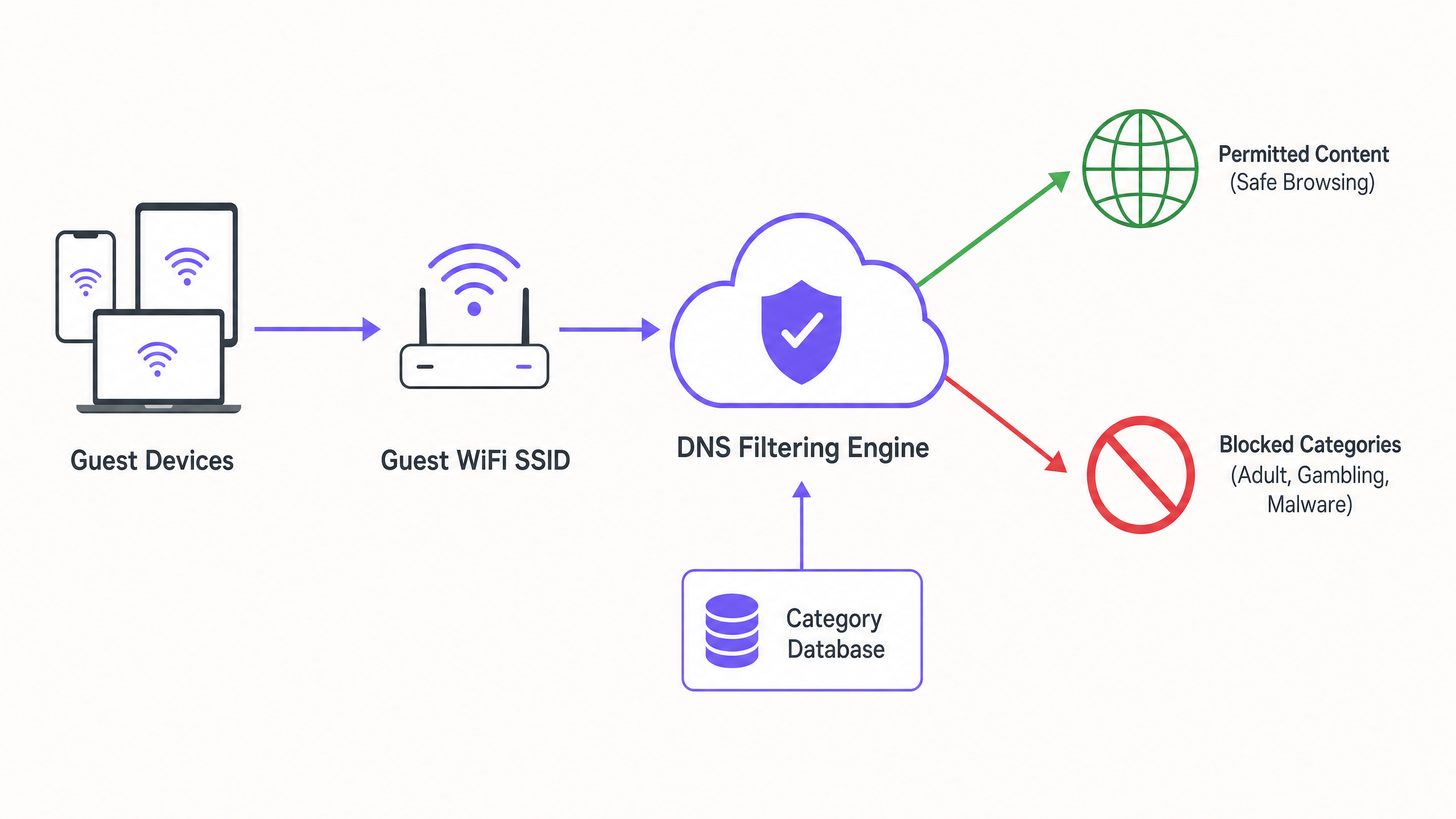
Im Mittelpunkt eines familienfreundlichen Netzwerks steht das kategorienbasierte DNS filtering. Im Gegensatz zu application-layer URL filtering oder deep packet inspection (DPI), die einen erheblichen Verarbeitungsaufwand erfordern und oft die SSL encryption unterbrechen, arbeitet DNS filtering auf der network layer. Wenn ein Client-Gerät versucht, eine Domain aufzulösen, wird die Abfrage von einer cloud-based DNS filtering engine abgefangen. Die Engine gleicht die angefragte Domain mit einer kontinuierlich aktualisierten Datenbank von kategorisierten URLs ab. Fällt die Domain in eine verbotene Kategorie (z. B. malware, adult content), wird die resolution blockiert und der Benutzer auf eine block page umgeleitet.
Dieser Ansatz bietet high throughput und low latency, wodurch er für dichte Umgebungen wie shopping centres, in denen Tausende von concurrent connections üblich sind, hoch scalable ist. Es ist entscheidend zu verstehen, Was ist DNS Filtering? Wie man schädliche Inhalte auf Guest WiFi blockiert , um dies korrekt zu architect.
Netzwerksegmentierung und -isolation
Eine grundlegende Sicherheitsanforderung ist die vollständige Isolation des guest network von der corporate infrastructure. Die guest SSID muss auf einem dedizierten VLAN mit einem separaten DHCP scope betrieben werden. Der Traffic muss über die DNS filtering engine geleitet werden, bevor er ins internet gelangt. Diese segmentation verhindert lateral movement, falls ein guest device kompromittiert wird, und stellt sicher, dass guest traffic policies die back-office operations nicht unbeabsichtigt beeinträchtigen.
Verschlüsselungsstandards und Authentifizierung
Für die wireless infrastructure ist WPA3 der aktuelle Standard für robuste encryption, der vor offline dictionary attacks auf pre-shared keys schützt. Während WPA2 weiterhin verbreitet ist, sollten neue Bereitstellungen WPA3-Unterstützung vorschreiben. Die Authentifizierung erfolgt typischerweise über ein captive portal, das zwei Zwecke erfüllt: terms-of-service acceptance und data capture. Die Integration dessen mit einer WiFi Analytics -Plattform ermöglicht es venue operators, consent-based first-party data in compliance mit GDPR und anderen regional privacy frameworks zu sammeln.
Implementierungsleitfaden
Die Bereitstellung von category-based filtering erfordert einen schrittweisen Ansatz, um Störungen des legitimen Traffics zu minimieren.
1. Audit und Basislinie
Bevor Blocking-Regeln implementiert werden, sollte die bestehende network architecture geprüft werden, um eine ordnungsgemäße VLAN isolation zu bestätigen. Die DNS filtering engine sollte für zwei bis vier Wochen im 'monitoring mode' eingesetzt werden. Diese baseline period bietet Einblick in die tatsächlichen traffic patterns im guest network und ermöglicht es IT teams, legitimate services zu identifizieren, die möglicherweise unbeabsichtigt falsch kategorisiert wurden.
2. Die Kategorienrichtlinie definieren
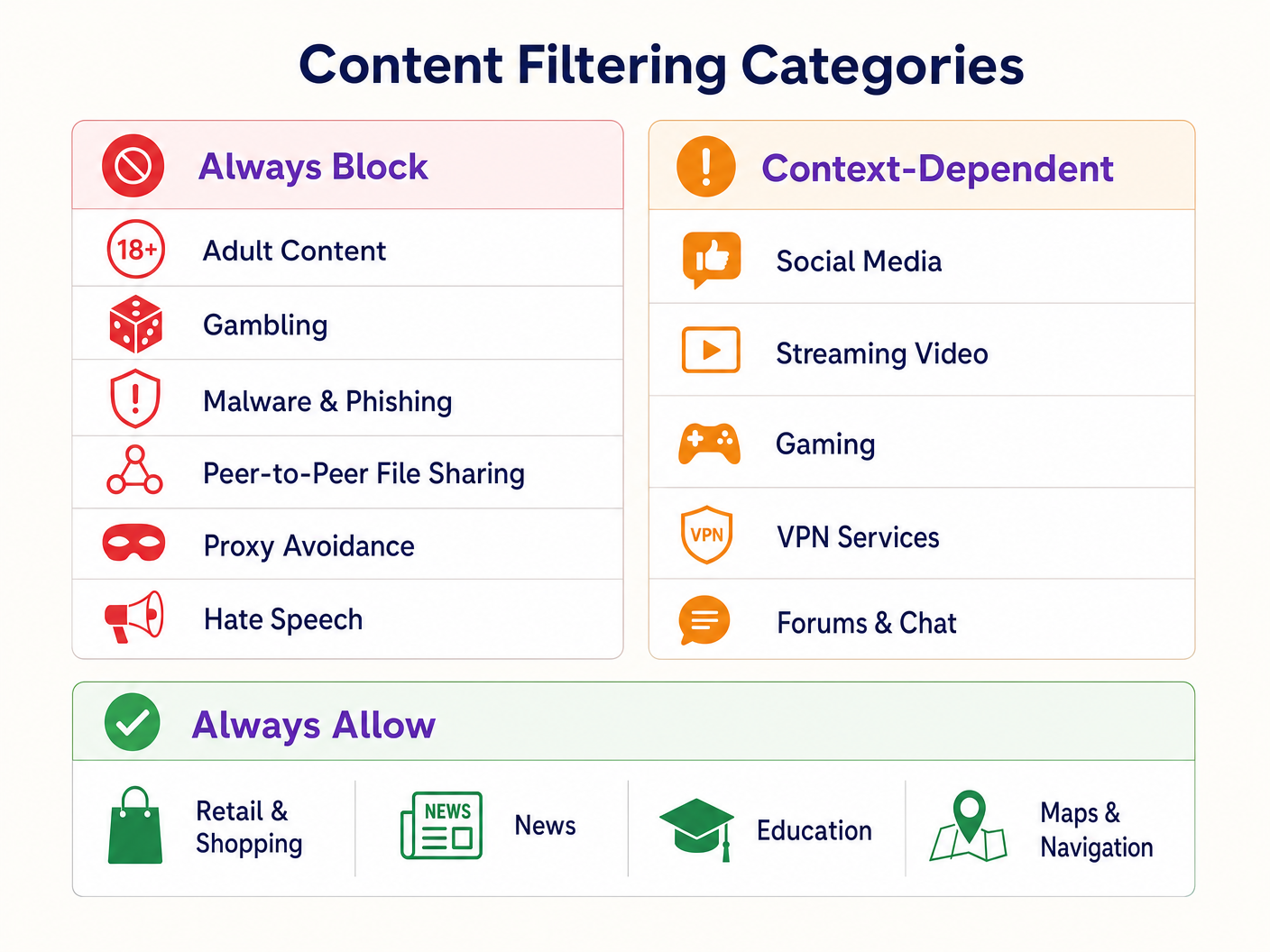
Einen gestuften Richtlinienrahmen festlegen:
- Immer blockieren: Adult content, gambling, malware, phishing, peer-to-peer (P2P) file sharing und proxy avoidance tools.
- Kontextabhängig: Social media, streaming video und gaming. Diese erfordern eine Abstimmung mit den operativen Zielen des Veranstaltungsortes (z. B. bandwidth conservation vs. dwell time encouragement).
- Immer zulassen: Retail domains, Nachrichten, Bildung und Navigation.
3. DNS over HTTPS (DoH) behandeln
Moderne Browser verwenden zunehmend standardmäßig DNS over HTTPS (DoH), wodurch DNS queries verschlüsselt und network-level filtering umgangen werden. Um die filtering policy durchzusetzen, muss die perimeter firewall so konfiguriert werden, dass sie outbound port 443 traffic zu bekannten DoH providers (z. B. Cloudflare's 1.1.1.1, Google's 8.8.8.8) blockiert. Dies zwingt client devices, auf den network-provided DNS resolver zurückzugreifen.
4. Durchsetzung und Ausnahmebehandlung
Wechseln Sie vom monitoring- in den enforcement mode. Konfigurieren Sie eine klare, branded block page, die den Benutzer darüber informiert, warum der Inhalt eingeschränkt wurde, und einen Mechanismus zur Meldung von false positives bietet. Erstellen Sie einen dokumentierten Workflow für die Überprüfung und whitelisting von domains, die von retail tenants oder venue management angefordert werden.
Best Practices
- Proaktive Kommunikation: Informieren Sie retail tenants vor der Durchsetzung über die filtering policy, um Störungen ihrer operational applications zu vermeiden.
- Regelmäßige Richtlinienüberprüfungen: Die threat landscape und internet usage patterns entwickeln sich weiter. Planen Sie vierteljährliche Überprüfungen der category policy und der database accuracy der filtering engine.
- Captive Portals nutzen: Verwenden Sie das captive portal nicht nur zur access control, sondern als strategischen Touchpoint. Stellen Sie sicher, dass das portal design mit der venue's brand übereinstimmt und die terms of use bezüglich c klar formuliert.ntent-Beschränkungen.
- Bandbreitennutzung überwachen: Während die DNS-Filterung den Zugriff auf bestimmte Inhalte verhindert, ist weiterhin ein Bandbreitenmanagement erforderlich. Implementieren Sie eine Ratenbegrenzung pro Client, um eine gerechte Verteilung der Ressourcen zu gewährleisten, insbesondere in Bereichen mit hoher Dichte. Lesen Sie mehr über die Leistungsoptimierung in unserem Leitfaden zu Office Wi Fi: Optimieren Sie Ihr modernes Office Wi-Fi-Netzwerk .
Fehlerbehebung & Risikominderung
Überblockierung (Fehlalarme)
Der häufigste Fehlerfall ist eine übermäßig aggressive anfängliche Richtlinie, die dazu führt, dass legitime Domains blockiert werden. Die Risikominderung basiert auf der anfänglichen Überwachungsphase zur Festlegung einer Verkehrsbasislinie und einem reaktionsschnellen Whitelisting-Prozess.
DoH-Umgehung
Wenn Benutzer erfolgreich auf blockierte Inhalte zugreifen, überprüfen Sie, ob die Firewall-Regeln, die bekannte DoH-Resolver blockieren, aktiv und aktualisiert sind. Das Nichtblockieren von DoH macht die DNS-Filterung auf Netzwerkebene unwirksam.
Captive Portal-Probleme
In Umgebungen mit komplexen HF-Eigenschaften können Geräte Schwierigkeiten haben, die Verbindung lange genug aufrechtzuerhalten, um die Captive Portal-Authentifizierung abzuschließen. Sorgen Sie für eine ausreichende AP-Dichte und eine optimale Kanalplanung. Weitere Informationen zu detaillierten HF-Planungsstrategien finden Sie unter Wi Fi Frequencies: Ein Leitfaden zu Wi-Fi-Frequenzen im Jahr 2026 .
ROI & Geschäftsauswirkungen
Die Implementierung von familienfreundlichem WiFi mittels DNS-Filterung liefert messbaren Geschäftswert:
- Risikominderung: Reduziert erheblich die Wahrscheinlichkeit von behördlichen Bußgeldern und Reputationsschäden, die mit dem Zugriff auf illegale oder unangemessene Inhalte im Netzwerk des Veranstaltungsortes verbunden sind.
- Bandbreitenoptimierung: Das Blockieren von P2P-Dateifreigaben und unautorisiertem Video-Streaming bewahrt Bandbreite für legitime Anwendungsfälle und verzögert kostspielige Leitungs-Upgrades.
- Verbesserte Datenerfassung: Ein sicheres, zuverlässiges Gastnetzwerk fördert höhere Opt-in-Raten am Captive Portal und bereichert das CRM des Veranstaltungsortes mit verwertbaren Erstanbieterdaten für gezielte Marketingkampagnen.
- Mieterzufriedenheit: Die Bereitstellung einer sauberen, leistungsstarken Netzwerkumgebung unterstützt die digitalen Initiativen von Einzelhandelsmietern und verbessert das gesamte Kundenerlebnis.
Hören Sie sich unseren technischen Briefing-Podcast unten an, um weitere Einblicke in Bereitstellungsstrategien und häufige Fallstricke zu erhalten:
Schlüsseldefinitionen
DNS Filtering
The process of blocking access to specific websites by preventing the resolution of their domain names into IP addresses based on categorized databases.
The primary mechanism for enforcing family-friendly content policies efficiently at scale.
VLAN Isolation
The practice of logically separating network traffic into distinct broadcast domains.
Essential for security, ensuring guest traffic cannot interact with corporate or back-office systems.
Captive Portal
A web page that a user must view and interact with before access is granted to a public network.
Used for terms-of-service acceptance and collecting consent-based first-party data.
DNS over HTTPS (DoH)
A protocol for performing remote Domain Name System resolution via the HTTPS protocol.
A significant challenge for network administrators as it encrypts DNS queries, bypassing standard network-level filtering.
WPA3
The third generation of Wi-Fi Protected Access, offering improved encryption and protection against offline dictionary attacks.
The current standard for securing wireless networks, particularly important for public or guest SSIDs.
False Positive
In the context of content filtering, a legitimate website that is incorrectly categorized and blocked by the filtering engine.
Requires a responsive whitelisting process to minimize disruption to venue operations or tenant businesses.
Deep Packet Inspection (DPI)
A form of computer network packet filtering that examines the data part of a packet as it passes an inspection point.
Often too resource-intensive for high-density guest networks compared to DNS filtering.
First-Party Data
Information a company collects directly from its customers and owns.
A key ROI driver for guest WiFi deployments, captured via the captive portal with user consent.
Ausgearbeitete Beispiele
A large shopping centre with 150 retail units is experiencing network congestion and complaints from parents regarding inappropriate content access on the open guest WiFi.
- Implement VLAN isolation for the guest SSID. 2. Deploy a cloud-based DNS filtering engine. 3. Configure a strict block policy for Adult, Gambling, Malware, and P2P categories. 4. Block outbound DoH traffic at the firewall. 5. Implement a captive portal requiring terms-of-service acceptance.
A hotel IT manager needs to implement family-friendly WiFi across public areas but must ensure corporate guests can still access necessary VPN services.
- Deploy DNS filtering with a baseline policy blocking Adult, Malware, and Gambling categories. 2. Explicitly allow the 'VPN Services' category in the filtering policy. 3. Monitor traffic logs to identify any specific corporate VPN endpoints that might be miscategorized and whitelist them proactively.
Übungsfragen
Q1. A retail tenant complains that their new inventory management web application is being blocked on the shopping centre's guest network. What is the immediate next step?
Hinweis: Consider the false-positive resolution workflow.
Musterlösung anzeigen
Review the DNS filtering logs to identify which category the tenant's application domain is currently assigned to. If it is a false positive (e.g., miscategorized as 'Proxy Avoidance'), add the specific domain to the global whitelist and notify the tenant.
Q2. During the monitoring phase of a new DNS filtering deployment, you notice a high volume of traffic to Cloudflare's 1.1.1.1. What does this indicate and how should you respond?
Hinweis: Think about encrypted DNS protocols.
Musterlösung anzeigen
This indicates client devices are using DNS over HTTPS (DoH) to bypass the network's DNS resolver. You must configure the perimeter firewall to block outbound port 443 traffic to known DoH provider IP addresses to force fallback to standard DNS.
Q3. A stadium IT director wants to implement family-friendly WiFi but is concerned about the performance impact of inspecting all traffic during a match day with 50,000 concurrent users. What architecture do you recommend?
Hinweis: Compare network-layer vs. application-layer filtering.
Musterlösung anzeigen
Recommend cloud-based DNS filtering rather than on-premise Deep Packet Inspection (DPI). DNS filtering only intercepts the initial domain resolution request, adding negligible latency, whereas DPI requires significant processing overhead to inspect the payload of every packet, which would bottleneck under stadium-density loads.