
Huawei AirEngine und CloudCampus Integration mit Purple WiFi
Dieses Handbuch bietet eine Schritt-für-Schritt-Anleitung für die Integration von Huawei AirEngine Access Points und iMaster NCE-Campus mit Purple WiFi. Es deckt die Captive Portal-Konfiguration, die 802.1X-Mitarbeiterauthentifizierung und die dynamische PPSK-VLAN-Steuerung für Unternehmensnetzwerke ab.
Diesen Leitfaden anhören
Podcast-Transkript ansehen

Executive Summary
Unternehmensnetzwerke erfordern zuverlässige Hardware gepaart mit intelligentem Identitätsmanagement. Huawei AirEngine Access Points und der iMaster NCE-Campus-Controller bieten High-Density-Konnektivität, während Purple das Cloud-Overlay für Authentifizierung, Analysen und Richtliniendurchsetzung bereitstellt. Dieses Handbuch beschreibt die Integrationsarchitektur, die für die Bereitstellung von Guest WiFi , sicherem Mitarbeiter-WiFi und Multi-Tenant-WiFi über einen einzigen Huawei-Controller erforderlich ist.
Durch die Integration von Huawei CloudCampus mit Purple ersetzen Sie isolierte Authentifizierungssilos durch ein einheitliches identitätsbasiertes Netzwerk. Wir sind an über 80.000 Live-Standorten im Einsatz und haben im Jahr 2024 440 Millionen Anmeldungen verarbeitet. Unsere hardwareunabhängige Plattform lässt sich nativ über Standard-RADIUS- und Captive Portal-Protokolle in Huawei integrieren. Diese Integration ermöglicht bewusste Opt-ins für Besucher, 802.1X-Zertifikatsvalidierung für Mitarbeiter und eine dynamische VLAN-Steuerung über Private Pre-Shared Keys (PPSK) für Mandanten.
Unabhängig davon, ob Sie ein Stadion, einen Universitätscampus oder eine Einzelhandelskette verwalten, bietet dieses Dokument die genauen Konfigurationsschritte, RADIUS-Attribute und Zugriffskontrolllisten (ACLs), die erforderlich sind, um Ihre Wireless Edge zu sichern und First-Party-Daten in großem Umfang zu erfassen.
Hören Sie sich den Podcast zum technischen Briefing an:
Technischer Deep-Dive
Die Integration basiert auf Standardprotokollen: RADIUS (UDP 1812/1813) für Authentifizierung und Accounting sowie HTTPS (TCP 443) für die Captive Portal-Weiterleitung. iMaster NCE-Campus fungiert als Network Access Server (NAS) und RADIUS-Relay und leitet Anfragen von den AirEngine Access Points an die Cloud-RADIUS-Infrastruktur von Purple weiter.
Architektur-Übersicht
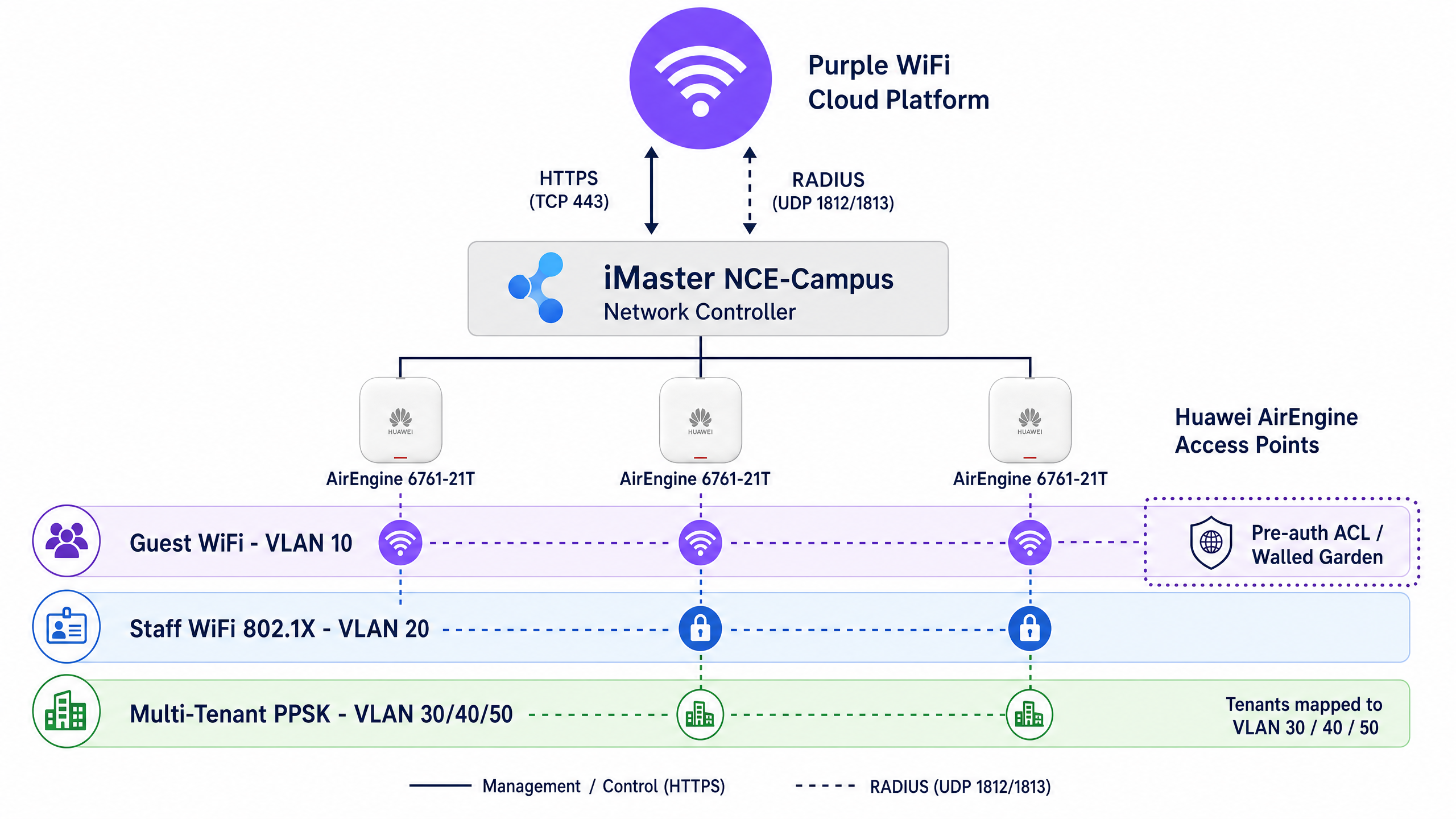
Purple unterstützt drei primäre Authentifizierungsmodelle auf Huawei-Hardware:
- Guest WiFi (Captive Portal): Nicht authentifizierter Datenverkehr wird vom Huawei-Controller abgefangen und auf die Splash-Page von Purple weitergeleitet. Der Zugriff vor der Authentifizierung wird durch eine Walled-Garden-ACL eingeschränkt. Nach erfolgreicher Anmeldung sendet Purple ein RADIUS Access-Accept, das dem Client vollen Netzwerkzugriff gewährt.
- Staff WiFi (802.1X): Mitarbeiter authentifizieren sich mit Unternehmensanmeldedaten über EAP-PEAP oder EAP-TLS. Purple validiert diese Anmeldedaten mit Identitätsanbietern wie Microsoft Entra ID, Okta oder Google Workspace.
- Multi-Tenant WiFi (PPSK): Mandanten verbinden sich über eine einzige gemeinsame SSID mit eindeutigen Passphrasen. Purple validiert die Passphrase und gibt spezifische RADIUS-Attribute zurück, um den Mandanten dynamisch in sein isoliertes VLAN zu steuern.
Walled Garden und Pre-Authentication ACLs
Ein Captive Portal erfordert einen Walled Garden – eine Zugriffskontrollliste (ACL), die den Datenverkehr zu wichtigen Diensten zulässt, bevor sich der Benutzer authentifiziert. Wenn der Walled Garden unvollständig ist, kann die Splash-Page nicht geladen werden, was zu einer schlechten Benutzererfahrung führt.
Für Huawei iMaster NCE-Campus muss die Pre-Authentifizierungs-ACL Folgendes zulassen:
- DNS-Auflösung (UDP 53)
- Die Captive Portal-Domains von Purple (
*.purpleportal.net,*.purple.ai) - Content Delivery Networks (CDNs), die Splash-Page-Assets hosten
- Domains von Identitätsanbietern, wenn Social Login (Apple, Google, Facebook) aktiviert ist
Sämtlicher andere Datenverkehr muss blockiert werden, bis Purple das RADIUS Access-Accept zurückgibt.
Dynamische VLAN-Steuerung und RADIUS-Attribute
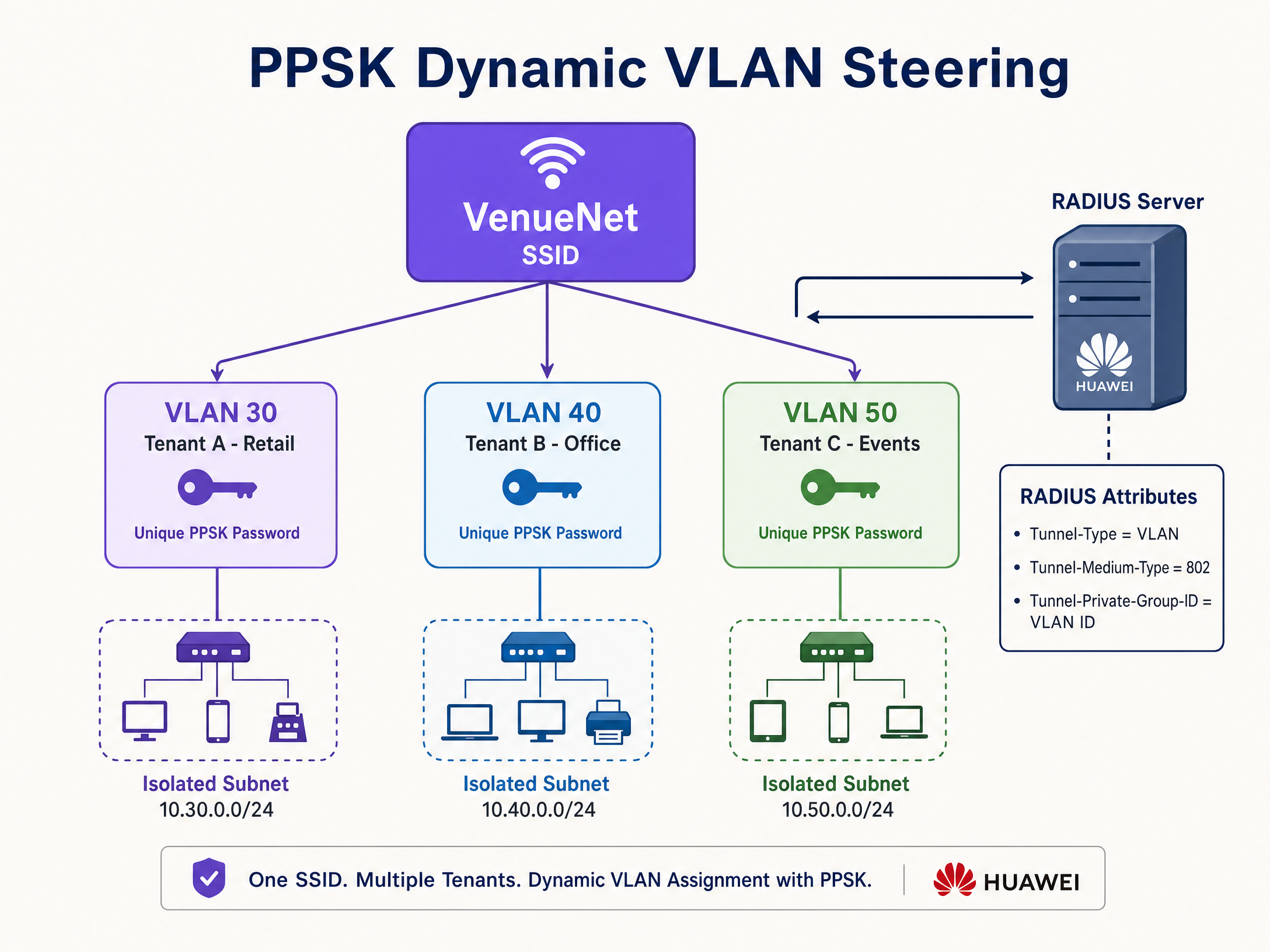
Zur Isolierung des Netzwerkverkehrs verwendet Purple eine dynamische VLAN-Zuweisung. Anstatt mehrere SSIDs auszustrahlen, strahlen Sie eine einzige SSID aus und weisen das VLAN dynamisch basierend auf der Identität des Benutzers zu.
Wenn Purple einen Benutzer authentifiziert (über 802.1X oder PPSK), gibt es ein Access-Accept-Paket zurück, das drei obligatorische IETF-Standard-RADIUS-Attribute enthält:
Tunnel-Type=VLAN(oder 13)Tunnel-Medium-Type=802(oder 6)Tunnel-Private-Group-ID=[VLAN ID]
Der Huawei-Controller empfängt diese Attribute und weist den AirEngine Access Point an, den Datenverkehr des Clients mit der angegebenen VLAN-ID zu taggen.
Implementierungsleitfaden
Dieser Abschnitt beschreibt die genauen Schritte zur Konfiguration von iMaster NCE-Campus für die Purple-Integration.
Schritt 1: Konfiguration des RADIUS-Relay-Servers
Definieren Sie zunächst Purple als externen Authentifizierungsserver.
- Navigieren Sie in iMaster NCE-Campus zu Design > Network Design > Template Management.
- Wählen Sie RADIUS Server und klicken Sie auf Create.
- Stellen Sie den Authentication service auf Portal authentication ein.
- Geben Sie die primären und sekundären RADIUS-IP-Adressen von Purple ein (verfügbar in Ihrem Purple-Dashboard).
- Stellen Sie den Authentifizierungsport auf 1812 und den Accountingport auf 1813 ein.
- Geben Sie das von Purple bereitgestellte RADIUS Shared Secret ein.
- Stellen Sie den NAS identifier auf Device MAC ein.
Schritt 2: Erstellung der Walled-Garden-ACL
Erstellen Sie die ACL, um den Datenverkehr vor der Authentifizierung zuzulassen.
- Navigieren Sie zu Design > Network Design > Template Management > ACL.
- Erstellen Sie eine neue ACL mit dem Namen
Purple_Walled_Garden. - Stellen Sie den ACL Type auf User ein.
- Fügen Sie Erlaubnisregeln für DNS und die von Purple benötigten Domains hinzu (z. B.
*.purpleportal.net). - Speichern Sie das ACL-Template.
Schritt 3: Konfiguration des Captive Portal-URL-Templates
Huawei erfordert ein URL-Template, um Standard-Weiterleitungsparameter dem von Purple geforderten Format zuzuordnen.
- Navigieren Sie zu Design > Network Design > Template Management > URL Template.
- Erstellen Sie ein neues Template mit dem Namen
Purple_URL_Template`. - Stellen Sie den Template Type auf Cloud platform-based relay authentication ein.
- Konfigurieren Sie das Parameter-Mapping genau wie folgt:
redirect-urlwird zugeordnet zuredirect-urlloginurlwird zugeordnet zulogin-urldevice-macwird zugeordnet zuap-macuser-ipwird zugeordnet zuuaddressuser-macwird zugeordnet zuumacssidwird zugeordnet zussid
Schritt 4: Bereitstellung der Guest SSID
Binden Sie den RADIUS-Server, die ACL und das URL-Template an die SSID.
- Navigieren Sie zu Provision > Device Configuration > Site Configuration.
- Wählen Sie AP und erstellen Sie eine neue SSID.
- Stellen Sie den Network Type auf Open ein.
- Wählen Sie Open+Portal authentication.
- Stellen Sie den Authentifizierungstyp auf Relay authentication by cloud platform ein.
- Stellen Sie den Interconnection-Modus auf RADIUS relay ein.
- Wählen Sie das zuvor erstellte
Purple_URL_Templateaus. - Fügen Sie in das Feld für die Drittanbieter-Authentifizierungs-URL Ihre eindeutige Purple Splash-Page-URL ein.
- Wählen Sie das Purple RADIUS-Server-Template aus.
- Wählen Sie die ACL
Purple_Walled_Gardenfür die Standard-Zulassungsregel (Permit Rule) aus. - Speichern und stellen Sie die Konfiguration auf den AirEngine Access Points bereit.
Best Practices
Um eine sichere und zuverlässige Bereitstellung zu gewährleisten, befolgen Sie diese herstellerneutralen Best Practices:
- 802.1X für Mitarbeiter implementieren: Verwenden Sie niemals gemeinsam genutzte PSKs für Mitarbeiternetzwerke. Stellen Sie 802.1X mit EAP-TLS über das SecurePass-Add-on von Purple bereit, um Client-Zertifikate auszustellen. Dies eliminiert passwortbasierte Phishing-Vektoren und entspricht den Anforderungen von ISO 27001.
- SSIDs konsolidieren: Das Ausstrahlen von zu vielen SSIDs verringert die Airtime-Effizienz aufgrund des Overheads durch Management-Frames. Nutzen Sie PPSK und dynamisches VLAN-Steering, um mandantenfähige Netzwerke in einer einzigen SSID zusammenzuführen.
- Trunk-Konfigurationen überprüfen: Die dynamische VLAN-Zuweisung schlägt geräuschlos fehl, wenn das zugewiesene VLAN auf dem Switch-Trunk-Port, der den Access Point verbindet, nicht zugelassen ist. Überprüfen Sie vor dem Testen des RADIUS-Steerings immer die Switchport-Konfigurationen.
- RADIUS-Latenz überwachen: Authentifizierungs-Timeouts resultieren häufig aus WAN-Latenzen. Stellen Sie sicher, dass Ihr iMaster NCE-Campus-Controller über eine Verbindung mit geringer Latenz zur regionalen RADIUS-Infrastruktur von Purple verfügt.
Fehlerbehebung & Risikominderung
Bei der Integration von Cloud-RADIUS in Enterprise-Controller lassen sich Probleme in der Regel auf drei Bereiche eingrenzen: den Walled Garden, das Shared Secret von RADIUS oder das VLAN-Trunking.
Splash Page lädt nicht
Symptom: Ein Gerät verbindet sich mit dem Guest WiFi, aber der Browser zeigt einen Timeout-Fehler anstelle der Purple Splash Page an.
Ursache: Die Walled Garden ACL ist unvollständig und blockiert den Zugriff auf die Portal-Domains von Purple oder erforderliche CDNs.
Behebung: Verbinden Sie ein Testgerät mit der SSID. Versuchen Sie, purpleportal.net anzupingen. Wenn der Ping fehlschlägt, überprüfen Sie die ACL-Konfiguration des iMaster NCE-Campus und stellen Sie sicher, dass sie auf den Pre-Authentication-Status der SSID angewendet wird.
Lautlose Authentifizierungsfehler
Symptom: Ein Benutzer gibt gültige Anmeldedaten ein, aber die Verbindung bricht ohne Fehlermeldung ab. Ursache: Keine Übereinstimmung des RADIUS Shared Secret zwischen iMaster NCE-Campus und Purple. Behebung: Kopieren Sie das Shared Secret direkt aus dem Purple-Dashboard und fügen Sie es in das Huawei RADIUS-Server-Template ein. Ein einzelnes nachfolgendes Leerzeichen beschädigt den in RADIUS-Paketen verwendeten MD5-Hash.
DHCP-Timeout nach der Authentifizierung
Symptom: Ein Mitarbeiter authentifiziert sich erfolgreich über 802.1X, aber das Gerät erhält eine 169.254.x.x APIPA-Adresse anstelle einer gültigen IP.
Ursache: Purple hat erfolgreich ein dynamisches VLAN über RADIUS zugewiesen, aber dieses VLAN wird nicht an den AirEngine Access Point weitergeleitet (not trunked).
Behebung: Melden Sie sich am Access-Switch an und überprüfen Sie, ob der Befehl port trunk allow-pass vlan die Ziel-VLAN-ID auf der mit dem AP verbundenen Schnittstelle enthält.
ROI & geschäftliche Auswirkungen
Die Bereitstellung von Huawei AirEngine mit Purple verwandelt eine Standard-Netzwerkinfrastruktur in einen messbaren geschäftlichen Mehrwert.
Für Betreiber im Einzelhandel erfasst diese Integration First-Party-Daten von Käufern und ermöglicht so gezielte Marketingkampagnen, die die Besucherfrequenz steigern und den durchschnittlichen Transaktionswert erhöhen. Das WiFi Analytics -Dashboard von Purple bietet Heatmaps und Verweildauer-Metriken, sodass Standortmanager die Ladenlayouts basierend auf dem tatsächlichen Besucherverhalten optimieren können.
In der Hotellerie eliminiert die automatisierte Authentifizierung über OpenRoaming oder Passpoint die Hürden manueller Logins und steigert so die Gästezufriedenheit. In mandantenfähigen Gebäuden reduziert das dynamische VLAN-Steering über PPSK den IT-Overhead, da separate SSIDs für jeden neuen Mandanten nicht mehr manuell bereitgestellt und verwaltet werden müssen.
Durch die Zusammenführung von Gäste-Engagement, Mitarbeitersicherheit und Mandantenisolierung auf einer einzigen Hardware-Plattform maximieren Unternehmen die Rendite ihrer Investition in Huawei CloudCampus.
Schlüsseldefinitionen
iMaster NCE-Campus
Huawei's cloud-based or on-premises network automation and management platform.
IT teams use this as the central controller to configure SSIDs, push policies to AirEngine APs, and set up RADIUS relay to Purple.
PPSK (Private Pre-Shared Key)
A security feature that allows multiple unique passwords to be used on a single SSID, with each password tying the user to a specific network policy or VLAN.
Essential for multi-tenant environments (like coworking spaces or retail parks) where tenants need isolated networks without broadcasting dozens of SSIDs.
Dynamic VLAN Steering
The process of assigning a device to a specific Virtual Local Area Network based on its authenticated identity, rather than the SSID it connected to.
Used by Purple to ensure that a manager, a cashier, and a guest connecting to the same physical access point are placed on completely separate, secure network segments.
Walled Garden
An Access Control List (ACL) applied to unauthenticated users, permitting access only to specific IP addresses or domains required to complete the login process.
If the Walled Garden is misconfigured, guests will see a blank screen or a timeout error instead of the Purple splash page.
RADIUS Relay
A configuration where the local network controller forwards authentication requests from access points to an external RADIUS server.
Huawei iMaster NCE-Campus acts as the relay, securely passing credentials from the venue to Purple's cloud infrastructure for validation.
802.1X
An IEEE standard for port-based network access control that provides an authentication mechanism to devices wishing to attach to a LAN or WLAN.
The enterprise standard for Staff WiFi. It replaces shared passwords with individual user credentials or digital certificates.
EAP-TLS
Extensible Authentication Protocol - Transport Layer Security. An 802.1X authentication method that relies on client and server certificates rather than passwords.
The most secure authentication method available. Purple's SecurePass issues these certificates to employee devices to eliminate phishing risks.
Captive Portal
A web page that a user of a public-access network is obliged to view and interact with before access is granted.
The primary mechanism Purple uses to capture first-party data and consent from venue visitors.
Ausgearbeitete Beispiele
A 200-room hotel needs to provide secure, isolated WiFi for guests, staff, and a third-party coffee shop operating in the lobby, using only two SSIDs to preserve airtime.
Deploy one SSID named 'Hotel_Guest' configured with an Open+Portal authentication policy pointing to Purple's captive portal. Deploy a second SSID named 'Hotel_Secure' configured with WPA3-Enterprise and 802.1X authentication. Staff authenticate via EAP-TLS, and Purple returns a RADIUS attribute assigning them to VLAN 20. The coffee shop uses PPSK on the same 'Hotel_Secure' SSID; they enter a unique passphrase, and Purple returns a RADIUS attribute assigning them to VLAN 30.
A large retail chain is migrating to Huawei AirEngine and needs to ensure their existing Purple splash page loads correctly across all stores without triggering security warnings on modern smartphones.
Configure the iMaster NCE-Campus URL template to map the required parameters (ap-mac, uaddress, umac, ssid, redirect-url) precisely. Build a comprehensive Walled Garden ACL that permits DNS (UDP 53) and HTTPS (TCP 443) traffic to Purple's domains and any required social login APIs. Ensure the controller intercepts HTTP traffic and redirects it to the HTTPS splash page.
Übungsfragen
Q1. You have configured the Guest SSID and the Walled Garden ACL on iMaster NCE-Campus. When you test the connection, your phone detects the captive portal, but the screen remains blank. What is the most likely cause?
Hinweis: Consider what the device needs to load a modern web page hosted on a cloud platform.
Musterlösung anzeigen
The Walled Garden ACL is likely missing permit rules for required domains. Specifically, DNS (UDP 53) must be permitted, along with HTTPS access to Purple's portal domains and any Content Delivery Networks (CDNs) hosting the page assets. If social login is enabled, those specific API endpoints must also be permitted pre-authentication.
Q2. A tenant using your PPSK network complains they cannot reach the internet. You check the iMaster NCE-Campus logs and see that Purple returned a RADIUS Access-Accept with Tunnel-Private-Group-ID set to 40. However, the client device has an IP address of 169.254.x.x. What is the configuration error?
Hinweis: Authentication succeeded, but network routing failed at the edge.
Musterlösung anzeigen
The switchport connecting the Huawei AirEngine access point to the network is not configured to trunk VLAN 40. While Purple successfully authorised the user and the controller instructed the AP to tag traffic with VLAN 40, the upstream switch dropped the packets because the VLAN is not permitted on the trunk. You must add VLAN 40 to the trunk allow-pass list on the access switch.
Q3. You are migrating from a legacy controller to Huawei iMaster NCE-Campus. You configure the RADIUS server template exactly as it was on the old system, but all authentication requests fail silently. What should you check first?
Hinweis: Silent failures in RADIUS usually indicate a cryptographic mismatch.
Musterlösung anzeigen
Verify the RADIUS Shared Secret. If the secret configured in iMaster NCE-Campus does not perfectly match the secret in the Purple dashboard, the RADIUS packets cannot be decrypted, resulting in silent failures or Access-Reject messages without clear error codes. Ensure there are no trailing spaces when copying the secret.
Weiterlesen in dieser Reihe
OpenWrt Custom Firmware Integration mit Purple WiFi
Dieses Handbuch bietet das vollständige Integrations-Playbook für die Bereitstellung von OpenWrt Custom Firmware mit Purple WiFi. Es deckt die Konfiguration des CoovaChilli Captive Portal, die Verwaltung des iptables Walled Garden, sicheres Mitarbeiter-WiFi über 802.1X mit hostapd sowie die mandantenfähige PPSK-Segmentierung mit dynamischer VLAN-Zuweisung ab. Damit erhalten IT-Teams die genauen Konfigurationsschritte, die für den Aufbau eines identitätsbasierten Netzwerks auf jeder OpenWrt-fähigen Hardware erforderlich sind.
MikroTik RouterOS Captive Portal und Purple WiFi Integrationsleitfaden
Dieser technische Leitfaden bietet eine Schritt-für-Schritt-Anleitung zur Integration von MikroTik RouterOS in die WiFi-Plattform von Purple. Er behandelt die Guest WiFi Captive Portal-Konfiguration, die Staff WiFi 802.1X-Authentifizierung und Multi-Tenant-WiFi unter Verwendung von Private PSKs für eine dynamische VLAN-Segmentierung.
Alta Labs Integration mit Purple WiFi: Einrichtung und Captive Portal Konfiguration
Dieses technische Referenzhandbuch beschreibt die End-to-End-Integration von Alta Labs AP6 und AP6 Pro Access Points mit dem Cloud-basierten Captive Portal von Purple. Es beschreibt detailliert die Konfiguration externer Weiterleitungen, RADIUS-Authentifizierung, Walled-Garden-Anforderungen und Multi-Tenant-Segmentierung mithilfe von AltaPass Private Pre-Shared Keys. Betreiber von Veranstaltungsorten und IT-Teams erhalten einen reproduzierbaren Bereitstellungsleitfaden für das Gastgewerbe, den Einzelhandel und Smart-Office-Umgebungen.