
OpenWrt Custom Firmware Integration mit Purple WiFi
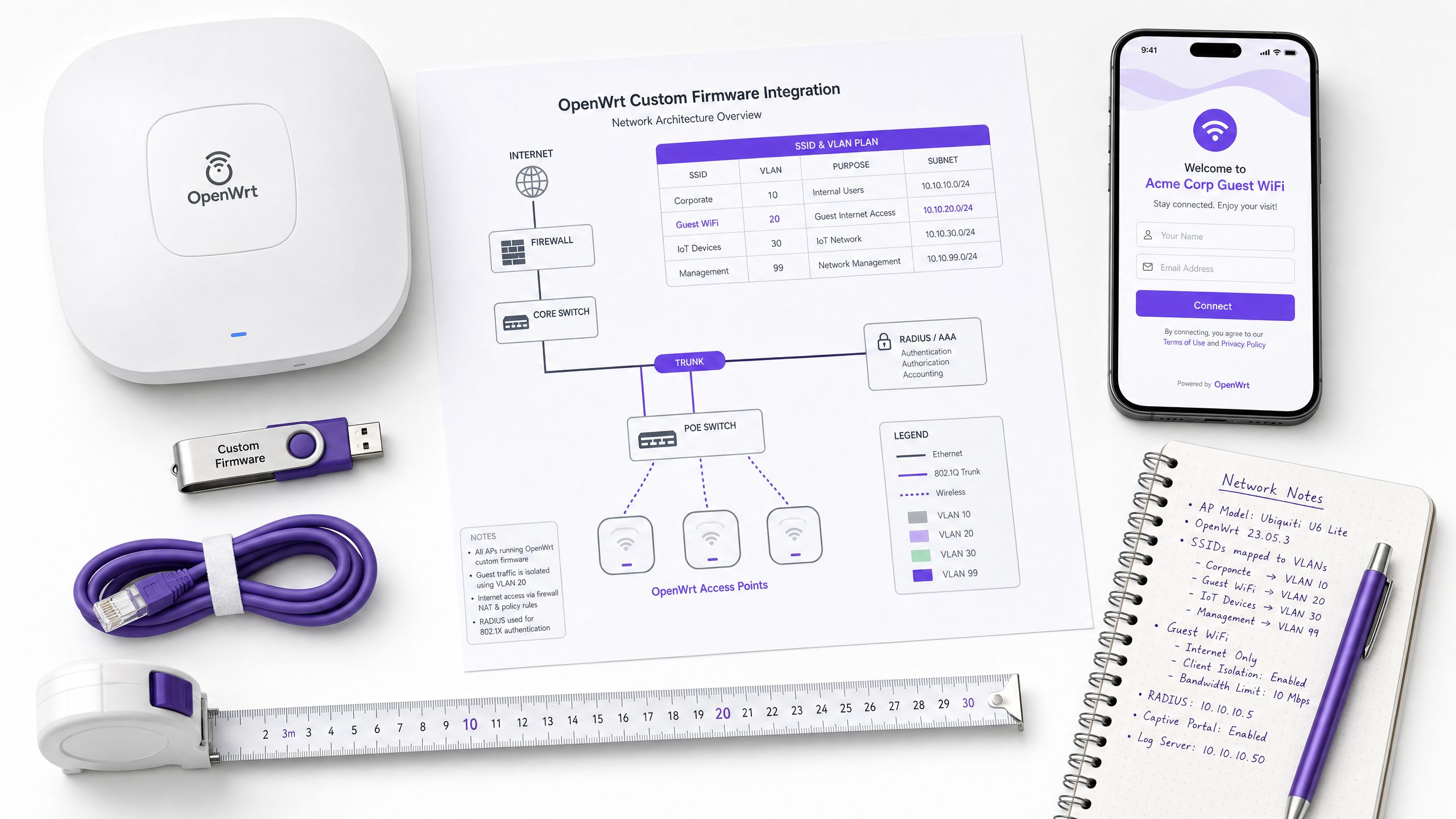
Dieses Handbuch bietet das vollständige Integrations-Playbook für die Bereitstellung von OpenWrt Custom Firmware mit Purple WiFi. Es deckt die Konfiguration des CoovaChilli Captive Portal, die Verwaltung des iptables Walled Garden, sicheres Mitarbeiter-WiFi über 802.1X mit hostapd sowie die mandantenfähige PPSK-Segmentierung mit dynamischer VLAN-Zuweisung ab. Damit erhalten IT-Teams die genauen Konfigurationsschritte, die für den Aufbau eines identitätsbasierten Netzwerks auf jeder OpenWrt-fähigen Hardware erforderlich sind.
Diesen Leitfaden anhören
Podcast-Transkript ansehen
Executive Summary
OpenWrt ist die bevorzugte Firmware für IT-Teams, die Hardware-Unabhängigkeit benötigen, ohne auf Kontrolle der Enterprise-Klasse verzichten zu müssen. Sie wird im Gastgewerbe, im Einzelhandel und in öffentlichen Einrichtungen eingesetzt und bietet einen vollständig konfigurierbaren Linux-basierten Netzwerk-Stack. Doch standardmäßig ist OpenWrt ein unbeschriebenes Blatt. Ohne eine strukturierte Identitätsebene werden Gastnetzwerke unüberschaubar, Mitarbeiternetzwerke bleiben unsicher und mandantenfähige Umgebungen fallen in ein einziges flaches Netzwerk zusammen.
Dieses Handbuch bietet das definitive Integrations-Playbook für die Anbindung von OpenWrt an die Cloud-RADIUS- und Captive Portal-Plattform von Purple. Wir behandeln vier verschiedene Bereitstellungsszenarien: die Weiterleitung zum Gast-Captive Portal mittels CoovaChilli, die Konfiguration des iptables Walled Garden, sicheres Mitarbeiter-WiFi über hostapd mit IEEE 802.1X sowie die mandantenfähige Segmentierung mittels Private Pre-Shared Keys (PPSK) mit dynamischer VLAN-Zuweisung. Am Ende verfügen Sie über die genauen Konfigurationsparameter, die häufigsten Fehlermuster und die Entscheidungsrahmen, die für die Bereitstellung eines produktionsbereiten, GDPR-konformen, identitätsgesteuerten Netzwerks auf jeder OpenWrt-fähigen Hardware erforderlich sind.
Purple ist an über 80.000 Live-Standorten im Einsatz und hat im Jahr 2024 440 Millionen Logins verarbeitet (interne Daten von Purple, 2024). Die hier beschriebene Architektur ist dieselbe, die in großem Umfang in Hotelketten, Einzelhandelsflächen und Verkehrsknotenpunkten eingesetzt wird.
Technischer Deep-Dive
Die CoovaChilli Captive Portal-Architektur
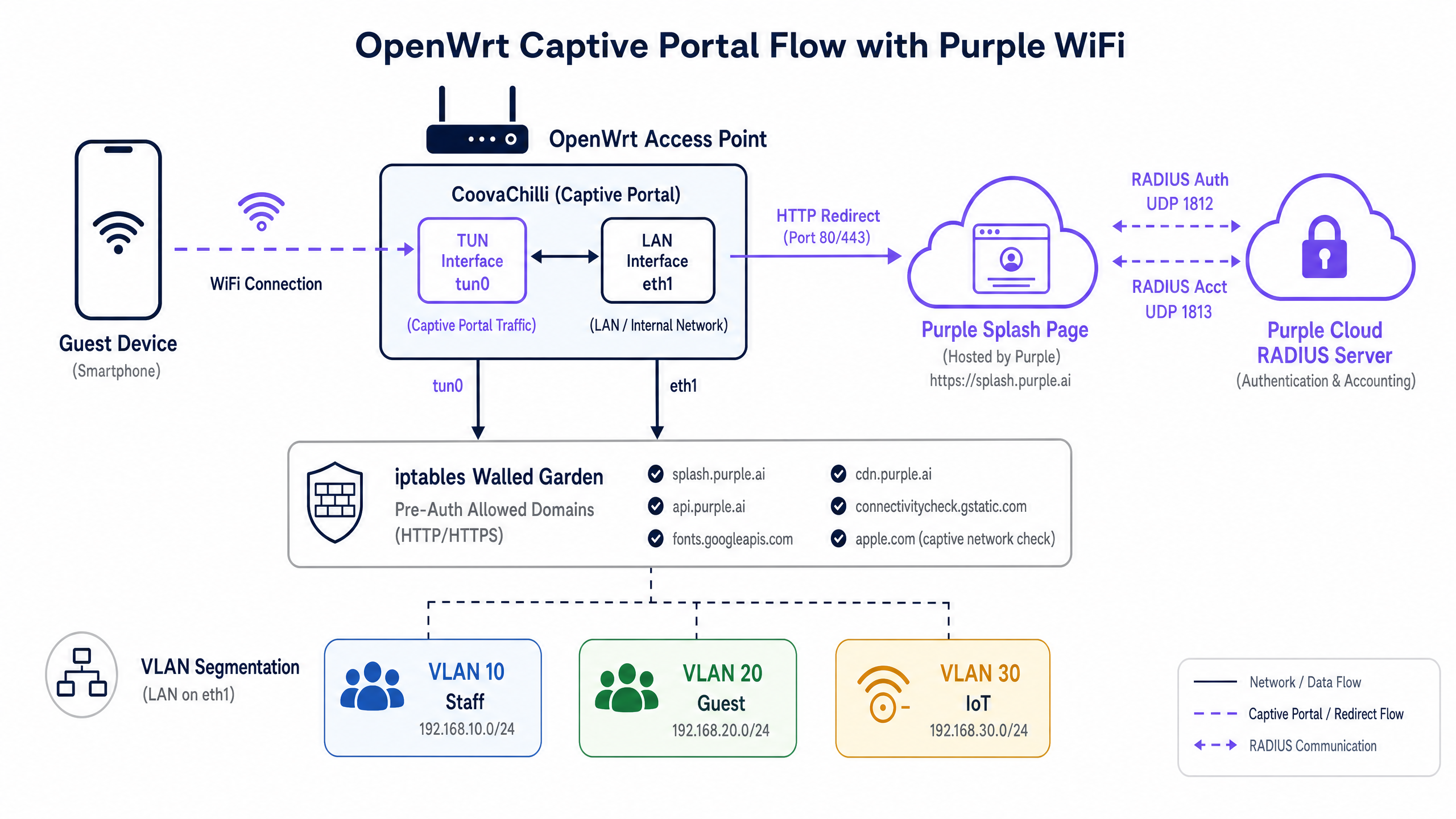
Bei der Bereitstellung von Gast-WiFi auf OpenWrt ist CoovaChilli der Branchenstandard-Access-Controller. Er fungiert als Captive Portal-Daemon, der nicht authentifizierten Client-Traffic abfängt, IP-Adressen über seinen internen DHCP-Server auf der virtuellen Schnittstelle tun0 bereitstellt und Walled-Garden-Richtlinien mithilfe von direkt verwalteten iptables-Regeln durchsetzt.
Der Authentifizierungsablauf funktioniert wie folgt. Ein Gastgerät verbindet sich mit der offenen SSID. CoovaChilli weist dem Gerät eine IP-Adresse aus seinem internen Pool zu (typischerweise 10.1.0.0/24). Wenn das Gerät seine erste HTTP-Anfrage sendet, fängt CoovaChilli diese ab und führt eine HTTP-302-Weiterleitung zur URL der Purple-Begrüßungsseite (Splash Page) durch. Während dieser Vorauthentifizierungsphase ist das Gerät isoliert – es kann nur die explizit im Walled Garden aufgeführten Domains erreichen.
Sobald sich der Gast im Purple-Portal authentifiziert, sendet der Cloud-RADIUS-Server von Purple eine Access-Accept-Nachricht an CoovaChilli auf UDP-Port 1812. CoovaChilli aktualisiert daraufhin seine iptables-Regeln, um den Internetzugang für diese spezifische MAC-Adresse zuzulassen, und beginnt mit der Übertragung von Accounting-Daten (Sitzungsdauer, übertragene Bytes) an den Purple RADIUS-Accounting-Server auf UDP-Port 1813. Accounting ist nicht optional – es ist der Mechanismus, mit dem Purple Ihr WiFi Analytics -Dashboard mit Sitzungsdaten füllt.
Walled Garden: iptables und Domain-Allowlists
Der Walled Garden ist das betrieblich kritischste Konfigurationselement in jeder Captive Portal-Bereitstellung. CoovaChilli verwaltet den Walled Garden über zwei Mechanismen: den Parameter uamallowed für einzelne IP-Adressen und den Parameter uamdomains für die domänenbasierte Freigabe (Allowlisting) mit DNS-Inspektion.
Für eine Purple-Integration sind die folgenden Walled-Garden-Einträge mindestens erforderlich:
| Domain | Zweck |
|---|---|
*.purple.ai |
Portal-Assets, API und Authentifizierungsendpunkte |
*.googleapis.com |
Google Fonts und Google Sign-In |
*.gstatic.com |
Google-Verbindungstest und statische Assets |
*.facebook.com |
Facebook Login-API |
*.fbcdn.net |
Facebook-CDN für Login-Assets |
captive.apple.com |
Apple CNA-Erkennung (siehe Hinweis unten) |
connectivitycheck.gstatic.com |
Android Captive Portal-Erkennung |
Hinweis zur Apple CNA-Verwaltung: Wenn Sie captive.apple.com in den Walled Garden aufnehmen, iOS-Geräte die Internetverbindung vor der Authentifizierung erkennen und das Captive Network Assistant-Popup unterdrücken. Die meisten Bereitstellungen im Gastgewerbe schließen diese Domain bewusst aus, um den automatischen Portal-Aufruf auszulösen. Die richtige Wahl hängt von der Gestaltung Ihres Gäste-Erlebnisses ab.
Sicheres Mitarbeiter-WiFi: hostapd und IEEE 802.1X
Gastnetzwerke erfordern ein reibungsloses Onboarding. Mitarbeiternetzwerke erfordern absolute Sicherheit. Für interne Benutzer verwendet OpenWrt hostapd, um die IEEE 802.1X-Authentifizierung zu ermöglichen. In dieser Architektur fungiert der OpenWrt-Access-Point als Authentifikator, der EAP-Nachrichten (Extensible Authentication Protocol) zwischen dem Client-Gerät (Supplicant) und dem Purple RADIUS-Server weiterleitet.
Für Unternehmensgeräte ist EAP-TLS der vorgeschriebene Standard. Es basiert auf einer gegenseitigen Zertifikatsauthentifizierung – sowohl der Server als auch das Client-Gerät weisen digitale Zertifikate vor –, wodurch Passwörter und die damit verbundenen Risiken von Diebstahl von Anmeldedaten oder Phishing vollständig eliminiert werden. Für Umgebungen, die noch nicht für eine vollständige Public-Key-Infrastruktur (PKI) bereit sind, bietet PEAP-MSCHAPv2 eine angemessene Übergangsoption, bei der ein verschlüsselter Tunnel zum Schutz von Benutzernamen und Passwörtern verwendet wird.
Nach erfolgreicher Authentifizierung eines Mitarbeiters gibt der RADIUS-Server Autorisierungsattribute zurück. Das Schlüsselattribut für die Netzwerksegmentierung ist Tunnel-Private-Group-ID, das OpenWrt anweist, den Benutzer dynamisch dem richtigen VLAN zuzuweisen. Dies ist der Mechanismus hinter identitätsbasierten Netzwerken: Die Identität des Benutzers, nicht sein physischer Standort, bestimmt seinen Netzwerkzugriff.
Mandantenfähige Segmentierung: OpenWrt PPSK Konfiguration
In Multi-Tenant-Umgebungen – Coworking-Spaces, Build-to-Rent-Immobilien (BTR), Einkaufszentren mit mehreren Anbietern oder Stadien mit separaten Sponsorenzonen – ist das Ausstrahlen mehrerer SSIDs betrieblich teuer und HF-ineffizient. Jede zusätzliche SSID erhöht den Overhead für Management-Frames und reduziert die verfügbare Sendezeit für den Datenverkehr.
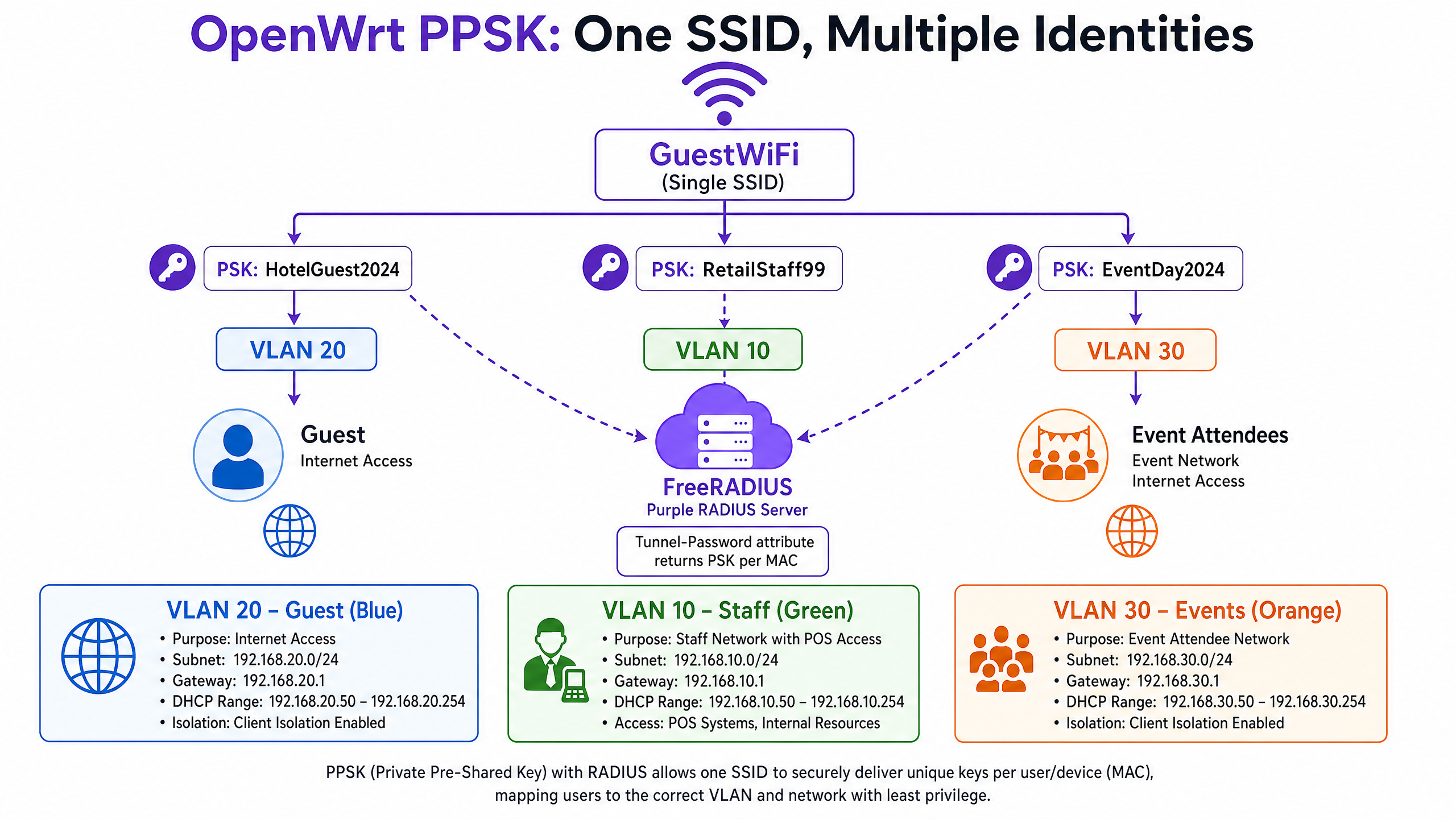
Private Pre-Shared Keys (PPSK), manchmal auch als dynamische PSK bezeichnet, lösen dieses Problem. Sie strahlen eine einzige SSID aus. Wenn ein Gerät versucht, eine Verbindung herzustellen, sendet hostapd die MAC-Adresse des Geräts über einen Standard-Access-Request an den RADIUS-Server. Der RADIUS-Server gleicht die MAC-Adresse mit seiner Datenbank ab und gibt ein Access-Accept zurück, das zwei kritische Attribute enthält: das Attribut Tunnel-Password (das eindeutige Passwort für dieses Gerät) und das Attribut Tunnel-Private-Group-ID (die VLAN-Zuweisung). Das Gerät verbindet sich mit seinem eindeutigen Passwort und wird direkt dem zugewiesenen VLAN zugeordnet.
Das bedeutet, dass sich ein Filialleiter und ein Event-Teilnehmer mit derselben SSID verbinden können, aber basierend auf ihrer eindeutigen Identität an völlig separate, isolierte Netzwerke weitergeleitet werden.
Implementierungsleitfaden
Schritt 1: Purple RADIUS-Anmeldedaten abrufen
Bevor Sie die OpenWrt-Konfiguration ändern, rufen Sie die folgenden Informationen aus der Admin-Konsole des Purple-Portals ab:
- IP-Adresse des primären RADIUS-Servers
- IP-Adresse des sekundären RADIUS-Servers (für Failover)
- RADIUS Shared Secret
- Captive Portal Splash-Page-URL
- Weiterleitungs-URL nach der Authentifizierung
Schritt 2: CoovaChilli für Gast-WiFi installieren und konfigurieren
Installieren Sie das Paket coova-chilli über opkg:
opkg update && opkg install coova-chilli
Die primäre Konfigurationsdatei ist /etc/chilli/defaults. Definieren Sie die Kernnetzwerkparameter:
# Netzwerkschnittstellen
HS_WANIF=eth0           # Upstream-Internetschnittstelle
HS_LANIF=wlan0          # Die Gast-WiFi-Schnittstelle (oder eine VLAN-Subschnittstelle)

# Gast-Subnetz
HS_NETWORK=10.10.20.0
HS_NETMASK=255.255.255.0
HS_UAMLISTEN=10.10.20.1 # IP von CoovaChilli im Gastnetzwerk
HS_UAMPORT=3990

# Purple RADIUS-Integration
HS_RADIUS=
HS_RADIUS2=
HS_RADSECRET=
HS_NASID=venue-openwrt-01

# Purple Splash-Page
HS_UAMSERVER=

# Walled Garden – domänenbasierte Whitelist
HS_UAMDOMAINS=".purple.ai,.googleapis.com,.gstatic.com,.facebook.com,.fbcdn.net"
Aktivieren und starten Sie den Dienst:
/etc/init.d/chilli enable
/etc/init.d/chilli start
Schritt 3: Konfigurieren Sie die drahtlose OpenWrt-Schnittstelle für die Gast-SSID
Definieren Sie in /etc/config/wireless die Gast-SSID als offenes Netzwerk, das an die von CoovaChilli verwaltete Schnittstelle gebunden ist:
config wifi-iface 'guest_wifi'
    option device 'radio0'
    option network 'guest'
    option mode 'ap'
    option ssid 'Venue_Guest'
    option encryption 'none'
    option isolate '1'
Die Client-Isolierung (isolate '1') verhindert, dass Gastgeräte untereinander kommunizieren – eine zwingend erforderliche Sicherheitsmaßnahme für jedes gemeinsam genutzte Netzwerk.
Schritt 4: hostapd für 802.1X Mitarbeiter-WiFi konfigurieren
Konfigurieren Sie für die Mitarbeiter-SSID WPA2-Enterprise in /etc/config/wireless:
config wifi-iface 'staff_wifi'
    option device 'radio0'
    option network 'staff_vlan10'
    option mode 'ap'
    option ssid 'Venue_Staff'
    option encryption 'wpa2'
    option server ''
    option port '1812'
    option key ''
    option dynamic_vlan '2'
    option vlan_tagged_interface 'eth0'
    option vlan_bridge 'br-vlan'
    option vlan_naming '0'
Die Einstellung dynamic_vlan '2' weist hostapd an, die vom RADIUS-Server zurückgegebene VLAN-Zuweisung zu erzwingen und die Authentifizierung abzulehnen, wenn kein VLAN zurückgegeben wird.
Paketanforderung: Das Standardpaket wpad-mini unterstützt kein WPA2-Enterprise. Sie müssen wpad oder wpad-openssl installieren:
opkg remove wpad-mini && opkg install wpad-openssl
Schritt 5: PPSK für Multi-Tenant-Segmentierung konfigurieren
PPSK erfordert, dass hostapd eine MAC-Adressen-Authentifizierung gegenüber dem RADIUS-Server durchführt, der dann das gerätespezifische Passwort zurückgibt. In /etc/config/wireless:
config wifi-iface 'ppsk_ssid'
    option device 'radio0'
    option mode 'ap'
    option ssid 'Venue_Connect'
    option encryption 'psk2'
    option key 'default_fallback_key'
    option macfilter 'radius'
    option server ''
    option port '1812'
    option key ''
    option dynamic_vlan '2'
    option vlan_tagged_interface 'eth0'
    option wpa_psk_radius '2'
Der Parameter wpa_psk_radius '2' weist hostapd an, das Attribut Tunnel-Password aus der RADIUS-Antwort zu verlangen. Wenn der RADIUS-Server kein Passwort zurückgibt, wird die Authentifizierung abgelehnt.
Auf der Seite von Purple RADIUS ordnet der Abschnitt authorize Ihrer FreeRADIUS-Konfiguration (oder einer entsprechenden Konfiguration) MAC-Adressen Passwörtern und VLAN-IDs zu:
# Beispiel für einen RADIUS-Autorisierungseintrag für PPSK
AA:BB:CC:DD:EE:FF   Auth-Type := Accept
    Tunnel-Password = "GuestPass2024",
    Tunnel-Type = VLAN,
    Tunnel-Medium-Type = IEEE-802,
    Tunnel-Private-Group-ID = "20"
Schritt 6: Dynamische VLAN-Zuweisung konfigurieren
Damit die dynamische VLAN-Zuweisung funktioniert, muss Ihr OpenWrt-Switch so konfiguriert sein, dass er die relevanten VLANs als getaggten Datenverkehr auf dem Trunk-Port überträgt, der mit Ihrem Core-Switch verbunden ist. In /etc/config/network:
config interface 'vlan10'
    option ifname 'eth0.10'
    option proto 'dhcp'

config interface 'vlan20'
    option ifname 'eth0.20'
    option proto 'dhcp'

config interface 'vlan30'
    option ifname 'eth0.30'
    option proto 'dhcp'
Stellen Sie sicher, dass Ihr Core-Switch-Port als Trunk konfiguriert ist und die VLANs 10, 20 und 30 getaggt weiterleitet.
Best Practices
Absolute Netzwerktrennung. Überbrücken Sie niemals gGast-Schnittstellen mit internen Netzwerken. Der Gast-Traffic muss auf einem dedizierten VLAN isoliert und direkt an die Internet-Firewall geleitet werden. Dies ist eine unverhandelbare Anforderung für die PCI-DSS-4.0-Compliance, die vorschreibt, dass Gast-WiFi-Netzwerke vollständig von allen Netzwerksegmenten isoliert sein müssen, die Karteninhaberdaten verarbeiten.
Präzision des Walled Garden. Ein unvollständiger Walled Garden ist die Hauptursache für Fehler beim Captive Portal. Verwenden Sie die Entwicklertools Ihres Browsers auf einem Testgerät, das mit der Gast-SSID verbunden ist, um zu identifizieren, welche Anfragen vor der Authentifizierung blockiert werden. Jede blockierte Domain ist ein potenzieller Portal-Fehler.
RADIUS-Accounting-Intervalle. Konfigurieren Sie das CoovaChilli-Accounting-Interimsintervall auf 120 Sekunden. Dies liefert Sitzungsdaten in Fast-Echtzeit im Purple-Analytics-Dashboard, ohne übermäßigen RADIUS-Traffic zu erzeugen.
Sekundärer RADIUS-Server. Konfigurieren Sie immer HS_RADIUS2 in Ihrer CoovaChilli-Konfiguration. Wenn der primäre Purple-RADIUS-Server nicht erreichbar ist, schlägt die Authentifizierung neuer Sitzungen durch CoovaChilli fehl. Der sekundäre Server bietet ein automatisches Failover, ohne dass eine Konfigurationsänderung am Access Point erforderlich ist.
Paketauswahl. Das Paket wpad-mini, das in vielen OpenWrt-Builds enthalten ist, unterstützt weder WPA2-Enterprise noch die dynamische VLAN-Zuweisung. Installieren Sie für jede Bereitstellung, die 802.1X oder PPSK erfordert, immer wpad-openssl.
Weitere Informationen zur WiFi-Sicherheitsarchitektur für Unternehmen finden Sie in unserem Leitfaden Enterprise-WiFi-Sicherheit: Ein vollständiger Leitfaden für 2026 .
Fehlerbehebung & Risikominderung
| Symptom | Wahrscheinliche Ursache | Lösung |
|---|---|---|
| Portal lädt nach Weiterleitung nicht | Unvollständiger Walled Garden | Fehlende CDN-/API-Domains zu HS_UAMDOMAINS hinzufügen |
| Authentifizierung schlägt lautlos fehl | Abweichung beim Shared Secret von RADIUS | Überprüfen Sie, ob HS_RADSECRET in CoovaChilli und im Purple-Portal exakt übereinstimmt |
| Keine Daten in Purple Analytics | RADIUS-Accounting blockiert | Überprüfen Sie, ob ausgehendes UDP 1813 zulässig ist; prüfen Sie die HS_RADIUS2-Accounting-Konfiguration |
| iOS zeigt kein Portal-Pop-up an | captive.apple.com im Walled Garden |
Apple-Erkennungsdomains aus HS_UAMDOMAINS entfernen |
| PPSK-Clients landen im falschen VLAN | vlan_tagged_interface falsch konfiguriert |
Trunk-Port-Konfiguration sowohl auf OpenWrt als auch auf dem Core-Switch überprüfen |
| 802.1X-Authentifizierung schlägt mit wpad-Fehler fehl | wpad-mini installiert |
wpad-mini entfernen, wpad-openssl installieren |
| Dynamisches VLAN schlägt auf ath10k fehl | Bekanntes Treiberproblem in älteren Builds | Auf OpenWrt 21.02 oder neuer aktualisieren; Nicht-CT-ath10k-Firmware verwenden |
Hinweis zur GDPR-Compliance: CoovaChilli selbst erfasst oder speichert keine personenbezogenen Daten. Alle Mechanismen zur Einholung von Einwilligungen, zur Datenverarbeitung und zur GDPR-Compliance werden von der Purple-Plattform auf der Portal-Ebene abgewickelt. Stellen Sie vor der Live-Schaltung sicher, dass Ihr Purple-Portal mit den Allgemeinen Geschäftsbedingungen und den Datenschutzhinweisen Ihres Standorts konfiguriert ist.
Für verwandte Hardware-Integrationsmuster lesen Sie unsere Leitfäden zu EnGenius Cloud Access Points Integration mit Purple WiFi und DrayTek Vigor Routern und Access Points Integration mit Purple WiFi .
ROI & geschäftliche Auswirkungen
Der Übergang von einfachen PSK-Netzwerken zu einer von Purple verwalteten OpenWrt-Architektur liefert messbare Ergebnisse in drei Dimensionen.
Datenerfassung und Marketing. Durch die Erzwingung der Captive Portal-Authentifizierung erfassen Standorte konforme First-Party-Demografiedaten – Namen, E-Mail-Adressen, soziale Profile – am Punkt der WiFi-Verbindung. Diese Daten fließen direkt in CRM- und E-Mail-Marketing-Plattformen ein, was die Anmeldungen für Treueprogramme fördert und zielgerichtete Kampagnen ermöglicht. Purple hat im Jahr 2024 440 Millionen Logins verarbeitet (interne Daten von Purple), was das Ausmaß der First-Party-Datenerfassung zeigt, die am Edge-Bereich des Netzwerks möglich ist.
Operative Effizienz. Die Implementierung von PPSK reduziert den SSID-Overhead und verbessert die WiFi-Leistung in dichten Umgebungen. Für eine Einzelhandelskette mit 200 Standorten spart die zentrale Identitätsverwaltung über den Cloud-RADIUS von Purple – anstatt die lokalen Router-Konfigurationen an jedem Standort zu aktualisieren – jährlich Hunderte von Technikerstunden. Eine einzige Änderung der RADIUS-Richtlinie wird sofort auf alle 200 Standorte übertragen.
Sicherheit und Compliance. Die dynamische VLAN-Zuweisung setzt das Prinzip der minimalen Rechtevergabe (Least Privilege) am Edge-Bereich durch. Mitarbeiter werden von Gästen isoliert. IoT-Geräte werden von Mitarbeitern isoliert. POS-Terminals werden von allen anderen Datenströmen isoliert. Diese Segmentierung erfüllt die Anforderungen von PCI DSS 4.0 zur Netzwerktrennung und bietet eine klare, überprüfbare Netzwerktopologie für GDPR-Compliance-Prüfungen.
Für branchenspezifische Bereitstellungsmuster lesen Sie unsere Leitfäden für Umgebungen in den Bereichen Einzelhandel , Hotellerie , Gesundheitswesen und Transportwesen . Möglicherweise finden Sie auch unseren Leitfaden Was ist Wireless Display: Protokolle & Best Practices 2026 nützlich, um ergänzende drahtlose Technologien bei Standort-Bereitstellungen zu verstehen.
Schlüsseldefinitionen
CoovaChilli
An open-source software access controller that provides a captive portal and walled-garden environment for wireless networks, using RADIUS for authentication and accounting.
IT teams deploy CoovaChilli on OpenWrt to intercept guest HTTP traffic and redirect it to the Purple splash page. It manages the iptables rules that enforce the walled garden and grant post-authentication internet access.
Walled garden
A strict allowlist of IP addresses or domains that an unauthenticated user can access before completing captive portal authentication.
Critical for allowing guest devices to load the Purple portal graphics and reach social media login APIs while blocking general internet access. An incomplete walled garden is the most common cause of captive portal failures.
PPSK (Private Pre-Shared Key)
A security mechanism where individual users or devices are assigned unique passphrases for the same WiFi SSID, with RADIUS returning the correct passphrase and VLAN assignment per device MAC address.
Used to segment multi-tenant environments without broadcasting multiple SSIDs. Supported in OpenWrt via the wpa_psk_radius parameter in hostapd.
Dynamic VLAN assignment
The process where a RADIUS server instructs the access point to place a specific authenticated user onto a specific virtual LAN, using the Tunnel-Type, Tunnel-Medium-Type, and Tunnel-Private-Group-ID RADIUS attributes.
The core mechanism for Identity-Based Networks. The user's identity, not their physical port, determines their network segment and access rights.
IEEE 802.1X
The IEEE standard for port-based network access control, defining the Authenticator (access point), Supplicant (client device), and Authentication Server (RADIUS) roles in enterprise WiFi authentication.
The underlying protocol for secure staff WiFi on OpenWrt. Requires the full wpad or wpad-openssl package - wpad-mini does not support it.
EAP-TLS (Extensible Authentication Protocol - Transport Layer Security)
An 802.1X authentication method that uses mutual certificate-based authentication, requiring both the RADIUS server and the client device to present valid digital certificates.
The gold standard for corporate device authentication. Eliminates passwords entirely, neutralising credential theft and phishing attacks. Requires a PKI infrastructure to issue client certificates.
Captive Network Assistant (CNA)
The pseudo-browser that iOS and Android devices automatically display when they detect they are behind a captive portal, based on probing specific detection URLs.
Network engineers must manage their walled gardens carefully to control whether the CNA triggers automatically. Most hospitality deployments exclude Apple and Google detection domains to force the CNA pop-up.
RADIUS accounting
The third pillar of the AAA (Authentication, Authorization, Accounting) framework, tracking network resource consumption by recording session start, interim updates, and session stop events on UDP port 1813.
Required by Purple to populate the analytics dashboard with session duration and bandwidth data. Configured in CoovaChilli via HS_RADIUS2 and the radiusacctport parameter.
hostapd
The open-source IEEE 802.11 access point daemon used by OpenWrt to manage wireless interfaces, supporting WPA2/WPA3-Enterprise, 802.1X, and PPSK authentication modes.
The core daemon for staff and PPSK WiFi on OpenWrt. The wpad-openssl package provides the full-featured hostapd build required for enterprise authentication.
Tunnel-Password attribute
A RADIUS attribute (attribute 69) used in PPSK deployments to return a per-device passphrase from the RADIUS server to the access point during MAC authentication.
The mechanism by which Purple's RADIUS server delivers unique PSKs to OpenWrt's hostapd daemon for PPSK-based multi-tenant segmentation.
Ausgearbeitete Beispiele
A 200-room hotel needs to provide tiered WiFi access: free basic internet for guests, high-speed access for loyalty members, and secure access for staff point-of-sale devices. The IT team wants to minimise SSID overhead and enforce PCI DSS network isolation between the POS terminals and guest traffic.
Deploy OpenWrt access points broadcasting two SSIDs: 'Hotel_Guest' (open, CoovaChilli-managed) and 'Hotel_Secure' (PPSK-managed via hostapd). On 'Hotel_Guest', CoovaChilli redirects all unauthenticated traffic to the Purple splash page. Guests authenticate via the portal and land on VLAN 20 (internet-only). On 'Hotel_Secure', configure hostapd with wpa_psk_radius=2. When a loyalty member's device connects, the RADIUS server returns their unique PSK and VLAN 21 (higher bandwidth tier). When a POS terminal connects, the RADIUS server returns the POS device PSK and VLAN 10 (internal network access, internet blocked). The VLAN segmentation enforces PCI DSS isolation between cardholder data (VLAN 10) and guest traffic (VLANs 20 and 21) at the access point level.
A retail chain is rolling out OpenWrt routers to 50 locations. During UAT at the first site, the Purple splash page loads correctly after redirect, but clicking the Facebook login button results in a connection timeout. The Google Sign-In button works correctly.
The issue is an incomplete CoovaChilli walled garden. Facebook's authentication flow requires access to multiple domains: facebook.com, connect.facebook.net, and fbcdn.net (Facebook's CDN for login assets). Google Sign-In works because googleapis.com and gstatic.com are already in the walled garden. Update the HS_UAMDOMAINS parameter in /etc/chilli/defaults to add '.facebook.com,.connect.facebook.net,.fbcdn.net'. Reload the chilli daemon with '/etc/init.d/chilli restart' and retest. To diagnose future walled garden issues systematically, connect a test device to the guest SSID and use browser developer tools (Network tab) to identify which requests return connection errors before authentication.
Übungsfragen
Q1. You have deployed OpenWrt with CoovaChilli at a Premier Inn property. Guests report that their iPhones do not automatically prompt them to log in when they connect to the guest WiFi. They must manually open Safari and navigate to an HTTP site to trigger the portal. What configuration change causes this, and how do you resolve it?
Hinweis: Consider how iOS determines whether a network has full internet access upon association.
Musterlösung anzeigen
The engineer has included Apple's captive portal detection domain (captive.apple.com) in the CoovaChilli walled garden via HS_UAMDOMAINS. When an iPhone connects, iOS sends a probe to captive.apple.com. Because this domain is in the walled garden, the probe succeeds pre-authentication, and iOS concludes it has full internet access - suppressing the Captive Network Assistant pop-up. To resolve this, remove captive.apple.com from HS_UAMDOMAINS and restart the chilli daemon. iOS devices will then receive a failed probe response, correctly identify the captive portal, and display the login prompt automatically.
Q2. A coworking space operator wants to deploy IoT smart thermostats across their estate. They already broadcast a 'Cowork_Guest' SSID (CoovaChilli) and a 'Cowork_Staff' SSID (802.1X). The thermostats do not support WPA2-Enterprise. How do you securely onboard them without adding a third SSID?
Hinweis: IoT devices typically support only WPA2-PSK. Consider which existing SSID can be extended to support per-device passphrases.
Musterlösung anzeigen
Configure PPSK on the 'Cowork_Staff' SSID by enabling wpa_psk_radius=2 in the hostapd configuration. Register each thermostat's MAC address in the Purple RADIUS server with a unique passphrase and VLAN 40 (IoT VLAN) as the Tunnel-Private-Group-ID. When a thermostat connects, hostapd queries the RADIUS server with the device MAC, receives the unique PSK and VLAN assignment, and places the thermostat on VLAN 40 - completely isolated from staff traffic on VLAN 10. This approach avoids a third SSID, maintains RF efficiency, and enforces least-privilege access for IoT devices without requiring 802.1X certificate infrastructure.
Q3. After deploying OpenWrt with CoovaChilli at a retail venue, the Purple analytics dashboard shows zero active sessions and no bandwidth data, despite guests successfully connecting and browsing the internet. What is the most likely cause, and what are the two steps to diagnose it?
Hinweis: Authentication (port 1812) and accounting (port 1813) are separate RADIUS functions.
Musterlösung anzeigen
The RADIUS accounting configuration is either missing or blocked. Step 1: Verify the CoovaChilli configuration. Check that HS_RADIUS and HS_RADIUS2 are set correctly in /etc/chilli/defaults, and confirm that the radiusacctport is set to 1813. If HS_RADIUS2 is not configured, there is no accounting server defined. Step 2: Verify firewall rules. Confirm that outbound UDP port 1813 traffic from the OpenWrt router to the Purple RADIUS server IP addresses is permitted by the venue's edge firewall. Use 'tcpdump -i eth0 udp port 1813' on the OpenWrt device to confirm whether accounting packets are being sent. If packets appear in tcpdump but the dashboard remains empty, the issue is a firewall blocking the traffic between the router and Purple's cloud RADIUS servers.
Q4. An OpenWrt deployment at a stadium uses dynamic VLAN assignment via RADIUS to segment fan WiFi (VLAN 30), media (VLAN 40), and operations (VLAN 50). After upgrading the access points to new hardware running OpenWrt 19.07 with ath10k drivers, VLAN assignment stops working. Authenticated users all land on the default VLAN regardless of RADIUS attributes. What is the known cause?
Hinweis: Consider driver-level support for AP/VLAN mode in ath10k.
Musterlösung anzeigen
This is a known regression in ath10k-ct (Candela Technologies) firmware included in OpenWrt 19.07. The ath10k-ct driver in this release has a bug that breaks AP/VLAN mode, preventing dynamic VLAN assignment from functioning. The resolution is to upgrade to OpenWrt 21.02 or later, where the ath10k-ct driver was updated to restore AP/VLAN functionality. Alternatively, replace the ath10k-ct firmware with the standard ath10k firmware (non-CT variant) on the 19.07 build. This issue does not affect ath9k-based hardware, which handles AP/VLAN mode correctly across all OpenWrt versions.
Weiterlesen in dieser Reihe
Huawei AirEngine und CloudCampus Integration mit Purple WiFi
Dieses Handbuch bietet eine Schritt-für-Schritt-Anleitung für die Integration von Huawei AirEngine Access Points und iMaster NCE-Campus mit Purple WiFi. Es deckt die Captive Portal-Konfiguration, die 802.1X-Mitarbeiterauthentifizierung und die dynamische PPSK-VLAN-Steuerung für Unternehmensnetzwerke ab.
MikroTik RouterOS Captive Portal und Purple WiFi Integrationsleitfaden
Dieser technische Leitfaden bietet eine Schritt-für-Schritt-Anleitung zur Integration von MikroTik RouterOS in die WiFi-Plattform von Purple. Er behandelt die Guest WiFi Captive Portal-Konfiguration, die Staff WiFi 802.1X-Authentifizierung und Multi-Tenant-WiFi unter Verwendung von Private PSKs für eine dynamische VLAN-Segmentierung.
Alta Labs Integration mit Purple WiFi: Einrichtung und Captive Portal Konfiguration
Dieses technische Referenzhandbuch beschreibt die End-to-End-Integration von Alta Labs AP6 und AP6 Pro Access Points mit dem Cloud-basierten Captive Portal von Purple. Es beschreibt detailliert die Konfiguration externer Weiterleitungen, RADIUS-Authentifizierung, Walled-Garden-Anforderungen und Multi-Tenant-Segmentierung mithilfe von AltaPass Private Pre-Shared Keys. Betreiber von Veranstaltungsorten und IT-Teams erhalten einen reproduzierbaren Bereitstellungsleitfaden für das Gastgewerbe, den Einzelhandel und Smart-Office-Umgebungen.