
Cambium Networks cnPilot and cnMaestro Integration with Purple WiFi
Dieser maßgebliche Leitfaden beschreibt die Integration von Cambium Networks cnPilot Access Points und dem cnMaestro Cloud-Controller mit der Purple WiFi Intelligence-Plattform. Er behandelt die Architektur, die Captive Portal-Konfiguration, Walled-Garden-Anforderungen, 802.1X-Mitarbeiter-WiFi und die dynamische VLAN-Segmentierung mittels Cambium ePSK für mandantenfähige Umgebungen.
Diesen Leitfaden anhören
Podcast-Transkript ansehen

Executive Summary
Für Unternehmensstandorte, die sich auf die Infrastruktur von Cambium Networks standardisieren, erfordert die Bereitstellung einer produktionsreifen Gäste-WiFi-Lösung eine enge Integration zwischen der drahtlosen Zugriffsschicht und der Identitätsmanagement-Plattform. Dieser Leitfaden bietet eine definitive Vorlage für die Integration von Cambium cnPilot Access Points und dem cnMaestro Cloud-Controller mit Purple WiFi. Durch die Kombination der skalierbaren Hardware von Cambium mit dem Captive Portal, der RADIUS-Authentifizierung und den Analysefunktionen von Purple können IT-Teams ihre drahtlosen Netzwerke von einer Kostenstelle in ein strategisches Asset verwandeln. Die hier beschriebene Architektur unterstützt alles von einfachem Gästezugang bis hin zu komplexer mandantenfähiger Segmentierung mittels Cambium Private Pre-Shared Keys (PPSK) und bietet sichere, konforme und datenreiche Konnektivität in den Bereichen Hotellerie, Einzelhandel und im öffentlichen Sektor.
Technischer Deep-Dive
Die Integration zwischen Cambium Networks und Purple basiert auf standardmäßiger HTTP-Weiterleitung und RADIUS-Protokollen. Dieser herstellerneutrale Ansatz gewährleistet robuste Sicherheit, plattformübergreifende Kompatibilität und zentralisiertes Management über cnMaestro.
Integrationsarchitektur
Der Kernmechanismus umfasst eine vom Cambium AP verwaltete Captive Portal-Weiterleitung, gepaart mit einer von Purple verwalteten RADIUS-Authentifizierung.
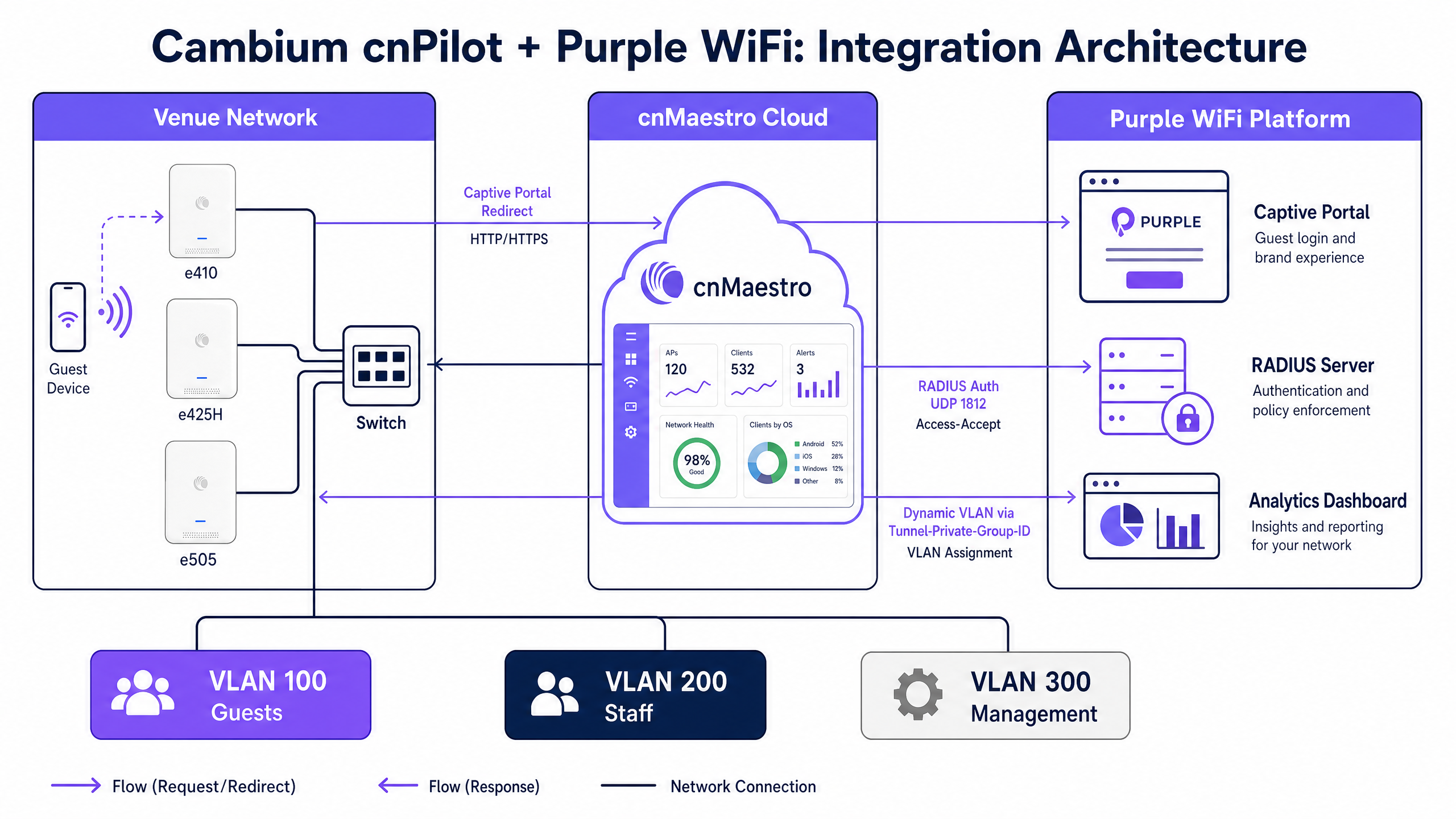
Wenn sich ein Gästegerät mit einer offenen Gäste-SSID verbindet, fängt der Cambium AP die ursprüngliche HTTP-Anfrage ab. Anstatt den Datenverkehr ins Internet weiterzuleiten, leitet der AP das Gerät an die von Purple gehostete Captive Portal-URL weiter. Der Gast schließt den Authentifizierungsablauf auf der Purple-Begrüßungsseite ab, die Social Login, E-Mail-Registrierung und benutzerdefinierte Datenerfassungsformulare unterstützt.
Nach erfolgreicher Authentifizierung sendet das Backend von Purple eine RADIUS-Access-Accept-Nachricht über den UDP-Port 1812 an den Cambium AP. Diese Nachricht signalisiert dem AP, das Client-Gerät aus dem Walled-Garden-Status vor der Authentifizierung in den vollständigen Netzwerkzugriff zu überführen. Gleichzeitig sendet der AP RADIUS-Accounting-Daten über den UDP-Port 1813 an Purple, wodurch die Analyse-Dashboards von Purple mit Informationen zu Sitzungsdauer, Datennutzung und Gerätetyp gefüllt werden.
Walled-Garden-Anforderungen
Der Walled Garden ist eine kritische Komponente des Captive Portal-Ablaufs. Er definiert die spezifischen IP-Adressen und Domains, die ein nicht authentifiziertes Gerät erreichen kann. Wenn der Walled Garden falsch konfiguriert ist, kann das Gerät das Purple-Portal nicht laden, was zu einem Verbindungs-Timeout führt.
Damit die Integration funktioniert, muss der Walled Garden die Portal-Domains von Purple, alle Content Delivery Network (CDN)-Endpunkte, die Portal-Assets hosten, sowie die Domains aller unterstützten Identitätsanbieter (wie Facebook, Google oder Microsoft Entra ID) enthalten.
Mandantenfähige Segmentierung mit Cambium ePSK
Die Implementierung von Private Pre-Shared Keys durch Cambium, unter dem Markennamen ePSK, ermöglicht es Netzwerkarchitekten, den Datenverkehr sicher zu segmentieren, ohne mehrere SSIDs auszustrahlen.
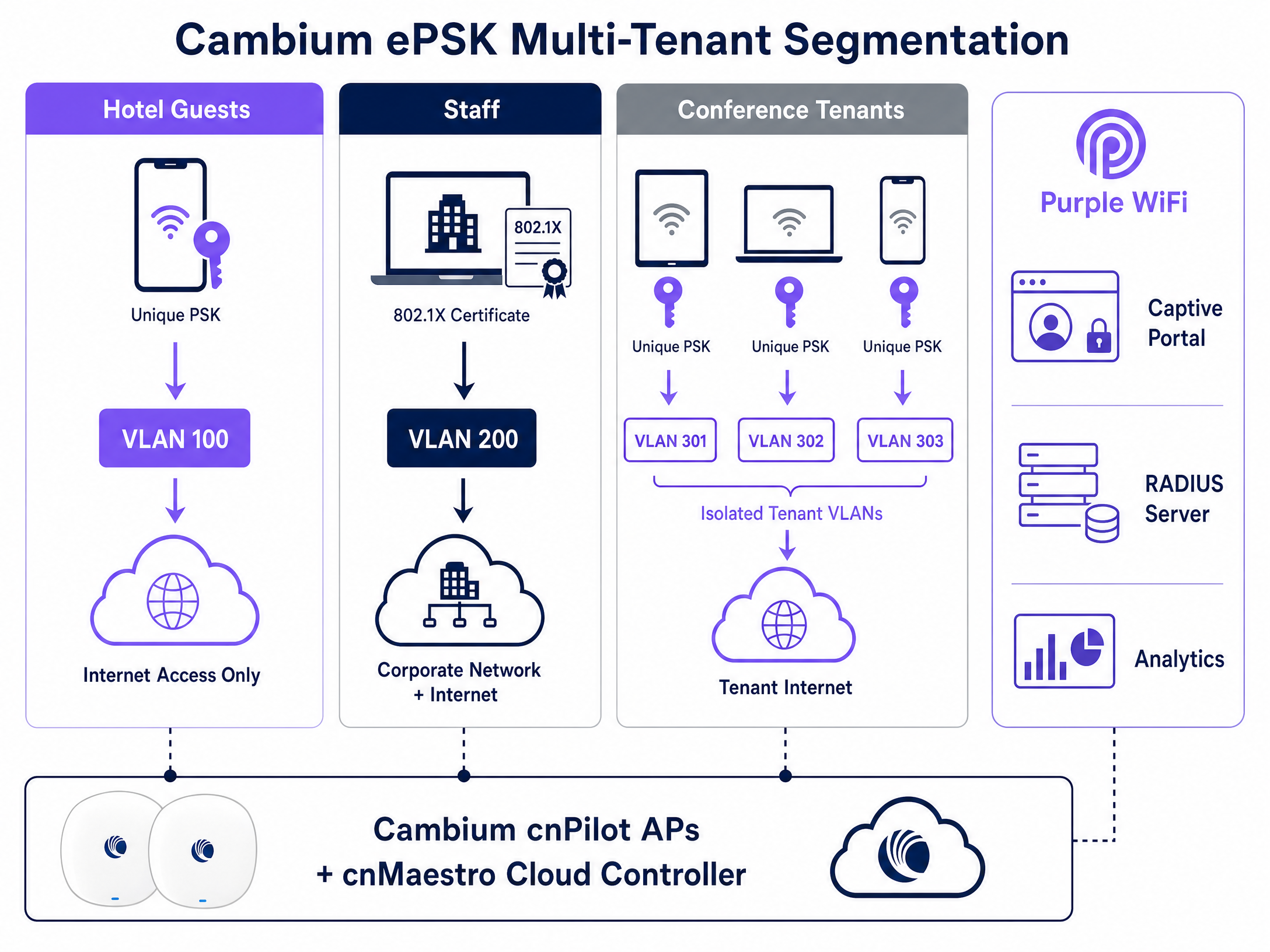
Mit ePSK unterstützt eine einzige SSID bis zu 2.000 eindeutige Passphrasen. Jede Passphrase ist einem bestimmten VLAN zugeordnet. Wenn sich ein Benutzer mit seinem eindeutigen Schlüssel verbindet, leitet der Cambium AP seinen Datenverkehr automatisch in das zugewiesene VLAN. Diese Funktion ist äußerst wertvoll für mandantenfähige Umgebungen wie Coworking-Spaces oder Wohngebäude, in denen jeder Mandant ein isoliertes Netzwerksegment benötigt. Purple integriert sich in diese Architektur, indem es den ePSK-Lebenszyklus über die cnMaestro API verwaltet und die Bereitstellung, VLAN-Zuweisung und den Widerruf von Mandanten-Anmeldedaten automatisiert.
Implementierungsleitfaden
Die Bereitstellung der Integration von Cambium und Purple erfordert eine präzise Konfiguration in der cnMaestro Cloud-Konsole. Befolgen Sie diese Schritte, um den grundlegenden Gäste-WiFi-Dienst einzurichten.
1. Konfigurieren des Gäste-WLANs
Navigieren Sie in cnMaestro zum Menü Configuration, wählen Sie WiFi Profiles und öffnen Sie die Registerkarte WLANs. Erstellen Sie ein neues WLAN-Profil.
- Name / SSID: Definieren Sie den Namen des Gästenetzwerks (z. B. "Venue Guest WiFi").
- Security: Auf Open festlegen.
- Client Isolation: Auf Enable festlegen, um zu verhindern, dass Gästegeräte im lokalen Subnetz miteinander kommunizieren.
2. Aktivieren des externen Hotspots
Suchen Sie in der WLAN-Konfiguration den Bereich Guest Access.
- Enable Guest Access: Aktivieren Sie dieses Kontrollkästchen.
- Portal Type: Wählen Sie External Hotspot.
- External Page URL: Geben Sie die spezifische Captive Portal-URL ein, die Sie von Ihrem Purple-Account-Manager erhalten haben.
3. Konfigurieren der RADIUS-Authentifizierung und des Accountings
Konfigurieren Sie im selben Bereich "Guest Access" die RADIUS-Parameter.
- Authentication Server: Geben Sie die IP-Adresse des primären RADIUS-Servers von Purple ein.
- Authentication Port:
1812 - Accounting Server: Geben Sie die IP-Adresse des primären RADIUS-Servers von Purple ein.
- Accounting Port:
1813 - Shared Secret: Geben Sie das von Purple bereitgestellte komplexe Shared Secret ein. Stellen Sie sicher, dass dieses auf beiden Plattformen exakt übereinstimmt.
4. Definieren des Walled Gardens
Füllen Sie unter den Einstellungen für den externen Hotspot die Walled-Garden-Liste aus. Sie müssen die wichtigsten Purple-Domains und die spezifischen Domains hinzufügen, die für Ihre gewählten Authentifizierungsmethoden erforderlich sind (z. B. Social-Login-Anbieter).
5. Konfigurieren von 802.1X für Mitarbeiter-WiFi
Um den Zugriff für Mitarbeiter zu sichern, erstellen Sie ein separates WLAN-Profil in cnMaestro.
- Security: Auf WPA2-Enterprise festlegen.
- RADIUS Server: Verweisen Sie auf die RADIUS-Server-IP von Purple auf Port 1812.
Mitarbeiter authentifizieren sich mit ihren Unternehmens-Anmeldedaten über Microsoft Entra ID oder Google Workspace, was Purple validites. Purple gibt dann ein Tunnel-Private-Group-ID RADIUS-Attribut zurück, das den Cambium AP anweist, das Mitarbeitergerät in das sichere Unternehmens-VLAN zu verschieben.
Best Practices
- VLAN-Trunking: Stellen Sie sicher, dass alle erforderlichen VLANs (Guest, Staff, Management) auf den Switch-Ports, die mit den Cambium APs verbunden sind, getrunkt sind. Wenn das VLAN im Trunk fehlt, können authentifizierte Clients keine IP-Adresse über DHCP beziehen.
- Konsistente Firmware: Standardisieren Sie Ihre AP-Infrastruktur auf die cnPilot-Firmware-Version 6.0 oder höher. Diese Version bietet die stabilste Unterstützung für externe Hotspot-Weiterleitungen und ePSK-Funktionen.
- Accounting ist zwingend erforderlich: Deaktivieren Sie niemals das RADIUS-Accounting. Purple verlässt sich vollständig auf den UDP 1813 Accounting-Stream, um Verweildauer-Metriken, Besuchsdaten und Compliance-Protokolle zu erstellen.
- Lokale PSKs für Mitarbeiter vermeiden: Ersetzen Sie veraltete, gemeinsam genutzte Passwörter in Mitarbeiternetzwerken durch eine 802.1X-Authentifizierung. Dieser Ansatz entspricht den ISO 27001-Anforderungen, da der Netzwerkzugriff an individuelle, überprüfbare Identitäten gebunden wird.
Fehlerbehebung & Risikominderung
Wenn Integrationsprobleme auftreten, zeigen sich diese in der Regel während der ersten Captive Portal-Weiterleitung oder der RADIUS-Authentifizierungsphase.
- Portal lädt nicht: Dies ist fast immer ein Walled-Garden-Problem. Wenn sich ein Gastgerät mit der SSID verbindet, aber anstelle der Splash-Page eine Zeitüberschreitung der Verbindung erhält, blockiert der AP den Zugriff auf die Purple-Portal-Domain. Überprüfen Sie Ihre Walled-Garden-Einträge in cnMaestro und stellen Sie sicher, dass die DNS-Auflösung vor der Authentifizierung zulässig ist.
- Authentifizierung fehlgeschlagen (Fehler: Ungültige Anmeldedaten): Überprüfen Sie das Shared Secret von RADIUS. Eine Diskrepanz zwischen cnMaestro und Purple führt dazu, dass der RADIUS-Server die Authentifizierungsanfragen stillschweigend verwirft.
- Gerät authentifiziert sich, hat aber keinen Internetzugang: Dies deutet auf einen Fehler bei der dynamischen VLAN-Zuweisung oder dem DHCP-Prozess hin. Überprüfen Sie, ob Purple die korrekte VLAN-ID in der RADIUS-Antwort zurückgibt, und stellen Sie sicher, dass die Trunking-Konfiguration des Switch-Ports dieses VLAN zulässt.
ROI & geschäftliche Auswirkungen
Die Bereitstellung von Purple WiFi auf einer Cambium Networks-Infrastruktur verwandelt ein standardmäßiges Netzwerk-Utility in ein messbares Geschäftsgut. Durch die Erfassung von First-Party-Daten am Point of Authentication können Standorte umfassende Besucherprofile erstellen und gezielte Marketingkampagnen steuern.
Beispielsweise implementierte Harrods Purple Guest WiFi und erzielte einen 57-fachen Marketing-ROI, indem die erfassten Daten in ihr Treueprogramm integriert wurden. In ähnlicher Weise generierten die AGS Airports einen ROI von 842 %, indem sie gestaffelte Bandbreiten und gezielte Passagieransprache nutzten. Durch die Standardisierung auf Cambium cnMaestro und Purple können IT-Verantwortliche eine sichere, konforme Konnektivität bereitstellen und gleichzeitig der Marketingabteilung die Daten liefern, die zur Umsatzsteigerung erforderlich sind.
Schlüsseldefinitionen
Captive Portal
A customized login page that requires users to authenticate or accept terms before gaining access to a public or enterprise WiFi network.
Used in Guest WiFi deployments to capture first-party data, enforce acceptable use policies, and present venue branding before granting internet access.
RADIUS
Remote Authentication Dial-In User Service; a networking protocol that provides centralized Authentication, Authorization, and Accounting (AAA) management.
The protocol Cambium APs use to communicate with Purple to verify user credentials and report session data.
Walled Garden
A limited environment that controls user access to web content and services pre-authentication.
Required in cnMaestro to allow guest devices to reach the Purple splash page and identity provider domains (like Facebook or Google) before they have full internet access.
ePSK
Enhanced Pre-Shared Key; Cambium's implementation of private pre-shared keys, allowing unique passphrases for individual users on a single SSID.
Used to provide secure, isolated network segments for multi-tenant environments without broadcasting numerous SSIDs.
Dynamic VLAN Assignment
The process of placing an authenticated device onto a specific Virtual Local Area Network based on RADIUS attributes rather than the physical port or SSID.
Allows IT to use a single SSID while securely separating guest traffic from staff or management traffic.
802.1X
An IEEE standard for port-based network access control, providing an authentication mechanism to devices wishing to attach to a LAN or WLAN.
The standard used for secure Staff WiFi, replacing shared passwords with individual corporate credentials validated against an identity provider.
cnMaestro
Cambium Networks' cloud-based or on-premises management platform for centralized control of wireless and wired network infrastructure.
The interface where network architects configure the WLAN profiles, RADIUS settings, and walled gardens required for the Purple integration.
First-Party Data
Information a company collects directly from its customers and owns entirely.
The primary business output of a Purple Guest WiFi deployment, used to drive marketing campaigns and understand visitor behavior.
Ausgearbeitete Beispiele
A 200-room hotel needs to deploy secure WiFi for guests, staff, and a conference centre. Guests require a branded captive portal, staff need secure access to internal systems, and the conference centre requires isolated networks for different event organizers. How should the network architect configure the Cambium cnMaestro environment to support this using Purple?
The architect should deploy three distinct WLAN profiles in cnMaestro.
- Guest WLAN: Configured as an Open network with 'External Hotspot' enabled. The redirect URL points to the Purple captive portal. RADIUS authentication (UDP 1812) and accounting (UDP 1813) point to Purple's servers. The walled garden includes Purple's domains.
- Staff WLAN: Configured as WPA2-Enterprise (802.1X). RADIUS points to Purple, which integrates with the hotel's Microsoft Entra ID. Staff authenticate with corporate credentials, and Purple assigns them to the Staff VLAN.
- Conference WLAN: Configured with WPA2 Pre-Shared Key and Cambium ePSK enabled. Purple provisions unique ePSK passphrases for each event organizer via the cnMaestro API, assigning each key to an isolated VLAN (e.g., VLAN 301, 302).
A retail chain has deployed Cambium e410 APs and configured the Purple captive portal. However, shoppers report that the splash page never appears on their smartphones; instead, the browser shows a connection timeout. What is the root cause and how is it resolved?
The root cause is an incomplete walled garden configuration in cnMaestro. The Cambium AP is blocking the HTTP/HTTPS traffic required to load the Purple portal before the user is authenticated.
To resolve this, the network engineer must log into cnMaestro, navigate to the Guest WLAN profile, and update the External Hotspot walled garden list. They must add Purple's specific portal domains and any associated CDN endpoints. Once applied, unauthenticated devices will be able to reach the portal and complete the login flow.
Übungsfragen
Q1. You are deploying Purple Guest WiFi across 50 retail stores using Cambium e505 APs. Users can connect to the SSID and see the splash page, but after logging in, they cannot access the internet. You verify that Purple is sending the Access-Accept message. What is the most likely infrastructure issue?
Hinweis: Consider what happens at the switch level when a device tries to obtain an IP address after authentication.
Musterlösung anzeigen
The most likely issue is missing VLAN trunking on the switch ports connecting to the Cambium APs. While the AP authorizes the device, if the assigned Guest VLAN is not permitted on the switch trunk, the device cannot reach the DHCP server to obtain an IP address, resulting in no internet access.
Q2. A university campus wants to use a single SSID for all students in the dormitories, but requires that each student's devices are isolated into their own private network segment to allow casting to their specific smart TV. How do you implement this using Cambium and Purple?
Hinweis: Look at Cambium's implementation of private pre-shared keys.
Musterlösung anzeigen
Implement Cambium ePSK (Enhanced Pre-Shared Key) on the dormitory WLAN. Purple will manage the ePSK lifecycle via the cnMaestro API, generating a unique passphrase for each student. When a student connects their devices using their specific key, the Cambium AP assigns them to a unique VLAN, creating an isolated private area network.
Q3. During a pilot deployment, Purple's analytics dashboard shows zero dwell time or data usage metrics for the Cambium test site, even though users are successfully authenticating and browsing the internet. What configuration step was missed in cnMaestro?
Hinweis: Analytics require session data, which is handled by a specific UDP port in the AAA configuration.
Musterlösung anzeigen
RADIUS Accounting was not configured. The network engineer must enable RADIUS Accounting in the cnMaestro Guest WLAN profile and point it to Purple's RADIUS server on UDP port 1813. Without this, Purple only handles authentication and receives no session lifecycle data.
Weiterlesen in dieser Reihe
CommScope Ruckus Integration mit Purple WiFi: Einrichtungs- und Konfigurationshandbuch
Dieses technische Referenzhandbuch bietet einen maßgeblichen Konfigurationsleitfaden für die Integration von CommScope Ruckus-Architekturen mit Purple WiFi. Es beschreibt Schritt-für-Schritt-Bereitstellungen für Guest WiFi Captive Portals, sicheres Mitarbeiter-WiFi über 802.1X und mandantenfähige Netzwerkisolierung mithilfe von Ruckus Dynamic PSK.
Cisco WLC and Catalyst Integration with Purple WiFi: Step-by-Step Guest Access Guide
Diese Anleitung beschreibt die schrittweise Integration von Cisco WLC und Catalyst 9800 Wireless mit Purple. Sie umfasst die Weiterleitung zum Guest WiFi Captive Portal über Central Web Authentication, sicheres Mitarbeiter-WiFi mittels 802.1X EAP-TLS sowie Multi-Tenant-Segmentierung über Cisco Identity Pre-Shared Keys (iPSK) mit dynamischer VLAN-Zuweisung. Sie richtet sich an Netzwerkarchitekten in Unternehmen und IT-Sicherheitsverantwortliche, die Cisco-Infrastrukturen im Gastgewerbe, im Einzelhandel und in großen öffentlichen Veranstaltungsorten bereitstellen.
OpenWrt Custom Firmware Integration with Purple WiFi
Dieses Handbuch bietet das vollständige Integrations-Playbook für die Bereitstellung von OpenWrt Custom Firmware mit Purple WiFi. Es deckt die Konfiguration des CoovaChilli Captive Portal, die Verwaltung des iptables Walled Garden, sicheres Mitarbeiter-WiFi über 802.1X mit hostapd sowie die mandantenfähige PPSK-Segmentierung mit dynamischer VLAN-Zuweisung ab. Damit erhalten IT-Teams die genauen Konfigurationsschritte, die für den Aufbau eines identitätsbasierten Netzwerks auf jeder OpenWrt-fähigen Hardware erforderlich sind.