
Der Enterprise-Leitfaden für SCEP: Bereitstellung des Simple Certificate Enrollment Protocol für automatisierte Campus-WiFi-Sicherheit
Dieser technische Referenzleitfaden bietet einen definitiven Architektur-Blueprint und eine Schritt-für-Schritt-Implementierungsstrategie für die Bereitstellung von Enterprise-WiFi-Zertifikaten mit SCEP. Er behandelt die entscheidenden Unterschiede zwischen SCEP und PKCS, die genaue Bereitstellungsreihenfolge für einen erfolgreichen Rollout sowie praxisnahe Strategien zur Risikominderung für IT-Verantwortliche.
Diesen Leitfaden anhören
Podcast-Transkript ansehen

Executive Summary
Für Enterprise-Standorte – ob in der dynamischen Hotellerie, im Filial-Einzelhandel oder auf einem modernen Unternehmenscampus – ist die Nutzung von Pre-Shared Keys oder einfachen Captive Portals für das Mitarbeiter-WiFi ein Sicherheitsrisiko und ein betrieblicher Engpass. Moderne Netzwerkarchitekturen erfordern eine 802.1X-Authentifizierung mittels EAP-TLS, um sicherzustellen, dass jedes Gerät kryptografisch verifiziert wird, bevor es Zugriff auf das Netzwerk erhält.
Die Herausforderung liegt in der Verteilung: Wie stellt man individuelle Client-Zertifikate auf Tausenden von Windows-, iOS- und Android-Geräten bereit, ohne den Helpdesk mit Support-Tickets zu überlasten? Microsoft Intune und andere MDM-Plattformen lösen dies durch ein automatisiertes Zertifikats-Lebenszyklusmanagement. Durch die Bereitstellung von SCEP-Profilen (Simple Certificate Enrollment Protocol) übertragen IT-Teams vertrauenswürdige Root- und Client-Zertifikate geräuschlos im Hintergrund auf verwaltete Endpunkte.
Dieser Leitfaden bietet einen definitiven Architektur-Blueprint und eine Schritt-für-Schritt-Implementierungsstrategie für die Bereitstellung von Enterprise-WiFi-Zertifikaten. Wir untersuchen die entscheidenden Unterschiede zwischen SCEP und PKCS, beschreiben die genaue Bereitstellungsreihenfolge für einen erfolgreichen Rollout und skizzieren praxisnahe Strategien zur Risikominderung, um sicherzustellen, dass Ihr Guest WiFi und Ihre Unternehmensnetzwerke sicher und leistungsstark bleiben.
Listen to the Briefing
Technical Deep-Dive: SCEP-Architektur
Bei der Planung Ihrer Strategie zur Bereitstellung von Enterprise-WiFi-Zertifikaten besteht die erste architektonische Entscheidung in der Auswahl des Bereitstellungsmechanismus für die Zertifikate. Mobile-Device-Management-Plattformen unterstützen sowohl SCEP als auch PKCS, arbeiten jedoch grundlegend unterschiedlich.
Simple Certificate Enrollment Protocol (SCEP)
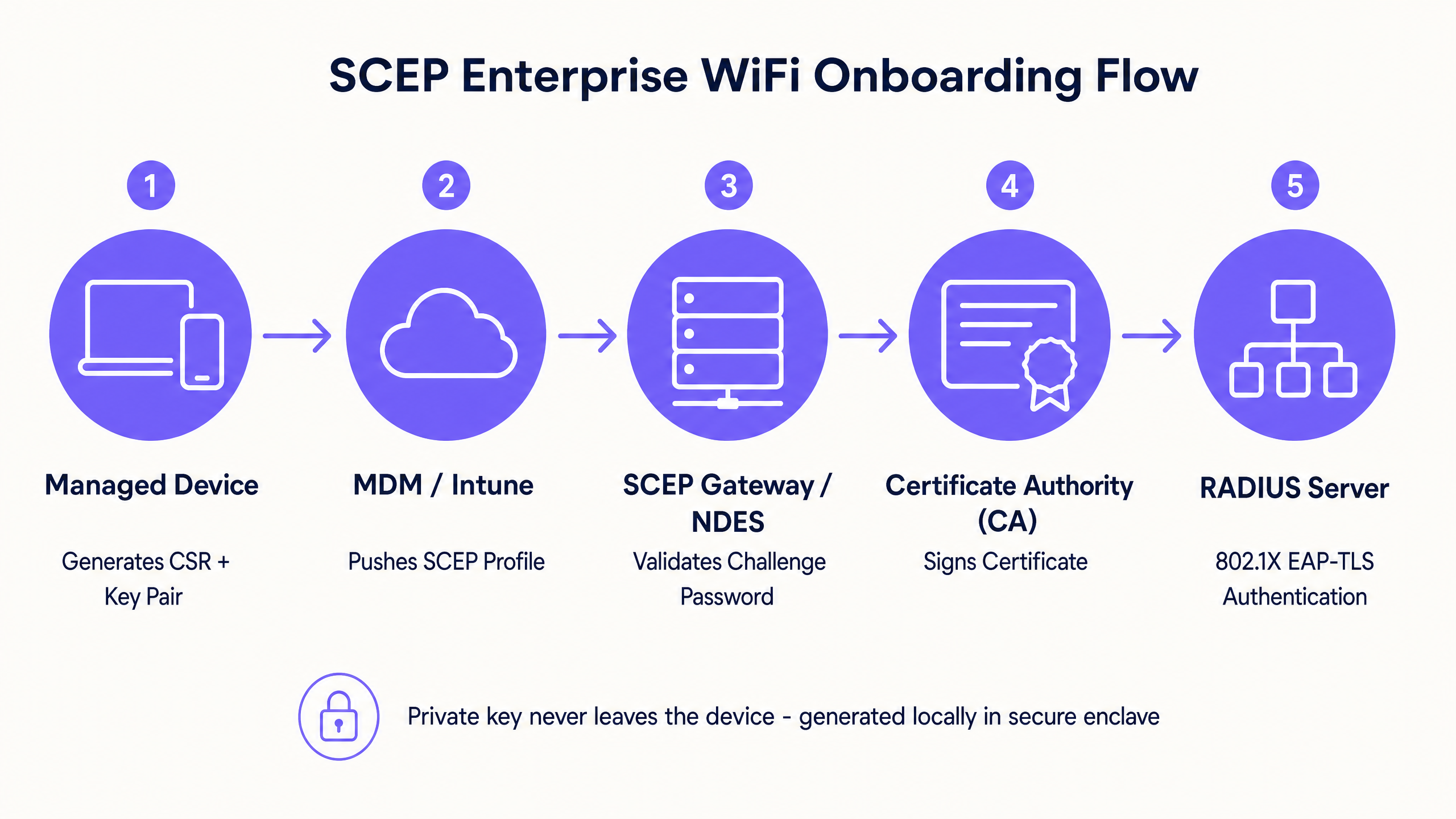
SCEP ist der Branchenstandard für die Registrierung von Unternehmensgeräten. In einem SCEP-Workflow weist der Verwaltungsdienst den Endpunkt an, sein eigenes privates und öffentliches Schlüsselpaar zu generieren. Das Gerät erstellt eine Zertifikatsignierungsanforderung (Certificate Signing Request, CSR) und sendet diese über einen NDES-Server (Network Device Enrollment Service) an Ihre Zertifizierungsstelle (Certificate Authority, CA). Die CA signiert die Anforderung und sendet das öffentliche Zertifikat an das Gerät zurück.
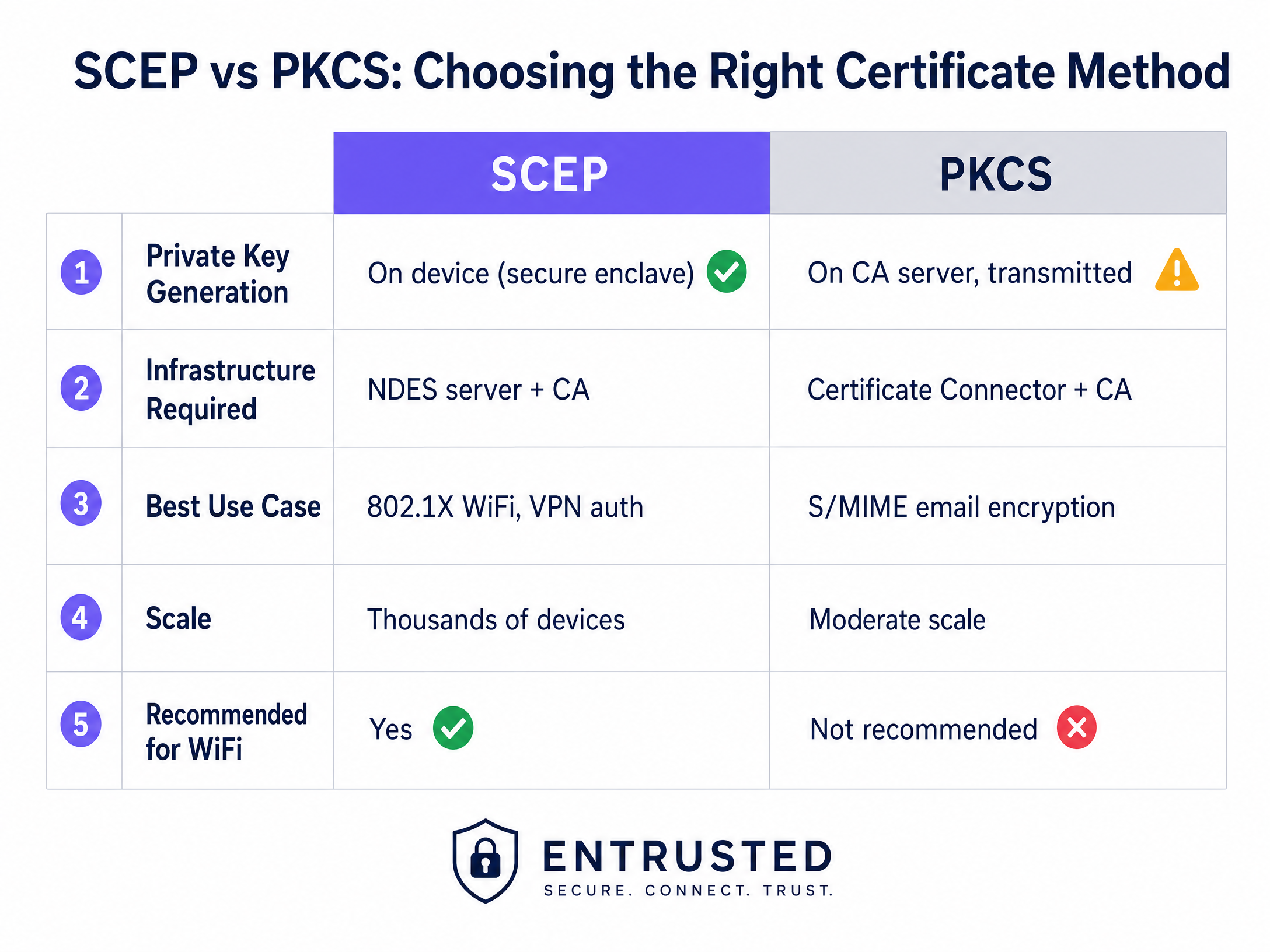
Der entscheidende Sicherheitsvorteil von SCEP besteht darin, dass der private Schlüssel das Gerät niemals verlässt. Er wird lokal generiert, in der sicheren Enklave des Geräts gespeichert (z. B. im TPM unter Windows oder in der Secure Enclave unter iOS) und niemals über das Netzwerk übertragen. Dies macht SCEP zum dringend empfohlenen Ansatz für die 802.1X-Authentifizierung.
Public Key Cryptography Standards (PKCS)
Im Gegensatz dazu generiert die Zertifizierungsstelle bei PKCS sowohl den öffentlichen als auch den privaten Schlüssel zentral. Der Zertifikats-Connector exportiert dieses Schlüsselpaar sicher und überträgt es auf das Zielgerät.
Obwohl PKCS die Bereitstellung und Wartung eines NDES-Servers überflüssig macht und somit den Infrastrukturaufwand verringert, birgt es ein theoretisches Sicherheitsrisiko, da der private Schlüssel über das Netzwerk übertragen wird. PKCS eignet sich im Allgemeinen besser für Anwendungsfälle, in denen eine Schlüsselhinterlegung (Key Escrow) erforderlich ist, wie z. B. bei der S/MIME-E-Mail-Verschlüsselung, als für die Netzwerkauthentifizierung.
Implementierungsleitfaden: Die Bereitstellungsreihenfolge
Die erfolgreiche Konfiguration eines verwalteten WiFi-Profils für 802.1X erfordert die strikte Einhaltung einer bestimmten Bereitstellungsreihenfolge. Profilabhängigkeiten schreiben vor, dass Vertrauen hergestellt werden muss, bevor die Authentifizierung konfiguriert werden kann.
Schritt 1: Bereitstellen des Profils für das vertrauenswürdige Root-Zertifikat
Bevor ein Gerät ein Client-Zertifikat anfordern oder Ihrem RADIUS-Server vertrauen kann, muss es der ausstellenden Zertifizierungsstelle vertrauen.
- Exportieren Sie Ihr Root-CA-Zertifikat und alle Intermediate-CA-Zertifikate als .cer-Dateien.
- Erstellen Sie in Ihrer MDM-Konsole ein neues Konfigurationsprofil.
- Wählen Sie die Zielplattform und den Profiltyp für vertrauenswürdige Zertifikate aus.
- Laden Sie die .cer-Datei hoch und stellen Sie dieses Profil für Ihre Zielgerätegruppen bereit.
Schritt 2: Konfigurieren des SCEP-Zertifikatsprofils
Sobald das Vertrauen hergestellt ist, konfigurieren Sie das SCEP-Profil, um den Geräten mitzuteilen, wie sie ihr Client-Zertifikat erhalten.
- Erstellen Sie ein neues Konfigurationsprofil und wählen Sie SCEP-Zertifikat aus.
- Konfigurieren Sie das Format des Antragstellernamens (Subject Name). Für die benutzergesteuerte Authentifizierung ist
CN={{UserPrincipalName}}Standard. Für die Geräteauthentifizierung verwenden SieCN={{AAD_Device_ID}}. - Legen Sie die Schlüsselverwendung (Key Usage) auf digitale Signatur und Schlüsselverschlüsselung fest.
- Geben Sie unter der erweiterten Schlüsselverwendung (Extended Key Usage) die Client-Authentifizierung an (OID: 1.3.6.1.5.5.7.3.2).
- Verknüpfen Sie dieses Profil mit dem in Schritt 1 erstellten Profil für das vertrauenswürdige Root-Zertifikat.
- Geben Sie die externe URL Ihres SCEP-Gateways oder NDES-Servers an.
Schritt 3: Bereitstellen des 802.1X-WiFi-Profils
Der letzte Schritt besteht darin, die WiFi-Konfiguration zu übertragen, die die Zertifikate mit der Netzwerk-SSID verknüpft.
- Erstellen Sie ein WiFi-Konfigurationsprofil.
- Geben Sie den Netzwerknamen genau so ein, wie er von Ihren Wireless Access Points übertragen wird.
- Wählen Sie WPA2-Enterprise oder WPA3-Enterprise als Sicherheitstyp.
- Legen Sie den EAP-Typ auf EAP-TLS fest.
- In den Authentifizierungseinstgs, wählen Sie das in Schritt 2 erstellte SCEP-Zertifikatsprofil als Client-Authentifizierungszertifikat aus.
- Geben Sie das vertrauenswürdige Stammzertifikat für die Servervalidierung an, um sicherzustellen, dass sich das Gerät nur mit Ihrem legitimen RADIUS-Server verbindet.
Best Practices & Branchenstandards
Beachten Sie bei der Implementierung der SCEP-Zertifikatsbereitstellung die folgenden herstellerneutralen Best Practices, um Compliance und Zuverlässigkeit zu gewährleisten.
Platzierung und Sicherheit des SCEP-Gateways
Das SCEP-Gateway muss über das Internet erreichbar sein, damit Remote-Geräte Zertifikate bereitstellen können, bevor sie vor Ort eintreffen. Die direkte Freigabe eines internen Servers im Internet stellt ein erhebliches Sicherheitsrisiko dar. Veröffentlichen Sie die SCEP-URL über einen Anwendungsproxy oder Reverse-Proxy. Dies ermöglicht einen sicheren Remote-Zugriff, ohne eingehende Firewall-Ports zu öffnen, und erlaubt es Ihnen, Richtlinien für bedingten Zugriff auf den Registrierungsablauf anzuwenden.
RADIUS- und CRL-Prüfung
Die Zertifikatsbereitstellung ist nur ein Teil der Sicherheitsgleichung; der Widerruf ist ebenso wichtig. Wenn ein Mitarbeiter das Unternehmen verlässt, entzieht das Deaktivieren seines Verzeichniskontos möglicherweise nicht sofort seinen WiFi-Zugang, sofern sein Client-Zertifikat gültig bleibt und der RADIUS-Server die Zertifikatssperrliste (CRL) nicht streng prüft.
Konfigurieren Sie Ihren RADIUS-Server so, dass er eine strenge CRL-Prüfung erzwingt. Stellen Sie sicher, dass Ihre CRL-Verteilungspunkte hochverfügbar sind; wenn der RADIUS-Server die CRL nicht erreichen kann, schlägt die Authentifizierung fehl, was zu einem weitreichenden Ausfall führt.
Für weitergehende Überlegungen zur modernen Konnektivität lesen Sie unseren Leitfaden zu Bandbreitenmanagement: Ein praktischer Leitfaden für 2026 .
Fehlerbehebung & Risikominderung
Selbst bei sorgfältiger Planung kann es bei der Zertifikatsbereitstellung zu Problemen kommen. Hier sind häufige Fehlerszenarien und Minderungsstrategien.
WiFi-Profil kann nicht angewendet werden
Das Gerät empfängt die vertrauenswürdigen Stamm- und SCEP-Zertifikate, aber das WiFi-Profil wird in der MDM-Konsole als fehlerhaft oder nicht anwendbar angezeigt. Dies wird fast immer durch eine fehlerhafte Gruppenzuordnung verursacht. Wenn das SCEP-Profil einer Benutzergruppe, das WiFi-Profil jedoch einer Gerätegruppe zugewiesen ist, kann das MDM die Abhängigkeit nicht auflösen. Überprüfen Sie Ihre Zuweisungen. Stellen Sie sicher, dass die vertrauenswürdigen Stamm-, SCEP- und WiFi-Profile alle für genau dieselbe Gruppe bereitgestellt werden.
Gateway-Fehler 403 Forbidden
Geräte können das SCEP-Zertifikat nicht abrufen, und die Gateway-Protokolle zeigen HTTP-403-Fehler. Dem Connector-Dienstkonto fehlen die erforderlichen Berechtigungen für die Zertifikatsvorlage, oder die URL-Filterung auf Ihrer Firewall blockiert die spezifischen Query-String-Parameter, die von SCEP verwendet werden. Stellen Sie sicher, dass das Connector-Konto über Lese- und Registrierungsberechtigungen für die CA-Vorlage verfügt. Überprüfen Sie die Firewall-Protokolle, um sicherzustellen, dass URLs, die ?operation=GetCACaps enthalten, nicht blockiert werden.
ROI & geschäftliche Auswirkungen
Der Übergang zur SCEP-gesteuerten 802.1X-Zertifikatsbereitstellung liefert messbare Erträge in den Bereichen Sicherheit und Betrieb.
- Reduzierung von Helpdesk-Tickets: Passwortbasiertes WiFi verursacht ein erhebliches Volumen an Support-Tickets bezüglich abgelaufener Passwörter, Sperrungen und Tippfehlern. Die zertifikatsbasierte Authentifizierung ist für den Benutzer unsichtbar und reduziert das WiFi-bezogene Helpdesk-Volumen in der Regel um 70 %.
- Verbesserte Sicherheitslage: EAP-TLS eliminiert das Risiko von Credential Harvesting und Man-in-the-Middle-Angriffen. Dies ist entscheidend für die Einhaltung von Frameworks wie PCI DSS und GDPR, insbesondere in Umgebungen im Einzelhandel und im Gesundheitswesen .
- Nahtloses Onboarding: Die Integration der Zertifikatsbereitstellung in bestehende MDM-Workflows sorgt vom ersten Tag an für eine einheitliche Zero-Touch-Bereitstellung.
Während SCEP Ihre verwalteten Unternehmensgeräte sichert, erfordern Gast- und Besuchernetzwerke einen anderen Ansatz. Für nicht verwaltete Geräte speist ein Captive Portal mit Social Login oder SMS-Verifizierung eine First-Party-Datenebene und liefert Ihnen umsetzbare Erkenntnisse. Erkunden Sie unsere WiFi Analytics -Plattform, um zu sehen, wie diese Daten den Umsatz steigern.
Schlüsseldefinitionen
SCEP (Simple Certificate Enrollment Protocol)
A protocol that allows devices to request digital certificates from a Certificate Authority, where the private key is generated and stored securely on the device itself.
The recommended method for deploying WiFi authentication certificates due to its high security and scalability across enterprise fleets.
PKCS (Public Key Cryptography Standards)
A set of standards where both the public and private keys are generated by the Certificate Authority and then securely delivered to the endpoint.
Often used for S/MIME email encryption, but less ideal for WiFi authentication due to the network transmission of the private key.
NDES (Network Device Enrollment Service)
A Microsoft Windows Server role that acts as a bridge, allowing devices without domain credentials to obtain certificates via SCEP.
A required infrastructure component when implementing SCEP certificate deployment with on-premises Microsoft PKI.
EAP-TLS (Extensible Authentication Protocol - Transport Layer Security)
The most secure 802.1X authentication method, requiring both the server and the client to present valid digital certificates.
The target authentication protocol that MDM WiFi and certificate profiles are designed to enable, eliminating password-based access.
CRL (Certificate Revocation List)
A list published by the Certificate Authority containing the serial numbers of certificates that have been revoked before their scheduled expiration date.
RADIUS servers must check the CRL during authentication to ensure terminated employees cannot access the network using a previously valid certificate.
CSR (Certificate Signing Request)
A block of encoded text given to a Certificate Authority when applying for an SSL/TLS certificate, containing the public key and identity information.
Generated locally by the managed device during the SCEP flow to request its unique identity credential.
802.1X
An IEEE standard for port-based network access control that provides an authentication mechanism to devices wishing to attach to a LAN or WLAN.
The foundational framework that enforces the requirement for EAP-TLS certificate validation before granting network access.
RADIUS (Remote Authentication Dial-In User Service)
A networking protocol that provides centralized authentication, authorization, and accounting management for users who connect and use a network service.
The server that evaluates the client certificate against the CA and CRL to make the final allow or deny decision for WiFi access.
Ausgearbeitete Beispiele
A 150-property hotel group needs to secure their staff network across a mix of Windows laptops for front-of-house, iOS devices for housekeeping, and Android tablets for restaurant point-of-sale. They currently use WPA2-Personal with a shared password rotated quarterly, generating massive helpdesk volume.
The hotel group deploys three Intune profiles in sequence to a unified device group. First, a Trusted Root Certificate profile establishes trust with the corporate CA. Second, a SCEP Certificate profile instructs devices to request a unique client certificate. Third, a WiFi profile configures the corporate SSID with WPA3-Enterprise and EAP-TLS, pointing to the SCEP certificate for authentication. The RADIUS server enforces strict CRL checking to revoke access instantly upon employee termination.
A fashion retailer with 200 stores requires PCI DSS compliance for their Windows-based point-of-sale systems managed through Intune. They must ensure strong authentication and strict network segmentation for any device handling cardholder data.
The retailer implements SCEP-based EAP-TLS for device-level authentication on the staff SSID. The RADIUS policy drives VLAN assignment, placing authenticated POS terminals onto a strictly isolated, PCI-scoped VLAN automatically. Guest WiFi is handled on a completely separate SSID with its own captive portal authentication flow, ensuring the two networks never intersect.
Übungsfragen
Q1. Your Intune deployment shows the Trusted Root and SCEP profiles successfully applied to a user's laptop, but the WiFi profile shows an 'Error' state. The user cannot connect to the corporate SSID. What is the most likely architectural cause?
Hinweis: Consider how MDM platforms resolve dependencies between related configuration profiles.
Musterlösung anzeigen
A group targeting mismatch. The SCEP profile is likely assigned to a User group, while the WiFi profile is assigned to a Device group (or vice versa). Intune cannot resolve the dependency across different group types, causing the WiFi profile deployment to fail. Audit the assignments and ensure all three profiles target the exact same Azure AD group.
Q2. A newly acquired subsidiary requires 802.1X authentication for their staff devices. Their security team mandates that private keys must never traverse the network and must be generated within the hardware TPM of the endpoint. Which certificate deployment method must you use?
Hinweis: Compare where the private key is generated in the SCEP workflow versus the PKCS workflow.
Musterlösung anzeigen
You must use SCEP (Simple Certificate Enrollment Protocol). In a SCEP workflow, the device generates its own private and public key pair locally within its secure enclave (TPM) and only sends a Certificate Signing Request (CSR) across the network. PKCS generates the private key centrally on the CA and transmits it over the network, which violates the security team's mandate.
Q3. An employee is terminated and their Active Directory account is disabled. However, their laptop remains connected to the corporate WiFi network for several hours before losing access. How do you resolve this security gap?
Hinweis: Disabling an account does not invalidate an existing certificate. What mechanism does the RADIUS server use to check certificate validity?
Musterlösung anzeigen
You must configure the RADIUS server to enforce strict Certificate Revocation List (CRL) checking. When an employee is terminated, their certificate must be explicitly revoked in the Certificate Authority. The RADIUS server will then check the CRL during the next authentication cycle and immediately deny access, regardless of the Active Directory account status.
Weiterlesen in dieser Reihe
GDPR und Guest WiFi: Compliance-Leitfaden für Venue-Marketer und die IT
Dieser Leitfaden bietet IT-Managern und Venue-Betreibern einen praktischen Rahmen, um sicherzustellen, dass Guest WiFi-Dienste vollständig GDPR-konform sind. Er behandelt die technische Architektur, Einwilligungsmechanismen, Datenaufbewahrung und wie Compliance in ein sicheres First-Party-Daten-Asset transformiert werden kann.
Konfiguration der Captive Portal-Weiterleitung auf Enterprise-Netzwerk-Controllern
Dieser maßgebliche Leitfaden beschreibt die technische Architektur und die herstellerspezifischen Konfigurationsschritte, die für die Implementierung der Captive Portal-Weiterleitung auf Enterprise-Netzwerk-Controllern erforderlich sind. Er bietet IT-Teams praxisnahe Anleitungen zur Konfiguration von Walled Gardens, zur Integration der RADIUS-Authentifizierung und zur Gewährleistung der Compliance mit GDPR und PCI DSS.
Enterprise-Gast-WiFi-Einrichtungsleitfaden: VLAN-Segmentierung, Sicherheit und Captive Portals
Dieser Leitfaden bietet einen technischen Entwurf für die Bereitstellung von Enterprise-Gast-WiFi mit Fokus auf VLAN-Segmentierung, Sicherheitsprotokolle und die Architektur von Captive Portals. Er beschreibt im Detail, wie Datenverkehr isoliert, Verschlüsselungsstandards durchgesetzt und First-Party-Daten an komplexen Standorten sicher erfasst werden.