

Minimierung von studentischen Ablenkungen durch netzwerkweites Ad Blocking
Dieser maßgebliche technische Leitfaden beschreibt die Architektur, Bereitstellung und den geschäftlichen Nutzen von netzwerkweitem Ad Blocking in Bildungseinrichtungen. Er bietet IT-Managern und Netzwerkarchitekten umsetzbare Strategien, um Bandbreite zurückzugewinnen, die Compliance zu stärken und Malvertising-Risiken zu eliminieren.
Diesen Leitfaden anhören
Podcast-Transkript ansehen
Executive Summary
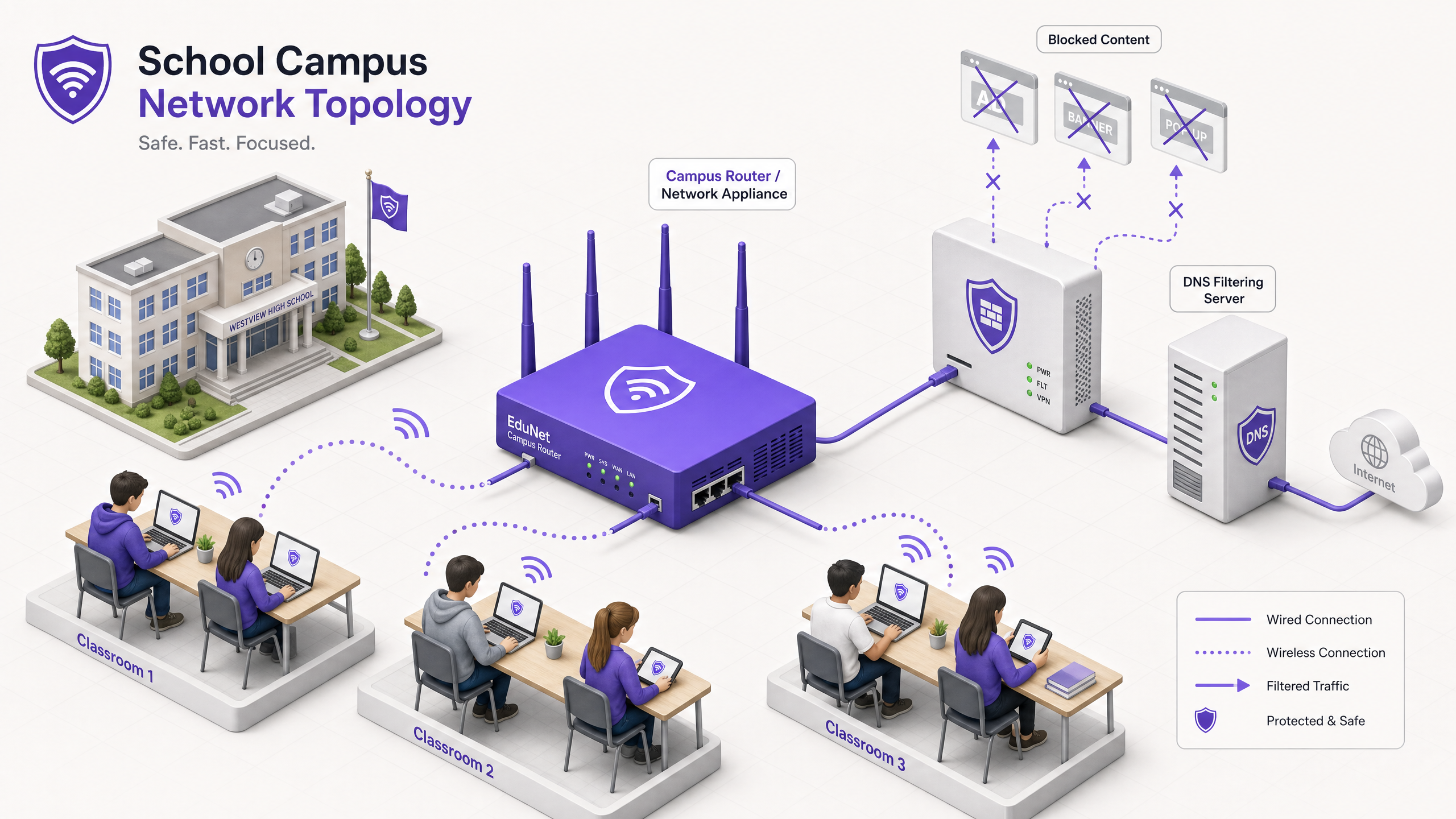
Für IT Directors und Netzwerkarchitekten, die Bildungseinrichtungen verwalten, hat die Geräteproliferation einen perfekten Sturm aus Bandbreitenverbrauch, Schutzrisiken und Compliance-Lücken geschaffen. Da Studenten durchschnittlich 2,5 Geräte auf den Campus mitbringen, ist die Verwaltung von Endpunkt-basiertem Filtering keine praktikable Betriebsstrategie mehr.
Network-level Ad Blocking stellt eine grundlegende Verschiebung von der Endpunktverwaltung zur Kontrolle auf Infrastrukturebene dar. Durch das Abfangen von Traffic auf DNS- oder Proxy-Ebene, bevor er das Client-Gerät erreicht, können IT-Teams unilateral bis zu 30 % des nicht-bildungsbezogenen Bandbreitenverbrauchs eliminieren, Malvertising-Risiken mindern und die Einhaltung von Datenschutzrahmen wie GDPR und COPPA durchsetzen.
Dieser technische Leitfaden beschreibt die Architektur, die Bereitstellungsmethodik und die ROI-Messung für die Implementierung von Network-level Ad Blocking auf K-12- und Universitätscampus, basierend auf realen Implementierungen in Umgebungen mit hoher Dichte.
Hören Sie unseren begleitenden Podcast für einen strategischen Überblick:
Technical Deep-Dive
Die Implementierung von Ad Blocking auf der Netzwerkebene erfordert einen geschichteten Architekturansatz, um die Vielfalt des modernen Web-Traffics zu bewältigen, insbesondere die Allgegenwart von HTTPS und aufkommenden verschlüsselten DNS-Protokollen.
DNS-Level Filtering Architecture
Die grundlegende Schicht des Netzwerk-Ad Blockings ist DNS filtering. Wenn ein Client-Gerät versucht, eine Domain aufzulösen, die mit Werbenetzwerken, Telemetrie oder Tracking verbunden ist, fängt der DNS resolver des Netzwerks die Anfrage ab und gleicht sie mit einer dynamischen Blocklist ab.
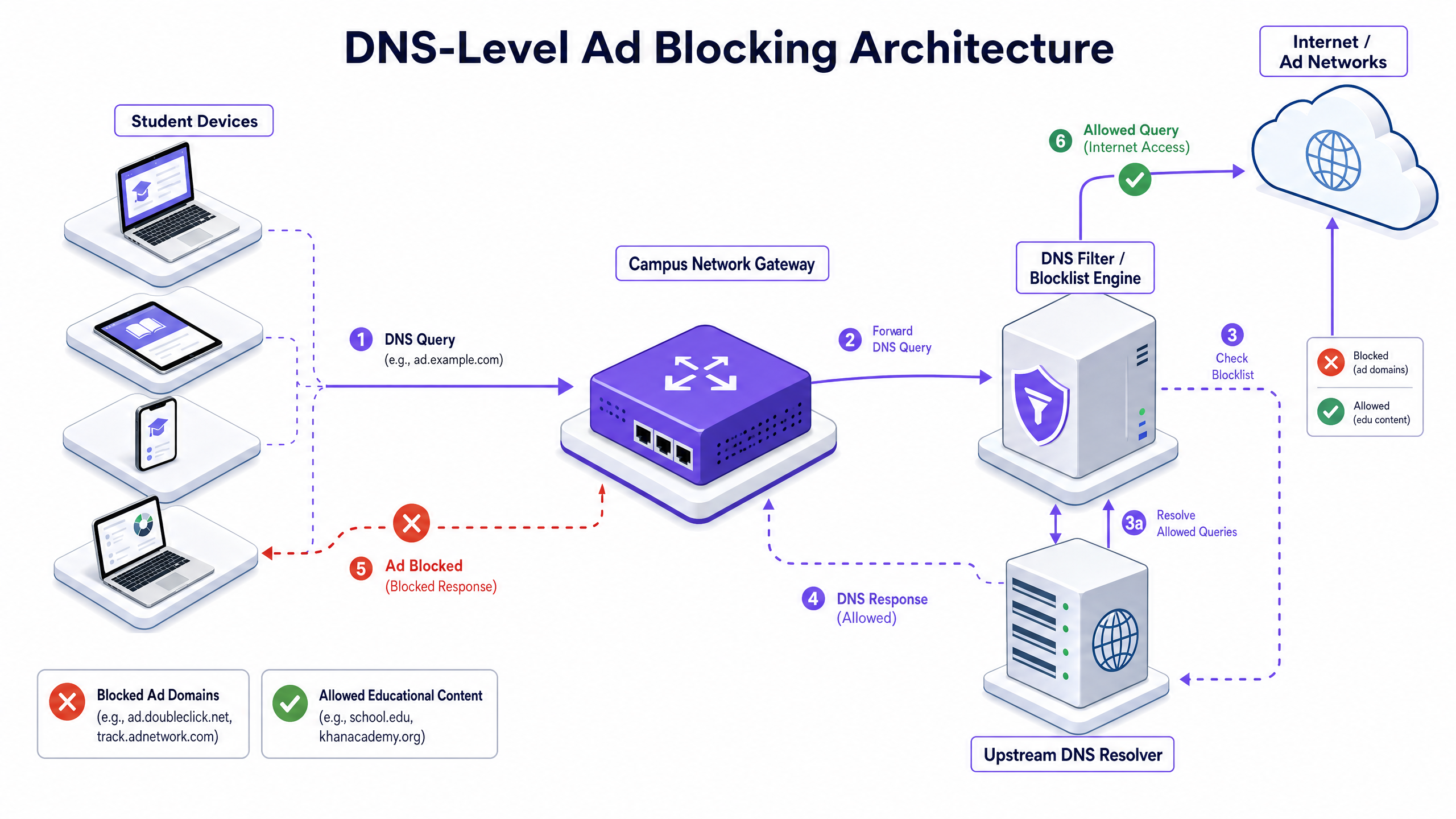
Dieser Ansatz ist hoch effizient, da er verhindert, dass die Verbindung überhaupt erst hergestellt wird. Die Ad Payload wird niemals heruntergeladen, und das Tracking-Skript wird niemals ausgeführt. Moderne Implementierungen müssen jedoch DNS-over-HTTPS (DoH) und DNS-over-TLS (DoT) berücksichtigen. Wenn Client-Geräte den lokalen Resolver unter Verwendung von encrypted DNS umgehen, wird die Filtering-Schicht umgangen. Netzwerkarchitekten müssen Perimeter-Firewalls so konfigurieren, dass sie bekannte DoH/DoT-Endpunkte (wie 8.8.8.8 über Port 443) blockieren, um ein Zurückfallen auf Standard-DNS (Port 53) zu erzwingen, oder eine Gateway-Lösung bereitstellen, die DoH-Traffic nativ inspiziert.
Proxy and SSL Inspection
Während DNS filtering den Großteil des Ad-Traffics verarbeitet, bietet transparentes HTTP/HTTPS proxying eine granulare Kontrolle über spezifische URLs statt ganzer Domains. Da die überwiegende Mehrheit des Web-Traffics verschlüsselt ist, ist die Bereitstellung von SSL inspection (Man-in-the-Middle-Entschlüsselung) für die Deep Packet Inspection notwendig.
Dies erfordert die Bereitstellung eines vertrauenswürdigen Root-Zertifikats auf allen verwalteten Geräten. Während dies in Enterprise-Umgebungen Standardpraxis ist, erfordert SSL inspection in Bildungseinrichtungen eine sorgfältige Abgrenzung, um die Entschlüsselung sensiblen Traffics (z. B. Bank- oder Gesundheitsportale) zu vermeiden, und muss mit der Acceptable Use Policy der Organisation übereinstimmen.
Integration with Network Access Control (NAC)
Effektives Filtering erfordert identitätsbewusste Richtlinien. Die Integration mit IEEE 802.1X ermöglicht es dem Netzwerk, differenzierte Filtering-Richtlinien basierend auf dem authentifizierten Benutzer- oder Geräteprofil anzuwenden. Ein Student, der sich über WPA3-Enterprise im Netzwerk anmeldet, erhält eine restriktive Richtlinie, während ein Mitarbeiter eine andere Richtlinie erhält und ein Besucher im Guest WiFi -Netzwerk eine grundlegende Compliance-Richtlinie erhält.
Implementation Guide
Die Bereitstellung von Network-level Ad Blocking erfordert einen schrittweisen Ansatz, um legitime Bildungsaktivitäten nicht zu stören.
Phase 1: Traffic Auditing and Baselining
Bevor Sie Blocking-Regeln implementieren, stellen Sie die Filtering-Lösung für 14-21 Tage in einem passiven Monitoring-Modus (nur Protokollierung) bereit. Dies etabliert eine Baseline der aktuellen DNS query volumes und Kategorisierung. Verwenden Sie diese Daten, um die Top Ad Networks und Tracking Domains zu identifizieren, die derzeit Bandbreite verbrauchen. Diese Baseline ist entscheidend für die spätere ROI calculation und das WiFi Analytics Reporting.
Phase 2: Pilot Deployment
Wählen Sie für die Pilotphase ein repräsentatives Network Segment – wie ein einzelnes Student VLAN oder ein bestimmtes Gebäude. Wenden Sie die anfänglichen Blocklist Policies an, die auf bekannte Ad Networks und Tracker abzielen.
Crucial Step: Etablieren Sie einen schnellen Whitelist Request Process. Lehrer werden unweigerlich False Positives begegnen, bei denen legitime Bildungsinhalte auf Domains gehostet werden, die als Advertising oder Tracking kategorisiert sind. Der IT helpdesk muss bereit sein, Domains schnell zu bewerten und zu whitelisten, um das Vertrauen der Stakeholder zu erhalten.
Phase 3: Full Rollout and Policy Tuning
Erweitern Sie die Bereitstellung auf alle relevanten Network Segments und wenden Sie differenzierte Policies über die 802.1X integration an. Überwachen Sie die Logs in den ersten 48 Stunden kontinuierlich, um systemische Probleme zu identifizieren.
Stellen Sie sicher, dass die Bereitstellung mit umfassenderen Security Policies übereinstimmt, wie z. B. der Pflege eines Explain what is audit trail for IT Security in 2026 , um die Compliance mit den Safeguarding Requirements zu demonstrieren.
Best Practices
- Layered Defense: Verlassen Sie sich nicht ausschließlich auf DNS filtering. Kombinieren Sie es mit Endpoint Management für schuleigene Geräte und robusten Firewall Rules, um Umgehungsversuche (z. B. VPN protocols, DoH) zu blockieren.
- Standardised Security: Stellen Sie sicher, dass alle neuen Wireless Deployments WPA3 verwenden, um vor Credential Theft zu schützen, was eine häufige vektor für Studenten, die versuchen, auf Personalnetzwerke zuzugreifen, um die Filterung zu umgehen.
- Einhaltung der Vorschriften: Stellen Sie im UK sicher, dass Ihre Filterrichtlinien die grundlegenden Anforderungen erfüllen, die in der IWF Compliance for Public WiFi Networks in the UK (oder Cumplimiento IWF para redes WiFi públicas en el Reino Unido für spanischsprachige Betriebe) dargelegt sind.
- Regelmäßige Überprüfung: Werbenetzwerke ändern ständig Domains, um Blocklisten zu umgehen. Stellen Sie sicher, dass Ihre Filterlösung dynamisch aktualisierte Threat Intelligence Feeds anstelle statischer Listen verwendet.
Fehlerbehebung & Risikominderung
| Fehlermodus | Grundursache | Minderungsstrategie |
|---|---|---|
| Umgehung über verschlüsseltes DNS | Studenten konfigurieren Browser zur Nutzung von DoH/DoT (z.B. Cloudflare, Google DNS). | Bekannte DoH-Anbieter-IP-Adressen an der Firewall blockieren; lokale DNS-Auflösung über DHCP erzwingen. |
| Umgehung über VPN | Nutzung kommerzieller VPN-Clients oder Browser-Erweiterungen. | Gängige VPN-Protokolle (IPsec, OpenVPN, WireGuard) und bekannte VPN-Anbieter-Domains in Studenten-VLANs blockieren. |
| Überblockierung (False Positives) | Aggressive heuristische Filterung blockiert Bildungsinhalte. | Implementieren Sie einen optimierten, SLA-gestützten Whitelist-Anfrageprozess für Lehrpersonal; testen Sie Richtlinien gründlich vor der vollständigen Bereitstellung. |
| IPv6-Leckage | Filterung nur auf IPv4 angewendet, was eine Umgehung über IPv6 DNS-Auflösung ermöglicht. | Stellen Sie sicher, dass die Filterlösung und die Netzwerkinfrastruktur Richtlinien über den gesamten IPv6-Stack vollständig unterstützen und durchsetzen. |
ROI & Geschäftsauswirkungen
Der Business Case für netzwerkweites Ad-Blocking geht über den Schutz hinaus; er liefert messbare betriebliche Effizienzen.
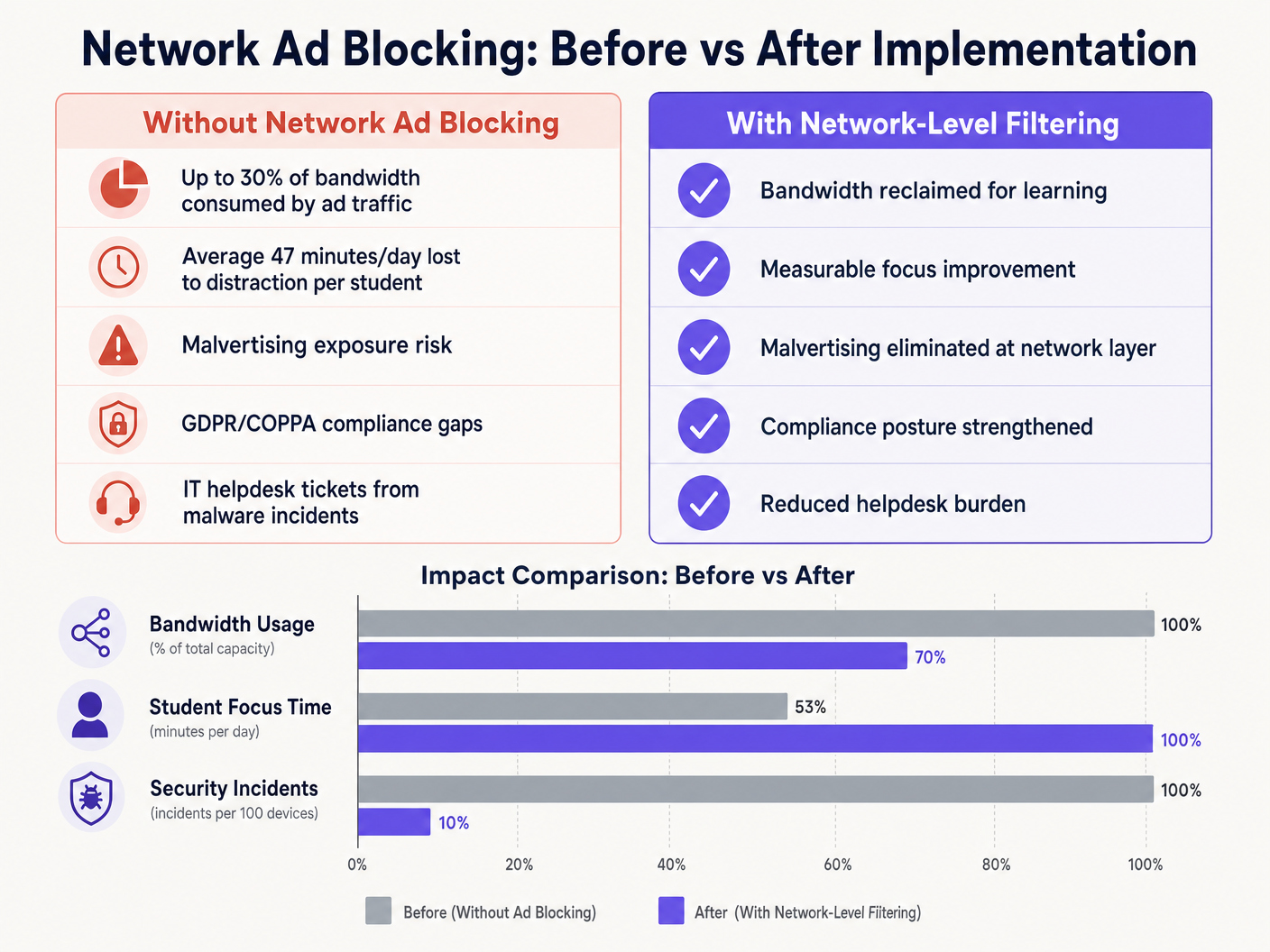
Durch die Eliminierung von Werbeinhalten und Tracking-Skripten am Netzwerkrand gewinnen Standorte typischerweise 15% bis 30% ihrer gesamten Bandbreite zurück. Diese wiedergewonnene Kapazität verzögert die Notwendigkeit teurer Leitungs-Upgrades und verbessert die Leistung kritischer Cloud-Anwendungen. Darüber hinaus reduziert das Blockieren von Malvertising-Domains auf der DNS-Ebene das Volumen von Malware-Vorfällen erheblich, wodurch das Aufkommen von IT-Helpdesk-Tickets und die Behebungskosten direkt gesenkt werden.
Ob bei der Bereitstellung in einer Schule, der Optimierung von Office Wi Fi: Optimize Your Modern Office Wi-Fi Network oder der Verwaltung von Umgebungen mit hoher Dichte im Einzelhandel , im Gesundheitswesen , im Gastgewerbe oder im Transportwesen – das Verständnis der physikalischen Schicht, wie z.B. Wi Fi Frequencies: A Guide to Wi-Fi Frequencies in 2026 , und die Sicherung der logischen Schicht durch DNS-Filterung sind wesentliche Bestandteile einer modernen Netzwerkarchitektur.
Schlüsseldefinitionen
DNS Filtering
The process of using the Domain Name System to block malicious websites and filter out harmful or unwanted content by returning a null IP address for blocked domains.
The primary mechanism for network-level ad blocking, operating upstream of client devices.
DNS-over-HTTPS (DoH)
A protocol for performing remote Domain Name System resolution via the HTTPS protocol, encrypting the data between the DoH client and the DoH-based DNS resolver.
A common method used to bypass local network DNS filtering policies.
Malvertising
The use of online advertising to spread malware, often through legitimate advertising networks without the publisher's knowledge.
A key security risk mitigated by network-level ad blocking.
SSL Inspection
The process of intercepting, decrypting, and inspecting HTTPS traffic for malicious content or policy violations before re-encrypting and forwarding it.
Required for deep packet inspection of encrypted web traffic, though complex to deploy in BYOD environments.
IEEE 802.1X
An IEEE Standard for port-based Network Access Control (PNAC), providing an authentication mechanism to devices wishing to attach to a LAN or WLAN.
Used to identify users and devices to apply differentiated filtering policies.
WPA3-Enterprise
The latest generation of Wi-Fi security, providing enhanced cryptographic strength and protecting against dictionary attacks.
Essential for securing campus networks and ensuring users cannot easily spoof identities to bypass filtering.
VLAN (Virtual Local Area Network)
A logical subnetwork that groups a collection of devices from different physical LANs.
Used to segment student, staff, and guest traffic to apply different security and filtering policies.
Transparent Proxy
An intermediary system that sits between a user and a content provider, intercepting requests without requiring client-side configuration.
Used to enforce URL-level filtering policies without deploying endpoint agents.
Ausgearbeitete Beispiele
A large multi-academy trust with 15,000 students across 12 campuses needs to implement ad blocking. They currently use a mix of school-issued Chromebooks and a BYOD policy for sixth-form students. The network is struggling with bandwidth congestion during peak hours.
- Deploy a cloud-managed DNS filtering solution across all 12 campuses, pointing all DHCP-assigned DNS settings to the cloud resolvers.
- Configure the firewall to block outbound port 53 traffic to any external IP other than the approved cloud resolvers to prevent manual DNS overrides.
- Block known DoH provider IPs at the firewall.
- Integrate the DNS filtering solution with the trust's Active Directory via 802.1X to apply different filtering policies: a strict policy for the Chromebook VLAN and a slightly more permissive policy for the BYOD VLAN, while maintaining core ad and malvertising blocking across both.
A university campus IT team receives complaints from the Computer Science faculty that the new network ad blocking solution is preventing access to legitimate development tools and APIs used in coursework.
- Review the DNS query logs for the Computer Science VLAN to identify the specific domains being blocked.
- Create a dedicated policy group for the Computer Science faculty and student VLANs.
- Implement a scoped whitelist for the required development domains, applying it only to the Computer Science policy group to maintain security across the rest of the campus.
- Establish a fast-track IT ticketing category specifically for 'Educational Content Blocking' to handle future requests with a 2-hour SLA.
Übungsfragen
Q1. You have deployed DNS filtering across the campus network, but monitoring shows that a significant number of student BYOD devices are still loading ads and accessing restricted content. What is the most likely cause, and how should you address it?
Hinweis: Consider how modern browsers handle DNS queries independently of the operating system's network settings.
Musterlösung anzeigen
The most likely cause is that modern browsers on the BYOD devices are using DNS-over-HTTPS (DoH) to bypass the local network's DNS resolver. To address this, configure the perimeter firewall to block known DoH provider IP addresses and drop outbound traffic on port 53 that does not originate from the approved campus DNS resolvers. This forces the devices to fall back to the local, filtered DNS infrastructure.
Q2. The school's leadership team wants to block all social media and advertising networks globally across the entire campus to ensure maximum compliance. As the IT Director, why might you advise against a single global policy, and what architecture would you propose instead?
Hinweis: Consider the different user groups on campus and their specific needs.
Musterlösung anzeigen
A single global policy will inevitably cause operational friction. Staff may need access to social media for communications or marketing, and certain ad networks may be required for legitimate educational tools. Instead, propose a segmented architecture using 802.1X integration to apply identity-aware policies. Create distinct VLANs and policy groups for Students, Staff, and Guests, applying strict blocking to students while allowing necessary access for staff.
Q3. Before switching the new DNS filtering solution into active enforcement mode, what critical operational process must be established with the IT helpdesk?
Hinweis: Think about the impact of false positives on teaching staff.
Musterlösung anzeigen
A rapid-response whitelist request process must be established. Heuristic filtering will inevitably block some legitimate educational resources (false positives). Without a fast, SLA-backed process for teachers to request domains be unblocked, the deployment will disrupt learning and cause stakeholder resistance.