
Museums- und Galerie-WiFi: Eine vernetzte Besucher-Experience schaffen
Dieser Leitfaden bietet einen umfassenden technischen Entwurf für die Bereitstellung von High-Density-WiFi in Museen und Galerien. Er behandelt die Netzwerkarchitektur, Strategien zur Besucherbindung und wie WiFi Analytics genutzt werden können, um den ROI und die Betriebseffizienz zu steigern.
Diesen Leitfaden anhören
Podcast-Transkript ansehen
Zusammenfassung
Für moderne Museen und Galerien ist WiFi nicht länger ein passives Hilfsmittel; es ist die grundlegende Infrastruktur der digitalen Besucherreise. Da kulturelle Einrichtungen von statischen Ausstellungen zu interaktiven, multimedialen Umgebungen übergehen, ist die Nachfrage an drahtlosen Netzwerken exponentiell gestiegen. Dieser Leitfaden bietet IT-Managern, Netzwerkarchitekten und Direktoren für den Veranstaltungsbetrieb einen praktischen Entwurf für die Planung und Bereitstellung von High-Density-WiFi-Netzwerken in komplexen kulturellen Einrichtungen.
Wir werden die spezifischen HF-Herausforderungen untersuchen, die historische Gebäude und hoher Besucherandrang mit sich bringen, die architektonischen Anforderungen für nahtlose Konnektivität und wie Plattformen wie Purple ein Kostenfaktor durch Guest WiFi Onboarding und fortschrittliche WiFi Analytics in einen strategischen Vorteil verwandeln können. Durch die Umsetzung der hier skizzierten Strategien können Veranstaltungsorte eine zuverlässige Konnektivität für digitales Ticketing, Wegweiser und interaktive Ausstellungen bieten und gleichzeitig verwertbare Erstanbieterdaten erfassen, um Mitgliederzahlen und Einnahmen zu steigern.
Technischer Einblick
Die HF-Herausforderung in kulturellen Einrichtungen
Museen stellen einzigartige HF-Umgebungen (Radiofrequenz) dar. Im Gegensatz zu Standardbüroräumen verfügen diese Veranstaltungsorte oft über dicke Steinmauern, umfangreiche Metallkonstruktionen und weitläufige, mehrstöckige Grundrisse. Diese physikalischen Eigenschaften verursachen eine erhebliche Signaldämpfung und Mehrwegeinterferenzen.
Darüber hinaus kann die Dichte der Nutzer stark schwanken. Eine Sonderausstellung könnte Tausende von Besuchern in einen begrenzten Raum locken und ein schlecht konzipiertes Netzwerk überlasten. Um diese Probleme zu mindern, ist eine robuste, hochdichte Netzwerkarchitektur erforderlich.
High-Density-Netzwerkarchitektur
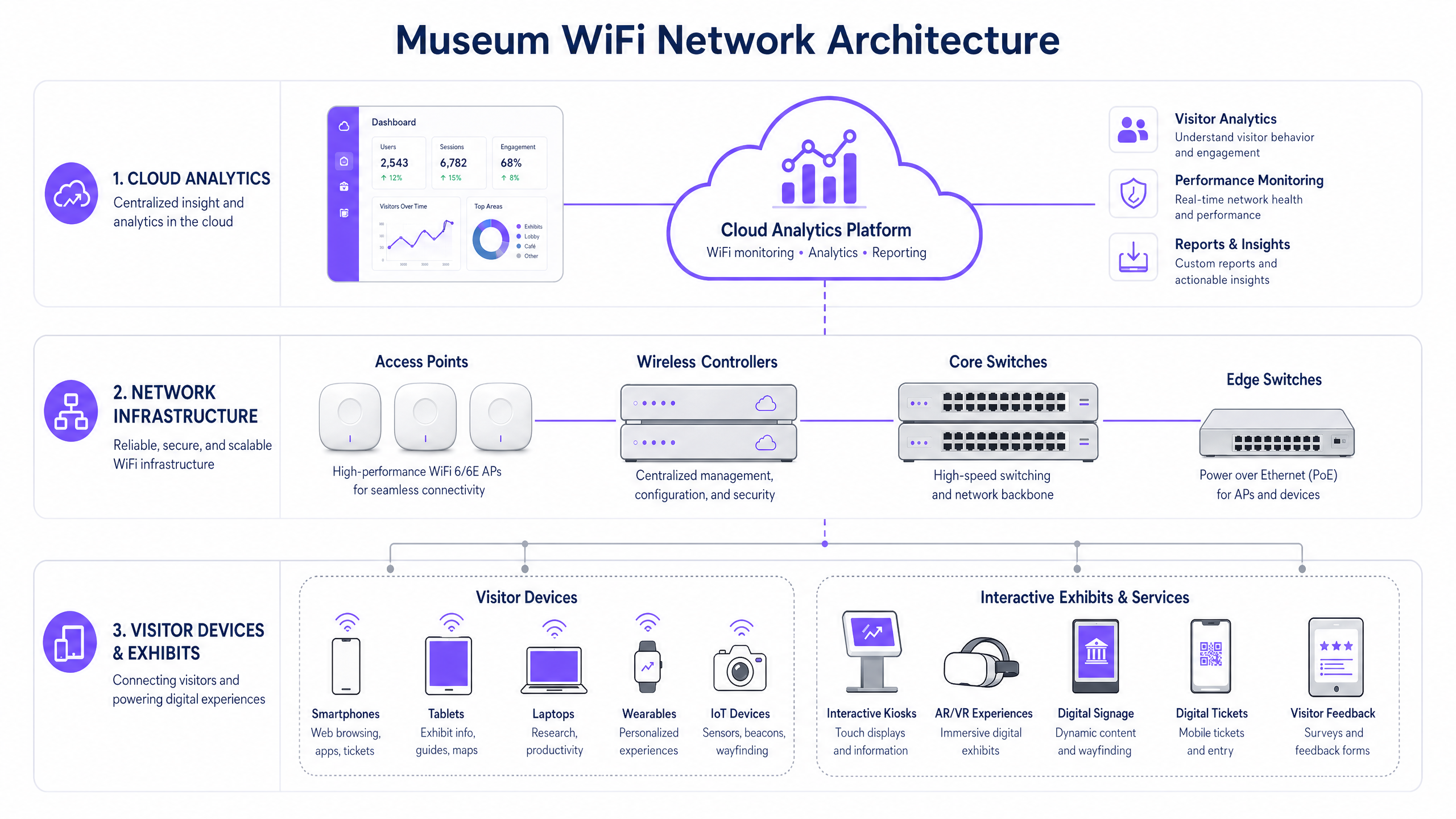
Um eine vernetzte Besucher-Experience zu unterstützen, muss die zugrunde liegende Infrastruktur widerstandsfähig und skalierbar sein.
- WiFi 6/6E Standard: Der Einsatz von IEEE 802.11ax (WiFi 6) oder WiFi 6E ist entscheidend. Diese Standards führen OFDMA (Orthogonal Frequency-Division Multiple Access) und MU-MIMO (Multi-User, Multiple Input, Multiple Output) ein, die die Netzwerkeffizienz in Umgebungen mit hoher Dichte drastisch verbessern, indem sie Access Points ermöglichen, gleichzeitig mit mehreren Geräten zu kommunizieren.
- Access Point (AP) Dichte und Platzierung: Eine vorausschauende Standortanalyse ist unerlässlich. APs müssen strategisch platziert werden, um eine überlappende Abdeckung ohne Gleichkanalinterferenzen zu gewährleisten. In historischen Gebäuden, in denen die Verkabelung eingeschränkt ist, können Mesh-Netzwerke oder Punkt-zu-Punkt-Funkbrücken erforderlich sein, obwohl festverdrahtete Verbindungen für die Kerninfrastruktur immer bevorzugt werden.
- Netzwerksegmentierung: Der Besucherdatenverkehr muss streng von Unternehmensnetzwerken, Point of Sale (POS)-Systemen und Gebäudemanagementsystemen (BMS) getrennt werden. Dies wird typischerweise durch die Verwendung von VLANs (Virtual Local Area Networks) und robusten Firewall-Richtlinien erreicht, um Sicherheit und Compliance zu gewährleisten.
Implementierungsleitfaden
Die Bereitstellung eines Museums-WiFi-Netzwerks erfordert eine sorgfältige Planung, um Leistung, Ästhetik und Benutzererfahrung in Einklang zu bringen.
Schritt 1: Die digitale Onboarding-Experience
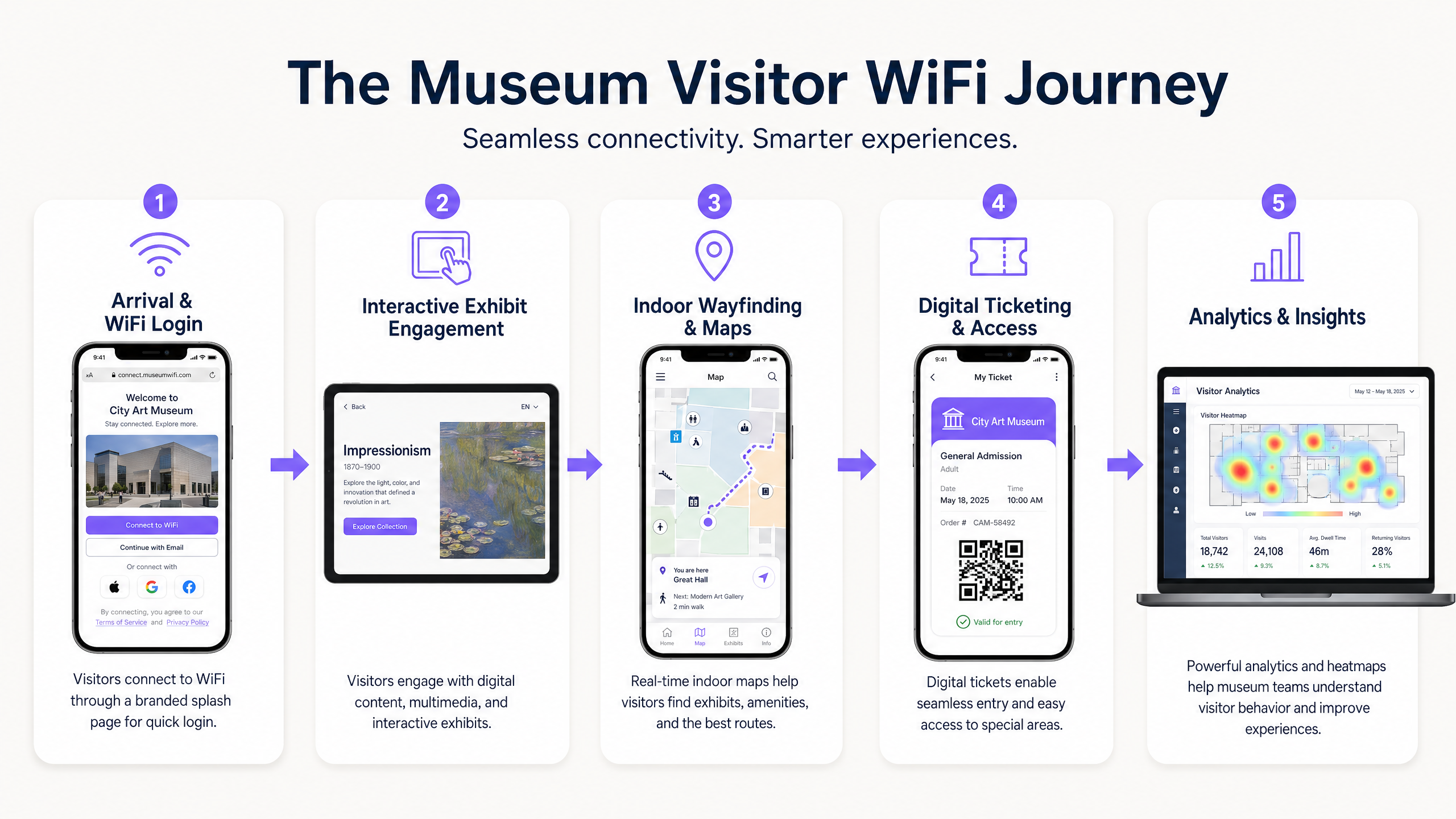
Das Captive Portal ist der erste digitale Berührungspunkt. Es muss reibungslos und dennoch sicher sein. Die Integration einer Lösung wie Purple’s Guest WiFi ermöglicht eine profilbasierte Authentifizierung. Besucher können sich über soziale Medien, E-Mail oder nahtlose Protokolle wie OpenRoaming authentifizieren. Dies reduziert Reibungsverluste und fördert die Netzwerkakzeptanz, was für die Datenerfassung entscheidend ist.
Schritt 2: Die Besucherreise ermöglichen
Nach der Verbindung muss das Netzwerk die gesamte Besucherreise unterstützen:
- Digitales Ticketing & Zugang: Eine hohe Verfügbarkeit an den Eingangspunkten ist unerlässlich, um digitale Tickets ohne Verzögerungen zu scannen.
- Interaktive Ausstellungen: Für Multimedia-Streaming und AR/VR-Erlebnisse im Zusammenhang mit Ausstellungen muss dedizierte Bandbreite zugewiesen werden.
- Indoor-Wegweiser: Durch die Nutzung des WiFi-Netzwerks in Verbindung mit BLE (Bluetooth Low Energy) Beacons können Veranstaltungsorte eine präzise Indoor-Navigation anbieten, die Besucher durch komplexe Galerie-Layouts führt.
Schritt 3: Datenerfassung und Analytics
Der wahre Wert des Netzwerks liegt in den Daten, die es generiert. Die Implementierung von WiFi Analytics ermöglicht es IT- und Marketingteams, das Besucherverhalten zu visualisieren. Heatmaps können beliebte Ausstellungen, Verweildauern und Bewegungsmuster aufzeigen. Diese Daten sind von unschätzbarem Wert für die Optimierung von Veranstaltungsort-Layouts, die Personalplanung und die Anpassung von Marketingkampagnen.
Best Practices
- Sicherheit und Compliance priorisieren: Stellen Sie sicher, dass das Netzwerk den Datenschutzbestimmungen wie der GDPR entspricht. Bei der Erfassung von Besucherdaten müssen Opt-in-Mechanismen transparent und klar kommuniziert werden. Sichern Sie das Netzwerk, wo möglich, mit WPA3-Verschlüsselung und erzwingen Sie eine strikte Trennung zwischen Gast- und Unternehmensdatenverkehr.
- Bandbreitenmanagement implementieren: Nutzen Sie Quality of Service (QoS)-Protokolle, um kritischen Datenverkehr (z. B. Ticketscanner) gegenüber allgemeinem Gast-Browsing zu priorisieren. Implementieren Sie Bandbreitenbeschränkungen pro Benutzer, um zu verhindern, dass ein einzelner Benutzer die Erfahrung für andere beeinträchtigt.
- Kontinuierliche Überwachung: Die Netzwerkleistung ist nicht statisch. Nutzen Sie cloudbasierte Management-Dashboards, um den AP-Zustand, die Client-Verbindungsraten und den gesamten Netzwerkdurchsatz in Echtzeit zu überwachen.
Fehlerbehebung & Risikominderung
Selbst die am besten konzipierten Netzwerke stoßen auf Probleme. Häufige Fehlerursachen sind* Co-Channel Interference (CCI): In dichten Umgebungen können APs auf demselben Kanal sich gegenseitig stören. Abhilfe: Implementieren Sie eine dynamische Kanalzuweisung und passen Sie die Sendeleistung sorgfältig an.
- Captive Portal Fehler: Wenn das Captive Portal nicht geladen werden kann, können Besucher keine Verbindung herstellen. Abhilfe: Stellen Sie sicher, dass die DNS-Infrastruktur robust ist, und erwägen Sie die Implementierung eines 'Walled Garden'-Zugangs für wesentliche Dienste, noch bevor die vollständige Authentifizierung erfolgt ist. (Siehe: Schützen Sie Ihr Netzwerk mit starkem DNS und Sicherheit ).
- Geräteinkompatibilität: Das Netzwerk muss eine Vielzahl von Client-Geräten unterstützen, einschließlich älterer Legacy-Hardware. Abhilfe: Behalten Sie die Unterstützung für ältere Standards (z. B. 802.11ac) bei, während Sie für moderne Geräte optimieren, um sicherzustellen, dass der kleinste gemeinsame Nenner die Gesamtleistung des Netzwerks nicht beeinträchtigt.
ROI & Geschäftsauswirkungen
Die Bereitstellung eines unternehmensweiten WiFi-Netzwerks ist eine erhebliche Investition. Der ROI ist jedoch in mehreren Dimensionen messbar:
- Operative Effizienz: Die automatisierte Datenerfassung reduziert den Bedarf an manuellen Besucherbefragungen. Die Indoor-Navigation entlastet das Personal bei der Wegbeschreibung.
- Gesteigerte Einnahmen: Gezielte Marketingkampagnen, die durch über Guest WiFi erfasste Erstanbieterdaten unterstützt werden, können Mitgliedschafts-Upgrades, den Verkauf von Eintrittskarten für Sonderausstellungen sowie Einkäufe im Einzelhandel/Café fördern.
- Verbesserte Besucherzufriedenheit: Ein nahtloses digitales Erlebnis korreliert direkt mit höheren Besucherzufriedenheitswerten und positiven Online-Bewertungen, was die zukünftige Besucherzahl steigert.
Indem Museen und Galerien das WiFi-Netzwerk nicht nur als IT-Ausgabe, sondern als strategische Plattform für Engagement und Analysen betrachten, können sie ihren operativen und kommerziellen Erfolg erheblich steigern.
Schlüsseldefinitionen
High-Density Environment
A physical space where a large number of client devices are connecting to the network simultaneously, requiring specialized RF design and AP configuration.
Museum atriums, special exhibition halls, and auditoriums are prime examples where standard office WiFi designs will fail.
Captive Portal
A web page that the user of a public-access network is obliged to view and interact with before access is granted.
This is the primary tool for visitor onboarding and data capture in a museum setting, often integrated with CRM systems.
WiFi 6 (802.11ax)
The current standard for wireless networks, designed specifically to improve efficiency and capacity in high-density environments.
Essential for modern museum deployments to handle the multitude of visitor smartphones and interactive exhibit devices.
VLAN (Virtual Local Area Network)
A logical grouping of devices on a network, allowing for the segmentation of traffic even if devices share the same physical infrastructure.
Used to separate visitor WiFi traffic from sensitive corporate or ticketing data, ensuring security.
Band Steering
A feature that encourages dual-band capable clients to connect to the less congested 5GHz or 6GHz bands rather than the crowded 2.4GHz band.
Crucial for optimizing performance in crowded museum spaces.
First-Party Data
Information a company collects directly from its customers and owns.
Gathered via the WiFi captive portal, this data is highly valuable for targeted marketing and understanding the visitor demographic.
RSSI (Received Signal Strength Indicator)
A measurement of the power present in a received radio signal.
Used during site surveys and troubleshooting to determine if a visitor has sufficient signal strength to maintain a reliable connection.
OpenRoaming
A roaming federation service enabling an automatic and secure WiFi experience globally.
Allows visitors to seamlessly connect to the museum WiFi without manually interacting with a captive portal, improving the user experience.
Ausgearbeitete Beispiele
A historic gallery with strict preservation orders needs to deploy WiFi to support a new AR (Augmented Reality) exhibit. Running new CAT6 cabling to the exhibit space is prohibited. How should the network architect proceed?
The architect should design a wireless mesh network or utilize point-to-point wireless bridges. High-capacity APs (WiFi 6) should be placed at the perimeter where cabling is permitted. These edge APs will wirelessly backhaul traffic from mesh APs located near the AR exhibit. The mesh APs should be housed in aesthetically appropriate, non-metallic enclosures to comply with preservation orders.
A large science museum is experiencing network congestion in its main atrium during peak weekend hours, leading to slow captive portal load times and visitor complaints.
The IT team should implement several optimization steps: 1) Enable band steering to force capable devices onto the less congested 5GHz band. 2) Implement strict per-user bandwidth limits (e.g., 5 Mbps down/up) to prevent bandwidth hogging. 3) Review the AP deployment in the atrium; if APs are maxed out on client connections, additional APs with directional antennas may be required to sectorize the coverage area and increase overall capacity.
Übungsfragen
Q1. A museum is planning a temporary outdoor exhibit in an adjacent courtyard. The exhibit will require reliable WiFi for digital interactive kiosks. Running cabling to the courtyard is not feasible. What is the most appropriate wireless architecture?
Hinweis: Consider the need for reliable backhaul for the kiosks without physical cabling.
Musterlösung anzeigen
Deploy a point-to-multipoint wireless bridge from the main building to the courtyard. Use outdoor-rated, directional antennas on the building to establish a strong backhaul link to outdoor APs in the courtyard. These outdoor APs will then provide localized WiFi coverage for the kiosks.
Q2. The marketing director wants to use WiFi analytics to track how many visitors enter a specific, small gallery room (5m x 5m). Currently, there is one AP in the adjacent hallway providing coverage to the room. Will this setup provide accurate location data for that specific room?
Hinweis: Think about how location tracking works using WiFi and the requirements for accuracy.
Musterlösung anzeigen
No, it will likely not provide accurate data. WiFi location analytics generally require trilateration, meaning a client device needs to be heard by at least three APs to accurately determine its position. A single AP in an adjacent hallway can only determine that the device is nearby, not its precise location within a small 5x5m room. Additional APs or BLE beacons would be required for precise indoor location tracking.
Q3. During a busy weekend, the IT dashboard shows that the 2.4GHz band is heavily congested, while the 5GHz band has plenty of capacity. However, many dual-band capable devices are still connecting to 2.4GHz. What configuration change should be implemented?
Hinweis: What feature forces or encourages capable devices to use a specific frequency band?
Musterlösung anzeigen
Enable and aggressively configure 'Band Steering' on the wireless controller. This feature will actively encourage dual-band capable clients to connect to the 5GHz band, freeing up airtime on the 2.4GHz band for legacy devices that only support 2.4GHz.
Weiterlesen in dieser Reihe
Was ist eine Probe Request? Verstehen, wie Geräte Netzwerke entdecken
Dieser technische Leitfaden bietet einen tiefen Einblick in IEEE 802.11 Probe Requests, aktives versus passives Scannen und die Auswirkungen der MAC randomisation auf Standortanalysen. Er liefert umsetzbare Implementierungsstrategien für Netzwerkarchitekten zur Optimierung von High-Density-Bereitstellungen, zur Minderung von Probe Storms und zur Sicherstellung einer genauen, GDPR-konformen Datenerfassung mithilfe authentifizierter Identitätsschichten.
Wie man langsames WiFi behebt, ohne Ihr Internetpaket zu aktualisieren
Ein umfassender technischer Leitfaden für IT-Manager und Netzwerkarchitekten zur Optimierung der Unternehmens-WiFi-Leistung, ohne die ISP-Bandbreite zu erhöhen. Behandelt HF-Tuning, Client-Dichte-Management, QoS-Implementierung und wie man WiFi-Analysen nutzt, um Engpässe zu diagnostizieren und zu beheben.
Die Checkliste für die Migration von Legacy NAC zu Cloud-Native NAC
Dieser maßgebliche technische Leitfaden bietet eine strukturierte, dreiphasige Checkliste für die Migration von der traditionellen Netzwerkzugriffskontrolle (NAC) zu einer Cloud-nativen Architektur. Er stattet IT-Manager und Netzwerkarchitekten mit umsetzbaren Strategien aus, um die Identitätsintegration, Richtlinienkonsistenz und Compliance zu gewährleisten, ohne den Veranstaltungsbetrieb zu stören.