
NHS Staff WiFi: Bereitstellung sicherer drahtloser Netzwerke im Gesundheitswesen
Dieser technische Leitfaden beschreibt die Architektur, Sicherheitsprotokolle und Bereitstellungsstrategien für NHS Staff WiFi und behandelt die 802.1X-Authentifizierung, VLAN-Segmentierung, BYOD-Richtlinien und die Einhaltung des DSP Toolkits. Er bietet IT-Führungskräften umsetzbare Anleitungen zur Bereitstellung von drahtlosen Netzwerken der Enterprise-Klasse, die klinische, administrative und Gastnutzer auf einer gemeinsamen physischen Infrastruktur bedienen, ohne die Sicherheit zu gefährden. Ob Sie eine neue Bereitstellung planen oder eine bestehende Infrastruktur härten, dieser Leitfaden liefert die Entscheidungsrahmen und Implementierungsschritte, die für dieses Quartal erforderlich sind.
Diesen Leitfaden anhören
Podcast-Transkript ansehen
Zusammenfassung für die Geschäftsleitung
Die Bereitstellung von sicherem, zuverlässigem WiFi in NHS-Einrichtungen ist keine optionale Annehmlichkeit mehr – sie ist eine kritische klinische Infrastruktur. Die Verlagerung hin zu mobiler Patientenversorgung, elektronischen Gesundheitsakten (EHR) und vernetzten medizinischen Geräten erfordert eine drahtlose Architektur, die nahtloses Roaming mit strengen Sicherheitskontrollen in Einklang bringt.
Für IT-Manager, Netzwerkarchitekten und CTOs besteht die zentrale Herausforderung darin, verschiedene Benutzergruppen – klinisches Personal, Verwaltungspersonal, Patienten und Gäste – auf einer gemeinsamen physischen Infrastruktur unterzubringen, ohne die Anforderungen des NHS Data Security and Protection (DSP) Toolkit zu gefährden. Dieser Leitfaden beschreibt die technischen Anforderungen für NHS Staff WiFi, wobei der Schwerpunkt auf robusten Authentifizierungsframeworks wie IEEE 802.1X, logischer Netzwerksegmentierung über VLANs und dem sicheren Onboarding von Bring Your Own Device (BYOD)-Endpunkten liegt.
Durch die Abkehr von veralteten Pre-Shared Keys (PSK) und die Einführung identitätsgesteuerter Zugriffsrichtlinien können Gesundheitsorganisationen das Risiko von Sicherheitsverletzungen mindern, den operativen Aufwand reduzieren und die drahtlose Grundlage für digitale Transformationsprogramme schaffen. Der geschäftliche Nutzen ist gleichermaßen stark: reduzierter Helpdesk-Aufwand, nachweisbare DSP Toolkit-Konformität und ein Netzwerk, das zukünftige klinische Innovationen unterstützen kann, ohne einen vollständigen Infrastrukturumbau zu erfordern.
Technischer Tiefgang
Authentifizierung und Zugriffssteuerung
Die Grundlage eines sicheren drahtlosen Netzwerks im Gesundheitswesen ist die identitätsbasierte Zugriffssteuerung. Veraltete WPA2-Personal-Netzwerke, die Pre-Shared Keys verwenden, sind für klinische Umgebungen grundsätzlich ungeeignet. Sie bieten keine individuelle Verantwortlichkeit, erschweren den Offboarding-Prozess beim Ausscheiden von Mitarbeitern und stellen einen Single Point of Failure dar, wenn die Anmeldeinformationen kompromittiert oder über die vorgesehene Gruppe hinaus geteilt werden.
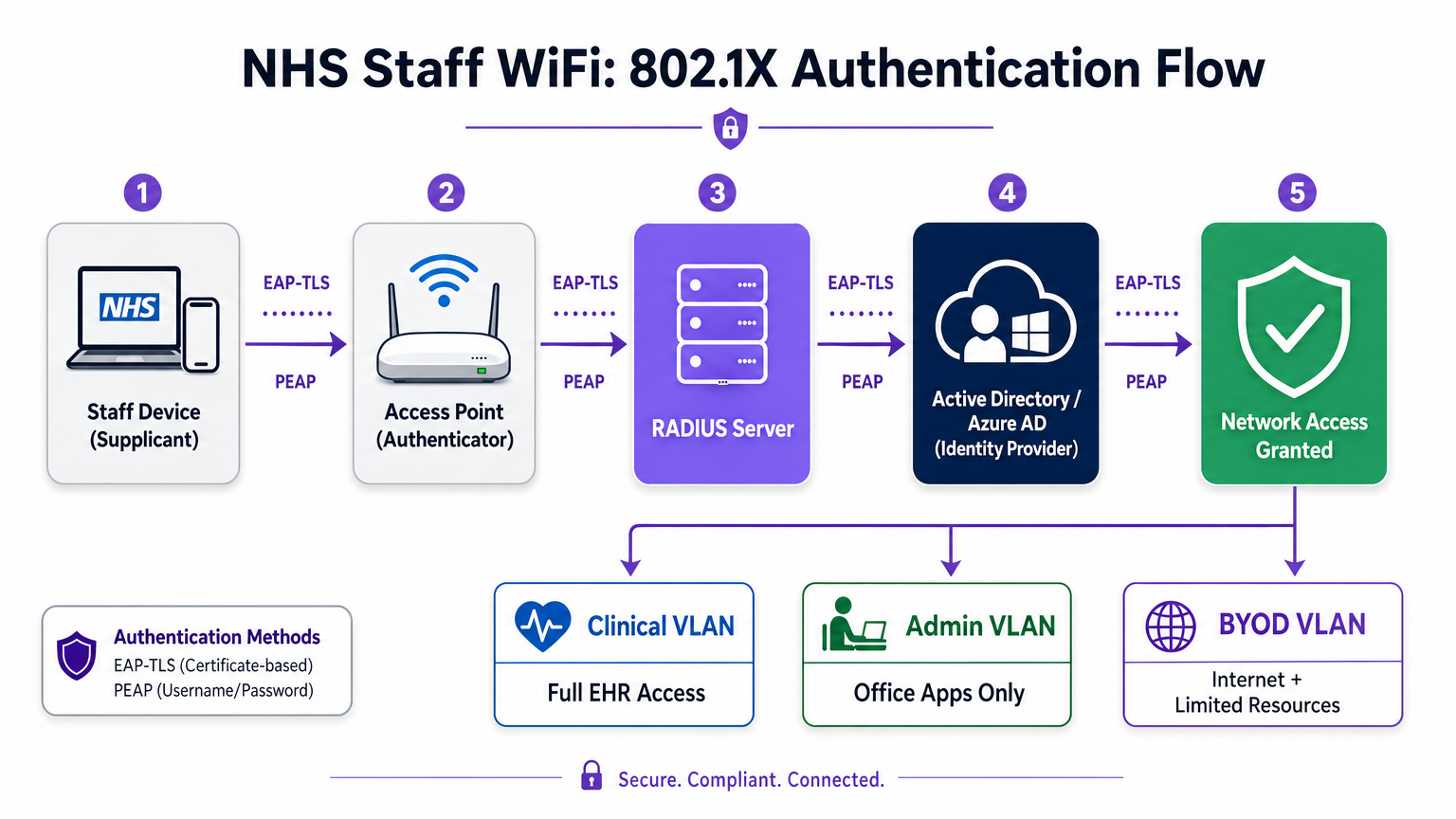
Moderne NHS-Bereitstellungen müssen WPA3-Enterprise (oder WPA2-Enterprise als minimalen Übergangszustand) unter Verwendung der IEEE 802.1X-Authentifizierung vorschreiben. Dieses Framework erfordert, dass jeder Benutzer oder jedes Gerät eindeutige Anmeldeinformationen vorlegt, bevor der Netzwerkzugriff gewährt wird, und das Ergebnis dieser Authentifizierung bestimmt, welchem logischen Netzwerksegment das Gerät zugeordnet wird.
Zwei EAP-Methoden dominieren Bereitstellungen im Gesundheitswesen:
| EAP-Methode | Authentifizierungsmechanismus | Am besten geeignet für | Sicherheitsstufe |
|---|---|---|---|
| EAP-TLS | Clientseitiges digitales Zertifikat | Unternehmensverwaltete klinische Geräte | Höchste — kein Passwort zum Phishing |
| PEAP-MSCHAPv2 | Benutzername/Passwort in verschlüsseltem Tunnel | BYOD, Verwaltungspersonal, ältere Geräte | Hoch — Anmeldeinformationen durch TLS geschützt |
EAP-TLS ist der Goldstandard für Unternehmensgeräte. Zertifikate werden über Mobile Device Management (MDM)-Plattformen verteilt, was eine Zero-Touch-Authentifizierung ermöglicht – das Gerät authentifiziert sich still im Hintergrund. PEAP-MSCHAPv2 tunnelt Active Directory- oder Azure AD-Anmeldeinformationen sicher innerhalb einer verschlüsselten TLS-Sitzung, wodurch es für BYOD-Szenarien geeignet ist, in denen die Zertifikatsverwaltung unpraktisch ist.
Die Integration der drahtlosen Infrastruktur mit dem zentralen Identitätsanbieter (IdP) der Organisation stellt sicher, dass der Zugriff automatisch widerrufen wird, wenn das AD-Konto eines Mitarbeiters deaktiviert wird, und erfüllt so direkt die DSP Toolkit-Anforderungen für das Zugriffs-Lebenszyklusmanagement.
Netzwerksegmentierung und Vertrauenszonen
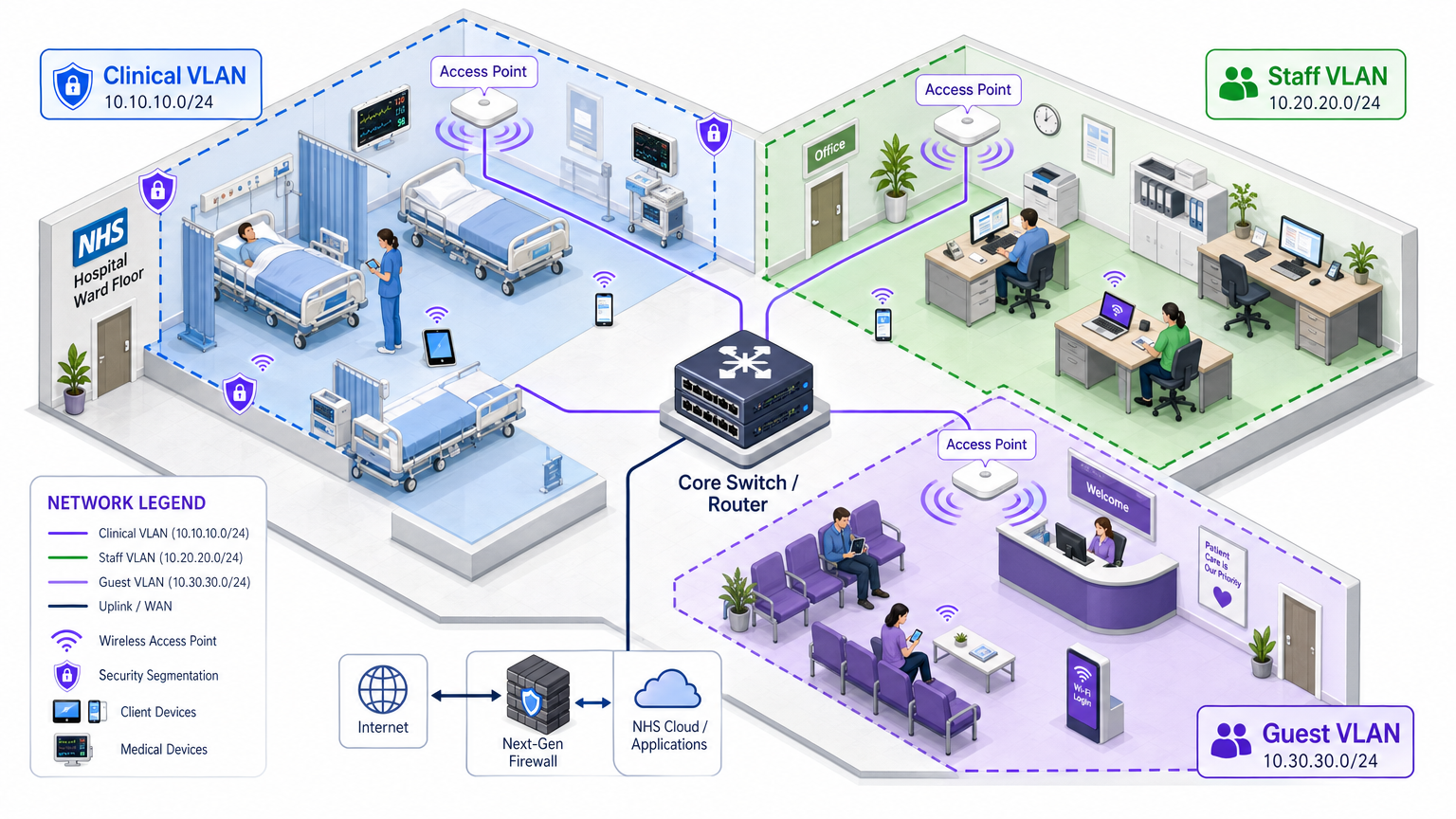
Physische Access Points senden über die gesamte Krankenhausfläche, aber die logische Segmentierung stellt sicher, dass der Datenverkehr nach dem Prinzip der geringsten Rechte isoliert bleibt. Eine flache Netzwerkarchitektur im Gesundheitswesen ist eine schwerwiegende Sicherheitslücke, die es einem kompromittierten Gastgerät oder einem anfälligen IoT-Sensor ermöglichen könnte, auf klinische Systeme zuzugreifen.
Best Practice schreibt die Erstellung separater Virtual Local Area Networks (VLANs) vor, die bestimmten SSIDs zugeordnet sind, wobei Firewall-Regeln die Datenverkehrsgrenzen zwischen ihnen durchsetzen:
| Zone | SSID | Authentifizierung | Zugriff | QoS-Priorität |
|---|---|---|---|---|
| Klinisch | NHS-Clinical | EAP-TLS (Zertifikat) | EHR, PACS, klinische Nachrichtenübermittlung | Höchste |
| Administrativ | NHS-Staff | PEAP (AD-Anmeldeinformationen) | Office-Anwendungen, Internet | Mittel |
| Medizinisches IoT | Versteckt/MAB | MAC-Authentifizierungs-Bypass | Nur Gerätesteuerung | Hoch |
| Gast / Patient | NHS-Guest | Captive portal | Nur Internet | Niedrig |
| BYOD | NHS-BYOD | PEAP (AD-Anmeldeinformationen) | Internet, eingeschränkter VDI | Niedrig |
Das Medical IoT VLAN verdient besondere Aufmerksamkeit. Viele vernetzte medizinische Geräte – Infusionspumpen, Patientenmonitore, drahtlose Rufsysteme – können 802.1X nicht unterstützen. MAC Authentication Bypass (MAB) ist die Ausweichlösung, muss aber mit strengen Firewall Access Control Lists (ACLs) kombiniert werden, die diese Geräte darauf beschränken, nur mit ihren zugewiesenen Verwaltungsservern zu kommunizieren.
Die BYOD-Herausforderung
Bring Your Own Device-Richtlinien werden für Verwaltungspersonal und Gastkliniker immer häufiger. Unverwaltete persönliche Geräte stellen jedoch ein erhebliches Risiko dar, wenn sie auf vertrauenswürdige Netzwerksegmente zugelassen werden.
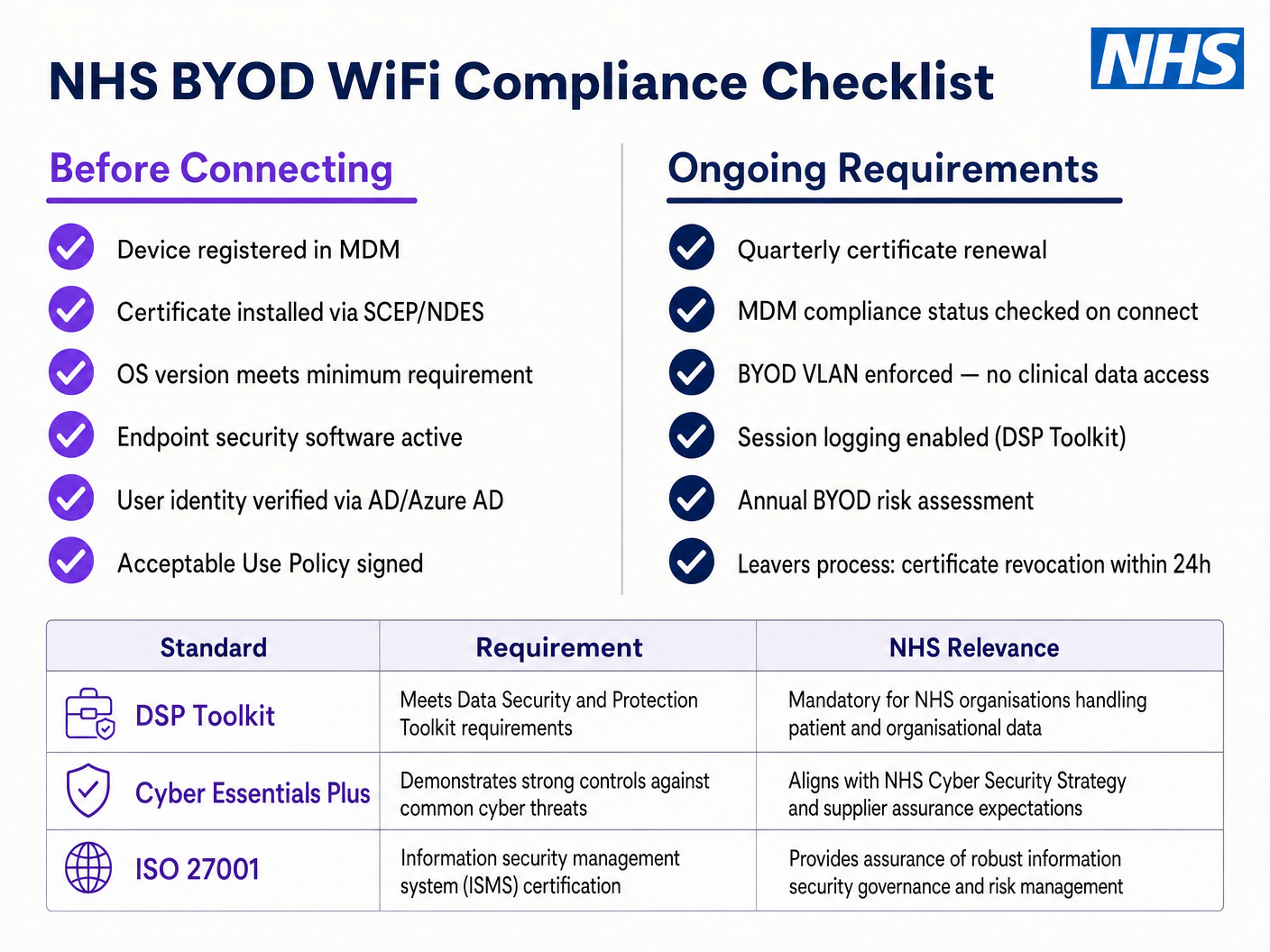
Eine sichere BYOD-Bereitstellung beinhaltet das Onboarding dieser Geräte in ein dediziertes BYOD VLAN. Diese Zone bietet Internetzugang und möglicherweise eingeschränkten Zugriff auf spezifische, nicht-sensible interne Ressourcen über ein sicheres Gateway oder eine Virtual Desktop Infrastructure (VDI). Es darf absolut kein direktes Routing zu klinischen Systemen oder Patientendatenbanken haben.
Implementierungsleitfaden
Die Bereitstellung einer sicheren NHS Staff WiFi-Architektur erfordert einen schrittweisen Ansatz, um Störungen des laufenden klinischen Betriebs zu minimieren.
Phase 1: Bewertung und Design
Beginnen Sie mit einer umfassenden Wireless-Standortanalyse. Gesundheitsumgebungen sind aufgrund von bleiverkleideten Wänden, schweren Maschinen und hoher Belegungsdichte bekanntermaßen schwierig für die RF-Ausbreitung. Das Design muss die Kapazität, nicht nur die Abdeckung, berücksichtigen, um eine ausreichende Dichte an Access Points in stark frequentierten Bereichen wie Notaufnahmen und Ambulanzen zu gewährleisten.
Definieren Sie die erforderlichen SSIDs und ordnen Sie diese den entsprechenden VLANs und Sicherheitsrichtlinien zu. Halten Sie die Anzahl der ausgestrahlten SSIDs auf ein Minimum – idealerweise nicht mehr als vier –, um den Verwaltungsaufwand zu reduzieren und die Überlastung durch Beacon-Frames zu minimieren, die die Gesamtleistung des Netzwerks beeinträchtigt.
Phase 2: Infrastrukturkonfiguration
Konfigurieren Sie die zentrale Switching- und Routing-Infrastruktur, um die definierten VLANs zu unterstützen. Implementieren Sie Firewall-Regeln an den Grenzen zwischen den Segmenten, um das Prinzip der geringsten Rechte durchzusetzen. Richten Sie den RADIUS-Server ein (z. B. Cisco ISE, Aruba ClearPass oder ein Cloud-basierter RADIUS-as-a-Service) und integrieren Sie ihn mit dem zentralen Identitätsanbieter. In Umgebungen, in denen die Purple-Plattform eingesetzt wird, bietet die Integration von WiFi Analytics in dieser Phase Einblicke in die Netzwerkauslastung, Roaming-Muster und Kapazitäts-Hotspots.
Phase 3: Richtliniendurchsetzung und Onboarding
Implementieren Sie die Authentifizierungsrichtlinien. Für Unternehmensgeräte nutzen Sie die MDM-Lösung, um die erforderlichen Wireless-Profile und Client-Zertifikate (für EAP-TLS) zu verteilen. Dies stellt sicher, dass verwaltete Geräte automatisch und sicher ohne Benutzereingriff verbunden werden.
Für BYOD etablieren Sie einen klaren Onboarding-Workflow – typischerweise ein Onboarding-Portal, das den Benutzer durch die Authentifizierung mit seinen Unternehmenszugangsdaten, die Annahme einer Nutzungsrichtlinie und die Verschiebung des Geräts in das sichere BYOD VLAN führt. Die Guest WiFi -Plattform von Purple kann als Captive Portal-Schicht für die Patienten- und Gast-SSID eingesetzt werden, um die GDPR-konforme Datenerfassung und die Annahme von Bedingungen in großem Umfang zu handhaben.
Phase 4: Testen und Validierung
Führen Sie vor der Inbetriebnahme End-to-End-Tests jedes Authentifizierungspfads, jeder VLAN-Zuweisung und jeder Firewall-Regel durch. Validieren Sie insbesondere das Roaming-Verhalten, indem Sie mit einem Testgerät durch die klinischen Bereiche gehen und dabei auf Re-Authentifizierungsereignisse achten. Bestätigen Sie, dass schnelle Roaming-Protokolle (802.11r und 802.11k) korrekt funktionieren und dass Anwendungssitzungen AP-Übergänge überstehen.
Best Practices
Pre-Shared Keys eliminieren. Stellen Sie alle Mitarbeiter- und klinischen Netzwerke auf 802.1X-Authentifizierung um, um individuelle Verantwortlichkeit und zentralisierte Zugriffskontrolle zu gewährleisten. Dies ist eine nicht verhandelbare Anforderung für die DSP Toolkit-Konformität.
Strikte Segmentierung durchsetzen. Erlauben Sie niemals Gast-, BYOD- oder IoT-Verkehr auf demselben logischen Segment wie klinische Daten. Verwenden Sie Stateful Firewalls, um das Inter-VLAN-Routing zu steuern, mit expliziten Deny-Regeln als Standardrichtlinie.
Klinischen Verkehr priorisieren. Implementieren Sie QoS-Richtlinien auf den Wireless-Controllern und Switches, um klinische Anwendungen – Voice over WLAN, EHR-Zugriff – gegenüber Gast- oder administrativem Verkehr zu priorisieren, insbesondere während Zeiten hoher Überlastung.
Schnelles Roaming aktivieren. Implementieren Sie 802.11r (Fast BSS Transition) und 802.11k (Radio Resource Measurement), um sicherzustellen, dass klinisches Personal sich durch die Einrichtung bewegen kann, ohne Anwendungs-Timeouts oder Verbindungsabbrüche zu erleben.
Kontinuierliche Überwachung. Nutzen Sie Analyseplattformen, um die Netzwerkleistung zu überwachen, nicht autorisierte Access Points zu identifizieren und das Roaming-Verhalten der Benutzer zu verfolgen. Das Verständnis von Besucherfrequenz und Nutzungsmustern – eine Technik, die sich in Retail - und Hospitality -Umgebungen bewährt hat – ist in einem Krankenhausumfeld für die Kapazitätsplanung und Fehlerbehebung gleichermaßen wertvoll.
Regelmäßige Audits. Führen Sie jährliche Wireless-Risikobewertungen durch, um die fortlaufende Einhaltung des DSP Toolkit, Cyber Essentials Plus und ISO 27001, wo zutreffend, sicherzustellen.
Fehlerbehebung & Risikominderung
Authentifizierungs-Timeouts
In Umgebungen mit hoher Client-Dichte können RADIUS-Server überlastet werden, was zu Authentifizierungs-Timeouts und Verbindungsabbrüchen führt. Stellen Sie sicher, dass die RADIUS-Infrastruktur ausreichend skaliert und hochverfügbar ist. Implementieren Sie Lastverteilung über mehrere Authentifizierungsserver und überwachen Sie die RADIUS-Antwortzeiten als wichtige Betriebsmetrik.
Roaming-Probleme
Klinisches Personal, das sich schnell zwischen Stationen bewegt, kann Verbindungsabbrüche erleben, wenn die Wireless-Infrastruktur keine schnellen Roaming-Protokolle unterstützt. Aktivieren Sie 802.11r und 802.11k auf den Wireless-Controllern und stellen Sie sicher, dass Client-Geräte diese Standards unterstützen. Führen Sie nach der Bereitstellung Roaming-Surveys durch, um Abdeckungslücken oder 'Sticky Client'-Probleme zu identifizieren und zu beheben, bei denen ein Gerät an einem entfernten, schwächeren AP festhält, anstatt zu einem näheren zu wechseln.
Inkompatibilität mit älteren Geräten
Ältere medizinische Geräte unterstützen möglicherweise keine modernen Sicherheitsprotokolle wie WPA3 oder 802.1X. Isolieren Sie diese Geräte auf einem dedizierten IoT VLAN mittels MAB. Implementieren Sie strikte Firewall-Regeln, um deren Kommunikation nur auf die notwendigen Management-Server zu beschränken. Ziehen Sie Hardware-Upgrades oder Wireless-Bridges für kritische Geräte in Betracht, die nicht nativ gesichert werden können.
Zertifikatsablauf
EAP-TLS-Implementierungen basieren auf Zertifikaten mit definierten Ablaufzeiten. Wenn Zertifikate ohne Verlängerung ablaufen, können sich Geräte nicht authentifizieren, was zu weitreichenden klinischen Störungen führt. Implementieren Sie eine automatisierte Zertifikatsverlängerung über SCEP (Simple Certificate Enrolment Protocol) über die MDM-Plattform und überwachen Sie die Zertifikatsablaufdaten proaktiv.
ROI & Geschäftsauswirkungen
Die Investition in eine sichere, unternehmenstaugliche Wireless-Architektur liefert messbare Erträge in klinischen, operativen und IT-Bereichen.
Klinische Effizienz. ZuverläDie Konnektivität stellt sicher, dass Kliniker sofortigen Zugriff auf Patientenakten am Behandlungsort haben, wodurch der Zeitaufwand für die Informationssuche oder den Umgang mit Verbindungsabbrüchen reduziert wird. Dies wirkt sich direkt auf den Patientendurchsatz und die Qualität der Versorgung aus.
Reduzierter IT-Aufwand. Die Abkehr von gemeinsam genutzten Passwörtern und manuellem Onboarding hin zu einer automatisierten, zertifikatbasierten Authentifizierung reduziert Helpdesk-Tickets im Zusammenhang mit Passwort-Resets und Konnektivitätsproblemen erheblich. Ein NHS Trust berichtete von einer 40%igen Reduzierung der WLAN-bezogenen Helpdesk-Anrufe nach einer Migration zu 802.1X.
Risikominderung. Strikte Segmentierung und robuste Authentifizierung sind grundlegend für die Erfüllung der DSP Toolkit-Anforderungen und mindern die finanziellen und reputativen Risiken, die mit Datenschutzverletzungen oder Compliance-Fehlern verbunden sind. Die Kosten einer Datenschutzverletzung übersteigen die Investition in eine ordnungsgemäß architekturierte WLAN-Infrastruktur bei weitem.
Zukunftssicherheit. Ein gut konzipiertes WLAN-Netzwerk bildet die Grundlage für zukünftige digitale Gesundheitsinitiativen – standortbasierte Dienste, Echtzeit-Asset-Tracking, fortschrittliche Telemedizinanwendungen – und stimmt mit umfassenderen strategischen Zielen im gesamten Gesundheitswesen und verwandten Sektoren wie dem Transportwesen überein, wo mobile Konnektivität die operative Effizienz untermauert.
Für Organisationen, die verstehen möchten, wie die Plattform von Purple auf die Gast- und Patienten-WiFi-Schicht dieser Architektur abgebildet wird, bietet die Branchenseite Gesundheitswesen einen detaillierten Überblick über NHS-kompatible Captive Portal-, Analyse- und GDPR-konforme Datenverarbeitungsfunktionen. Dieselben Analyseprinzipien, die die Kundenbindung im Einzelhandel fördern, lassen sich direkt in operative Intelligenz für Krankenhausverwaltungsteams umsetzen.
Schlüsseldefinitionen
IEEE 802.1X
An IEEE standard for port-based Network Access Control (PNAC). It provides an authentication mechanism to devices wishing to attach to a LAN or WLAN, requiring each device to present credentials before being granted access.
This is the mandatory standard for replacing insecure shared passwords with individual, identity-based logins for staff and clinical devices. It is the cornerstone of a DSP Toolkit-compliant wireless architecture.
VLAN (Virtual Local Area Network)
A logical subnetwork that groups a collection of devices from different physical network segments. VLANs allow network administrators to partition a single switched network to match the functional and security requirements of different user groups.
VLANs are essential for segmenting clinical traffic from guest and administrative traffic, limiting the blast radius of a potential security breach and enforcing the principle of least privilege.
RADIUS (Remote Authentication Dial-In User Service)
A networking protocol that provides centralised Authentication, Authorisation, and Accounting (AAA) management for users who connect and use a network service.
The RADIUS server acts as the decision engine between the wireless access points and the central identity database (Active Directory), deciding who gets access and to which VLAN they are assigned.
EAP-TLS (Extensible Authentication Protocol - Transport Layer Security)
An EAP method that relies on client and server certificates to establish a secure, mutually authenticated connection. Neither party trusts the other without a valid certificate.
The most secure method for authenticating hospital-owned devices. Certificates distributed via MDM ensure that only managed, trusted endpoints can access the clinical network, with no password to phish or share.
MAB (MAC Authentication Bypass)
A method of authenticating devices based on their hardware MAC address, used as a fallback for devices that do not support 802.1X.
Necessary for legacy medical IoT devices that need network access but cannot handle complex authentication protocols. Must always be paired with strict firewall ACLs to contain the device to its permitted communication paths.
DSP Toolkit (Data Security and Protection Toolkit)
An online self-assessment tool mandated by NHS England that all organisations must complete if they have access to NHS patient data and systems. It maps to the National Data Guardian's ten data security standards.
Compliance with the DSP Toolkit is mandatory for NHS organisations and their suppliers. Robust wireless security — including 802.1X, segmentation, and access lifecycle management — is a critical component of demonstrating compliance.
SSID (Service Set Identifier)
The primary name associated with an 802.11 wireless local area network, broadcast by access points to allow client devices to identify and connect to the network.
Hospitals should minimise the number of broadcast SSIDs (e.g., NHS-Clinical, NHS-Guest) to reduce management overhead and RF overhead. Each SSID should map to a specific security policy and VLAN.
QoS (Quality of Service)
Technologies that manage data traffic to reduce packet loss, latency, and jitter on a network by prioritising certain types of traffic over others.
Crucial in healthcare to ensure that life-critical clinical applications and voice communications are always prioritised over less important traffic such as guest video streaming or software updates.
802.11r (Fast BSS Transition)
An IEEE amendment that enables fast roaming between access points by pre-authenticating the client to the target AP before the physical transition occurs, dramatically reducing roaming latency.
Essential for clinical environments where staff are constantly moving. Without 802.11r, devices must perform a full RADIUS re-authentication on every AP transition, which can cause application sessions to time out.
Ausgearbeitete Beispiele
An NHS Trust is deploying new mobile workstations (Workstations on Wheels) across multiple wards. The IT team needs to ensure these devices maintain connectivity as nurses move between access points, while also guaranteeing that only authorised devices can access the clinical VLAN containing the Electronic Health Record system.
The Trust should implement an 802.1X authentication framework using EAP-TLS. The IT team will use their MDM solution to push a unique client certificate and the corresponding wireless profile to each workstation. The wireless controllers will be configured to authenticate these devices against a RADIUS server, which verifies the certificate against the internal PKI. Upon successful authentication, the RADIUS server dynamically assigns the workstation to the dedicated Clinical VLAN via a RADIUS attribute (e.g., Tunnel-Private-Group-ID). To address the roaming requirement, 802.11r (Fast BSS Transition) and 802.11k (Radio Resource Measurement) must be enabled on the wireless infrastructure to allow the workstations to transition seamlessly between access points without performing a full re-authentication cycle against the RADIUS server each time.
A hospital needs to provide internet access for visiting locum doctors using their personal laptops (BYOD). These doctors need to access cloud-based medical reference tools but must be strictly prohibited from accessing the hospital's internal patient databases.
The hospital should deploy a dedicated BYOD SSID mapped to an isolated BYOD VLAN. Authentication should be handled via 802.1X using PEAP-MSCHAPv2, allowing the locums to log in using temporary Active Directory credentials provided by HR upon arrival. The core firewall must be configured with an ACL that explicitly denies any routing from the BYOD VLAN to the Clinical or Administrative VLANs, permitting only outbound traffic to the internet. Additionally, a captive portal can be utilised upon initial connection to enforce an Acceptable Use Policy before granting full internet access. When the locum's temporary AD account is disabled at the end of their engagement, their wireless access is automatically revoked.
Übungsfragen
Q1. A new wing is being added to the hospital, and the facilities team wants to deploy wireless temperature sensors in the medication storage fridges. These sensors only support WPA2-Personal (Pre-Shared Key) and cannot use 802.1X. How should the network architect integrate these securely?
Hinweis: Consider the principle of least privilege and how to isolate non-compliant devices from clinical systems.
Musterlösung anzeigen
The architect should create a dedicated, hidden SSID mapped to a specific 'Facilities IoT' VLAN. The sensors will connect using the PSK. Crucially, strict firewall ACLs must be applied to this VLAN, allowing the sensors to communicate only with their specific central management server and denying all other traffic — particularly routing to the Clinical VLAN or the internet. MAC Authentication Bypass (MAB) should also be configured to ensure only the specific MAC addresses of the purchased sensors are permitted on that VLAN, preventing rogue devices from joining using the same PSK.
Q2. During a busy morning shift, nurses report that their tablets are frequently dropping connection to the EHR system as they walk the length of the ward, requiring them to log in again. The wireless coverage survey shows strong signal strength throughout the ward. What is the likely cause and solution?
Hinweis: Strong signal does not guarantee seamless transitions between access points. Consider the authentication overhead on each AP transition.
Musterlösung anzeigen
The likely cause is a lack of fast roaming protocols. As the tablet moves out of range of one AP and connects to the next, it is being forced to perform a full 802.1X re-authentication against the RADIUS server, which introduces enough latency to cause the EHR application session to time out. The solution is to enable 802.11r (Fast BSS Transition) on the wireless controllers, which allows the client to securely roam between APs without the latency of a full re-authentication cycle. 802.11k should also be enabled to help the device identify the optimal target AP before the transition occurs.
Q3. An NHS Trust is preparing for its annual DSP Toolkit assessment. The auditor notes that the administrative staff use a shared password to access the Staff WiFi network. What is the primary risk identified here, and what is the recommended remediation?
Hinweis: Focus on individual accountability and the access lifecycle when staff leave the organisation.
Musterlösung anzeigen
The primary risk is a lack of individual accountability and poor access lifecycle management. If an administrative staff member leaves the Trust, the shared password remains valid, potentially allowing unauthorised access. Furthermore, it is impossible to audit which specific user performed an action on the network. The remediation is to deprecate the shared password (PSK) network and migrate administrative staff to an 802.1X authenticated network using PEAP-MSCHAPv2 with their Active Directory credentials. This ensures individual accountability and automatic access revocation when their AD account is disabled upon leaving, directly addressing the DSP Toolkit's requirements for access control and audit logging.
Weiterlesen in dieser Reihe
Die Zukunft der Wi-Fi-Sicherheit: KI-gesteuertes NAC und Bedrohungserkennung
Dieser maßgebliche Leitfaden beleuchtet die Entwicklung der Unternehmens-Wi-Fi-Sicherheit von veraltetem WPA2 zu KI-gesteuerter Netzwerkzugangskontrolle (NAC) und Bedrohungserkennung. Er wurde für IT-Führungskräfte entwickelt und bietet umsetzbare Bereitstellungsstrategien zur Sicherung von Umgebungen mit hoher Dichte wie Einzelhandel, Gastgewerbe und Stadien mithilfe der identitätsbasierten Netzwerke von Purple.
Verwaltung der IoT-Gerätesicherheit mit NAC und MPSK
Dieser technische Leitfaden beschreibt, wie Unternehmen ihre Headless-IoT-Geräte mithilfe der Multiple Pre-Shared Key (MPSK)-Architektur und Network Access Control (NAC) sichern können. Er bietet umsetzbare Implementierungsschritte zur Erreichung von Mikrosegmentierung, zur Eindämmung von Sicherheitsrisiken und zur Einhaltung von Vorschriften, ohne die Skalierbarkeit zu beeinträchtigen.
RadSec: Wie RADIUS über TLS die Sicherheit der WiFi-Authentifizierung verbessert
Diese maßgebliche technische Referenz erklärt, wie RadSec (RFC 6614) die Sicherheit der Unternehmens-WiFi-Authentifizierung verbessert, indem es den traditionellen RADIUS-Verkehr in TLS-Verschlüsselung einhüllt. Für IT-Manager und Netzwerkarchitekten konzipiert, behandelt sie Architektur, Bereitstellungsstrategien und praktische Schritte zur Minderung der Risiken von unverschlüsseltem UDP RADIUS-Verkehr in Unternehmens- und Gastnetzwerken.