
Patient WiFi: Ein vollständiger Leitfaden für NHS Trusts und Krankenhausbetreiber
Ein umfassender technischer und kommerzieller Leitfaden für NHS Trusts und Krankenhausbetreiber zur Bereitstellung, Sicherung und Monetarisierung von Patient WiFi. Behandelt Netzwerksegmentierung, DSPT-Konformität, Inhaltsfilterung und die Nutzung von Analysen zur Verbesserung der Patientenergebnisse.
Diesen Leitfaden anhören
Podcast-Transkript ansehen
Zusammenfassung
Die Bereitstellung eines robusten, sicheren und konformen Patient WiFi ist für NHS Trusts und private Krankenhausbetreiber nicht länger eine "nette Annehmlichkeit", sondern eine kritische Infrastrukturanforderung. Patienten erwarten Konnektivität, um ihr Leben zu organisieren, mit der Familie zu kommunizieren und während ihres Aufenthalts auf digitale Gesundheitsdienste zuzugreifen.
Die Bereitstellung dieser Konnektivität in einer klinischen Umgebung bringt jedoch erhebliche technische und Governance-Herausforderungen mit sich.
Dieser Leitfaden bietet IT-Managern, Netzwerkarchitekten und CTOs einen umfassenden Rahmen für die Planung, Bereitstellung und Verwaltung von Patient WiFi-Netzwerken. Wir untersuchen die Notwendigkeit einer strikten Netzwerksegmentierung, die Komplexität der Einhaltung des Data Security and Protection Toolkit (DSPT), die Implementierung einer strengen Inhaltsfilterung und die kommerziellen Modelle, die diese Bereitstellungen aufrechterhalten. Indem Patient WiFi als Unternehmensdienst und nicht als Consumer-Breitband-Overlay behandelt wird, können Trusts Risiken mindern, die Integrität klinischer Systeme gewährleisten und Plattformen wie Guest WiFi nutzen, um verwertbare Erkenntnisse zu gewinnen und die Patientenzufriedenheit zu verbessern.
Technischer Einblick: Architektur und Standards
Die Grundlage jeder Krankenhaus-WiFi-Bereitstellung ist die absolute Trennung zwischen Patientenverkehr und klinischen Systemen. Ein Krankenhaus ist eine RF-Umgebung mit hoher Dichte und starken Interferenzen, in der lebenswichtige Geräte in unmittelbarer Nähe zu Consumer-Smartphones betrieben werden.
Netzwerksegmentierung und VLAN-Design
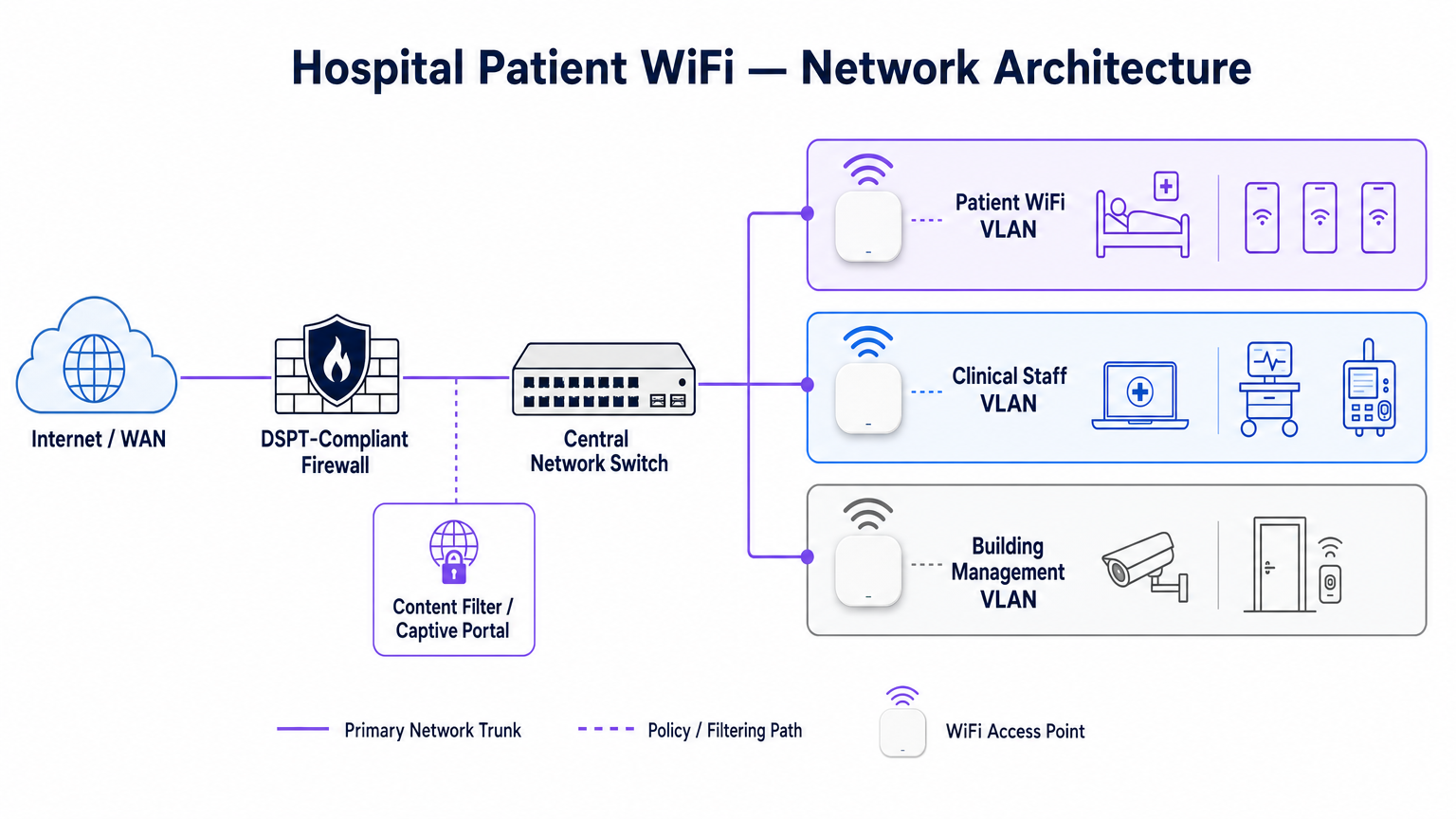
Zum Schutz der klinischen Integrität muss Patient WiFi in einem dedizierten Virtual Local Area Network (VLAN) betrieben werden. Die Standard-Unternehmensarchitektur schreibt mindestens drei verschiedene Segmente vor:
- Patienten-/Gast-VLAN: Leitet über ein Captive Portal, erzwingt eine strikte Inhaltsfilterung und bietet nur Internetzugang.
- Klinisches VLAN: Dediziert für Mitarbeitergeräte und medizinische Geräte (z. B. Infusionspumpen, mobile Workstations). Umgeht das Captive Portal und leitet über einen überwachten, sicheren Pfad.
- Gebäudemanagement-VLAN: Unterstützt IoT-Geräte, CCTV und Umweltkontrollen.
Der Datenverkehr im Patienten-VLAN muss auf Switch-Ebene isoliert und durch Firewall-Regeln eingeschränkt werden, die das Routing zu internen Subnetzen explizit verweigern.
Access Point-Dichte und RF-Planung
Die Bereitstellung von WiFi in einem Krankenhaus erfordert die Überwindung erheblicher physischer Barrieren – bleiverkleidete Wände, schwere Maschinen und dichter Beton. Sich auf "Flurabdeckung" zu verlassen, ist ein häufiger Fehler. Eine vorausschauende RF-Vermessung, gefolgt von einer aktiven Validierung nach der Installation, ist obligatorisch.
Für neue Bereitstellungen ist IEEE 802.11ax (Wi-Fi 6) der Basisstandard. Die Implementierung von Orthogonal Frequency-Division Multiple Access (OFDMA) und BSS Colouring ist entscheidend für die Bewältigung der hohen Gerätedichte, die typisch für moderne Krankenhausstationen ist, die Reduzierung der Latenz und die Minderung von Interferenzen durch medizinische Telemetriesysteme, die im 2,4-GHz-Band betrieben werden.
Backhaul- und Durchsatzanforderungen
Ein häufiger Fehler ist die Bereitstellung von Access Points der Enterprise-Klasse, die jedoch mit unzureichendem Backhaul unterversorgt werden. Ein Krankenhaus mit 500 Betten kann während der abendlichen Spitzenzeiten problemlos 1 Gbps gleichzeitiger Nachfrage erzeugen. Betreiber müssen dedizierte, ungeteilte Standleitungen anstelle von gemeinsam genutzten Breitbandleitungen bereitstellen, um den Durchsatz zu gewährleisten und eine Überlastung des Kernnetzwerks zu vermeiden. Für weiteren Kontext zur dedizierten Konnektivität siehe Was ist eine Standleitung? Dediziertes Business Internet .
Implementierungsleitfaden: Compliance und Filterung
Die Bereitstellung der physischen Infrastruktur ist nur die halbe Miete; die Governance- und Compliance-Schicht ist ebenso entscheidend.
DSPT-Konformität
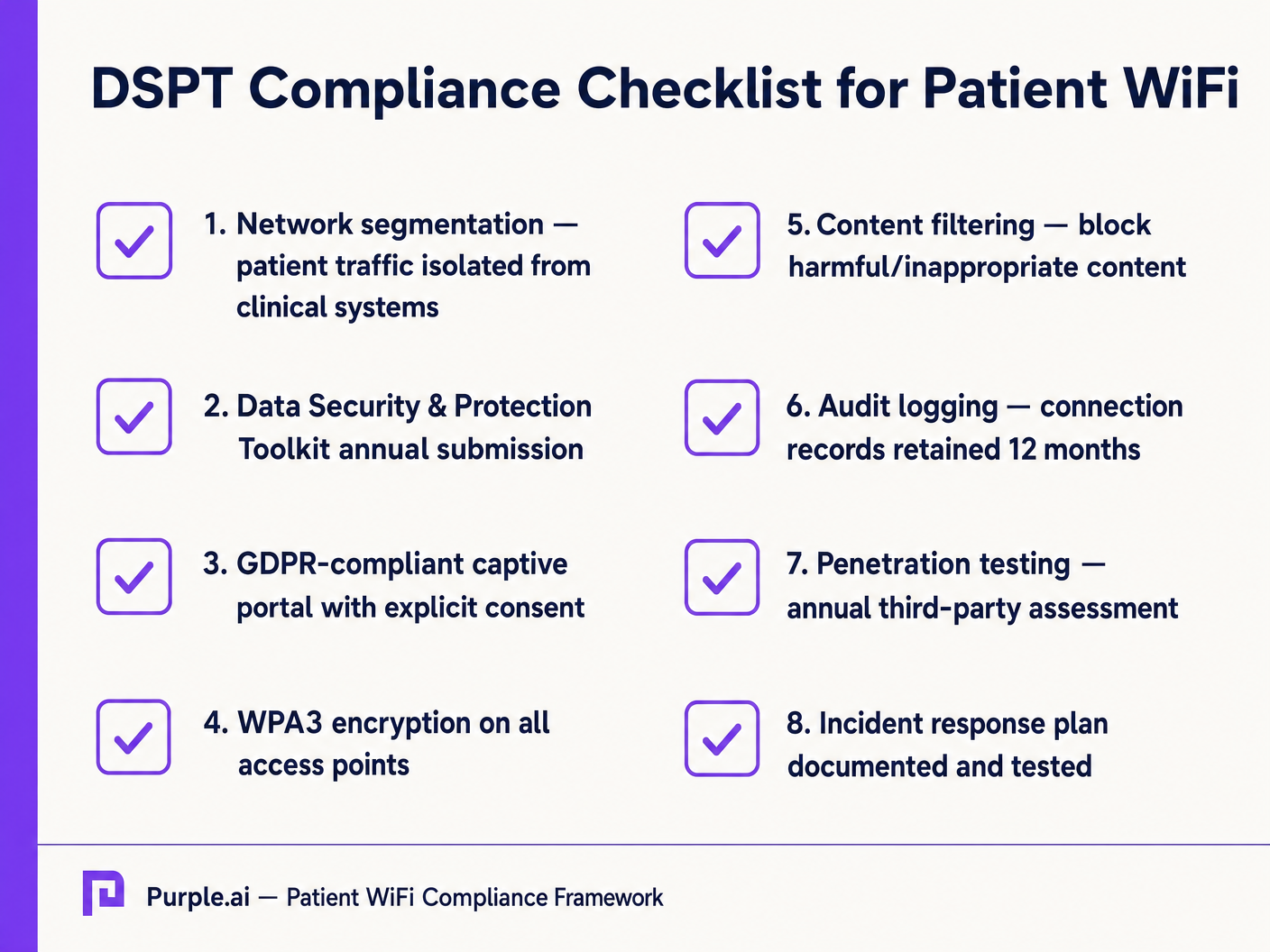
Für NHS Trusts ist die Einhaltung des Data Security and Protection Toolkit (DSPT) nicht verhandelbar. Patient WiFi-Bereitstellungen müssen Folgendes nachweisen:
- Strikte Netzwerksegmentierung.
- Robuste Zugriffskontrollen und Audit-Protokollierung (Verbindungsprotokolle werden mindestens 12 Monate aufbewahrt).
- Jährliche Penetrationstests durch Dritte.
Inhaltsfilterung
Die NHS-Richtlinien schreiben vor, dass Patient WiFi den Zugang zu unangemessenen oder schädlichen Inhalten, einschließlich Erwachsenenmaterial, extremistischen Websites und Glücksspielplattformen, blockieren muss. Dies wird typischerweise über DNS-basierte oder Proxy-basierte Filterung erreicht, die direkt auf das Patienten-VLAN angewendet wird. Die Filterlösung muss Echtzeit-Bedrohungsdatenfeeds aufnehmen, um neu identifizierte bösartige Domains dynamisch zu blockieren.
Captive Portals und GDPR
Das Captive Portal ist das Gateway zum Netzwerk und der primäre Mechanismus zur Erfassung der Benutzerzustimmung. Gemäß GDPR müssen Trusts eine explizite, informierte Zustimmung einholen, bevor sie personenbezogene Daten (wie MAC addresses oder E-Mail-Adressen) verarbeiten. Das Portal muss eine klare Datenschutzerklärung und explizite Opt-ins präsentieren. Die Nutzung einer robusten Plattform gewährleistet die Compliance und ermöglicht gleichzeitig die Erfassung wertvoller demografischer Daten.
ROI & Geschäftsauswirkungen: Kostenlose vs. kostenpflichtige Modelle
Die kommerzielle Strategie hinter Patient WiFi definiert dessen langfristige Nachhaltigkeit.
Das kostenlose WiFi-Modell
Die überwiegende Mehrheit der NHS Trusts bietet Patient WiFi kostenlos am Nutzungspunkt an. Dieses Modell wird typischerweise durch Investitionsausgaben oder operative Budgets finanziert. Der ROI wird in Patientenzufriedenheit gemessen (oft widergespiegelt in Friends und Family Test-Ergebnisse) und die Reduzierung des Verwaltungsaufwands für das klinische Personal, das sich nicht mehr um Konnektivitätsbeschwerden kümmern muss.
Das Konzessionsmodell
Einige größere Trusts nutzen ein Konzessionsmodell, bei dem ein externer Managed Service Provider (MSP) die Infrastruktur im Austausch für Monetarisierungsrechte finanziert. Dies kann die Bereitstellung gezielter Werbung über das Captive Portal oder das Angebot eines gestaffelten Dienstes (kostenloses Basis-Browsing, kostenpflichtiges Premium-Streaming) umfassen. Bei der Einführung dieses Modells müssen Trusts sicherstellen, dass Werbeinhalte streng geprüft werden, um den NHS-Werten zu entsprechen, und dass Datenmonetarisierungspraktiken der GDPR entsprechen.
Durch die Integration von WiFi Analytics können Trusts die Netzwerkauslastung überwachen, die Verweildauer von Patienten verfolgen und nach der Verbindung automatisierte Feedback-Umfragen auslösen, wodurch ein Kostenfaktor in einen strategischen Vorteil für die operative Verbesserung umgewandelt wird. Dieser datengesteuerte Ansatz spiegelt erfolgreiche Implementierungen in anderen Sektoren wider, wie Healthcare und Retail .
Schlüsseldefinitionen
VLAN (Virtual Local Area Network)
A logical subnetwork that groups a collection of devices from different physical LANs. Essential for isolating patient traffic from clinical systems.
Used by network architects to ensure that a compromised patient device cannot access sensitive medical equipment or electronic health records.
DSPT (Data Security and Protection Toolkit)
An online self-assessment tool that allows NHS organisations to measure their performance against the National Data Guardian's 10 data security standards.
Mandatory for all NHS Trusts; failure to properly segment patient WiFi or log access can result in a failed DSPT submission.
Captive Portal
A web page that a user of a public-access network is obliged to view and interact with before access is granted.
The primary interface for capturing user consent, presenting terms of use, and applying brand identity to the WiFi experience.
802.11ax (Wi-Fi 6)
The sixth generation of the Wi-Fi standard, designed specifically to improve performance in high-density environments.
Crucial for hospital wards where dozens of patients, visitors, and staff devices are competing for airtime simultaneously.
OFDMA (Orthogonal Frequency-Division Multiple Access)
A feature of Wi-Fi 6 that allows a single transmission to deliver data to multiple devices simultaneously.
Reduces latency and improves efficiency in crowded hospital environments, preventing the network from grinding to a halt during peak hours.
Content Filtering
The use of software or hardware to restrict the content that a reader is authorised to access over the network.
Required by NHS guidance to prevent access to illegal, extremist, or adult content on patient networks.
Leased Line
A dedicated, fixed-bandwidth, symmetric data connection connecting a business directly to the internet exchange.
Necessary for hospital WiFi backhaul to ensure guaranteed throughput, avoiding the contention issues of shared broadband.
MAC Address
A unique identifier assigned to a network interface controller (NIC) for use as a network address in communications.
Considered personal data under GDPR; its collection and storage by the WiFi analytics platform requires explicit user consent.
Ausgearbeitete Beispiele
A 400-bed NHS Trust is experiencing severe network congestion on its legacy patient WiFi during the hours of 6 PM to 9 PM, leading to patient complaints and staff distraction. The current setup uses a shared 500 Mbps broadband connection and Wi-Fi 4 (802.11n) access points in the corridors.
- Upgrade backhaul to a dedicated 1 Gbps symmetrical leased line to guarantee peak-hour throughput. 2. Replace corridor-based Wi-Fi 4 APs with in-room Wi-Fi 6 (802.11ax) APs to improve RF penetration and handle high device density via OFDMA. 3. Implement traffic shaping on the firewall to cap individual user bandwidth at 5 Mbps, preventing single users from monopolising the connection with 4K streaming.
A private hospital group wants to deploy a new patient WiFi network but is concerned about the DSPT compliance implications of capturing patient data on the captive portal.
Deploy a GDPR-compliant captive portal solution (like Purple) that separates authentication data from clinical data. Configure the portal to require explicit opt-in for any data processing beyond the minimum required for network access. Ensure the Patient VLAN is strictly isolated from the Clinical VLAN via the core firewall. Implement DNS-based content filtering to block malicious and inappropriate categories.
Übungsfragen
Q1. An NHS Trust wants to implement a single SSID for both staff and patients to 'simplify the user experience'. They plan to use a captive portal to differentiate user types. Is this approach recommended?
Hinweis: Consider the DSPT requirements for network segmentation and the risk of a compromised patient device.
Musterlösung anzeigen
No, this approach is highly discouraged and introduces significant security risks. Patient and clinical staff traffic must be segregated at the VLAN level with separate SSIDs. Relying solely on a captive portal for differentiation does not provide adequate Layer 2 isolation, putting clinical systems at risk from malware or lateral movement originating from untrusted patient devices.
Q2. A hospital is planning to upgrade its patient WiFi and wants to ensure adequate coverage. The IT manager suggests placing access points in the main corridors to cover the adjacent patient rooms and save on hardware costs. What is the flaw in this plan?
Hinweis: Think about the physical construction of hospital environments and RF attenuation.
Musterlösung anzeigen
Corridor placement is a flawed strategy in hospitals. Hospital walls often contain lead lining (for X-ray rooms), heavy concrete, and dense infrastructure that severely attenuates RF signals. This results in poor in-room coverage, high latency, and dropped connections. Access points should be deployed inside patient rooms or wards based on a professional predictive RF survey.
Q3. A Trust has deployed patient WiFi but is receiving complaints about slow speeds during the evening. The APs are Wi-Fi 6, and the core switches are 10G capable. The internet connection is a 1 Gbps shared broadband line. What is the likely bottleneck?
Hinweis: Differentiate between local network capacity and WAN backhaul.
Musterlösung anzeigen
The bottleneck is the shared broadband internet connection. Even with high-capacity local infrastructure (Wi-Fi 6 and 10G switches), a shared broadband line suffers from contention ratios, meaning the bandwidth is shared with other premises in the area. During evening peak hours, this contention severely degrades throughput. The Trust should upgrade to a dedicated, uncontended leased line.
Weiterlesen in dieser Reihe
Was ist eine Probe Request? Verstehen, wie Geräte Netzwerke entdecken
Dieser technische Leitfaden bietet einen tiefen Einblick in IEEE 802.11 Probe Requests, aktives versus passives Scannen und die Auswirkungen der MAC randomisation auf Standortanalysen. Er liefert umsetzbare Implementierungsstrategien für Netzwerkarchitekten zur Optimierung von High-Density-Bereitstellungen, zur Minderung von Probe Storms und zur Sicherstellung einer genauen, GDPR-konformen Datenerfassung mithilfe authentifizierter Identitätsschichten.
Wie man langsames WiFi behebt, ohne Ihr Internetpaket zu aktualisieren
Ein umfassender technischer Leitfaden für IT-Manager und Netzwerkarchitekten zur Optimierung der Unternehmens-WiFi-Leistung, ohne die ISP-Bandbreite zu erhöhen. Behandelt HF-Tuning, Client-Dichte-Management, QoS-Implementierung und wie man WiFi-Analysen nutzt, um Engpässe zu diagnostizieren und zu beheben.
Die Checkliste für die Migration von Legacy NAC zu Cloud-Native NAC
Dieser maßgebliche technische Leitfaden bietet eine strukturierte, dreiphasige Checkliste für die Migration von der traditionellen Netzwerkzugriffskontrolle (NAC) zu einer Cloud-nativen Architektur. Er stattet IT-Manager und Netzwerkarchitekten mit umsetzbaren Strategien aus, um die Identitätsintegration, Richtlinienkonsistenz und Compliance zu gewährleisten, ohne den Veranstaltungsbetrieb zu stören.