

RADIUS-Richtlinien für die feingranulare Netzwerkzugriffskontrolle konfigurieren
Dieser maßgebliche Leitfaden bietet IT-Managern, Netzwerkarchitekten und Direktoren für Veranstaltungsbetrieb eine vollständige technische Blaupause zur Konfiguration von RADIUS-Richtlinien für eine feingranulare Netzwerkzugriffskontrolle. Er behandelt die 802.1X-Architektur, dynamische VLAN-Zuweisung, EAP-Methodenauswahl und gestaffelte Bereitstellungsstrategien. Praxisnahe Implementierungsszenarien aus dem Gastgewerbe und Einzelhandel zeigen, wie diese Techniken messbare Compliance, Sicherheit und operativen ROI liefern.
Listen to this guide
View podcast transcript
Zusammenfassung für die Geschäftsleitung
Für Unternehmensstandorte – von weitläufigen Einzelhandelskomplexen bis hin zu Stadien mit hoher Dichte – sind Netzwerksicherheit und Benutzererfahrung untrennbar miteinander verbunden. Die Konfiguration von RADIUS-Richtlinien für eine feingranulare Netzwerkzugriffskontrolle bietet den Mechanismus zur dynamischen Segmentierung des Datenverkehrs und stellt sicher, dass Unternehmensressourcen von Gastnetzwerken und anfälligen IoT-Geräten isoliert bleiben. Dies ist kein optionales Upgrade mehr; es ist eine grundlegende Anforderung, die durch Compliance-Vorgaben wie PCI DSS und GDPR bedingt ist.
Dieser Leitfaden liefert eine detaillierte technische Blaupause für die Bereitstellung von RADIUS-basierter Zugriffskontrolle. Wir untersuchen die Architektur der IEEE 802.1X-Authentifizierung, die Mechanismen der dynamischen VLAN-Zuweisung über Vendor-Specific Attributes (VSAs) und die Integration von Identitätsanbietern wie Active Directory, Entra ID und Purples OpenRoaming-Identitätsanbieter. Indem IT-Verantwortliche über einfache Pre-Shared Keys (PSKs) hinausgehen und eine kontextbezogene Richtliniendurchsetzung implementieren, können sie Risiken mindern, Abläufe optimieren und Plattformen wie Purple nutzen, um Gast-WiFi von einem Kostenfaktor in einen strategischen Vorteil zu verwandeln. Der Fokus liegt durchweg auf umsetzbaren, herstellerneutralen Strategien, die messbaren ROI und operative Resilienz liefern.
Technischer Einblick
Die Architektur des kontextsensitiven Zugriffs
Im Kern basiert die Konfiguration von RADIUS-Richtlinien für eine feingranulare Netzwerkzugriffskontrolle auf dem IEEE 802.1X-Standard. Dieses Framework ermöglicht eine portbasierte Netzwerkzugriffskontrolle, die sicherstellt, dass nur authentifizierte und autorisierte Geräte Zugang zu bestimmten Netzwerksegmenten erhalten. Die Architektur besteht aus drei Hauptkomponenten: dem Supplikanten (Client-Gerät), dem Authenticator (Wireless Access Point oder Switch) und dem Authentifizierungsserver (RADIUS).
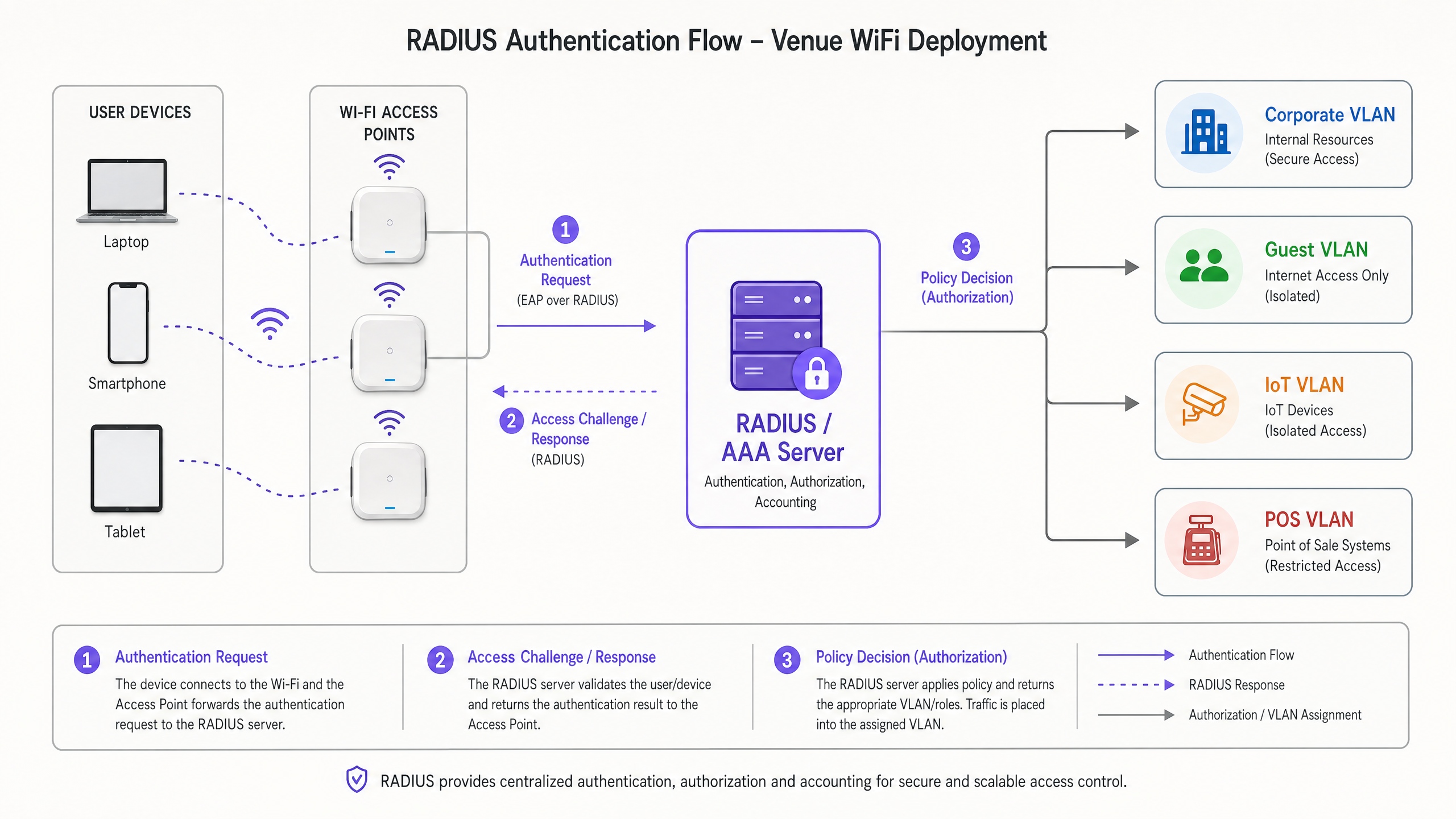
Wenn ein Gerät eine Verbindung herstellt, kapselt der Authenticator die Extensible Authentication Protocol (EAP)-Nachrichten und leitet sie an den RADIUS-Server weiter. Der RADIUS-Server überprüft die Anmeldeinformationen anhand eines Identitätsspeichers – wie Active Directory, LDAP oder einem Cloud-basierten Identitätsanbieter. Entscheidend ist, dass moderne RADIUS-Implementierungen nicht nur eine Access-Accept- oder Access-Reject-Nachricht zurückgeben. Sie geben Vendor-Specific Attributes (VSAs) zurück, die den Netzwerkkontext des Benutzers bestimmen: VLAN-Zuweisung, Anwendung von Access Control Lists (ACLs) und Bandbreitenbegrenzungsparameter.
Für Unternehmensbereitstellungen ist das Verständnis von Wi Fi Frequencies: A Guide to Wi-Fi Frequencies in 2026 unerlässlich, da die Eigenschaften der physikalischen Schicht die Leistung von Authentifizierungs-Handshakes in Umgebungen mit hoher Dichte direkt beeinflussen.
Dynamische VLAN-Zuweisung und Mikro-Segmentierung
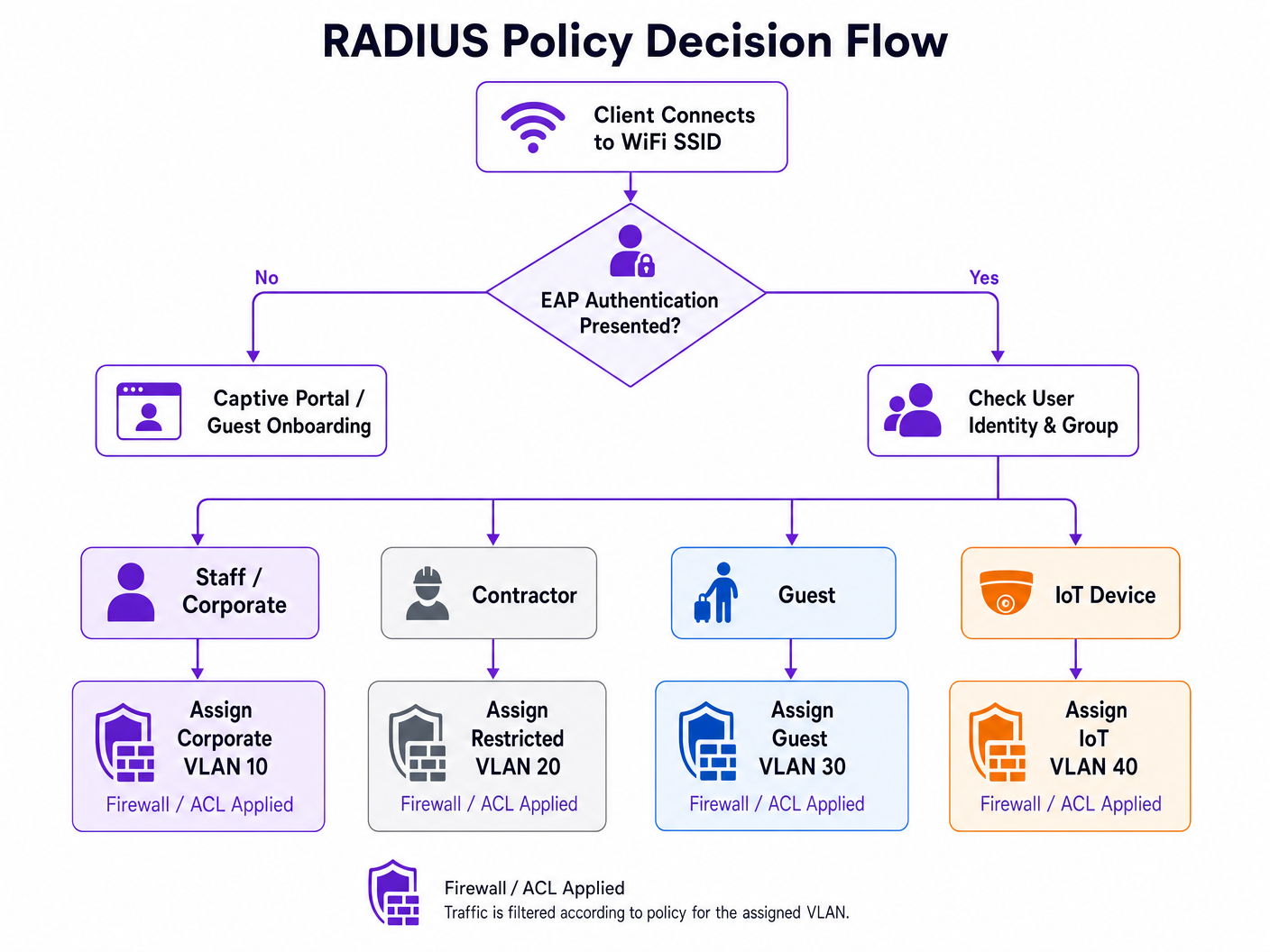
Die leistungsstärkste Anwendung von RADIUS-Richtlinien ist die dynamische VLAN-Zuweisung. Anstatt mehrere SSIDs für verschiedene Benutzergruppen auszustrahlen – was die HF-Leistung aufgrund des Beacon-Overheads beeinträchtigt – kann eine einzige 802.1X-fähige SSID alle Unternehmensbenutzer bedienen. Der RADIUS-Server bestimmt das geeignete VLAN basierend auf der Gruppenzugehörigkeit des Benutzers und kontextuellen Faktoren.
Wenn sich beispielsweise ein Mitglied des Finanzteams authentifiziert, weist der RADIUS-Server den Access Point an, dessen Datenverkehr auf VLAN 10 zu platzieren. Wenn sich ein IoT-Gerät über MAC Authentication Bypass (MAB) authentifiziert, wird es auf einem isolierten VLAN 40 mit strengen ACLs platziert. Dieser Ansatz reduziert die Angriffsfläche drastisch und vereinfacht gleichzeitig die HF-Umgebung. Für spezifische Herstellerimplementierungen siehe How to Configure NAC Policies for VLAN Steering in Cisco Meraki .
Auswahl der EAP-Methode
Die Wahl der EAP-Methode hat erhebliche Auswirkungen auf die Sicherheitslage und die operative Komplexität. Die folgende Tabelle fasst die wichtigsten Optionen zusammen:
| EAP Method | Authentication Mechanism | Recommended Use Case | Security Level |
|---|---|---|---|
| EAP-TLS | Gegenseitige Zertifikatsauthentifizierung | Unternehmensverwaltete Geräte mit MDM | Höchste |
| PEAP-MSCHAPv2 | Server-Zertifikat + Benutzername/Passwort | BYOD, Mitarbeitergeräte | Hoch |
| EAP-TTLS | Server-Zertifikat + interne Anmeldeinformationen | Gemischte Umgebungen | Hoch |
| MAB | MAC-Adresse als Anmeldeinformation | Headless IoT, ältere Geräte | Niedrig (mit strengen ACLs verwenden) |
Vermeiden Sie veraltete Protokolle wie LEAP und EAP-MD5 vollständig; sie sind kryptografisch schwach und sollten in keiner modernen Bereitstellung vorkommen.
Implementierungsleitfaden
Die Bereitstellung einer robusten RADIUS-Infrastruktur erfordert eine sorgfältige Planung und gestaffelte Ausführung. Die folgenden Schritte skizzieren einen herstellerneutralen Ansatz zur Konfiguration von RADIUS-Richtlinien für eine feingranulare Netzwerkzugriffskontrolle.
Phase 1: Integration der Identitätsquelle
Die Grundlage jeder Richtlinie ist ein sauberes, gut strukturiertes Identitätsverzeichnis. Unabhängig davon, ob Sie lokale Active Directory- oder Cloud-native Lösungen wie Entra ID oder Okta verwenden, müssen die Verzeichnisgruppen direkt Ihren beabsichtigten Netzwerksegmenten zugeordnet sein.
- Bestehende Gruppen prüfen: Stellen Sie sicher, dass Benutzergruppen logisch und, wo möglich, gegenseitig ausschließend sind. Entfernen Sie veraltete Konten und konsolidieren Sie überlappende Gruppen.
- Zugriffsebenen definieren: Etablieren Sie klare Stufen — Führungskräfte, Mitarbeiter, Auftragnehmer, Gäste, IoT — mit dokumentierten Zugriffsrechten für jede.
- Purple als Identitätsanbieter integrieren: Für öffentliche Netzwerke fungiert Purple als kostenloser Identitätsanbieter für Dienste wie OpenRoaming unter der Connect-Lizenz. Dies überbrückt nahtlos die Lücke zwischen öffentlichem Guest WiFi -Zugang und sicheren Authentifizierungs-Frameworks und eliminiert die Notwendigkeit eines traditionellen Captive Portal für wiederkehrende Benutzer.
Phase 2: Richtlinienkonfiguration und Attributzuordnung
Konfigurieren Sie den RADIUS-Server so, dass eingehende Anfragen basierend auf mehreren Kontextfaktoren und nicht nur auf Anmeldeinformationen bewertet werden.
- Authentifizierungsprotokolle: EAP-TLS für Unternehmensgeräte vorschreiben. PEAP-MSCHAPv2 für BYOD bereitstellen. Diese über die RADIUS-Richtlinie durchsetzen und Verbindungen ablehnen, die schwächere Methoden versuchen.
- Bedingungsabgleich: Erstellen Sie Richtlinien, die die
NAS-IP-Address(die IP des Authentifikators), dieCalled-Station-Id(die SSID) und die Tageszeit bewerten. Das Zugriffsprofil eines Auftragnehmers um 02:00 Uhr sollte sich wesentlich von seinem Profil um 09:00 Uhr unterscheiden. - Durchsetzungsprofile: Definieren Sie die zurückzugebenden RADIUS-Attribute. Standard-VLAN-Zuweisungsattribute sind:
Tunnel-Type=VLAN,Tunnel-Medium-Type=802undTunnel-Private-Group-Id=[VLAN_ID].
Phase 3: Gestaffelte Einführung und Überwachung
Setzen Sie die 802.1X-Durchsetzung niemals gleichzeitig im gesamten Unternehmen ein.
- Überwachungsmodus: Implementieren Sie Richtlinien im Überwachungs- oder Auditmodus, bei dem Authentifizierungsfehler protokolliert, der Zugriff jedoch weiterhin gewährt wird. Dies identifiziert falsch konfigurierte Supplikanten und ältere Geräte, bevor die Durchsetzung beginnt.
- Gezielte Durchsetzung: Aktivieren Sie die Durchsetzung standort- oder abteilungsweise und beheben Sie Probleme, bevor Sie den Umfang erweitern.
- Analyseintegration: Nutzen Sie Plattformen wie Purple's WiFi Analytics , um Authentifizierungserfolgsraten, Sitzungsdauern und Roaming-Verhalten zu überwachen. Diese Daten sind entscheidend für die Identifizierung von Abdeckungslücken und Authentifizierungsengpässen.
Best Practices
Bei der Konfiguration von RADIUS-Richtlinien für eine granulare Netzwerkzugriffskontrolle gewährleistet die Einhaltung von Industriestandards langfristige Stabilität und Sicherheit.
Zertifikatbasierte Authentifizierung (EAP-TLS): Setzen Sie, wo immer möglich, EAP-TLS ein. Dies eliminiert die Risiken, die mit dem Diebstahl von Anmeldeinformationen und Passwortmüdigkeit verbunden sind. Mobile Device Management (MDM)-Plattformen können die Zertifikatsbereitstellung im großen Maßstab automatisieren.
Implementierung der MAC-Randomisierungs-Minderung: Moderne mobile Betriebssysteme verwenden MAC-Adressen-Randomisierung, um die Privatsphäre der Benutzer zu schützen. Stellen Sie bei Guest WiFi -Bereitstellungen sicher, dass Ihr Captive Portal und Ihre RADIUS-Abrechnungssysteme den Umgang mit sich ändernden MAC-Adressen elegant handhaben – zum Beispiel durch die Verwendung von Sitzungstoken oder persistenten Geräteprofilen, die während des anfänglichen Onboardings generiert werden.
Redundanz und Failover: RADIUS ist eine kritische Infrastrukturkomponente. Stellen Sie RADIUS-Server in hochverfügbaren Clustern an geografisch verteilten Standorten bereit. Konfigurieren Sie Authentifikatoren mit primären und sekundären Server-IPs und legen Sie aggressive Timeout- und Wiederholungswerte fest, um Authentifizierungsverzögerungen während Failover-Ereignissen zu minimieren.
Kontextdaten nutzen: Integrieren Sie Standortdaten in Richtlinienentscheidungen. Ein Auftragnehmer könnte Zugriff auf interne Ressourcen erhalten, wenn er mit einem AP im Ingenieurgebäude verbunden ist, aber auf reinen Internetzugang beschränkt sein, wenn er in der Cafeteria verbunden ist. Technologien, die in BLE Low Energy Explained for Enterprise besprochen werden, können diesen Standortkontext mit präzisen Positionsdaten erweitern.
Fehlerbehebung & Risikominderung
Die Komplexität von 802.1X-Bereitstellungen führt zu spezifischen Fehlermodi. Eine proaktive Risikominderung ist unerlässlich, um die Betriebszeit aufrechtzuerhalten.
Häufige Fehlermodi
| Fehlermodus | Grundursache | Abhilfe |
|---|---|---|
| Massenauthentifizierungsfehler | Abgelaufener RADIUS-Server oder Root-CA-Zertifikat | Zertifikatslebenszyklusmanagement mit automatisierten Benachrichtigungen nach 90/60/30 Tagen |
| Individuelle Gerätefehler | Fehlkonfiguration des Supplikanten oder fehlende Root-CA | MDM-bereitgestellte WLAN-Profile mit korrektem Trust Store |
| EAP-Timeout | Hohe WAN-Latenz zum zentralisierten RADIUS | WAN-Pfad optimieren; verteilten RADIUS oder RADIUS-Proxy in Betracht ziehen |
| IoT-Gerätefehler | Gerät unterstützt 802.1X nicht | MAB mit strikter VLAN-Isolation und ACLs bereitstellen |
Für verteilte Unternehmen ist die in SD WAN vs MPLS: The 2026 Enterprise Network Guide besprochene Architektur direkt relevant, um eine geringe Latenz bei der Konnektivität zu zentralisierten AAA-Diensten über mehrere Standorte hinweg zu gewährleisten.
ROI & Geschäftsauswirkungen
Die Investition des technischen Aufwands, der für die Konfiguration von RADIUS-Richtlinien für eine granulare Netzwerkzugriffskontrolle erforderlich ist, führt zu erheblichen, messbaren Erträgen in mehreren Dimensionen.
Reduzierter Betriebsaufwand: Die Konsolidierung mehrerer SSIDs in einem einzigen 802.1X-Netzwerk mit dynamischer VLAN-Zuweisung reduziert HF-Interferenzen, verbessert die verfügbare Sendezeit und vereinfacht die laufende Verwaltung. Teams berichten von einer signifikanten Reduzierung der Helpdesk-Tickets im Zusammenhang mit WiFi-Konnektivität, sobald eine stabile 802.1X-Bereitstellung vorhanden ist.
Verbesserte Compliance-Position: Für Sektoren wie Retail und Healthcare ist eine strikte Netzwerksegmentierung eine regulatorische Anforderung – PCI DSS bzw. HIPAA. RADIUS-Richtlinien bieten die überprüfbaren, auditierbaren Kontrollen, die erforderlich sind, um Compliance-Audits zu bestehen und erhebliche finanzielle Strafen zu vermeiden. Für Organisationen des öffentlichen Sektors werden GDPR-Verpflichtungen bezüglich der Datentrennung in ähnlicher Weise berücksichtigt.
Verbesserte Benutzererfahrung: Nahtlose, sichere Authentifizierung – insbesondere über EAP-TLS oder OpenRoaming – eliminiert die Reibung von Captive Portals für wiederkehrende Unternehmensbenutzer und VIP-Gäste. In Hospitality - und Transport -Einrichtungen wirkt sich dies direkt auf die Zufriedenheitsmetriken und die wiederholte Interaktion aus.
Key Definitions
RADIUS (Remote Authentication Dial-In User Service)
A networking protocol that provides centralised Authentication, Authorisation, and Accounting (AAA) management for users who connect and use a network service. Defined in RFC 2865.
The core engine for enterprise network access control, determining who gets on the network, what they can access, and logging the activity for audit purposes.
IEEE 802.1X
An IEEE Standard for port-based Network Access Control (PNAC). It provides an authentication mechanism to devices wishing to attach to a LAN or WLAN, blocking all traffic until authentication is complete.
The standard that forces a device to prove its identity before it is allowed to send any data traffic on the network. The enforcement mechanism that makes RADIUS policies actionable.
EAP (Extensible Authentication Protocol)
An authentication framework frequently used in wireless networks and point-to-point connections. It provides a transport layer for authentication methods (EAP methods) such as TLS or MSCHAPv2.
The envelope that carries the actual authentication credentials between the client and the RADIUS server. The choice of EAP method determines the security level of the authentication exchange.
VSA (Vendor-Specific Attribute)
Attributes within a RADIUS message that allow vendors to support extended attributes not defined in the base RADIUS RFCs. Used to convey network policy instructions from the RADIUS server to the authenticator.
The mechanism by which RADIUS instructs network hardware to assign a user to a specific VLAN, apply a firewall role, or enforce bandwidth limits. Without VSAs, RADIUS can only permit or deny access.
Dynamic VLAN Assignment
The process where a RADIUS server instructs an access point or switch to place a user's traffic onto a specific Virtual LAN based on their identity, group membership, or contextual attributes.
The key technique for network micro-segmentation. Allows a single physical infrastructure to securely support multiple distinct user groups without broadcasting multiple SSIDs.
Supplicant
The software client on an end-user device (laptop, smartphone, IoT device) that initiates and negotiates the 802.1X authentication exchange with the network authenticator.
Built into modern operating systems (Windows, macOS, iOS, Android). Misconfigured supplicants — particularly incorrect certificate trust settings — are the most common source of 802.1X connectivity issues.
Authenticator
The network device (wireless access point or Ethernet switch) that acts as the enforcement point in an 802.1X deployment. It relays EAP messages between the supplicant and the RADIUS server, and enforces the policy decision.
The gatekeeper. The authenticator blocks all traffic from a port or wireless association until the RADIUS server returns an Access-Accept message, at which point it applies the returned VSAs.
MAB (MAC Authentication Bypass)
A fallback authentication method where the network device's MAC address is submitted as its credential to the RADIUS server. Used for devices that do not support 802.1X supplicants.
A necessary operational tool for legacy and headless IoT devices, but inherently less secure than cryptographic authentication. Should always be paired with strict VLAN isolation and ACLs.
EAP-TLS (EAP Transport Layer Security)
A certificate-based EAP method that provides mutual authentication between the client and the RADIUS server using X.509 certificates. Considered the most secure EAP method available.
The recommended authentication method for corporate-managed devices. Eliminates password-based credential risks entirely. Requires a PKI infrastructure and MDM for certificate provisioning.
Worked Examples
A large conference centre needs to provide secure, segmented WiFi access for event staff, exhibitors, and general attendees. They currently broadcast three separate SSIDs, which is causing significant co-channel interference and poor performance in high-density exhibition halls.
The venue transitions to a single, 802.1X-enabled SSID named 'Conference_Secure'. They implement a RADIUS server integrated with their event management database.
- Event staff authenticate using their corporate credentials via PEAP-MSCHAPv2. The RADIUS policy matches their Active Directory group and returns Tunnel-Private-Group-Id=10 (Staff VLAN), granting access to internal AV management systems.
- Exhibitors are provided unique, time-limited credentials tied to their stand booking. Upon authentication, the RADIUS server returns Tunnel-Private-Group-Id=20 (Exhibitor VLAN), which has ACLs permitting access to specific presentation servers and internet egress.
- General attendees use a separate open SSID with a captive portal integrated with Purple for marketing data collection, consent management, and basic internet access.
The result is a 40% reduction in management frame overhead, measurably improved throughput in exhibition halls, and a clear audit trail for compliance purposes.
A retail chain needs to secure thousands of wireless Point of Sale (POS) terminals across 500 locations. They are currently using WPA2-PSK, and IT is concerned about the operational risk of rotating the pre-shared key across 500 sites, as well as PCI DSS audit findings.
The IT team deploys a centralised RADIUS infrastructure and configures the POS terminals for EAP-TLS authentication.
- An MDM solution pushes a unique client certificate to each POS terminal during provisioning.
- The wireless access points at each store are configured to forward authentication requests to the central RADIUS servers over the SD-WAN fabric.
- The RADIUS policy verifies the client certificate against the internal PKI and returns attributes to place the device on the isolated POS VLAN (VLAN 50), satisfying PCI DSS network segmentation requirements.
- A certificate revocation list (CRL) is maintained, allowing IT to instantly quarantine a lost or stolen terminal by revoking its certificate — without impacting any other device.
Practice Questions
Q1. A hospital needs to deploy new wireless infusion pumps across three wards. These devices do not support 802.1X supplicants. The CISO requires that these devices are completely isolated from the corporate network and can only communicate with the specific clinical management server at 10.5.1.20. How should you configure the network access control policy?
Hint: Consider how devices without 802.1X capabilities can be identified and the principle of least privilege when defining the ACL.
View model answer
Implement MAC Authentication Bypass (MAB). Register the MAC addresses of all infusion pumps in the RADIUS database during the provisioning process. Create a specific RADIUS policy that matches these MAC addresses and returns VSAs assigning them to an isolated IoT VLAN (e.g., VLAN 60). Apply strict ACLs to this VLAN permitting outbound traffic only to 10.5.1.20 on the required clinical management ports, and blocking all other inter-VLAN and internet traffic. Additionally, configure DHCP snooping and dynamic ARP inspection on the IoT VLAN to prevent spoofing attacks.
Q2. Following a recent acquisition, an enterprise now has two distinct Active Directory domains: corp.acme.com and corp.legacy.com. They want all employees from both entities to use the same 'ACME_Corporate' SSID without migrating the legacy domain. How can RADIUS facilitate this?
Hint: Think about how RADIUS handles authentication routing based on the identity realm and how policy servers can proxy requests to different backend directories.
View model answer
Configure the RADIUS infrastructure (using a policy server such as Cisco ISE, Aruba ClearPass, or a RADIUS proxy) to evaluate the realm suffix provided in the user's EAP identity — for example, user@corp.acme.com versus user@corp.legacy.com . Create routing policies that forward authentication requests to the appropriate backend Active Directory domain based on the realm. Define standardised enforcement profiles that return consistent VLAN VSAs regardless of the backend domain, ensuring users from both entities receive the correct network placement. This approach avoids a disruptive directory migration while maintaining a unified user experience.
Q3. You are designing the WiFi for a 60,000-seat stadium. The client's current design specifies 8 separate SSIDs for different staff functions: Ticketing, Security, Concessions, Medical, Media, Operations, VIP, and Maintenance. What is your recommendation and why?
Hint: Consider the impact of management frame overhead on wireless performance in a high-density RF environment.
View model answer
Strongly advise against broadcasting 8 SSIDs. In a high-density environment, each SSID generates beacon frames on every access point at regular intervals, consuming significant airtime and reducing the capacity available for actual data traffic. The recommendation is to consolidate all staff functions onto a single 802.1X-enabled SSID. Utilise RADIUS dynamic VLAN assignment to segment the traffic on the backend — when a ticketing device authenticates, RADIUS places it on the Ticketing VLAN; when a medical device authenticates, it goes to the Medical VLAN with appropriate ACLs. This provides the required logical separation while optimising the physical RF environment. A separate open SSID with a captive portal can handle general public access.