
Retail WiFi: Wie In-Store WiFi Umsatz, Kundenbindung und Besucherfrequenz steigert
Dieser maßgebliche technische Leitfaden beschreibt, wie IT- und Betriebsteams von Unternehmen Retail WiFi als strategisches kommerzielles Asset einsetzen können. Er behandelt den Wandel von grundlegender Konnektivität zu einer umsatzgenerierenden Infrastruktur durch die Erfassung von First-Party-Daten, Besucherfrequenzanalysen und eine sichere, hochdichte Netzwerkarchitektur.
Diesen Leitfaden anhören
Podcast-Transkript ansehen
Zusammenfassung für die Geschäftsleitung
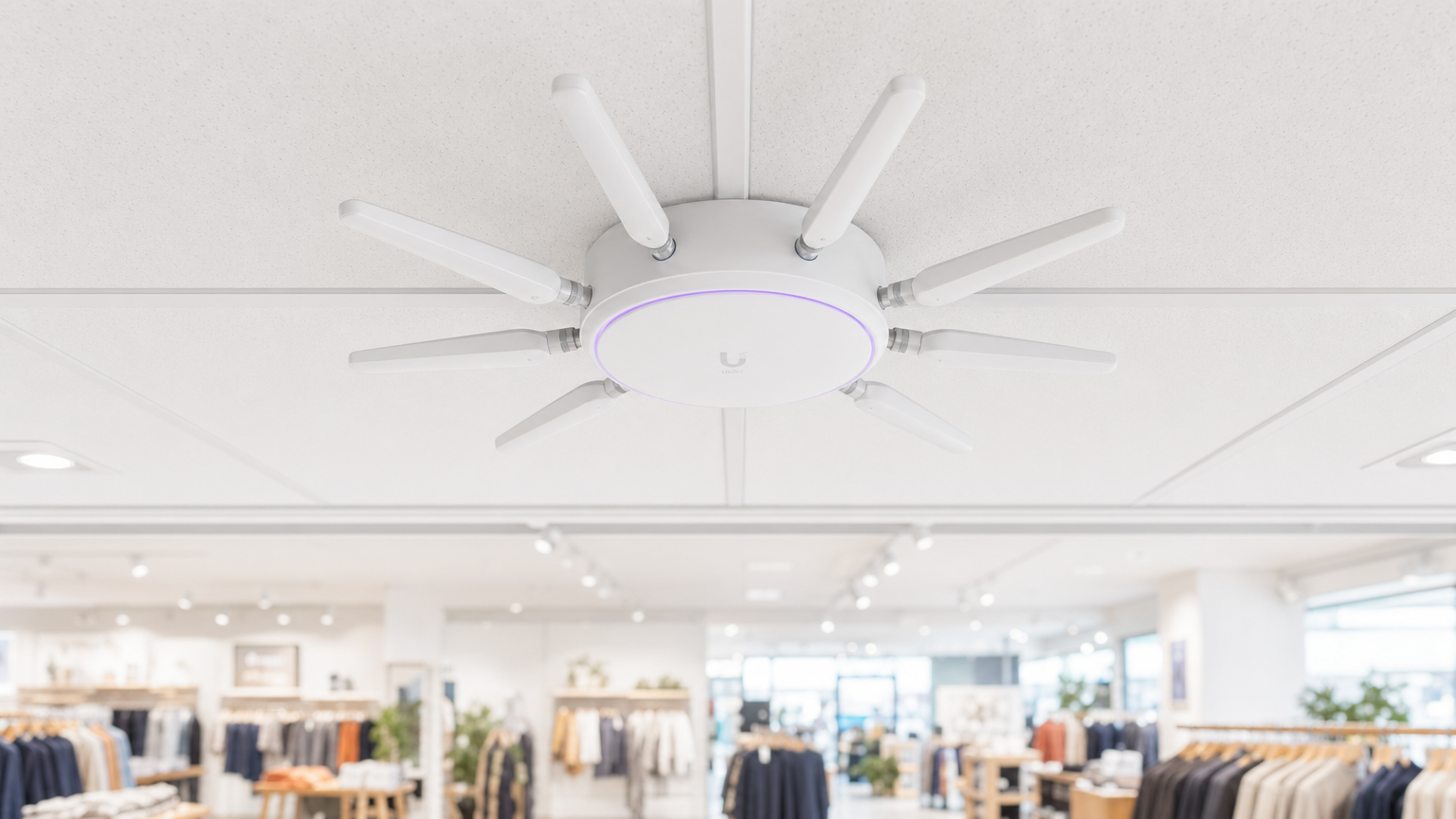
Für moderne Betreiber von Veranstaltungsorten und Einzelhandelsunternehmen ist die Bereitstellung von In-Store WiFi nicht länger nur eine Dienstleistung oder eine geringfügige Annehmlichkeit für Kunden; es ist eine kritische kommerzielle Infrastrukturschicht. Wenn IT-Architekten und Marketingleiter sich bei der Implementierung abstimmen, verwandelt sich Retail Store WiFi in einen leistungsstarken Motor für die Erfassung von First-Party-Daten, Besucherfrequenzanalysen und personalisierte Kundenbindung.
Dieser Leitfaden bietet leitenden IT-Managern, CTOs und Netzwerkarchitekten einen strategischen Rahmen für die Bereitstellung von hochdichtem WiFi in Einzelhandelsgeschäften. Er geht über die grundlegende Bereitstellung von Internetzugang hinaus und untersucht, wie die Netzwerkzugangsschicht, Captive Portals und Analyseintegrationen zusammenwirken, um einen messbaren Return on Investment (ROI) zu erzielen. Wir werden die technische Architektur untersuchen, die erforderlich ist, um Hunderte gleichzeitiger Verbindungen sicher zu unterstützen, die Compliance-Vorschriften für die Datenerfassung und die Integration von Plattformen wie Purple's Guest WiFi , um Kundenbindung und Umsatz zu steigern. Ob Sie einen einzelnen Flagship-Standort aufrüsten oder die Infrastruktur einer globalen Einzelhandelskette standardisieren, diese Referenz beschreibt die herstellerneutralen Best Practices und architektonischen Entscheidungen, die notwendig sind, um ein Netzwerk aufzubauen, das sowohl dem Benutzer als auch dem Unternehmen dient.
Technischer Deep-Dive: Architektur und Standards
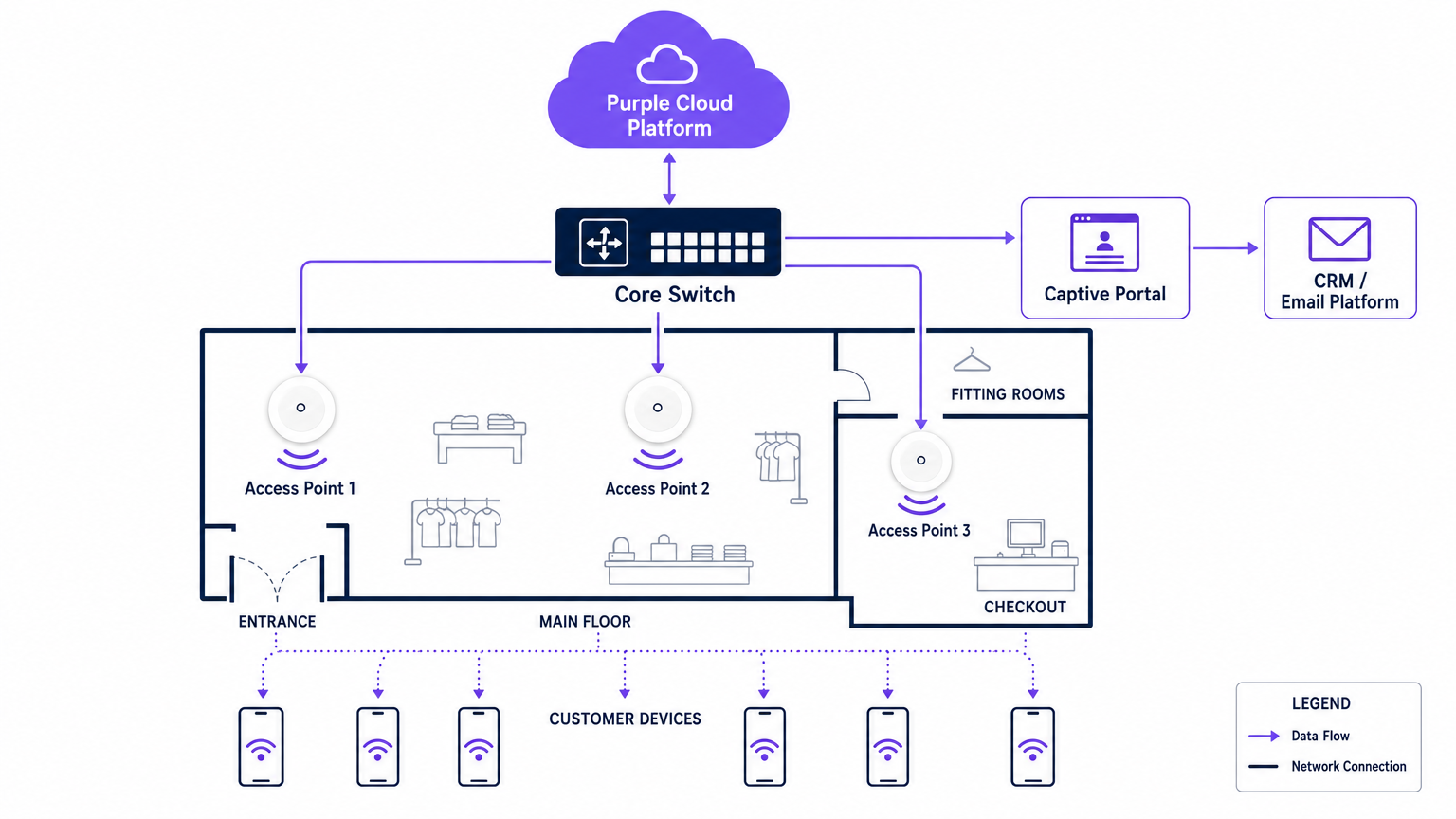
Eine robuste Retail WiFi-Bereitstellung erfordert eine strukturierte, mehrschichtige Architektur, um Zuverlässigkeit, Sicherheit und Datenextraktionsfähigkeiten zu gewährleisten. Die Infrastruktur muss eine hohe Client-Dichte unterstützen und gleichzeitig eine strikte Isolation zwischen Gast-Traffic und Unternehmens- oder Point-of-Sale (POS)-Systemen aufrechterhalten.
Die Funkzugangsschicht
Die Grundlage jeder modernen Retail-Bereitstellung ist die Funkzugangsschicht, die auf dem IEEE 802.11ax-Standard, kommerziell bekannt als Wi-Fi 6, aufgebaut sein muss. Für jede neue Bereitstellung in Einzelhandelsgeschäften mit WiFi ist Wi-Fi 6 die obligatorische Basis. Sein Hauptvorteil in Einzelhandelsumgebungen ist nicht nur der Spitzendurchsatz, sondern seine Fähigkeit, hohe Client-Dichten effizient durch Orthogonal Frequency-Division Multiple Access (OFDMA) und Basic Service Set (BSS) Colouring zu handhaben.
OFDMA ermöglicht es, einen einzelnen drahtlosen Kanal in kleinere Unterkanäle zu unterteilen, wodurch ein Access Point mit mehreren Client-Geräten gleichzeitig kommunizieren kann. In einer belebten Einzelhandelsumgebung, wie einem Kaufhaus während einer Spitzenhandelsperiode, verhindert dies die Netzwerkverschlechterung, die ältere Wi-Fi 5-Bereitstellungen plagte. BSS Colouring mindert Co-Channel-Interferenzen, was besonders kritisch in Einzelhandelsparks mit mehreren Mietern ist, wo sich benachbarte Netzwerke oft überlappen.
Netzwerkinfrastruktur und Switching
Access Points müssen an eine robuste kabelgebundene Infrastruktur angeschlossen werden. Core- und Edge-Switches sollten ausreichend Power over Ethernet (PoE+) zur Unterstützung moderner Access Points sowie eine ausreichende Uplink-Kapazität bereitstellen. Ein durchschnittliches Einzelhandelsgeschäft benötigt mindestens einen 1-Gigabit-Uplink von Edge zu Core, während Umgebungen mit hoher Dichte oder Flagship-Stores mit 10-Gigabit-Geschwindigkeiten aggregieren sollten.
Die externe Internetverbindung ist häufig ein vernachlässigter Engpass. Betreiber von Veranstaltungsorten sollten dedizierte, symmetrische Verbindungen priorisieren. Wie in unserem Leitfaden zu Was ist eine Standleitung? Dediziertes Business Internet detailliert beschrieben, bietet eine dedizierte Leitung die Service Level Agreements (SLAs), die notwendig sind, um die Verfügbarkeit sowohl für Gastdienste als auch für kritische Einzelhandelsoperationen zu gewährleisten.
Authentifizierung und das Captive Portal
Das Captive Portal ist die kritische Schnittstelle, an der technische Infrastruktur auf kommerzielle Strategie trifft. Wenn ein Benutzer sich mit dem Gastnetzwerk verbindet, wird er abgefangen und zu einem gebrandeten Portal umgeleitet, das eine Authentifizierung erfordert. Dies ist der Mechanismus zur Erfassung von First-Party-Daten.
Authentifizierungsmethoden umfassen typischerweise E-Mail, SMS oder Social Login, wobei E-Mail für die langfristige CRM-Integration am robustesten bleibt. Das Portal muss über HTTPS betrieben werden, um Benutzerdaten während der Übertragung zu sichern. Darüber hinaus muss der Authentifizierungsprozess nahtlos in ein WiFi Analytics -Backend integriert werden, um die MAC-Adresse des Geräts mit dem authentifizierten Benutzerprofil zu korrelieren und so eine nachfolgende Verhaltensverfolgung zu ermöglichen.
Sicherheit und Compliance
Sicherheit in einer Retail WiFi-Umgebung ist zweifach: Schutz des Unternehmensnetzwerks und Schutz des Gastes.
- Netzwerksegmentierung: Gast-Traffic muss logisch vom Unternehmens- und POS-Traffic unter Verwendung von Virtual Local Area Networks (VLANs) isoliert werden. Dies ist eine zwingende Anforderung für die Payment Card Industry Data Security Standard (PCI DSS)-Compliance. Das Mischen von Gast- und Zahlungsverkehr im selben Subnetz führt zu einem sofortigen Audit-Fehler.
- Verschlüsselungsstandards: Während offene Netzwerke mit Captive Portals weiterhin üblich sind, verschiebt sich die Branche hin zur WPA3-Verschlüsselung. WPA3-SAE (Simultaneous Authentication of Equals) bietet Forward Secrecy, das frühere Sitzungen schützt, selbst wenn ein Passwort kompromittiert wird. Für Unternehmensgeräte sollte die 802.1X-Authentifizierung strikt durchgesetzt werden.
- Datenschutz (GDPR): Die Erfassung von First-Party-Daten über das Captive Portal muss den regionalen Datenschutzbestimmungen, wie der GDPR in Europa, entsprechen. Die Zustimmung muss explizit, spezifisch und von den allgemeinen Geschäftsbedingungen entbündelt sein. Der WiFi-Plattformanbieter muss als konformer Datenverarbeiter agieren.
Implementierungsleitfaden
Die Bereitstellung eines kommerziellen WiFi-Netzwerks erfordert einen systematischen Ansatz, um sowohl die technische Leistung als auch die Geschäftsausrichtung zu gewährleisten.
Schritt 1: Anforderungserfassung und Stakeholder-Abstimmung
Die IT muss nichtnicht isoliert arbeiten. Vor der Auswahl der Hardware müssen IT-Architekten sich mit Marketing- und Betriebsleitern abstimmen, um die kommerziellen Ziele zu definieren. Bestimmen Sie die erforderlichen Datenerfassungsfelder für das Captive Portal, die Integrationspunkte mit bestehenden CRM-Systemen und die spezifischen benötigten Analysen (z.B. Verweildauer, Zonenfluss).
Schritt 2: HF-Standortanalyse und prädiktive Modellierung
Eine professionelle Hochfrequenz (HF)-Standortanalyse ist unerlässlich. Sich auf Grundrisse zu verlassen, um die Platzierung von Access Points abzuschätzen, führt oft zu Abdeckungslücken in kritischen Bereichen wie Umkleidekabinen oder Kassenschlangen.
Ingenieure sollten prädiktive Modellierungssoftware verwenden, gefolgt von einer aktiven Vor-Ort-Analyse, um die Dämpfung durch Regale, Inventar und architektonische Merkmale zu berücksichtigen. Eine Faustregel ist ein Access Point pro 150-200 Quadratmeter, aber Zonen mit hoher Dichte erfordern eine spezifische Kapazitätsplanung statt nur einer Abdeckungsplanung.
Schritt 3: Infrastrukturbereitstellung und Konfiguration
Stellen Sie während der physischen Installation sicher, dass alle Verkabelungen den Cat6a-Standards entsprechen, um zukünftige Multi-Gigabit-Access Points zu unterstützen. Konfigurieren Sie die Netzwerk-Controller so, dass die Client-Isolation im Gast-VLAN erzwungen wird, um die Peer-to-Peer-Kommunikation zwischen verbundenen Geräten zu verhindern. Implementieren Sie Quality of Service (QoS)-Richtlinien, um die Bandbreite für Gäste zu drosseln und sicherzustellen, dass kritische Einzelhandelsoperationen (wie Inventurscanner und POS-Terminals) Priorität erhalten.
Schritt 4: Captive Portal und CRM-Integration
Gestalten Sie das Captive Portal so, dass es die Markenidentität widerspiegelt und gleichzeitig die Reibung minimiert. Halten Sie die Datenerfassungsfelder auf ein Minimum – typischerweise Name und E-Mail-Adresse –, um die Konversionsraten zu maximieren. Integrieren Sie das Portal über eine API in das CRM- oder Marketing-Automatisierungsplattform der Marke. Dies stellt sicher, dass, wenn ein Kunde sich authentifiziert, sein Profil sofort in der zentralen Datenbank aktualisiert oder erstellt wird, wodurch automatisierte Willkommens-Workflows oder Treueprogramm-Integrationen ausgelöst werden.
Schritt 5: Analyse-Kalibrierung und Überprüfung
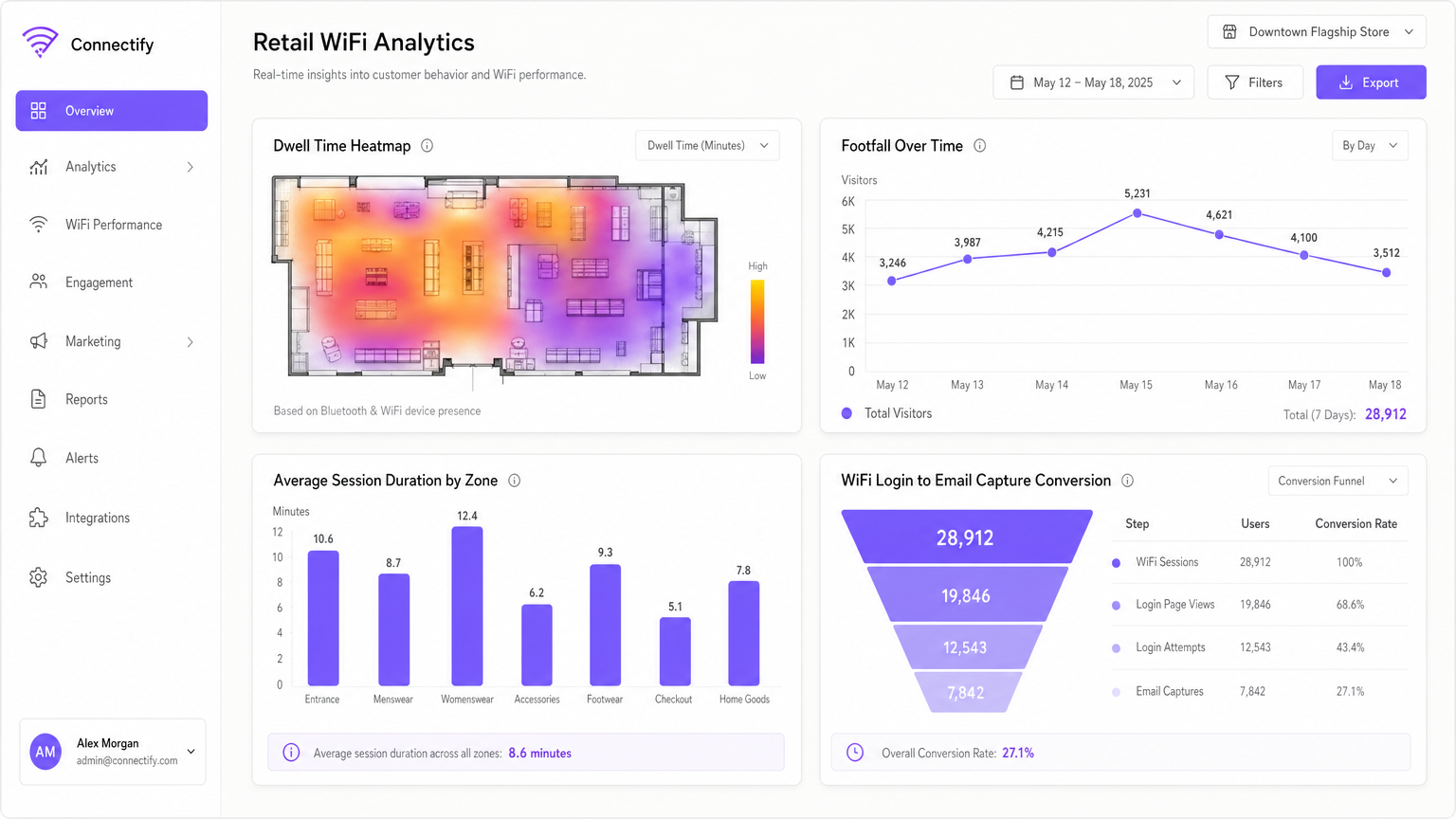
Sobald das Netzwerk live ist, kalibrieren Sie die Analyseplattform, um spezifische physische Zonen innerhalb des Geschäfts zu definieren (z.B. 'Herrenmode', 'Eingang', 'Kasse'). Etablieren Sie einen monatlichen Überprüfungszyklus, bei dem IT- und Marketingteams Besucherfrequenztrends, Verweildauern und Netzwerk-Performance-Metriken analysieren, um sowohl die Netzwerkkonfiguration als auch das Ladenlayout zu optimieren.
Best Practices
Um den ROI von Einzelhandels-WiFi zu maximieren, halten Sie sich an die folgenden Best Practices der Branche:
- Priorisieren Sie Erstanbieterdaten: Mit der Abschaffung von Drittanbieter-Cookies ist In-Store WiFi eine der zuverlässigsten Quellen für Erstanbieterdaten. Stellen Sie sicher, dass Ihre Captive Portal-Strategie für die einwilligungsbasierte Datenerfassung optimiert ist.
- Implementieren Sie profilbasierte Authentifizierung: Der Übergang zu nahtlosen, sicheren Authentifizierungsmethoden wie Passpoint (Hotspot 2.0) ermöglicht es Benutzern, sich automatisch an verschiedenen Orten zu verbinden, ohne wiederholt Captive Portals durchlaufen zu müssen, was die Benutzererfahrung und Datenkontinuität erheblich verbessert.
- Nutzen Sie Standortanalysen: Verwenden Sie die von verbundenen Geräten generierten Präsenzdaten, um den Kundenfluss zu verstehen. Wie in Einzelhandels -Umgebungen zu sehen ist, kann die Analyse, welche Gänge den meisten Verkehr erhalten, Merchandising- und Personalentscheidungen beeinflussen.
- Sorgen Sie für Herstellerneutralität: Wählen Sie ein Analyse- und Captive Portal-Overlay, wie Purple, das hardwareunabhängig ist. Dies verhindert eine Herstellerbindung auf der Infrastrukturebene und ermöglicht standardisierte Analysen über eine gemischte Hardware-Landschaft hinweg.
Fehlerbehebung & Risikominderung
Auch gut konzipierte Netzwerke stoßen auf Probleme. Das Verständnis gängiger Fehlermodi ist entscheidend für die Aufrechterhaltung der Servicekontinuität.
| Fehlermodus | Symptom | Grundursache & Behebung |
|---|---|---|
| Captive Portal-Fehler | Benutzer verbinden sich mit der SSID, erhalten aber keinen Internetzugang und keine Anmeldeaufforderung. | Ursache: DNS-Umleitungsfehler oder SSL-Zertifikatsfehler auf dem Portal-Controller. Behebung: Stellen Sie sicher, dass die Walled Garden-Konfiguration die DNS-Auflösung und den Zugriff auf die IP/den Hostnamen des Portals vor der Authentifizierung zulässt. Überprüfen Sie, ob die SSL-Zertifikate gültig und vertrauenswürdig sind. |
| Leistungsabfall bei hoher Dichte | Langsamer Durchsatz und häufige Verbindungsabbrüche während der Stoßzeiten. | Ursache: Gleichkanalinterferenzen oder unzureichende AP-Kapazität (zu viele Clients pro Funkmodul). Behebung: Implementieren Sie eine dynamische Kanalzuweisung. Rüsten Sie auf Wi-Fi 6 Access Points auf. Reduzieren Sie die Sendeleistung, um die Zellengrößen zu verkleinern und das Roaming zu weniger überlasteten APs zu fördern. |
| Rogue Access Points | Unautorisierte Netzwerke erscheinen mit ähnlichen SSIDs (Evil Twin-Angriffe). | Ursache: Böswillige Akteure versuchen, Gastzugangsdaten abzufangen. Behebung: Aktivieren Sie Wireless Intrusion Prevention Systems (WIPS) auf dem Netzwerk-Controller, um Rogue APs automatisch zu erkennen und zu unterdrücken. |
| VLAN-Leckage | Gastgeräte können Unternehmens-IP-Adressen anpingen. | Ursache: Fehlkonfigurierte Switch-Ports oder fehlende Access Control Lists (ACLs) auf dem Core-Router. Behebung: Führen Sie regelmäßige Penetrationstests durch. Erzwingen Sie strikt die Client-Isolation und überprüfen Sie, ob ACLs den gesamten privaten Adressraum nach RFC 1918 vom Gast-VLAN blockieren. |
ROI & Geschäftsauswirkungen
Das ultimative Maß für eine Einzelhandels-WiFi-Bereitstellung ist deren Auswirkung auf das Geschäftsergebnis. IT-Führungskräfte müssen diesen Wert dem gesamten Unternehmen vermitteln.
- Erhöhte Verweildauer: Zuverlässiges WiFi ermutigt Kunden, mehr Zeit im Geschäft zu verbringen, was direkt mit einer erhöhten Warenkorbgröße korreliert.
- Marketing-Attribution: Durch die Verfolgung von Geräte-MAC-Adressen können Einzelhändler die Offline-Auswirkungen von Online-Kampagnen messen. Wenn ein Kunde eine Werbe-E-Mail erhält und das Geschäft drei Tage später besucht, liefert das WiFi-Netzwerk die Attributionsdaten.
- Kundenbindung: Das Captive portal ist ein hochkonversionsstarker Akquisitionskanal für Treueprogramme. Das Anbieten von Hochgeschwindigkeitszugang im Austausch für die Treueregistrierung skaliert die Nutzerbasis des Programms schnell.
- Operative Effizienz: Frequenzanalysen ermöglichen dynamische Personalmodelle, die eine angemessene Abdeckung während Spitzenzeiten gewährleisten und die Lohnkosten in ruhigeren Zeiten senken.
Indem Einzelhandelsunternehmen das In-Store WiFi als strategisches Gut und nicht als versunkene Kosten betrachten, können sie ein Netzwerk aufbauen, das nicht nur Geräte verbindet, sondern grundlegend Umsatz, Loyalität und operative Intelligenz fördert.
Schlüsseldefinitionen
Captive Portal
A web page that a user of a public access network is obliged to view and interact with before access is granted. It is the primary mechanism for authentication, terms of service acceptance, and data capture.
IT teams deploy captive portals to secure the network and ensure legal compliance, while marketing teams use them to acquire customer data and drive loyalty program sign-ups.
MAC Address (Media Access Control)
A unique identifier assigned to a network interface controller (NIC) for use as a network address in communications within a network segment.
In retail WiFi analytics, the MAC address is used to anonymously track device movement across the store, providing data on dwell times and repeat visits, even if the user hasn't authenticated.
Wi-Fi 6 (802.11ax)
The sixth generation of the Wi-Fi standard, designed specifically to improve performance in high-density environments through technologies like OFDMA and BSS Colouring.
When upgrading retail infrastructure, IT managers specify Wi-Fi 6 to ensure the network can handle hundreds of simultaneous shoppers without degrading performance.
VLAN (Virtual Local Area Network)
A logical subnetwork that groups a collection of devices from different physical LANs. It allows network administrators to partition a single switched network to match the functional and security requirements of their systems.
VLANs are critical in retail to separate the untrusted guest WiFi traffic from the highly sensitive Point-of-Sale (POS) traffic, ensuring PCI DSS compliance.
First-Party Data
Information a company collects directly from its customers and owns entirely, such as email addresses, purchase history, and WiFi session data.
With the decline of third-party tracking cookies, retail marketers rely heavily on the guest WiFi network to capture first-party data for targeted campaigns.
Walled Garden
A network configuration that allows unauthenticated users access to a limited set of specific websites or IP addresses, while blocking all other internet access.
IT teams configure walled gardens so users can access the captive portal login page and necessary authentication services (like social media APIs) before they are fully authorised on the network.
Dwell Time
The length of time a customer spends in a specific area of a store, measured by tracking their device's connection or probe requests to the WiFi access points.
Operations directors use dwell time analytics to evaluate the effectiveness of store layouts, window displays, and promotional endcaps.
PCI DSS (Payment Card Industry Data Security Standard)
An information security standard for organizations that handle branded credit cards from the major card schemes.
IT architects must design the retail network to ensure guest WiFi access does not compromise the security of the payment infrastructure, avoiding severe financial penalties.
Ausgearbeitete Beispiele
A national retail chain with 50 locations is experiencing low marketing opt-in rates (under 5%) on their current guest WiFi network, which uses a generic, unbranded splash page. The CTO needs to increase data capture to support a new omnichannel loyalty initiative.
The IT team deploys a centralised, hardware-agnostic captive portal solution across all 50 locations. They replace the generic splash page with a branded, responsive portal that clearly articulates the value exchange: 'Log in for free high-speed WiFi and an immediate 10% discount code'. The portal is configured to capture only Name and Email, reducing friction. Crucially, the platform is integrated via API with the retailer's CRM. When a user authenticates, their details are pushed to the CRM, triggering an automated email containing the discount code. The network is also configured to remember the device's MAC address, allowing seamless authentication on subsequent visits to any of the 50 locations.
A large department store is suffering from severe network congestion on weekends. Customers complain that the guest WiFi is unusable, and the store manager reports that POS terminals (which share the physical network infrastructure) are occasionally dropping connections.
The network architect conducts an RF spectrum analysis and identifies severe co-channel interference and AP saturation. The remediation plan involves three steps: 1) Upgrading the highest-density zones (food court, main entrance) to Wi-Fi 6 access points to leverage OFDMA. 2) Implementing strict QoS policies on the core router, guaranteeing bandwidth for the POS VLAN and throttling guest VLAN traffic to 5 Mbps per client. 3) Enabling dynamic channel assignment and reducing the transmit power of the access points to shrink the cell sizes, encouraging client devices to roam more efficiently and reducing overlap.
Übungsfragen
Q1. Your retail client wants to implement a guest WiFi network to capture customer emails. They plan to use their existing flat network architecture, connecting the new guest access points directly to the same switch that handles the POS terminals, without VLAN segmentation. What is the primary risk of this approach?
Hinweis: Consider the security standards required for processing payments.
Musterlösung anzeigen
The primary risk is a severe violation of PCI DSS compliance. A flat network allows untrusted guest devices to potentially communicate with or intercept traffic from the POS terminals. The network must be segmented using VLANs to isolate the cardholder data environment from the guest network.
Q2. A venue operator notices that while footfall in the store is high, the capture rate on the captive portal is below 2%. The portal currently asks for First Name, Last Name, Email, Phone Number, Date of Birth, and Postcode. How should the IT and Marketing teams resolve this?
Hinweis: Consider the friction involved in the authentication process.
Musterlösung anzeigen
The low capture rate is due to excessive friction in the authentication process. The teams should redesign the captive portal to request only the minimum necessary information—typically just Name and Email, or offer a social login option. Progressive profiling can be used later to gather more details once the initial relationship is established.
Q3. A newly deployed Wi-Fi 6 network in a busy shopping centre is experiencing poor performance. The IT manager notes that all access points are transmitting at maximum power on the 2.4GHz band. What configuration change is required?
Hinweis: Think about how RF signals interact in dense environments.
Musterlösung anzeigen
The access points are likely causing severe co-channel interference because their cell sizes are too large and overlapping. The IT manager should reduce the transmit power on the access points, particularly on the 2.4GHz band, to shrink the cell sizes. They should also ensure dynamic channel assignment is enabled and encourage clients to steer towards the 5GHz band where possible.
Weiterlesen in dieser Reihe
Was ist eine Probe Request? Verstehen, wie Geräte Netzwerke entdecken
Dieser technische Leitfaden bietet einen tiefen Einblick in IEEE 802.11 Probe Requests, aktives versus passives Scannen und die Auswirkungen der MAC randomisation auf Standortanalysen. Er liefert umsetzbare Implementierungsstrategien für Netzwerkarchitekten zur Optimierung von High-Density-Bereitstellungen, zur Minderung von Probe Storms und zur Sicherstellung einer genauen, GDPR-konformen Datenerfassung mithilfe authentifizierter Identitätsschichten.
Wie man langsames WiFi behebt, ohne Ihr Internetpaket zu aktualisieren
Ein umfassender technischer Leitfaden für IT-Manager und Netzwerkarchitekten zur Optimierung der Unternehmens-WiFi-Leistung, ohne die ISP-Bandbreite zu erhöhen. Behandelt HF-Tuning, Client-Dichte-Management, QoS-Implementierung und wie man WiFi-Analysen nutzt, um Engpässe zu diagnostizieren und zu beheben.
Die Checkliste für die Migration von Legacy NAC zu Cloud-Native NAC
Dieser maßgebliche technische Leitfaden bietet eine strukturierte, dreiphasige Checkliste für die Migration von der traditionellen Netzwerkzugriffskontrolle (NAC) zu einer Cloud-nativen Architektur. Er stattet IT-Manager und Netzwerkarchitekten mit umsetzbaren Strategien aus, um die Identitätsintegration, Richtlinienkonsistenz und Compliance zu gewährleisten, ohne den Veranstaltungsbetrieb zu stören.