
Shopping Centre WiFi: Ein Leitfaden für Immobilienverwalter
Dieser Leitfaden bietet einen umfassenden technischen und kommerziellen Entwurf für die Bereitstellung von flächendeckendem WiFi in einem Einkaufszentrum. Er behandelt eine dreistufige Netzwerkarchitektur, hochdichtes RF-Design, GDPR-konforme Datenerfassung und Strategien zur Monetarisierung von Retail Media. Immobilienverwalter, IT-Teams und CTOs finden hier umsetzbare Bereitstellungsanleitungen sowie ein klares ROI-Framework, um die Gästekonnektivität in ein First-Party-Datenasset zu verwandeln.
Diesen Leitfaden anhören
Podcast-Transkript ansehen
Executive Summary
Die Bereitstellung von flächendeckendem WiFi in einer Einzelhandelsimmobilie ist nicht länger nur ein operativer Aufwand oder eine generische Gästeannehmlichkeit. Für moderne Einkaufszentren bildet ein robustes, hochdichtes Wireless-Netzwerk die Grundlage einer datengesteuerten Geschäftsstrategie. Durch die Implementierung eines richtig architektonisch gestalteten Netzwerks können Immobilienverwalter und IT-Führungskräfte anonyme Besucherströme in verwertbare First-Party-Daten umwandeln und so sowohl die betriebliche Effizienz steigern als auch neue Einnahmequellen durch die Monetarisierung von Retail Media erschließen.
Dieser Leitfaden beschreibt die technische Architektur, Bereitstellungsüberlegungen und den Business Case für Enterprise-Grade Guest WiFi in Einzelhandelsumgebungen. Er überbrückt die Lücke zwischen komplexer Netzwerktechnik und greifbaren Geschäftsergebnissen und bietet IT-Managern, Netzwerkarchitekten und CTOs einen Entwurf für die Bereitstellung einer resilienten, skalierbaren und sicheren Konnektivitätslösung, die sowohl den Gastzugang als auch die betrieblichen Anforderungen unterstützt. Dieselben Prinzipien gelten auch für angrenzende Sektoren wie Retail , Hospitality und große öffentliche Veranstaltungsorte.
Technical Deep-Dive
Netzwerkarchitektur und Topologie
Die Architektur eines Shopping Centre WiFi-Netzwerks muss massive Skalierbarkeit, hohe Client-Dichte und anspruchsvolle RF-Umgebungen berücksichtigen. Ein standardmäßiges dreistufiges hierarchisches Modell ist für jede Bereitstellung dieser Größe unerlässlich.
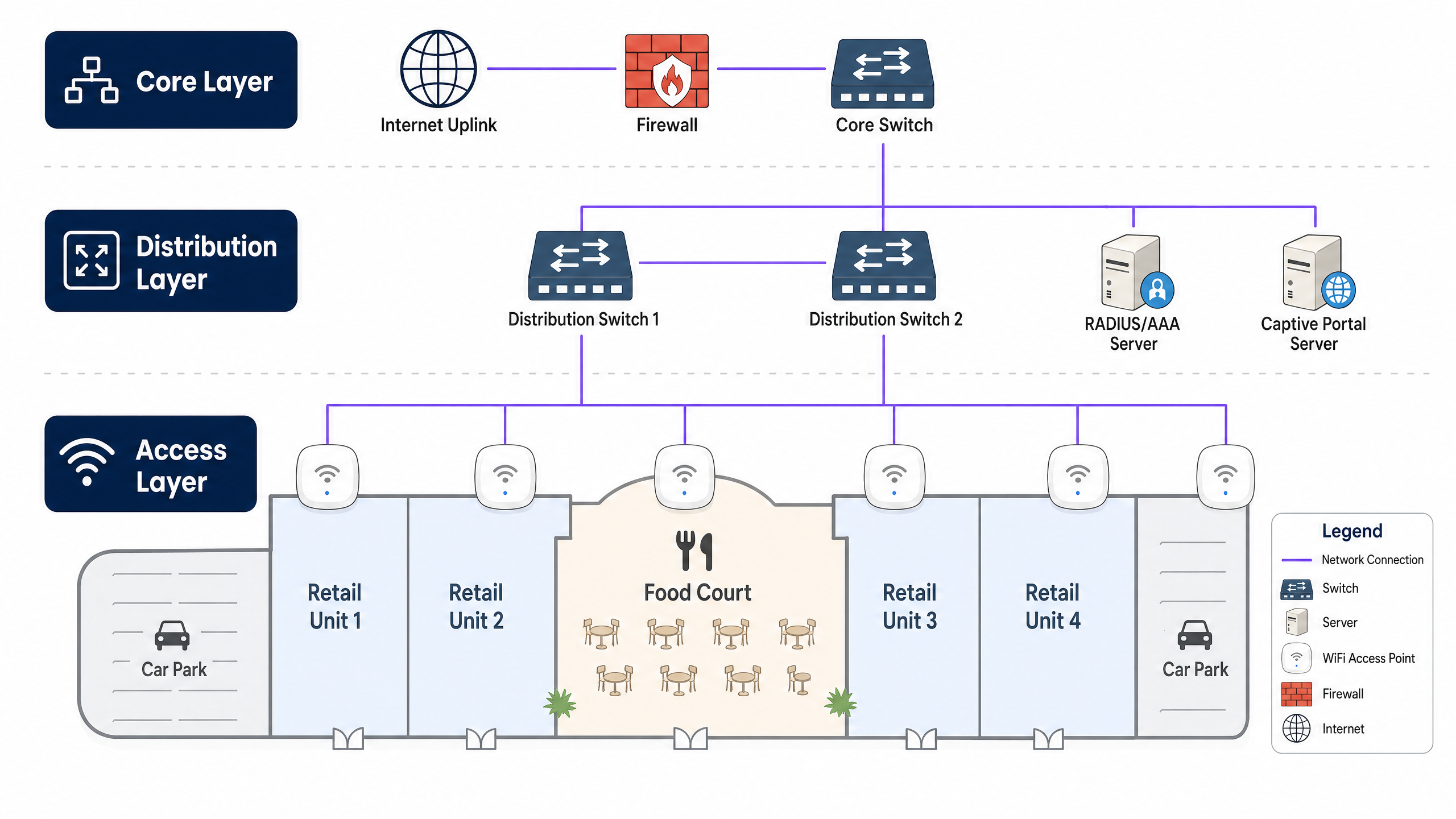
Die Core Layer bildet das Hochgeschwindigkeits-Backbone und bietet redundantes Routing, Firewall-Dienste und Internet-Uplink-Konnektivität. Diese Schicht muss einen hohen Durchsatz unterstützen, um Spitzenverkehrslasten ohne Engpässe zu bewältigen. Die Distribution Layer aggregiert den Datenverkehr von der Access Layer, wendet QoS-Richtlinien (Quality of Service) an und leitet den Datenverkehr zum Core. Sie beherbergt typischerweise RADIUS/AAA-Server für die Authentifizierung und Captive Portal-Server für das Guest Onboarding. Die Access Layer ist der Rand des Netzwerks, an dem sich Clients verbinden, und umfasst Power over Ethernet (PoE)-Switches und hochdichte WiFi Access Points, die über die Verkaufsfläche, Food Courts und Parkplätze verteilt sind.
Wireless Standards und Frequenzen
Moderne Bereitstellungen sollten auf WiFi 6 (802.11ax) oder WiFi 6E standardisiert werden, die erhebliche Verbesserungen in Umgebungen mit hoher Dichte durch Technologien wie OFDMA (Orthogonal Frequency-Division Multiple Access) und MU-MIMO bieten. Diese Standards ermöglichen es APs, gleichzeitig mit mehreren Geräten zu kommunizieren, was die Latenz in überfüllten Bereichen wie Food Courts drastisch reduziert.
Dual-Band (2.4 GHz und 5 GHz) oder Tri-Band (mit zusätzlichem 6 GHz) APs sind erforderlich. Während 2.4 GHz eine bessere Durchdringung durch Wände und eine größere Reichweite bietet, ist es stark überlastet. 5 GHz und 6 GHz bieten breitere Kanäle und höheren Durchsatz, erfordern jedoch eine dichtere AP-Platzierung. Ein gut konzipiertes Netzwerk wird Dual-Band-fähige Clients aktiv auf die 5 GHz- oder 6 GHz-Bänder (Band Steering) lenken, um die gesamte Spektrumsnutzung zu optimieren.
Sicherheit und Compliance
Sicherheit ist von größter Bedeutung, insbesondere beim Umgang mit Gästedaten und der potenziellen Integration mit Point-of-Sale (POS)-Systemen oder Operational Technology (OT).
Für den Guest Access implementieren Sie ein sicheres Captive Portal für das Onboarding. Verwenden Sie WPA3-Personal (SAE), wo unterstützt, oder Open/Enhanced Open (OWE) für nahtlosen Zugang. Entscheidend ist, dass die Client-Isolation auf AP-Ebene aktiviert sein muss, um die Peer-to-Peer-Kommunikation zwischen Gastgeräten zu verhindern. Für den Datenschutz muss der Datenerfassungsmechanismus den GDPR, CCPA oder lokalen Datenschutzbestimmungen entsprechen. Eine robuste Guest WiFi -Plattform verwaltet die Zustimmung explizit während des Onboarding-Prozesses. Für den Corporate/OT Access trennen Sie den operativen Datenverkehr (z. B. HVAC-Sensoren, Überwachungskameras, POS) auf dedizierte VLANs, gesichert mit 802.1X-Authentifizierung (WPA3-Enterprise).
Implementation Guide
Schritt 1: Standortbegehung und RF-Planung
Eine prädiktive und aktive Standortbegehung ist der entscheidende erste Schritt. Einzelhandelsumgebungen sind dynamisch; Ladenlayouts ändern sich, und saisonale Auslagen können die RF-Ausbreitung erheblich verändern.
Eine Predictive Survey verwendet Software-Tools, um die Umgebung basierend auf Grundrissen und Baumaterialien zu modellieren und eine erste Schätzung für die AP-Anzahl und -Platzierung zu liefern. Eine Active Survey (AP-on-a-stick) testet physisch die AP-Abdeckung und Interferenzen vor Ort. Dies ist in Einkaufszentren unerlässlich, um Variablen wie Glasfassaden, Metallarmaturen und bestehende Tenant WiFi-Netzwerke zu berücksichtigen, die Co-Channel-Interferenzen verursachen.
Schritt 2: Infrastruktur-Bereitstellung
Stellen Sie sicher, dass die kabelgebundene Infrastruktur die Wireless-Anforderungen unterstützen kann. Verlegen Sie Cat6A-Kabel zu allen AP-Standorten, um Multi-Gigabit-Durchsatz und höhere PoE-Budgets (PoE+ oder PoE++) zu unterstützen. Wählen Sie Access Switches mit ausreichenden PoE-Budgets, um alle APs gleichzeitig zu versorgen, was besonders wichtig ist, wenn stromhungrige WiFi 6/6E APs eingesetzt werden. Eine robuste Internetverbindung ist unerlässlich; erwägen Sie eine dedizierte Standleitung für garantierte Bandbreite und SLAs. Erfahren Sie mehr in unserem Leitfaden: Was ist eine Standleitung? Dediziertes Business Internet .
Schritt 3: AP-Platzierung und -Konfiguration
In High-Density-Bereichen wie Food Courts oder Veranstaltungsräumen verwenden Sie APs mit Richtantennen, um kleinere, fokussierte Mikrozellen zu schaffen, die die Kapazität erhöhen, ohne die Co-Channel-Interferenzen zu verstärken. In Korridoren und Gehwegen versetzen Sie die AP-Platzierung, um eine kontinuierliche Abdeckung für Roaming-Clients zu gewährleisten. Passen Sie die Sendeleistungspegel sorgfältig an; APs sollten nicht mit maximaler Leistung senden, da dies Sticky Clients erzeugt – Geräte, die sich weigern, zu einem näheren AP zu wechseln – und Interferenzen erhöht.
Schritt 4: Captive Portal und Analytics-Integration
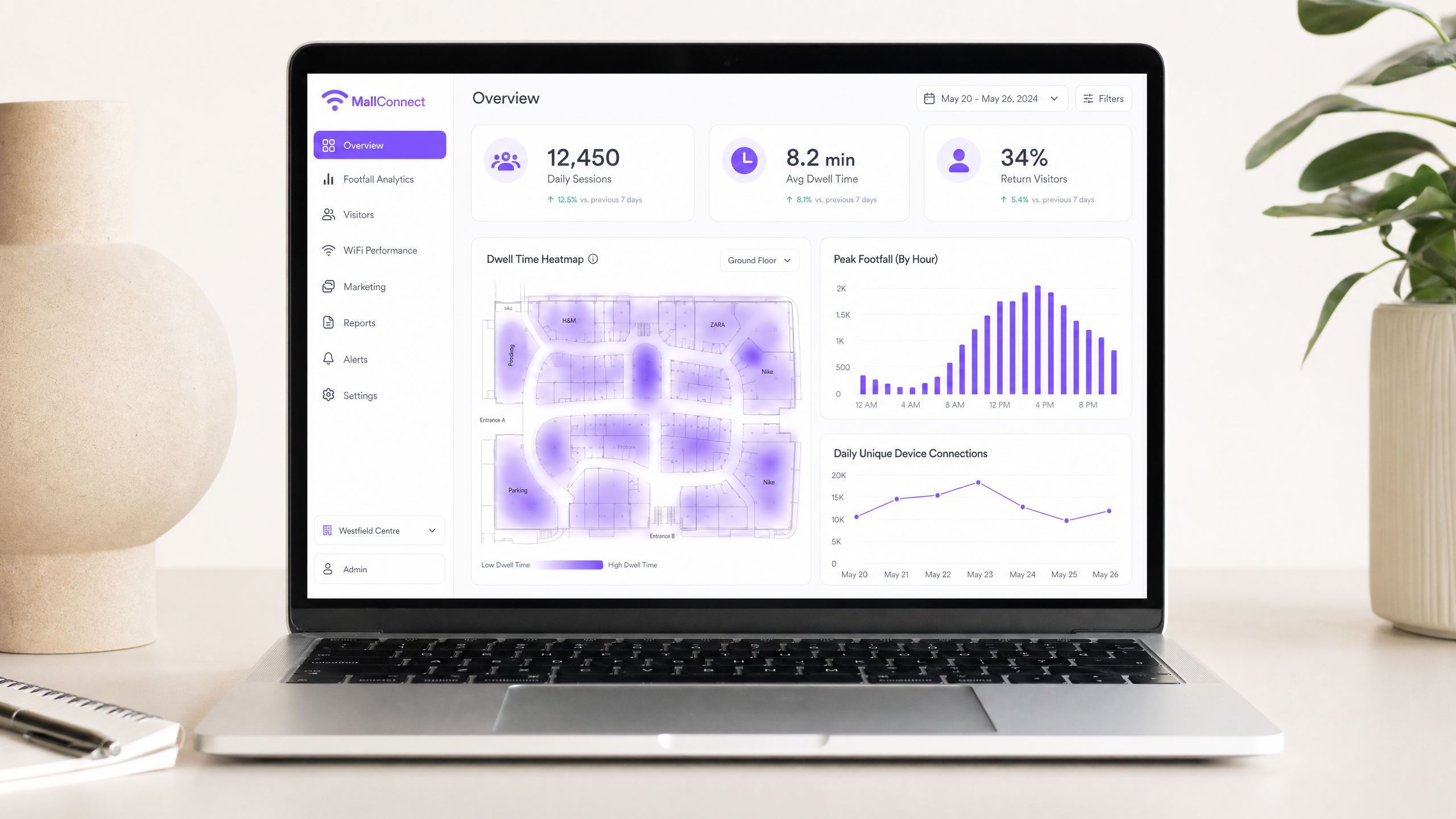
Integrieren Sie das Netzwerk mit einer robusten Analytics-Plattform. Das Captive Portal ist das Tor zur Datenerfassung. Gestalten Sie den Onboarding-Prozess reibungslos, indem Sie Social Login, E-Mail-Registrierung oder nahtlose Authentifizierung wie OpenRoaming anbieten. Sobald die Verbindung hergestellt ist, sollte die Plattform beginnen, Standortdaten, Verweildauern und die Häufigkeit wiederkehrender Besuche zu aggregieren. Dies verwandelt das Netzwerk von einem Kostenfaktor in einen Marketing-Asset. Entdecken Sie die Funktionen einer umfassenden WiFi Analytics -Lösung.
Best Practices
Gäste- und Unternehmensdatenverkehr trennen: Verwenden Sie stets VLANs, um den Gäste-Datenverkehr logisch von Unternehmens- und Betriebsdaten zu trennen. Dies ist eine grundlegende Sicherheitsanforderung, insbesondere in Umgebungen, die der PCI DSS-Konformität unterliegen, wo Zahlungskartendaten das Netzwerk durchlaufen können.
Band Steering implementieren: Leiten Sie fähige Clients aktiv auf die 5 GHz- oder 6 GHz-Bänder, um das überlastete 2,4 GHz-Spektrum für ältere Geräte und IoT-Sensoren freizugeben.
DHCP und DNS optimieren: Umgebungen mit hohem Durchsatz wie Einkaufszentren erschöpfen DHCP-Pools schnell. Reduzieren Sie die DHCP-Lease-Zeiten (z.B. auf 1 oder 2 Stunden), um IP-Adressen effizient zurückzugewinnen. Stellen Sie eine robuste DNS-Infrastruktur sicher, um hohe Abfragevolumen zu bewältigen. Lesen Sie mehr darüber, wie Sie Ihr Netzwerk mit starkem DNS und Sicherheit schützen .
Kontinuierliche Überwachung: Die HF-Umgebung ändert sich ständig. Nutzen Sie ein Wireless Management System (WMS), das Echtzeit-Einblicke in den Client-Zustand, den AP-Status und die Interferenzpegel bietet.
Fehlerbehebung & Risikominderung
Häufige Fehlerursachen
Co-Channel Interference (CCI) tritt auf, wenn mehrere APs auf demselben Kanal arbeiten und sich gegenseitig hören können, wodurch Geräte auf freie Sendezeit warten müssen und der Durchsatz drastisch reduziert wird. Mindern Sie dies durch sorgfältige Kanalplanung, dynamisches Funkmanagement (RRM) und die Reduzierung der AP-Sendeleistung.
Sticky Clients sind Geräte, die mit einem AP verbunden bleiben, selbst wenn ein näherer, stärkerer AP verfügbar ist. Implementieren Sie minimale RSSI-Schwellenwerte, um Clients mit schwachen Signalen sanft zu trennen und sie zum Roaming zu einem besser verbundenen AP zu zwingen.
DHCP Pool Exhaustion verhindert, dass Benutzer sich verbinden können, da dem Netzwerk die IP-Adressen ausgegangen sind. Verwenden Sie größere Subnetze (z.B. /22 oder /21) für Gastnetzwerke und reduzieren Sie die DHCP-Lease-Zeiten.
Rogue APs sind unautorisierte Access Points, die mit dem Netzwerk verbunden sind und ein erhebliches Sicherheitsrisiko darstellen. Aktivieren Sie Wireless Intrusion Prevention Systems (WIPS), um Rogue-Geräte automatisch zu erkennen und einzudämmen.
ROI & Geschäftlicher Nutzen
Datenerfassung und Analytics
Ein ordnungsgemäß konfiguriertes Netzwerk erfasst passive Analytics (Besucherfrequenz, Verweildauer, Bewegungsmuster) und aktive Analytics (Demografie, Kontaktdaten über das Captive Portal). Diese Daten liefern Betreibern detaillierte Einblicke in das Einkaufsverhalten und ermöglichen datengestützte Entscheidungen bezüglich Mieterplatzierung, Mietbewertung und Marketingeffektivität. Der gleiche datengestützte Ansatz ist in stark frequentierten Veranstaltungsorten wirksam, wie in unserem Zoo- und Freizeitpark WiFi: Konnektivitätsleitfaden für stark frequentierte Veranstaltungsorte beschrieben.
Monetarisierung von Retail Media
Das Captive Portal selbst ist eine erstklassige digitale Werbefläche. Immobilienverwalter können dies monetarisieren, indem sie während des Onboarding-Prozesses gezielte Werbung oder Sponsoring von Einzelhandelsmietern oder Drittanbietern schalten. Dies verwandelt das WiFi-Netzwerk in einen direkten umsatzgenerierenden Kanal.
Verbesserung des Kundenerlebnisses
Nahtlose Konnektivität ermöglicht Indoor-Navigation, standortbasierte Angebote und personalisierte Kommunikation. Durch die Integration von WiFi-Daten mit bestehenden CRM- oder Treueprogrammen können Veranstaltungsorte hochgradig zielgerichtete, kontextbezogene Erlebnisse bieten, die das Engagement fördern und die Ausgaben pro Besuch erhöhen.
Schlüsseldefinitionen
Co-Channel Interference (CCI)
Occurs when multiple access points transmit on the same frequency channel and can 'hear' each other. Because WiFi is a half-duplex medium (only one device can talk at a time on a channel), CCI forces devices to wait, severely degrading network performance and throughput.
A primary cause of poor WiFi performance in dense retail environments where too many APs are deployed without proper channel planning or power management.
Band Steering
A network feature that detects dual-band capable clients and actively encourages or forces them to connect to the less congested 5 GHz or 6 GHz bands rather than the crowded 2.4 GHz band.
Essential for maximising throughput and capacity in high-density areas like shopping centre food courts where the 2.4 GHz band is saturated.
Captive Portal
A web page that the user of a public-access network is obliged to view and interact with before internet access is granted. Typically used for authentication, accepting terms of service, and marketing data capture.
The primary mechanism for converting anonymous footfall into known contacts and gathering first-party data for marketing and analytics purposes.
Client Isolation
A security feature configured on the access point that prevents connected wireless clients from communicating directly with one another over the local network.
A mandatory security control for public guest networks to prevent peer-to-peer attacks and malware spread among shoppers' devices.
Dwell Time
The length of time a visitor spends within a specific defined area (zone) of the venue, calculated based on the presence of their WiFi-enabled device as detected by the access point infrastructure.
A key metric for venue operators to understand shopper engagement, value different retail zones, and measure the effectiveness of marketing campaigns and store layouts.
RSSI (Received Signal Strength Indicator)
A measurement of the power present in a received radio signal, expressed in dBm (decibels relative to one milliwatt). It indicates how well a device can 'hear' an access point.
Used in network design to determine AP placement and configured in minimum RSSI thresholds to force sticky clients to roam to a stronger access point.
OpenRoaming
A federation of WiFi networks that allows users to seamlessly and securely connect automatically across different venues without needing to repeatedly log in or use captive portals. Based on the Passpoint (802.11u) standard.
A modern approach to frictionless connectivity that improves the user experience while still allowing venues to maintain secure, authenticated connections and capture analytics data.
Power over Ethernet (PoE)
A technology standardised in IEEE 802.3af, 802.3at (PoE+), and 802.3bt (PoE++) that passes electric power along with data on twisted pair Ethernet cabling, allowing a single cable to provide both data connection and power to devices such as wireless access points.
Critical for deploying APs across a large retail estate, as it eliminates the need to install separate electrical outlets at every AP location, significantly reducing installation cost and complexity.
VLAN (Virtual Local Area Network)
A logical subdivision of a physical network that groups devices together regardless of their physical location. Traffic between VLANs requires routing through a Layer 3 device, providing logical isolation between network segments.
The fundamental mechanism for separating guest WiFi traffic from corporate, POS, and operational technology networks in a retail environment.
Ausgearbeitete Beispiele
A regional shopping centre (approx. 50,000 sqm) is experiencing severe connectivity issues in its central food court during peak lunch hours. Users report being connected to WiFi but unable to load web pages. The current setup uses 4 standard omni-directional APs mounted on the 10-metre high ceiling.
- Conduct an active RF survey to confirm Co-Channel Interference (CCI) and capacity exhaustion. Validate that the APs are all operating on the same or overlapping channels, and measure the concurrent client count during peak hours.
- Replace the 4 omni-directional APs with 8-10 high-density APs utilising directional (patch) antennas. Mount them lower where possible, or angle them to create focused micro-cells over specific seating areas.
- Implement strict Band Steering to force 5GHz/6GHz connections for all capable clients.
- Reduce transmit power on all food court APs to minimise cell overlap and reduce CCI.
- Verify DHCP pool size and reduce lease time to 30 minutes for this specific zone to prevent pool exhaustion.
- Validate backhaul capacity from the distribution switch to the core to ensure the wired network is not the bottleneck.
A luxury retail outlet village wants to implement a guest WiFi network to collect shopper demographics and build a marketing database. However, the IT team is concerned about GDPR compliance and the security of the tenant POS networks.
- Network Segmentation: Create a dedicated, isolated VLAN specifically for guest WiFi traffic, completely separate from the corporate and POS VLANs. Route this guest VLAN directly to the internet firewall, bypassing all internal networks.
- Client Isolation: Enable Layer 2 client isolation on all guest APs to prevent devices from communicating with each other.
- Captive Portal Configuration: Implement a captive portal integrated with a compliant Guest WiFi platform such as Purple.
- Consent Management: Configure the portal to require explicit, opt-in consent for marketing communications and data processing, clearly linking to the privacy policy before granting access. Separate the marketing consent checkbox from the mandatory Terms of Service acceptance.
- Authentication: Offer social login or email registration to capture verified demographic data, and ensure all data is processed and stored in compliance with GDPR Article 6 (lawful basis for processing).
Übungsfragen
Q1. Your marketing team wants to implement a new augmented reality (AR) indoor navigation app that relies heavily on the guest WiFi network. The current network was designed three years ago primarily for basic web browsing. What is the most critical technical assessment you must perform before launching the app, and what specific metrics should you measure?
Hinweis: Consider the difference between a network designed for coverage versus one designed for high throughput, low latency, and precise location accuracy.
Musterlösung anzeigen
You must perform a capacity analysis and active site survey. The existing network was likely designed for coverage (basic connectivity). AR applications require high throughput (minimum 10–25 Mbps per active user), low latency (sub-20ms), and sufficient AP density for accurate location triangulation (typically APs within 10–15 metres of each user). Measure concurrent client counts per AP, average and peak throughput per user, RSSI variance across the estate, and roaming event frequency. If the network cannot meet these thresholds, an AP densification project and upgrade to WiFi 6 will be required before the app launch.
Q2. A tenant in the shopping centre complains that their wireless Point-of-Sale (POS) terminals frequently drop connections, especially during busy weekend hours. You observe that the tenant's AP is operating on channel 6 on the 2.4GHz band, and several nearby mall guest APs are also broadcasting on channel 6. What is the immediate recommended action, and what longer-term architectural change should be considered?
Hinweis: Think about how WiFi devices share airtime on the same frequency, and the implications of POS systems being on the same network as guest devices.
Musterlösung anzeigen
The immediate action is to mitigate Co-Channel Interference. Coordinate a channel plan: if the POS terminals support 5GHz, migrate the tenant's AP to the 5GHz band immediately. If 2.4GHz is required, ensure the tenant's AP and surrounding mall APs use non-overlapping channels (1, 6, or 11) with no adjacent APs on the same channel. The longer-term architectural change is to ensure POS systems are on a dedicated, isolated VLAN with a separate SSID, completely segregated from the guest network. This also addresses PCI DSS compliance requirements for cardholder data environments.
Q3. The property management team wants to monetize the guest WiFi by selling targeted ads on the captive portal. The legal team has flagged GDPR concerns. How should the network architecture and onboarding flow be designed to satisfy both the commercial requirement and legal compliance?
Hinweis: Focus on the specific GDPR requirements for consent, and how the captive portal flow must be structured to make consent freely given, specific, informed, and unambiguous.
Musterlösung anzeigen
The onboarding flow must implement a two-stage consent model. Stage one presents the mandatory Terms of Service (required for network access). Stage two presents a clearly separate, optional opt-in checkbox for marketing communications and data processing for targeted advertising. These must not be pre-ticked and must be independent of each other. The platform must log the timestamp, IP address, and specific consent given for each user. Users must be able to access, modify, or withdraw consent at any time via a self-service portal. Architecturally, all user data must be stored in a GDPR-compliant data store (ideally within the EEA), and the captive portal platform must provide a Data Processing Agreement (DPA). Only users who have explicitly opted in should be served targeted ads.
Weiterlesen in dieser Reihe
Was ist eine Probe Request? Verstehen, wie Geräte Netzwerke entdecken
Dieser technische Leitfaden bietet einen tiefen Einblick in IEEE 802.11 Probe Requests, aktives versus passives Scannen und die Auswirkungen der MAC randomisation auf Standortanalysen. Er liefert umsetzbare Implementierungsstrategien für Netzwerkarchitekten zur Optimierung von High-Density-Bereitstellungen, zur Minderung von Probe Storms und zur Sicherstellung einer genauen, GDPR-konformen Datenerfassung mithilfe authentifizierter Identitätsschichten.
Wie man langsames WiFi behebt, ohne Ihr Internetpaket zu aktualisieren
Ein umfassender technischer Leitfaden für IT-Manager und Netzwerkarchitekten zur Optimierung der Unternehmens-WiFi-Leistung, ohne die ISP-Bandbreite zu erhöhen. Behandelt HF-Tuning, Client-Dichte-Management, QoS-Implementierung und wie man WiFi-Analysen nutzt, um Engpässe zu diagnostizieren und zu beheben.
Die Checkliste für die Migration von Legacy NAC zu Cloud-Native NAC
Dieser maßgebliche technische Leitfaden bietet eine strukturierte, dreiphasige Checkliste für die Migration von der traditionellen Netzwerkzugriffskontrolle (NAC) zu einer Cloud-nativen Architektur. Er stattet IT-Manager und Netzwerkarchitekten mit umsetzbaren Strategien aus, um die Identitätsintegration, Richtlinienkonsistenz und Compliance zu gewährleisten, ohne den Veranstaltungsbetrieb zu stören.