
So ändern Sie WiFi Kanäle zur Vermeidung von Interferenzen
Dieses umfassende technische Handbuch bietet IT-Managern, Netzwerkarchitekten und Betriebsleitern einen definitiven, schrittweisen Ansatz zur Identifizierung von WiFi Interferenzquellen und zur strategischen Änderung von WiFi Kanälen, um diese zu eliminieren. Es behandelt die Bandplanung im Bereich 2,4 GHz und 5 GHz, Spektrumanalyse, Radio Resource Management sowie DFS-Aspekte, basierend auf den Standards IEEE 802.11 und realen Bereitstellungsszenarien. Die Implementierung dieser Strategien führt zu messbaren Verbesserungen des Durchsatzes, der Client-Stabilität und des ROI der Infrastruktur, ohne dass Investitionen in neue Hardware erforderlich sind.
Video overview
Diesen Leitfaden anhören
Podcast-Transkript ansehen
Teil unserer Kernserie: WiFi HF-Planungshandbuch →
WiFi channel optimizer & interference advisor
Evaluate 2.4 GHz, 5 GHz, and 6 GHz spectrum allocation, calculate co-channel interference (CCI) penalties, eliminate adjacent-channel collisions, and generate step-by-step router configuration instructions.
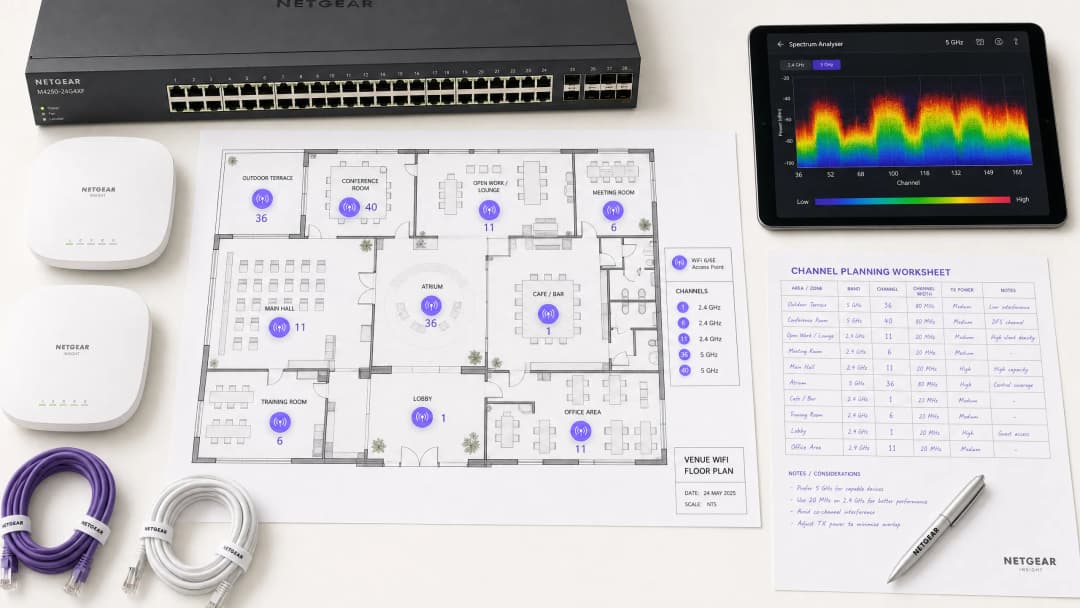
Overview
Für Enterprise-Umgebungen - von weitläufigen hospitality Standorten bis hin zu dicht besiedelten retail Verkaufsflächen - ist zuverlässiges WiFi längst kein Luxus mehr, sondern eine kritische Infrastruktur. Interferenzen bleiben die Hauptursache für Verbindungsabbrüche, hohe Latenzzeiten und schlechten Durchsatz, was sich direkt auf die betriebliche Effizienz und das guest WiFi Erlebnis auswirkt. Dieser Leitfaden bietet Netzwerkarchitekten und IT-Managern eine fundierte, schrittweise Methodik zur Identifizierung von Interferenzquellen und zur strategischen Änderung von WiFi Kanälen, um diese zu minimieren.
Durch die Implementierung herstellerneutraler Best Practices für das Spektrum-Management können Unternehmen den ROI ihrer Infrastruktur maximieren, ein nahtloses Client-Roaming gewährleisten und die wachsende Dichte von IoT- und Benutzergeräten unterstützen - ohne Kompromisse bei Sicherheits- oder Compliance-Standards wie PCI-DSS und GDPR einzugehen. Das Grundprinzip ist einfach: Interferenzen sind ein Problem des Spektrum-Managements, kein Hardware-Problem. Die korrekte Konfiguration der bestehenden Infrastruktur behebt in den meisten Fällen Performance-Probleme, die fälschlicherweise einer unzureichenden AP-Dichte oder veralteter Hardware zugeschrieben werden.
Technischer Deep Dive
Vor der Durchführung von Konfigurationsänderungen ist es wichtig, die physikalische Ebene von IEEE 802.11-Netzwerken zu verstehen. Das Radiofrequenz-Spektrum (RF) ist ein gemeinsam genutztes Medium, das durch CSMA/CA-Protokolle (Carrier Sense Multiple Access with Collision Avoidance) geregelt wird. Interferenzen lassen sich im Wesentlichen in zwei Kategorien einteilen: Gleichkanal-Interferenzen (Co-Channel Interference, CCI) und Nachbarkanal-Interferenzen (Adjacent-Channel Interference, ACI).
Gleichkanal-Interferenzen (CCI) treten auf, wenn mehrere Access Points oder Clients auf demselben Kanal senden. Während das 802.11-Protokoll dies mithilfe von CSMA/CA steuert - bei dem Geräte vor dem Senden prüfen, ob das Medium frei ist - zwingt eine übermäßige CCI die Geräte dazu, auf freie Sendezeiten zu warten, was den Durchsatz drastisch senkt und die Latenz erhöht. Dies ist im Grunde ein Überlastungsproblem und kein echtes RF-Rauschen, und der CSMA/CA-Mechanismus bewältigt dies bis zu einem gewissen Grad reibungslos.
Nachbarkanal-Interferenzen (ACI) sind weitaus destruktiver. Dies geschieht, wenn APs auf überlappenden Frequenzen arbeiten (zum Beispiel die Kanäle 2 und 4 im 2,4 GHz-Band). Da sich die Übertragungen überschneiden, aber von CSMA/CA nicht decodiert werden können, werden sie als reines Rauschen behandelt. Dies erhöht das Grundrauschen und führt zu Paketverlusten sowie erneuten Übertragungen. In stark frequentierten Umgebungen kann ACI den effektiven Durchsatz um 60 - 70 % reduzieren und ist der häufigste Konfigurationsfehler bei Enterprise-Bereitstellungen.
Das 2,4 GHz-Dilemma
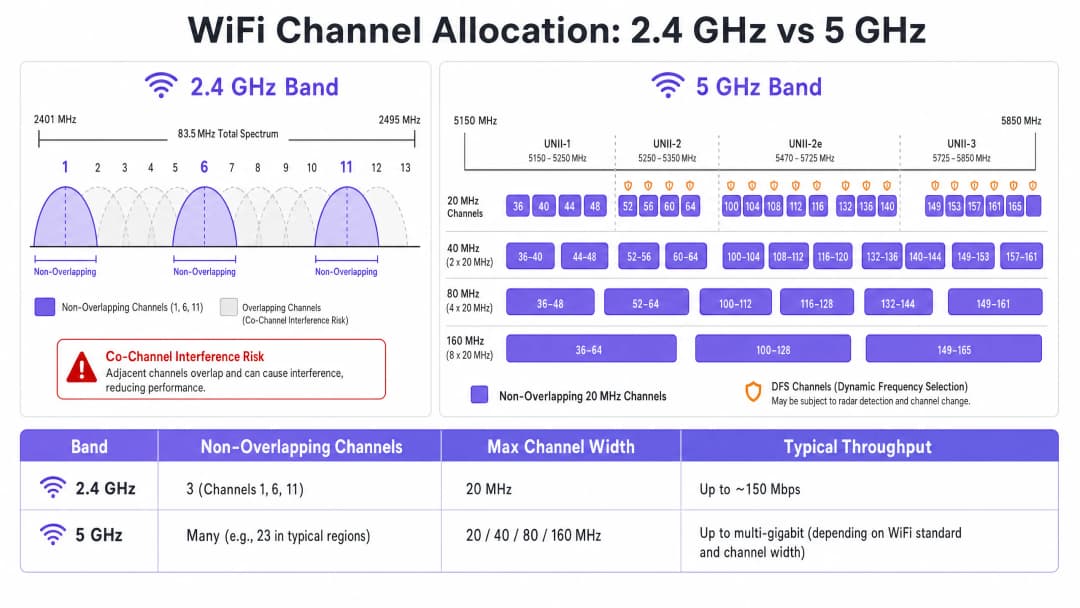
Das 2,4 GHz-Band bietet eine bessere Reichweite und Wanddurchdringung, ist jedoch durch sein schmaleres Spektrum - insgesamt ca. 83,5 MHz - stark eingeschränkt. Obwohl je nach Regulierungsbereich 11 bis 14 Kanäle verfügbar sind, sind nur drei davon wirklich überschneidungsfrei: die Kanäle 1, 6 und 11. Die Verwendung eines anderen Kanals in einer Bereitstellung mit mehreren APs führt unweigerlich zu ACI. Darüber hinaus ist dieses Band stark durch Nicht-WiFi-Störquellen überlastet, darunter Bluetooth-Geräte, Mikrowellen und DECT-Schnurlostelefone, die im selben Spektrum arbeiten. Für eine detaillierte Analyse, wie Bluetooth Low Energy mit der WiFi-Infrastruktur koexistiert, lesen Sie unseren Leitfaden Enterprise BLE Low Energy Decoded. Für eine allgemeinere Betrachtung der Bandauswahl siehe WiFi Frequencies: The 2026 Guide to WiFi Frequencies.
Der 5 GHz-Vorteil
Das 5 GHz-Band bietet deutlich mehr Spektrum und stellt eine Fülle von überschneidungsfreien 20-MHz-Kanälen in den Teilbändern UNII-1, UNII-2, UNII-2e und UNII-3 zur Verfügung. Dieses Band ist die richtige Standardwahl für den Datenverkehr von Enterprise-Clients. Es bringt jedoch zwei entscheidende Komplexitäten mit sich: Kompromisse bei der Kanalbündelung (Channel Bonding) und Dynamic Frequency Selection (DFS).
Channel-Bonding - das Kombinieren von 20 MHz Kanälen zu Breiten von 40, 80 oder 160 MHz - erhöht zwar den Spitzendurchsatz für einen einzelnen Client, verringert jedoch die Gesamtzahl der verfügbaren unabhängigen Kanäle. In Umgebungen mit hoher Dichte führt dies zu schwerer CCI. DFS-Kanäle (hauptsächlich UNII-2 und UNII-2e) erfordern, dass APs nach Radarsignalen suchen und den Kanal bei Erkennung sofort freigeben, was zu Verbindungsabbrüchen bei Clients führt. Dies ist ein entscheidender Aspekt für Standorte in der Nähe von Flughäfen, Wetterstationen oder militärischen Einrichtungen.
Haben Sie Fragen zu Ihrem spezifischen Setup?
Unser Team arbeitet mit Standortbetreibern, IT-Managern und Netzwerktechnikern an über 80.000 Standorten zusammen. Buchen Sie ein 20-minütiges Gespräch und wir zeigen Ihnen, wie andere diese Herausforderungen gelöst haben.
Playbook für die Implementierung
Das Ändern von WiFi Kanälen darf niemals auf Vermutungen basieren. Es erfordert einen systematischen, datengestützten Ansatz.
Schritt 1: Durchführung einer Spektrumanalyse
Erstellen Sie vor jeglichen Konfigurationsänderungen eine empirische Baseline. Nutzen Sie einen Spektrumanalysator - entweder dedizierte Hardware oder in Enterprise-WLAN-Controller integrierte Tools - um die RF-Umgebung auf beiden Bändern zu untersuchen. Dokumentieren Sie Folgendes: fremde oder benachbarte APs und deren Kanalzuweisungen, das Grundrauschen pro Kanal, das Vorhandensein von Nicht-WiFi-Störquellen und die aktuellen AP-Sendeleistungspegel. Diese Baseline ist Ihr Referenzpunkt zur Messung der Auswirkungen nachfolgender Änderungen.
Schritt 2: Entwicklung eines Kanalplans
Für das 2,4 GHz Band: Beschränken Sie Ihren Kanal-Pool strikt auf die Kanäle 1, 6 und 11. Stellen Sie alle Kanalbreiten auf 20 MHz ein - dies ist nicht verhandelbar. Wenn die AP-Dichte so hoch ist, dass selbst bei einem 1-6-11-Schema erhebliche CCI auftritt, sollten Sie in Betracht ziehen, 2,4-GHz-Funkmodule selektiv in einem Schachbrettmuster zu deaktivieren. Dadurch wird die 2,4-GHz-AP-Dichte effektiv halbiert, während die Abdeckung durch die verbleibenden APs aufrechterhalten wird.
Für das 5 GHz Band: Maximieren Sie die Nutzung der verfügbaren, überschneidungsfreien Kanäle. In Umgebungen mit hoher Dichte - wie Konferenzzentren, Stadien, Transportknotenpunkten - sollten Sie Kanalbreiten von 20 MHz erzwingen, um die Anzahl der unabhängigen Kanäle zu maximieren. Erhöhen Sie nur in Zonen mit geringer Dichte, in denen CCI kein Problem darstellt, auf 40 MHz. Prüfen Sie die Einbeziehung von DFS-Kanälen sorgfältig in Abhängigkeit von Ihrem spezifischen Standort und der Nähe zu Radar-Quellen. Konsultieren Sie die länderspezifische Liste der regionalen Kanalverfügbarkeiten Ihrer nationalen Regulierungsbehörde.
Schritt 3: Konfiguration der Access Points
Greifen Sie auf Ihren Wireless LAN Controller (WLC) oder Ihr Cloud-Management-Dashboard zu, um Ihren Kanalplan anzuwenden. Die meisten Enterprise-Plattformen bieten Radio Resource Management (RRM) oder Auto-RF-Funktionen, die Kanäle und Leistungspegel dynamisch zuweisen.
| Methodik | Bestens geeignet für | Risiken |
|---|---|---|
| Manuelle statische Planung | Komplexe, hochfrequentierte oder an Radarbereiche angrenzende Standorte | Erfordert regelmäßige Nachuntersuchungen bei Veränderungen der Umgebung |
| Auto-RF / RRM | Einfachere Installationen mit geringerer Dichte | Kann in schwankenden RF-Umgebungen zu unruhigem Kanalwechsel (Channel Flapping) führen |
| Hybrid Mode | Die meisten Enterprise-Bereitstellungen | Erfordert eine sorgfältige Konfiguration der Einschränkungen |
In hochkomplexen Umgebungen führt eine manuelle, statische Kanalplanung auf der Grundlage prädiktiver Messungen oft zu einer besseren Stabilität, als sich ausschließlich auf Auto-RF zu verlassen. Die Sendeleistung muss parallel abgestimmt werden - in dichten Bereitstellungen sollte die Sendeleistung von 5 GHz APs auf 10-14 dBm gesenkt werden, um die Zellengrößen zu verringern und Interferenzen zwischen den APs zu reduzieren.
Schritt 4: Verifizieren und Überwachen
Führen Sie nach dem Übernehmen der Änderungen eine Messung vor Ort nach der Implementierung durch, um den neuen Kanalplan zu validieren. Überwachen Sie die Key Performance Indicators (KPIs) über Ihre WiFi analytics Plattform und konzentrieren Sie sich dabei auf Wiederholungsraten (Retry Rates), die Airtime-Auslastung pro AP, die Anzahl der Client-Assoziierungen und das Roaming-Verhalten. Eine gut abgestimmte RF-Umgebung sollte in Spitzenzeiten Wiederholungsraten von unter 10 % und eine Airtime-Auslastung von unter 70 % aufweisen.

Best Practices
Erzwingen Sie eine Kanalbreite von 20 MHz in Umgebungen mit hoher Dichte. In Umgebungen wie Konferenzzentren oder Stadien sollten Sie der Kapazität - also mehr überlappungsfreien Kanälen - Vorrang vor dem maximalen Durchsatz einzelner Clients durch breitere Kanäle geben. Die Gesamtleistung des Netzwerks wird sich dadurch erheblich verbessern.
Implementieren Sie aktiv Band Steering. Konfigurieren Sie Band Steering, um 5 GHz-fähige Clients vom überlasteten 2,4 GHz-Band wegzulenken und in Richtung 5 GHz zu leiten. Die meisten modernen Enterprise-Controller unterstützen dies nativ. Reservieren Sie 2,4 GHz für IoT-Geräte und ältere Hardware, die nicht auf 5 GHz betrieben werden kann.
Deaktivieren Sie ältere Datenraten. Deaktivieren Sie 802.11b-Datenraten (1, 2, 5,5, 11 Mbps) auf allen SSIDs. Diese veralteten Raten verbrauchen unverhältnismäßig viel Airtime und verlangsamen das gesamte Netzwerk. Legen Sie die Mindestdatenrate auf 12 oder 24 Mbps fest, um Clients zu einem früheren Roaming zu zwingen und den Overhead von Management-Frames zu reduzieren.
Planen Sie regelmäßige RF-Audits. RF-Umgebungen sind dynamisch. Neue benachbarte Netzwerke, Gebäuderenovierungen und neue Geräte verändern die Interferenzlandschaft kontinuierlich. Planen Sie vierteljährliche RF-Audits, um Ihren Kanalplan auf dem neuesten Stand zu halten.
Integrieren Sie Sicherheits- und Netzwerkmanagement. Stellen Sie sicher, dass die Erkennung und Eindämmung von Rogue APs aktiviert ist, um zu verhindern, dass nicht autorisierte Geräte Interferenzen oder Sicherheitslücken verursachen. Weitere Informationen zum Thema Cybersicherheit, einschließlich der Inhaltsfilterung in Gastnetzwerken, finden Sie unter "What is DNS Filtering? How to Block Harmful Content on Guest WiFi". Optimierungsstrategien speziell für Büros finden Sie unter Office WiFi: Optimising Your Modern Office WiFi Network.
Fehlerbehebung & Risikominderung
Symptom: Starke Signalstärke, schlechter Durchsatz. Dies ist ein klassisches Zeichen für Gleichkanalstörungen (Co-Channel Interference). Das Grundrauschen ist zwar gering, aber die Airtime ist gesättigt. Überprüfen Sie die Kanalzuweisungen und die Sendeleistung der APs. Senken Sie die Sendeleistung und erzwingen Sie Kanalbreiten von 20 MHz, um Airtime freizusetzen und die räumliche Wiederverwendung zu verbessern.
Symptom: Unregelmäßige Verbindungsabbrüche von Clients in bestimmten Bereichen. Überprüfen Sie sofort die DFS-Ereignisprotokolle. Wenn sich APs in diesem Bereich auf UNII-2- oder UNII-2e-Kanälen befinden und nahe an einer Radarquelle liegen, sind sie gesetzlich verpflichtet, den Kanal zu räumen, was zu Verbindungsabbrüchen bei Clients führt. Schließen Sie diese spezifischen DFS-Kanäle aus der Kanalplanung im betroffenen Bereich aus.
Symptom: Kanalplan ändert sich ständig automatisch. Dies ist ein Kanal-Flapping, das durch einen überempfindlichen Auto-RF-Algorithmus verursacht wird, der auf vorübergehende Störungen reagiert. Schränken Sie die RRM-Empfindlichkeitseinstellungen ein, erhöhen Sie die Hold-Timer oder wechseln Sie zu einer statischen Kanalplanung basierend auf Messdaten.
Symptom: Gutes Signal, aber schlechte Leistung in bestimmten Bereichen. Nicht-WiFi-Interferenzen durch Mikrowellengeräte, DECT-Telefone oder Industrieanlagen können den Rauschpegel anheben. Ein Spektrumanalysator identifiziert diese Quellen. Zur Behebung können Sie die Quelle entfernen oder betroffene APs in die 5-GHz- oder 6-GHz-Bänder verlegen, die gegen die meisten Nicht-WiFi-Interferenzquellen im 2,4-GHz-Band immun sind.
ROI & Business Impact
Die Optimierung von WiFi-Kanälen ist ein kostenloses Infrastruktur-Upgrade, das unmittelbare, messbare Erträge liefert. Unternehmen, die eine ordnungsgemäße RF-Kanalplanung implementieren, berichten in der Regel von einer Reduzierung der WiFi-bezogenen Helpdesk-Tickets um 30 bis 40 % im ersten Quartal. In healthcare Umgebungen sichert eine gut abgestimmte RF-Umgebung den ununterbrochenen Fluss kritischer Telemetriedaten und unterstützt die Einhaltung von Kommunikationsanforderungen für klinische Geräte. Im retail garantiert sie den reibungslosen Betrieb von mobilen Kassensystemen, präzise Standortanalysen und zuverlässige Bestandsverwaltungsanwendungen.
Aus Investitionsperspektive (CapEx) erübrigt eine korrekte Kanalplanung oft den vermeintlichen Bedarf an zusätzlicher AP-Hardware. Viele Organisationen, die glauben, ein Problem mit der AP-Dichte zu haben, haben in Wirklichkeit ein Problem mit der Kanalplanung. Es ist gängige Praxis, bei jeder gründlichen Netzwerkbewertung zuerst Probleme mit der RF-Konfiguration zu beheben - noch vor der Beschaffung zusätzlicher Hardware. Eine gut abgestimmte RF-Umgebung verlängert zudem den Lebenszyklus der bestehenden Infrastruktur, verschiebt teure Hardware-Aktualisierungszyklen und liefert eine sofortige, quantifizierbare Rendite für bestehende Investitionen.
Schlüsseldefinitionen
Co-Channel Interference (CCI)
Interferenzen, die auftreten, wenn mehrere Access Points oder Client-Geräte gleichzeitig auf genau demselben Frequenzkanal senden.
Wird von CSMA/CA verwaltet, verursacht jedoch bei übermäßiger Ausprägung Überlastung und reduzierten Durchsatz. Das Hauptsymptom ist eine hohe Auslastung der Sendezeit bei geringem Durchsatz.
Adjacent-Channel Interference (ACI)
Interferenzen, die durch Geräte verursacht werden, die auf überlappenden, aber nicht identischen Frequenzkanälen senden, wodurch RF-Rauschen entsteht, das CSMA/CA nicht decodieren oder verwalten kann.
Zerstörerischer als CCI. Erhöht das Grundrauschen, verursacht Paketverlust und erzwingt erneute Übertragungen. Wird durch die Verwendung anderer Kanäle als 1, 6 und 11 auf 2.4 GHz verursacht.
Dynamic Frequency Selection (DFS)
Ein IEEE 802.11h-Mechanismus, der voraussetzt, dass WiFi-Access-Points auf bestimmten 5 GHz-Kanälen nach Radarsignalen suchen und den Kanal sofort freigeben, wenn ein Radar erkannt wird.
Betrifft UNII-2- und UNII-2e-Kanäle. Ein kritischer Aspekt für Standorte in der Nähe von Flughäfen, Wetterstationen oder Militärgeländen, wo eine häufige Radarerkennung zu Verbindungsabbrüchen bei Clients führt.
Radio Resource Management (RRM)
Automatisierte Algorithmen in Enterprise-WLAN-Controllern, die Kanalzuweisungen und Sendeleistungsstufen basierend auf Echtzeit-RF-Bedingungen dynamisch anpassen.
Nützlich für die Anpassung an sich ändernde RF-Umgebungen, kann jedoch in unbeständigen Umgebungen zu häufigen Kanalwechseln führen, was die Client-Konnektivität beeinträchtigt.
Channel Bonding
Der Prozess des Kombinierens mehrerer benachbarter 20 MHz-Kanäle zu breiteren 40, 80 oder 160 MHz-Kanälen, um den maximalen Durchsatz für einzelne Clients zu erhöhen.
Reduziert die Gesamtzahl der verfügbaren, überschneidungsfreien Kanäle, was das CCI-Risiko in dichten Bereitstellungen erhöht. Sollte in hochdichten Enterprise-Umgebungen vermieden werden.
Band Steering
Eine Funktion des WLAN-Controllers, die Dualband-fähige Client-Geräte dazu animiert, sich eher mit dem 5 GHz-Band als mit dem überlasteten 2.4 GHz-Band zu verbinden.
Unerlässlich für den Lastenausgleich in Enterprise-Bereitstellungen. Schont das begrenzte 2.4 GHz-Spektrum für IoT-Geräte und ältere Hardware, die nicht auf 5 GHz betrieben werden können.
CSMA/CA
Carrier Sense Multiple Access with Collision Avoidance. Das von IEEE 802.11 WiFi verwendete Medienzugriffssteuerungsprotokoll, das erfordert, dass Geräte vor dem Senden auf freie Sendezeit prüfen.
Der Mechanismus, der regelt, wie WiFi-Geräte das RF-Medium gemeinsam nutzen. Hohe CCI zwingt Geräte dazu, länger auf freie Sendezeit zu warten, was den Durchsatz direkt verringert und die Latenz erhöht.
Noise Floor
Der Gesamtpegel der Hintergrund-RF-Energie, die in einem bestimmten Frequenzband vorhanden ist, gemessen in dBm. Ein höheres Grundrauschen verringert das effektive Signal-Rausch-Verhältnis (SNR) für WiFi-Übertragungen.
Erhöht durch ACI, Nicht-WiFi-Interferenzen und schlechte Kanalplanung. Ein hohes Grundrauschen zwingt Geräte dazu, niedrigere Modulationsverfahren und Datenraten zu verwenden, was den Durchsatz verringert.
Spatial Reuse
Die Fähigkeit mehrerer Access Points, gleichzeitig auf demselben Kanal zu senden, ohne sich gegenseitig zu stören, ermöglicht durch physische Trennung und angemessene Sendeleistungsstufen.
Der grundlegende Mechanismus, mit dem sich hochdichte WiFi-Netzwerke skalieren lassen. Wird durch die Reduzierung der AP-Sendeleistung und die Verwendung der minimal erforderlichen Kanalbreiten maximiert.
Ausgearbeitete Beispiele
Ein Hotel mit 200 Zimmern verzeichnet während der abendlichen Hauptverkehrszeiten complaints über langsames WiFi. Die aktuelle Bereitstellung nutzt 40-MHz-Kanäle im 2,4-GHz-Band auf 80 APs, wobei Auto-RF aktiviert ist. Die Protokolle des WLAN-Controllers zeigen den ganzen Abend über häufige Kanalwechsel.
Phase 1 - Sofortige Behebung: Konfigurieren Sie sofort alle 2,4-GHz-Funkmodule auf eine Kanalbreite von 20 MHz um. Beschränken Sie den 2,4-GHz-Kanal-Pool im Controller ausschließlich auf die Kanäle 1, 6 und 11. Dies allein wird ACI in der gesamten Bereitstellung eliminieren.
Phase 2 - Auto-RF stabilisieren: Überprüfen Sie die Auto-RF-Ereignisprotokolle. Wenn APs die Kanäle häufiger als einmal pro Stunde wechseln, reagiert der Algorithmus auf transiente Interferenzen. Erhöhen Sie den RRM-Hold-Down-Timer und verringern Sie die Empfindlichkeitsschwelle. Wenn die Instabilität anhält, migrieren Sie zu einem statischen Kanalplan.
Phase 3 - Band Steering: Aktivieren Sie aggressives Band Steering, um Dual-Band-Geräte auf 5 GHz zu zwingen. Dies reduziert die Last im 2,4-GHz-Band während der Hauptverkehrszeiten erheblich.
Phase 4 - Validierung: Setzen Sie nach der Änderung einen Spektrumanalysator ein und überwachen Sie die Wiederholungsraten sowie die Airtime-Auslastung über das WiFi Analytics-Dashboard für 48 Stunden, um die Verbesserung zu bestätigen.
Eine große Einzelhandelskette hat APs im Abstand von jeweils 12 Metern in einem 4.000 Quadratmeter großen Vertriebszentrum installiert. Selbst im 5-GHz-Band bei Verwendung von 20-MHz-Kanälen ist die CCI hoch, der Durchsatz schlecht und mobile Scanner verzeichnen während der Hauptschichtzeiten häufige Verbindungsabbrüche.
Schritt 1 - Sendeleistung prüfen: Die APs sind fast sicher auf maximale Sendeleistung (typischerweise 20 - 23 dBm) konfiguriert. Bei einem Abstand von 12 Metern führt dies zu einer massiven Zellüberlappung. Reduzieren Sie die Sendeleistung im 5-GHz-Band auf 10 - 12 dBm, um die Zellgrößen zu verringern und die Interferenzen zwischen den APs zu reduzieren.
Schritt 2 - Veraltete Datenraten deaktivieren: Deaktivieren Sie alle 802.11b/g-Datenraten unter 12 Mbps. Dies zwingt Scanner dazu, zum nächstgelegenen AP zu wechseln, anstatt mit einer niedrigen Datenrate mit einem weit entfernten AP verbunden zu bleiben, was überproportional viel Airtime verbraucht.
Schritt 3 - Kanalplan überprüfen: Stellen Sie sicher, dass der 5-GHz-Kanalplan die maximale Anzahl der verfügbaren, überschneidungsfreien Kanäle nutzt. Bei einer hohen AP-Dichte kommt es auf jeden einzelnen eindeutigen Kanal an.
Schritt 4 - Validierung durch Messung nach der Änderung: Führen Sie eine Begehung mit einem Spektrumanalysator durch, um die verringerte Überlappung zwischen den APs und ein verbessertes Signal-Rausch-Verhältnis (SNR) in der gesamten Halle zu bestätigen.
Übungsfragen
Q1. Sie stellen ein neues drahtloses Netzwerk in einem Bürogebäude mit mehreren Mietern bereit. Ihr Spektrum-Scan zeigt eine starke Auslastung auf den Kanälen 1, 6 und 11 durch benachbarte Mieter. Ein Junior-Ingenieur schlägt vor, die Kanäle 3, 8 und 13 zu nutzen, um "dem Engpass auszuweichen". Wie reagieren Sie und was ist die korrekte Konfiguration?
Hinweis: Bedenken Sie den Unterschied zwischen Co-Channel Interference (CCI) und Adjacent-Channel Interference (ACI) und welche davon schädlicher für die Netzwerkleistung ist.
Musterlösung anzeigen
Der Vorschlag des Junior-Ingenieurs ist falsch und würde zu einer schweren Leistungsminderung führen. Die Kanäle 3, 8 und 13 überschneiden sich jeweils mit den Kanälen 1, 6 und 11, was zu Adjacent-Channel Interference (ACI) führen würde - der destruktivsten Form von WiFi-Interferenz. ACI äußert sich als reines RF-Rauschen, das CSMA/CA nicht verwalten kann, was zu Paketverlusten und Neuübertragungen führt. Die korrekte Konfiguration ist die Bereitstellung auf den Kanälen 1, 6 und 11. Dies wird zwar Co-Channel Interference (CCI) mit den Nachbarmietern verursachen, aber CSMA/CA kann CCI problemlos bewältigen, indem sich die Geräte abwechseln. Die Gesamtleistung wird erheblich besser sein als bei ACI.
Q2. Bei einer Stadion-Bereitstellung werden 80-MHz-Kanäle im 5-GHz-Band verwendet, um während Veranstaltungen mit "Gigabit-WiFi"-Geschwindigkeiten zu werben. Benutzer berichten von langsamen Ladezeiten, häufigen Verbindungsabbrüchen und schlechter Video-Streaming-Qualität während der Hauptbelegungszeiten. Bei der AP-Hardware handelt es sich um moderne WiFi 6-Geräte. Was ist der architektonische Fehler und wie sieht die Behebung aus?
Hinweis: Bewerten Sie den Kompromiss zwischen dem maximalen Durchsatz eines einzelnen Clients und der Gesamtnetzwerkkapazität in einer Umgebung mit hoher Dichte.
Musterlösung anzeigen
Der architektonische Fehler ist die Verwendung von 80-MHz-Kanalbreiten in einer Umgebung mit hoher Dichte. Jeder 80-MHz-Kanal bündelt vier 20-MHz-Kanäle, was die Gesamtzahl der überlappungsfreien Kanäle, die für die gesamte Bereitstellung zur Verfügung stehen, drastisch reduziert. Da viele APs gezwungen sind, dieselben breiten Kanäle wiederzuverwenden, wird die Co-Channel Interference schwerwiegend. Die Lösung besteht darin, die Kanalbreiten bei allen APs auf 20 MHz zu reduzieren. Dies erhöht die Anzahl der verfügbaren unabhängigen Kanäle, reduziert CCI und verbessert die Gesamtnetzwerkkapazität erheblich. Der maximale Durchsatz pro Client sinkt zwar, aber die Anzahl der Clients, die gleichzeitig bedient werden können - und die Qualität ihrer Verbindung - steigt erheblich.
Q3. In Ihrem Krankenhausnetzwerk kommt es zu sporadischen Client-Verbindungsabbrüchen, die medizinische Geräte auf Stationen in der Nähe des Hubschrauberlandeplatzes auf dem Dach des Krankenhauses betreffen. Die betroffenen APs sind für die Nutzung der Kanäle 52, 56, 60 und 64 konfiguriert. Was ist die wahrscheinlichste Ursache und was ist die korrekte Behebung?
Hinweis: Berücksichtigen Sie die regulatorischen Anforderungen für die spezifisch genutzten 5-GHz-Kanäle und welche Systeme in der Nähe eines Hubschrauberlandeplatzes betrieben werden.
Musterlösung anzeigen
Die Kanäle 52, 56, 60 und 64 sind UNII-2-DFS-Kanäle. Die Hubschrauber, die den Landeplatz nutzen, oder die damit verbundenen Luftfahrtradersysteme lösen wahrscheinlich DFS-Radarerkennungsereignisse auf den APs in dieser Zone aus. Wenn ein Radar erkannt wird, sind die APs gesetzlich verpflichtet, diese Kanäle sofort zu verlassen, was zu Verbindungsabbrüchen bei den Clients führt. Die korrekte Behebung besteht darin, alle DFS-Kanäle aus dem Kanalplan für APs in den Zonen nahe dem Hubschrauberlandeplatz auszuschließen. Konfigurieren Sie diese APs so um, dass sie UNII-1-Kanäle (36, 40, 44, 48) oder UNII-3-Kanäle (149, 153, 157, 161, 165) nutzen, die keinen DFS-Anforderungen unterliegen.
Häufig gestellte Fragen
Why should you change your default WiFi channel?
Most commercial routers and consumer access points ship configured to auto-select channels or default to crowded channels (such as channel 1 or 6 on 2.4 GHz, or channel 36 on 5 GHz). Changing to a designated non-overlapping channel avoids co-channel interference from neighbouring networks, reduces packet retransmissions, lowers latency, and restores full throughput.
Which 2.4 GHz channels are non-overlapping and safe to use?
In standard 802.11b/g/n/ax deployments, only channels 1, 6, and 11 do not overlap with each other when using standard 20 MHz channel widths. Using adjacent channels such as 2, 3, 4, or 5 causes severe adjacent-channel interference (ACI), causing frame collisions and packet loss across all nearby radios.
How do 5 GHz channels differ from 2.4 GHz channels?
The 5 GHz spectrum provides up to 25 non-overlapping 20 MHz channels across UNII-1, UNII-2 (DFS), and UNII-3 bands, compared to only 3 on 2.4 GHz. 5 GHz signals experience higher attenuation through physical barriers, resulting in smaller coverage cells that allow higher spatial frequency reuse in dense enterprise venues.
Should you use 20 MHz, 40 MHz, or 80 MHz channel width?
For 2.4 GHz, always enforce 20 MHz channel width; 40 MHz consumes over 80% of the entire band and creates unavoidable interference. For 5 GHz, 20 MHz or 40 MHz widths are recommended for high-density offices and venues to preserve non-overlapping channels. 80 MHz is suitable only for standalone residential environments with minimal co-channel contention.
What are DFS channels and should you use them when changing channels?
Dynamic Frequency Selection (DFS) channels (channels 52 to 144) share 5 GHz frequencies with radar installations. Access points must monitor for radar signals (Channel Availability Check) and vacate the frequency immediately upon detection. While DFS unlocks 16 additional channels for high-density venues, avoid DFS near airports or for mission-critical real-time voice and IoT.
How does enterprise channel planning eliminate co-channel interference?
Coordinated enterprise RF channel planning uses site surveys and spectrum analyzers to alternate channels across adjacent access points, balancing transmit power so 2.4 GHz coverage does not bleed beyond 5 GHz cells. Purple WiFi analytics and RF management optimize roaming boundaries and automate band steering across multi-vendor networks.
Weiterlesen in dieser Reihe
Verständnis von RSSI und Signalstärke für eine optimale Kanalplanung
Dieser Leitfaden bietet einen umfassenden technischen Einblick in RSSI, das Signal-Rausch-Verhältnis (SNR) und die Prinzipien der HF-Ausbreitung für eine optimale Kanalplanung. Er bietet IT-Managern, Netzwerkarchitekten und Leitern des Standortbetriebs praktische Strategien zur Reduzierung von Gleichkanal- und Nachbarkanalstörungen, zur Optimierung der AP-Platzierung und zur Nutzung von Analysen für messbare geschäftliche Auswirkungen in den Bereichen Gastgewerbe, Einzelhandel und im öffentlichen Sektor.
20MHz vs 40MHz vs 80MHz: Welche Kanalbreite sollten Sie nutzen?
Dieser Leitfaden bietet eine definitive, herstellerneutrale technische Referenz für IT-Manager, Netzwerkarchitekten und Leiter des Veranstaltungsbetriebs zur Auswahl der richtigen WiFi Kanalbreite - 20MHz, 40MHz oder 80MHz - bei Enterprise-Bereitstellungen im Gastgewerbe, im Einzelhandel, bei Veranstaltungen und im öffentlichen Sektor. Er behandelt die zugrunde liegende IEEE 802.11-Mechanik, Kapazitätskompromisse in der Praxis und eine schrittweise Anleitung zur Bereitstellung, um Teams bei der richtigen Entscheidung in diesem Quartal zu unterstützen. Die Wahl der Kanalbreite ist eine der wirkungsvollsten Entscheidungen bei jedem Entwurf eines drahtlosen LANs, da sie sich direkt auf den Durchsatz, Interferenzen, die Unterstützung von Client-Dichten und die Zuverlässigkeit von diensten für Gäste auswirkt.
WiFi 6 vs. WiFi 5: Löst es Kanalinterferenzen?
Dieser Leitfaden bietet einen technischen Deep-Dive darüber, wie WiFi 6 (802.11ax) Kanalinterferenzen in High-Density-Unternehmensumgebungen durch OFDMA und BSS Coloring bewältigt. Er stattet IT-Manager, Netzwerkarchitekten und CTOs mit praxisnahen Bereitstellungsstrategien, realen Fallstudien aus dem Gastgewerbe und dem Gesundheitswesen sowie einem Framework zur Bewertung des ROI von Infrastruktur-Upgrades an Standorten aus, an denen die Wireless-Performance geschäftskritisch ist.
Haben Sie Fragen zu Ihrem spezifischen Setup?
Unser Team arbeitet mit Standortbetreibern, IT-Managern und Netzwerktechnikern an über 80.000 Standorten zusammen. Buchen Sie ein 20-minütiges Gespräch und wir zeigen Ihnen, wie andere diese Herausforderungen gelöst haben.