

So bauen Sie ein Campus WiFi-Netzwerk: Ein Leitfaden für die Universitäts-IT
Dieser technische Leitfaden bietet einen umfassenden Entwurf für die Planung und Bereitstellung von hochdichten Campus WiFi-Netzwerken, der alles abdeckt, von aktiven Standortbegehungen und der Platzierung von Access Points bis hin zur Controller-Architektur, nahtlosem Roaming und sicherem Gast-Onboarding. Er richtet sich an IT-Manager, Netzwerkarchitekten und CTOs an Universitäten und großen Veranstaltungsorten, die umsetzbare Anleitungen zur Planung und Durchführung einer drahtlosen Bereitstellung in diesem Quartal benötigen. Der Leitfaden ordnet auch die Guest WiFi- und Analyseplattform von Purple realen Integrationspunkten innerhalb des Bereitstellungslebenszyklus zu.
Listen to this guide
View podcast transcript
Zusammenfassung für die Geschäftsleitung
Für IT-Teams von Universitäten und Betreiber von Veranstaltungsorten ist ein Campus WiFi-Netzwerk keine Annehmlichkeit mehr – es ist eine kritische Infrastruktur. Moderne Hochschulumgebungen erfordern hochdichte, drahtlose Netzwerke mit hohem Durchsatz, die in der Lage sind, mehrere Geräte pro Benutzer, bandbreitenintensive Anwendungen und nahtlose Mobilität über große physische Flächen hinweg zu unterstützen. Dieser Leitfaden beschreibt die technische Architektur, Bereitstellungsstrategien und bewährte Betriebspraktiken, die zum Aufbau eines widerstandsfähigen drahtlosen Campus-Netzwerks erforderlich sind. Wir konzentrieren uns auf die praktische Implementierung – von der HF-Planung und der Auswahl von Access Points (APs) bis hin zur Controller-Architektur und dem sicheren Onboarding – um sicherzustellen, dass Ihre Bereitstellung ROI, Compliance und ein reibungsloses Benutzererlebnis bietet. Ob Sie in einem einzelnen Gebäude oder auf einem Gelände mit mehreren Standorten bereitstellen, die hier dargelegten Prinzipien gelten gleichermaßen für Umgebungen in den Bereichen Gastgewerbe , Einzelhandel , Gesundheitswesen und Transport .
Technischer Deep-Dive: Architektur und Standards
Der Aufbau eines drahtlosen Campus-Netzwerks erfordert einen strukturierten Ansatz für die Topologie und die Einhaltung moderner drahtloser Standards. Die in der Architekturphase getroffenen Entscheidungen bestimmen die Skalierbarkeit, Sicherheit und Leistung aller nachfolgenden Schritte.
Die Drei-Schichten-Architektur
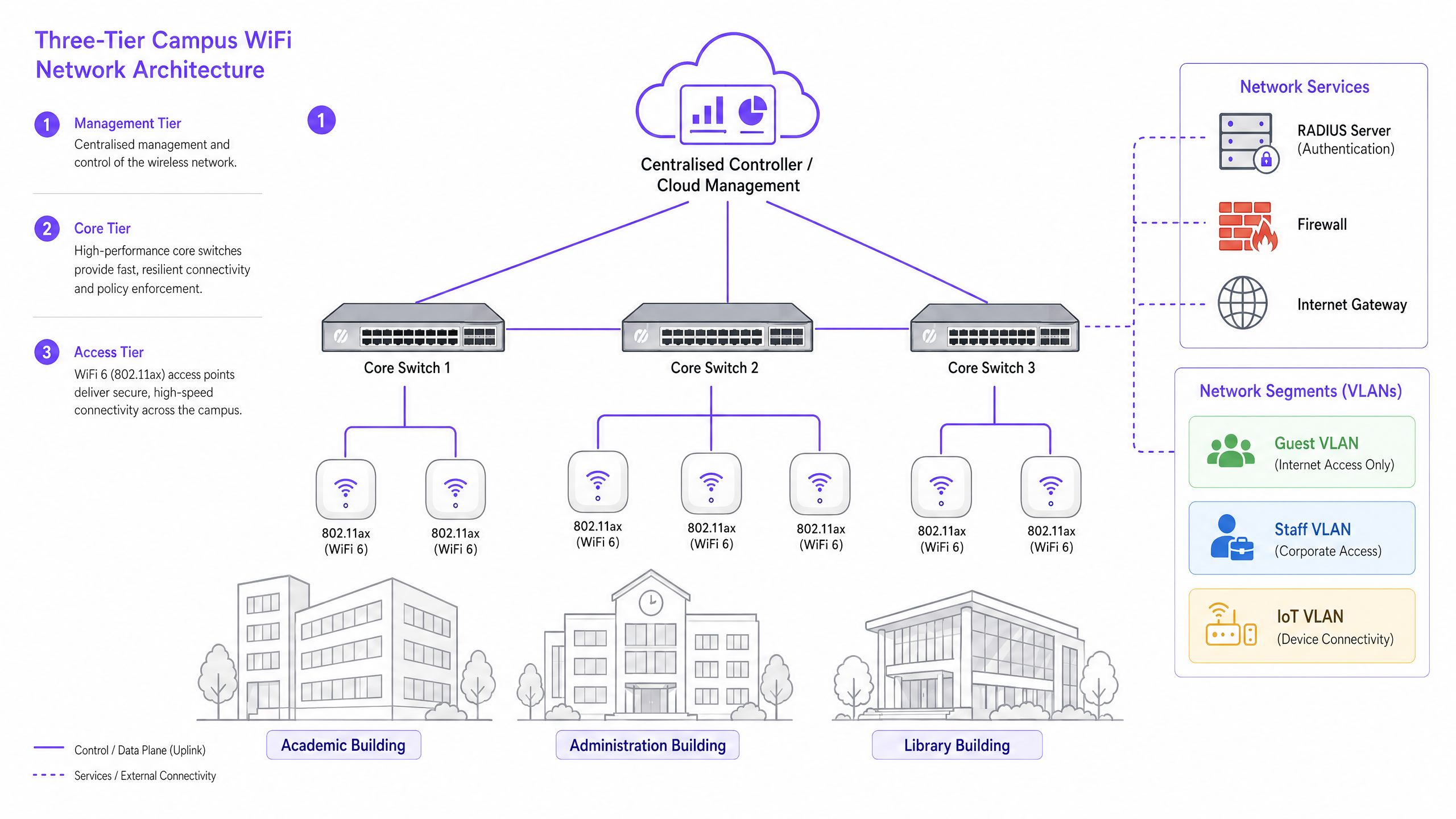
Campus-Netzwerke von Unternehmen verwenden eine hierarchische Drei-Schichten-Architektur, um Skalierbarkeit, Ausfallsicherheit und Leistung zu gewährleisten. Die drei Schichten sind wie folgt:
Management-/Core-Schicht: Das zentrale Nervensystem des Netzwerks. Dazu gehören hochleistungsfähige Core-Routing-Switches und der zentrale WLAN-Controller – ob On-Premise oder Cloud-verwaltet. Der Controller übernimmt das HF-Management, Roaming-Handoffs, die globale Richtliniendurchsetzung und das Firmware-Management über alle Access Points hinweg. Cloud-verwaltete Controller sind zur dominierenden Wahl für neue Bereitstellungen geworden, da sie die Verwaltung mehrerer Standorte vereinfachen und die Hardwarekosten vor Ort senken.
Verteilungsschicht: Aggregiert den Datenverkehr von der Zugriffsschicht, wendet Routing-Richtlinien an und gewährleistet Redundanz, bevor Daten an den Core weitergeleitet werden. In kleineren Campus-Umgebungen wird diese Schicht oft in den Core integriert.
Zugriffsschicht: Der Rand des Netzwerks, bestehend aus Power over Ethernet Plus (PoE+) Edge-Switches und den drahtlosen Access Points (APs) selbst. Für neue Bereitstellungen ist PoE+ der Mindeststandard, da WiFi 6 Access Points deutlich mehr Strom verbrauchen als ihre Vorgänger.
Drahtlose Standards und Frequenzen
Moderne Bereitstellungen sollten auf 802.11ax (WiFi 6) oder WiFi 6E standardisiert werden. WiFi 6 führt kritische Funktionen für hohe Dichte ein, darunter Orthogonal Frequency-Division Multiple Access (OFDMA), das es einem einzelnen AP ermöglicht, mehrere Clients gleichzeitig auf Unterkanälen zu bedienen, und Target Wake Time (TWT), das den Batterieverbrauch von IoT-Geräten reduziert. WiFi 6E erweitert diese Fähigkeiten in das 6-GHz-Band und bietet ein massives zusammenhängendes Spektrum, das frei von Interferenzen älterer Geräte ist – ein erheblicher Vorteil in Umgebungen mit hoher Dichte wie Hörsälen und Konferenzsälen.
| Standard | Frequency Bands | Max Throughput | Key Feature | Best Use Case |
|---|---|---|---|---|
| 802.11n (WiFi 4) | 2.4GHz / 5GHz | 600 Mbps | MIMO | Nur Legacy-Unterstützung |
| 802.11ac (WiFi 5) | 5GHz | 3.5 Gbps | MU-MIMO | Bestehende Bereitstellungen |
| 802.11ax (WiFi 6) | 2.4GHz / 5GHz | 9.6 Gbps | OFDMA, TWT | Neue Campus-Bereitstellungen |
| 802.11ax (WiFi 6E) | 2.4 / 5 / 6GHz | 9.6 Gbps | 6GHz-Spektrum | Hohe Dichte, zukunftssicher |
Sicherheit und Authentifizierung
Sicherheit muss mehrschichtig sein. Für Mitarbeiter und eingeschriebene Studenten ist die 802.1X/EAP-Authentifizierung, die mit dem Identitätsanbieter der Universität (Active Directory, LDAP oder einem Cloud-Identitätsdienst) verknüpft ist, obligatorisch. Dies bietet einen verschlüsselten, auf Anmeldeinformationen basierenden Zugriff, der die Anforderungen von Standards wie ISO 27001 und Cyber Essentials erfüllt. Für temporäre Benutzer – Gastwissenschaftler, Konferenzteilnehmer und die Öffentlichkeit – ist ein sicheres Captive Portal erforderlich. Die Integration einer robusten Guest WiFi -Lösung gewährleistet ein GDPR-konformes Onboarding, anpassbare Splash Pages und die Möglichkeit, umsetzbare Erkenntnisse über WiFi Analytics zu sammeln. Der gesamte drahtlose Datenverkehr sollte mit WPA3, dem aktuellen Standard, verschlüsselt werden, der stärkere Schutzmaßnahmen gegen Brute-Force-Angriffe bietet als sein Vorgänger WPA2. Für eine umfassende Überprüfung der Sicherheit von Access Points siehe unseren Access Point Security: Ihr Enterprise-Leitfaden 2026 .
Implementierungsleitfaden: Von der Vermessung zur Bereitstellung
Die Bereitstellung eines Campus-Netzwerks ist ein phasenweiser Prozess, der eine sorgfältige Planung erfordert, bevor ein einziges Kabel verlegt oder ein AP montiert wird.
Phase 1: Die aktive Standortbegehung
Eine prädiktive Vermessung anhand von Grundrissen ist für komplexe Campus-Umgebungen unzureichend. Sie müssen aktive HF-Messungen vor Ort durchführen. Baumaterialien in älteren Universitäten – dickes Mauerwerk, Metallgitter, Stahlbeton – dämpfen Signale unvorhersehbar. Die Vermessung identifiziert HF-Blackholes und hilft, die optimale AP-Platzierung zu bestimmen, um sowohl Abdeckung als auch Kapazität zu gewährleisten. Das Ergebnis sollte eine validierte Heatmap sein, die Signalstärke, Kanalnutzung und Interferenzpegel auf jeder Etage zeigt.
Phase 2: Kapazitätsplanung
Historisch wurden Netzwerke auf Abdeckung ausgelegt – um sicherzustellen, dass ein Signal jede Ecke erreichte. Heute wird auf Kapazität ausgelegt. In einem Hörsaal mit 300 Plätzen gehen Sie von drei Geräten pro Student aus: Laptop, Smartphone und Tablet. Dies erfordert den Einsatz von hochdichten APs mit Richtantennen zur Sektorisierungden Raum, anstatt sich auf einen einzigen omnidirektionalen AP zu verlassen, der schnell überlastet wäre. Als Faustregel für Umgebungen mit hoher Dichte gilt ein AP pro 25-30 gleichzeitigen Benutzern in einer Vorlesungsumgebung.
Phase 3: AP-Platzierung und Kanalplanung
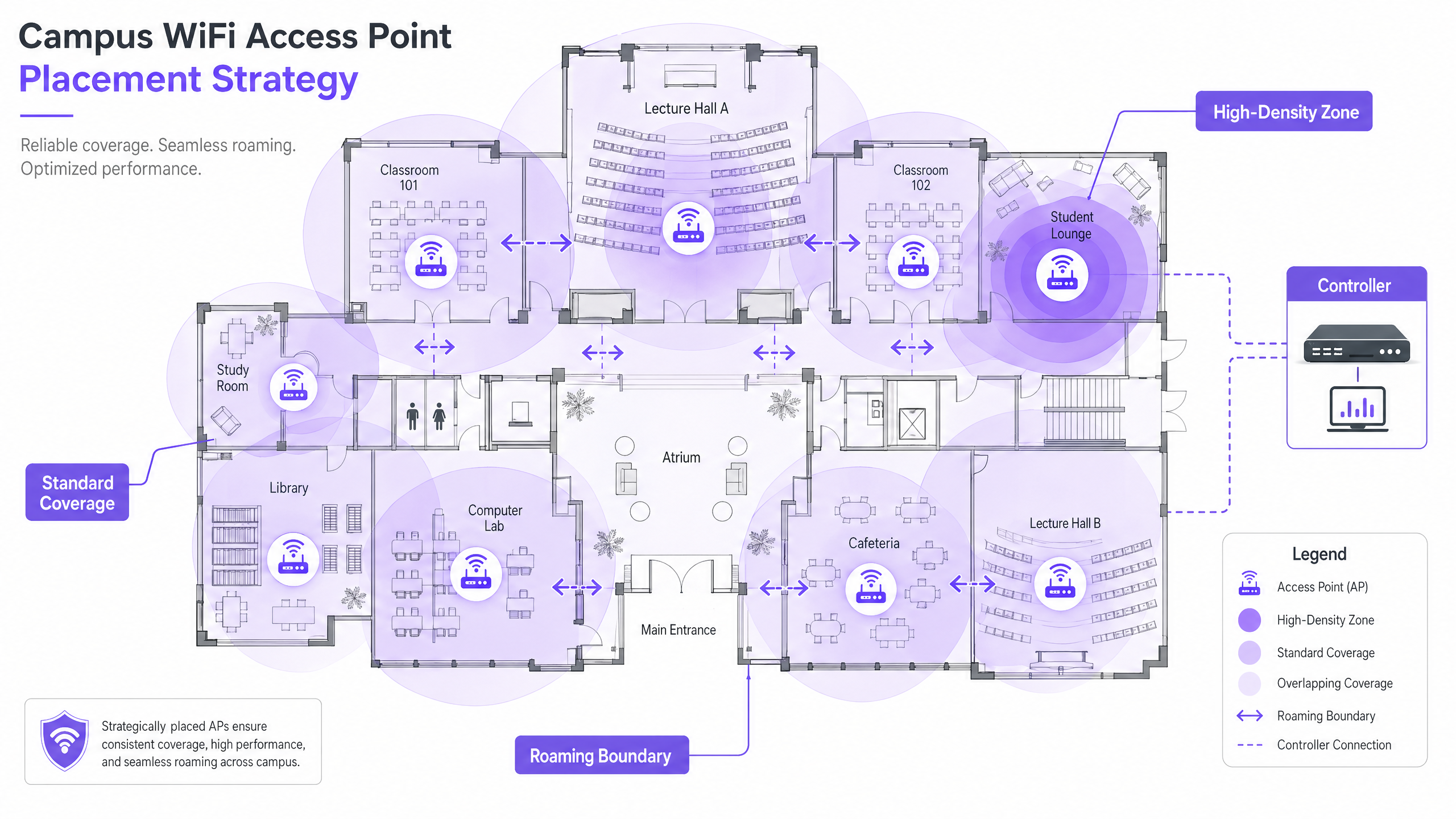
Eine sorgfältige Kanalplanung ist unerlässlich, um Co-Channel Interference (CCI) zu minimieren. Verwenden Sie nicht überlappende Kanäle (1, 6, 11 auf 2,4 GHz; dynamische Zuweisung auf 5 GHz und 6 GHz). Stellen Sie sicher, dass APs strategisch platziert werden – vermeiden Sie die Montage über abgehängten Decken oder hinter Lüftungskanälen, da dies die Leistung beeinträchtigt. Für Umgebungen mit hohen Decken verwenden Sie APs mit nach unten gerichteten Richtantennen.
Phase 4: Konfiguration von nahtlosem Roaming
Wenn Benutzer sich zwischen Gebäuden bewegen, muss ihre Verbindung nahtlos zwischen den APs übergeben werden. Implementieren Sie das schnelle Roaming-Dreigestirn: 802.11k (Nachbarberichte), 802.11v (BSS-Übergangsmanagement) und 802.11r (schneller BSS-Übergang). Zusammen ermöglichen diese Standards Client-Geräten, intelligente Roaming-Entscheidungen zu treffen und Authentifizierungsübergaben in Millisekunden statt in Sekunden abzuschließen – entscheidend für VoIP und Echtzeitanwendungen.
Die Abstimmung der Sendeleistung ist ebenso wichtig. Ist die Sendeleistung zu hoch, bleiben Client-Geräte an einem entfernten AP hängen ('sticky clients'), anstatt zu einem näheren zu wechseln. Reduzieren Sie die Sendeleistung, um überlappende, aber angemessen große Abdeckungszellen zu schaffen, und deaktivieren Sie ältere Datenraten (1, 2, 5,5 Mbps), um Geräte zu zwingen, schwache Verbindungen zu trennen und zu roamen.
Phase 5: VLAN-Segmentierung und Richtliniendurchsetzung
Erstellen Sie dedizierte VLANs für jede Benutzerklasse: Mitarbeiter, Studenten, Gäste und IoT-Geräte. IoT-Geräte – Gebäudemanagementsysteme, Überwachungskameras, digitale Beschilderung – sollten niemals ein Netzwerksegment mit Benutzergeräten teilen. Wenden Sie strenge Firewall-Regeln zwischen VLANs an, die nur die minimal notwendige Kommunikation zulassen. Für DNS-basierte Sicherheit und Schutz vor bösartigen Domains lesen Sie unseren Leitfaden: Schützen Sie Ihr Netzwerk mit starkem DNS und Sicherheit .
Best Practices für Campus-Umgebungen
Die folgenden herstellerneutralen Empfehlungen stellen die branchenübliche Praxis für große drahtlose Netzwerkbereitstellungen dar.
Band Steering: Leiten Sie fähige Client-Geräte auf die weniger ausgelasteten 5-GHz- oder 6-GHz-Bänder, wobei das 2,4-GHz-Band für ältere Geräte und Langstrecken-IoT-Sensoren reserviert bleibt. Die meisten modernen Controller unterstützen automatisches Band Steering.
Minimale RSSI-Schwellenwerte: Konfigurieren Sie den Controller so, dass er Verbindungen von Clients ablehnt, deren Signalstärke unter einen definierten Schwellenwert (typischerweise -75 dBm) fällt. Dies verhindert, dass Clients mit schwachem Signal die Erfahrung aller anderen Benutzer auf dem AP beeinträchtigen.
Wireless Intrusion Prevention (WIPS): Aktivieren Sie WIPS auf dem Controller, um Rogue-APs zu erkennen und zu unterdrücken – persönliche Router, die von Studenten oder Mitarbeitern angeschlossen werden und Störungen verursachen sowie Sicherheitslücken einführen.
Außenabdeckung: Erweitern Sie das Netzwerk auf Innenhöfe und Außenbereiche mit robusten, wetterfesten APs mit Richtantennen. Outdoor-APs müssen extremen Temperaturen, Feuchtigkeit und Vandalismus standhalten.
DHCP-Lease-Verwaltung: In Bereichen mit hoher Fluktuation (Mensen, Bibliotheken) reduzieren Sie die DHCP-Lease-Zeiten für Gastnetzwerke auf ein bis zwei Stunden, um eine Erschöpfung der IP-Adressen zu verhindern.
Purples Fokus auf Hochschulbildung wächst rasant – lesen Sie, wie unser VP Education Tim Peers dem Team beitritt und was dies für die Campus-Netzwerkstrategie bedeutet.
Fehlerbehebung & Risikominderung
Auch gut konzipierte Netzwerke stoßen auf betriebliche Probleme. Im Folgenden sind die häufigsten Fehlerursachen und deren Behebungen aufgeführt.
| Fehlermodus | Symptome | Grundursache | Behebung |
|---|---|---|---|
| Sticky Clients | Schlechte Leistung trotz starkem Signal | Sendeleistung zu hoch; ältere Raten aktiviert | Sendeleistung reduzieren; Raten unter 11 Mbps deaktivieren |
| DHCP-Erschöpfung | Benutzer können keine Verbindung herstellen | Lease-Zeiten zu lang; Subnetz zu klein | Lease-Zeiten reduzieren; Subnetze erweitern |
| Co-Channel Interference | Langsamer Durchsatz im gesamten Bereich | Schlechte Kanalplanung | Dynamische Kanalzuweisung implementieren |
| Rogue APs | Störungen; Sicherheitswarnungen | Unautorisierte persönliche Router | WIPS aktivieren; regelmäßige HF-Audits durchführen |
| Authentifizierungsfehler | Benutzer können sich nicht anmelden | RADIUS-Server-Überlastung oder Fehlkonfiguration | Redundanten RADIUS bereitstellen; Authentifizierungsprotokolle überwachen |
ROI & Geschäftsauswirkungen
Für die Universitätsleitung und Betriebsleiter von Veranstaltungsorten reicht der ROI eines Hochleistungsnetzwerks weit über die grundlegende Konnektivität hinaus. Ein robustes drahtloses Campus-Netzwerk unterstützt direkt moderne pädagogische Tools, digitale Campus-Initiativen und Programme zur Steigerung der Betriebseffizienz.
Die Nutzung von WiFi Analytics liefert umsetzbare Informationen zu Besucherfrequenz, Verweildauer und Raumnutzung. Diese Daten können Immobilienentscheidungen beeinflussen – indem sie ungenutzte Gebäude oder Spitzenlastbereiche identifizieren – und die HVAC-Nutzung basierend auf realen Belegungsdaten optimieren, was messbare Energieeinsparungen liefert. Dies sind dieselben Analysestrategien, die von Betreibern im Einzelhandel und im Gastgewerbe eingesetzt werden und nun zunehmend auf Campus-Umgebungen angewendet werden.
Für Organisationen, die Gast-WiFi als Teil einer umfassenderen digitalen Engagement-Strategie einsetzen, kann eine gut konfigurierte Gast-WiFi -Plattform auch Marketing-Automatisierung, Alumni-Engagement und Besucher-Erlebnisprogramme unterstützen. Für kleinere oder Satelliten-Campus-Standorte bietet unser Leitfaden So richten Sie einen WiFi-Hotspot für Ihr Unternehmen ein einen praktischen Ausgangspunkt.
Briefing anhören
Key Definitions
802.11ax (WiFi 6)
The current IEEE standard for wireless networking, designed specifically to improve efficiency and performance in high-density environments through OFDMA, MU-MIMO, and TWT.
Essential for modern campus deployments to support a high volume of concurrent devices without performance degradation.
Co-Channel Interference (CCI)
Interference that occurs when multiple access points in the same area operate on the same channel, causing devices to wait for clear airtime before transmitting.
Poor channel planning leads to high CCI, which severely degrades network throughput even when signal strength is strong.
VLAN (Virtual Local Area Network)
A logical subnetwork that groups a collection of devices, isolating their traffic from other devices on the same physical network infrastructure.
Crucial for security and performance; separating guest, staff, student, and IoT traffic prevents lateral movement and reduces congestion.
802.1X
An IEEE standard for port-based Network Access Control, providing a credential-based authentication mechanism for devices connecting to a LAN or WLAN via a RADIUS server.
The mandatory standard for secure, enterprise-grade authentication for staff and enrolled students on campus networks.
Captive Portal
A web page that a user of a public-access network must interact with before network access is granted, typically used for terms of service acceptance, authentication, and data capture.
Used for guest onboarding on campus networks; must be GDPR-compliant and integrated with an analytics platform for operational value.
OFDMA (Orthogonal Frequency-Division Multiple Access)
A multi-user version of OFDM that allows a single access point to simultaneously serve multiple clients on different sub-channels within the same transmission.
A key WiFi 6 feature that dramatically improves efficiency in high-density environments like lecture halls.
Sticky Client
A wireless device that remains connected to a distant AP with a weak signal, even when a closer AP with a stronger signal is available, due to the client's reluctance to initiate a roam.
Causes poor performance for the affected user and unnecessary load on the distant AP; mitigated by proper RF tuning and disabling legacy data rates.
RSSI (Received Signal Strength Indicator)
A measurement of the power level of a received radio signal, typically expressed in dBm (decibels relative to one milliwatt), where values closer to zero indicate a stronger signal.
Used during site surveys to determine coverage boundaries and during controller configuration to set minimum connection thresholds.
PoE+ (Power over Ethernet Plus)
An IEEE 802.3at standard that delivers up to 30 watts of power over standard Ethernet cabling, sufficient to power WiFi 6 access points without a separate power supply.
The minimum PoE standard required for new campus deployments using WiFi 6 APs.
Worked Examples
A Russell Group university is upgrading a Grade II listed, 19th-century library to support 500 concurrent student connections. The building features thick stone walls, high ceilings, and ornate internal partitions. How should the IT team approach the wireless deployment?
Step 1: Commission an active, on-site RF survey — predictive modelling will be highly inaccurate due to the stone walls and irregular floor plan. Use professional wifi survey software to generate validated heat maps. Step 2: Deploy high-density WiFi 6 APs with directional patch antennas focused downward into reading areas, avoiding signal bounce off high ceilings. Target one AP per 25 concurrent users. Step 3: Implement a dedicated VLAN for student access via 802.1X linked to the university's Active Directory, and a separate guest VLAN with a captive portal for visiting researchers and public users. Step 4: Tune AP transmit power to create appropriately sized coverage cells, preventing sticky clients as students move between reading rooms. Step 5: Disable legacy data rates (1, 2, 5.5 Mbps) to enforce roaming. Step 6: Deploy a cloud-managed controller for centralised visibility and RF optimisation.
A Premier League football stadium needs to provide WiFi coverage for 40,000 concurrent connections on match days, with a secondary requirement for event-day analytics on fan movement and dwell times.
Step 1: Deploy under-seat APs with highly directional antennas to create micro-cells for specific seating sections — this is the only viable approach at this density. Step 2: Disable 2.4GHz radios on the majority of APs to eliminate Co-Channel Interference in the dense RF environment; force all traffic to 5GHz and 6GHz. Step 3: Enable 802.11k/v/r to facilitate rapid roaming as fans move through concourses during half-time. Step 4: Implement a captive portal via Purple's Guest WiFi platform for secure, high-throughput onboarding, capturing opt-in analytics data on fan movement and dwell times. Step 5: Segment the network with separate VLANs for fans, operations staff, broadcast equipment, and point-of-sale systems. Step 6: Ensure PCI DSS compliance on the payment network segment.
Practice Questions
Q1. You are deploying APs in a new university dormitory block. The building has long central corridors with student rooms on either side, separated by solid concrete walls. Should you place APs in the central corridors or inside the individual dorm rooms?
Hint: Consider the attenuation caused by concrete walls and fire doors, and the capacity required per room.
View model answer
Deploy APs inside the dorm rooms, using wall-plate APs that mount flush to the wall and connect via the in-room Ethernet port. Corridor deployments result in poor signal penetration into rooms due to concrete walls and heavy fire doors, and fail to provide the per-room capacity needed for multiple devices per student. Wall-plate APs provide a dedicated, high-quality connection for each room and are the industry-standard approach for student accommodation.
Q2. Users in the university cafeteria are reporting slow WiFi speeds during the lunch period, despite their devices showing full signal strength bars. What are the two most likely causes, and how would you investigate each?
Hint: Signal strength does not equal capacity. Consider both the RF environment and the number of concurrent users.
View model answer
The two most likely causes are: (1) AP capacity overload — the APs are overwhelmed by the sheer number of concurrent devices during the lunch rush. Investigate by checking the controller dashboard for client counts per AP and throughput utilisation. If APs are serving 80+ clients, additional APs or a high-density AP upgrade is required. (2) Co-Channel Interference — multiple APs in the cafeteria are operating on the same channel, causing devices to wait for clear airtime. Investigate using a spectrum analyser or the controller's RF health dashboard. Resolve by enabling dynamic channel assignment and ensuring non-overlapping channel allocation.
Q3. Your university is hosting a major international conference with 800 delegates, all of whom will need WiFi access for three days. The conference is held in a building that normally serves 200 staff. How do you approach the temporary network uplift?
Hint: Consider both the temporary capacity increase and the security separation between conference delegates and permanent staff.
View model answer
Deploy temporary high-density APs in the main conference hall and breakout rooms, connected to the existing switching infrastructure via temporary PoE+ switches if port capacity is insufficient. Create a dedicated conference VLAN, completely isolated from the staff network, with its own DHCP scope and internet breakout. Deploy a branded captive portal via a guest WiFi platform for delegate onboarding, capturing opt-in data for post-event analytics. Reduce DHCP lease times to two hours to manage IP address churn across the three-day event. After the conference, remove temporary APs and decommission the conference VLAN.