
So konfigurieren Sie die 802.1X WiFi-Authentifizierung: Eine Schritt-für-Schritt-Anleitung
Dieser technische Leitfaden bietet eine Schritt-für-Schritt-Anleitung zur Konfiguration der 802.1X Enterprise WiFi-Authentifizierung. Er behandelt die Einrichtung von RADIUS-Servern, die Zertifikatsbereitstellung und praktische Bereitstellungsstrategien für IT-Führungskräfte in stark frequentierten Umgebungen.
Diesen Leitfaden anhören
Podcast-Transkript ansehen
Zusammenfassung für Führungskräfte
Für Unternehmensnetzwerke sind gemeinsame PSKs (Pre-Shared Keys) nicht mehr ausreichend, um die Unternehmensinfrastruktur zu sichern. Da Unternehmen mit strengeren Compliance-Vorgaben (PCI DSS, GDPR) und einer wachsenden Angriffsfläche konfrontiert sind, ist der Übergang zur 802.1X-Authentifizierung ein entscheidendes Sicherheitsgebot.
Dieser Leitfaden bietet eine praktische, herstellerunabhängige Bereitstellungsanleitung zur Konfiguration von 802.1X auf Enterprise Access Points. Wir behandeln die Kernarchitektur – Supplicant, Authenticator und Authentication Server – zusammen mit der Zertifikatsverwaltung, der RADIUS-Konfiguration und häufigen Bereitstellungsfallen. Für IT-Manager und Netzwerkarchitekten, die in Einzelhandels-, Gastgewerbe- oder öffentlichen Umgebungen tätig sind, bietet diese Referenz die umsetzbaren Schritte, die zur Implementierung einer robusten, identitätsbasierten Netzwerkzugangskontrolle erforderlich sind, während der Unternehmens- und Gastverkehr strikt getrennt bleiben.
Hören Sie sich unten unser begleitendes Podcast-Briefing an, um einen 10-minütigen Überblick über die Architektur und Implementierungsstrategien zu erhalten.
Technischer Einblick: Die 802.1X-Architektur
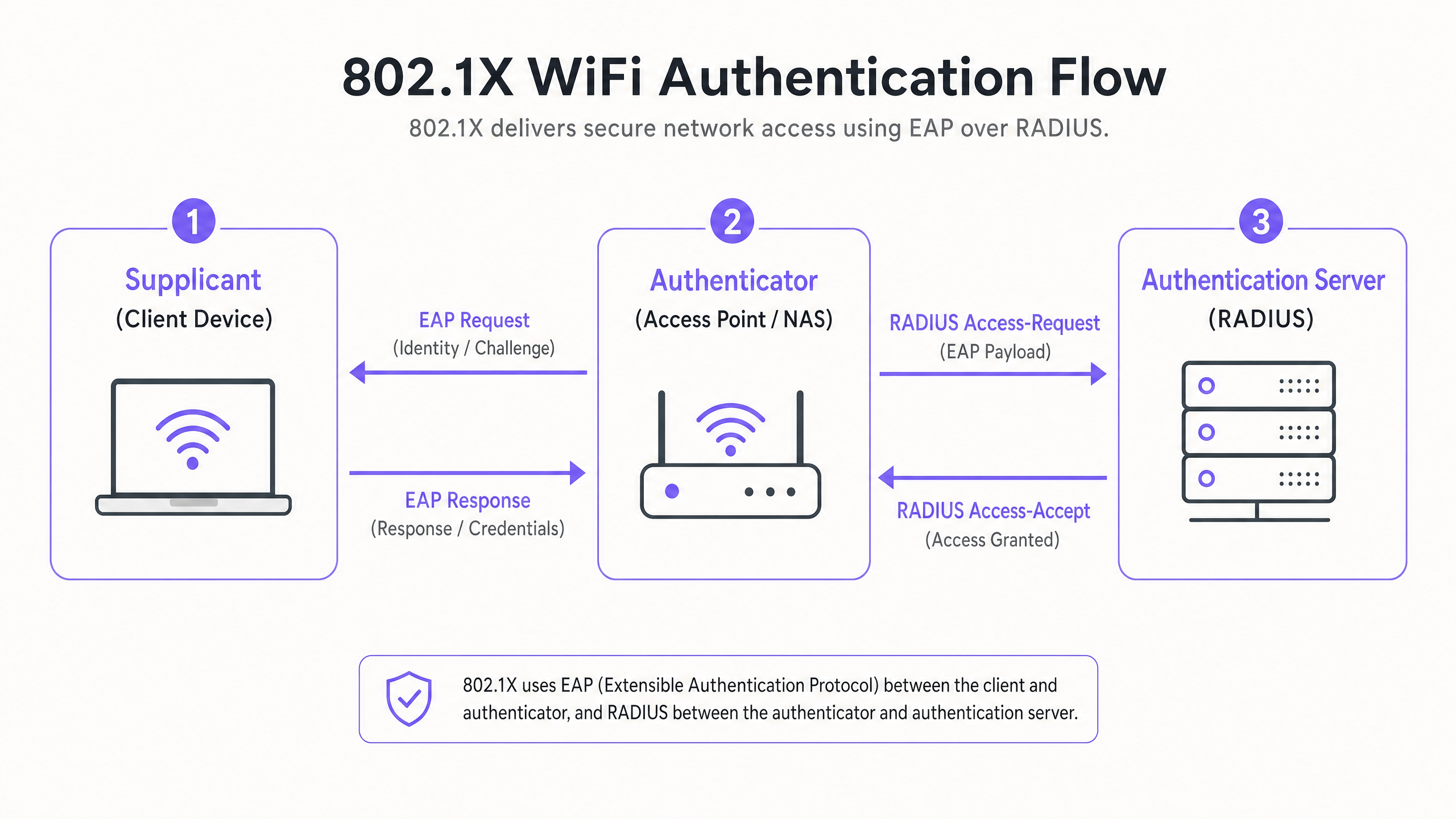
Der IEEE 802.1X-Standard definiert die portbasierte Netzwerkzugangskontrolle. Im drahtlosen Kontext verhindert er, dass ein Client-Gerät Datenverkehr sendet oder empfängt, bis es sich erfolgreich gegenüber einem zentralen Verzeichnis authentifiziert hat.
Die drei Kernkomponenten
- Der Supplicant (Client-Gerät): Die Software auf dem Laptop, Smartphone oder IoT-Gerät, die Zugriff anfordert. Sie muss die gewählte EAP-Methode (Extensible Authentication Protocol) unterstützen.
- Der Authenticator (Access Point / WLC): Das Netzwerkgerät, das als Gatekeeper fungiert. Es öffnet einen „kontrollierten Port“, der nur EAP-Verkehr zulässt, bis die Authentifizierung erfolgreich ist.
- Der Authentifizierungsserver (RADIUS): Der zentrale Server (z. B. Microsoft NPS, FreeRADIUS, Cisco ISE), der Anmeldeinformationen gegen einen Identitätsspeicher (wie Active Directory) validiert und eine Access-Accept- oder Access-Reject-Nachricht zurückgibt.
EAP-Methoden: Die Wahl der richtigen Sicherheitshaltung
Die Wahl der EAP-Methode bestimmt Ihr Sicherheitsniveau und die Komplexität der Bereitstellung.
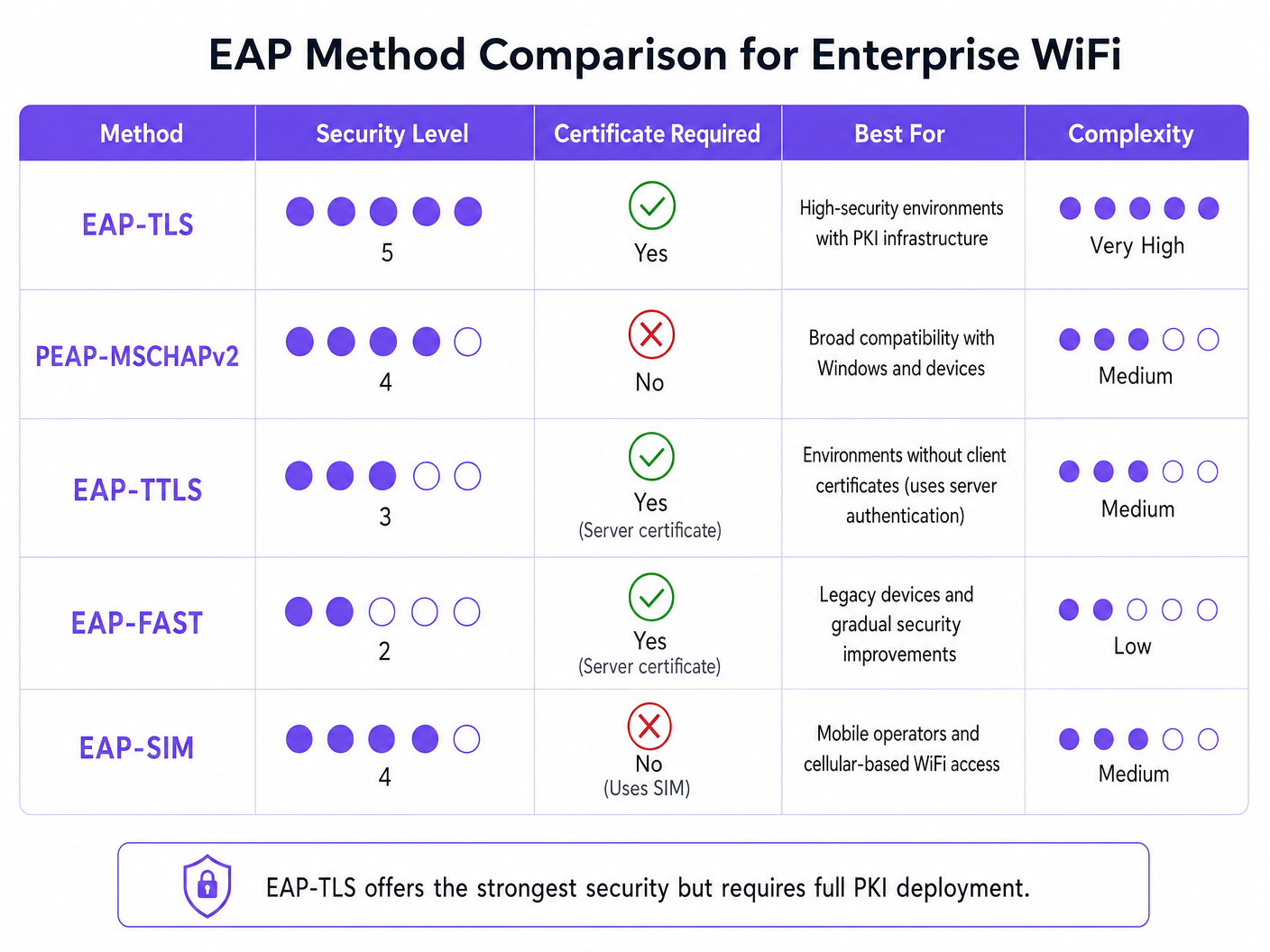
- EAP-TLS (Transport Layer Security): Der Goldstandard. Erfordert sowohl Server- als auch Client-Zertifikate. Es werden keine Passwörter übertragen. Unerlässlich für Hochsicherheitsumgebungen, erfordert jedoch eine vollständige Public Key Infrastructure (PKI).
- PEAP-MSCHAPv2 (Protected EAP): Die häufigste Enterprise-Bereitstellung. Verwendet ein serverseitiges Zertifikat, um einen sicheren TLS-Tunnel zu erstellen, innerhalb dessen der Client einen Benutzernamen und ein Passwort sendet. Einfacher bereitzustellen, aber anfällig für Credential Harvesting, wenn Client-Geräte nicht so konfiguriert sind, dass sie das Serverzertifikat streng validieren.
- EAP-SIM/AKA: Verwendet SIM-Karten-Anmeldeinformationen zur Authentifizierung. Zunehmend relevant für nahtloses Onboarding in Transport -Drehkreuzen und großen öffentlichen Einrichtungen.
Implementierungsleitfaden: Schritt-für-Schritt-Konfiguration
Die Bereitstellung von 802.1X erfordert eine koordinierte Konfiguration über Ihren RADIUS-Server, Ihre Access Points und Ihre Client-Geräte hinweg.
Schritt 1: RADIUS-Server-Vorbereitung
Unabhängig davon, ob Sie Microsoft Network Policy Server (NPS) oder eine Alternative verwenden, bleiben die Kernprinzipien identisch.
- RADIUS-Clients definieren: Registrieren Sie jeden Access Point (oder Wireless LAN Controller) in Ihrem RADIUS-Server. Weisen Sie ein starkes, zufällig generiertes Shared Secret (mindestens 22 Zeichen) zu, um die Kommunikation zwischen dem AP und dem RADIUS-Server zu sichern.
- Serverzertifikat installieren: Installieren Sie für PEAP oder EAP-TLS ein X.509-Zertifikat auf dem RADIUS-Server. Die Verwendung eines Zertifikats einer vertrauenswürdigen öffentlichen Zertifizierungsstelle (CA) vereinfacht die Bereitstellung in BYOD-Umgebungen, da das Stammzertifikat bereits von Client-Betriebssystemen als vertrauenswürdig eingestuft wird.
Schritt 2: Richtlinienkonfiguration
Konfigurieren Sie Ihre Netzwerkrichtlinien, um Zugriffsrechte basierend auf der Identität festzulegen.
- Verbindungsanforderungsrichtlinien: Definieren Sie, wie der RADIUS-Server eingehende Anfragen verarbeitet. Typischerweise beinhaltet dies das Abgleichen des NAS-Port-Typs (Wireless - IEEE 802.11) und die lokale Authentifizierung von Anfragen.
- Netzwerkrichtlinien: Ordnen Sie Active Directory-Gruppen Netzwerkzugriffsrechten zu. Ordnen Sie beispielsweise die Gruppe „Domain Computers“ dem Unternehmens-VLAN zu. Verwenden Sie RADIUS-Attribute (
Tunnel-Type=VLAN,Tunnel-Medium-Type=802,Tunnel-Private-Group-ID=[VLAN_ID]), um VLANs bei erfolgreicher Authentifizierung dynamisch zuzuweisen.
Schritt 3: Access Point Konfiguration
Konfigurieren Sie die SSID auf Ihrer drahtlosen Infrastruktur (z. B. Meraki, Aruba, Cisco).
- Erstellen Sie eine neue SSID und wählen Sie WPA2-Enterprise oder WPA3-Enterprise.
- Geben Sie die IP-Adresse Ihrer primären und sekundären RADIUS-Server ein.
- Geben Sie das in Schritt 1 definierte Shared Secret ein.
- Aktivieren Sie die Dynamische VLAN-Zuweisung, wenn Ihr RADIUS-Server VLAN-Attribute überträgt.
Schritt 4: Client-Supplicant-Bereitstellung
Dies ist der kritischste und oft übersehene Schritt. Verlassen Sie sich nicht darauf, dass Benutzer ihre Geräte manuell konfigurieren.
- Unternehmensgeräte: Verwenden Sie Gruppenrichtlinienobjekte (GPO) oder Ihre Mobile Device Management (MDM)-Plattform, um das WiFi-Profil zu übertragen. Das Profil muss die vertrauenswürdige Stamm-CA und den genauen Servernamen Ihres RADIUS-Servers angeben, um Evil Twin-Angriffe zu verhindern.
- BYOD: Implementieren Sie ein Onboarding-Portal oder eine MDM-Lösung, um sichere Profile an Mitarbeiter zu übertragen-eigene Geräte.
Best Practices & Industriestandards
Um eine robuste Implementierung zu gewährleisten, befolgen Sie die folgenden architektonischen Best Practices:
- Strenge Zertifikatsvalidierung: Erlauben Sie Clients niemals, Serverzertifikate blind zu akzeptieren. Dies ist der primäre Vektor für das Abgreifen von PEAP-Anmeldeinformationen.
- Gast-Traffic isolieren: Ihre 802.1X-Infrastruktur ist für den Unternehmenszugriff vorgesehen. Gast-Traffic muss vollständig getrennt bleiben. Implementieren Sie eine dedizierte Guest WiFi -Plattform mit eigenem Captive Portal und Analyseschicht. Wie in unserem Leitfaden Schützen Sie Ihr Netzwerk mit starkem DNS und Sicherheit erörtert, ist die logische Trennung grundlegend für die Netzwerkverteidigung.
- Redundanz implementieren: RADIUS ist ein kritischer Dienst. Stellen Sie primäre und sekundäre RADIUS-Server bereit. In verteilten Umgebungen wie großen Retail -Ketten sollten Sie lokale RADIUS-Proxys für die Ausfallsicherheit in Betracht ziehen, falls die WAN-Verbindung unterbrochen wird.
Fehlerbehebung & Risikominderung
Wenn Implementierungen fehlschlagen, liegt dies meist an einigen häufigen Konfigurationsfehlern:
- RADIUS-Timeout-Fehler: Oft verursacht durch ein nicht übereinstimmendes Shared Secret zwischen dem AP und dem RADIUS-Server oder durch Firewall-Regeln, die UDP-Ports 1812 (Authentifizierung) und 1813 (Accounting) blockieren.
- Client-Ablehnung: Überprüfen Sie die RADIUS-Ereignisprotokolle (z. B. Windows Ereignisanzeige -> Benutzerdefinierte Ansichten -> Serverrollen -> Netzwerkrichtlinien- und Zugriffsdienste). Suchen Sie nach der Ereignis-ID 6273. Häufige Ursachen sind abgelaufene Client-Zertifikate oder das Versagen des Clients, der Zertifikatskette des Servers zu vertrauen.
- VLAN-Zuweisungsfehler: Wenn die Authentifizierung erfolgreich ist, der Client aber keine IP-Adresse erhält, überprüfen Sie, ob der mit dem AP verbundene Switch-Port als Trunk-Port konfiguriert ist, der das dynamisch zugewiesene VLAN zulässt.
ROI & Geschäftsauswirkungen
Die Implementierung von 802.1X führt zu einem erheblichen operativen und sicherheitsrelevanten ROI:
- Risikominderung: Eliminiert das Risiko, dass ein einzelner kompromittierter PSK das gesamte Unternehmensnetzwerk gefährdet, und unterstützt direkt die PCI DSS- und GDPR-Compliance-Bemühungen.
- Betriebliche Effizienz: Zentralisiert die Zugriffskontrolle. Wenn ein Mitarbeiter das Unternehmen verlässt, wird durch die Deaktivierung seines Active Directory-Kontos sofort sein WiFi-Zugriff widerrufen. Es ist nicht erforderlich, PSKs unternehmensweit zu rotieren.
- Netzwerktransparenz: Bietet eine detaillierte Sichtbarkeit darüber, wer sich genau im Netzwerk befindet und welches Gerät verwendet wird, was eine bessere Kapazitätsplanung und Bedrohungsjagd ermöglicht.
In komplexen Umgebungen mit hoher Dichte, wie Stadien oder Hospitality -Veranstaltungsorten, ist die Verwaltung der Unternehmenssicherheit neben dem Gastzugang eine Herausforderung. Durch die Sicherung von Unternehmensressourcen mit 802.1X und die Nutzung einer robusten WiFi Analytics -Plattform für den Besucher-Traffic können IT-Führungskräfte eine sichere, skalierbare Konnektivität bereitstellen, die sowohl dem Unternehmen als auch seinen Kunden dient. Für Einblicke in die Verwaltung von Umgebungen mit hoher Dichte lesen Sie unseren Zoo und Freizeitpark WiFi: Leitfaden zur Konnektivität an Veranstaltungsorten mit hohem Besucheraufkommen .
Schlüsseldefinitionen
802.1X
An IEEE standard for port-based network access control that provides an authentication mechanism to devices wishing to attach to a LAN or WLAN.
The foundational protocol for enterprise WiFi security, replacing vulnerable shared passwords.
Supplicant
The client device or software application requesting access to the network.
IT teams must manage supplicant configuration via MDM to ensure secure connections.
Authenticator
The network device (Access Point or Switch) that facilitates the authentication process by acting as a proxy between the Supplicant and the Authentication Server.
Configured with the RADIUS server IP and a shared secret to securely forward EAP traffic.
RADIUS
Remote Authentication Dial-In User Service; a networking protocol that provides centralized Authentication, Authorization, and Accounting (AAA) management.
The backend server (like Microsoft NPS) that actually validates the user's credentials against a directory.
EAP (Extensible Authentication Protocol)
An authentication framework frequently used in wireless networks and point-to-point connections, supporting multiple authentication methods.
The 'language' spoken between the Supplicant and the RADIUS server.
EAP-TLS
An EAP method that uses Transport Layer Security, requiring both server and client-side certificates for mutual authentication.
The most secure method available, often mandated for high-security or classified environments.
PEAP
Protected Extensible Authentication Protocol; encapsulates EAP within an encrypted and authenticated TLS tunnel.
The most widely deployed enterprise method, balancing security with ease of deployment by only requiring a server-side certificate.
Dynamic VLAN Assignment
The process where a RADIUS server instructs the Access Point to place an authenticated user onto a specific VLAN based on their directory group membership.
Crucial for segmenting network traffic (e.g., separating HR, Engineering, and IoT devices) while broadcasting only a single corporate SSID.
Ausgearbeitete Beispiele
A 300-room luxury hotel needs to secure its back-of-house operational network (staff tablets, VoIP phones, management laptops) while keeping it entirely separate from the guest network. They currently use a single PSK for staff.
- Deploy Microsoft NPS linked to the hotel's existing Active Directory.
- Configure PEAP-MSCHAPv2, using a public certificate (e.g., DigiCert) on the NPS server to simplify tablet onboarding.
- Create an 802.1X SSID ('Hotel_Ops') on the APs.
- Use the hotel's MDM platform to push the 'Hotel_Ops' WiFi profile to all staff tablets and laptops, explicitly configuring the profile to trust the DigiCert root CA and validate the NPS server name.
- Maintain the existing open guest SSID, routing it through Purple's captive portal for terms acceptance and analytics, ensuring guest VLANs cannot route to the operational VLANs.
A university campus is migrating to 802.1X and needs to support a massive BYOD environment for 15,000 students across various operating systems.
- Deploy a robust RADIUS cluster (e.g., FreeRADIUS or Cisco ISE) with load balancing.
- Implement PEAP-MSCHAPv2 for broad device compatibility.
- Deploy an onboarding portal (e.g., SecureW2) that automatically configures the student's device supplicant to use the correct EAP settings and trust the university's RADIUS server certificate.
- Use dynamic VLAN assignment via RADIUS attributes to place students into appropriate subnets based on their campus location to manage broadcast domains.
Übungsfragen
Q1. Your organisation is deploying 802.1X using PEAP-MSCHAPv2. During testing, users report they are prompted to 'Accept a Certificate' when connecting for the first time. How should you address this?
Hinweis: Consider the security implications of allowing users to make trust decisions regarding network infrastructure.
Musterlösung anzeigen
You must configure the client supplicant profiles (via MDM or Group Policy) to explicitly trust the Root CA that issued the RADIUS server's certificate, and to validate the specific server name. Relying on users to manually accept certificates trains them to ignore security warnings and leaves the network vulnerable to Evil Twin (credential harvesting) attacks.
Q2. You need to secure a fleet of warehouse barcode scanners. They support WPA2-Enterprise but do not have a mechanism to install client certificates or join Active Directory. What is the most secure deployment approach?
Hinweis: Evaluate the EAP methods that do not require client-side certificates but still provide encrypted authentication.
Musterlösung anzeigen
Deploy PEAP-MSCHAPv2. Create a dedicated service account in your directory for the scanners. Configure the RADIUS server with a server certificate to establish the TLS tunnel, and configure the scanners to authenticate using the service account credentials inside the tunnel. Ensure the RADIUS policy restricts this service account to a specific, isolated warehouse VLAN.
Q3. After configuring the APs and the RADIUS server, client devices successfully authenticate (verified in RADIUS logs with an Access-Accept), but they fail to receive an IP address and cannot access the network. What is the most likely infrastructure issue?
Hinweis: Authentication has succeeded, meaning the 802.1X phase is complete. The issue lies in the subsequent network provisioning phase.
Musterlösung anzeigen
The most likely issue is a VLAN misconfiguration on the wired network. If the RADIUS server is using dynamic VLAN assignment to place the client on a specific VLAN (e.g., VLAN 20), the switch port connecting the Access Point must be configured as an 802.1Q trunk port that allows VLAN 20. If the VLAN is not trunked to the AP, the client's DHCP requests will be dropped.
Weiterlesen in dieser Reihe
Per-Device PSK nach Anbieter: iPSK, DPSK, MPSK und PPSK im Vergleich (und WPA3-Unterstützung)
Ein umfassender Vergleich von Per-Device-PSK-Implementierungen bei Cisco Meraki, HPE Aruba, Ruckus, Juniper Mist, Extreme, Fortinet und Ubiquiti UniFi. Erfahren Sie, wie sich WPA3-SAE auf Per-Device-Key-Strategien auswirkt und wann Sie Übergangsmodi implementieren sollten, anstatt auf 802.1X umzusteigen.
Was ist MAC-Adressauthentifizierung? Wann man sie nutzen und wann man sie vermeiden sollte
Dieser maßgebliche technische Leitfaden behandelt die MAC-Adressauthentifizierung in Unternehmens-WiFi-Umgebungen – wie RADIUS-basierte MAC-Authentifizierung auf Layer 2 funktioniert, ihre inhärenten Sicherheitslücken (einschließlich MAC-Spoofing und die Auswirkungen der MAC-Randomisierung auf OS-Ebene) und die genauen operativen Kontexte, in denen sie ein gültiges Werkzeug zur Verwaltung von IoT- und kopflosen Geräten bleibt. Er bietet umsetzbare Bereitstellungsanleitungen für IT-Manager und Netzwerkarchitekten in den Bereichen Gastgewerbe, Einzelhandel, Gesundheitswesen und öffentlicher Sektor, mit realen Fallbeispielen, Entscheidungsrahmen und Integrationskontext für die Gast-WiFi- und Analyseplattform von Purple.
Einrichtung von Enterprise WiFi auf iOS und macOS mit 802.1X
Dieser maßgebliche Leitfaden bietet leitenden IT-Führungskräften umsetzbare Schritte für die Bereitstellung von 802.1X Enterprise WiFi auf iOS- und macOS-Geräten. Er behandelt die zertifikatbasierte Authentifizierung (EAP-TLS), MDM-Konfigurationsprofile und die Architekturintegration zur Sicherung von Unternehmensnetzwerken bei gleichzeitiger Unterstützung von BYOD-Initiativen.