

So konfigurieren Sie NAC-Richtlinien für die VLAN-Steuerung in Cisco Meraki
Dieser maßgebliche Leitfaden bietet IT-Leitern, Netzwerkarchitekten und Direktoren für Veranstaltungsbetrieb ein praktisches, schrittweises Framework zur Konfiguration von NAC-Richtlinien und VLAN-Steuerung in Cisco Meraki Umgebungen. Er behandelt die 802.1X-Implementierung, die Isolierung von IoT-Geräten über MAC Authentication Bypass und die nahtlose Integration mit der Guest WiFi-Analyseplattform von Purple, um eine sichere, konforme und hochleistungsfähige Netzwerksegmentierung in den Bereichen Gastgewerbe, Einzelhandel und öffentliche Einrichtungen zu gewährleisten.
Listen to this guide
View podcast transcript
Zusammenfassung für Führungskräfte
Für Unternehmensstandorte – von hochfrequentierten Stadien bis hin zu weitläufigen Hotelkomplexen – ist ein flaches Netzwerk ein kompromittiertes Netzwerk. Das Senden mehrerer SSIDs zur Segmentierung des Datenverkehrs beeinträchtigt die HF-Leistung, verschwendet wertvolle Sendezeit und schafft einen administrativen Aufwand, der sich bei Multi-Site-Implementierungen schlecht skalieren lässt. Der moderne Standard ist die dynamische Segmentierung: das Senden einer einzigen sicheren SSID und die Nutzung von Network Access Control (NAC), um Geräte automatisch zu profilieren, zu authentifizieren und in das richtige VLAN zu steuern.
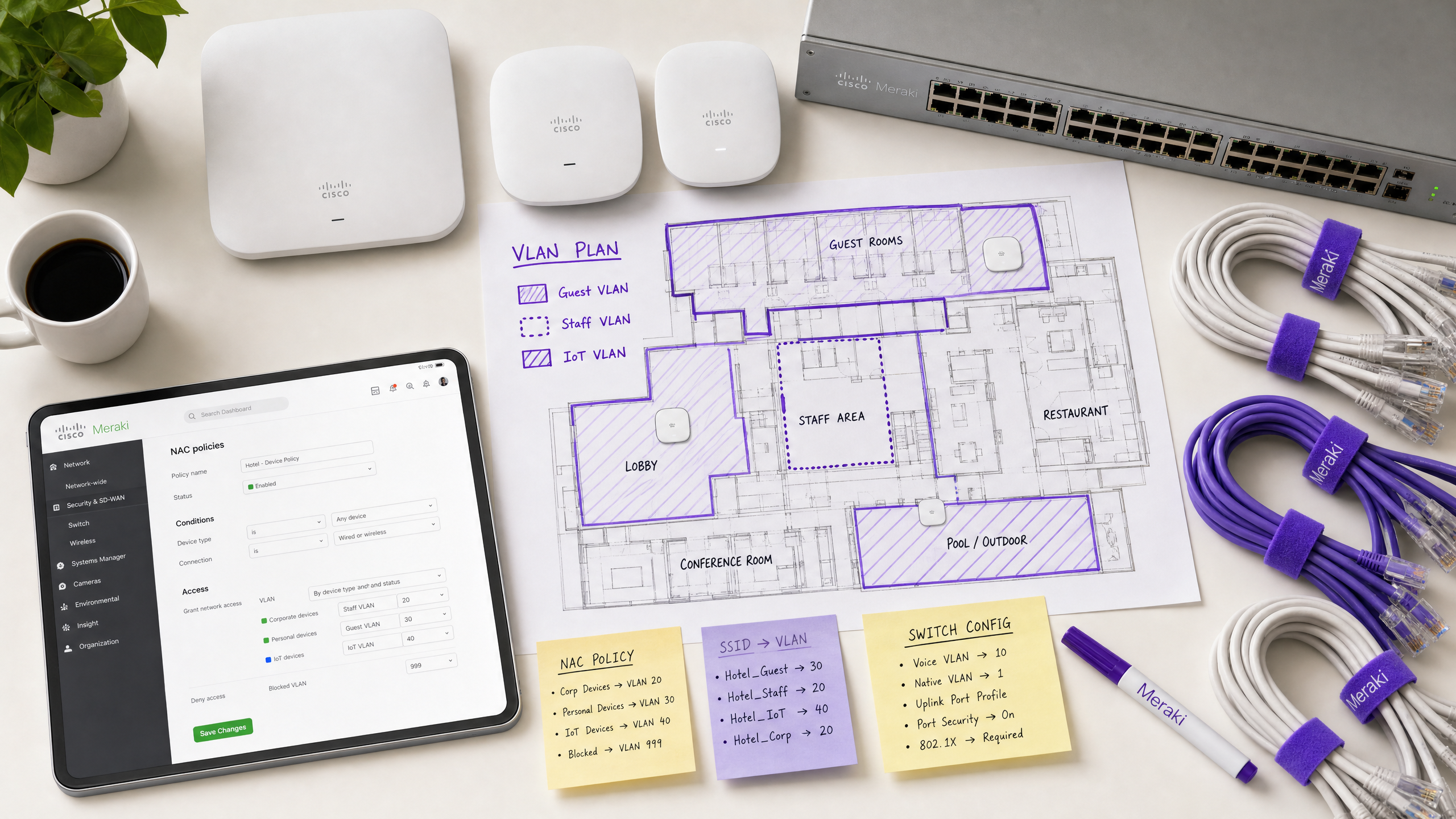
Dieser Leitfaden bietet erfahrenen IT-Architekten und Betriebsleitern einen praktischen Entwurf zur Konfiguration von NAC-Richtlinien für die VLAN-Steuerung in Cisco Meraki. Wir umgehen die akademische Theorie, um uns auf die Realitäten der Bereitstellung zu konzentrieren: die Implementierung von IEEE 802.1X für Unternehmensgeräte, die Nutzung von MAC Authentication Bypass (MAB) für kopflose IoT-Systeme und die nahtlose Integration mit Guest WiFi -Plattformen wie Purple, um einen sicheren, konformen Zugang in Einzelhandel , Gastgewerbe und anderen Unternehmensumgebungen zu gewährleisten. Durch die Beherrschung dieser Konfigurationen können Unternehmen Sicherheitsrisiken mindern, die PCI DSS-Konformität gewährleisten und den Netzwerkdurchsatz optimieren – alles über eine einzige, zentral verwaltete SSID.
Technischer Einblick
Die Architektur der dynamischen VLAN-Steuerung
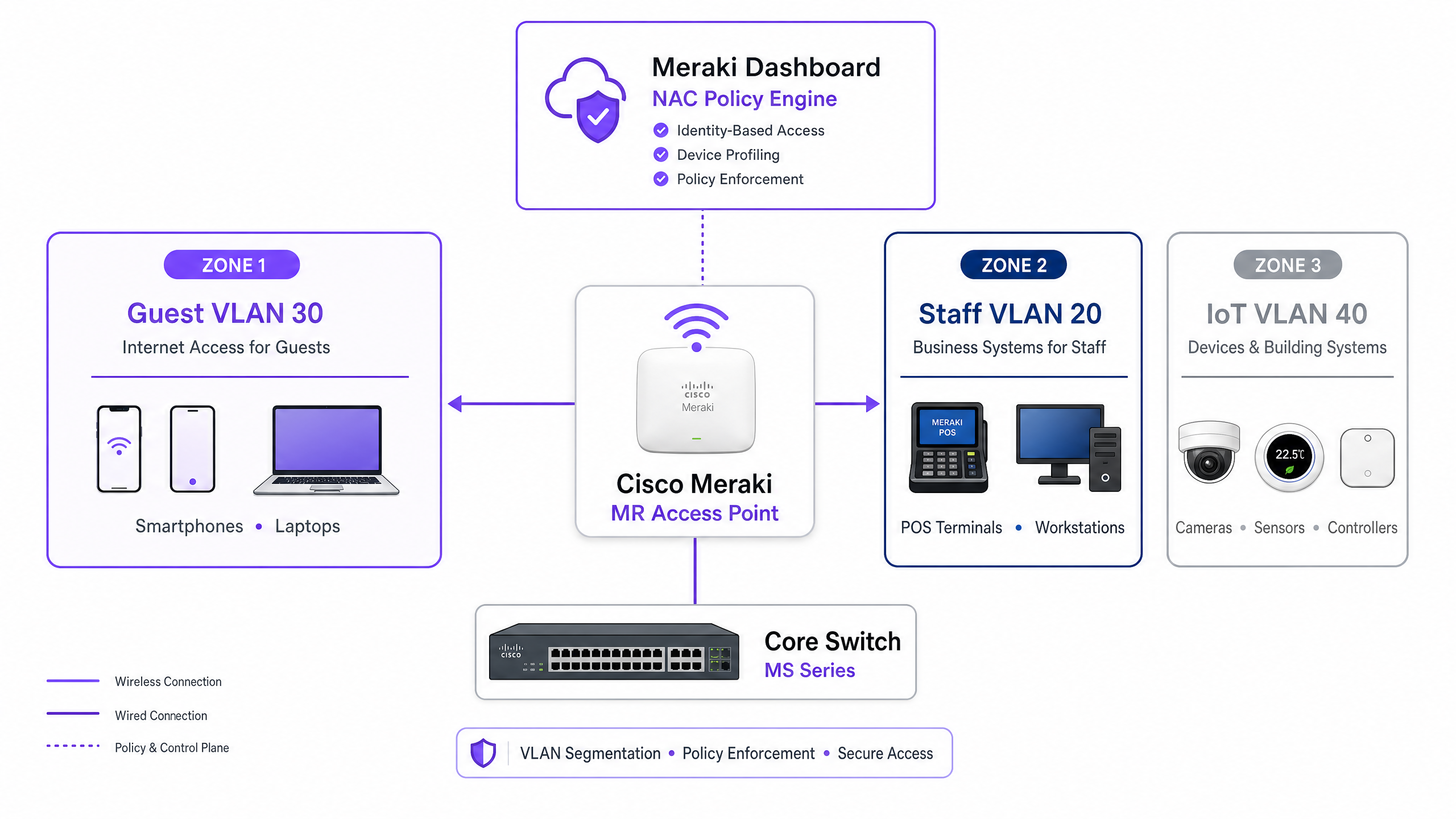
Die VLAN-Steuerung in einer Meraki-Umgebung basiert auf der Interaktion zwischen drei Kernkomponenten: dem Meraki Access Point (als Authentifikator), dem Client-Gerät (dem Supplikanten) und dem NAC/RADIUS-Server (dem Authentifizierungsserver). Dieses Drei-Parteien-Modell ist durch den IEEE 802.1X-Standard definiert und bildet das Rückgrat jeder unternehmensweiten Zugriffskontrollbereitstellung.
Wenn sich ein Gerät mit dem Netzwerk verbindet, fängt der AP den Datenverkehr ab und leitet eine Access-Request an den RADIUS-Server weiter. Nach erfolgreicher Authentifizierung antwortet der RADIUS-Server mit einer Access-Accept-Nachricht. Entscheidend ist, dass diese Nachricht für die VLAN-Steuerung spezifische IETF-Standard-RADIUS-Attribute enthalten muss, die dem AP mitteilen, welches VLAN anzuwenden ist:
| RADIUS-Attribut | ID | Wert | Zweck |
|---|---|---|---|
| Tunnel-Type | 64 | 13 (VLAN) | Gibt das Tunneling-Protokoll an |
| Tunnel-Medium-Type | 65 | 6 (802) | Gibt das Transportmedium an |
| Tunnel-Private-Group-ID | 81 | z.B. 20 |
Gibt die Ziel-VLAN-ID an |
Wenn der Meraki AP diese Attribute empfängt, taggt er den Datenverkehr des Clients dynamisch mit der angegebenen VLAN ID, bevor er ihn an den Switchport weiterleitet. Dieser Prozess ist für den Endbenutzer transparent und wird innerhalb von Millisekunden nach der Verbindung abgeschlossen.
Authentifizierungsmechanismen
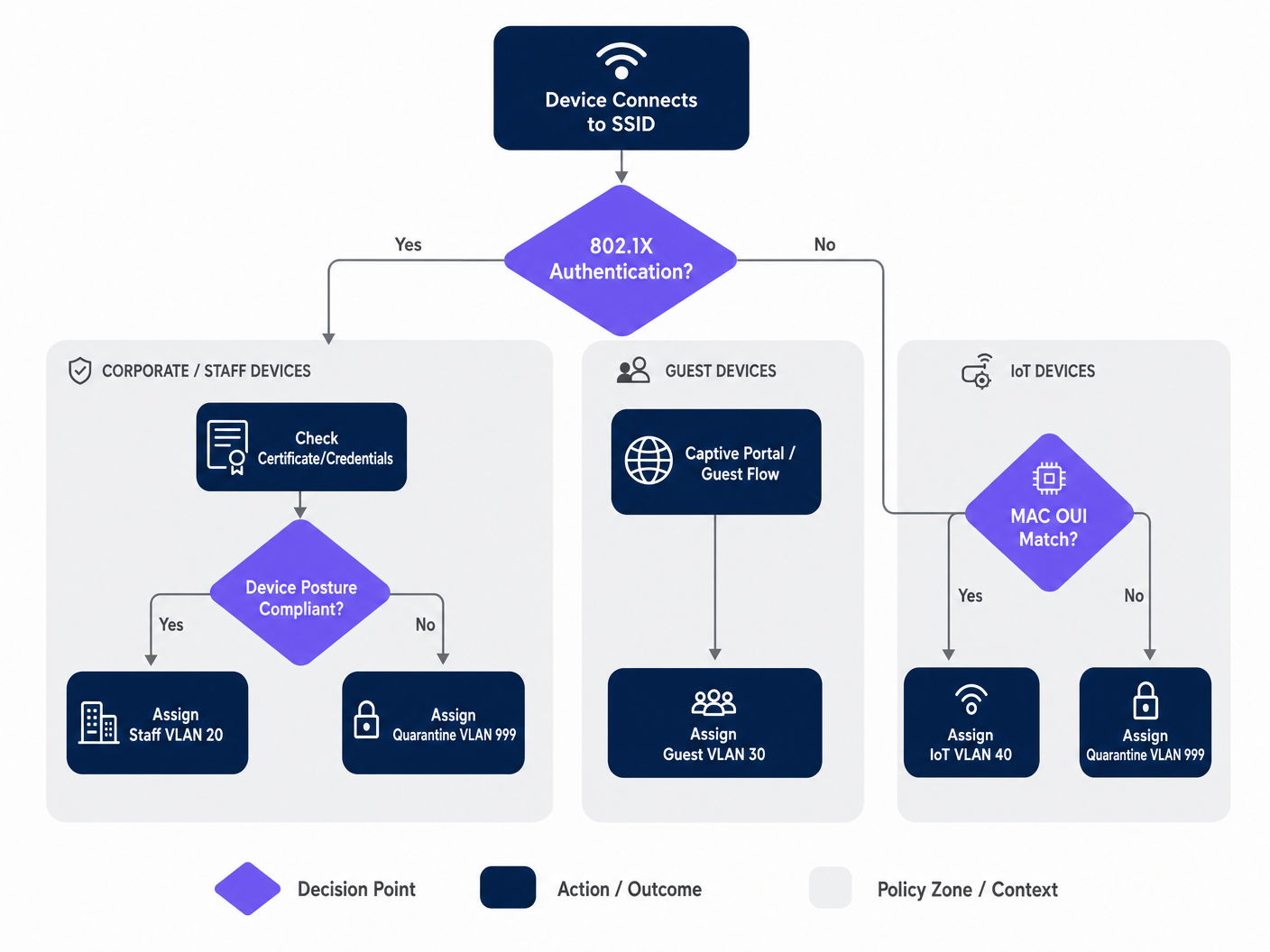
Unternehmensnetzwerke erfordern typischerweise einen mehrstufigen Authentifizierungsansatz, da die Gerätepopulation an jedem Standort heterogen ist. Die drei primären Mechanismen sind:
IEEE 802.1X (EAP-TLS oder PEAP) ist der Goldstandard für Unternehmens- und Mitarbeitergeräte. Die Authentifizierung basiert auf digitalen Zertifikaten (EAP-TLS) oder sicheren Anmeldeinformationen (PEAP-MSCHAPv2) und bietet robuste Verschlüsselung und Identitätsvalidierung. Dies ist der empfohlene Ansatz für jedes Gerät, das von der MDM-Plattform des Unternehmens verwaltet wird.
MAC Authentication Bypass (MAB) ist unerlässlich für kopflose Geräte – IP-Kameras, POS-Terminals, Gebäudemanagementsensoren und Smart-TVs –, die keinen 802.1X-Supplikanten ausführen können. Die MAC-Adresse wird als Identifikator verwendet. Obwohl weniger sicher als zertifikatbasierte Authentifizierung (MAC-Adressen können gefälscht werden), bietet MAB in Kombination mit strengen VLAN-ACLs eine akzeptable Sicherheitslage für isolierte IoT-Segmente. Eine umfassende Behandlung dieses Themas finden Sie in unserem Leitfaden zu Verwaltung der IoT-Gerätesicherheit mit NAC und MPSK .
Captive Portal Authentifizierung wird für den Gastzugang verwendet. Geräte werden in einen eingeschränkten Vorauthentifizierungszustand versetzt, bis der Benutzer einen Anmeldevorgang – typischerweise Social Login, E-Mail-Registrierung oder ein einfacher Klick – abgeschlossen hat, der von einer Plattform wie Purple gehostet wird. Dies erfasst Erstanbieterdaten und steuert das Gerät gleichzeitig in ein isoliertes Gast-VLAN.
Implementierungsleitfaden
Schritt 1: Planen Sie Ihre VLAN-Architektur
Bevor Sie das Meraki Dashboard berühren, definieren Sie Ihre VLAN-Segmentierungsstrategie. Eine typische Bereitstellung an einem Unternehmensstandort verwendet die folgende Struktur:
| VLAN ID | Name | Zweck | Authentifizierungsmethode |
|---|---|---|---|
| 10 | Management | Netzwerkinfrastruktur | Statisch |
| 20 | Personal | Unternehmensgeräte, interne Systeme | 802.1X (EAP-TLS) |
| 30 | Gast | Internetzugang für Besucher | Captive Portal (Purple) |
| 40 | IoT | Kameras, Sensoren, Smart Devices | MAB |
| 50 | POS | Zahlungsterminals (PCI-Umfang) | 802.1X (Zertifikat) |
| 999 | Quarantäne | Fehlgeschlagene Authentifizierung, unbekannte Geräte | Keine |
Schritt 2: Konfigurieren Sie die Switch-Infrastruktur
Bevor die Wireless-Einstellungen konfiguriert werden, muss die kabelgebundene Infrastruktur vorbereitet werden. Die Switchports, die mit den Meraki APs verbunden sind, müssen als Trunk-Ports konfiguriert werden, die alle VLANs zulassen, die der AP dynamisch zuweisen könnte. Dies ist das häufigste Versäumnis bei fehlgeschlagenen Implementierungen.
Im Meraki Dashboard navigieren Sie zu Switch > Monitor > Switch ports, wählen die mit Ihren APs verbundenen Ports aus, setzen den Typ auf Trunk, konfigurieren das Native VLAN (typischerweise Ihr Management-VLAN) und geben im Feld Zugelassene VLANs alle potentialle Client-VLANs explizit (z. B. 20,30,40,50,999).
Schritt 3: Konfigurieren der Meraki SSID für 802.1X
Navigieren Sie zu Wireless > Configure > Access control und wählen Sie die Ziel-SSID aus. Wählen Sie unter Network access die Option Enterprise with 802.1X. Scrollen Sie zum Abschnitt RADIUS servers und fügen Sie Ihre NAC-Serverdetails hinzu: IP-Adresse, Port (Standard 1812 für Authentifizierung, 1813 für Accounting) und das Shared Secret. Fügen Sie für Redundanz einen sekundären RADIUS-Server hinzu.
Schritt 4: RADIUS Override für VLAN Tagging aktivieren
Dies ist der entscheidende Schritt, der es dem Meraki AP ermöglicht, VLAN-Zuweisungen vom NAC-Server zu akzeptieren. Scrollen Sie auf derselben Seite Access control zum Abschnitt Addressing and traffic. Stellen Sie Client IP assignment auf Bridge mode ein – dies stellt sicher, dass Clients IP-Adressen vom lokalen DHCP-Server in ihrem zugewiesenen VLAN erhalten und nicht vom NAT des AP. Wählen Sie unter VLAN tagging die Option Use VLAN tag from RADIUS.
Schritt 5: Gastzugang mit Purple konfigurieren
Erstellen Sie für Gastnetzwerke eine separate SSID, die mit einer offenen Assoziation und einer Captive Portal-Integration konfiguriert ist. Stellen Sie Network access auf Open (no encryption) ein und konfigurieren Sie die Splash page so, dass sie auf Ihre Purple Portal-URL verweist. Stellen Sie das VLAN tagging so ein, dass der gesamte vorauthentifizierte Datenverkehr einem dedizierten, isolierten Gast-VLAN (z. B. VLAN 30) zugewiesen wird, und aktivieren Sie die Client isolation, um eine laterale Bewegung zwischen Gastgeräten zu verhindern. Die WiFi Analytics -Plattform von Purple übernimmt den Authentifizierungsfluss und die Datenerfassung.
Best Practices
Implementieren Sie eine Fail-Closed-Haltung mit kritischen Authentifizierungs-VLANs. Wenn der RADIUS-Server nicht erreichbar ist, schalten Sie nicht auf „Fail Open“ und gewähren Sie keinen vollständigen Netzwerkzugriff. Konfigurieren Sie ein kritisches Authentifizierungs-VLAN, das grundlegende Internetkonnektivität bietet, aber den Zugriff auf alle internen Ressourcen blockiert, bis der NAC-Server wiederhergestellt ist. Dies ist besonders wichtig für Einzelhandelsumgebungen, in denen POS-Terminals auch während eines RADIUS-Ausfalls weiterhin Zahlungen verarbeiten müssen.
Aktivieren Sie Fast BSS Transition (802.11r) für nahtloses Roaming. Die dynamische VLAN-Zuweisung kann während des Roamings Latenzzeiten verursachen, da sich das Gerät an jedem AP neu authentifizieren muss. Die Aktivierung von 802.11r gewährleistet nahtlose Übergaben für Sprach- und Videoanwendungen im gesamten Veranstaltungsort. Dies ist unerlässlich für Gastgewerbeumgebungen, in denen sich Gäste kontinuierlich durch die Unterkunft bewegen. Das Verständnis von Wi Fi Frequencies: A Guide to Wi-Fi Frequencies in 2026 kann auch dazu beitragen, die Kanalplanung für dichte Bereitstellungen zu optimieren.
Segmentieren Sie den IoT-Verkehr aggressiv. Mischen Sie niemals IoT-Geräte mit Unternehmens- oder Gastverkehr. Verwenden Sie MAB, um diese Geräte zu identifizieren und sie in dedizierte VLANs mit strengen Layer-3-Firewall-Regeln zu leiten, die nur die für den Gerätebetrieb erforderlichen spezifischen Ports und Ziele zulassen. Eine kompromittierte IP-Kamera sollte niemals Ihr POS-Netzwerk oder Ihre Unternehmensdateiserver erreichen können.
Erzwingen Sie WPA3 auf Corporate SSIDs. Wo die Gerätekompatibilität dies zulässt, konfigurieren Sie Corporate SSIDs so, dass sie WPA3-Enterprise verwenden. Dies bietet eine stärkere Verschlüsselung und eliminiert Schwachstellen, die mit WPA2 PMKID-Angriffen verbunden sind.
Fehlerbehebung & Risikominderung
Häufige Fehlerursachen
Clients erhalten keine IP-Adresse. Dies ist fast immer ein Problem mit der Switchport-Konfiguration. Überprüfen Sie, ob der mit dem AP verbundene Switchport als Trunk konfiguriert ist und dass das dynamisch zugewiesene VLAN auf diesem Trunk zugelassen ist. Überprüfen Sie außerdem, ob der DHCP-Server einen aktiven Bereich für dieses VLAN hat und ob der DHCP-Relay-Agent (falls zutreffend) korrekt konfiguriert ist.
Authentifizierungs-Timeouts. Wenn Geräte während des 802.1X-Handshakes ein Timeout aufweisen, überprüfen Sie die Netzwerklatenz zwischen den Meraki APs und dem RADIUS-Server. Hohe Latenz kann dazu führen, dass EAP-Timer ablaufen. Das Event Log des Meraki Dashboards zeigt 8021x_auth_timeout-Ereignisse an, wenn dies der Fall ist.
Falsche VLAN-Zuweisung. Verwenden Sie das Event Log des Meraki Dashboards, um die RADIUS Access-Accept-Nachrichten anzuzeigen. Überprüfen Sie, ob der NAC-Server das korrekte Tunnel-Private-Group-ID-Attribut sendet. Wenn es fehlt oder falsch ist, liegt das Problem in der NAC-Richtlinienkonfiguration, nicht im Meraki AP. Die meisten NAC-Plattformen (Cisco ISE, ClearPass) bieten detaillierte RADIUS-Authentifizierungsprotokolle, die genau zeigen, welche Attribute zurückgegeben wurden.
MAC-Randomisierung unterbricht MAB. Moderne iOS- und Android-Geräte randomisieren ihre MAC-Adressen standardmäßig. Für Gastnetzwerke, die von Purple verwaltet werden, wird dies elegant über den Captive Portal-Fluss gehandhabt – die Identität wird durch die Benutzeranmeldung und nicht durch die MAC-Adresse hergestellt. Stellen Sie für IoT-Geräte, die MAB verwenden, sicher, dass die tatsächliche Hardware-MAC-Adresse in der Endpunkt-Datenbank registriert ist, da diese Geräte nicht randomisieren.
ROI & Geschäftlicher Nutzen
Die Implementierung von NAC-gesteuertem VLAN-Steering bietet messbaren Geschäftswert für Unternehmensstandorte in mehreren Dimensionen:
| Geschäftsergebnis | Mechanismus | Messbarer Einfluss |
|---|---|---|
| Reduzierter Betriebsaufwand | Weniger SSIDs zu verwalten | 60-70% Reduzierung der SSID-Anzahl |
| Verbesserte Sicherheitslage | Automatisierte Mikrosegmentierung | Begrenzter Explosionsradius bei Sicherheitsverletzungen |
| Compliance-Ermöglichung | Identitätsbasierte Zugriffskontrolle | PCI DSS, GDPR, ISO 27001 Konformität |
| Gastdatenerfassung | Purple Captive Portal-Integration | Erstanbieterdaten in großem Umfang |
| Netzwerkleistung | Reduzierter Management-Frame-Overhead | Verbesserter Durchsatz in Bereichen mit hoher Dichte |
Für Betreiber im Bereich Healthcare und Transport rechtfertigt allein das Compliance-Argument die Investition. Die Fähigkeit zu demonstrieren, dass Patientenakten in einem streng isolierten VLAN liegen oder dass Ticketing-Systeme vom öffentlichen WiFi getrennt sind, ist eine wesentliche Risikominderung, die sowohl interne Audit- als auch externe regulatorische Anforderungen erfüllt.
Für Betreiber im Gastgewerbe und Einzelhandel verwandelt die Integration mit Purples Gast-WiFi-Plattform das Gastnetzwerk von einem Kostenfaktor in einen Umsatzgenerator.wertvolles Gut. Jede authentifizierte Gastsitzung wird zu einem Datenpunkt, der in Marketing-Automatisierung, Kundenbindungsprogramme und Standortanalysen einfließt — während die zugrunde liegende NAC-Richtlinie sicherstellt, dass der Gastverkehr niemals interne Systeme berührt.
Hören Sie das Briefing
Für einen tieferen Einblick in Bereitstellungsstrategien und häufige Fallstricke hören Sie unseren 10-minütigen technischen Briefing-Podcast:
Key Definitions
Network Access Control (NAC)
A security architecture that enforces policy on devices seeking to access network resources, typically evaluating identity, device posture, and compliance status before granting access and assigning a network segment.
IT teams deploy NAC platforms (such as Cisco ISE or Aruba ClearPass) to act as the central policy engine, deciding which VLAN a device belongs in based on who or what it is, and what state it is in.
VLAN Steering (Dynamic VLAN Assignment)
The process of automatically assigning a client device to a specific Virtual Local Area Network (VLAN) upon successful authentication, regardless of which physical port or SSID they connect to.
Essential for high-density venues to reduce the number of broadcasted SSIDs while maintaining strict security segmentation between guest, staff, and IoT device populations.
IEEE 802.1X
An IEEE standard for port-based network access control that provides an authentication mechanism to devices wishing to attach to a LAN or WLAN, using the Extensible Authentication Protocol (EAP) framework.
The gold standard for authenticating corporate laptops and staff smartphones, ensuring only verified users with valid credentials or certificates can access internal resources.
MAC Authentication Bypass (MAB)
A fallback authentication method where a device's MAC address is used as its identity credential when it cannot support 802.1X. The MAC address is sent to the RADIUS server as both the username and password.
Crucial for onboarding headless IoT devices — printers, cameras, sensors, and POS terminals — onto a secure, segmented network without requiring user intervention.
RADIUS (Remote Authentication Dial-In User Service)
A networking protocol that provides centralised Authentication, Authorisation, and Accounting (AAA) management for users and devices connecting to a network service.
The protocol used by the Meraki AP to communicate with the NAC server. The AP sends Access-Request messages; the NAC server responds with Access-Accept (including VLAN attributes) or Access-Reject.
Captive Portal
A web page that a user of a public-access network is obliged to view and interact with before full network access is granted. Typically used for terms acceptance, login, or data capture.
The primary method for onboarding guest users in hospitality, retail, and public-sector environments. Platforms like Purple host the captive portal, capturing analytics data and enforcing terms of service.
Client Isolation
A wireless security feature that prevents devices connected to the same SSID or VLAN from communicating directly with each other, forcing all traffic through the gateway.
A mandatory setting for Guest VLANs to prevent malicious actors from scanning or attacking other guests' devices. Should be enabled on any SSID where untrusted devices are expected.
Fast BSS Transition (802.11r)
An IEEE 802.11 amendment that enables fast and secure handoffs from one access point to another by pre-caching authentication keys, reducing roaming latency from hundreds of milliseconds to under 50ms.
Must be enabled when using 802.1X and dynamic VLAN assignment in venues where users are mobile, to prevent voice calls or video streams from dropping as users move between access points.
EAP-TLS (Extensible Authentication Protocol - Transport Layer Security)
A mutual authentication method within the 802.1X framework that uses digital certificates on both the client and the authentication server, providing the highest level of security for wireless authentication.
The recommended authentication method for PCI DSS-scoped devices and any environment where credential theft is a significant risk. Requires a PKI infrastructure to issue and manage client certificates.
Worked Examples
A 400-room hotel needs to deploy a secure wireless network. They require staff to access internal booking systems securely, guests to access the internet via a branded captive portal, and smart TVs in the rooms to connect to a local media server. They want to minimise SSID broadcast overhead to ensure optimal performance in high-density areas.
The IT team should deploy two SSIDs. SSID 1: 'Hotel_Secure' configured for 802.1X. Staff authenticate using EAP-TLS with corporate certificates issued by the hotel's PKI. The NAC server (Cisco ISE) recognises the staff identity and returns RADIUS attributes assigning them to VLAN 20 (Staff), which has full access to the PMS and booking systems. The Smart TVs, lacking 802.1X capabilities, are profiled using MAC Authentication Bypass (MAB). The NAC server recognises the TV MAC OUI prefixes and assigns them to VLAN 40 (IoT), which has ACLs permitting access only to the media server on port 8080 and the internet. SSID 2: 'Hotel_Guest' configured as Open with a Purple captive portal. Guests connect, are redirected to the Purple splash page, and upon successful social login or email registration, are assigned to VLAN 30 (Guest) with client isolation enabled. The Purple platform captures first-party data for the hotel's CRM and marketing automation.
A retail chain is rolling out new wireless Point-of-Sale (POS) terminals across 50 locations. These devices must be strictly segmented to comply with PCI DSS requirements. However, the IT team is concerned about what happens if the central RADIUS server goes offline during peak trading hours.
The POS terminals should connect to an 802.1X-enabled SSID, utilising certificate-based authentication (EAP-TLS) to ensure strong identity validation. The NAC policy will steer these devices into a dedicated, highly restricted POS VLAN (VLAN 50) with Layer 3 firewall rules permitting traffic only to the payment gateway IPs on the required ports. To mitigate the risk of RADIUS server failure, the IT team must configure a Critical Authentication VLAN on the Meraki access points. If the AP cannot reach the RADIUS server within the configured timeout, it will automatically drop the POS terminals into this critical VLAN. This VLAN should be configured with strict ACLs that allow traffic only to the essential payment processing gateways, ensuring transactions can continue while blocking all other network access. A secondary RADIUS server at each location provides an additional layer of redundancy.
Practice Questions
Q1. A hospital IT director reports that newly installed wireless IP cameras are failing to connect to the 'Med_Secure' SSID, which is configured for 802.1X. The cameras do not support certificate-based authentication and have no user interface. How should the network architecture be adjusted to securely onboard these devices?
Hint: Consider how headless devices are profiled and authenticated when they cannot run an 802.1X supplicant.
View model answer
The IT team must utilise MAC Authentication Bypass (MAB) on the NAC server. The cameras' MAC addresses should be added to the endpoint database and profiled as 'IoT_Camera'. When a camera attempts to connect, the NAC server will use the MAC address as the authentication credential and return the RADIUS attributes to steer the camera into an isolated IoT VLAN. Strict Layer 3 ACLs should be applied to this VLAN, permitting traffic only to the camera management server and blocking all other internal network access. The hospital should also consider using DHCP fingerprinting as a secondary profiling method to verify the device type matches the expected profile for the registered MAC address.
Q2. During a network audit at a retail chain, it is discovered that staff laptops on the dynamic VLAN are successfully authenticating via 802.1X (the Event Log shows Access-Accept messages with the correct VLAN ID) but are not receiving IP addresses. Guest devices on a separate SSID are functioning normally. What is the most likely configuration error and how would you resolve it?
Hint: The authentication is succeeding — the issue is in the data path after the VLAN tag is applied.
View model answer
The most likely issue is that the physical switchport connecting the Meraki AP to the core switch is not configured correctly. While the AP is successfully authenticating the client and tagging the traffic with the Staff VLAN ID, the switchport is likely configured as an access port (or a trunk port that is missing the Staff VLAN in its allowed list). The switchport must be configured as a trunk, and the dynamically assigned Staff VLAN must be explicitly listed in the allowed VLANs. The IT team should navigate to Switch > Monitor > Switch ports in the Meraki Dashboard, select the port connected to the AP, verify it is set to Trunk type, and confirm the Staff VLAN ID is included in the Allowed VLANs field.
Q3. A stadium wants to offer seamless WiFi to 50,000 fans during events while securely connecting point-of-sale terminals and digital signage. The current network team proposes broadcasting five different SSIDs to separate the traffic. Why is this a poor design for a high-density environment, and what is the recommended architecture?
Hint: Consider the impact of management frames on wireless airtime in a high-density environment.
View model answer
Broadcasting five SSIDs creates excessive management frame overhead — each SSID requires its own beacon frames broadcast at regular intervals by every access point. In a high-density environment like a stadium with hundreds of APs, this management frame overhead consumes a significant proportion of available airtime, directly reducing the throughput available for user data. The recommended approach is to broadcast a maximum of two SSIDs: one Open SSID with a Purple captive portal for the 50,000 fans, steering them to a Guest VLAN with client isolation; and one 802.1X-enabled secure SSID for all corporate devices. The NAC policy will then dynamically steer POS terminals into a PCI-compliant VLAN and digital signage into an IoT VLAN based on their identity, without requiring additional SSIDs.