
So konfigurieren Sie WPA2-Enterprise auf gängigen Access-Point-Plattformen (Cisco, Aruba, Ubiquiti)
Dieser technische Leitfaden bietet leitenden IT-Fachkräften und Netzwerkarchitekten eine definitive, herstellerspezifische Anleitung für die Bereitstellung von WPA2-Enterprise auf Cisco, Aruba und Ubiquiti Plattformen. Er beschreibt detailliert die Architektur, RADIUS-Integration, Compliance-Anforderungen und reale Bereitstellungsszenarien in Unternehmens- und Veranstaltungsort-Umgebungen.
Diesen Leitfaden anhören
Podcast-Transkript ansehen
Teil unserer Kernserie: Enterprise WiFi Security Guide →
Executive Summary
Die Bereitstellung von WPA2-Enterprise ist kein optionales Sicherheits-Upgrade mehr - sie ist die essenzielle Grundlage für jedes kabellose Netzwerk der Enterprise-Klasse. Für IT-Manager und Netzwerkarchitekten in den Bereichen Hotellerie, Einzelhandel und im öffentlichen Sektor wird der Wechsel von Pre-Shared Keys hin zur 802.1X-Authentifizierung durch strenge Compliance-Vorgaben wie PCI-DSS und GDPR vorangetrieben. Dieses technische Referenzhandbuch bietet konkrete, umsetzbare und plattformspezifische Konfigurationsschritte für die drei führenden Access-Point-Hersteller: Cisco, Aruba und Ubiquiti.
Durch den Übergang zu WPA2-Enterprise können Enterprise-Unternehmen die mit gemeinsam genutzten Zugangsdaten verbundenen Risiken eliminieren, granulare Audit-Trails pro Sitzung erhalten und eine dynamische Netzwerksegmentierung ermöglichen. Bei korrekter Implementierung sichert diese Architektur nicht nur den Unternehmensperimeter, sondern lässt sich auch nahtlos in Besuchernetzwerke integrieren, die über eine umfassende Guest WiFi-Plattform verwaltet werden. Die folgenden Abschnitte beschreiben detailliert die technische Architektur, die Bereitstellungsschritte und die Strategien zur Risikominimierung, die für eine erfolgreiche Einführung erforderlich sind.
Technical Deep-Dive
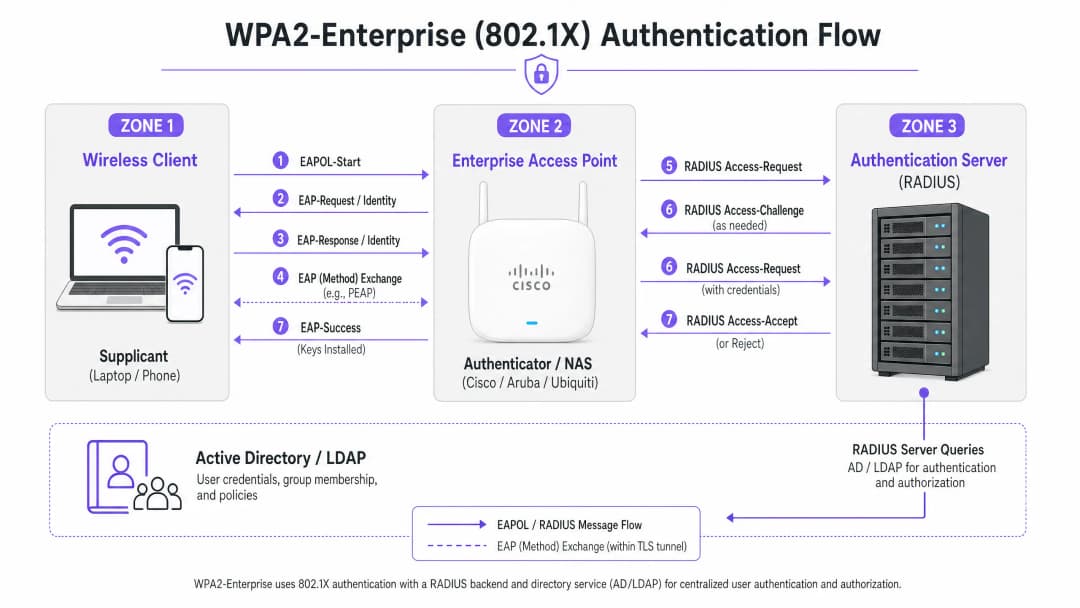
WPA2-Enterprise stützt sich auf den Standard IEEE 802.1X, um eine portbasierte Netzwerkzugriffskontrolle bereitzustellen. Im Gegensatz zu WPA2-Personal, das einen statischen Pre-Shared Key (PSK) verwendet, erfordert WPA2-Enterprise, dass sich jeder Supplicant (Client-Gerät) einzeln gegenüber einem externen Authentifizierungsserver - in der Regel ein RADIUS-Server - authentifiziert, bevor Zugriff auf das Netzwerk gewährt wird.
Die Architektur besteht aus drei Hauptkomponenten:
- Der Supplicant: Das Client-Gerät, das versucht, eine Verbindung zum Netzwerk herzustellen.
- Der Authenticator: Der Enterprise-Access-Point oder Wireless-LAN-Controller (beispielsweise ein Cisco WLC oder Aruba Mobility Controller), der den Authentifizierungsprozess ermöglicht.
- Der Authentication Server: Der Back-End-RADIUS-Server (beispielsweise Cisco ISE, Aruba ClearPass oder Windows NPS), der die Zugangsdaten mit einem Verzeichnisdienst wie Active Directory oder LDAP abgleicht.
Der EAP-Austauschprozess
Der Authentifizierungsprozess nutzt das Extensible Authentication Protocol over LAN (EAPOL). Während der ersten Phase fungiert der Authenticator lediglich als transparenter Proxy. Sobald der RADIUS-Server die Zugangsdaten validiert hat, sendet er eine Access-Accept-Nachricht an den Authenticator zurück, der dann die zur Sicherung der WiFi-Sitzung erforderlichen Verschlüsselungsschlüssel ableitet.
Die Wahl des EAP-Verfahrens ist entscheidend. PEAP-MSCHAPv2 ist das am weitesten verbreitete Verfahren, da es die herkömmliche Active Directory-Passwortauthentifizierung unterstützt und gleichzeitig den Austausch innerhalb eines durch das Serverzertifikat eingerichteten TLS-Tunnels schützt. Für maximale Sicherheit wird jedoch EAP-TLS empfohlen. EAP-TLS erfordert eine gegenseitige Zertifikatsauthentifizierung (sowohl der Server als auch der Client müssen gültige Zertifikate vorweisen), was vor Diebstahl von Anmeldedaten schützt, aber eine robuste Public Key Infrastructure (PKI) oder Mobile Device Management (MDM) Lösung für die Zertifikatsverteilung erfordert.
Implementierungshandbuch
Die grundlegenden Prinzipien der Konfiguration von WPA2-Enterprise sind herstellerübergreifend einheitlich, die Ausführung variiert jedoch je nach Verwaltungsoberfläche und Ökosystem.

Cisco (Catalyst und Meraki)
Cisco-Umgebungen reichen in ihrer Skalierung typischerweise von Campus-Bereitstellungen bis hin zu verteilten Unternehmensnetzwerken.
Cisco Catalyst (WLC/DNA Center):
- RADIUS-Server definieren: Navigieren Sie zum Reiter "Security", wählen Sie "AAA" und konfigurieren Sie die primären und sekundären RADIUS-Authentifizierungs- und Accounting-Server. Stellen Sie sicher, dass der Shared Secret mit der Konfiguration des RADIUS-Servers übereinstimmt.
- WLAN-Profil erstellen: Erstellen Sie unter dem Reiter "WLANs" ein neues Profil.
- Sicherheitsrichtlinie konfigurieren: Setzen Sie die Layer-2-Sicherheit auf WPA+WPA2 und aktivieren Sie 802.1X als Authentication Key Management (AKM) Methode.
- AAA-Server binden: Ordnen Sie die zuvor definierten RADIUS-Server dem WLAN-Profil zu. Wenn eine dynamische VLAN-Zuweisung erforderlich ist, aktivieren Sie "AAA Override".
Cisco Meraki:
- SSID-Konfiguration: Navigieren Sie im Meraki-Dashboard zu Wireless > SSIDs und wählen Sie das Zielnetzwerk aus.
- Zugriffskontrolle: Setzen Sie die Zuordnungsanforderung auf "WPA2-Enterprise mit meinem RADIUS-Server".
- RADIUS-Einstellungen: Geben Sie die IP-Adresse Ihrer RADIUS-Infrastruktur, den Authentifizierungs-Port (normalerweise 1812), den Accounting-Port (1813) und den Shared Secret ein. Das Meraki-Dashboard enthält ein integriertes Test-Tool zur Überprüfung der RADIUS-Konnektivität vor der Bereitstellung.
Aruba Networks
Aruba ist die dominierende Plattform im Bereich Hospitality und Hochschulbildung und nutzt den ClearPass Policy Manager intensiv für fortschrittliche Zugriffskontrolle.
- AAA-Profil definieren: Erstellen Sie in Aruba Central oder der Benutzeroberfläche des Mobility Controllers ein neues AAA-Profil. Dieses Profil legt fest, wie die Authentifizierung verarbeitet wird.
- RADIUS-Servergruppe konfigurieren: Fügen Sie Ihre RADIUS-Server zu einer Servergruppe hinzu und legen Sie Failover-Regeln und Timeout-Werte fest. Verknüpfen Sie diese Gruppe mit dem AAA-Profil.3. Virtuelle AP-Konfiguration: Erstellen oder ändern Sie das virtuelle AP-Profil (SSID). Stellen Sie den Sicherheitstyp auf WPA2-Enterprise ein.
- Profile binden: Binden Sie das AAA-Profil an das virtuelle AP-Profil. Wenn Sie ClearPass verwenden, stellen Sie sicher, dass der RADIUS CoA (Change of Authorization)-Port (3799) durch alle zwischengeschalteten Firewalls zugelassen ist, um eine dynamische Richtliniendurchsetzung zu ermöglichen.
Ubiquiti (UniFi)
Ubiquiti bietet über den UniFi Network Controller eine kostengünstige Lösung für Retail- und KMU-Umgebungen.
- RADIUS-Profil erstellen: Navigieren Sie zu Einstellungen > Profile > RADIUS. Erstellen Sie ein neues Profil mit der IP-Adresse, den Ports (1812/1813) und dem Shared Secret Ihres externen RADIUS-Servers.
- SSID-Konfiguration: Gehen Sie zu Einstellungen > WiFi und erstellen Sie ein neues drahtloses Netzwerk.
- Sicherheitseinstellungen: Wählen Sie "WPA2 Enterprise" als Sicherheitsprotokoll und binden Sie das neu erstellte RADIUS-Profil.
- Überlegungen zur RADIUS-Architektur: Im Gegensatz zu Controllern für Großunternehmen, die möglicherweise lokales, ausfallsicheres RADIUS bieten, verlässt sich UniFi stark auf externe Server (beispielsweise FreeRADIUS oder Windows NPS). Stellen Sie eine zuverlässige Verbindung zwischen den UniFi APs und dem RADIUS-Backend sicher.
Haben Sie Fragen zu Ihrem spezifischen Setup?
Unser Team arbeitet mit Standortbetreibern, IT-Managern und Netzwerktechnikern an über 80.000 Standorten zusammen. Buchen Sie ein 20-minütiges Gespräch und wir zeigen Ihnen, wie andere diese Herausforderungen gelöst haben.
Best Practices
Um sicherzustellen, dass die Bereitstellung sowohl widerstandsfähig als auch sicher ist, müssen Netzwerkarchitekten mehrere kritische Best Practices befolgen:
- Zertifikatsvalidierung erzwingen: Client-Geräte müssen explizit so konfiguriert werden, dass sie das Zertifikat des RADIUS-Servers anhand einer vertrauenswürdigen Zertifizierungsstelle (CA) validieren. Andernfalls ist das Netzwerk anfällig für "Evil Twin"-Angriffe, bei denen ein betrügerischer Access Point Benutzeranmeldeinformationen abgreifen kann.
- RADIUS-Redundanz implementieren: Der RADIUS-Server befindet sich im kritischen Pfad für den Netzwerkzugriff. Konfigurieren Sie immer primäre und sekundäre RADIUS-Server. In verteilten Umgebungen sollten Sie eine in der Cloud gehostete RADIUS-Lösung für hohe Verfügbarkeit in Betracht ziehen.
- Dynamische VLAN-Zuweisung nutzen: Verwenden Sie RADIUS-Attribute (wie
Tunnel-Pvt-Group-ID), um Benutzer basierend auf ihrer Active Directory-Gruppenmitgliedschaft dynamisch bestimmten VLANs zuzuweisen. Dies erzwingt die Netzwerksegmentierung, ohne dass mehrere SSIDs ausgestrahlt werden müssen. - RADIUS-Accounting aktivieren: Konfigurieren Sie nicht nur die Authentifizierung. RADIUS-Accounting (Port 1813) ist obligatorisch, um die von Compliance-Frameworks geforderten Audit-Trails zu erstellen.
- Sichern Sie den Netzwerkrand: Erfahren Sie mehr über den Schutz Ihrer Infrastruktur in unserem Leitfaden Schutz Ihres Netzwerks mit robustem DNS und Sicherheit.
Fehlerbehebung und Risikominderung
Selbst bei sorgfältiger Planung kann es bei Bereitstellungen zu Problemen kommen. Zu den häufigen Fehlern gehören:
- Fehlerhaftes Shared Secret: Ein einfacher Tippfehler im RADIUS Shared Secret führt zu lautlosen Authentifizierungsfehlern. Überprüfen Sie das Secret sowohl auf dem Authentifikator als auch auf dem RADIUS-Server.
- Fehler bei der Zeitsynchronisation: Die Zertifikatsvalidierung erfordert genaue Zeitstempel. Stellen Sie sicher, dass alle APs, Controller und RADIUS-Server über eine zuverlässige NTP-Quelle synchronisiert sind.
- Firewalls blockieren RADIUS-Traffic: Stellen Sie sicher, dass die UDP-Ports 1812 (Authentifizierung) und 1813 (Accounting) zwischen den APs/Controllern und den RADIUS-Servern geöffnet sind. Wenn Sie CoA verwenden, stellen Sie sicher, dass UDP 3799 geöffnet ist.
- Fehlkonfiguration des Clients: Das häufigste Problem ist, dass Client-Geräte nicht so konfiguriert sind, dass sie der Zertifizierungsstelle (CA) vertrauen, die das Zertifikat des RADIUS-Servers ausgestellt hat. Verwenden Sie MDM oder Gruppenrichtlinien, um das richtige drahtlose Profil auf die Unternehmensgeräte zu übertragen.
Für ein umfassenderes Verständnis des Authentifizierungsprotokolls siehe How to Configure 802.1X WiFi Authentication: A Step-by-Step Guide.
ROI und geschäftlicher Nutzen
Über den spürbaren Sicherheitsgewinn hinaus bietet der Übergang zu WPA2-Enterprise einen erheblichen geschäftlichen Mehrwert.
- Risikominderung: Die Eliminierung gemeinsam genutzter Passwörter reduziert die Angriffsfläche und das Risiko einer Datenpanne, die schwerwiegende finanzielle und rufschädigende Folgen haben kann, drastisch.
- Operative Effizienz: Die Integration der WiFi-Authentifizierung mit Ihrem bestehenden Identitätsanbieter (wie Active Directory) ermöglicht ein automatisiertes Onboarding und Offboarding von Mitarbeitern. Wenn ein Mitarbeiter das Unternehmen verlässt, entzieht das Deaktivieren seines AD-Kontos sofort seinen WiFi-Zugang.
- Compliance-Konformität: Detaillierte Audit-Trails und eine Authentifizierung pro Benutzer sind Voraussetzungen für die Einhaltung von PCI-DSS und ISO 27001.
- Einheitliche Infrastruktur: Durch die Nutzung dynamischer VLAN-Zuweisung können Standorte Unternehmens-, Back-of-House- und IoT-Traffic sicher auf derselben physischen Hardware betreiben, die auch für den Gastzugang genutzt wird. Das Gastnetzwerk kann dann mithilfe einer dedizierten WiFi Analytics-Lösung monetarisiert und analysiert werden, um den Return on Investment der Hardware zu maximieren. Stellen Sie sicher, dass Sie über ausreichend Bandbreite verfügen, indem Sie verstehen, What Is a Leased Line? Dedicated Business Internet.
Schlüsseldefinitionen
WPA2-Enterprise
Ein Sicherheitsprotokoll für drahtlose Netzwerke, das IEEE 802.1X nutzt, um eine Authentifizierung pro Benutzer über einen externen Server bereitzustellen, anstatt eines einzelnen gemeinsam genutzten Passworts.
Der obligatorische Standard zur Absicherung von Unternehmens- und Betriebs-WiFi-Netzwerken in Enterprise-Umgebungen.
802.1X
Ein IEEE-Standard für portbasierte Netzwerkzugriffskontrolle, der einen Authentifizierungsmechanismus für Geräte bereitstellt, die eine Verbindung zu einem LAN oder WLAN herstellen möchten.
Das zugrundeliegende Framework, das die Funktionsweise von WPA2-Enterprise ermöglicht.
RADIUS
Remote Authentication Dial-In User Service - ein Netzwerkprotokoll, das eine zentralisierte Verwaltung von Authentifizierung, Autorisierung und Accounting (AAA) bietet.
Die Serverkomponente, die Benutzeranmeldedaten mit einer Datenbank wie dem Active Directory abgleicht.
Supplicant
Der Software-Client auf einem Gerät (Laptop, Smartphone), der mit dem Authentifikator kommuniziert, um Netzwerkzugriff anzufordern.
Der Endpunkt, der mit den korrekten EAP-Einstellungen und dem entsprechenden Zertifikatsvertrauen konfiguriert werden muss.
Authentifikator
Das Netzwerkgerät (Access Point oder Switch), das den Authentifizierungsprozess erleichtert, indem es Nachrichten zwischen dem Supplicant und dem Authentifizierungsserver weiterleitet.
Die vom IT-Team verwaltete Cisco, Aruba oder Ubiquiti Hardware.
EAP (Extensible Authentication Protocol)
Ein Authentifizierungs-Framework, das häufig in drahtlosen Netzwerken und Point-to-Point-Verbindungen verwendet wird und mehrere Authentifizierungsmethoden unterstützt.
Das Protokoll zur Kapselung des Austauschs von Anmeldedaten.
PEAP-MSCHAPv2
Eine PEAP-Methode, die den MSCHAPv2-Passwortaustausch in einem sicheren TLS-Tunnel kapselt, der durch das Zertifikat des Servers eingerichtet wird.
Die am häufigsten gewählte Bereitstellungsmethode, da sie ein ausgewogenes Verhältnis zwischen Sicherheit und der bequemen Nutzung standardmäßiger AD-Passwörter bietet.
Dynamic VLAN Assignment
Der Prozess, bei dem ein RADIUS-Server den Access Point anweist, einen authentifizierten Benutzer basierend auf seiner Identität oder Gruppenzugehörigkeit in ein bestimmtes VLAN einzustufen.
Entscheidend für die Netzwerksegmentierung, damit verschiedene Benutzertypen dieselben physischen APs sicher nutzen können.
Ausgearbeitete Beispiele
Ein Hotel mit 200 Zimmern muss ein sicheres WiFi für seine Back-of-House-Mitarbeiter (Reinigung, Management) über bestehende Aruba Access Points bereitstellen, während der Datenverkehr der Mitarbeiter streng vom Gästenetzwerk getrennt bleiben soll.
Das IT-Team konfiguriert eine einzelne SSID namens „Hotel_Staff“ mit WPA2-Enterprise. Sie integrieren Aruba ClearPass mit dem Active Directory des Hotels. In ClearPass konfigurieren sie Durchsetzungsrichtlinien: Wenn sich ein Benutzer in der AD-Gruppe „Management“ befindet, gibt ClearPass ein RADIUS-Attribut zurück, das ihn dem VLAN 10 (Management-Netzwerk) zuweist. Befindet sich der Benutzer in der Gruppe „Housekeeping“, wird er dem VLAN 20 (Betriebsnetzwerk) zugewiesen. Die APs sind so konfiguriert, dass sie diese dynamischen VLAN-Zuweisungen durchsetzen.
Eine nationale Einzelhandelskette mit 50 Standorten nutzt Cisco Meraki. Sie müssen ihre Point-of-Sale-Terminals (POS) über WiFi absichern, um die PCI-DSS-Compliance zu erfüllen, und ihr altes WPA2-Personal-Setup ersetzen.
Der Netzwerkarchitekt stellt einen in der Cloud gehosteten RADIUS-Service bereit, um die Implementierung lokaler Server in jeder Filiale zu vermeiden. Im Meraki Dashboard konfigurieren sie die SSID „Retail_POS“ für WPA2-Enterprise und verweisen auf die Cloud-RADIUS-IPs. Sie erstellen über ihre MDM-Plattform eindeutige Client-Zertifikate für jedes POS-Terminal und konfigurieren den RADIUS-Server so, dass er EAP-TLS erfordert. Die Meraki APs sind so konfiguriert, dass sie sowohl RADIUS-Authentifizierungs- als auch Accounting-Daten an den Cloud-Service senden.
Übungsfragen
Q1. Ihre Organisation implementiert WPA2-Enterprise mit Ubiquiti UniFi Access Points. Während des Tests können sich Clients erfolgreich verbinden, aber das Compliance-Team stellt fest, dass im zentralen Protokollierungssystem keine Protokolle über die Dauer der Benutzersitzungen oder die Datennutzung vorhanden sind. Was ist das wahrscheinlichste Versäumnis bei der Konfiguration?
Hinweis: Die Authentifizierung gewährt Zugriff, aber ein anderer Prozess erfasst die Nutzung.
Musterlösung anzeigen
Der RADIUS-Accounting-Port (1813) wurde nicht konfiguriert oder wird von einer Firewall blockiert. Während die Authentifizierung (Port 1812) funktioniert, muss das Accounting explizit aktiviert werden, um Sitzungsüberwachungsprotokolle zu erstellen.
Q2. Ein Benutzer meldet, dass er keine Verbindung zum WPA2-Enterprise-Netzwerk des Unternehmens herstellen kann. Sie überprüfen die Cisco WLC-Protokolle und sehen, dass der AP den EAP-Request weiterleitet, aber die RADIUS-Serverprotokolle zeigen ein "Access-Reject" aufgrund einer "Unknown CA" an. Was muss behoben werden?
Hinweis: Denken Sie an die Vertrauensbeziehung, die während des Aufbaus des TLS-Tunnels hergestellt wird.
Musterlösung anzeigen
Der Supplicant des Client-Geräts ist nicht so konfiguriert, dass er der Zertifizierungsstelle (CA) vertraut, die das Zertifikat des RADIUS-Servers ausgestellt hat. Der Client bricht die Verbindung ab, um einen potenziellen Evil-Twin-Angriff zu verhindern. Das CA-Zertifikat muss auf das Client-Gerät übertragen werden.
Q3. Sie entwerfen ein Netzwerk für ein Stadion. Sie müssen Mitarbeiter, Ticket-Terminals und das Gäste-WiFi unterstützen. Wie sollten Sie die SSIDs strukturieren, um Funkinterferenzen zu minimieren und gleichzeitig die Sicherheit aufrechtzuerhalten?
Hinweis: Vermeiden Sie es, für jeden einzelnen Anwendungsfall eine eigene SSID auszustrahlen.
Musterlösung anzeigen
Stellen Sie maximal zwei SSIDs bereit. Eine SSID für Gäste mit einem Captive Portal (wie Purple). Eine zweite SSID für alle betrieblichen Abläufe im Unternehmen unter Verwendung von WPA2-Enterprise. Nutzen Sie Dynamic VLAN Assignment über den RADIUS-Server, um die Mitarbeiter auf ein VLAN und die Ticket-Terminals basierend auf ihren Authentifizierungsdaten auf ein anderes VLAN zu segmentieren.
Weiterlesen in dieser Reihe
Ein Leitfaden für Netzwerkadministratoren zur Konfiguration der RADIUS-Authentifizierung für Gäste-WiFi
Eine umfassende technische Referenz für Netzwerkadministratoren zur Bereitstellung der RADIUS-Authentifizierung für Gäste-WiFi. Behandelt die Architektur, herstellerunabhängige Konfigurationsschritte, Best Practices für die Sicherheit und die Behebung häufiger Bereitstellungsfehler.
Implementierung von SCEP für sicheres BYOD und 802.1X WiFi in der Hochschulbildung
Dieser technische Leitfaden beschreibt detailliert, wie IT-Teams an Hochschulen die 802.1X-Zertifikatsregistrierung für Tausende von BYOD-Geräten mithilfe von SCEP automatisieren können. Er behandelt die Architektur, die Sicherheitsvorteile und praktische Bereitstellungsschritte, um das manuelle Onboarding durch ein sicheres, kontaktloses Netzwerkzugriffsmodell zu ersetzen.
Konfigurieren von RADIUS-Authentifizierung für Gäste- und Mitarbeiter-WiFi-Netzwerke
Dieses technische Referenzhandbuch beschreibt die Architektur, Konfiguration und Bereitstellung der RADIUS-Authentifizierung für WiFi-Netzwerke von Unternehmen für Gäste und Mitarbeiter. Es bietet Netzwerkarchitekten und IT-Managern die genauen Protokolle, Sicherheitsstandards und Fehlerbehebungsmethoden, die für den Aufbau sicherer, skalierbarer drahtloser Zugriffskontrollsysteme erforderlich sind.
Haben Sie Fragen zu Ihrem spezifischen Setup?
Unser Team arbeitet mit Standortbetreibern, IT-Managern und Netzwerktechnikern an über 80.000 Standorten zusammen. Buchen Sie ein 20-minütiges Gespräch und wir zeigen Ihnen, wie andere diese Herausforderungen gelöst haben.