
So richten Sie Azure Entra ID (Azure AD) für die WiFi-Authentifizierung ein
Dieser maßgebliche Leitfaden beschreibt die Architektur, die Implementierungsschritte und die geschäftlichen Auswirkungen der Integration von Azure Entra ID mit 802.1X für die Unternehmens-WiFi-Authentifizierung. Er bietet Netzwerkarchitekten und IT-Managern praktische Bereitstellungsstrategien, die veraltete PSKs durch einen Zero-Trust-basierten, zertifikatsbasierten Netzwerkzugang ersetzen.
Diesen Leitfaden anhören
Podcast-Transkript ansehen
Zusammenfassung für Führungskräfte
Für CTOs und Netzwerkarchitekten, die komplexe Umgebungen verwalten – von großen Gastgewerbe -Standorten bis hin zu dynamischen Einzelhandels -Flächen – geht es bei der Sicherung des Unternehmensnetzwerks nicht mehr nur um starke Passwörter. Veraltete Pre-Shared Keys (PSKs) und die grundlegende Anmeldeauthentifizierung sind grundsätzlich inkompatibel mit modernen Zero-Trust-Architekturen.
Dieser Leitfaden beschreibt den Übergang zur 802.1X-zertifikatsbasierten WiFi-Authentifizierung, die direkt in Azure Entra ID (ehemals Azure AD) integriert ist. Durch den Übergang zu EAP-TLS (Extensible Authentication Protocol mit Transport Layer Security) können Unternehmen die Risiken im Zusammenhang mit dem Diebstahl von Anmeldeinformationen eliminieren, die Geräteintegration über Mobile Device Management (MDM) automatisieren und sicherstellen, dass nur konforme, verwaltete Geräte auf sensible Unternehmens-VLANs zugreifen können. Wir werden die technische Architektur, die Bereitstellungsschritte und wie diese Unternehmenssicherheitsstrategie parallel zu Gastnetzwerkstrategien läuft, die von Plattformen wie Purple verwaltet werden, untersuchen.
Technischer Einblick
Der Wandel von Anmeldeinformationen zu Zertifikaten
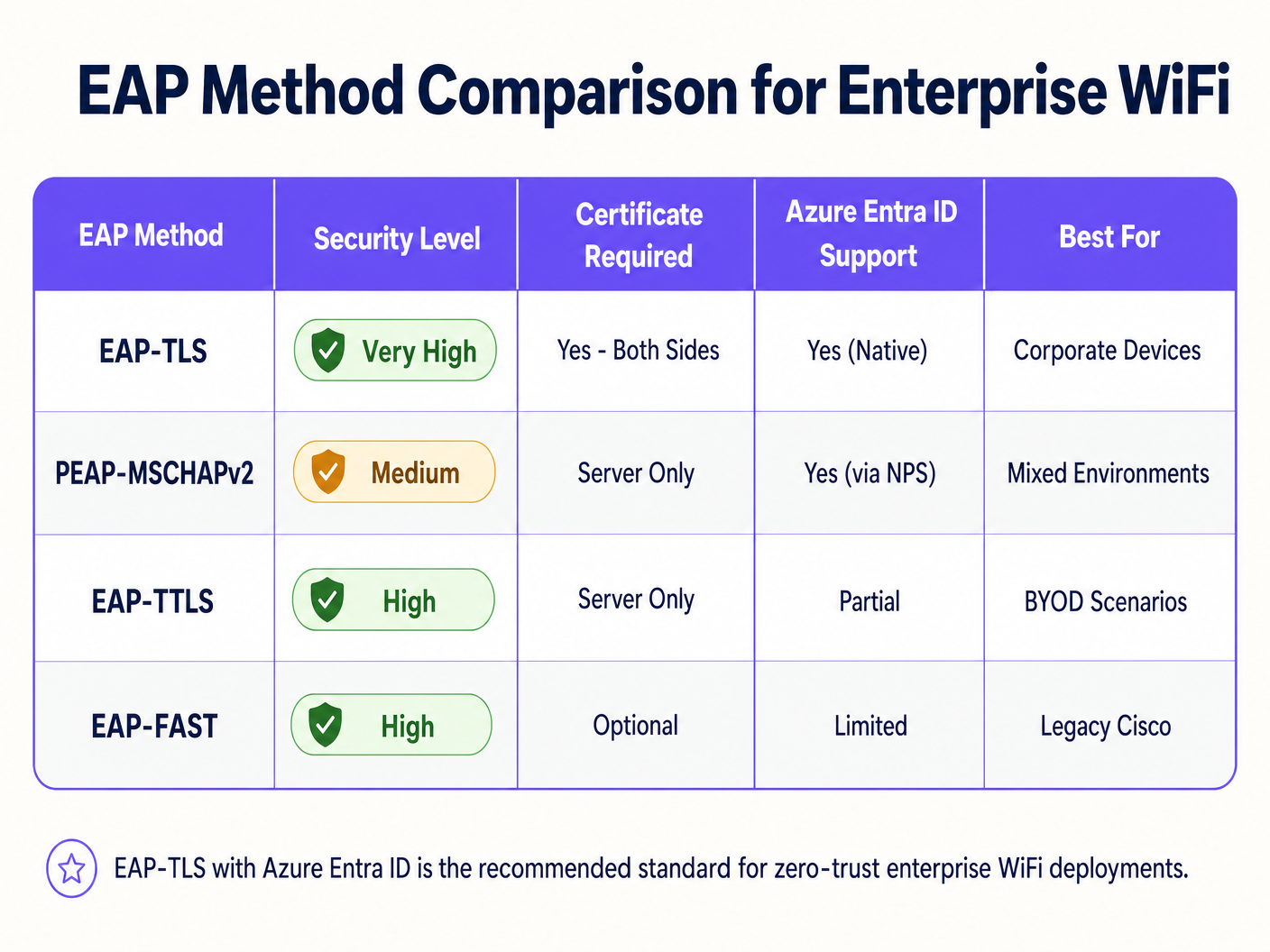
Historisch gesehen basierte Unternehmens-WiFi auf PEAP-MSCHAPv2, was von Benutzern die Eingabe ihrer Domänenanmeldeinformationen erforderte. Microsoft stellt jedoch die anmeldeinformationsbasierte Authentifizierung aufgrund ihrer Anfälligkeit für Adversary-in-the-Middle (AiTM)-Angriffe aktiv ein. Der Industriestandard ist jetzt EAP-TLS, das eine gegenseitige Zertifikatsauthentifizierung verwendet.
Bei einer EAP-TLS-Bereitstellung präsentieren sowohl der RADIUS-Server als auch das Client-Gerät digitale Zertifikate. Wenn einem Gerät ein gültiges Zertifikat fehlt, das von Ihrer vertrauenswürdigen Zertifizierungsstelle (CA) ausgestellt wurde, lehnt der RADIUS-Server die Verbindung ab, bevor das Gerät überhaupt eine IP-Adresse erhält.
Die architektonische Brücke: RADIUS und Entra ID
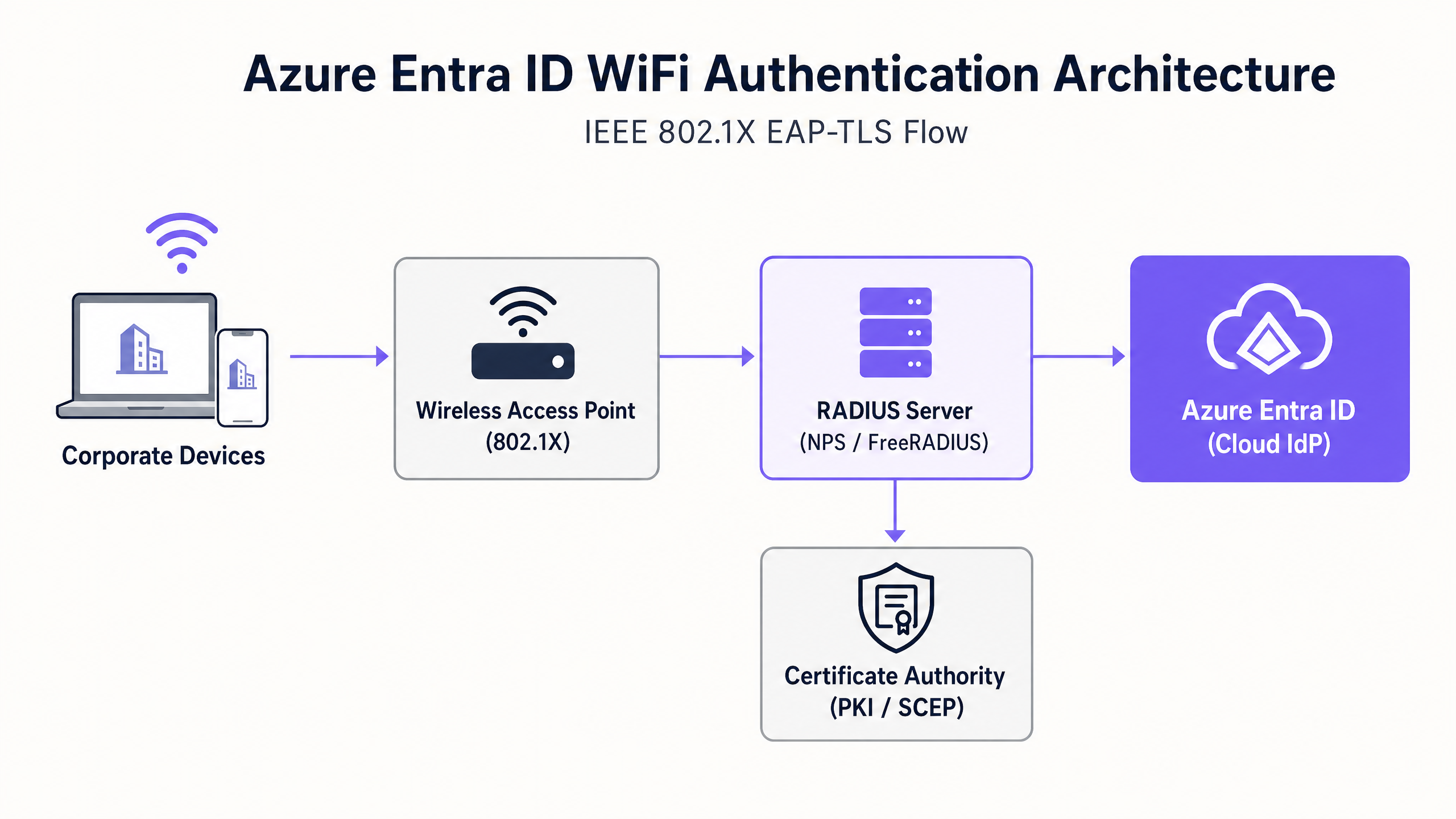
Azure Entra ID ist ein Cloud Identity Provider (IdP), der moderne Protokolle wie SAML und OIDC verwendet; es spricht nativ kein RADIUS, das Protokoll, das von Wireless Access Points (WAPs) verwendet wird. Um diese Lücke zu schließen, müssen Netzwerkarchitekten einen RADIUS-Server bereitstellen, der mit Entra ID kommunizieren kann. Dies wird typischerweise erreicht durch:
- Cloud RADIUS-Lösungen: Speziell entwickelte Plattformen (z. B. SecureW2, SCEPman oder Portnox), die sich über APIs direkt in Entra ID und Intune integrieren lassen.
- On-Premises Network Policy Server (NPS): Verwendung der Azure MFA-Erweiterung, obwohl dies im Vergleich zu Cloud-nativen RADIUS zunehmend als veralteter Ansatz angesehen wird.
Implementierungsleitfaden
Die Bereitstellung von Azure Entra ID für die WiFi-Authentifizierung erfordert die Koordination zwischen Identitäts-, Geräteverwaltungs- und Netzwerkinfrastrukturteams.
Schritt 1: Aufbau der Public Key Infrastructure (PKI)
Sie müssen eine CA einrichten, um Client- und Serverzertifikate auszustellen. In einer Cloud-First-Umgebung ist dies oft eine Cloud-PKI, die über das Simple Certificate Enrollment Protocol (SCEP) in Microsoft Intune integriert ist.
Schritt 2: Konfigurieren des RADIUS-Servers
Stellen Sie Ihre RADIUS-Infrastruktur bereit und binden Sie sie an Ihren Entra ID-Mandanten. Der RADIUS-Server benötigt ein eigenes Serverzertifikat, das von Ihren Client-Geräten als vertrauenswürdig eingestuft wird, um seine Identität während des EAP-Handshakes zu beweisen.
Schritt 3: Bereitstellen von MDM-Profilen über Intune
Verlassen Sie sich nicht darauf, dass Benutzer ihre WiFi-Einstellungen manuell konfigurieren. Verwenden Sie Intune, um ein umfassendes WiFi-Profil bereitzustellen, das Folgendes umfasst:
- Das vertrauenswürdige Root-CA-Zertifikat.
- Das SCEP-Profil zur Anforderung des Client-Zertifikats.
- Die WiFi-Konfiguration selbst, die explizit die SSID und die genauen Servernamen Ihrer RADIUS-Infrastruktur definiert, um Evil Twin-Angriffe zu verhindern.
Schritt 4: Konfigurieren des Wireless LAN Controllers (WLC)
Konfigurieren Sie Ihre Access Points oder den WLC für die Verwendung von WPA2/WPA3-Enterprise (802.1X). Leiten Sie den Authentifizierungs- und Abrechnungsverkehr an Ihre neuen RADIUS-Server-IP-Adressen und konfigurieren Sie die gemeinsamen RADIUS-Geheimnisse.
> "Stellen Sie bei der Konfiguration von 802.1X sicher, dass Ihre RADIUS-Timeout-Werte auf dem WLC ausreichen, um die Latenz der Cloud-basierten Zertifikatsvalidierung zu bewältigen, typischerweise eine Erhöhung von 2 Sekunden auf 5 Sekunden." [1]
Best Practices
- Trennung von Unternehmens- und Gastverkehr: Unternehmensgeräte sollten 802.1X verwenden, das an Entra ID gebunden ist. Gastgeräte sollten eine offene SSID mit einem Captive Portal nutzen. Für robusten Gastzugang und Analysen nutzen Sie Gast-WiFi -Lösungen. Dies gewährleistet eine vollständige Isolation des nicht vertrauenswürdigen Datenverkehrs.
- MAC Authentication Bypass (MAB) sorgfältig implementieren: IoT-Geräte und ältere Hardware (z. B. alte Scanner in Transport -Hubs) können 802.1X oft nicht unterstützen. Platzieren Sie diese auf einer separaten SSID unter Verwendung von MAB oder einem dedizierten PSK und beschränken Sie deren Netzwerkzugriff über strenge ACLs.
- Zertifikatsperrung priorisieren: Stellen Sie sicher, dass Ihre Certificate Revocation List (CRL) oder Online Certificate Status Protocol (OCSP)-Endpunkte hochverfügbar sind. Wenn der RADIUS-Server den Sperrstatus nicht überprüfen kann, schlägt die Authentifizierung fehl.
Fehlerbehebung & Risikominderung
Wenn Bereitstellungen fehlschlagen, liegt die Schuld selten beim Cloud IdP. Häufige Fehlerursachen sind:
- Zeitversatz (Clock Skew): EAP-TLS ist sehr zeitempfindlich. Stellen Sie sicher, dass alle Infrastrukturkomponenten, insbesondere der WLC und die RADIUS-Server, über NTP synchronisiert sind.
- Intune-Synchronisierungsverzögerungen: Wenn ein neues Gerät registriert wird, kann es einige Zeit dauern, bis das SCEP-Zertifikat ausgestellt wird und das Gerät versucht, eine Verbindung herzustellen. Planen Sie diese Latenz während des Onboardings ein.
- RADIUS-Server-Namenskonflikt: Wenn der im Intune WiFi-Profil definierte Servername nicht exakt mit dem Common Name (CN) oder Subject Alternative Name (SAN) auf dem Zertifikat des RADIUS-Servers, wird der Client die Verbindung stillschweigend trennen, um sich vor nicht autorisierten APs zu schützen.
Für weitere Einblicke in die Sicherung Ihrer Infrastruktur, lesen Sie unseren Leitfaden zum Thema Schützen Sie Ihr Netzwerk mit starkem DNS und Sicherheit .
ROI & Geschäftsauswirkungen
Der Übergang zur Azure Entra ID WiFi-Authentifizierung liefert messbare Ergebnisse:
- Reduzierter Helpdesk-Aufwand: Die Eliminierung der passwortbasierten Authentifizierung reduziert drastisch Tickets im Zusammenhang mit Passwortsperren und WiFi-Zugangsdaten-Updates.
- Beschleunigte Compliance: EAP-TLS bietet den kryptografischen Identitätsnachweis, der von Frameworks wie PCI DSS und ISO 27001 gefordert wird, entscheidend für Gesundheitswesen und Einzelhandelsumgebungen.
- Automatisierte Offboarding: Wenn ein Mitarbeiter das Unternehmen verlässt, entzieht die Deaktivierung seines Kontos in Entra ID sofort seinen Netzwerkzugriff an allen Standorten und mindert so Insider-Bedrohungen.
Durch die Sicherung des Unternehmensrückgrats können sich IT-Teams auf umsatzgenerierende Initiativen konzentrieren, wie die Nutzung von WiFi Analysen , um das Besucherverhalten zu verstehen und das Engagement zu fördern.
Referenzen
[1] Microsoft Learn. (2023). Sicherer Wi-Fi-Zugriff mit Intune und EAP-TLS.
Schlüsseldefinitionen
802.1X
An IEEE standard for port-based network access control, requiring devices to authenticate before gaining access to the LAN or WLAN.
This is the underlying protocol that makes enterprise WiFi secure, moving beyond simple shared passwords.
EAP-TLS
Extensible Authentication Protocol with Transport Layer Security. An authentication method requiring digital certificates on both the client and the server.
Considered the most secure method for WiFi authentication, preventing credential theft and AiTM attacks.
RADIUS
Remote Authentication Dial-In User Service. A networking protocol that provides centralized Authentication, Authorization, and Accounting (AAA).
The protocol your Access Points use to ask the authentication server, 'Should I let this device on the network?'
SCEP
Simple Certificate Enrollment Protocol. A protocol used to securely issue certificates to network devices.
Used by MDM platforms like Intune to silently request and install client certificates onto corporate laptops and phones.
MAC Authentication Bypass (MAB)
A method of granting network access based on the device's MAC address rather than a username or certificate.
Used as a fallback for legacy devices (like old printers or IoT sensors) that lack the software to perform an 802.1X handshake.
Evil Twin Attack
A rogue access point masquerading as a legitimate corporate SSID to intercept traffic or steal credentials.
EAP-TLS mitigates this because the client device is configured to only trust the specific certificate of the legitimate corporate RADIUS server.
Supplicant
The software client on the endpoint device (e.g., the Windows WiFi manager) that handles the 802.1X authentication process.
IT teams must configure the supplicant via MDM to ensure it behaves securely and doesn't prompt users to accept untrusted server certificates.
Conditional Access
Azure Entra ID policies that evaluate signals (user, location, device compliance) to make access decisions.
Modern Cloud RADIUS solutions can check Conditional Access during the WiFi handshake, denying network access if Intune flags the device as non-compliant.
Ausgearbeitete Beispiele
A 500-site retail chain needs to secure back-of-house iPads used for inventory management. Currently, they use a single shared PSK across all stores. How should they migrate to Azure Entra ID authentication?
- Enroll all iPads into Microsoft Intune.
- Deploy a Cloud RADIUS solution integrated with the corporate Entra ID tenant.
- Configure Intune to deploy a SCEP certificate to each iPad.
- Push a WiFi profile via Intune that configures the iPads to connect to the 'Corporate-BOH' SSID using EAP-TLS, validating the Cloud RADIUS server's certificate.
- Update the Meraki/Aruba access points in all 500 stores to point to the Cloud RADIUS IP addresses for the 'Corporate-BOH' SSID.
- Phased rollout: Enable the new SSID, verify iPad connectivity via Intune reporting, then decommission the legacy PSK SSID.
A university campus is migrating from on-prem Active Directory to Azure Entra ID. They have thousands of BYOD (Bring Your Own Device) student laptops that currently connect using PEAP-MSCHAPv2 (username and password). How do they handle BYOD in a cloud-first Entra ID environment?
- Deploy an onboarding portal (e.g., SecureW2 JoinNow or similar BYOD onboarding tool).
- Students connect to an open 'Onboarding' SSID, which redirects them to the portal.
- The portal prompts the student to authenticate against Azure Entra ID (using their university email and MFA).
- Upon successful authentication, the portal generates a unique client certificate and automatically configures the student's device for EAP-TLS.
- The device automatically connects to the secure 'Edu-Secure' SSID using the new certificate.
Übungsfragen
Q1. Your organisation is migrating to Azure Entra ID and Intune. You currently use PEAP-MSCHAPv2 for WiFi. The security team mandates that WiFi authentication must be resistant to credential theft. Which EAP method should you deploy?
Hinweis: Which method relies entirely on certificates rather than passwords?
Musterlösung anzeigen
You should deploy EAP-TLS. EAP-TLS uses mutual certificate authentication, meaning the client device must present a valid certificate issued by your PKI. Because it does not use passwords, it is highly resistant to credential theft and adversary-in-the-middle attacks.
Q2. After deploying EAP-TLS via Intune, users report they cannot connect to the WiFi. Looking at the RADIUS logs, you see 'Certificate Revocation Check Failed'. What is the most likely cause?
Hinweis: What infrastructure must the RADIUS server communicate with to verify a certificate hasn't been compromised?
Musterlösung anzeigen
The RADIUS server is unable to reach the Certificate Revocation List (CRL) or OCSP endpoint of your Certificate Authority. Ensure that the firewalls allow the RADIUS server outbound access to the HTTP URLs specified in the client certificates.
Q3. A hospital needs to connect 50 legacy heart-rate monitors to the network. These devices only support WPA2-Personal (Pre-Shared Key) and cannot be enrolled in Intune. How should you secure them while maintaining your Entra ID 802.1X deployment for corporate laptops?
Hinweis: Do not mix authentication types on the same SSID.
Musterlösung anzeigen
Create a dedicated, separate SSID specifically for the medical IoT devices. Use a strong, unique Pre-Shared Key (or Identity PSK/iPSK if supported by your network vendor) or MAC Authentication Bypass (MAB). Crucially, place this SSID on a highly restricted VLAN with strict Access Control Lists (ACLs) that only allow the monitors to communicate with their specific medical server, blocking all other lateral network access.
Weiterlesen in dieser Reihe
Per-Device PSK nach Anbieter: iPSK, DPSK, MPSK und PPSK im Vergleich (und WPA3-Unterstützung)
Ein umfassender Vergleich von Per-Device-PSK-Implementierungen bei Cisco Meraki, HPE Aruba, Ruckus, Juniper Mist, Extreme, Fortinet und Ubiquiti UniFi. Erfahren Sie, wie sich WPA3-SAE auf Per-Device-Key-Strategien auswirkt und wann Sie Übergangsmodi implementieren sollten, anstatt auf 802.1X umzusteigen.
Was ist MAC-Adressauthentifizierung? Wann man sie nutzen und wann man sie vermeiden sollte
Dieser maßgebliche technische Leitfaden behandelt die MAC-Adressauthentifizierung in Unternehmens-WiFi-Umgebungen – wie RADIUS-basierte MAC-Authentifizierung auf Layer 2 funktioniert, ihre inhärenten Sicherheitslücken (einschließlich MAC-Spoofing und die Auswirkungen der MAC-Randomisierung auf OS-Ebene) und die genauen operativen Kontexte, in denen sie ein gültiges Werkzeug zur Verwaltung von IoT- und kopflosen Geräten bleibt. Er bietet umsetzbare Bereitstellungsanleitungen für IT-Manager und Netzwerkarchitekten in den Bereichen Gastgewerbe, Einzelhandel, Gesundheitswesen und öffentlicher Sektor, mit realen Fallbeispielen, Entscheidungsrahmen und Integrationskontext für die Gast-WiFi- und Analyseplattform von Purple.
Einrichtung von Enterprise WiFi auf iOS und macOS mit 802.1X
Dieser maßgebliche Leitfaden bietet leitenden IT-Führungskräften umsetzbare Schritte für die Bereitstellung von 802.1X Enterprise WiFi auf iOS- und macOS-Geräten. Er behandelt die zertifikatbasierte Authentifizierung (EAP-TLS), MDM-Konfigurationsprofile und die Architekturintegration zur Sicherung von Unternehmensnetzwerken bei gleichzeitiger Unterstützung von BYOD-Initiativen.