
Stadium WiFi: Wie man Konnektivität in großem Maßstab für Fans bereitstellt
Dieser maßgebliche technische Leitfaden bietet umsetzbare Anleitungen für IT-Manager, Netzwerkarchitekten und Betriebsleiter von Veranstaltungsorten zur Planung, Bereitstellung und Monetarisierung von hochdichten Stadium WiFi-Netzwerken. Er behandelt die HF-Architektur für extreme Gerätedichte, sichere Authentifizierung in großem Maßstab, Netzwerksegmentierung und Risikominderung – zusammen mit praktischen Fallstudien und einem klaren Rahmen zur Messung des ROI. Veranstaltungsorte, die korrekt implementieren, können ihre WiFi-Infrastruktur von einem Kostenfaktor in eine strategische Plattform für Fan-Engagement, Retail Media und operative Intelligenz verwandeln.
Diesen Leitfaden anhören
Podcast-Transkript ansehen
Zusammenfassung für Führungskräfte
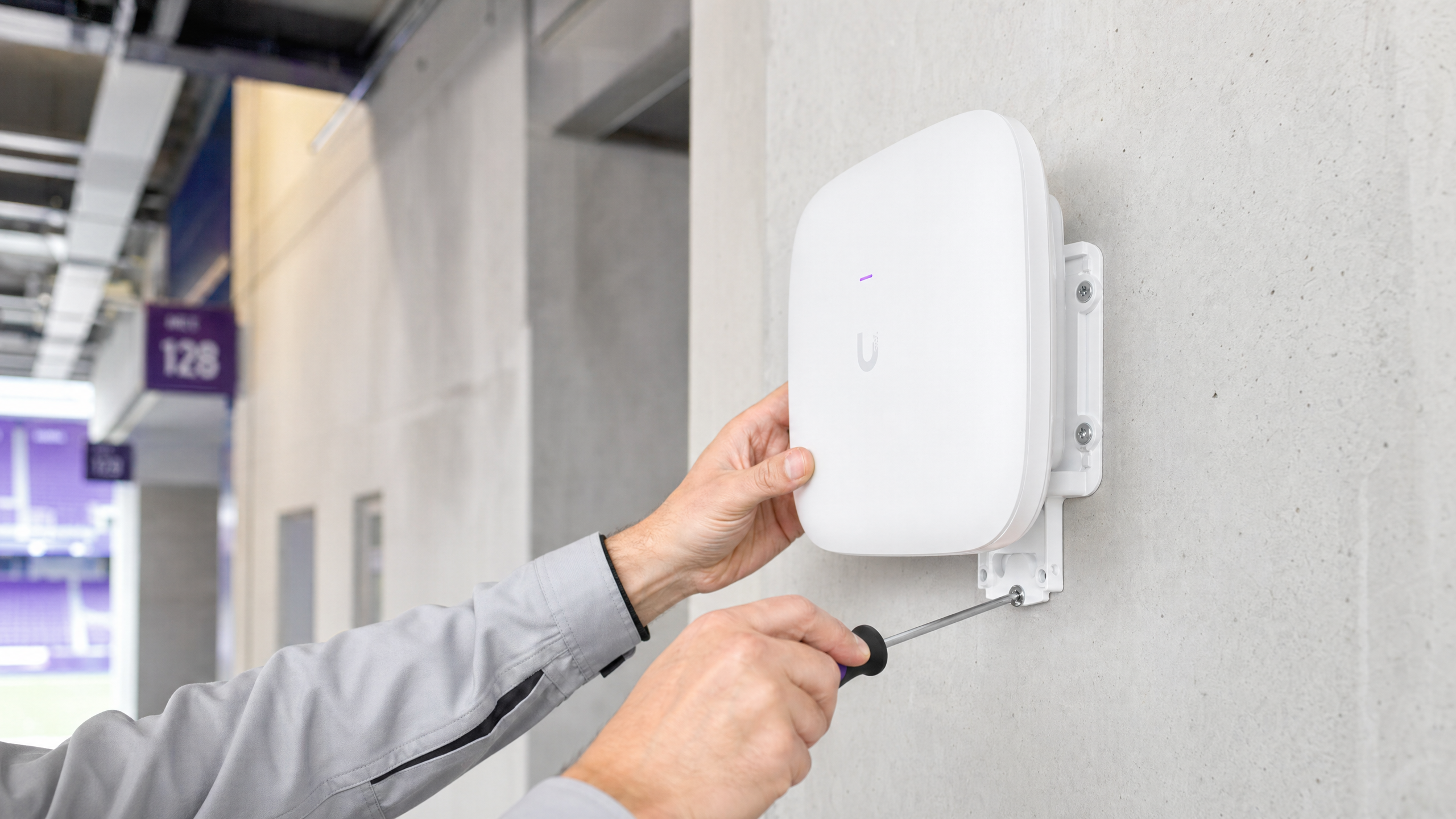
Die Bereitstellung von zuverlässigem WiFi in einer Stadionumgebung ist eine der anspruchsvollsten Herausforderungen im Netzwerk-Engineering. Für IT-Manager, CTOs und Betriebsleiter von Veranstaltungsorten geht es nicht mehr nur darum, grundlegende Konnektivität bereitzustellen – es geht darum, ein nahtloses digitales Fan-Erlebnis zu ermöglichen und gleichzeitig einen messbaren ROI zu generieren. Stadien stehen vor extremer Gerätedichte, massiven Nutzungsspitzen während der Halbzeit und der Notwendigkeit, kritische Betriebssysteme neben dem Gastzugang zu unterstützen. Dieser Leitfaden beschreibt die technische Architektur, Bereitstellungsstrategien und Risikominderungsmaßnahmen, die erforderlich sind, um venue wifi in großem Maßstab bereitzustellen. Durch die Integration eines robusten HF-Designs mit Plattformen wie Purple's Guest WiFi und WiFi Analytics können Veranstaltungsorte ihr Netzwerk von einem Kostenfaktor in einen strategischen Vermögenswert verwandeln, der die Monetarisierung von Retail Media und operative Intelligenz vorantreibt. Die hier dargelegten Prinzipien gelten gleichermaßen für hospitality -Veranstaltungsorte, retail -Umgebungen und transport -Drehkreuze – überall dort, wo extreme Dichte und Fan-Engagement zusammenkommen.
Technischer Tiefgang
Die HF-Herausforderung: Extreme Dichte und Gleichkanalstörungen
Die grundlegende Herausforderung von Stadium WiFi ist die Verwaltung extremer Client-Dichte in einem begrenzten physischen Raum. Traditionelle Unternehmensbereitstellungsmodelle – die sich auf omnidirektionale Antennen zur Abdeckung großer Bereiche verlassen – versagen unter Stadionbedingungen aufgrund von Gleichkanalstörungen (Co-Channel Interference, CCI). Wenn mehrere Access Points auf demselben Frequenzkanal senden, verbringen Geräte die meiste Zeit damit, auf freie Sendezeit zu warten, anstatt Daten zu übertragen. In einem Zuschauerbereich mit 50.000 Geräten ist dies katastrophal.
Um CCI zu bekämpfen, müssen Netzwerkarchitekten Mikrozellen entwerfen. Dies beinhaltet den Einsatz einer großen Anzahl hochdirektionaler, schmalstrahliger Antennen – typischerweise mit Strahlbreiten von 30 Grad oder weniger –, um den Zuschauerbereich in kleine, isolierte Abdeckungszonen zu unterteilen. Jede Mikrozelle bedient eine begrenzte Anzahl von Geräten und gewährleistet so einen hohen Durchsatz und geringe Konflikte. Montageoptionen umfassen Unter-Sitz-Gehäuse (bevorzugt für den unteren Bereich) und an Handläufen montierte direktionale APs für die oberen Ränge.
Wi-Fi 6E und Spektrumzuweisung
Moderne Stadionbereitstellungen müssen Wi-Fi 6E nutzen. Die Hinzufügung des 6-GHz-Spektrumbands bietet bis zu 1.200 MHz sauberes, zusammenhängendes Spektrum, frei von den Dynamic Frequency Selection (DFS)-Radareinschränkungen, die 5-GHz-Bereitstellungen in komplexen Umgebungen erschweren. Dies ermöglicht breitere Kanäle (160 MHz oder 320 MHz mit Wi-Fi 7), deutlich höheren Durchsatz für kompatible Geräte und reduzierte Latenz – alles unerlässlich für bandbreitenintensive Anwendungen wie Video-Wiederholungen am Platz und Social Media Sharing.
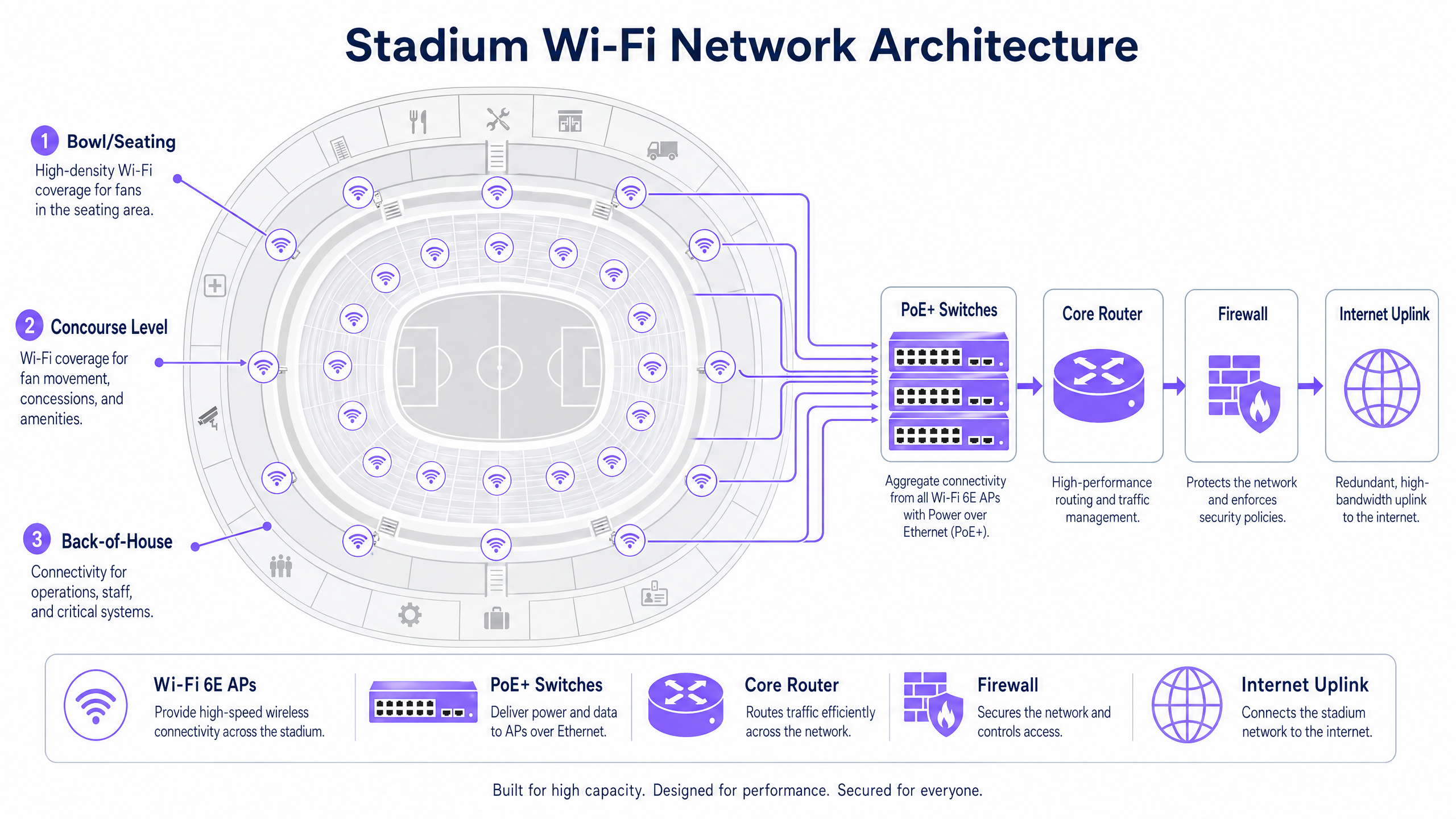
Die folgende Tabelle fasst die wichtigsten Unterschiede zwischen den für Stadionbereitstellungen relevanten Wi-Fi-Standards zusammen:
| Standard | Frequenzbänder | Max. Kanalbreite | Hauptvorteil für Stadien |
|---|---|---|---|
| Wi-Fi 5 (802.11ac) | 5 GHz | 80 MHz | Weit verbreitet, aber begrenztes Spektrum |
| Wi-Fi 6 (802.11ax) | 2.4 / 5 GHz | 160 MHz | OFDMA und BSS Colouring reduzieren Interferenzen |
| Wi-Fi 6E (802.11ax) | 2.4 / 5 / 6 GHz | 160 MHz | Sauberes 6 GHz Spektrum, keine DFS-Einschränkungen |
| Wi-Fi 7 (802.11be) | 2.4 / 5 / 6 GHz | 320 MHz | Multi-Link Operation für extremen Durchsatz |
Authentifizierung und Sicherheit in großem Maßstab
Reibungsloses Onboarding ist in großem Maßstab entscheidend. Captive Portals, obwohl wertvoll für die Erfassung von Erstanbieterdaten, können einen erheblichen Engpass darstellen, wenn 50.000 Fans versuchen, sich in den fünfzehn Minuten vor dem Anpfiff zu verbinden. Die Branche bewegt sich hin zu profilbasierter Authentifizierung, insbesondere OpenRoaming – einer Föderation, die es Geräten ermöglicht, sich automatisch und sicher über 802.1X und WPA3-Enterprise zu verbinden. Purple fungiert in diesem Ökosystem als Identitätsanbieter und gewährleistet einen sicheren, nahtlosen Zugang, während jede Gerätesitzung weiterhin einem persistenten Benutzerprofil für Analysezwecke zugeordnet wird.
Für Veranstaltungsorte, die weiterhin ein Captive Portal-Onboarding zur Datenerfassung benötigen, besteht die Lösung darin, die Authentifizierung vorzubereiten: Geräte dürfen sich sofort verbinden und eine IP-Adresse erhalten, dann wird das Portal asynchron präsentiert. Dies verhindert den DHCP- und Assoziationssturm, der auftritt, wenn alle Geräte gleichzeitig auf das Portal zugreifen.
Für eine detaillierte Behandlung der Sicherheitsprinzipien öffentlicher Netzwerke – direkt anwendbar auf Stadionumgebungen – siehe unseren Leitfaden zu Airport WiFi Security: How to Protect Passengers on Public Networks . Die dort behandelten Segmentierungs- und DNS-Sicherheitsprinzipien sind hier gleichermaßen relevant. Zusätzlich bietet Protect Your Network with Strong DNS and Security spezifische Anleitungen zu DNS-Layer-Verteidigungen für öffentliche Netzwerke.
Implementierungsleitfaden
Schritt 1: Standortanalyse und HF-Planung
Bevor ein einziges Kabel verlegt wird, ist ein detailliertes prädiktives HF-Modell des Veranstaltungsortes unerlässlich. Verwenden Sie Tools wie Ekahau oder iBwave, um die AP-Platzierung, Antennenmuster und die erwartete Abdeckung zu modellieren. Validieren Sie das Modell mit einer physischen Standortanalyse, wobei Sie besonders auf die im Zuschauerbereich verwendeten Materialien (Beton, Metall, Glas) und mögliche Störquellen (Rundfunkgeräte, temporäre Strukturen) achten sollten.
Schritt 2: Physische Bereitstellung
Die AP-Platzierung im Zuschauerbereich fällt typischerweise in zwei Kategorien:
Unter-Sitz-Bereitstellung: APs werden in robusten, IP67-zertifizierten Gehäusen unter den Sitzen montiert. Dies bietet eine hervorragende Sichtlinie zu den direkt darüber liegenden Geräten und menschlichePersonen auf den Sitzen dämpfen das HF-Signal auf natürliche Weise, wodurch die CCI zwischen benachbarten Zellen reduziert wird. Die Verkabelung ist komplexer, aber die HF-Leistung ist überlegen.
Überkopf-/Handlauf-Bereitstellung: Gerichtete APs werden an Laufstegen, Handläufen oder Blenden montiert und zeigen nach unten auf bestimmte Sitzbereiche. Dies ist einfacher zu verkabeln, erfordert jedoch eine präzise Antennenausrichtung und ist anfälliger für Interferenzen in einer offenen Stadionumgebung.
Für den Umlauf sind standardmäßige Decken-APs für Unternehmen geeignet, da die Dichte geringer und die Umgebung kontrollierter ist.
Schritt 3: Netzwerksegmentierung
Ein Stadionnetzwerk ist eine Multi-Tenant-Umgebung. Eine strikte Verkehrssegmentierung mittels VLANs und Firewall-Richtlinien ist zwingend erforderlich:
| VLAN | Zweck | Hauptanforderung |
|---|---|---|
| VLAN 10 | Gast-/Fan-WiFi | Captive portal oder OpenRoaming Onboarding |
| VLAN 20 | Point-of-Sale / Einzelhandel | PCI DSS-Konformität, isoliert vom Gastverkehr |
| VLAN 30 | Betrieb / Personal | 802.1X-Authentifizierung, eingeschränkter Zugriff |
| VLAN 40 | Gebäudemanagement | Isoliert, kein Internetzugang |
Dieses Segmentierungsprinzip ist branchenübergreifend konsistent – ob in Einzelhandels -Umgebungen oder Gesundheitseinrichtungen eingesetzt, die Trennung von Betriebs- und Gastverkehr ist eine nicht verhandelbare Sicherheitsgrundlage.
Schritt 4: Backhaul und Infrastrukturdimensionierung
HF-Abdeckung ist ohne adäquates Backhaul nutzlos. Stellen Sie sicher, dass Ihre PoE+-Edge-Switches mindestens 10-Gbps-Uplinks zur Aggregationsschicht haben, mit 40 Gbps für Aggregationspunkte mit hoher Dichte, die den Sitzbereich bedienen. Der zentrale Internet-Uplink muss für die gleichzeitige Spitzennutzung dimensioniert sein – eine dedizierte Standleitung mit redundanter Ausfallsicherung ist der Standard für Veranstaltungsorte dieser Größenordnung. Weitere Informationen zu dedizierten Konnektivitätsoptionen finden Sie unter Was ist eine Standleitung? Dediziertes Business Internet .
Schritt 5: Analytics-Integration
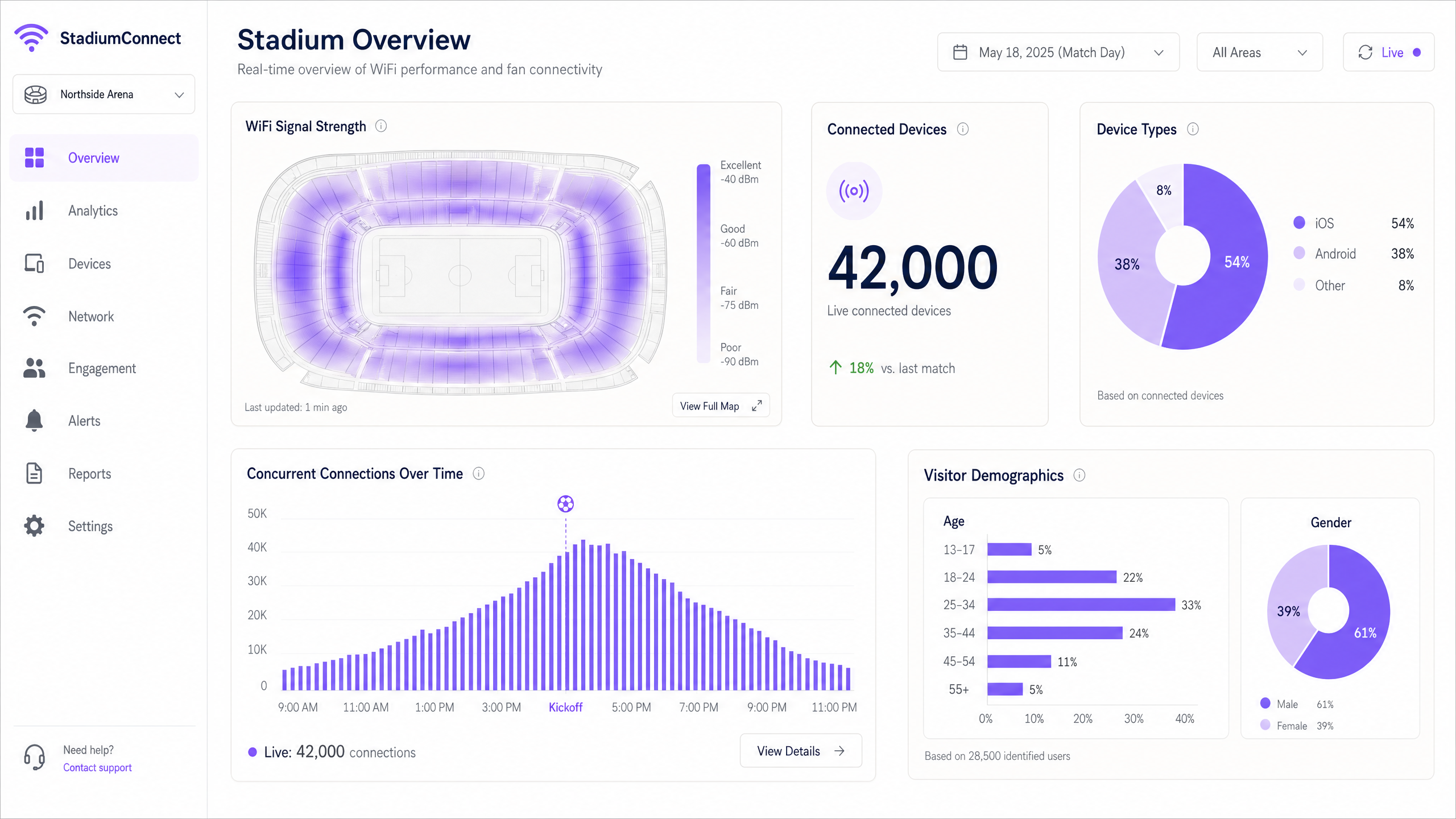
Sobald das Netzwerk betriebsbereit ist, integrieren Sie es mit einer Plattform wie Purple, um Daten zu erfassen und zu nutzen. Die WiFi Analytics -Plattform von Purple bietet Echtzeit-Dashboards für Geräteanzahl, Signal-Heatmaps und Besucher-Demografien – und verwandelt das Netzwerk in eine operative Intelligenzschicht.
Best Practices
Aggressives Datenratenmanagement: Deaktivieren Sie alle älteren 802.11b- und 802.11g-Raten. Stellen Sie die minimale obligatorische Basisrate auf 12 Mbps oder 24 Mbps ein. Dies zwingt "sticky clients", zu einem näheren AP zu wechseln, anstatt an einem entfernten mit schwachem Signal festzuhalten, und verhindert, dass langsame Geräte unverhältnismäßig viel Airtime verbrauchen.
Band Steering: Konfigurieren Sie APs so, dass sie fähige Geräte auf die 5-GHz- und 6-GHz-Bänder lenken und das 2,4-GHz-Band für IoT-Geräte und ältere Hardware freihalten.
DHCP-Pool-Dimensionierung: Dimensionieren Sie Gast-VLAN-Subnetze großzügig (ein /16 oder /20) und legen Sie kurze Lease-Zeiten von 30–60 Minuten fest, um IP-Adressen von Geräten, die den Veranstaltungsort verlassen haben, zurückzugewinnen. DHCP-Erschöpfung ist eine der häufigsten Ursachen für Konnektivitätsausfälle zur Halbzeit.
Erkennung nicht autorisierter APs: Implementieren Sie die Erkennung und Eindämmung nicht autorisierter APs. Fans und Rundfunkanstalten, die persönliche Hotspots erstellen, können schwere Interferenzen auf benachbarten Kanälen verursachen.
DNS-Sicherheit: Implementieren Sie DNS-Filterung im Gastnetzwerk, um den Zugriff auf bösartige Domains zu blockieren und das Risiko der Malware-Verbreitung zu reduzieren. Implementierungsanleitungen finden Sie unter Schützen Sie Ihr Netzwerk mit starkem DNS und Sicherheit .
WPA3-Übergangsmodus: Aktivieren Sie WPA3-SAE im Übergangsmodus, um sowohl WPA2- als auch WPA3-Clients gleichzeitig zu unterstützen und so eine verbesserte Sicherheit für fähige Geräte zu gewährleisten, ohne ältere Hardware auszuschließen.
Fehlerbehebung & Risikominderung
Fehlermodus 1: Der Halbzeit-Spike
Symptom: Geräte zeigen ein starkes WiFi-Signal, können aber keine Webseiten laden oder Transaktionen abschließen.
Ursache: DHCP-Pool-Erschöpfung oder Engpässe im Kernnetzwerk – kein HF-Problem.
Lösung: Überprüfen Sie die DHCP-Bereichsnutzung in Echtzeit. Erhöhen Sie die Subnetzgröße und reduzieren Sie die Lease-Zeiten. Überprüfen Sie die Uplink-Auslastung von Edge-Switches zum Core-Router. Dies ist ein Layer-3-Fehler, kein Layer-1/2-Problem – das Hinzufügen weiterer APs hilft nicht und kann HF-Interferenzen verschlimmern.
Fehlermodus 2: Störung durch nicht autorisierte Geräte
Symptom: Plötzliche Verschlechterung in bestimmten Sitzbereichen während der Veranstaltung.
Ursache: Ein Rundfunksprecher oder Fan hat einen Hotspot oder tragbaren Router auf einem benachbarten Kanal erstellt.
Lösung: Verwenden Sie die Spektrumanalyse-Tools des Wireless Controllers, um das störende Gerät zu identifizieren. Implementieren Sie Richtlinien zur Eindämmung nicht autorisierter APs. Erwägen Sie den Einsatz eines dedizierten Spektrumanalysators für Großveranstaltungen.
Fehlermodus 3: Physische Schäden
Symptom: Einzelne APs gehen während oder nach Veranstaltungen offline.
Ursache: Verschüttungen, physische Einwirkungen oder Wettereinflüsse auf Unter-Sitz-Gehäuse.
Lösung: Spezifizieren Sie IP67-zertifizierte Gehäuse für alle Unter-Sitz-APs. Implementieren Sie eine Echtzeit-AP-Zustandsüberwachung mit Alarmierung. Halten Sie einen Vorrat an Ersatz-APs bereit und stellen Sie sicher, dass schnelle Austauschverfahren für Vorfälle am Spieltag vorhanden sind.
Fehlermodus 4: MAC-Adressen-Randomisierung beeinträchtigt Analytics
Symptom: Besucherzählerdaten erscheinen inkonsistent; wiederkehrende Besucher erscheinen als neue Benutzer.
Ursache: Moderne iOS- und Android-Geräte randomisieren ihre MAC-Adresse pro Netzwerk, was MAC-basiertes Tracking verhindert.
Lösung: Wechseln Sie von MAC-basiertem Tracking zu profilbasierter Authentifizierung. Wenn Benutzer sich über OpenRoaming oder eine Marken-App authentifizieren, ist die Identität an ein persistentes Profil gebunden und nicht an eine Hardware-Adresse. Die Plattform von Purple handhabt dies nativ.
ROI & Geschäftsauswirkungen
Die Bereitstellung von Stadion-WiFi ist eine erhebliche Kapitalinvestition. Ein Stadion mit 50.000 Plätzen kann 500–1.000 Access Points, eine umfangreiche Verkabelungsinfrastruktur und laufende Betriebskosten erfordern. Um diese Investition zu rechtfertigen, müssen Veranstaltungsorte das Netzwerk für operative Intelligenz und Umsatzgenerierung nutzen.
Mithilfe der WiFi Analytics -Plattform von Purple können Veranstaltungsorte den ROI über verschiedene Dimensionen hinweg quantifizieren:
| Einnahmen-/Einsparungskategorie | Mechanismus | Indikativer Einfluss |
|---|---|---|
| Monetarisierung von Retail Media | Gezielte Sponsoring-Nachrichten an authentifizierte Fans | Neue Einnahmequelle durch Sponsoren |
| Optimierung der Konzessionen | Laufweganalysen zur Identifizierung von Warteschlangenengpässen und zur Optimierung des Personaleinsatzes | Reduzierte Wartezeiten, erhöhte Ausgaben pro Kopf |
| Reduzierte IT-Supportkosten | Profilbasierte Authentifizierung reduziert Helpdesk-Anrufe am Spieltag | Geringerer Betriebsaufwand |
| Sicherheit & Compliance | Echtzeit-Überwachung der Personendichte für Evakuierungsplanung | Risikominderung, Versicherungsvorteil |
| Fan-Loyalität | Personalisierte Engagement-Kampagnen basierend auf der Besuchshistorie | Erhöhte Verlängerungsraten für Dauerkarten |
Die WiFi-Datenerfassungsfunktion eines gut implementierten Stadionnetzwerks ist ein bedeutendes kommerzielles Gut. Erstpartei-Daten, die bei der Authentifizierung erfasst werden – mit vollständiger GDPR-Zustimmung – ermöglichen es dem Veranstaltungsort, detaillierte Fanprofile zu erstellen, die gezieltes Marketing, personalisierte In-App-Erlebnisse und Sponsorenaktivierungen unterstützen.
Für Veranstaltungsorte in angrenzenden Sektoren gelten dieselben Prinzipien: Gastgewerbe -Betreiber nutzen WiFi Analytics, um das Gästeverhalten über verschiedene Objekte hinweg zu verstehen, während Verkehrsknotenpunkte Laufwegdaten für die Einzelhandelsplatzierung und Kapazitätsplanung nutzen.
Schlüsseldefinitionen
Co-Channel Interference (CCI)
Degradation that occurs when multiple access points transmit on the same frequency channel within range of each other, causing devices to defer transmission and wait for clear airtime.
The primary RF failure mode in high-density stadium deployments. Mitigated by micro-cell architecture and careful channel planning.
Micro-Cell Architecture
A wireless network design using highly directional, narrow-beam antennas to create small, isolated coverage zones, each serving a limited number of devices.
The mandatory design pattern for stadium seating bowls. Contrasts with traditional omnidirectional AP deployments used in office environments.
OpenRoaming
A Wireless Broadband Alliance federation that enables devices to automatically and securely connect to participating WiFi networks using 802.1X and WPA3-Enterprise, without captive portal interaction.
Eliminates the authentication bottleneck at large events. Purple acts as an identity provider in the OpenRoaming ecosystem.
Airtime Fairness
A wireless scheduling mechanism that allocates equal transmission time to each connected device, regardless of its connection speed, preventing slow legacy devices from consuming disproportionate airtime.
Critical in stadiums where a mix of new and old smartphones compete for the same wireless medium.
802.1X
An IEEE standard for port-based network access control, providing an authentication framework for devices connecting to a LAN or WLAN, typically using RADIUS for credential validation.
Used for secure, enterprise-grade authentication for staff devices, PoS terminals, and OpenRoaming-enabled guest devices.
PCI DSS
Payment Card Industry Data Security Standard. A mandatory compliance framework for any network that processes, stores, or transmits payment card data.
Applies to any stadium network segment supporting concession stand PoS terminals. Requires strict isolation from guest WiFi traffic.
DHCP Exhaustion
A network failure condition where the DHCP server has assigned all available IP addresses in its pool and cannot service new connection requests.
A common cause of half-time connectivity failures in stadiums. Mitigated by large subnet sizing (/16 or /20) and short lease times (30–60 minutes).
Wi-Fi 6E
An extension of the IEEE 802.11ax (Wi-Fi 6) standard that adds support for the 6 GHz frequency band, providing up to 1,200 MHz of additional clean spectrum.
The recommended standard for new stadium deployments. The 6 GHz band is free from DFS constraints and legacy device congestion, making it ideal for high-density environments.
BSS Colouring
A Wi-Fi 6 mechanism that tags transmissions with a colour identifier to allow APs to distinguish between overlapping networks on the same channel, reducing unnecessary deferral.
Reduces the impact of Co-Channel Interference in dense deployments where perfect channel separation is not achievable.
WPA3-SAE
Wi-Fi Protected Access 3 with Simultaneous Authentication of Equals. Replaces the WPA2-PSK handshake with a more secure Dragonfly key exchange, resistant to offline dictionary attacks.
The recommended security standard for guest WiFi networks. Should be deployed in transition mode to support both WPA2 and WPA3 clients.
Ausgearbeitete Beispiele
A 45,000-seat football stadium is experiencing severe connectivity failures during half-time. Users report full WiFi signal bars but cannot load web pages or complete mobile payments at concession stands. The network was deployed three years ago using 300 ceiling-mounted omnidirectional APs. What is the diagnosis and recommended remediation plan?
This is a multi-layer failure. The strong signal with no usable connectivity is the classic signature of a Layer 3 failure, not a Layer 1/2 RF problem. Immediate diagnostics: 1) Check DHCP pool utilisation — if scope utilisation exceeds 90%, IP address exhaustion is the primary cause. Increase the guest VLAN subnet from a /24 to a /16 and reduce lease times to 30 minutes. 2) Check uplink utilisation on edge switches — if 1 Gbps uplinks are saturated, upgrade to 10 Gbps. 3) Check core router CPU and memory utilisation for signs of bottlenecking. For the longer term, the omnidirectional AP deployment must be replaced with a micro-cell architecture using directional under-seat or handrail-mounted APs. The current deployment is causing severe Co-Channel Interference under load, which compounds the Layer 3 issues. Upgrade to Wi-Fi 6E hardware during the redeployment.
A major conference centre hosting a 10,000-delegate technology summit needs to deploy temporary WiFi for a three-day large wifi network event. The venue has existing infrastructure but it was designed for 2,000 concurrent users. How should the temporary deployment be architected?
For a temporary high-density deployment: 1) Conduct a rapid site survey to identify coverage gaps and interference sources. 2) Deploy temporary high-density APs (Wi-Fi 6 or 6E) on portable stands or clipped to existing infrastructure in the main hall and breakout rooms. Target one AP per 50-75 devices. 3) Provision a dedicated VLAN and DHCP scope for the event, sized for 15,000 devices (allowing for multiple devices per delegate). 4) Arrange a temporary bandwidth upgrade or secondary internet circuit for the event duration. 5) Integrate with Purple's Guest WiFi platform to provide a branded captive portal for delegate onboarding and real-time analytics. 6) Pre-stage authentication by pre-loading the event WiFi profile on delegate devices via the conference app. This is a wifi indoor event deployment pattern that prioritises rapid provisioning and monitoring over long-term infrastructure investment.
Übungsfragen
Q1. You are the network architect for a 60,000-seat stadium. The venue director wants to save capital expenditure by using 150 standard enterprise omnidirectional APs mounted on the roof of the upper tier, rather than 800 directional under-seat APs. How do you advise, and what is the technical justification?
Hinweis: Consider the impact of Co-Channel Interference (CCI) and the physics of RF propagation in an open bowl environment.
Musterlösung anzeigen
Advise strongly against the omnidirectional approach. In an open seating bowl, omnidirectional APs mounted at height will have overlapping coverage areas across multiple sections, creating severe Co-Channel Interference. Under load, devices will hear 5–10 APs on the same channel simultaneously, causing constant transmission deferral and effectively collapsing throughput to unusable levels. The 150-AP approach will appear to work in testing with low device counts but will fail catastrophically at capacity. The 800 directional under-seat APs create isolated micro-cells, each serving approximately 50–75 devices, with human bodies providing natural RF attenuation between cells. The higher capital cost is justified by the performance difference — the omnidirectional approach will generate significant reputational damage and costly remediation work post-deployment.
Q2. During a sold-out match, the concession stand PoS terminals are experiencing slow transaction times and occasional failures. The PoS terminals share the same physical APs as the fan guest network but are on a separate VLAN. What are the likely causes and how do you remediate?
Hinweis: Consider both RF-layer and network-layer causes. Think about Quality of Service (QoS) and VLAN traffic prioritisation.
Musterlösung anzeigen
Two likely causes: 1) RF contention — the PoS terminals are competing for airtime with thousands of fan devices on the same APs. Remediation: implement QoS policies on the APs and switches to mark PoS traffic with a higher DSCP value (e.g., CS5) and prioritise it in the transmission queue. 2) Uplink saturation — if the edge switch uplinks are saturated with guest traffic, PoS packets are being dropped or delayed. Remediation: ensure PoS VLANs have guaranteed bandwidth allocation at the switch level using traffic shaping policies. For a permanent fix, consider deploying dedicated APs for the PoS network, physically separated from the guest WiFi APs, to eliminate RF contention entirely.
Q3. A venue director asks how the WiFi network can help them understand why fans are spending less at the merchandise store in the east concourse compared to the west concourse. What data does the network provide and how would you present the business case for investing in WiFi analytics?
Hinweis: Consider footfall analytics, dwell time, and the correlation between network data and commercial outcomes.
Musterlösung anzeigen
Using Purple's WiFi Analytics platform, the network provides: 1) Footfall counts — how many devices pass through or enter the east concourse area. 2) Dwell time — how long devices remain in the merchandise store area. 3) Journey mapping — where fans go before and after visiting the store. If the data shows high footfall but low dwell time in the east store, it indicates queue abandonment or poor product visibility. If footfall itself is low, the issue is wayfinding or fan routing. The business case: the analytics platform converts an existing infrastructure investment into a commercial intelligence tool. The cost of the analytics licence is typically recovered within one or two events through optimised staffing, improved product placement, or targeted promotional campaigns delivered via the guest WiFi portal.
Weiterlesen in dieser Reihe
Was ist eine Probe Request? Verstehen, wie Geräte Netzwerke entdecken
Dieser technische Leitfaden bietet einen tiefen Einblick in IEEE 802.11 Probe Requests, aktives versus passives Scannen und die Auswirkungen der MAC randomisation auf Standortanalysen. Er liefert umsetzbare Implementierungsstrategien für Netzwerkarchitekten zur Optimierung von High-Density-Bereitstellungen, zur Minderung von Probe Storms und zur Sicherstellung einer genauen, GDPR-konformen Datenerfassung mithilfe authentifizierter Identitätsschichten.
Wie man langsames WiFi behebt, ohne Ihr Internetpaket zu aktualisieren
Ein umfassender technischer Leitfaden für IT-Manager und Netzwerkarchitekten zur Optimierung der Unternehmens-WiFi-Leistung, ohne die ISP-Bandbreite zu erhöhen. Behandelt HF-Tuning, Client-Dichte-Management, QoS-Implementierung und wie man WiFi-Analysen nutzt, um Engpässe zu diagnostizieren und zu beheben.
Die Checkliste für die Migration von Legacy NAC zu Cloud-Native NAC
Dieser maßgebliche technische Leitfaden bietet eine strukturierte, dreiphasige Checkliste für die Migration von der traditionellen Netzwerkzugriffskontrolle (NAC) zu einer Cloud-nativen Architektur. Er stattet IT-Manager und Netzwerkarchitekten mit umsetzbaren Strategien aus, um die Identitätsintegration, Richtlinienkonsistenz und Compliance zu gewährleisten, ohne den Veranstaltungsbetrieb zu stören.