
Universitäts-WiFi: So bauen Sie ein campusweites drahtloses Netzwerk auf
Dieser umfassende Leitfaden bietet erfahrenen IT-Profis umsetzbare Strategien für die Planung, Bereitstellung und Verwaltung eines robusten campusweiten drahtlosen Netzwerks. Er behandelt hierarchische Netzwerkarchitekturen, Sicherheitsstandards (IEEE 802.1X, WPA3, GDPR) und wie Analysen genutzt werden können, um den ROI in Hochschulumgebungen zu steigern. Egal, ob Sie eine bestehende Infrastruktur aufrüsten oder von Grund auf neu aufbauen, dieser Leitfaden bildet jeden Entscheidungspunkt von der Standortbegehung bis zur laufenden Optimierung ab.
Diesen Leitfaden anhören
Podcast-Transkript ansehen
Zusammenfassung für die Geschäftsleitung
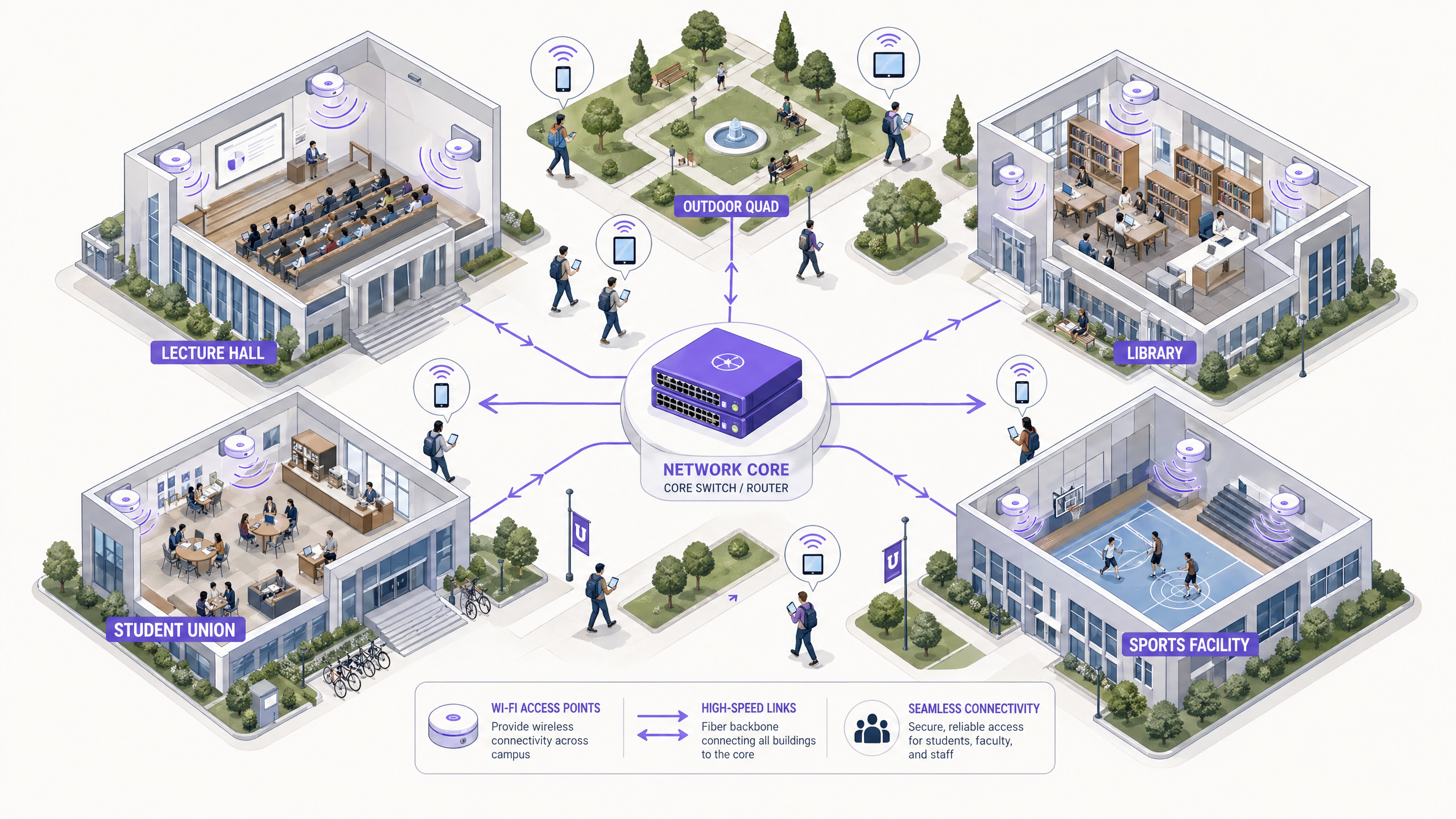
Für Hochschulen ist ein zuverlässiges campusweites WLAN nicht länger eine Annehmlichkeit – es ist eine kritische Infrastruktur, vergleichbar mit Strom und Wasser. Moderne Universitäten müssen Umgebungen mit hoher Dichte, nahtloses Roaming über große physische Flächen und sicheren Zugang für eine vielfältige Benutzerbasis, bestehend aus Studierenden, Dozenten, Forschenden und Gästen, unterstützen. Dieser Leitfaden bietet IT-Managern, Netzwerkarchitekten und CTOs einen maßgeblichen Entwurf für die Bereitstellung und Verwaltung eines leistungsstarken Universitäts-WiFi-Netzwerks. Durch die Konzentration auf eine robuste hierarchische Architektur, strenge Sicherheitsprotokolle einschließlich IEEE 802.1X und WPA3 Enterprise sowie die strategische Integration von Analysen können Institutionen eine optimale Konnektivität gewährleisten, Risiken mindern und einen messbaren ROI nachweisen. Wir untersuchen praktische Bereitstellungsphasen von ersten Standortbegehungen bis zur laufenden Optimierung mithilfe von Plattformen wie Purple's Guest WiFi und WiFi Analytics .
Technischer Einblick
Netzwerkarchitektur und Topologie
Der Aufbau eines campusweiten WLANs erfordert eine skalierbare, hierarchische Architektur. Der Standardansatz umfasst drei verschiedene Schichten: die Core-, Distributions- und Access-Schicht.
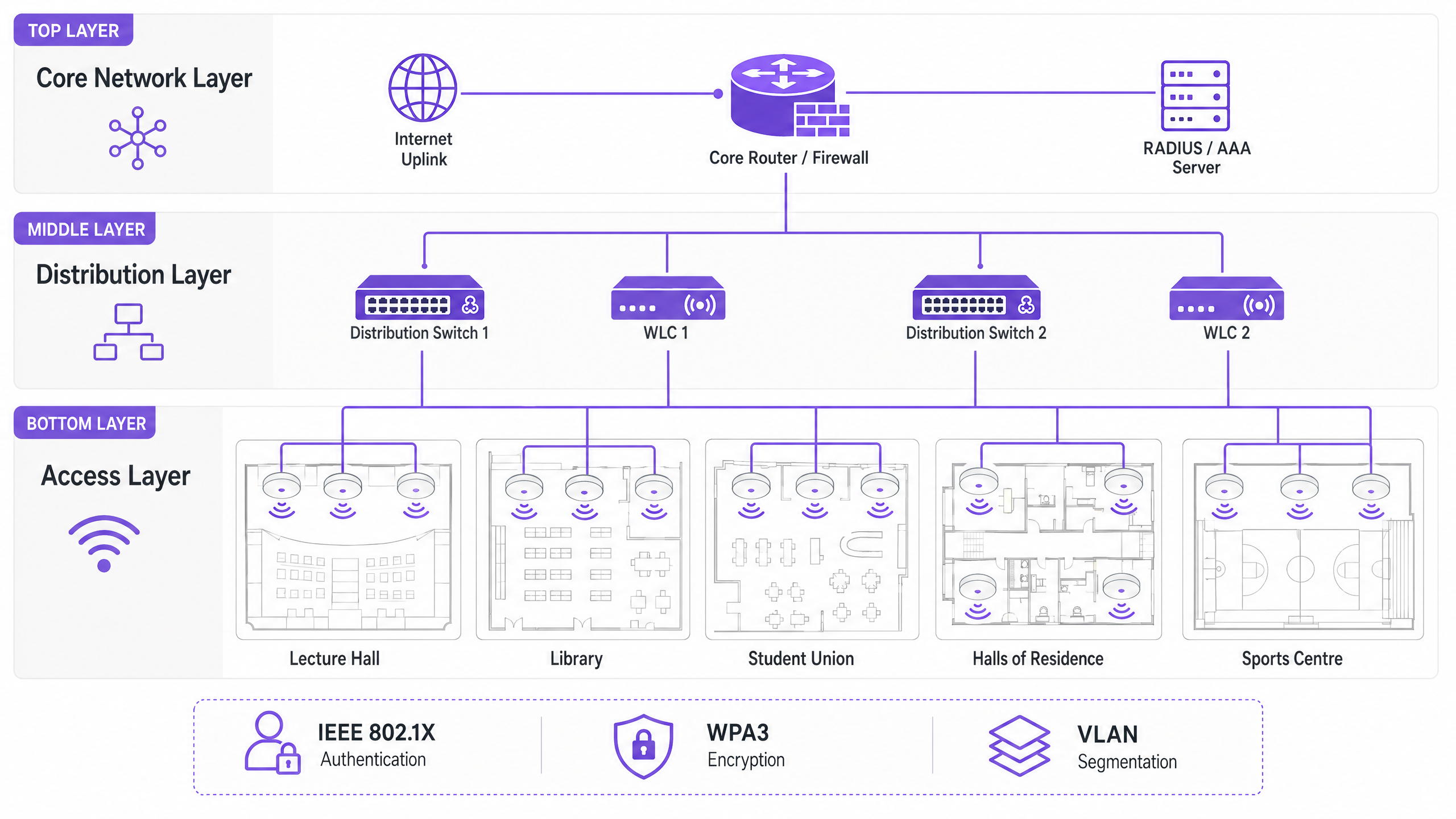
Die Core-Schicht bildet das Hochgeschwindigkeits-Backbone des Netzwerks. Sie übernimmt das Routing des Datenverkehrs zwischen verschiedenen Teilen des Campus und ins Internet. Hohe Verfügbarkeit und Redundanz sind hier von größter Bedeutung – Core-Router und Firewalls müssen in der Lage sein, massiven Durchsatz ohne Latenz zu bewältigen. Dual-Homed Uplinks und redundante Netzteile sind Standardpraxis.
Die Distributionsschicht fungiert als Vermittler, aggregiert den Datenverkehr von Access-Switches und erzwingt Netzwerkrichtlinien. Wireless LAN Controller (WLCs) befinden sich typischerweise hier, verwalten die Flotte von Access Points (APs), handhaben das RF-Management und gewährleisten nahtloses Roaming für Benutzer, die sich zwischen Gebäuden bewegen. Auf dieser Schicht werden auch Quality of Service (QoS)-Richtlinien angewendet.
Die Access-Schicht ist der Rand des Netzwerks, an dem Client-Geräte verbunden werden. Sie besteht aus PoE (Power over Ethernet)-Switches und den physischen APs, die in Hörsälen, Bibliotheken, Studentenwerken und auf Außenbereichen eingesetzt werden. Hochdichte APs, die Wi-Fi 6 (802.11ax) oder Wi-Fi 6E unterstützen, sind unerlässlich für Bereiche mit vielen gleichzeitig verbundenen Geräten.
Sicherheitsstandards und Authentifizierung
Die Sicherung eines Universitätsnetzwerks erfordert ein Gleichgewicht zwischen robustem Schutz und Benutzerzugänglichkeit in einer komplexen Multi-Tenancy-Umgebung.
WPA3 Enterprise und IEEE 802.1X sind für die Sicherung von Mitarbeiter- und Studentenverbindungen unerlässlich. 802.1X bietet portbasierte Network Access Control (NAC), die sicherstellt, dass nur authentifizierte Benutzer und Geräte auf das Netzwerk zugreifen können. Es integriert sich mit einem zentralen RADIUS-Server (wie FreeRADIUS oder Microsoft NPS), der mit dem Active Directory oder LDAP-Verzeichnis der Universität verbunden ist. Dies bedeutet, dass die Netzwerkanmeldeinformationen eines Studenten dieselben sind wie seine Universitätsanmeldung – was den Helpdesk-Aufwand drastisch reduziert.
Gastzugang und Captive Portals dienen Besuchern, Konferenzteilnehmern und Studieninteressierten. Ein sicheres Captive Portal gewährleistet die Einhaltung der GDPR und bietet gleichzeitig eine kontrollierte Onboarding-Erfahrung. Die Integration mit Lösungen wie Purple ermöglicht einen nahtlosen Gastzugang und erfasst gleichzeitig wertvolle Erstanbieterdaten für Marketing- und Betriebszwecke. Für einen tieferen Einblick in die Sicherung der Netzwerkbasis siehe Schützen Sie Ihr Netzwerk mit starkem DNS und Sicherheit .
VLAN-Segmentierung ist unerlässlich, um verschiedene Arten von Datenverkehr zu isolieren. Studentenverkehr, Fakultätsressourcen, IoT-Geräte (intelligente Gebäudesensoren, HLK-Steuerungen) und Gastzugang müssen sich auf separaten VLANs befinden. Dies begrenzt potenzielle Sicherheitsverletzungen, verhindert Broadcast-Stürme und ermöglicht eine granulare Bandbreitenverwaltung pro Benutzerklasse.
Implementierungsleitfaden
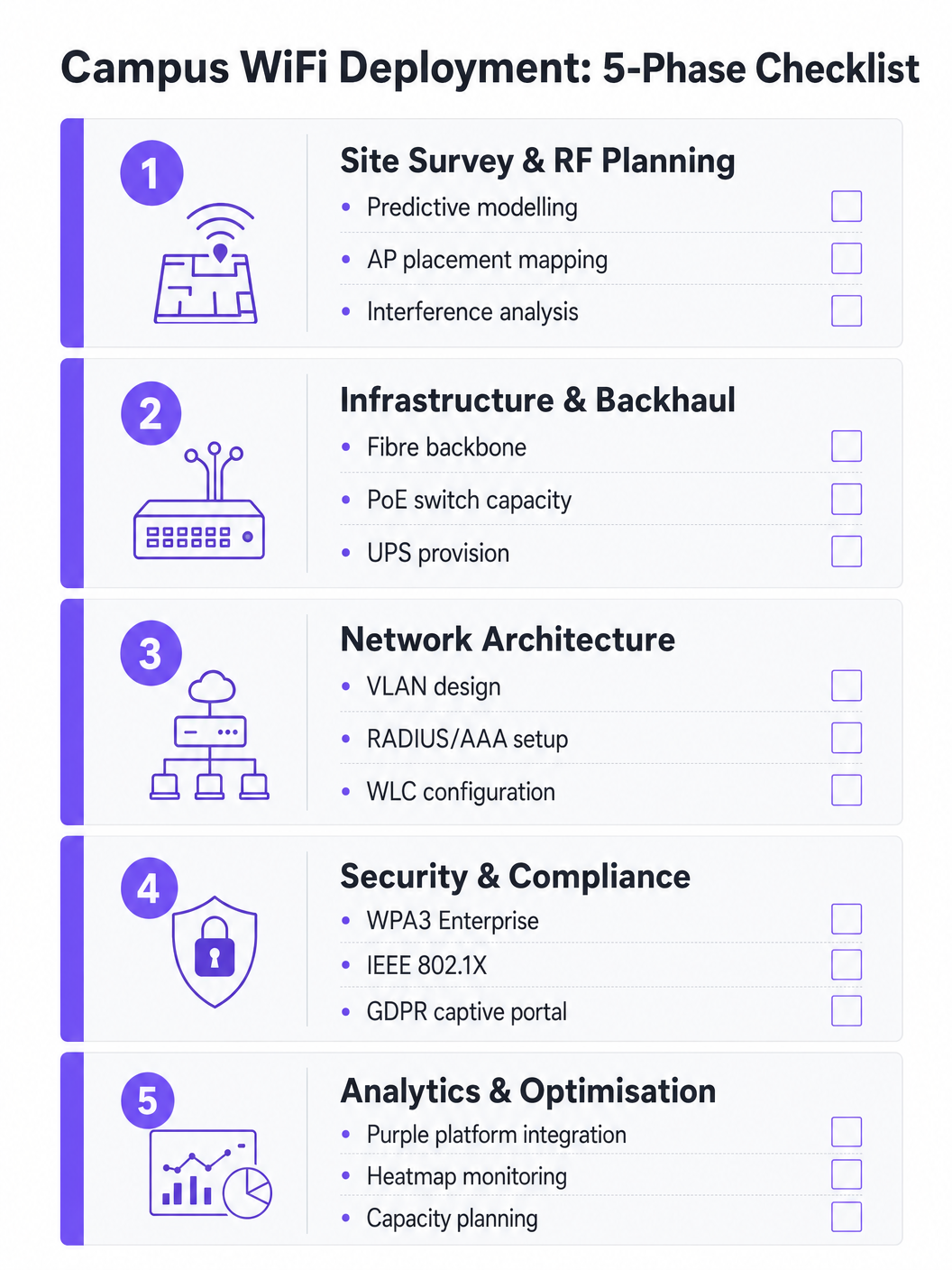
Phase 1: Standortbegehung und RF-Planung
Raten Sie niemals bei der AP-Platzierung. Eine umfassende prädiktive und aktive Standortbegehung ist die wichtigste Einzelinvestition in das Projekt. Tools wie Ekahau oder AirMagnet sollten verwendet werden, um die physische Umgebung zu kartieren, dabei Baumaterialien (Beton, Glas, Metall), Störquellen (ältere Bluetooth-Geräte, Mikrowellenherde, benachbarte Netzwerke) und die erwartete Benutzerdichte pro Zone zu berücksichtigen. Ziel ist es, eine ausreichende Abdeckung und Kapazität ohne Gleichkanalstörungen zu gewährleisten. Prädiktive Modelle sollten nach der Bereitstellung der ersten APs durch aktive Messungen validiert werden.
Phase 2: Infrastruktur- und Backhaul-Upgrades
Vor der Bereitstellung neuer APs muss die zugrunde liegende kabelgebundene Infrastruktur bewertet und bei Bedarf aufgerüstet werden. Stellen Sie sicher, dass CAT6A-Verkabelung eingesetzt wird, um Multi-Gigabit Ethernet (mGig) zu unterstützen, das von modernen Wi-Fi 6/6E APs benötigt wird. Überprüfen Sie, ob Edge-Switches ausreichend PoE+- oder PoE++-Strom für die neuen AP-Modelle liefern können. Das Core-Netzwerk muss über ausreichende Bandbreite verfügen – ziehen Sie dedizierte Business-Internetverbindungen für Resilienz in Betracht. Für weitere Informationen zu Backhaul-Optionen lesen Sie Was ist eine Standleitung? Dediziertes Business Internet .
Phase 3: Konfiguration der Netzwerkarchitektur
Konfigurieren Sie die WLCs und APs gemäß dkonzipierte Architektur. Implementieren Sie QoS-Richtlinien, um kritischen Datenverkehr (VoIP, Videokonferenzen, Forschungsdatenübertragungen) gegenüber Massen-Downloads und Streaming zu priorisieren. Stellen Sie sicher, dass nahtlose Roaming-Protokolle (802.11r für schnelle BSS-Übergänge, 802.11k für Nachbarberichte und 802.11v für BSS-Übergangsmanagement) korrekt konfiguriert sind, damit Geräte zwischen APs wechseln können, ohne die Verbindung zu verlieren.
Phase 4: Härtung der Sicherheit und Compliance
Implementieren Sie WPA3 Enterprise auf Mitarbeiter- und Studenten-SSIDs. Konfigurieren Sie IEEE 802.1X mit EAP-TLS oder PEAP-MSCHAPv2, abhängig von den Geräteverwaltungsfunktionen. Implementieren Sie ein GDPR-konformes Captive Portal für Gast-SSIDs. Stellen Sie sicher, dass alle Verwaltungsschnittstellen mit starken Anmeldeinformationen und zertifikatbasierter Authentifizierung gesichert sind. Führen Sie vor der Inbetriebnahme einen Penetrationstest durch.
Phase 5: Integration von Analysen und kontinuierliche Optimierung
Integrieren Sie das Netzwerk in eine Analyseplattform, um Einblicke in den AP-Zustand, die Client-Dichte, Roaming-Muster und die Bandbreitennutzung zu erhalten. Die WiFi Analytics -Plattform von Purple bietet operative Dashboards, die sowohl dem IT-Team als auch dem Veranstaltungsortmanagement zugutekommen. Dies ist keine einmalige Übung – HF-Umgebungen ändern sich, wenn Gebäude renoviert werden und Gerätetypen sich weiterentwickeln.
Bewährte Verfahren
Auf Kapazität, nicht nur auf Abdeckung, auslegen. Im Hochschulbereich ist Abdeckung einfach; Kapazität ist schwierig. Ein Hörsaal mag überall ein starkes Signal haben, aber wenn sich 300 Studenten gleichzeitig mit einem einzigen AP verbinden, wird das Netzwerk versagen. Setzen Sie APs mit hoher Dichte ein und nutzen Sie Funktionen wie Band Steering, um fähige Clients auf die weniger überlasteten 5 GHz- oder 6 GHz-Bänder zu leiten. Deaktivieren Sie ältere Datenraten (1, 2, 5.5 und 11 Mbps), um Sticky Clients zu zwingen, zu näheren APs zu wechseln.
Kontinuierliche Überwachung implementieren. Das Netzwerk ist keine einmalige Einrichtung, die man dann vergessen kann. Nutzen Sie Analyseplattformen, um den AP-Zustand, die Client-Dichte und Roaming-Muster in Echtzeit zu überwachen. Die Analysen von Purple können Einblicke in die Nutzung von Räumen geben und so zukünftige Infrastruktur-Entscheidungen und Raumauslastungsstrategien beeinflussen.
OpenRoaming für nahtloses Onboarding nutzen. Für Gastwissenschaftler und Studenten von Partnerinstitutionen beseitigt die Implementierung von OpenRoaming die Hürde der manuellen Netzwerkanmeldung. Purple fungiert als kostenloser Identitätsanbieter für OpenRoaming unter der Connect-Lizenz, wodurch Benutzer von teilnehmenden Institutionen automatisch und sicher eine Verbindung herstellen können – eine erhebliche Verbesserung des Besuchererlebnisses.
Alles segmentieren. Erlauben Sie niemals Gastdatenverkehr auf demselben VLAN wie interne Ressourcen. Verwenden Sie separate SSIDs, VLANs und Firewall-Regeln für jede Benutzerklasse. Wenden Sie Bandbreitenbegrenzungen auf Gast-VLANs an, um zu verhindern, dass ein einzelner Benutzer den Uplink während Spitzenzeiten überlastet.
Fehlerbehebung & Risikominderung
Gleichkanalinterferenz (CCI) tritt auf, wenn mehrere APs auf demselben Kanal sich gegenseitig hören können, wodurch sie abwechselnd senden und die Leistung stark beeinträchtigen. Dies ist die häufigste Ursache für schlechtes WiFi in dichten Umgebungen. Die Minderung umfasst eine ordnungsgemäße HF-Planung, die Nutzung dynamischer Kanalzuweisungsfunktionen (DCA) auf dem WLC und die Reduzierung der Sendeleistung von APs in dichten Bereichen.
Sticky Clients sind Geräte, die sich weigern, zu einem näheren AP zu wechseln und eine schwache Verbindung zu einem entfernten aufrechterhalten. Dies ist besonders häufig bei älteren Smartphones und Laptops der Fall. Die Minderung umfasst die Anpassung der minimalen obligatorischen Datenraten – das Deaktivieren niedrigerer Raten zwingt den Treiber des Clients, eine bessere Verbindung zu suchen.
DHCP-Erschöpfung ist ein überraschend häufiger Fehlerfall in Bereichen mit hoher Fluktuation wie Außenbereichen und Studentenwerken. Wenn der DHCP-Pool keine IP-Adressen mehr hat, können neue Geräte trotz starkem Signal keine Verbindung herstellen. Die Minderung umfasst die Implementierung kürzerer DHCP-Lease-Zeiten (ein bis zwei Stunden) für Gast- und Studenten-VLANs und die Sicherstellung, dass die DHCP-Bereiche für die maximale Anzahl gleichzeitiger Geräte korrekt dimensioniert sind.
Rogue Access Points stellen ein erhebliches Sicherheitsrisiko dar. Ein Mitarbeiter oder Student, der einen Consumer-Router anschließt, schafft einen ungesicherten Zugangspunkt. Die Minderung umfasst die Aktivierung der Erkennung von Rogue APs auf dem WLC und die Durchführung regelmäßiger physischer Audits.
ROI & Geschäftsauswirkungen
Ein robustes Campus-WiFi-Netzwerk liefert messbare Erträge, die über die grundlegende Konnektivität hinausgehen. Durch die Integration von Plattformen wie Purple können Universitäten die folgenden Ergebnisse quantifizieren:
| Metrik | Messansatz | Typisches Ergebnis |
|---|---|---|
| Studentenzufriedenheit | NPS-Umfragen, Volumen der IT-Helpdesk-Tickets | Reduzierung WiFi-bezogener Beschwerden |
| Raumauslastung | Heatmap-Analysen, Verweildauerdaten | Optimierte Zuweisung von Bibliotheks- und Lernräumen |
| IT-Betriebseffizienz | Helpdesk-Ticketvolumen, Onboarding-Zeit | Reduzierter manueller Bereitstellungsaufwand |
| Erfassung von Gastdaten | Captive Portal-Registrierungen | Wachstum der First-Party-Marketingdatenbank |
| Netzwerkverfügbarkeit | SLA-Überwachung, Vorfallberichte | Verbesserte SLA-Einhaltung |
Die Analyse- und Gastdatenfunktionen der Purple-Plattform eröffnen auch Umsatzmöglichkeiten – insbesondere bei großen öffentlichen Veranstaltungen auf dem Campus, wo gestufte Zugangsmodelle eingesetzt werden können. Ähnliche ROI-Frameworks gelten in den Bereichen Einzelhandel , Gastgewerbe , Gesundheitswesen und Transport , in denen Purple tätig ist. Für eine breitere Perspektive auf WiFi-Implementierungen in großen Veranstaltungsorten siehe Airport WiFi: How Operators Deliver Connectivity Across Terminals und WiFi Aeroportuale: Come gli Operatori Forniscono Connettività tra i Terminal .
Schlüsseldefinitionen
IEEE 802.1X
A standard for port-based Network Access Control (NAC) that provides an authentication mechanism for devices wishing to connect to a LAN or WLAN. It requires a supplicant (client device), an authenticator (the AP or switch), and an authentication server (RADIUS).
Used to authenticate students and staff before they are allowed onto the network, integrating with a RADIUS server and Active Directory for credential validation. Eliminates shared PSK passwords and enables per-user policy enforcement.
WLC (Wireless LAN Controller)
A centralised hardware or software appliance that manages and configures multiple Access Points from a single point of control. It handles RF management, roaming, firmware updates, and policy enforcement across the AP fleet.
Essential for large deployments to ensure consistent policy enforcement, dynamic channel assignment, and seamless roaming across the campus. Can be physical hardware or a cloud-managed virtual instance.
Co-Channel Interference (CCI)
Interference that occurs when two or more APs operating on the same frequency channel are within range of each other. Both APs must wait for the channel to be clear before transmitting, severely reducing throughput.
The primary cause of poor performance in dense deployments. Mitigated by careful channel planning, dynamic channel assignment (DCA) on the WLC, and reducing AP transmit power.
Band Steering
A technique used by APs to encourage dual-band capable client devices to connect to the 5 GHz or 6 GHz band rather than the more congested 2.4 GHz band, by delaying or suppressing probe responses on 2.4 GHz.
Critical for maximising capacity and throughput in high-density areas. The 5 GHz and 6 GHz bands offer more non-overlapping channels and higher throughput, but shorter range.
Captive Portal
A web page that users are redirected to before gaining full network access. It typically requires acceptance of terms of service, authentication, or data capture before the user's MAC address is permitted through the firewall.
Used for guest access management, GDPR-compliant data collection, and branded onboarding experiences. Platforms like Purple provide customisable captive portal solutions with analytics integration.
VLAN (Virtual Local Area Network)
A logical grouping of network devices that behave as if they are on the same physical network, regardless of their actual physical location. VLANs are defined at Layer 2 and are used to segment broadcast domains.
Used to isolate different user classes (students, staff, guests, IoT devices) for security and performance. Prevents guest traffic from reaching internal resources and allows per-VLAN bandwidth policies.
PoE (Power over Ethernet)
A technology that passes electrical power along with data on twisted-pair Ethernet cabling, allowing a single cable to provide both data connection and electrical power to devices such as APs.
Allows APs to be installed in locations without dedicated power outlets. IT teams must verify that edge switches have sufficient PoE budget (total watts) to power all connected APs, particularly with power-hungry Wi-Fi 6E models requiring PoE++ (802.3bt).
OpenRoaming
A global WiFi roaming federation built on the Hotspot 2.0 (Passpoint) standard, allowing users to automatically and securely connect to participating networks without manual login, using their existing identity credentials.
Improves the experience for visiting academics and students from partner institutions. Purple can act as an identity provider for OpenRoaming under the Connect licence, enabling automatic secure connections for eligible users.
WPA3 Enterprise
The latest generation of the Wi-Fi Protected Access security protocol for enterprise networks. It uses 192-bit minimum-strength security protocols and mandates the use of Protected Management Frames (PMF), providing stronger protection against offline dictionary attacks.
The recommended security standard for all staff and student SSIDs. Replaces WPA2 Enterprise and provides significantly stronger protection for sensitive research and personal data transmitted over the wireless network.
RADIUS (Remote Authentication Dial-In User Service)
A networking protocol that provides centralised Authentication, Authorisation, and Accounting (AAA) management for users who connect and use a network service.
The backbone of 802.1X authentication on campus networks. The RADIUS server validates credentials against Active Directory and returns the appropriate VLAN assignment and access policy for each authenticated user.
Ausgearbeitete Beispiele
A large university is upgrading its main lecture theatre (capacity 500) to Wi-Fi 6. The previous deployment used 4 APs mounted on the high ceiling, resulting in poor performance and frequent disconnects during peak times. What is the correct approach?
The IT team must shift from a coverage-centric design to a capacity-centric one. First, conduct a new site survey specifically for the lecture theatre, modelling the expected device count (assume 1,000+ devices given 2+ devices per student). Replace the ceiling-mounted omni-directional APs with either under-seat AP deployments or directional (patch) antenna arrays mounted on the side walls, creating smaller, focused micro-cells. Increase the AP count to 8-12 Wi-Fi 6 APs, each serving a defined section of seating. Disable 2.4 GHz radios on alternating APs to reduce co-channel interference, relying primarily on 5 GHz and 6 GHz bands. Implement strict band steering and disable legacy data rates below 12 Mbps. Configure the WLC to use 20 MHz channel widths in the 5 GHz band (rather than 40 or 80 MHz) to allow more non-overlapping channels and reduce interference.
A campus network is experiencing intermittent connectivity issues in the outdoor quad area. Users report strong signal but inability to load web pages during the lunch period (12:00-13:30). What is the diagnostic approach?
Strong signal with no connectivity is a Layer 2/3 issue, not an RF problem. The diagnostic sequence should be: (1) Check the DHCP scope for the outdoor VLAN — query the DHCP server for scope utilisation. If it is above 80%, DHCP exhaustion is the likely cause. Reduce lease times to 1 hour and expand the scope if possible. (2) If DHCP is healthy, check the uplink capacity of the outdoor distribution switch. If the APs are connected via a congested uplink, the bottleneck is wired, not wireless. (3) Analyse the RF environment for external interference using a spectrum analyser — municipal WiFi networks or nearby businesses may be causing noise floor elevation. (4) Review the firewall and NAT table for session exhaustion during peak periods.
Übungsfragen
Q1. A university is planning to deploy WiFi in a newly constructed outdoor sports stadium with a capacity of 8,000 spectators. The stadium has no roof and an open bowl design. What is the most critical RF consideration and how should AP placement be approached?
Hinweis: Consider the lack of physical boundaries, signal propagation in an open environment, and the extreme device density during events.
Musterlösung anzeigen
The most critical consideration is controlling signal propagation and minimising Co-Channel Interference in an environment with no natural RF attenuation. Unlike indoor environments, the open bowl means signals travel freely, causing APs to interfere with each other across the entire space. The correct approach is to use directional (sector) antennas mounted under the seating tiers, pointing downward into the seating rows to create highly focused micro-cells. Transmit power must be carefully tuned to limit cell size. Wi-Fi 6 APs with OFDMA and BSS Colouring features should be specified to handle the extreme device density. Separate SSIDs and VLANs should be configured for event staff, media, and public attendees.
Q2. During a network upgrade, the IT team notices that older IoT devices (legacy HVAC sensors and door access controllers) are failing to connect to the new campus WiFi network after the security upgrade to WPA3 Enterprise.
Hinweis: Consider the security protocol compatibility of legacy embedded devices and the need to maintain security for other user classes.
Musterlösung anzeigen
The new network enforcing WPA3 Enterprise is incompatible with older IoT devices that only support WPA2 or earlier protocols. The solution is to create a dedicated, isolated SSID and VLAN specifically for legacy IoT devices, utilising WPA2-PSK with a strong, rotated passphrase, or MAC Authentication Bypass (MAB) for devices that cannot support any EAP method. This VLAN must be tightly firewalled — IoT devices should only be able to communicate with their specific management servers, not the broader campus network. The main student and staff SSIDs remain on WPA3 Enterprise, maintaining security for the primary user population.
Q3. The university wants to monetise its guest WiFi network during large public events (open days, graduation ceremonies, public lectures) while remaining GDPR-compliant. What is the recommended architecture?
Hinweis: Consider data capture requirements, consent mechanisms, and the difference between free and premium access tiers.
Musterlösung anzeigen
Deploy a captive portal solution such as Purple integrated with the guest VLAN. Configure a tiered access model: a free tier offering basic internet access (with bandwidth caps) in exchange for email address and explicit GDPR-compliant marketing consent, and an optional premium tier offering higher bandwidth for a fee (processed via a payment gateway integration). The captive portal must display a clear privacy notice and record consent timestamps to satisfy GDPR Article 7 requirements. Captured first-party data feeds into the university's CRM for post-event marketing. All guest traffic must be isolated from internal university systems via firewall rules, and data retention policies must be documented and enforced.
Q4. The IT team receives complaints that WiFi performance in the main library is poor between 10:00 and 14:00 on weekdays, despite the network showing healthy AP status in the management console. How should the team approach diagnosis?
Hinweis: Consider time-based patterns and what changes between off-peak and peak hours.
Musterlösung anzeigen
The time-based pattern is the key diagnostic clue — the issue only occurs during peak occupancy hours, suggesting a capacity problem rather than a hardware or configuration fault. The diagnostic sequence should be: (1) Check per-AP client association counts during the problem window — if any AP is serving more than 30-40 clients simultaneously, it is overloaded. (2) Review DHCP scope utilisation for the library VLAN. (3) Check uplink utilisation on the distribution switch serving the library — the wired backhaul may be saturated. (4) Review the channel utilisation and retry rates on the APs using the WLC's RF statistics. The likely resolution is either deploying additional APs to distribute the client load, or implementing stricter band steering and minimum data rate policies to improve per-client throughput.
Weiterlesen in dieser Reihe
Was ist eine Probe Request? Verstehen, wie Geräte Netzwerke entdecken
Dieser technische Leitfaden bietet einen tiefen Einblick in IEEE 802.11 Probe Requests, aktives versus passives Scannen und die Auswirkungen der MAC randomisation auf Standortanalysen. Er liefert umsetzbare Implementierungsstrategien für Netzwerkarchitekten zur Optimierung von High-Density-Bereitstellungen, zur Minderung von Probe Storms und zur Sicherstellung einer genauen, GDPR-konformen Datenerfassung mithilfe authentifizierter Identitätsschichten.
Wie man langsames WiFi behebt, ohne Ihr Internetpaket zu aktualisieren
Ein umfassender technischer Leitfaden für IT-Manager und Netzwerkarchitekten zur Optimierung der Unternehmens-WiFi-Leistung, ohne die ISP-Bandbreite zu erhöhen. Behandelt HF-Tuning, Client-Dichte-Management, QoS-Implementierung und wie man WiFi-Analysen nutzt, um Engpässe zu diagnostizieren und zu beheben.
Die Checkliste für die Migration von Legacy NAC zu Cloud-Native NAC
Dieser maßgebliche technische Leitfaden bietet eine strukturierte, dreiphasige Checkliste für die Migration von der traditionellen Netzwerkzugriffskontrolle (NAC) zu einer Cloud-nativen Architektur. Er stattet IT-Manager und Netzwerkarchitekten mit umsetzbaren Strategien aus, um die Identitätsintegration, Richtlinienkonsistenz und Compliance zu gewährleisten, ohne den Veranstaltungsbetrieb zu stören.