

Was ist DNS-Filterung? Wie man schädliche Inhalte im Gast-WiFi blockiert
Dieser umfassende technische Leitfaden erklärt, wie DNS-Filterung auf der Netzwerkschicht funktioniert, um das Gast-WiFi von Unternehmen zu sichern, und behandelt Bereitstellungsarchitekturen, Umgehungsprävention und Captive Portal-Integration. Er bietet umsetzbare Implementierungsanleitungen für IT-Führungskräfte in Einzelhandel, Gastgewerbe und öffentlichen Einrichtungen, die Inhaltsrichtlinien durchsetzen, den Markenruf schützen und die Einhaltung von PCI DSS und GDPR nachweisen müssen. Praxisbeispiele aus Hotel- und Einzelhandelsumgebungen veranschaulichen die praktischen Kompromisse und Konfigurationsentscheidungen, die den Bereitstellungserfolg bestimmen.
Diesen Leitfaden anhören
Podcast-Transkript ansehen
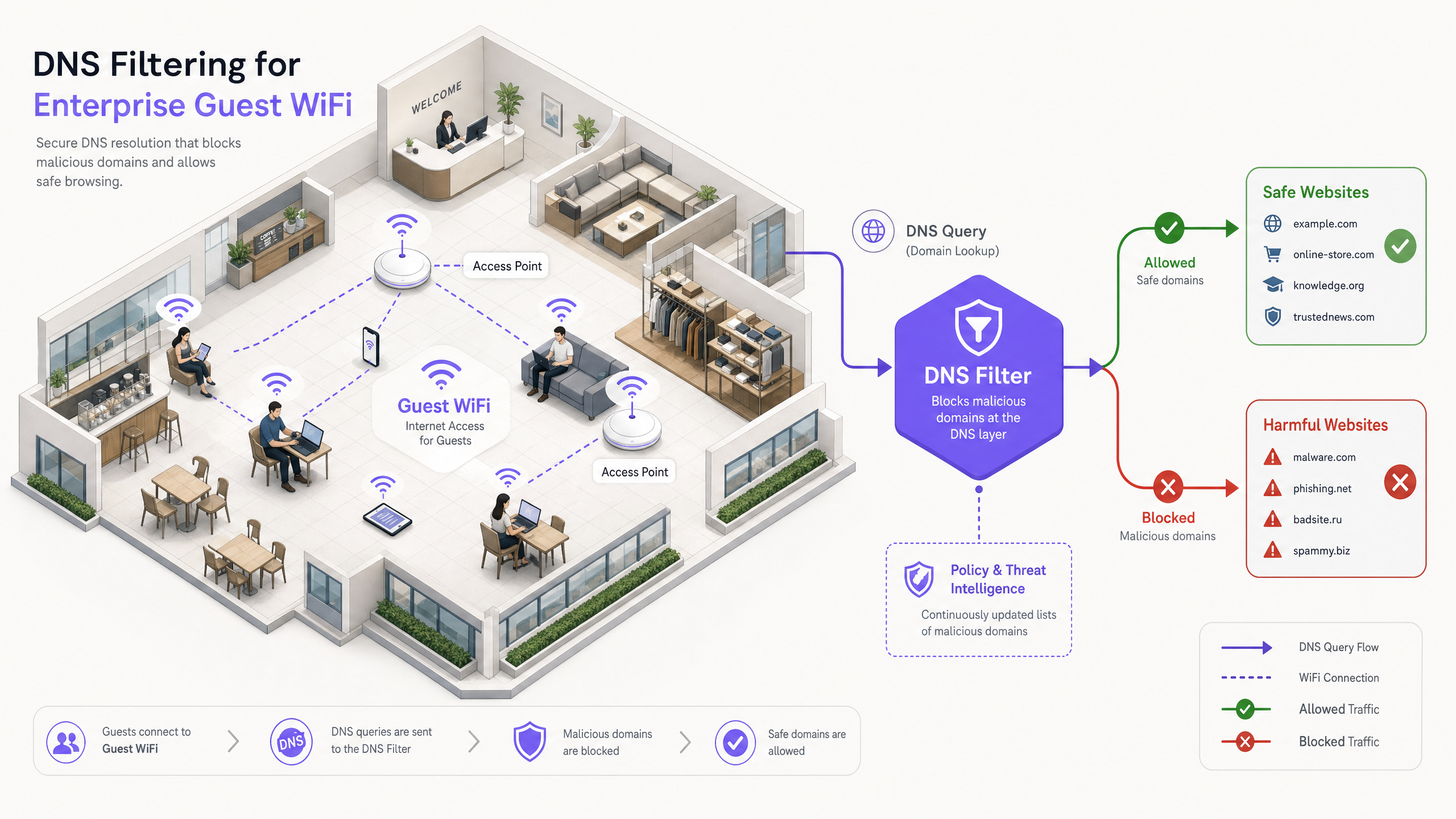
Zusammenfassung für Führungskräfte
Für IT-Führungskräfte in Unternehmen, die große öffentliche Netzwerke verwalten, ist die Gewährleistung eines sicheren, konformen und leistungsfähigen Browsing-Erlebnisses ein entscheidendes operatives Mandat. Gast-WiFi-Netzwerke im Gastgewerbe, Einzelhandel und in öffentlichen Einrichtungen sind Hauptziele für bösartige Aktivitäten und Richtlinienverstöße – von Botnet-Command-and-Control-Verkehr bis hin zu illegalem Streaming und unangemessenen Inhalten. Dieser Leitfaden bietet eine definitive technische Referenz zur DNS-Filterung: dem effizientesten Mechanismus zur Blockierung schädlicher Inhalte und zur Risikominderung am Netzwerkrand.
Im Gegensatz zu ressourcenintensiver Deep Packet Inspection (DPI) oder starren IP-Blocklisten fängt die DNS-Filterung die anfängliche Domain-Auflösungsanfrage ab. Durch die Bewertung von Anfragen anhand von Echtzeit-Bedrohungsdaten-Feeds verhindert sie Verbindungen zu bösartigen oder unangemessenen Domains, bevor eine Nutzlast ausgetauscht wird. Dieser Ansatz gewährleistet hohen Durchsatz und minimale Latenz – unerlässlich für Umgebungen, die Tausende gleichzeitiger Benutzer unterstützen.
Die Implementierung einer robusten DNS-Filterung schützt nicht nur den Ruf des Veranstaltungsortes, sondern unterstützt auch die Einhaltung von Datenschutzbestimmungen und familienfreundlichen Nutzungsrichtlinien. Für Organisationen, die Lösungen wie Guest WiFi und WiFi Analytics nutzen, ist die Integration von DNS-basierten Kontrollen eine grundlegende Sicherheitsanforderung, die jede andere Schicht des Gastnetzwerk-Stacks untermauert.
Technischer Deep-Dive: So funktioniert DNS-Filterung
DNS-Filterung fungiert als proaktive Sicherheitsebene innerhalb der Netzwerkarchitektur. Wenn ein Client-Gerät versucht, auf eine Domain zuzugreifen, fängt der lokale DNS-Resolver die Anfrage ab. Anstatt sofort die IP-Adresse zurückzugeben, wird die Anfrage an eine Filter-Engine weitergeleitet, die sie anhand von Richtlinien und Bedrohungsdaten bewertet, bevor sie entscheidet, ob sie aufgelöst oder blockiert werden soll.
Die Auflösungspipeline
Die DNS-Filterungs-Auflösungspipeline arbeitet in vier verschiedenen Phasen. Erstens, Anfrageabfang: Das Gastgerät verbindet sich mit dem Netzwerk und empfängt die IP-Konfiguration über DHCP, die den DNS-Filterserver als primären Resolver festlegt. Zweitens, Richtlinienbewertung: Die Filter-Engine empfängt die Anfrage (z.B., malicious-domain.com) und gleicht sie mit kategorisierten Blocklisten und dynamischen, in Echtzeit aktualisierten Bedrohungsdaten-Feeds ab. Drittens, Auflösung oder Sinkholing: Ist die Domain harmlos, löst die Engine die echte IP-Adresse auf und die Verbindung wird normal fortgesetzt. Verstößt die Domain gegen die Richtlinien, gibt die Engine eine nicht-routingfähige IP-Adresse zurück – eine Technik, die als Sinkholing bekannt ist – oder leitet den Benutzer auf eine markengeschützte Blockierungsseite um. Viertens, Protokollierung: Jede Anfrage, ob aufgelöst oder blockiert, wird zu Audit- und Analysezwecken protokolliert.
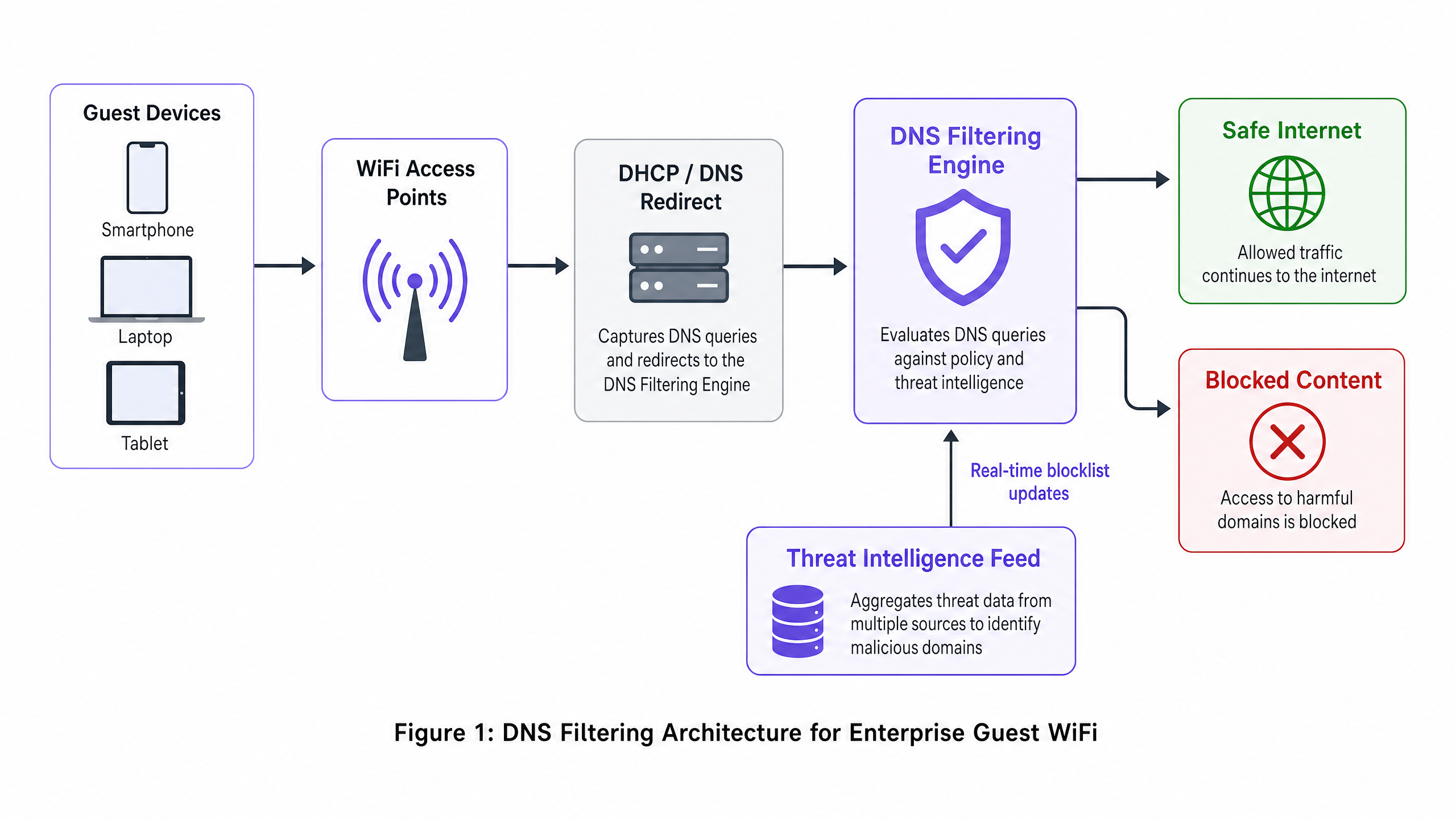
Architektonische Vorteile
Der Einsatz von DNS-Filterung bietet deutliche Vorteile gegenüber alternativen Methoden zur Inhaltskontrolle. Der Latenz-Overhead ist vernachlässigbar – DNS-Anfragen sind leichte UDP-Pakete, und deren Auswertung fügt weniger als 2ms hinzu, was für den Endbenutzer nicht wahrnehmbar ist. Der Ansatz ist auch protokollunabhängig: Da die Filterung erfolgt, bevor die Verbindung hergestellt wird, ist sie unabhängig vom zugrunde liegenden Anwendungsprotokoll (HTTP, HTTPS, FTP) oder der Portnummer wirksam. Dies ist ein erheblicher Vorteil gegenüber der URL-basierten Proxy-Filterung, die verschlüsselten HTTPS-Verkehr nicht inspizieren kann, ohne ein benutzerdefiniertes Root-Zertifikat auf jedem Endpunkt bereitzustellen – eine Unmöglichkeit auf nicht verwalteten Gastgeräten.
Skalierbarkeit ist eine weitere Kernstärke. Ein einzelner robuster DNS-Cluster kann Millionen von Anfragen pro Sekunde verarbeiten, was ihn ideal für Umgebungen mit hoher Dichte wie Stadien, große Konferenzzentren oder Multi-Site- Retail -Bereitstellungen macht. Für komplexe Multi-Tenant-Topologien lässt sich die DNS-Filterung sauber in VLAN-basierte Segmentierungsstrategien integrieren, wie in Designing a Multi-Tenant WiFi Architecture for MDU beschrieben.
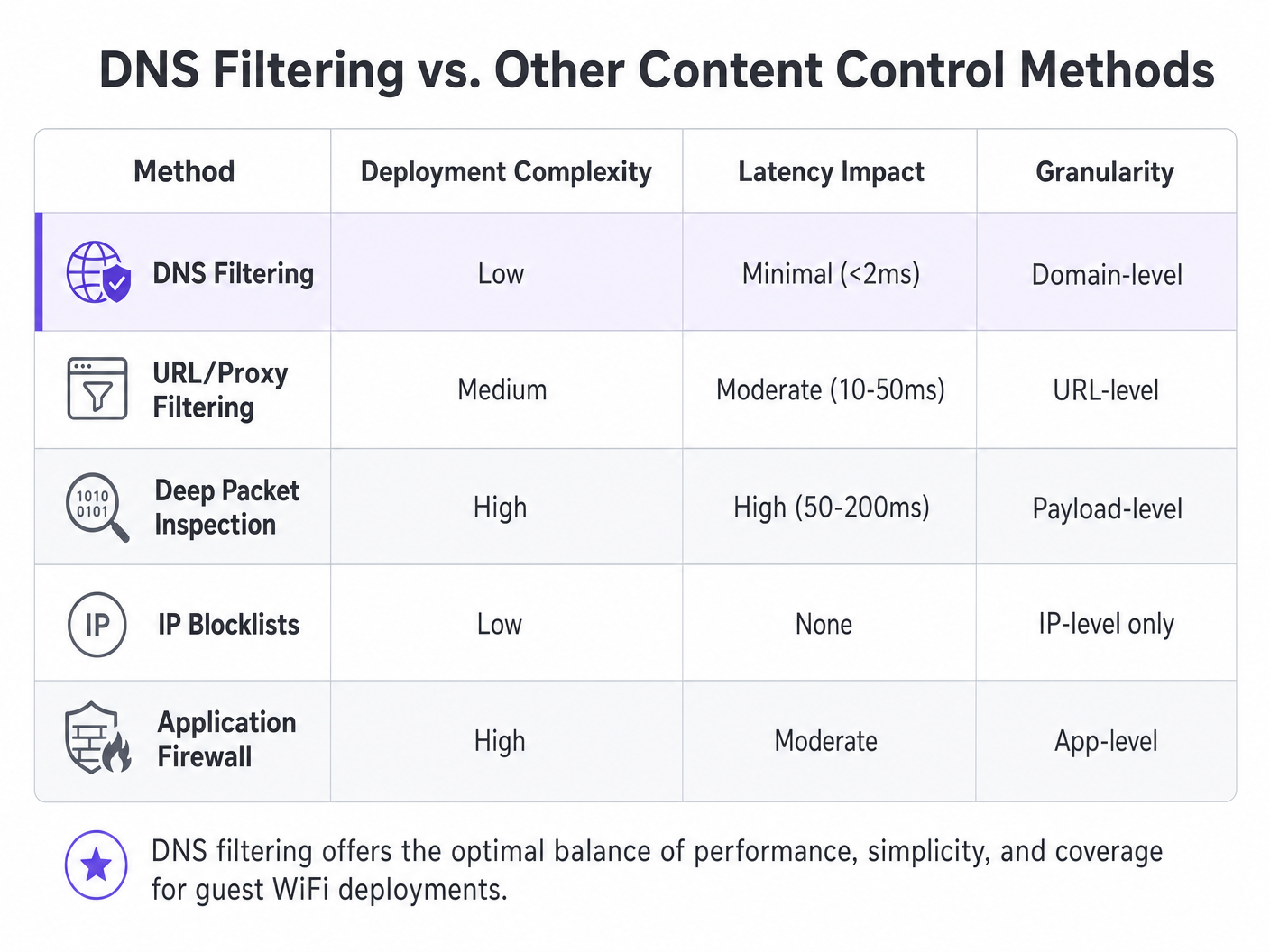
| Methode | Bereitstellungskomplexität | Latenzauswirkung | Granularität | Eignung für Gastnetzwerke |
|---|---|---|---|---|
| DNS Filtering | Niedrig | Minimal (<2ms) | Domain-Ebene | Empfohlen |
| URL/Proxy Filtering | Mittel | Moderat (10–50ms) | URL-Ebene | Begrenzt (HTTPS-Probleme) |
| Deep Packet Inspection | Hoch | Hoch (50–200ms) | Payload-Ebene | Nicht empfohlen |
| IP Blocklists | Niedrig | Keine | Nur IP-Ebene | Nur ergänzend |
| Application Firewall | Hoch | Moderat | App-Ebene | Komplementär |
Implementierungsleitfaden
Der Einsatz von DNS-Filterung erfordert eine sorgfältige Planung, um eine umfassende Abdeckung zu gewährleisten, ohne den legitimen Datenverkehr zu stören. Die folgenden Schritte skizzieren eine herstellerneutrale Bereitstellungsstrategie, die in den Bereichen Hospitality , Healthcare , Transport und Einzelhandel anwendbar ist.
Schritt 1: Netzwerksegmentierung und DHCP-Konfiguration
Die robusteste Bereitstellungsmethode besteht darin, das Netzwerk-Gateway oder den DHCP-Server so zu konfigurieren, dass er die IP-Adressen des DNS-Filterservers an alle Gast-Clients vergibt. Dies stellt sicher, dass jedes Gerät, das dem Netzwerk beitritt, automatisch den sicheren Resolver verwendet, ohne dass eine Agenteninstallation auf dem Endpunkt erforderlich ist.
Für Umgebungenn mit komplexen Topologien – wie sie in Entwicklung einer Multi-Tenant WiFi-Architektur für MDU beschrieben sind – stellen Sie sicher, dass VLANs, die dem Gastverkehr gewidmet sind, strikt über den gefilterten DNS geleitet werden, während operative VLANs (PMS, POS, Gebäudemanagement) weiterhin interne Resolver verwenden. Diese VLAN-basierte Isolation ist eine Voraussetzung für die PCI DSS-Konformität, die eine strikte Netzwerksegmentierung zwischen Umgebungen mit Kartendaten und nicht vertrauenswürdigen Gastnetzwerken vorschreibt.
Schritt 2: Umgehungsprävention – Port 53 blockieren
Dieser Schritt ist der Punkt, an dem viele Implementierungen scheitern. Die alleinige Zuweisung der DNS-Server über DHCP ist unzureichend. Ein Benutzer mit benutzerdefinierten DNS-Einstellungen auf seinem Gerät – die auf 8.8.8.8 oder 1.1.1.1 verweisen – umgeht den Filter vollständig. Die Abhilfe ist einfach: Implementieren Sie Firewall-Regeln am Gateway, die den gesamten ausgehenden Datenverkehr auf Port 53 (UDP und TCP) zu jeder anderen IP-Adresse als den dafür vorgesehenen Filterservern blockieren. Dies erzwingt den gesamten DNS-Verkehr durch den kontrollierten Resolver.
Erwägen Sie außerdem, DNS over HTTPS (DoH) zu blockieren. DoH verschlüsselt die DNS-Abfrage innerhalb des HTTPS-Verkehrs auf Port 443, wodurch sie auf Netzwerkebene nicht von normalem Webverkehr zu unterscheiden ist. Die effektivste Gegenmaßnahme besteht darin, eine Blockliste bekannter DoH-Anbieter-IP-Adressen (Cloudflare, Google, NextDNS) zu pflegen und diese an der Firewall zu blockieren.
Schritt 3: Richtliniendefinition und Kategorienmanagement
Legen Sie granulare Richtlinien fest, die auf den Anforderungen und dem Publikum des Veranstaltungsortes basieren. Eine typische Basisrichtlinie für öffentliches WiFi umfasst das Blockieren von Sicherheitsbedrohungen (Malware, Phishing, Botnet-C2-Server), nicht jugendfreien Inhalten und illegalen Aktivitäten (Piraterie, illegales Streaming). In bestimmten Sektoren können zusätzliche Kategorien angemessen sein: Glücksspiel und Waffen für Gesundheitseinrichtungen oder soziale Medien während der Geschäftszeiten für Unternehmens-Gastnetzwerke.
Schritt 4: Captive Portal-Integration – Der Walled Garden
Dies ist der technisch nuancierteste Aspekt der Implementierung. Captive Portals erfordern, dass sich Gäste authentifizieren, bevor sie vollen Internetzugang erhalten. Während der Vorauthentifizierungsphase befindet sich das Gastgerät in einem eingeschränkten Zustand – es kann nur das Captive Portal selbst erreichen. Wenn die DNS-Filterung während dieser Phase aktiv ist, kann sie die externen Domains blockieren, die für soziale Logins (Google OAuth, Facebook Login) oder Seiten zur Annahme der Nutzungsbedingungen erforderlich sind.
Die Lösung ist ein korrekt konfigurierter Walled Garden: eine Reihe von Domains, die in der DNS-Filterrichtlinie explizit zugelassen sind, bevor die Authentifizierung abgeschlossen ist. Diese Liste muss die eigene Domain des Captive Portal, alle OAuth-Identitätsanbieter-Domains und alle CDN-Endpunkte enthalten, die zum Rendern der Portal-Assets erforderlich sind. Eine fehlerhafte Konfiguration ist die häufigste Ursache für unterbrochene Gast-Onboarding-Erlebnisse. Diese Integrationsüberlegung gilt gleichermaßen für Büroumgebungen, wie in Office Wi Fi: Optimieren Sie Ihr modernes Office Wi-Fi-Netzwerk besprochen.
Schritt 5: Anpassung der Blockierungsseite und Benutzerkommunikation
Stellen Sie klare, gebrandete Blockierungsseiten bereit, die erklären, warum der Inhalt eingeschränkt wurde, und bieten Sie eine Möglichkeit, eine Überprüfung anzufordern, falls die Blockierung ein Fehlalarm ist. Dies reduziert Helpdesk-Tickets erheblich und unterstreicht das Engagement des Veranstaltungsortes für eine sichere Browsing-Umgebung. Eine gut gestaltete Blockierungsseite verwandelt eine Einschränkung in einen Markenkontaktpunkt.
Best Practices
Um die Effektivität der DNS-Filterung zu maximieren, halten Sie sich an die folgenden branchenüblichen Empfehlungen.
Hochverfügbarkeitsarchitektur: Konfigurieren Sie sekundäre und tertiäre DNS-Resolver. Wenn die primäre Filter-Engine nicht erreichbar ist, sollte der Datenverkehr nahtlos auf einen sekundären Resolver umgeleitet werden. Vermeiden Sie es, den Standard-Resolver des ISP als Fallback zu konfigurieren, da dies die Filterung während eines Ausfalls vollständig umgehen würde.
Regelmäßige Richtlinienprüfungen: Überprüfen Sie kontinuierlich Protokolle und Analysen, um Fehlalarme und aufkommende Bedrohungsmuster zu identifizieren. Integrieren Sie DNS-Abfrageprotokolle in Ihre WiFi Analytics -Plattform, um das Surfverhalten mit Netzwerk-Performance-Metriken zu korrelieren.
Qualität des Threat Intelligence Feeds: Die Effektivität der DNS-Filterung ist direkt proportional zur Qualität und Aktualität des Threat Intelligence Feeds. Bewerten Sie Anbieter nach der Häufigkeit der Feed-Updates (stündlich ist die Basis; Echtzeit wird bevorzugt), der Breite der Kategorienabdeckung und der Fehlalarmrate.
DNSSEC-Validierung: Wo unterstützt, aktivieren Sie die DNSSEC-Validierung auf dem Filter-Resolver. Dies verhindert DNS-Cache-Poisoning-Angriffe, bei denen ein Angreifer falsche DNS-Einträge einschleust, um Benutzer auf bösartige Websites umzuleiten.
Fehlerbehebung & Risikominderung
Auch bei einer robusten Architektur treten betriebliche Probleme auf. Im Folgenden sind die häufigsten Fehlerursachen und deren Abhilfemaßnahmen aufgeführt.
Fehlalarme: Legitime Domains, die fälschlicherweise als bösartig oder richtlinienverletzend eingestuft werden. Pflegen Sie einen leicht zugänglichen Allowlist-Managementprozess und eine schnelle Reaktions-SLA für Benutzerberichte. Überwachen Sie das Verhältnis von blockierten zu gesamten Abfragen; eine ungewöhnlich hohe Blockierungsrate ist ein starker Indikator für überaggressive Richtlinieneinstellungen.
Captive Portal-Fehler: Wie oben beschrieben, wird dies durch fehlende Walled Garden-Einträge verursacht. Diagnostizieren Sie, indem Sie DNS-Abfragen von einem Testgerät während der Vorauthentifizierungsphase erfassen und identifizieren, welche Abfragen blockiert werden. Fügen Sie diese Domains der Vorauthentifizierungs-Allowlist hinzu.
Leistungsabfall: Eine unzureichende DNS-Infrastruktur kann zu langsamem Browsen führen, was sich eher in hohen Seitenladezeiten als in vollständigen Ausfällen äußert. Setzen Sie lokale Caching-Resolver ein, um die Abfragelast auf den vorgelagerten Filter-Engines zu reduzieren. Überwachen Sie die DNS-Abfrageantwortzeiten; alles über 50 ms erfordert eine Untersuchung.
DoH-Umgehung: Wenn Analysen trotz Firewall-Regeln Datenverkehr zu bekannten DoH-Anbietern zeigen, überprüfen Sie, ob die Blockliste der DoH-Anbieter-IPs aktuell ist und ob die Firewall-Regeln für alle Gast-VLAN eZugangspunkte.
ROI & Geschäftsauswirkungen
Der Return on Investment für DNS-Filterung geht weit über die bloße Risikominderung hinaus. Für Gastgewerbe -Einrichtungen wirkt sich die Gewährleistung einer familienfreundlichen Umgebung direkt auf den Markenruf und die Net Promoter Scores aus. Ein einziger Vorfall, bei dem ein Gast – insbesondere ein Minderjähriger – auf unangemessene Inhalte im Netzwerk einer Einrichtung zugreift, kann erhebliche Reputations- und rechtliche Risiken nach sich ziehen.
Durch das Blockieren bandbreitenintensiver illegaler Streams können Einrichtungen auch die Netzwerkleistung optimieren und kostspielige Infrastruktur-Upgrades verzögern. In einem Hotel mit 500 Zimmern, in dem ein erheblicher Teil der Gäste von Piraterie-Websites streamte, kann der Einsatz von DNS-Filterung zum Blockieren dieser Domains die Spitzenbandbreitenauslastung um 20–35 % reduzieren, wodurch das Erlebnis für alle Gäste direkt verbessert und der Bedarf an zusätzlicher Uplink-Kapazität aufgeschoben wird.
Aus Compliance-Sicht ist der Nachweis robuster Netzwerksicherheitskontrollen oft eine Voraussetzung für die PCI DSS-Zertifizierung und unterstützt das GDPR-Prinzip des Datenschutzes durch Technikgestaltung. Die Kosten für eine DNS-Filterung – typischerweise ein Bruchteil eines Cents pro Benutzer und Monat für cloudbasierte Lösungen – sind vernachlässigbar im Vergleich zu den potenziellen Kosten einer behördlichen Strafe oder eines markenschädigenden Sicherheitsvorfalls.
Für IT-Teams, die häufige Bereitstellungen an mehreren Standorten verwalten, ist der Betriebsaufwand minimal. Cloudbasierte DNS-Filterlösungen erfordern keine lokale Hardware, aktualisieren Bedrohungsdaten automatisch und bieten eine zentralisierte Richtlinienverwaltung über Hunderte von Standorten hinweg von einem einzigen Dashboard aus.
Schlüsseldefinitionen
DNS Filtering
A security technique that intercepts DNS queries and evaluates them against policy and threat intelligence before resolving or blocking the requested domain.
The primary mechanism for content control on enterprise guest WiFi networks, operating at the network layer without requiring endpoint agents.
DNS Sinkholing
The practice of returning a false, non-routable IP address in response to a DNS query for a malicious or policy-violating domain, preventing the connection from being established.
Used to neutralise malware command-and-control traffic and prevent access to harmful sites without the user receiving a standard connection error.
Captive Portal
A web page that a user of a public-access network is required to interact with before full internet access is granted, typically used for terms acceptance, authentication, or data capture.
Crucial for guest onboarding and data collection; must be carefully integrated with DNS filtering to prevent the walled garden catch-22.
Walled Garden
A set of domains that are explicitly allowed in the DNS filtering policy during the pre-authentication phase, enabling the captive portal and authentication services to function before the user has accepted terms.
Misconfiguration of the walled garden is the most common cause of broken captive portal experiences in DNS-filtered guest networks.
Deep Packet Inspection (DPI)
A form of network packet filtering that examines the data payload of packets as they pass through an inspection point, enabling content-level analysis.
A more resource-intensive alternative to DNS filtering; impractical for high-throughput guest networks and unable to inspect encrypted HTTPS traffic without certificate interception.
DNS over HTTPS (DoH)
A protocol that encrypts DNS queries within HTTPS traffic, preventing network-level interception of DNS lookups.
Can be used to bypass traditional DNS filtering; administrators should block known DoH provider IPs at the firewall to maintain filtering coverage.
VLAN (Virtual Local Area Network)
A logical network segment that groups devices independently of their physical location, enforced at the switch or router level.
Essential for isolating guest WiFi traffic from internal corporate or operational networks, a prerequisite for PCI DSS compliance.
Threat Intelligence Feed
A continuously updated data stream containing information about known malicious domains, IP addresses, and URLs, used to power security systems.
The quality and freshness of the threat intelligence feed directly determines the effectiveness of a DNS filtering deployment against newly registered malicious domains.
DNSSEC (DNS Security Extensions)
A suite of IETF specifications that add cryptographic authentication to DNS responses, preventing cache poisoning and spoofing attacks.
Should be enabled on DNS filtering resolvers where supported to prevent attackers from injecting false DNS records to redirect users.
Ausgearbeitete Beispiele
A 500-room luxury hotel chain needs to implement content filtering on their guest WiFi. They currently experience high bandwidth utilisation due to illegal streaming and have received complaints about inappropriate content accessible in public areas. They require a solution that does not impact the performance of their property management system (PMS) which shares the same physical infrastructure via VLANs.
- Deploy a cloud-based DNS filtering solution. Configure the DHCP scope for the Guest WiFi VLAN to assign the cloud DNS filtering IPs as the primary and secondary resolvers. 2. Implement firewall rules on the gateway to block all outbound UDP and TCP traffic on port 53 from the Guest VLAN to any external IP other than the approved DNS filtering servers. 3. Create a content filtering policy blocking 'Adult Content', 'Piracy/Copyright Theft', 'Malware/Phishing', and 'Botnet C2'. 4. Configure a branded block page with the hotel's logo and a clear message. 5. Critically, ensure the PMS VLAN DHCP scope continues to use the internal DNS servers. The firewall rules blocking port 53 must be scoped exclusively to the Guest VLAN, not applied globally. 6. Monitor DNS query logs for the first 30 days to identify and resolve any false positives affecting legitimate guest services.
A large retail shopping centre wants to offer free public WiFi but must comply with strict family-friendly corporate policies. They also need to gather demographic data through a captive portal with social login options. How should they configure DNS filtering to support both requirements without breaking the onboarding flow?
- Integrate the DNS filtering solution with the existing network gateway, assigning filtering DNS IPs via DHCP on the guest SSID. 2. Before applying any blocking policy, configure the walled garden. Add the following to the pre-authentication allowlist: the captive portal's own domain and CDN endpoints, Google OAuth domains (accounts.google.com, oauth2.googleapis.com), Facebook Login domains ( www.facebook.com , graph.facebook.com), and any other identity providers in use. 3. Apply the content filtering policy (adult, gambling, malware, piracy categories) to activate only after successful authentication. 4. Implement port 53 egress blocking on the guest VLAN. 5. Customise the block page with the retail centre's branding and a clear, friendly message about family-friendly browsing. 6. Test the complete onboarding flow with multiple device types (iOS, Android, Windows) before go-live.
Übungsfragen
Q1. A stadium IT director reports that since deploying DNS filtering on the guest WiFi, guests are unable to complete the social login process on the captive portal. The portal uses Google and Facebook OAuth. What is the most likely architectural flaw and how would you resolve it?
Hinweis: Consider what external resources are required during the pre-authentication phase, before the user has accepted the terms of service.
Musterlösung anzeigen
The social login domains (accounts.google.com, oauth2.googleapis.com, www.facebook.com , graph.facebook.com) have not been added to the walled garden — the pre-authentication allowlist in the DNS filtering policy. The filter is blocking these queries because the user has not yet authenticated, creating a catch-22. The resolution is to explicitly add all required OAuth and identity provider domains to the pre-authentication allowlist, then re-test the full onboarding flow across iOS, Android, and Windows devices before re-deploying.
Q2. To improve network performance, a network architect proposes implementing a transparent HTTPS proxy to inspect all guest traffic instead of DNS filtering. Why is this approach fundamentally unsuitable for a public guest WiFi environment?
Hinweis: Think about the requirements for inspecting encrypted HTTPS traffic and the nature of unmanaged guest devices.
Musterlösung anzeigen
Transparent HTTPS inspection requires deploying a custom root certificate to every client device to perform a man-in-the-middle decryption of TLS traffic. On a managed corporate network this is achievable via MDM or Group Policy. On a public guest network, the venue has no control over guest endpoints, making certificate deployment impossible. Without the certificate, the proxy will generate severe TLS certificate warnings on every HTTPS site, completely breaking the browsing experience. DNS filtering is the correct approach for BYOD environments as it requires no endpoint agent or certificate.
Q3. A retail chain has deployed DNS filtering by assigning the filtering DNS IPs via DHCP on the guest SSID. Analytics show that a significant volume of adult content is still being accessed. What network configuration step was most likely missed, and what is the remediation?
Hinweis: How might a technically capable user override the DNS settings assigned by DHCP?
Musterlösung anzeigen
The network administrator failed to implement outbound firewall rules blocking port 53 (UDP and TCP) from the guest VLAN to any external IP other than the approved DNS filtering servers. Users with custom DNS settings hardcoded on their devices (e.g., 8.8.8.8) are bypassing the DHCP-assigned filtering resolvers entirely. The remediation is to add gateway firewall rules that redirect or drop all outbound port 53 traffic not destined for the filtering servers. Additionally, consider blocking known DoH provider IPs on port 443 to prevent encrypted DNS bypass.
Q4. A conference centre is planning a major international event. They expect 8,000 concurrent WiFi users over three days. Their current DNS infrastructure consists of a single on-premises filtering appliance. What architectural risks does this present and what changes would you recommend?
Hinweis: Consider both performance capacity and availability. What happens if the single appliance fails or becomes overloaded?
Musterlösung anzeigen
The single on-premises appliance presents two critical risks: a single point of failure (if it goes offline, all DNS resolution fails, taking down the entire guest network) and potential performance bottleneck under peak load. Recommendations: 1) Migrate to a cloud-based DNS filtering service with geographically distributed resolver infrastructure, capable of handling millions of queries per second. 2) Configure at least two resolver IPs in the DHCP scope (primary and secondary) pointing to different cloud resolver endpoints. 3) Implement local caching resolvers at the venue to reduce upstream query load and improve response times. 4) Conduct a load test prior to the event simulating peak concurrent users to validate the architecture.