

Was ist IPSK? Identity Pre-Shared Keys erklärt
Dieser umfassende technische Leitfaden erklärt Identity Pre-Shared Keys (IPSK/DPSK) und beschreibt detailliert, wie sie Sicherheit auf Unternehmensniveau und dynamisches VLAN-Steering für Mehrfamilienhäuser (MDUs) und Studentenwohnheime ohne die Komplexität von 802.1X bieten.
Diesen Leitfaden anhören
Podcast-Transkript ansehen
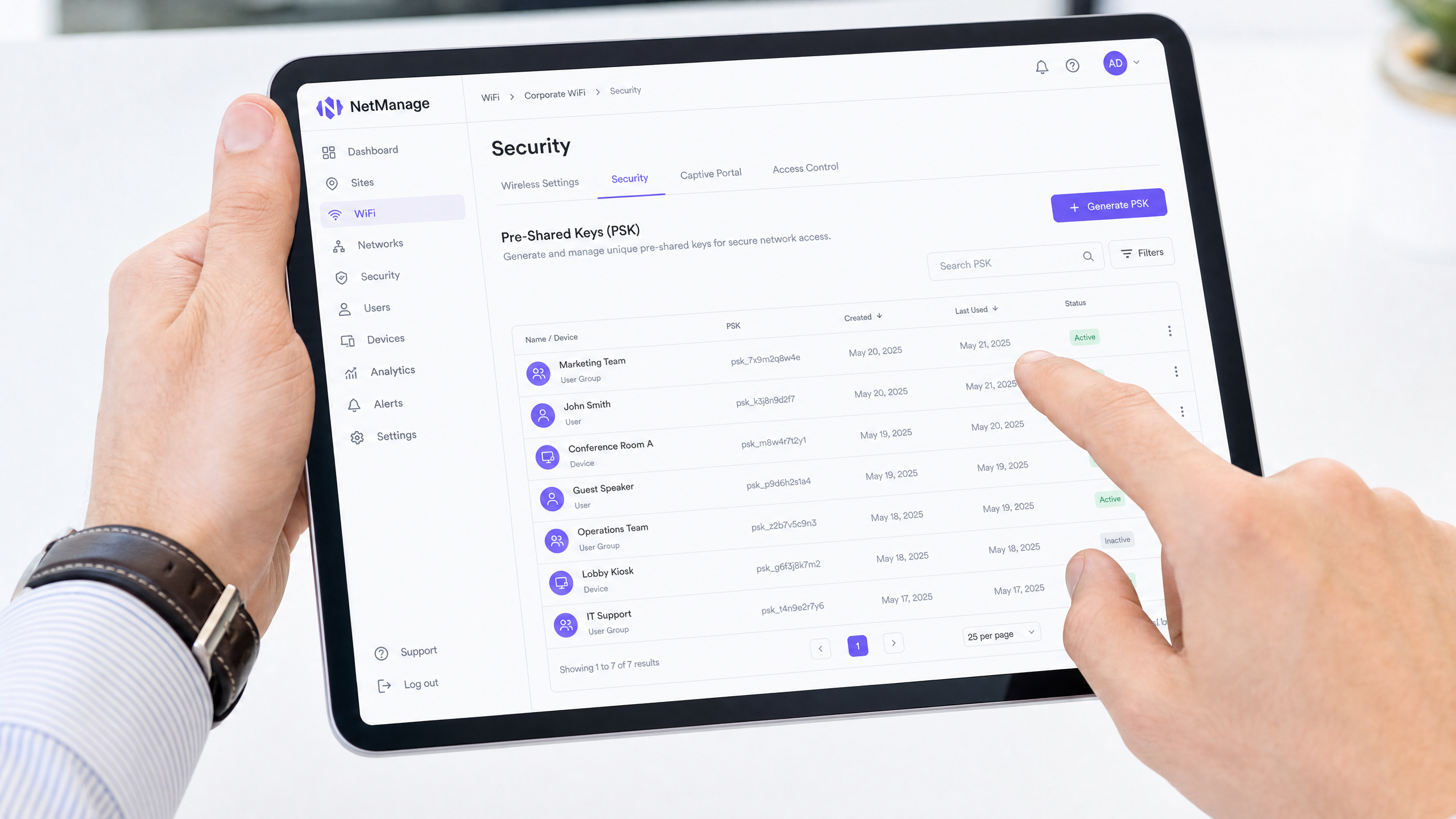
Hören Sie unserem Senior Solutions Architect zu, wie er die IPSK-Architektur in diesem 10-minütigen Briefing erläutert:
Executive Summary
Für Immobilienverwalter und IT-Direktoren, die Mehrfamilienhäuser (MDUs) betreiben, insbesondere in Studentenwohnheimen, stellt die Verwaltung des drahtlosen Zugangs eine einzigartige Herausforderung dar. Sie müssen die von den Bewohnern erwartete benutzerfreundliche Onboarding-Erfahrung mit der Sicherheit, Verantwortlichkeit und Netzwerksegmentierung auf Unternehmensniveau in Einklang bringen, die Compliance-Vorschriften erfordern.
Standard WPA2-Personal (ein einzelnes gemeinsames Passwort) bietet keine Benutzerverantwortlichkeit oder dynamische Netzwerksegmentierung. Umgekehrt bietet 802.1X (RADIUS) auf Unternehmensebene hervorragende Sicherheit, führt jedoch zu erheblichen Reibungsverlusten beim Onboarding von Headless-Geräten wie Spielkonsolen, Smart-TVs und IoT-Hardware, die in Wohnumgebungen üblich sind.
Identity Pre-Shared Keys (IPSK), auch bekannt als Dynamic PSK (DPSK), schließt diese Lücke. Es bietet das nahtlose Onboarding von WPA2-Personal und gleichzeitig die pro-Benutzer-Verantwortlichkeit, dynamisches VLAN-Steering und granulare Lebenszyklusverwaltung, die typischerweise 802.1X-Architekturen vorbehalten sind. Dieser Leitfaden beschreibt die technischen Mechanismen von IPSK, Bereitstellungsstrategien und warum es die definitive Architektur für moderne MDU- und Studentenwohnheimnetzwerke ist.
Technischer Deep-Dive: Was ist IPSK und wie funktioniert es?
Im Kern ist IPSK ein Authentifizierungsmechanismus, der es einem einzelnen Service Set Identifier (SSID) ermöglicht, mehrere, eindeutige Pre-Shared Keys (PSKs) zu unterstützen, wobei jeder Schlüssel auf Controllerebene an eine spezifische Identität (einen Benutzer, einen Raum oder eine Gerätegruppe) gebunden ist.
Das architektonische Problem bei geteilten PSKs
Bei einer traditionellen WPA2-Personal-Bereitstellung verwenden alle Clients, die sich mit der SSID verbinden, dieselbe Passphrase. Dies führt zu mehreren architektonischen Schwachstellen:
- Mangel an Identitätskontext: Das Netzwerk kann den Datenverkehr von Bewohner A und Bewohner B auf der Authentifizierungsebene nicht unterscheiden.
- Keine Netzwerksegmentierung: Alle Geräte landen in derselben Broadcast-Domäne (VLAN), es sei denn, es werden komplexe MAC-basierte Überschreibungen implementiert.
- Fehlerhaftes Lebenszyklusmanagement: Der Entzug des Zugriffs für ein einzelnes kompromittiertes Gerät oder einen abreisenden Bewohner erfordert die Änderung des globalen PSK, was ein störendes netzwerkweites Wiederverbindungsereignis für alle Benutzer erzwingt.
Die IPSK-Lösung
IPSK verlagert die Intelligenz vom Endgerät auf den Wireless Controller oder die Cloud-Management-Plattform.
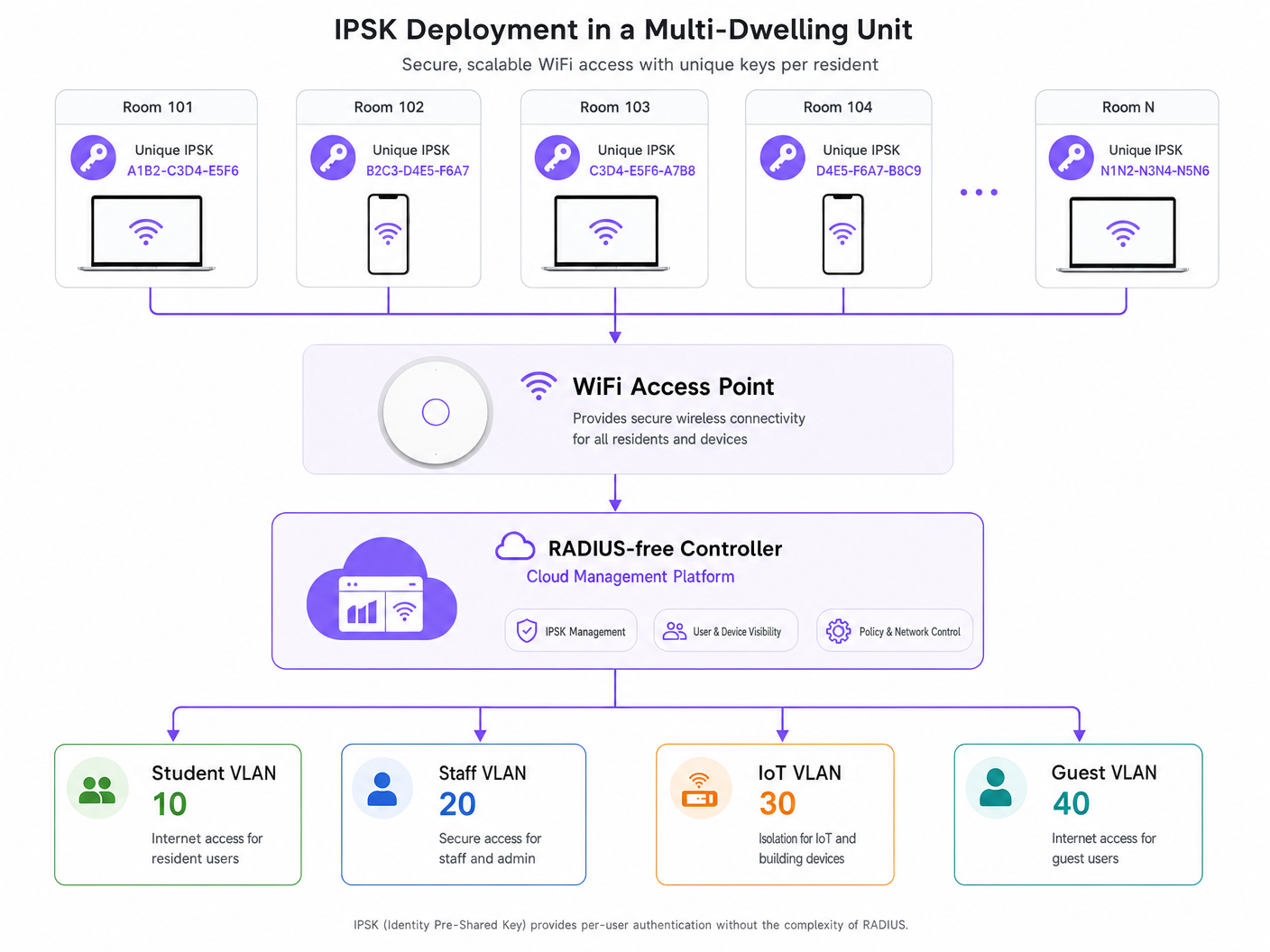
Wenn sich ein Gerät mit der SSID verbindet, präsentiert es seinen zugewiesenen PSK. Der Access Point leitet diese Anfrage an den Controller weiter. Der Controller fragt seine interne Datenbank (oder einen externen Identitätsanbieter über API) ab, um den Schlüssel zu validieren. Nach erfolgreicher Validierung gibt der Controller das mit diesem spezifischen Schlüssel verknüpfte Autorisierungsprofil zurück.
Dieses Autorisierungsprofil legt typischerweise fest:
- VLAN-Zuweisung: Dynamische Steuerung des Geräts in ein spezifisches Netzwerksegment (z.B. VLAN 10 für Raum 101, VLAN 20 für Raum 102).
- Rollenbasierte Zugriffskontrolle (RBAC): Anwendung spezifischer Firewall-Regeln oder Access Control Lists (ACLs).
- Rate Limiting: Durchsetzung von Bandbreitenbegrenzungen pro Benutzer oder pro Raum.
Da der Schlüssel für den Benutzer einzigartig ist, erreichen Sie identitätsbasiertes Networking, ohne 802.1X-Supplicants auf den Client-Geräten zu benötigen.
Vergleich: WPA2-Personal vs. IPSK vs. 802.1X
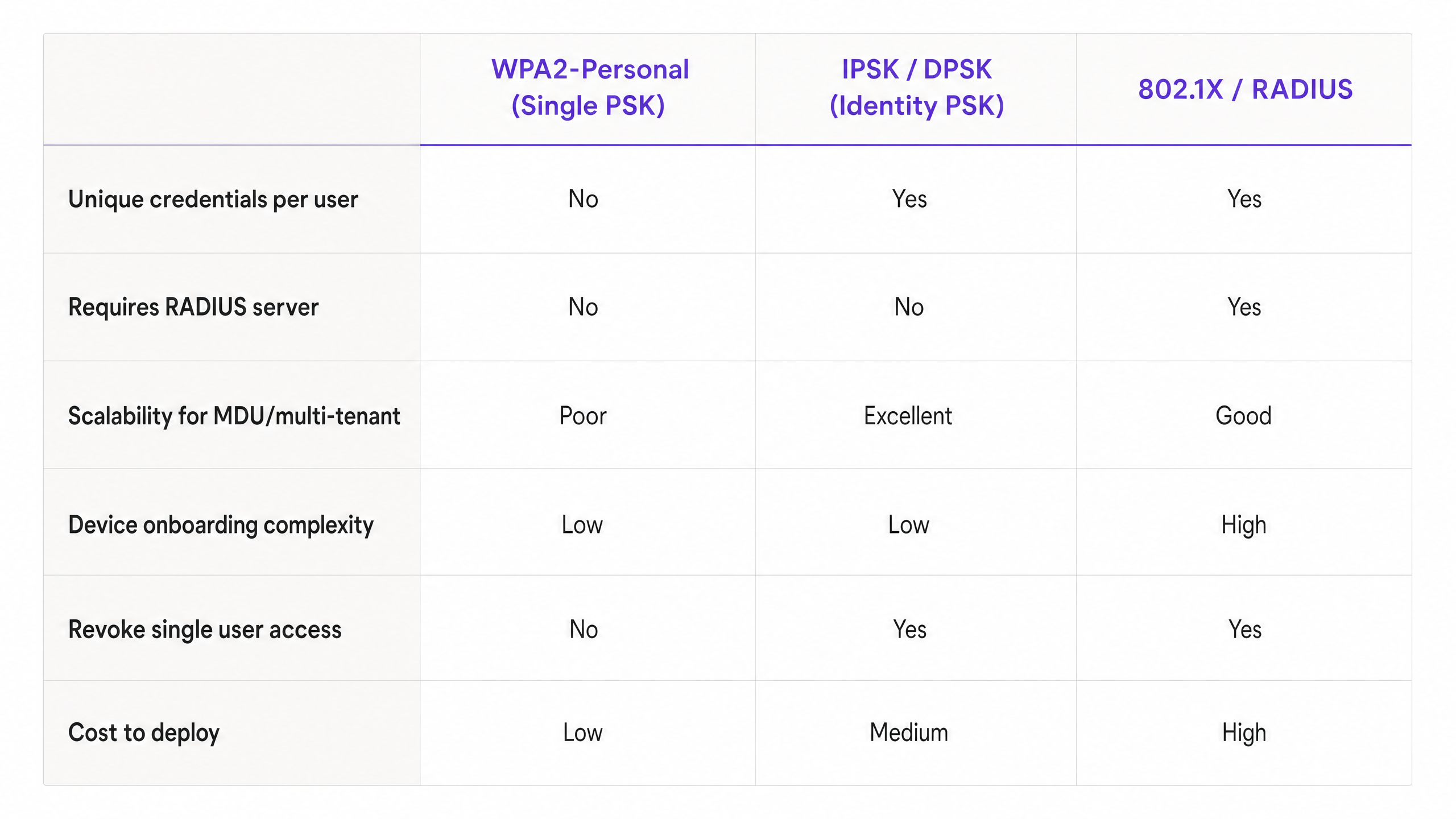
Um zu verstehen, wo IPSK passt, muss man es mit den Alternativen vergleichen. Während 802.1X der Goldstandard für Teppichbüros in Unternehmen bleibt (siehe unseren Leitfaden zu Office Wi Fi: Optimize Your Modern Office Wi-Fi Network ), ist es aufgrund von Gerätekompatibilitätsproblemen oft ungeeignet für MDUs. IPSK bietet die Sicherheitsvorteile von 802.1X mit der Einfachheit von WPA2-Personal.
Implementierungsleitfaden: IPSK in MDU-Umgebungen bereitstellen
Die effektive Bereitstellung von IPSK erfordert eine sorgfältige Planung hinsichtlich Schlüsselgenerierung, -verteilung und Lebenszyklusmanagement.
1. Schlüsselgenerierung und Entropie
Schlüssel müssen kryptografisch sicher sein. Vermeiden Sie die Verwendung von fortlaufenden Nummern, Raumnummern oder leicht zu erratenden Phrasen. Generieren Sie Schlüssel programmatisch (mindestens 16-20 alphanumerische Zeichen). Wenn Sie eine Plattform wie die Guest WiFi -Lösung von Purple nutzen, kann diese Generierung automatisiert und mit dem Profil des Bewohners verknüpft werden.
2. Durchsetzung von Gerätelimits
Ein entscheidender Implementierungsschritt ist die Durchsetzung einer maximalen Geräteanzahl pro IPSK. Wenn einem Bewohner ein Schlüssel zugewiesen wird, sollte er auf eine angemessene Anzahl gleichzeitiger Authentifizierungen beschränkt sein (z.B. 5 bis 8 Geräte). Wird dies nicht durchgesetzt, kann ein einziger geleakter Schlüssel von Dutzenden unbefugter Benutzer verwendet werden, was die Netzwerkleistung beeinträchtigt und die Audit-Spur kompromittiert.
3. Konfiguration des dynamischen VLAN-Steerings
Konfigurieren Sie Ihren Wireless Controller so, dass spezifische IPSKs spezifischen VLANs zugeordnet werden. In einem Studentenwohnheim sieht die Architektur typischerweise so aus:
- Bewohner-VLANs: Entweder ein einzigartiges VLAN pro Raum (Mikrosegmentierung) oder ein gemeinsames Bewohner-VLAN mit aktivierter Client-Isolation.
- IoT VLAN: Für Gebäudemanagement, intelligente Thermostate und BLE-Beacons (lesen Sie mehr über BLE Low Energy Explained for Enterprise ).
- Mitarbeiter-/Admin-VLAN: Sicherer Zugang für die Immobilienverwaltung.
DiesAnsatz wird in unserem umfassenden Leitfaden näher erläutert: Entwicklung einer Multi-Tenant WiFi-Architektur für MDUs .
4. Integration mit Property Management Systemen (PMS)
Der wahre ROI von IPSK wird realisiert, wenn der Schlüssel-Lebenszyklus automatisiert ist. Integrieren Sie die API Ihres Wireless Controllers mit Ihrem PMS oder Ihrer Mieterdatenbank.
- Bereitstellung: Wenn ein Mietvertrag unterzeichnet wird, generiert ein API-Aufruf automatisch einen IPSK und sendet ihn per E-Mail an den Bewohner.
- Widerruf: Wenn der Mietvertrag endet, widerruft ein API-Aufruf den Schlüssel sofort und beendet den Netzwerkzugriff ohne IT-Intervention.
Best Practices & Industriestandards
- WPA3-Übergang: Stellen Sie sicher, dass Ihre Hardware WPA3-SAE (Simultaneous Authentication of Equals) unterstützt. WPA3 verbessert die Sicherheit von Pre-Shared Keys erheblich, indem es Offline-Wörterbuchangriffe mindert und Forward Secrecy bietet. Moderne IPSK-Implementierungen sollten WPA3 nutzen, wo immer die Client-Kompatibilität dies zulässt.
- Client-Isolation: Wenn Sie mehrere Bewohner in einem gemeinsamen VLAN anstatt in VLANs pro Raum platzieren, MÜSSEN Sie die Client-Isolation (Layer 2-Isolation) auf AP-Ebene aktivieren, um laterale Bewegungen und Peer-to-Peer-Angriffe zwischen Bewohnern zu verhindern.
- Compliance: Für Betreiber im Gastgewerbe oder MDU-Sektor bietet IPSK die notwendigen Audit-Logs zur Einhaltung von Vorschriften wie der GDPR, da Netzwerkflüsse direkt den Anmeldeinformationen eines bestimmten Benutzers zugeordnet werden können.
Fehlerbehebung & Risikominderung
Häufige Fehlerursachen
1. Skalierungsgrenzen des Controllers Risiko: Ältere oder Einsteiger-Wireless-Controller haben feste Grenzen für die Anzahl der einzigartigen PSKs, die sie speichern können (z. B. max. 500 Schlüssel pro SSID). Minderung: Überprüfen Sie die maximal unterstützte IPSK-Skalierung Ihrer Hardware vor der Bereitstellung. Für große MDUs sind Cloud-verwaltete Architekturen (wie Cisco Meraki oder Aruba Central) oder dedizierte Policy Engines erforderlich.
2. Roaming-Latenz Risiko: Wenn die Controller-Datenbank bei AP-zu-AP-Roaming-Ereignissen langsam reagiert, werden Sprach- und Videoanrufe unterbrochen. Minderung: Stellen Sie sicher, dass die Controller-Infrastruktur lokalisiert oder hochverfügbar ist. Aktivieren Sie Fast BSS Transition (802.11r), falls von Ihrer IPSK-Implementierung unterstützt.
3. Schlüsselhortung/Veraltete Schlüssel Risiko: Das Versäumnis, Schlüssel zu widerrufen, wenn Bewohner ausziehen, führt zu einer überladenen Datenbank und einer massiven Sicherheitslücke. Minderung: Implementieren Sie ein automatisiertes Lebenszyklusmanagement über die API-Integration mit Ihrem PMS. Führen Sie vierteljährliche Audits der aktiven Schlüssel durch.
ROI & Geschäftsauswirkungen
Der Übergang zu einer IPSK-Architektur liefert messbare Geschäftsergebnisse für Immobilienverwalter und IT-Direktoren:
- Reduzierter Support-Aufwand: Die Beseitigung von 802.1X-Supplicant-Konfigurationsproblemen und die Notwendigkeit eines MAC Authentication Bypass (MAB) für Headless-Geräte reduziert die Helpdesk-Tickets um bis zu 60% während des kritischen Onboarding-Zeitraums im September.
- Verbesserte Monetarisierung: Durch die Verknüpfung von Identität mit dem Netzwerkzugriff können Betreiber gestaffelte Bandbreitenpakete anbieten (z. B. Basispaket in der Miete enthalten, Premium-Paket für Gamer).
- Umsetzbare Analysen: Mit identitätsbewusstem Networking können Immobilienverwalter WiFi Analytics nutzen, um die Raumnutzung, die Verweildauer in Gemeinschaftsbereichen und die allgemeine Gebäudenutzung zu verstehen, ähnlich wie bei Implementierungen im Einzelhandel und Transportwesen .
IPSK ist nicht nur eine Sicherheitsfunktion; es ist die grundlegende Architektur, die sichere, skalierbare und verwaltbare Multi-Tenant-Netzwerke ermöglicht.
Schlüsseldefinitionen
IPSK (Identity Pre-Shared Key)
An authentication method that allows multiple unique pre-shared keys to be used on a single SSID, with each key tied to a specific user policy or VLAN.
Used in MDUs to provide per-user security without the complexity of 802.1X.
DPSK (Dynamic Pre-Shared Key)
A vendor-specific (primarily Ruckus) term for the same underlying technology as IPSK.
You will encounter this term when evaluating different vendor data sheets.
Dynamic VLAN Steering
The process where a network controller automatically assigns a connecting device to a specific Virtual LAN based on the authentication credentials provided.
Essential for multi-tenant environments to isolate resident traffic from staff or IoT traffic on the same physical access points.
802.1X
The IEEE standard for port-based Network Access Control, requiring a RADIUS server and client supplicants.
The enterprise alternative to IPSK, but often unsuitable for residential environments due to headless device incompatibility.
Headless Device
A network-connected device lacking a web browser or advanced configuration interface (e.g., gaming consoles, smart TVs, IoT sensors).
These devices drive the requirement for IPSK, as they cannot navigate captive portals or configure 802.1X supplicants.
WPA3-SAE
Simultaneous Authentication of Equals, the secure key establishment protocol used in WPA3 to prevent offline dictionary attacks.
The modern security standard that should be paired with IPSK deployments on compatible hardware.
Client Isolation
A wireless network setting that prevents devices connected to the same AP from communicating directly with each other.
Mandatory security control if multiple residents are placed into a single shared VLAN.
MAC Authentication Bypass (MAB)
A fallback mechanism in 802.1X networks where a device's MAC address is used as its identity credential.
A cumbersome administrative process that IPSK eliminates by providing native PSK support for headless devices.
Ausgearbeitete Beispiele
A 400-bed student accommodation block currently uses a single WPA2-Personal password. Residents complain about poor performance, and IT cannot prevent departing students from continuing to use the network from the car park. They need to secure the network, segment traffic per room, and support gaming consoles without increasing helpdesk tickets.
Deploy an IPSK architecture on a single SSID. Integrate the wireless controller API with the property management system. Upon lease signing, generate a unique 20-character IPSK per resident. Configure the controller to dynamically steer each resident's key to a unique Per-Room VLAN. Set a device limit of 6 concurrent devices per key. Automate key revocation upon lease termination.
A boutique hotel wants to offer secure, segmented WiFi to guests but cannot rely on captive portals because guests increasingly travel with smart speakers and streaming sticks that cannot navigate web logins.
Implement IPSK tied to the hotel reservation system. When a guest checks in, the PMS triggers an API call to generate a unique IPSK valid only for the duration of their stay. The key is printed on the room key sleeve or sent via SMS. The network dynamically assigns their devices to a private VLAN for that specific room, allowing their phone to cast to the room's smart TV securely.
Übungsfragen
Q1. You are designing the network for a 200-unit build-to-rent property. The client wants to use 802.1X for maximum security. However, their demographic research shows residents bring an average of 3 headless devices (smart TVs, consoles) per unit. What is your architectural recommendation?
Hinweis: Consider the operational overhead of onboarding 600 headless devices onto an 802.1X network.
Musterlösung anzeigen
Recommend an IPSK architecture instead of 802.1X. While 802.1X provides excellent security, the 600 headless devices would require MAC Authentication Bypass (MAB), creating a massive administrative burden for the helpdesk. IPSK provides the necessary per-user accountability and VLAN segmentation while allowing headless devices to connect seamlessly using standard PSK methods.
Q2. During an IPSK deployment, the property manager requests that residents be allowed to choose their own custom WiFi passwords to improve the user experience. How do you respond?
Hinweis: Think about cryptographic entropy and dictionary attacks.
Musterlösung anzeigen
Advise strongly against this. User-selected passwords lack sufficient entropy and are vulnerable to dictionary attacks. In an IPSK environment, weak keys compromise the security of the entire SSID. Keys must be programmatically generated (minimum 16-20 random alphanumeric characters) and distributed securely via the property management system integration.
Q3. A network utilizing IPSK is experiencing IP address exhaustion in the main DHCP pool, despite the building only being at 60% occupancy. What configuration oversight likely caused this?
Hinweis: Think about what happens if a key is shared freely.
Musterlösung anzeigen
The network likely failed to enforce a Maximum Device Count per IPSK. Without a device limit, residents can share their unique key with non-residents or connect an unlimited number of devices, rapidly exhausting DHCP scopes and bandwidth. A strict concurrent device limit (e.g., 5-8 devices per key) must be enforced at the controller level.