
Wie man das Kundenerlebnis in Einzelhandelsgeschäften verbessert
Dieser technische Leitfaden bietet umsetzbare Strategien für IT-Leiter und Betriebsleiter von Veranstaltungsorten, um Unternehmens-Guest WiFi und Analysen zur Verbesserung des physischen Kundenerlebnisses im Einzelhandel zu nutzen. Er behandelt Netzwerkarchitektur, Erfassung von Erstanbieterdaten, Captive Portal-Design und die Integration von Marketingsystemen, um einen messbaren ROI zu erzielen. Von der GDPR-konformen Datenerfassung bis zur Echtzeit-Personalisierung ordnet dieser Leitfaden jede Phase der Implementierung einem konkreten Geschäftsergebnis zu.
Diesen Leitfaden anhören
Podcast-Transkript ansehen
Zusammenfassung für die Geschäftsleitung
In modernen Einzelhandelsumgebungen ist das Netzwerk nicht länger nur Infrastruktur – es ist die Grundlage des physischen Kundenerlebnisses. Da der E-Commerce weiterhin den Standard für datengesteuerte Personalisierung setzt, müssen physische Geschäfte ihre Präsenz nutzen, um Erstanbieterdaten zu erfassen und kontextbezogenes Engagement in großem Maßstab zu liefern. Dieser Leitfaden behandelt, wie das Kundenerlebnis in Einzelhandelsgeschäften verbessert werden kann, indem intelligente Guest WiFi und WiFi Analytics -Plattformen eingesetzt werden, die anonyme Laufkundschaft in bekannte, ansprechbare Kundenprofile umwandeln.
Indem sie über die grundlegende Konnektivität hinausgehen, können IT- und Betriebsleiter ihre drahtlose Infrastruktur in ein umsatzgenerierendes Asset verwandeln, das umsetzbare Erkenntnisse erfasst, Ladenlayouts optimiert und Echtzeit-Marketing ermöglicht. Ob Sie ein einzelnes Flagship-Store oder eine nationale Kette von 200 Standorten verwalten, die hier dargelegten Prinzipien gelten direkt für Ihre Implementierungsentscheidungen in diesem Quartal.
Technischer Tiefgang
Die Rolle von intelligentem WiFi im Einzelhandel
Zu wissen, wie man das Kundenerlebnis im Geschäft verbessert, beginnt mit dem Verständnis der darunter liegenden Datenschicht. Wenn ein Kunde ein Geschäft betritt, sendet sein mobiles Gerät probe requests aus – kleine 802.11-Management-Frames, die gesendet werden, um verfügbare drahtlose Netzwerke zu erkennen. Fortschrittliche Analyseplattformen erfassen diese Signale passiv, um grundlegende Besucherdaten zu generieren, die eine kontinuierliche Zählung von Geräten in und um den Veranstaltungsort ermöglichen, ohne dass eine Benutzeraktion erforderlich ist.
Allerdings hat die auf Probe Requests basierende Verfolgung eine grundlegende Einschränkung: MAC address randomisation. Seit iOS 14 und Android 10 weisen mobile Betriebssysteme während der Scanphase randomisierte MAC-Adressen zu, was es unmöglich macht, ein einzelnes Gerät über mehrere Besuche hinweg allein mit passiven Methoden zuverlässig zu verfolgen. Genau deshalb ist das aktive Verbindungsereignis – der Moment, in dem sich ein Kunde über ein Captive Portal authentifiziert – die entscheidende Gelegenheit zur Datenerfassung. Nach der Authentifizierung ist die Sitzung des Kunden an einen persistenten Identifikator (typischerweise eine E-Mail-Adresse oder eine Loyalty ID) gebunden, nicht an eine temporäre Hardware-Adresse.
Netzwerkarchitektur für Einzelhandelsanalysen
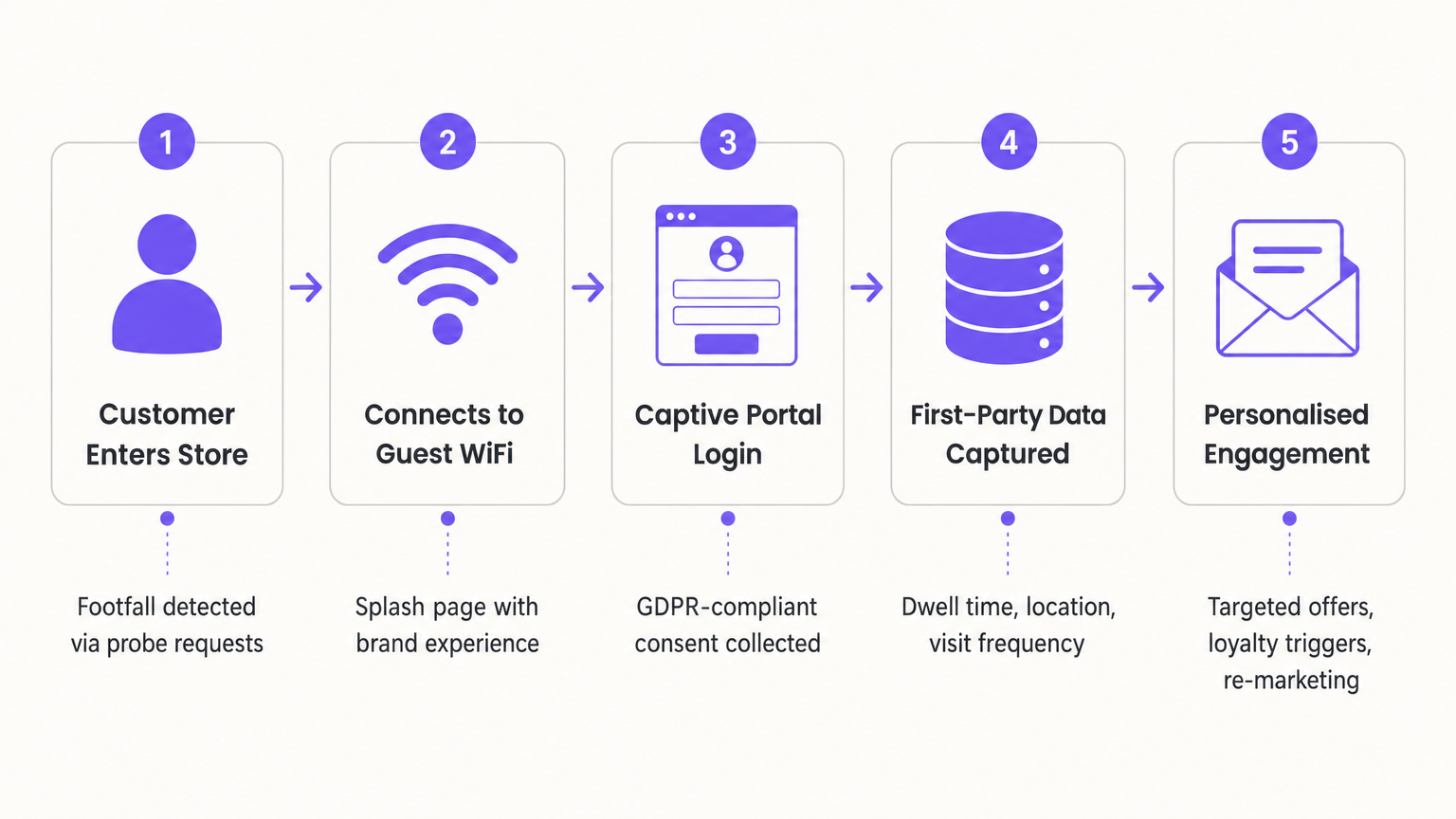
Eine produktionsreife Implementierung für eine mittlere bis große Einzelhandelsumgebung umfasst vier verschiedene Schichten:
| Schicht | Komponenten | Wichtige Überlegungen |
|---|---|---|
| Physisch | Hochdichte APs, PoE-Switches, strukturierte Verkabelung | AP-Platzierung für Standortgenauigkeit, nicht nur Abdeckung |
| Netzwerk | VLAN-Segmentierung, Firewall-ACLs, DHCP-Scoping | PCI DSS-Isolation von Gast- vs. Unternehmensverkehr |
| Anwendung | Captive Portal, Analyse-Engine, CRM-Integration | API-Konnektivität, Einwilligungsmanagement, Datenaufbewahrung |
| Analysen | Heatmaps, Verweildauer, Besuchsfrequenz, Journey Mapping | Korrelation mit POS-Daten für Konversionsanalyse |
Access Point Platzierung verdient im Einzelhandel besondere Aufmerksamkeit. Das Ziel ist nicht nur, Abdeckung zu erreichen; es ist, eine ausreichende Standortauflösung für Analysen zu erzielen. Für eine genaue Zonenpositionierung (z.B. um zu unterscheiden, in welcher Abteilung sich ein Kunde befindet) sollten APs in einer Dichte von etwa einem AP pro 150–200 Quadratmetern im offenen Einzelhandel eingesetzt werden, mit engerem Abstand in der Nähe von hochfrequentierten Zonen wie Kassen, Umkleidekabinen und Werbedisplays.
Standards und Compliance
Jede Unternehmens-Einzelhandelsimplementierung muss die folgenden Standards berücksichtigen:
IEEE 802.11ax (Wi-Fi 6): Die aktuelle Basis für Einzelhandelsumgebungen mit hoher Dichte. Unterstützt OFDMA und BSS Colouring zur Verbesserung der Effizienz in überlasteten RF-Umgebungen – entscheidend in Einkaufszentren mit überlappenden Netzwerken mehrerer Mieter.
WPA3: Obligatorisch für neue Implementierungen. WPA3-SAE (Simultaneous Authentication of Equals) eliminiert die Schwachstellen von WPA2-PSK, besonders relevant für Gastnetzwerke, bei denen das Passwort weit verbreitet ist.
PCI DSS v4.0: Anforderung 1.3 schreibt vor, dass Netzwerkzugriffskontrollen direkte Verbindungen zwischen der Karteninhaberdatenumgebung und nicht vertrauenswürdigen Netzwerken verhindern. Guest WiFi ist ein nicht vertrauenswürdiges Netzwerk. VLAN-Segmentierung, die an der Firewall erzwungen wird, ist die Standardmaßnahme.
GDPR (UK und EU): Das Captive Portal ist ein Datenverarbeitungspunkt. Die Einwilligung muss freiwillig, spezifisch, informiert und unmissverständlich erteilt werden. Vorab angekreuzte Kästchen sind nicht konform. Ihre Datenschutzrichtlinie muss am Punkt der Einwilligung zugänglich sein, und Datenaufbewahrungsfristen müssen definiert und durchgesetzt werden.
Captive Portal als Datenerfassungs-Engine
Das Captive Portal ist das kommerzielle Herz der Guest WiFi-Implementierung. Sein Design bestimmt direkt Ihre Datenerfassungsrate. Ein schlecht gestaltetes Portal – langsam zu laden, übermäßige Formularfelder erfordernd oder verwirrende Einwilligungssprache präsentierend – wird Abbruchraten von über 60% aufweisen. Ein gut gestaltetes Portal, das Social Login (Google, Facebook, Apple) oder ein E-Mail-Formular mit einem einzigen Feld anbietet, kann in einer Einzelhandelsumgebung Verbindungsraten von 40–70% der erkannten Geräte erreichen.
Nach der Authentifizierung ist die Portal-Weiterleitung ein wertvoller Marketingmoment. Leiten Sie Kunden auf eine Landingpage weiter, die eine Anmeldung für ein Treueprogramm, eine aktuelle Aktion oder eine Produktempfehlung basierend auf ihrer Besuchshistorie anbietet. Hier beginnen Retail -Betreiber, die Lücke zu den Personalisierungsfähigkeiten des E-Commerce zu schließen.
Implementierungsleitfaden
Phase 1: Infrastrukturbewertung und Design
Beginnen Sie mit einer vorausschauenden RF-Standortuntersuchung unter Verwendung von Tools wie Ekahau oder iBwave. Modellieren Sie die AP-Platzierung anhand Ihres Grundrisses und berücksichtigen Sie dabei Baumaterialien, Regale und Kühleinheiten (häufig in Supermärkten, die 2,4-GHz- und 5-GHz-Signale erheblich dämpfen). Validieren Sie die prädiktive Umfrage mit einer aktiven Umfrage nach der Bereitstellung.
Definieren Sie Ihre SSID-Architektur. Eine typische Einzelhandelsbereitstellung verwendet drei SSIDs:
- Corporate: WPA3-Enterprise mit 802.1X-Authentifizierung, für Mitarbeitergeräte und Back-Office-Systeme.
- POS/IoT: Isoliertes VLAN, WPA3-PSK oder zertifikatsbasiert, für Zahlungsterminals und IoT-Sensoren.
- Guest: Offene SSID mit Captive Portal, isoliertes VLAN, für Kundengeräte.
Phase 2: Captive Portal Bereitstellung und Integration
Konfigurieren Sie Ihr Captive Portal mit Ihrer Markenidentität. Integrieren Sie es mit Ihrem Identitätsanbieter für Social Login. Implementieren Sie den Zustimmungsfluss gemäß den GDPR-Anforderungen. Verbinden Sie die Authentifizierungsereignisse des Portals über Webhook oder REST API mit Ihrem CRM – dies ist der Auslöser für alle nachgelagerten Marketingautomatisierungen.
Speziell für Supermarktbetreiber sollten Sie in dieser Phase die Integration mit Ihrem Kundenkartensystem in Betracht ziehen. Wenn sich ein Kunde mit einer E-Mail-Adresse anmeldet, die einem Treueprofil entspricht, können Sie seine Sitzung sofort personalisieren – indem Sie seinen Punktestand, relevante Angebote oder eine personalisierte Willkommensnachricht auf der Weiterleitungsseite anzeigen.
Phase 3: Analytics-Konfiguration und Basislinien-Erstellung
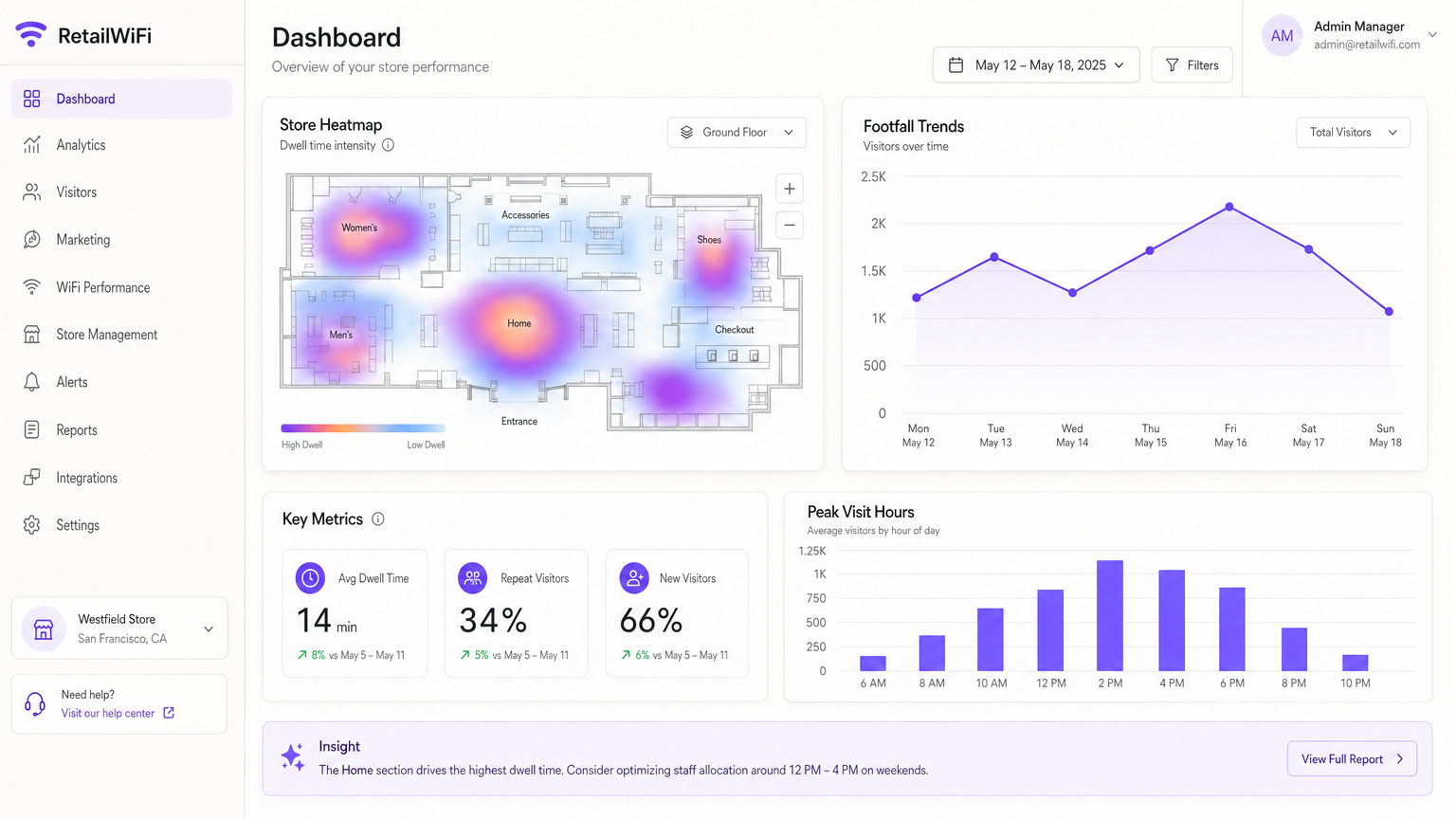
Konfigurieren Sie Ihre Analytics-Plattform, um Zonen zu definieren, die Ihrem Ladenlayout entsprechen (Abteilungen, Eingang, Kasse, Umkleidekabinen). Erstellen Sie eine 30-tägige Basislinie für Verweildauer- und Besucherfrequenzdaten, bevor Sie operative Schlussfolgerungen ziehen. Diese Basislinie ist Ihr Kontrolldatensatz zur Messung der Auswirkungen späterer Änderungen am Ladenlayout oder an Aktionen.
Phase 4: Marketing-Integration und -Aktivierung
Mit dem Fluss von Erstanbieterdaten in Ihr CRM aktivieren Sie Ihre Marketing-Workflows. Beginnen Sie mit wirkungsvollen, wenig komplexen Automatisierungen:
- Willkommens-Trigger: E-Mail oder SMS, die innerhalb von 30 Minuten nach der ersten Verbindung gesendet wird.
- Re-Engagement-Trigger: E-Mail, die an Kunden gesendet wird, die seit 30 Tagen nicht mehr zu Besuch waren.
- Loyalitäts-Trigger: Push-Benachrichtigung an Nutzer der Loyalitäts-App, wenn sie sich im Geschäft verbinden.
Für tiefgreifendere Personalisierungsstrategien siehe Wie Personalisierung die Kundenbindung und den Umsatz steigert .
Best Practices
Priorisieren Sie die Erfassung von Erstanbieterdaten über alles andere. Da Drittanbieter-Cookies in den meisten gängigen Browsern und mobilen Plattformen effektiv abgeschafft wurden, ist die Gast-WiFi-Verbindung einer der zuverlässigsten Mechanismen zur Erfassung von Erstanbieterdaten, die physischen Einzelhändlern zur Verfügung stehen. Jeder verbundene Kunde ist ein Datenwert.
Behandeln Sie das Captive Portal als Produkt, nicht als Konfiguration. Übertragen Sie die UX-Verantwortung Ihrem Marketingteam, nicht nur der IT. Die Konversionsrate des Portals bestimmt direkt die Qualität und das Volumen Ihrer Datenpipeline.
Korrelieren Sie WiFi-Analysen mit POS-Daten. Verweildauer- und Besucherfrequenzdaten sind operativ interessant, aber sie werden kommerziell aussagekräftig, wenn sie mit Transaktionsdaten korreliert werden. Eine Abteilung mit hoher Verweildauer und geringer Konversion ist ein Merchandising-Problem. Eine Abteilung mit hoher Konversion und geringer Verweildauer ist eine Upsell-Möglichkeit.
Implementieren Sie Bandbreitenmanagement vom ersten Tag an. Nutzen Sie Traffic Shaping, um Fair-Usage-Richtlinien im Gastnetzwerk durchzusetzen. Definieren Sie Bandbreitenbegrenzungen pro Gerät und implementieren Sie anwendungsbezogenes QoS, um bandbreitenintensive Anwendungen (Video-Streaming) zugunsten des allgemeinen Surfens zu depriorisieren.
Testen Sie Ihre VLAN-Segmentierung regelmäßig. Die PCI DSS-Konformität erfordert, dass Ihr Gastnetzwerk Ihre Karteninhaberdatenumgebung nicht erreichen kann. Führen Sie vierteljährliche Penetrationstests oder zumindest automatisierte Netzwerkscans durch, um die Integrität der VLAN-Grenzen zu überprüfen.
Dieselben Prinzipien, die die CX-Verbesserung im Einzelhandel vorantreiben, gelten auch für andere Arten von physischen Veranstaltungsorten. Für den Kontext, wie sich diese Strategien auf andere Sektoren übertragen lassen, siehe unsere Leitfäden für Betreiber in den Bereichen Gastgewerbe und Transport .
Fehlerbehebung & Risikominderung
MAC-Adressen-Randomisierung
Symptom: Passive Besucherzahlen erscheinen inkonsistent oder überhöht; Wiederholungsbesucherquoten sind unplausibel niedrig. Grundursache: iOS- und Android-Geräte verwenden während der Sondierungsphase randomisierte MACs, wodurch Phantom-Gerätezählungen entstehen. Abhilfe: Verlagern Sie Ihre Analyse-Strategie auf authentifizierte Sitzungen. Fördern Sie die Verbindung über das Captive Portal. Berichten Sie über die Anzahl authentifizierter Sitzungen statt über sondierungsbasierte Gerätezählungen für Geschäftsmetriken.
Geringe Captive Portal Konversion
Symptom: Hohe Besucherfrequenz passiv erkannt, aber geringe Anzahl authentifizierter Sitzungen. Grundursache: Portal-Reibung – langsame Ladezeiten, komplexe Formulare oder unklare Wertversprechen. Abhilfe: Implementieren Sie Social Login. Reduzieren Sie Formularfelder auf eine einzige erforderliche Eingabe. Führen Sie A/B-Tests für Portal-Designs durch. Stellen Sie sicher, dass das Portal auf einer 4G-Verbindung in unter zwei Sekunden lädt.
Netzwerküberlastung während der Stoßzeiten
Symptom: Kundenbeschwerden über langsames WiFi während der Wochenend-Stoßzeiten; die Analyseplattform zeigt eine verschlechterte Standortgenauigkeit. Grundursache: Unzureichende AP-Dichte oder schlechte Kanalplanung, die zu Gleichkanalinterferenzen führt. Abhilfe: Führen Sie während der Stoßzeiten eine aktive Standortbegehung durch. Implementieren Sie Band Steering, um fähige Geräte auf 5-GHz- oder 6-GHz-Bänder zu leiten. Erwägen Sie eine Wi-Fi 6E-Bereitstellung für Zonen mit hoher Dichte.
GDPR-Zustimmungslücken
Symptom: Rechts- oder Compliance-Team meldet, dass Zustimmungsnachweise unvollständig sind oder die Zustimmungssprache mehrdeutig ist. Grundursache: Captive Portal ohne ordnungsgemäßes Zustimmungsmanagement konfiguriert, oder Zustimmungsnachweise werden nicht aufbewahrt. Abhilfe: Implementieren Sie eine Consent Management Platform (CMP), die in Ihr Captive Portal integriert ist. Bewahren Sie zeitgestempelte Zustimmungsnachweise für die Dauer Ihrer Datenaufbewahrungsfrist zuzüglich eines Compliance-Puffers auf.
ROI & Geschäftsnutzen Impakt
Die Rechtfertigung einer Gast-WiFi- und Analysebereitstellung gegenüber einem Vorstand oder Finanzausschuss erfordert die Übersetzung technischer Kennzahlen in kommerzielle Ergebnisse.
| Metrik | Messmethode | Erwartetes Ergebnis |
|---|---|---|
| Datenerfassungsrate | Authentifizierte Sitzungen / erkannte Geräte | 40–70% in optimierten Bereitstellungen |
| E-Mail-Listenwachstum | Neue E-Mail-Adressen pro Monat erfasst | Direkt dem portal zuzuordnen |
| Erhöhung der Verweildauer | Durchschnittliche Sitzungsdauer vs. Basislinie | 10–20% Steigerung durch personalisiertes Engagement |
| Wiederbesuchsrate | % der wiederkehrenden authentifizierten Nutzer | Vergleich mit der Basislinie vor der Bereitstellung |
| Kampagnenkonversion | Umsatz aus WiFi-ausgelösten Kampagnen / Kampagnenkosten | Typischerweise 3–8x ROI bei ausgelösten E-Mail-Kampagnen |
Für eine Einzelhandelskette mit 50 Standorten, die täglich 500 authentifizierte Sitzungen pro Geschäft erfasst, entspricht dies 25.000 First-Party-Datenpunkten pro Tag oder etwa 750.000 pro Monat. Bei einer konservativen E-Mail-Marketing-Konversionsrate von 2% und einem durchschnittlichen Bestellwert von 45 £ generiert eine einzige monatliche Re-Engagement-Kampagne etwa 675.000 £ an zurechenbarem Umsatz – gegenüber Infrastrukturkosten, die typischerweise innerhalb von 12–18 Monaten amortisiert sind.
Der Business Case zur Verbesserung der Customer Experience im Einzelhandel ist nicht theoretisch. Das Netzwerk ist bereits vorhanden. Die Frage ist, ob Sie den vollen kommerziellen Wert daraus ziehen.
Schlüsseldefinitionen
Captive Portal
A web page presented to a user before they are granted access to a network, used for authentication, data capture, and consent collection.
The primary interface for converting anonymous footfall into known, addressable customer profiles. Its design directly determines the quality and volume of your first-party data pipeline.
Probe Request
An 802.11 management frame broadcast by a mobile device to discover available wireless networks in range.
Used by analytics platforms to estimate total footfall, including customers who never connect. Reliability is limited by MAC address randomisation in modern devices.
Dwell Time
The duration a customer's device is detected within a defined zone of the store, used as a proxy for engagement with that area.
A critical operational metric for store layout optimisation, staff allocation, and promotional display effectiveness.
MAC Address Randomisation
A privacy feature in iOS 14+ and Android 10+ that assigns a temporary, randomised hardware address when a device scans for networks, preventing persistent passive tracking.
Fundamentally changes the analytics strategy: passive tracking is unreliable for individual identification; authenticated sessions via captive portals are the required alternative.
First-Party Data
Information collected directly from customers through their own interactions with your brand, as opposed to data purchased from or shared by third parties.
The most valuable and compliant form of customer data, particularly as third-party cookies are deprecated. Guest WiFi is one of the most effective first-party data collection mechanisms for physical venues.
VLAN (Virtual Local Area Network)
A logical network segment that isolates traffic at Layer 2, allowing multiple independent networks to share the same physical infrastructure.
Essential for separating guest WiFi traffic from corporate and POS networks. Required by PCI DSS to protect the cardholder data environment from untrusted network access.
PCI DSS
Payment Card Industry Data Security Standard — a set of security requirements for organisations that handle credit card data, including network segmentation requirements.
Requires that guest networks have no network-layer access to environments processing payment card data. Non-compliance can result in fines and loss of card processing rights.
Heatmap
A data visualisation that uses colour gradients to represent the density or intensity of a variable across a spatial area — in retail, typically customer presence or dwell time.
Used by store planners and operations teams to understand actual customer behaviour patterns and make evidence-based decisions about layout, signage, and product placement.
OFDMA (Orthogonal Frequency Division Multiple Access)
A multi-user version of OFDM used in Wi-Fi 6 (802.11ax) that allows a single AP to serve multiple clients simultaneously on sub-channels of a single channel.
Critical for high-density retail environments where many devices are competing for airtime simultaneously, improving overall network efficiency and reducing latency.
Ausgearbeitete Beispiele
A national fashion retailer with 50 UK locations has high footfall but low loyalty programme membership. Their current guest WiFi is a simple password-protected network with no data capture. They want to grow their CRM database by 100,000 opted-in contacts within 12 months. What is the deployment approach?
Replace the existing password-protected SSID with an open SSID backed by a captive portal. Configure the portal to offer social login (Google, Apple) and email authentication. Set the redirect page to a loyalty programme sign-up landing page, with a 10% discount incentive for completing registration. Integrate the portal's authentication events with the retailer's CRM via REST API webhook. Configure automated welcome emails to trigger within 30 minutes of first connection. Deploy across all 50 locations in a phased rollout over 8 weeks, starting with the 10 highest-footfall stores. With an average of 600 daily footfall per store and a conservative 30% portal connection rate, the deployment generates approximately 3,000 new data points per day across the estate, reaching the 100,000 target in approximately 34 days of full operation.
A large supermarket operator wants to understand why their prepared foods section has high footfall but low sales conversion. They have an existing guest WiFi network but no analytics platform. How do they use WiFi analytics to diagnose and address the problem?
Deploy Purple's WiFi Analytics platform on the existing infrastructure. Define a zone boundary around the prepared foods section in the analytics platform's floor plan configuration. Run a 30-day baseline data collection period to establish average dwell time and visit frequency for the zone. Correlate the dwell time data with POS transaction data from the prepared foods tills for the same period. If dwell time is high but conversion is low, the data points to a merchandising or pricing issue rather than a discovery problem. If dwell time is low, the issue is likely navigation or signage. Use the heatmap data to identify where customers are entering and exiting the zone to inform a layout redesign. Post-redesign, run a further 30-day measurement period to quantify the uplift.
Übungsfragen
Q1. Your marketing team wants to send real-time SMS offers to customers as they enter specific departments in your flagship store. Your current passive tracking system only sees randomised MAC addresses and cannot reliably identify individual customers. What is the architectural solution, and what data privacy considerations apply?
Hinweis: Consider how to move from passive observation to active, consent-based identification. Think about the trigger event and the data linkage required.
Musterlösung anzeigen
Implement a captive portal requiring SMS or email authentication. Once the user connects and verifies their identity, their session is tied to a known identifier (phone number or email), not a transient MAC address. The analytics platform can then fire a webhook to your marketing platform when that authenticated user's device is detected in a specific zone, triggering the SMS offer. Data privacy considerations: consent for SMS marketing must be captured explicitly at the portal — separate from the consent for network access. The consent record must be timestamped and retained. The customer must be able to opt out at any time.
Q2. During a PCI DSS audit, the assessor discovers that a device on the guest WiFi subnet can successfully ping a POS terminal on the retail network. The finding is classified as a critical non-compliance. What immediate and long-term remediation steps must the IT team take?
Hinweis: Focus on network segmentation, firewall rules, and verification methodology.
Musterlösung anzeigen
Immediate action: isolate the guest network by implementing strict ACLs on the firewall to block all traffic from the guest VLAN to the POS VLAN. Verify the fix by attempting the ping again from the guest subnet. Long-term remediation: review the entire VLAN architecture to ensure all untrusted networks are properly segmented. Implement quarterly automated network scanning to verify VLAN boundaries remain intact. Document the segmentation architecture as part of your PCI DSS compliance evidence. Consider deploying a network access control (NAC) solution to enforce device posture on the corporate network.
Q3. A regional supermarket chain has deployed guest WiFi across 20 stores. After 60 days, the analytics platform shows that portal connection rates average only 18% of detected devices. The target was 40%. What are the most likely causes, and how would you diagnose and address them?
Hinweis: Think about the user journey from detection to authentication. Consider both technical and UX factors.
Musterlösung anzeigen
Likely causes include: (1) poor portal UX — too many form fields, slow load time, or unclear value proposition; (2) insufficient in-store signage promoting the WiFi network; (3) the SSID name is not visible or intuitive; (4) the portal is not mobile-optimised. Diagnostic approach: measure portal load time on a 4G connection (target under 2 seconds); review the abandonment point in the portal flow using analytics; audit in-store signage at entrance and high-dwell zones; A/B test portal designs. Remediation: simplify to a single-field email form or social login; add a clear incentive on the portal (e.g., '10% off today for connecting'); deploy prominent in-store WiFi signage; ensure the SSID is named clearly (e.g., '[Brand] Free WiFi').
Weiterlesen in dieser Reihe
Privacy by Design: Anonymisierung von WiFi-Daten für die GDPR-Konformität
Dieser maßgebliche Leitfaden beschreibt die technische Architektur und Implementierungsstrategien zur Anonymisierung von WiFi-Daten, um die GDPR-Konformität sicherzustellen. Er bietet IT-Führungskräften und Netzwerkarchitekten umsetzbare Frameworks, um robuste Standortanalysen mit strengen Datenschutzanforderungen in Einklang zu bringen.
Heatmapping vs. Presence Analytics: Technische Unterschiede
Dieser maßgebliche technische Leitfaden beschreibt die entscheidenden architektonischen und operativen Unterschiede zwischen WiFi Heatmapping und Presence Analytics für Betreiber von Unternehmensstandorten. Er bietet IT-Führungskräften, Netzwerkarchitekten und Betriebsleitern umsetzbare Bereitstellungs-Frameworks, reale Implementierungsszenarien und herstellerneutrale Best Practices, um den maximalen ROI aus ihrer bestehenden drahtlosen Infrastruktur zu erzielen.
Wie man die Verweildauer mit WiFi Location Analytics berechnet
Dieser Leitfaden bietet eine umfassende technische Referenz zur Berechnung der WiFi-Verweildauer mittels WiFi Location Analytics. Er deckt die gesamte Architektur ab, von der Erfassung von 802.11 Probe Requests über die RSSI-basierte Trilateration bis zur Analyse von Geofence-Zonen. Er richtet sich an IT-Manager, Netzwerkarchitekten und Betriebsleiter von Veranstaltungsorten, die präzise, skalierbare Standortinformationen in Einzelhandel, Gastgewerbe, Gesundheitswesen und im öffentlichen Sektor implementieren müssen. Die Leser erhalten umsetzbare Implementierungsanleitungen, Fallstudien aus der Praxis und einen klaren Rahmen für die Umwandlung von Rohdaten in messbare Geschäftsergebnisse.