
Wie man das Kundenerlebnis in Hotels mit WiFi verbessert
Dieser Leitfaden bietet IT-Führungskräften und Betreibern von Veranstaltungsorten einen technischen Entwurf, um Hotel-WiFi von einer grundlegenden Annehmlichkeit in einen aktiven Engagement-Kanal zu verwandeln. Er behandelt die Architektur, PMS-Integrationen und Bereitstellungsstrategien, die erforderlich sind, um personalisierte Gästeerlebnisse zu bieten, Zimmer-Upgrades zu fördern und die Akquise für Treueprogramme zu steigern. Vom Captive Portal-Design und der GDPR-Konformität bis hin zu Präsenzanalyse und der Automatisierung von Umfragen nach dem Aufenthalt ist dies die definitive operative Referenz für IT-Teams im Gastgewerbe.
Diesen Leitfaden anhören
Podcast-Transkript ansehen
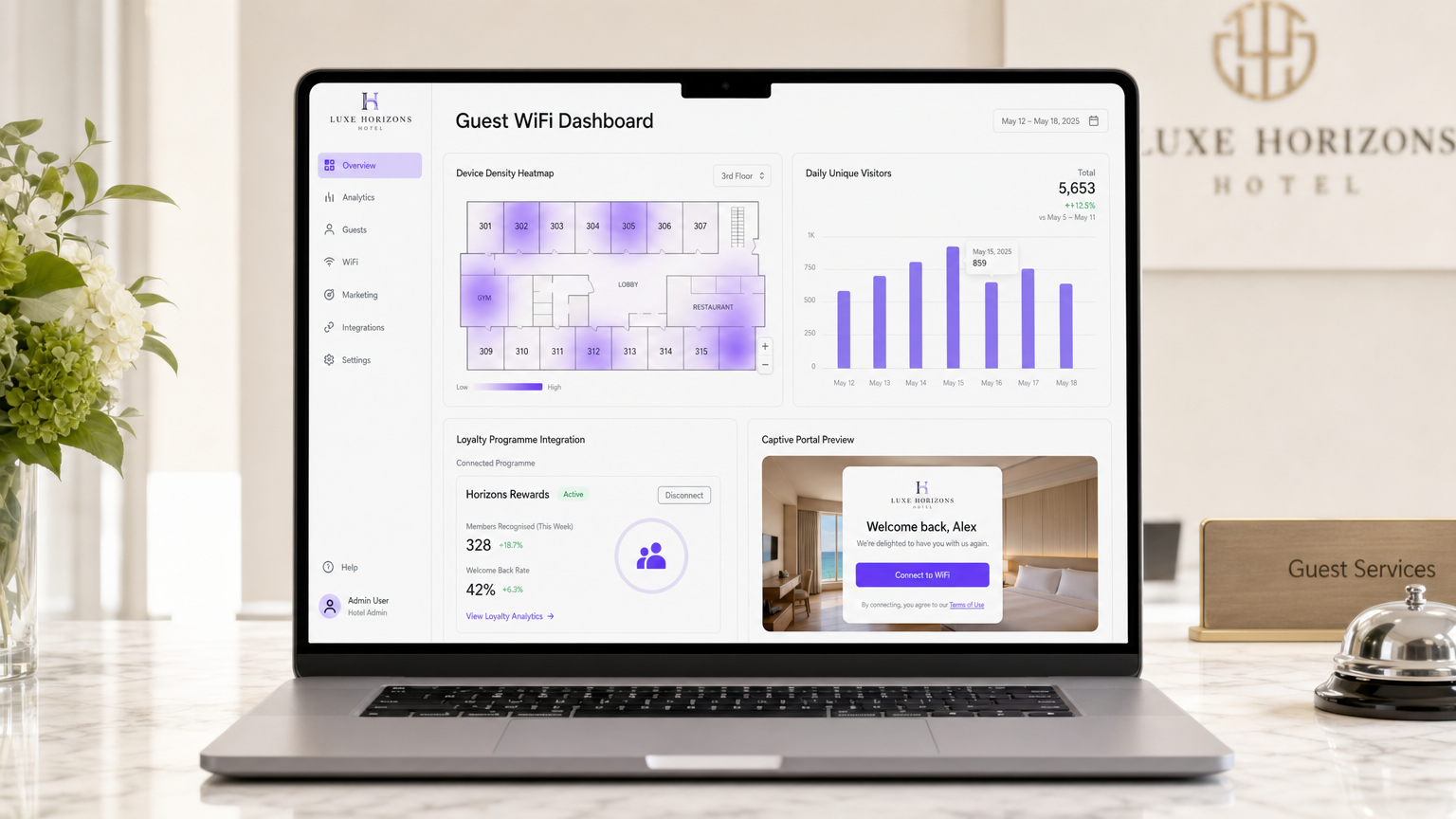
Zusammenfassung für Führungskräfte
Für den modernen Hotelbetrieb hat sich das Gäste-WiFi von einer grundlegenden Annehmlichkeit zu einer kritischen Infrastrukturschicht entwickelt, die Umsatz, Loyalität und betriebliche Effizienz fördert. Dieser Leitfaden beschreibt, wie das Kundenerlebnis in Hotels mit WiFi verbessert werden kann, indem passive Konnektivität in einen aktiven Engagement-Kanal umgewandelt wird. Wir untersuchen die technische Architektur, die erforderlich ist, um personalisierte Begrüßungen, gezielte Zimmer-Upgrades, nahtlose Integration von Treueprogrammen und automatisierte Umfragen nach dem Aufenthalt zu ermöglichen.
Durch den Einsatz von Unternehmensplattformen wie Purple können IT-Führungskräfte über die bloße Bereitstellung von Bandbreite hinausgehen und messbaren Geschäftswert liefern. Diese Referenz behandelt die Bereitstellungsüberlegungen, Integrationsmuster und Sicherheitsstandards, die für die Implementierung einer robusten Guest WiFi - und WiFi Analytics -Lösung erforderlich sind, die den Anforderungen des heutigen vernetzten Reisenden gerecht wird und gleichzeitig die Einhaltung globaler Datenschutzbestimmungen, einschließlich GDPR und PCI DSS, gewährleistet.
Technischer Deep-Dive: Architektur für Personalisierung
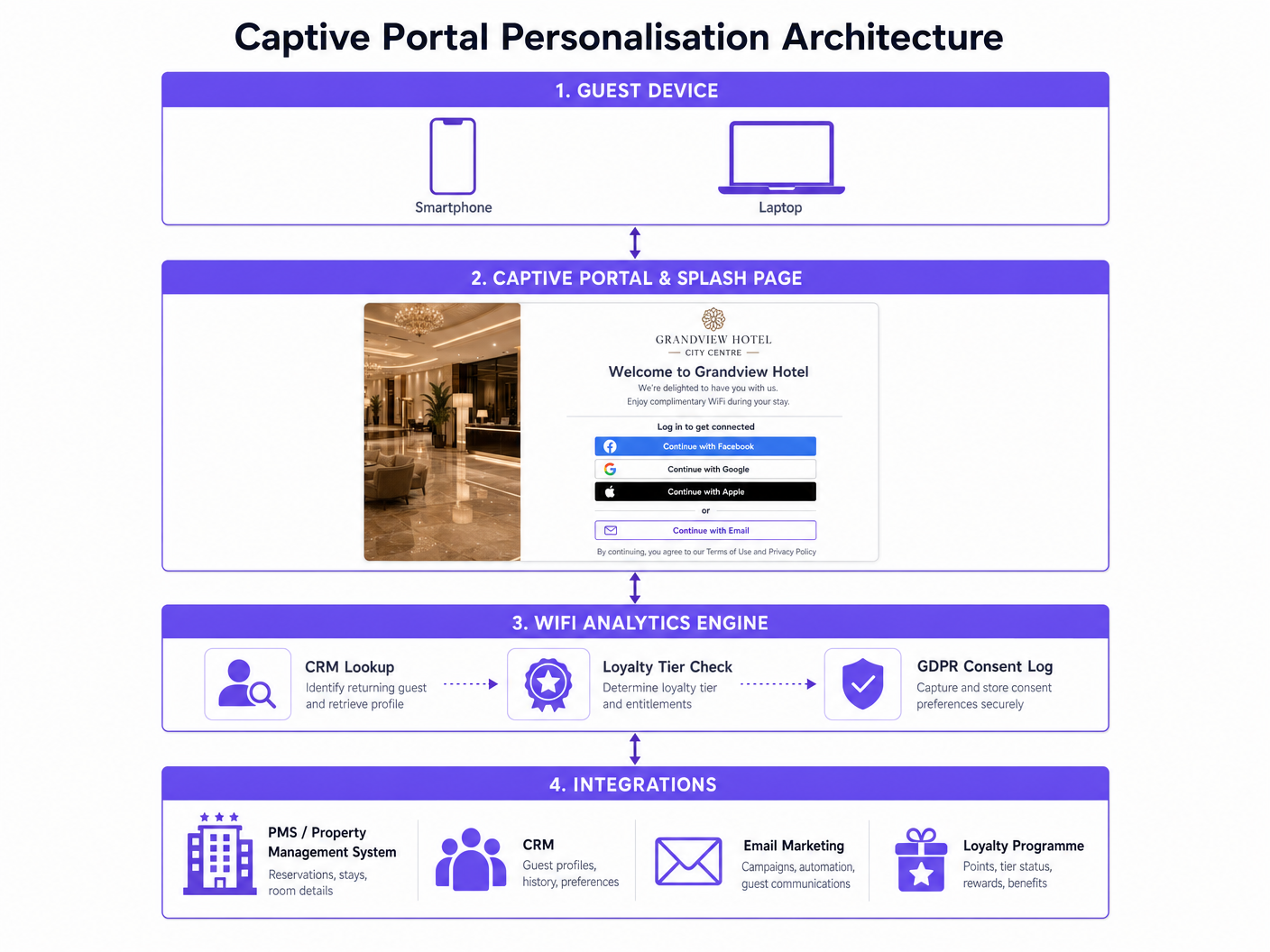
Um eine sinnvolle Personalisierung zu erreichen, muss die WiFi-Infrastruktur nahtlos in den breiteren Technologie-Stack des Hotels integriert werden, insbesondere in die Property Management System (PMS)- und Customer Relationship Management (CRM)-Plattformen. Dieser Abschnitt behandelt die wichtigsten Architekturkomponenten und deren Zusammenspiel.
Das Captive Portal als Identitätsschicht
Das Captive Portal dient als primärer Authentifizierungs- und Datenerfassungsmechanismus. Anstelle eines generischen Pre-Shared Key (PSK) verwenden moderne Implementierungen eine ausgeklügelte Splash Page, die mehrere Authentifizierungsmethoden unterstützt, darunter Social Login (OAuth 2.0 über Google, Facebook oder Apple), E-Mail-Registrierung und direkte Authentifizierung von Treueprogramm-Anmeldeinformationen. Diese Schicht ist verantwortlich für die Identifizierung des Benutzers, die Erfassung der erforderlichen Zustimmung gemäß GDPR Artikel 7 und die Weitergabe dieses Identitätskontextes an die Analyse-Engine.
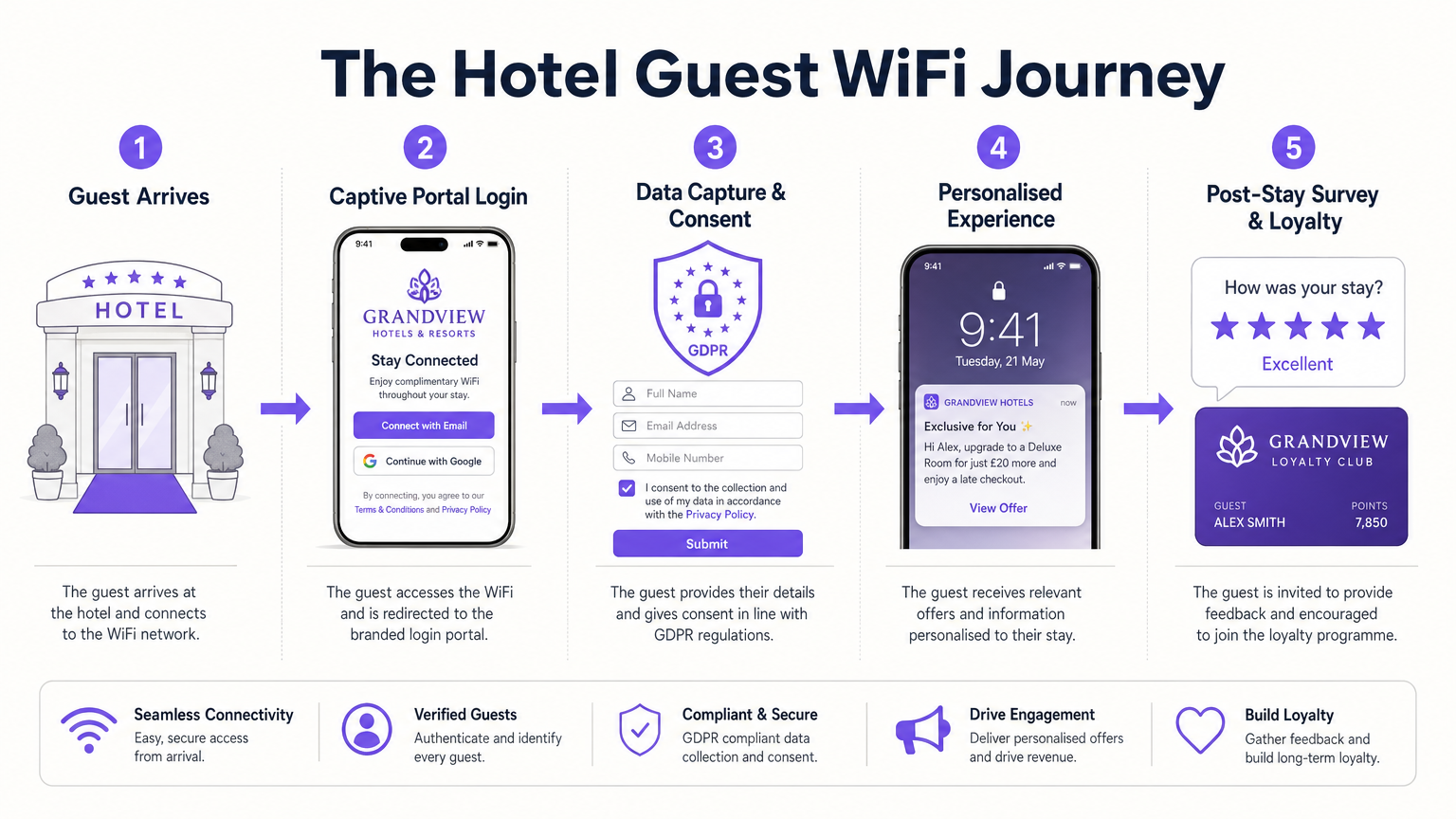
Die SSID-Architektur sollte mit einer klaren Trennung der Belange konzipiert werden. Eine einzige gastseitige SSID leitet den gesamten nicht authentifizierten Datenverkehr über DNS-Interception an den Captive Portal Controller weiter. Die Walled Garden-Konfiguration muss sorgfältig gepflegt werden, um den Zugriff auf alle erforderlichen externen Domains – Social Login-Anbieter, CDN-gehostete Portal-Assets und alle Authentifizierungsdienste von Drittanbietern – zu ermöglichen, bevor der Gast den Anmeldevorgang abschließt. Die Nichtpflege des Walled Garden ist die häufigste Ursache für Captive Portal-Fehler in Produktionsumgebungen.
Integration mit Property Management Systemen
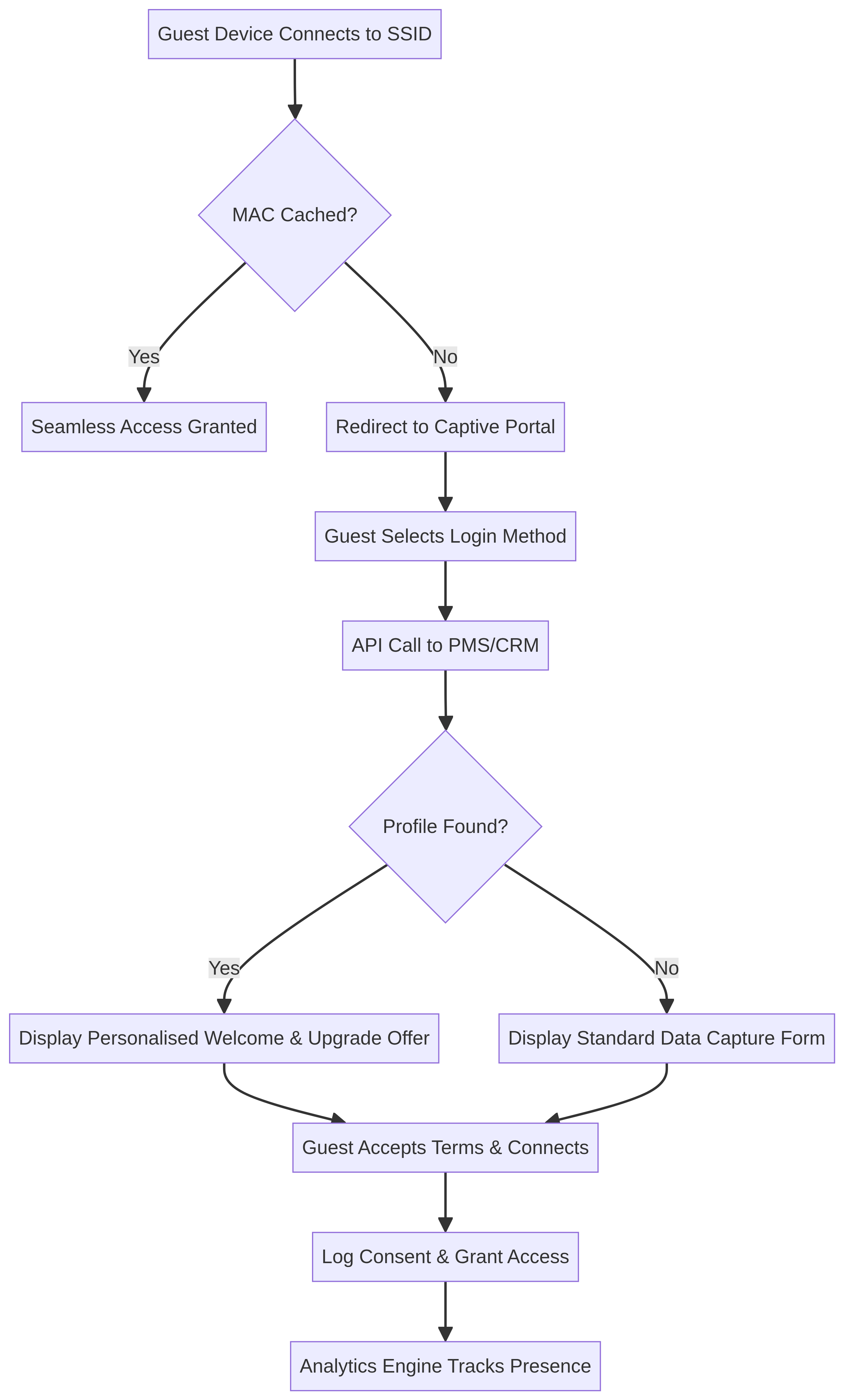
Der wahre Wert einer WiFi Analytics -Plattform entfaltet sich, wenn sie in das PMS integriert wird. Wenn ein Gast sich verbindet, kann das System das PMS mithilfe seiner authentifizierten Identität (E-Mail oder Treuenummer) abfragen, um seinen aktuellen Reservierungsstatus, die Zimmernummer und den Treuestatus in Echtzeit abzurufen. Dieser Datenaustausch ermöglicht es dem Captive Portal, personalisierte Inhalte dynamisch darzustellen: eine Begrüßungsnachricht, die den Gast namentlich anspricht, seinen aktuellen Treuepunkte-Saldo oder ein gezieltes Upgrade-Angebot, das für seine aktuelle Buchung relevant ist.
Die Integration wird typischerweise über einen REST API-Aufruf von der WiFi-Analyseplattform an das PMS implementiert, der zum Zeitpunkt der erfolgreichen Authentifizierung ausgelöst wird. Die PMS-Antwort-Payload wird dann verwendet, um eine dynamische Template-Engine zu füllen, die die entsprechende Splash Page-Variante rendert. Die Latenz bei diesem API-Aufruf ist ein wichtiger Leistungsfaktor; der Aufruf muss innerhalb weniger hundert Millisekunden abgeschlossen sein, um eine Beeinträchtigung des Benutzererlebnisses zu vermeiden.
Präsenzanalyse und räumliche Intelligenz
Nach der Authentifizierung beginnt die Analyse-Engine mit der Verarbeitung von Präsenzdaten. Durch die Analyse der Signalstärke (RSSI) von mehreren Access Points kann das System Verweildauern und Bewegungsmuster innerhalb des Veranstaltungsortes bestimmen. Diese räumliche Intelligenz ist entscheidend, um zu verstehen, wie Gäste die Hoteleinrichtungen nutzen – von der Lobby über das Restaurant bis zum Spa. Die Rolle von Purple als kostenloser Identitätsanbieter für Dienste wie OpenRoaming unter der Connect-Lizenz vereinfacht diesen Prozess zusätzlich, indem sie eine sichere, automatische Aufnahme wiederkehrender Gäste über verschiedene Immobilien hinweg ermöglicht, ohne eine erneute Authentifizierung zu erfordern.
Der Entscheidungsfluss für Authentifizierung und Personalisierung ist unten dargestellt:
Implementierungsleitfaden: Schritt-für-Schritt-Bereitstellung
Die Bereitstellung einer umfassenden WiFi-Engagement-Lösung erfordert eine sorgfältige Planung und Koordination zwischen IT-, Marketing- und Betriebsteams. Die folgenden Phasen bieten einen strukturierten Bereitstellungsfahrplan.
Phase 1: Infrastruktur-Bereitschaft und Netzwerkarchitektur
Bevor das Captive Portal implementiert wird, stellen Sie sicher, dass die zugrunde liegende drahtlose Infrastruktur die erwartete Gerätedichte und Durchsatzanforderungen unterstützen kann.
| Überlegung | Empfehlung | Standard |
|---|---|---|
| SSID-Strategie | Einzelne Gäste-SSID mit Captive Portal; separate Unternehmens-SSID mit 802.1X | IEEE 802.11i |
| Netzwerksegmentierung | Dediziertes VLAN für Gastdatenverkehr, isoliert von Unternehmens- und POS-Netzwerken | PCI DSS Anforderung 1 |
| AP-Dichte | Durchführung einer HF-Standortuntersuchung; Ziel -65 dBm minimaler RSSI im gesamten Veranstaltungsort | IEEE 802.11k/v/r |
| Sicherheitsprotokoll | WPA3-SAE für Gast-SSID, wo Gerätekompatibilität dies zulässt | IEEE 802.11ax |
| Durchsatz-Baseline | Mindestens 5 Mbit/s pro gleichzeitigem Gerät in Bereichen mit hoher Dichte | Herstellerunabhängige Best Practice |
Stellen Sie sicher, dass der Gastdatenverkehr mithilfe dedizierter VLANs streng von Unternehmens- und Betriebsnetzwerken segmentiert ist. Dies ist nicht nur eine Best Practice; es ist eine obligatorische Kontrolle gemäß PCI DSS, wenn Zahlungssysteme auf derselben physischen Infrastruktur betrieben werden.
Phase 2: Captive Portal Konfiguration und Branding
Das Captive Portal ist oft der erste digitale Berührungspunkt, den ein Gast vor Ort erlebt. Sein Design und seine Leistung wirken sich direkt auf die Wahrnehmung der Hotelmarke durch den Gast aus.
Konfigurieren Sie Authentifizierungsoptionen, die Reibung und Datenerfassung ausbalancieren. E-Mail- und soziale Logins sind Standard, aber die Integration einer direkten Treueprogramm-Authentifizierung liefert die wertvollsten Identitätsdaten. Implementieren Sie dynamische Inhaltsregeln, um verschiedene Splash-Seiten basierend auf Variablen wie dem Status des wiederkehrenden oder neuen Gastes, der Tageszeit oder dem spezifischen Standort des Veranstaltungsortes anzuzeigen. Zum Beispiel sollte ein Gast, der sich im Spa verbindet, ein anderes Willkommenserlebnis sehen als einer, der sich in der Lobby verbindet.
Alle Datenerfassung muss der GDPR entsprechen. Implementieren Sie klare, granulare Opt-in-Kontrollkästchen für Marketingkommunikation und stellen Sie sicher, dass das Einwilligungs-Protokoll in einem manipulationssicheren Audit-Trail erfasst wird. Die Rechtsgrundlage für die Verarbeitung sollte auf der Splash-Seite klar angegeben werden.
Phase 3: PMS- und CRM-Integration
Dies ist der wichtigste Schritt, um personalisierte Begrüßungen und die Bereitstellung von Zimmer-Upgrades zu ermöglichen.
Stellen Sie sichere API-Verbindungen zwischen der WiFi-Plattform und dem PMS und CRM her. Definieren Sie, wie Felder vom Captive Portal den Gastprofilen im CRM zugeordnet werden, und richten Sie automatisierte Auslöser ein. Wenn sich beispielsweise ein Gast authentifiziert und das PMS bestätigt, dass er sich in einem Standardzimmer mit verfügbarem Suitenbestand befindet, lösen Sie ein Captive Portal Interstitial aus, das ein kostenpflichtiges Upgrade anbietet. Dieses Angebot sollte mit einem klaren Call-to-Action und einem zeitlich begrenzten Anreiz präsentiert werden, um die Konversion zu fördern.
Phase 4: Automatisierung von Umfragen nach dem Aufenthalt
Konfigurieren Sie die Analyseplattform zur Überwachung der Gästeanwesenheit. Wenn das Gerät eines Gastes für einen definierten Zeitraum (typischerweise 12-24 Stunden, was den Check-out anzeigt) nicht im Netzwerk gesehen wird, lösen Sie einen Webhook an die E-Mail-Marketing-Plattform aus. Dieser Webhook sendet die NPS- oder CSAT-Umfrage-E-Mail nach dem Aufenthalt, um die Zustellung zu gewährleisten, solange das Erlebnis noch frisch ist, und die Rücklaufquoten zu maximieren.
Best Practices für Hotel-WiFi-Implementierungen
Die folgenden Empfehlungen spiegeln branchenübliche Ansätze für Hospitality WiFi-Implementierungen wider und sind auf eine Reihe von Veranstaltungsorten anwendbar, einschließlich Retail , Healthcare und Transport Umgebungen.
Priorisieren Sie eine reibungslose Einarbeitung für wiederkehrende Gäste. Nutzen Sie MAC-Adress-Caching oder Standards wie Passpoint (Hotspot 2.0 / IEEE 802.11u), um wiederkehrende Gäste automatisch zu authentifizieren, ohne dass sie ihre Anmeldeinformationen erneut eingeben müssen. Ein Gast, der drei Nächte bleibt, sollte dem Captive Portal nur einmal begegnen.
Standortbasierte Analysen verantwortungsvoll nutzen. Anwesenheitsanalysedaten sind leistungsstark, müssen aber mit Sorgfalt behandelt werden. Stellen Sie sicher, dass Ihre Datenaufbewahrungsrichtlinien klar dokumentiert sind und dass die Gäste in der vom Captive Portal verlinkten Datenschutzrichtlinie über die Anwesenheitsverfolgung informiert werden.
Automatisieren Sie die Interaktion nach dem Aufenthalt. Verlassen Sie sich nicht auf manuelle PMS-Exporte, um Umfrage-E-Mails auszulösen. Nutzen Sie Netzwerk-Anwesenheitsdaten als Auslöser, um Aktualität und Genauigkeit zu gewährleisten.
Stellen Sie die PCI DSS-Konformität für alle Zahlungsströme sicher. Wenn das Captive Portal Zahlungen für Premium-Bandbreitenstufen oder Upgrade-Käufe verarbeitet, muss der gesamte Zahlungsfluss PCI DSS-konform sein. Verwenden Sie eine tokenisierte, gehostete Zahlungsseite von einem zertifizierten Zahlungsgateway, anstatt Kartendaten auf Ihrer eigenen Infrastruktur zu verarbeiten.
WiFi- und Loyalitätsstrategien abstimmen. Ermöglichen Sie Gästen, sich mit ihren Loyalitätsdaten beim WiFi zu authentifizieren. Dies schafft eine direkte, dauerhafte Verbindung zwischen dem digitalen Verhalten vor Ort und dem Loyalitätsprofil, was eine umfassendere Personalisierung bei zukünftigen Aufenthalten ermöglicht.
Für weiteren Kontext zur Entwicklung von Unternehmensnetzwerken siehe Hotel WiFi: The Complete Guide for Hoteliers und WiFi para Hoteles: La Guía Completa para Hoteleros .
Fehlerbehebung & Risikominderung
Captive Portal wird nicht angezeigt
Symptom: Gäste verbinden sich mit der SSID, aber die Splash-Seite wird nicht angezeigt oder erscheint fehlerhaft.
Grundursache: Am häufigsten verursacht durch Fehlkonfiguration des Walled Garden, DNS-Abfangfehler oder Sicherheitsfunktionen auf Geräteebene, die die HTTP-Weiterleitung blockieren, die das Portal auslöst.
Abhilfe: Überprüfen Sie den Walled Garden regelmäßig, um sicherzustellen, dass alle erforderlichen Domains auf der Whitelist stehen. Schulen Sie das Rezeptionspersonal, um Gäste anzuleiten, das Portal manuell auszulösen, indem sie zu einer Nicht-HTTPS-URL navigieren. Überwachen Sie die Erfolgsraten der Portal-Anzeige über das Analyse-Dashboard und richten Sie Warnungen für anomale Rückgänge ein.
Niedrige Marketing-Opt-in-Raten
Symptom: Hohe WiFi-Verbindungsraten, aber geringe Erfassung verwertbarer E-Mail-Adressen oder Marketing-Einwilligungen.
Grundursache: Das Wertversprechen für das Opt-in ist unklar, oder das Formular ist zu lang und umständlich.
Abhilfe: Implementieren Sie progressives Profiling. Bieten Sie einen reibungslosen One-Click-Social-Login für den grundlegenden Zugang an und präsentieren Sie dann einen klaren Werttausch – höhere Bandbreite, ein kostenloses Getränk oder sofortige Treuepunkte – im Gegenzug für das Ausfüllen des erweiterten Profils.
Ungenaue Anwesenheitsanalysen
Symptom: Heatmaps zeigen unregelmäßige oder unlogische Bewegungsmuster der Gäste, die nicht den physischen Beobachtungen entsprechen.
Grundursache: Unzureichende AP-Dichte, schlechte AP-Platzierung, HF-Signalübersprechen zwischen Zonen oder mangelnde Kalibrierung der Analyseplattform.
Abhilfe: Führen Sie regelmäßige HF-Standortbegehungen durch. Stellen Sie sicher, dass APs mit optimaler Dichte für Standortanalysen und nicht nur für die Abdeckung bereitgestellt werden. Kalibrieren Sie die Analyseplattform mithilfe präziser Grundrisse und physischer Skalierungsmaße.
MAC-Randomisierung beeinträchtigt die Gästeerkennung
Symptom: Das System erkennt wiederkehrende Gäste nicht, was zu generischen Portal-Erlebnissen für bekannte Treuemitglieder führt.
Grundursache: Moderne iOS- und Android-Geräte verwenden pro Netzwerk randomisierte MAC-Adressen, die sich zwischen den Besuchen ändern können.
Abhilfe: Verlagern Sie die Identifikationsstrategie von der Hardware-Ebene (MAC-Adresse) auf die Identitätsebene. Verlangen Sie von Gästen, sich am Captive Portal mit einem persistenten Identifikator – E-Mail oder Treuenummer – zu authentifizieren. Speichern Sie diese Identität im CRM und verwenden Sie sie als Primärschlüssel für die gesamte Personalisierungslogik.
ROI & Geschäftsauswirkungen
Die Implementierung einer ausgeklügelten WiFi-Analyseplattform verwandelt ein Kosten-Center in einen umsatzgenerierenden Vermögenswert. Die Geschäftsauswirkungen können in verschiedenen Dimensionen gemessen werden.
| Metrik | Typische Ausgangsbasis | Mit WiFi-Analyseplattform | Verbesserung |
|---|---|---|---|
| Anmeldequote Treueprogramm | 5-8% der Gäste (Rezeption) | 20-35% der sich verbindenden Gäste | 3-4-fache Steigerung |
| Konversionsrate Zimmer-Upgrade | 2-3% (Upselling an der Rezeption) | 8-15% (gezieltes Portalangebot) | 3-5-fache Steigerung |
| Rücklaufquote Umfrage nach dem Aufenthalt | 8-12% (verzögerte E-Mail) | 25-40% (innerhalb von Stunden ausgelöst) | 2-3-fache Steigerung |
| Gästezufriedenheitswert (NPS) | Ausgangsbasis | +10-15 NPS-Punkte | Messbarer Anstieg |
Diese Zahlen sind indikativ und variieren je nach Objekttyp, Gästedemografie und der Qualität der implementierten Personalisierungslogik. Der Haupttreiber des ROI ist die Qualität der PMS- und CRM-Integration; ein schlecht integriertes System, das wiederkehrende Gäste nicht von neuen Ankünften unterscheiden kann, wird deutlich geringere Erträge liefern.
Für zusätzlichen Kontext zum ROI von Enterprise WiFi und Bereitstellungsüberlegungen siehe Was ist eine Standleitung? Dediziertes Business Internet und Wi Fi im Auto: Der vollständige Enterprise Guide 2026 .
Schlüsseldefinitionen
Captive Portal
A web page that a user of a public-access network is obliged to view and interact with before full internet access is granted. Implemented via DNS interception or HTTP redirect at the network layer.
This is the primary mechanism for IT to enforce terms of service, capture guest identity data, present targeted marketing messages, and log GDPR consent. Its design and performance directly impact the guest's first digital impression of the hotel.
Walled Garden
A network access control mechanism that restricts unauthenticated users to a limited set of pre-approved domains before they complete the captive portal authentication flow.
Crucial for allowing devices to reach social login providers (Google, Facebook, Apple) and CDN-hosted portal assets before the guest has authenticated. Misconfiguration is the most common cause of captive portal failures in production.
MAC Randomization
A privacy feature in modern operating systems (iOS 14+, Android 10+) that generates a unique, randomized MAC address for each WiFi network a device connects to, preventing long-term cross-session device tracking.
IT teams must design authentication flows that rely on captured identity (email or loyalty ID) rather than persistent MAC addresses for long-term guest profiling and recognition.
Passpoint / Hotspot 2.0
An IEEE 802.11u-based standard that enables devices to automatically and securely connect to WiFi networks using pre-provisioned credentials, without requiring manual interaction with a captive portal.
Used to provide a seamless, cellular-like roaming experience for returning guests or loyalty members, eliminating captive portal friction on subsequent visits and across multiple properties.
Property Management System (PMS)
The core software application used by hotels to manage reservations, room assignments, check-in and check-out, billing, and guest profiles. Common platforms include Oracle OPERA, Mews, and Cloudbeds.
Integrating the WiFi analytics platform with the PMS via REST API is essential for enabling real-time, personalised captive portal experiences based on live reservation data, loyalty tier, and room type.
Presence Analytics
The use of WiFi infrastructure to detect the location and movement of wireless devices within a physical space by analysing RSSI (Received Signal Strength Indicator) data from multiple access points. Provides metrics including dwell time, footfall, and zone-to-zone movement.
Provides venue operations directors with actionable data on how guests use hotel facilities, informing staffing decisions, space layout optimisation, and the timing of targeted marketing communications.
VLAN Segmentation
The practice of dividing a single physical network into multiple logical networks (Virtual Local Area Networks) to isolate traffic flows and enforce access control policies at the network layer.
A mandatory security control to ensure that guest WiFi traffic is completely isolated from corporate systems, payment card networks, and operational infrastructure. Required under PCI DSS Requirement 1 for any environment where payment systems share physical network infrastructure.
OpenRoaming
A Wireless Broadband Alliance (WBA) federation standard that enables devices to automatically and securely connect to participating WiFi networks using a single identity credential, providing a seamless roaming experience across venues and operators.
Purple's role as a free identity provider for OpenRoaming under the Connect license simplifies connectivity for guests, reducing login friction across multiple properties or participating venues. Particularly valuable for frequent business travellers.
Progressive Profiling
A data capture strategy that collects guest information incrementally across multiple interactions, rather than requiring all data fields to be completed in a single form submission.
Resolves the tension between marketing's desire for rich guest data and operations' requirement for frictionless onboarding. Guests provide basic information on first connection and are incentivised to provide additional data over time in exchange for tangible benefits.
Ausgearbeitete Beispiele
A 300-room business hotel wants to increase sign-ups for its new loyalty programme. Currently, guests connect via a generic PSK and front desk staff are struggling to meet sign-up targets during busy check-in periods. The hotel's CRM is Salesforce and the PMS is Oracle OPERA.
- Replace the PSK with an open SSID and deploy a captive portal via Purple's Guest WiFi platform.
- Configure the captive portal to offer tiered bandwidth: basic speed (5 Mbps) for email login, and premium high-speed access (25 Mbps) in exchange for joining the loyalty programme directly on the splash page.
- Integrate the WiFi platform's API with Salesforce CRM to automatically provision the new loyalty account and send a welcome email with the guest's points balance instantly upon sign-up.
- Configure a secondary trigger: if the guest's email is already in Salesforce (returning guest), skip the sign-up form and present a personalised welcome with their current points balance instead.
- Monitor conversion rates via the WiFi analytics dashboard and A/B test different value propositions (bandwidth vs. F&B voucher) to optimise the sign-up rate.
A luxury resort with 5 properties wants to send automated post-stay NPS surveys. Their current process relies on manual daily exports from the PMS, resulting in surveys arriving 3-4 days after checkout. Response rates are below 8%. They want to achieve a 25%+ response rate.
- Deploy a WiFi analytics platform that tracks guest presence via device association with access points across all 5 properties.
- Configure a 'Checkout Trigger' within the analytics engine: when a guest's device is not seen on the network for 18 hours (a threshold calibrated to avoid false triggers from guests who leave the property during the day), the system flags the profile as 'checked out'.
- Use a webhook to automatically push this event to the email marketing platform (e.g., Mailchimp or Braze), triggering the NPS survey email within 2-4 hours of the inferred departure.
- Personalise the survey email with the guest's name, property name, and stay dates pulled from the CRM.
- Set up a dashboard to monitor response rates per property and per survey trigger delay, allowing ongoing optimisation of the trigger threshold.
Übungsfragen
Q1. You are deploying a new captive portal for a hotel chain with 10 properties. The marketing team wants to include a 10-field form to capture extensive guest data at every login, while the operations team wants a frictionless 1-click login to minimise complaints. How do you architect a solution that satisfies both requirements without compromising either goal?
Hinweis: Consider progressive profiling and the value exchange principle. Think about what the guest receives in return for each piece of data they provide.
Musterlösung anzeigen
Implement progressive profiling with tiered access. Configure the captive portal to offer a frictionless one-click social login (Google or Apple) or simple email capture for basic, time-limited WiFi access at standard speed. Present a separate, optional 'Complete Your Profile' screen offering a clear value exchange — premium bandwidth tier, a complimentary F&B voucher, or immediate loyalty points — in return for completing the extended 10-field profile. This approach captures the data marketing needs from motivated guests without creating friction for every single connection. Track completion rates per field to identify and remove low-value data points that reduce conversion.
Q2. During a pilot deployment at a 250-room hotel, the analytics engine reports that guests are spending an average of 4 hours in the lobby, which contradicts physical observations by the operations team who estimate average lobby dwell time at under 30 minutes. What is the most likely technical cause and how do you resolve it?
Hinweis: Think about how devices behave when not actively in use, how the system defines 'presence', and what happens to device associations when guests move to their rooms.
Musterlösung anzeigen
The most likely cause is RF signal bleed from the lobby access points into adjacent guest rooms, combined with an overly generous 'last seen' timeout in the analytics platform. Devices in rooms directly above or adjacent to the lobby are associating with lobby APs due to stronger signal strength, and the analytics platform is attributing their presence to the lobby zone. To resolve this: first, reduce the transmit power of lobby APs to limit signal bleed into upper floors; second, ensure guest room APs are deployed with sufficient density so devices prefer them over lobby APs; third, calibrate the analytics platform's zone boundary RSSI thresholds using physical floor plan data; and fourth, reduce the 'last seen' timeout to a value that reflects realistic lobby dwell patterns (e.g., 15 minutes).
Q3. A hotel wants to deliver a 'Welcome Back' personalised message to returning guests on the captive portal. After deployment, the system fails to recognise approximately 65% of guests who have stayed before and have profiles in the CRM. The hotel's IT team suspects MAC randomization is the cause. How do you architect a permanent solution that resolves this without requiring hardware changes?
Hinweis: If the hardware identifier is unreliable between sessions, what other identifier can serve as a persistent anchor? Consider the authentication flow and what the guest already knows.
Musterlösung anzeigen
Shift the identification strategy entirely from the hardware layer (MAC address) to the identity layer. The solution has two components. First, on the captive portal, require guests to authenticate using a persistent identifier — email address or loyalty programme number — rather than relying on MAC address recognition for returning guest detection. Second, configure the WiFi platform to perform a CRM lookup using the authenticated email or loyalty number at the point of login. If a matching profile is found, serve the personalised 'Welcome Back' experience regardless of the device's MAC address. The MAC address should be retained only as a session-level identifier for the duration of the current stay (for MAC caching to avoid re-authentication during the stay), not as a long-term identity anchor. This architectural change also resolves the issue for guests who use multiple devices during their stay.
Weiterlesen in dieser Reihe
Privacy by Design: Anonymisierung von WiFi-Daten für die GDPR-Konformität
Dieser maßgebliche Leitfaden beschreibt die technische Architektur und Implementierungsstrategien zur Anonymisierung von WiFi-Daten, um die GDPR-Konformität sicherzustellen. Er bietet IT-Führungskräften und Netzwerkarchitekten umsetzbare Frameworks, um robuste Standortanalysen mit strengen Datenschutzanforderungen in Einklang zu bringen.
Heatmapping vs. Presence Analytics: Technische Unterschiede
Dieser maßgebliche technische Leitfaden beschreibt die entscheidenden architektonischen und operativen Unterschiede zwischen WiFi Heatmapping und Presence Analytics für Betreiber von Unternehmensstandorten. Er bietet IT-Führungskräften, Netzwerkarchitekten und Betriebsleitern umsetzbare Bereitstellungs-Frameworks, reale Implementierungsszenarien und herstellerneutrale Best Practices, um den maximalen ROI aus ihrer bestehenden drahtlosen Infrastruktur zu erzielen.
Wie man die Verweildauer mit WiFi Location Analytics berechnet
Dieser Leitfaden bietet eine umfassende technische Referenz zur Berechnung der WiFi-Verweildauer mittels WiFi Location Analytics. Er deckt die gesamte Architektur ab, von der Erfassung von 802.11 Probe Requests über die RSSI-basierte Trilateration bis zur Analyse von Geofence-Zonen. Er richtet sich an IT-Manager, Netzwerkarchitekten und Betriebsleiter von Veranstaltungsorten, die präzise, skalierbare Standortinformationen in Einzelhandel, Gastgewerbe, Gesundheitswesen und im öffentlichen Sektor implementieren müssen. Die Leser erhalten umsetzbare Implementierungsanleitungen, Fallstudien aus der Praxis und einen klaren Rahmen für die Umwandlung von Rohdaten in messbare Geschäftsergebnisse.