
Wie man eindeutige Geräte in drahtlosen Unternehmensnetzwerken verfolgt
Dieser Leitfaden bietet einen umfassenden technischen Überblick über die Verfolgung eindeutiger Geräte in drahtlosen Unternehmensnetzwerken. Er behandelt moderne Herausforderungen wie MAC randomisation und detaillierte Implementierungsstrategien für Betreiber von Veranstaltungsorten und IT-Teams, um präzise Analysen und Benutzeridentifikation aufrechtzuerhalten.
Diesen Leitfaden anhören
Podcast-Transkript ansehen
Zusammenfassung für Führungskräfte
Für IT-Führungskräfte in Unternehmen und Betreiber von Veranstaltungsorten ist die Fähigkeit, eindeutige Geräte in einem drahtlosen Netzwerk präzise zu verfolgen, grundlegend für die operative Intelligenz und den Marketing-ROI. Die Landschaft hat sich jedoch grundlegend verändert. Die weit verbreitete Einführung der MAC address randomisation durch große mobile Betriebssysteme (iOS 14+, Android 10+) hat ältere Tracking-Methoden obsolet gemacht und erfordert eine strategische Neuausrichtung bei der Identifizierung und Authentifizierung von Benutzern.
Dieser technische Referenzleitfaden beschreibt die moderne Architektur, die erforderlich ist, um Geräte in Unternehmensumgebungen – von weitläufigen Einzelhandelsflächen bis hin zu hochfrequentierten Stadien – zuverlässig zu verfolgen. Wir werden die technischen Mechanismen der Geräteidentifikation untersuchen, die Auswirkungen datenschutzorientierter OS-Updates bewerten und umsetzbare Bereitstellungsstrategien bereitstellen. Durch den Übergang von hardwarezentriertem Tracking zu identitätszentrierter Authentifizierung – unter Nutzung von Captive Portals, 802.1X und persistenten Sitzungstoken – können Unternehmen robuste WiFi Analytics aufrechterhalten und gleichzeitig die Einhaltung strenger Datenschutzbestimmungen gewährleisten.
Technischer Deep-Dive: Die Evolution der Geräteverfolgung
Der traditionelle Ansatz: MAC-Adressen-Abhängigkeit
Historisch gesehen verließen sich Unternehmensnetzwerke stark auf die Media Access Control (MAC)-Adresse – eine eindeutige, hardwarekodierte Kennung, die jedem Network Interface Controller (NIC) zugewiesen ist. Wenn ein Gerät nach Netzwerken suchte oder sich mit einem Access Point verband, protokollierte die Netzwerkinfrastruktur diese MAC-Adresse. Dies lieferte eine persistente Kennung, die von Analyseplattformen verwendet wurde, um Verweildauer, Besuchsfrequenz und standortübergreifende Bewegungen zu berechnen.
Der Paradigmenwechsel: MAC Randomisation
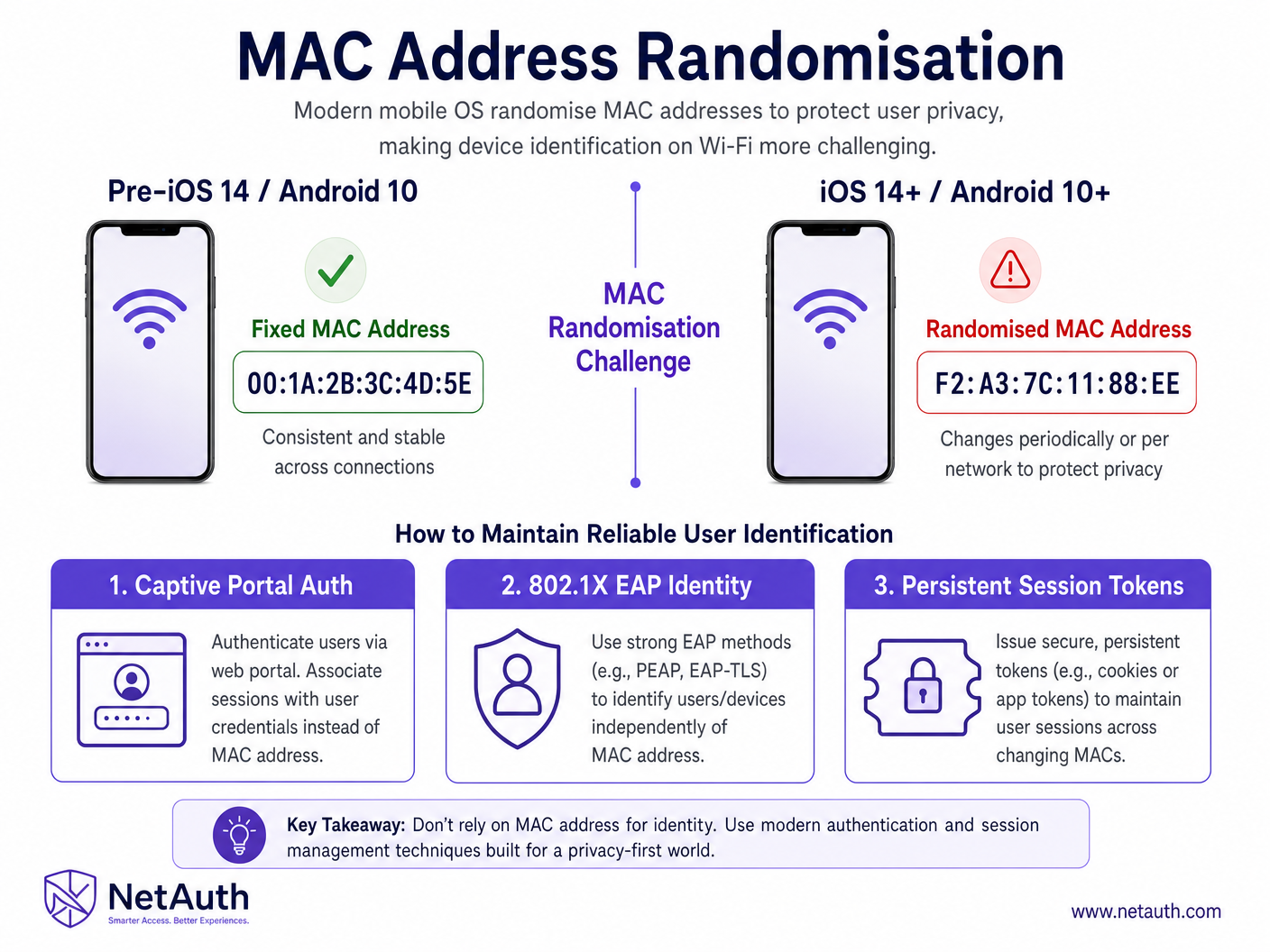
Um die Privatsphäre der Benutzer zu verbessern und passives Tracking zu verhindern, führten Apple und Google die MAC randomisation ein. Wenn ein modernes Gerät nach Netzwerken scannt, sendet es eine randomisierte, temporäre MAC-Adresse. Noch kritischer ist, dass das Gerät beim Verbinden mit einem Netzwerk eine andere randomisierte MAC-Adresse pro SSID verwenden kann und in einigen Konfigurationen diese Adresse periodisch (z.B. alle 24 Stunden) wechselt.
Dies unterbricht grundlegend Analysemodelle, die sich auf die MAC-Adresse als Primärschlüssel verlassen. Ein einzelner wiederkehrender Besucher könnte über eine Woche als mehrere eindeutige Geräte erscheinen, was Metriken wie Besucherfrequenz und Loyalität stark verfälscht.
Moderne Architektur: Identitätszentriertes Tracking
Um die MAC randomisation zu überwinden, hat sich die Branche auf identitätszentriertes Tracking verlagert. Dies beinhaltet die Verlagerung des primären Identifikators von der Hardware-Schicht (Layer 2) zur Anwendungsschicht (Layer 7).
1. Captive Portal Authentifizierung
Die am weitesten verbreitete Lösung an öffentlichen Orten ist das Guest WiFi Captive Portal. Anstatt das Gerät zu verfolgen, authentifiziert das Netzwerk den Benutzer. Wenn sich ein Benutzer verbindet, wird er zu einem Portal weitergeleitet, wo er sich per E-Mail, Social Login oder SMS authentifiziert. Die Analyseplattform (wie Purple) verknüpft dann die aktuelle Sitzung (und ihre temporäre MAC-Adresse) mit dem authentifizierten Benutzerprofil.
2. Persistente Sitzungstoken und Cookies
Sobald sich ein Benutzer über das Captive Portal authentifiziert hat, hinterlegt das System ein persistentes Cookie oder Sitzungstoken im Browser des Geräts. Wenn der Benutzer zum Veranstaltungsort zurückkehrt, kann das Netzwerk ihn, selbst wenn sich seine MAC-Adresse geändert hat, stillschweigend über das Token erneut authentifizieren und die neue MAC-Adresse mit dem bestehenden Benutzerprofil verknüpfen.
3. 802.1X EAP und Passpoint (Hotspot 2.0)
Für nahtlose, sichere Konnektivität bieten Technologien wie 802.1X und Passpoint (Hotspot 2.0) eine robuste Lösung. Geräte werden mit einem Zertifikat oder Profil versehen, das sie automatisch im Netzwerk authentifiziert. Die Identität ist an das Zertifikat gebunden, wodurch die Notwendigkeit der MAC-Adressen-Verfolgung vollständig entfällt. Dies ist die Grundlage moderner Initiativen wie OpenRoaming.
Implementierungsleitfaden: Bereitstellungsstrategien
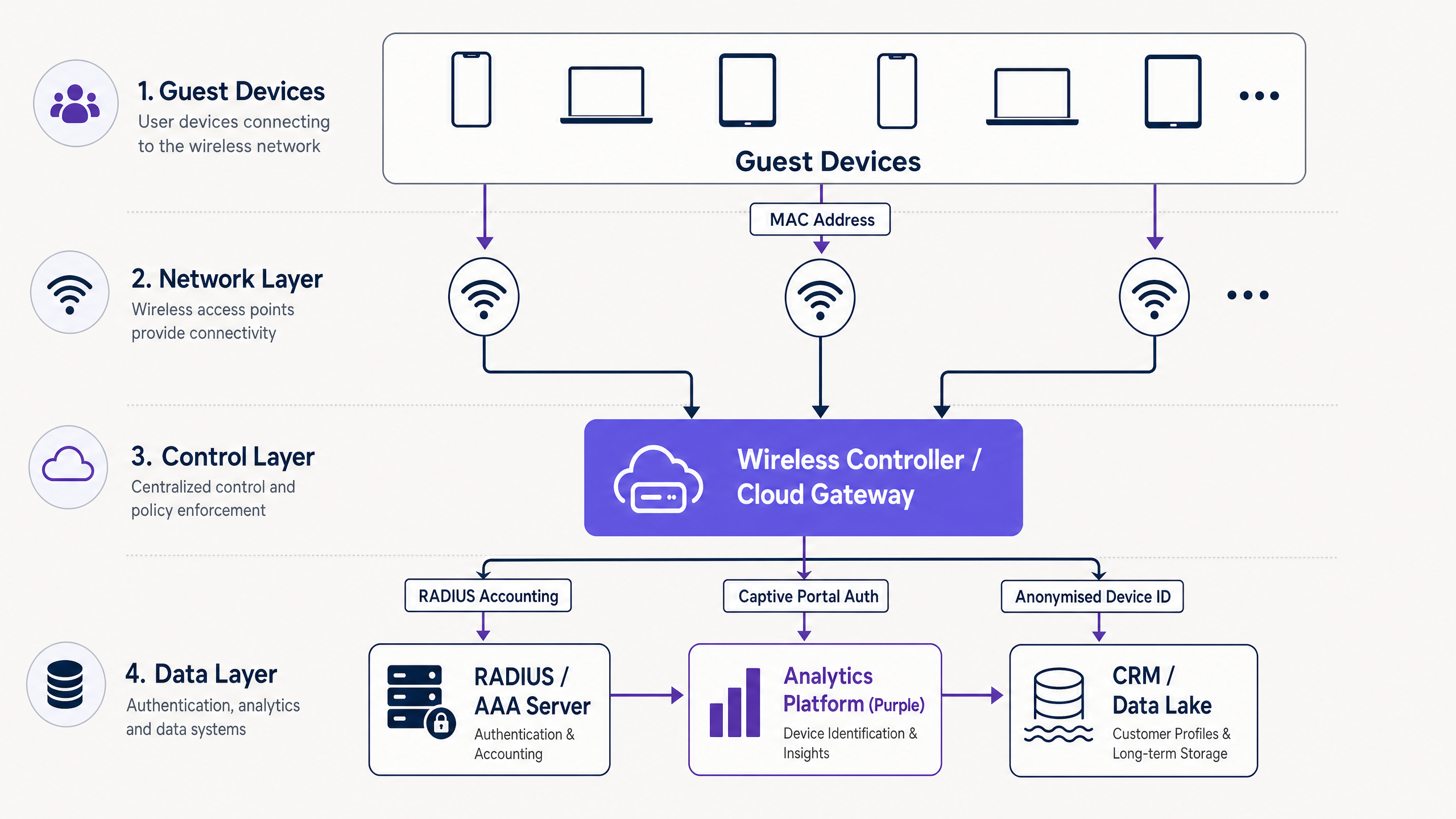
Die Bereitstellung einer robusten Architektur zur Geräteverfolgung erfordert eine sorgfältige Koordination zwischen der Netzwerkinfrastruktur und der Analyseplattform.
Schritt 1: Konfiguration der Netzwerkinfrastruktur
Stellen Sie sicher, dass Ihre Wireless LAN Controller (WLCs) oder cloud-verwalteten Access Points für die Unterstützung fortschrittlicher Authentifizierungsmethoden konfiguriert sind.
- RADIUS Integration: Konfigurieren Sie die Infrastruktur so, dass RADIUS-Accounting-Daten an Ihre Analyseplattform weitergeleitet werden. Diese Daten umfassen Start-/Stoppzeiten der Sitzung, Datennutzung und die aktuelle MAC-Adresse.
- Walled Garden Konfiguration: Stellen Sie sicher, dass die Captive Portal-Domains und die erforderlichen Authentifizierungsserver (z.B. Social Login APIs) im Pre-Authentication Walled Garden zugelassen sind.
Schritt 2: Captive Portal Design und Bereitstellung
Das Captive Portal ist der entscheidende Punkt für die Identitätserfassung.
- Reibungsloses Onboarding: Minimieren Sie die erforderlichen Schritte zur Verbindung. How a wi fi assistant Enables Passwordless Access in 2026 unterstreicht die Bedeutung einer nahtlosen Authentifizierung.
- Progressive Profilerstellung: Fragen Sie nicht alle Daten sofort ab. Sammeln Sie grundlegende Kontaktdaten beim ersten Besuch und fordern Sie zusätzliche Details (z.B. Demografie, Präferenzen) bei späteren Besuchen an.
Schritt 3: Integration der Analyseplattform
Integrieren Sie die Netzwerkdaten mit einer robusten Analyseplattform wie Purple.
- Identitätsauflösungslogik: Die Plattform muss in der Lage sein, mehrere MAC-Adressen einem einzelnen Benutzer zuzuordnen Profil basierend auf Authentifizierungsereignissen und Sitzungstoken.
- Data Lake Synchronisation: Stellen Sie sicher, dass die Analysedaten nahtlos in Ihr CRM oder Ihren Data Lake fließen, um umfassendere Business-Intelligence-Anwendungen zu ermöglichen.
Best Practices für Unternehmensumgebungen
1. Benutzererfahrung vor Datenerfassung priorisieren
Ein umständlicher Authentifizierungsprozess schreckt Benutzer ab und reduziert Ihre gesamte Datenerfassungsrate. Streben Sie ein Gleichgewicht an. Wie in Wie man die Gästezufriedenheit verbessert: Das ultimative Playbook besprochen, ist ein nahtloses WiFi-Erlebnis ein entscheidender Bestandteil der gesamten Gästezufriedenheit.
2. Passpoint für stark frequentierte Veranstaltungsorte nutzen
In Umgebungen wie Stadien oder großen Konferenzzentren können Captive Portals Engpässe verursachen. Passpoint ermöglicht eine sichere, automatische Verbindung und bietet ein reibungsloses Erlebnis bei gleichzeitiger Sicherstellung einer zuverlässigen Benutzeridentifikation.
3. Einhaltung gesetzlicher Vorschriften gewährleisten
Geräte-Tracking beinhaltet naturgemäß persönliche Daten.
- GDPR / CCPA: Stellen Sie sicher, dass während des Captive Portal Onboarding-Prozesses eine ausdrückliche Zustimmung eingeholt wird. Bieten Sie klare Mechanismen für Benutzer, um sich abzumelden oder die Datenlöschung zu beantragen.
- Datenminimierung: Sammeln Sie nur Daten, die einem bestimmten Geschäftszweck dienen.
Fehlerbehebung & Risikominderung
Häufige Fehlerursachen
- Aufgeblähte Zahlen eindeutiger Besucher: Wenn Ihre Analyseplattform randomisierte MAC-Adressen nicht korrekt auflöst, sind Ihre Metriken für eindeutige Besucher künstlich hoch.
- Abhilfe: Stellen Sie sicher, dass Ihre Identitätsauflösungslogik korrekt funktioniert und dass Sitzungstoken erfolgreich bereitgestellt und gelesen werden.
- Captive Portal Abbruchrate: Hohe Abbruchraten am Captive Portal weisen auf Reibung im Onboarding-Prozess hin.
- Abhilfe: Vereinfachen Sie die Anmeldeoptionen, optimieren Sie das Portal für mobile Geräte und überprüfen Sie die Walled Garden Konfiguration, um sicherzustellen, dass notwendige Ressourcen schnell geladen werden.
- Inkonsistentes Tracking über mehrere Standorte hinweg: Wenn ein Benutzer mehrere Standorte innerhalb einer Kette (z.B. eine Retail Marke) besucht, sollte er nahtlos erkannt werden.
- Abhilfe: Implementieren Sie eine zentralisierte Authentifizierungsdatenbank und stellen Sie eine konsistente SSID-Benennung und Sicherheitskonfiguration über alle Standorte hinweg sicher.
ROI & Geschäftsauswirkungen
Genaues Geräte-Tracking ist nicht nur eine IT-Metrik; es ist ein grundlegender Geschäftstreiber.
- Marketing-Attribution: Durch die genaue Verfolgung von Benutzern können Marketingteams physische Besuche digitalen Kampagnen zuordnen. Wenn ein Benutzer ein E-Mail-Angebot erhält und sich anschließend mit dem WiFi des Veranstaltungsortes verbindet, kann die Plattform den Attributionskreislauf schließen.
- Operative Effizienz: Das Verständnis von Verweildauern und Besucherströmen ermöglicht es Betreibern von Veranstaltungsorten, Personal, Layout und Ressourcenzuweisung zu optimieren. Dies ist besonders wichtig in Hospitality und Healthcare Umgebungen.
- Verbessertes Gästeerlebnis: Das Erkennen wiederkehrender Besucher ermöglicht eine personalisierte Interaktion, fördert die Loyalität und erhöht den Lifetime Value.
Schlüsseldefinitionen
MAC Randomisation
A privacy feature in modern operating systems where a device generates a temporary, random MAC address instead of its true hardware address when scanning for or connecting to networks.
IT teams must understand this as it fundamentally breaks legacy analytics systems that rely on MAC addresses for persistent device tracking.
Captive Portal
A web page that a user must view and interact with before access is granted to a public network. Often used for authentication, payment, or accepting terms of service.
This is the primary mechanism for shifting from hardware-centric tracking to identity-centric tracking in enterprise guest WiFi deployments.
802.1X
An IEEE standard for port-based network access control (PNAC). It provides an authentication mechanism to devices wishing to attach to a LAN or WLAN.
Essential for secure, seamless authentication (like Passpoint) that bypasses the need for captive portals and is immune to MAC randomisation issues.
Passpoint (Hotspot 2.0)
A standard that enables mobile devices to automatically discover and connect to Wi-Fi networks without user intervention, using secure 802.1X authentication.
Crucial for high-density venues where frictionless onboarding is required, allowing for reliable tracking without captive portal bottlenecks.
Session Token
A unique identifier generated and sent from a server to a client to identify the current interaction session. Often stored as a cookie.
Used to maintain user identity across network reconnections, even if the device's MAC address has rotated.
Identity Resolution
The process of matching multiple identifiers (like various randomised MAC addresses) to a single, comprehensive user profile.
The core function of modern analytics platforms like Purple to ensure accurate visitor metrics.
Walled Garden
A limited environment that controls the user's access to web content and services before they have fully authenticated to the network.
Must be correctly configured to allow captive portals and third-party authentication services (like social logins) to function prior to granting full internet access.
RADIUS (Remote Authentication Dial-In User Service)
A networking protocol that provides centralized Authentication, Authorization, and Accounting (AAA) management for users who connect and use a network service.
The protocol used to pass authentication and session data (including MAC addresses and data usage) from the wireless controller to the analytics platform.
Ausgearbeitete Beispiele
A national retail chain with 500 locations is reporting a 300% increase in 'new' visitors over the past six months, while sales have remained flat. The IT Director suspects the WiFi analytics data is flawed.
- Audit the current tracking methodology: Determine if the analytics platform is relying solely on MAC addresses. 2. Implement Identity-Centric Tracking: Deploy a captive portal requiring user authentication (email or SMS) to access the Guest WiFi. 3. Enable Session Persistence: Configure the captive portal to drop a persistent cookie on the user's device. 4. Update Analytics Logic: Configure the analytics platform to merge profiles based on the authenticated identity, overriding the temporary MAC addresses. 5. Baseline New Metrics: Establish a new baseline for unique visitors based on authenticated users rather than device MACs.
A large stadium needs to track VIP attendees across different hospitality suites to optimise staffing and F&B services, but captive portals cause unacceptable delays during peak ingress.
- Deploy Passpoint (Hotspot 2.0): Implement Passpoint across the stadium network. 2. Pre-provision VIPs: Distribute Passpoint profiles to VIP ticket holders via the stadium app or email prior to the event. 3. Automatic Authentication: When VIPs arrive, their devices automatically and securely connect to the network using 802.1X EAP, without requiring a captive portal interaction. 4. Track via Identity: The network infrastructure logs the movement of these authenticated identities across the access points serving the hospitality suites.
Übungsfragen
Q1. Your organisation is deploying a new Guest WiFi network across 50 retail locations. The marketing team requires accurate data on repeat visitor frequency. Which authentication strategy should you prioritize?
Hinweis: Consider the impact of MAC randomisation on tracking returning devices without explicit user identification.
Musterlösung anzeigen
You should prioritize an identity-centric authentication strategy using a Captive Portal. By requiring users to authenticate (e.g., via email or social login) and deploying persistent session tokens, you can reliably identify returning visitors regardless of whether their device has rotated its MAC address. Relying on MAC addresses alone will result in inflated 'new visitor' metrics and inaccurate repeat frequency data.
Q2. A hospital IT director wants to track the movement of medical carts equipped with WiFi modules to optimize asset utilization. These modules do not support captive portal interaction. How can they ensure reliable tracking?
Hinweis: These are headless IoT devices, not user-facing smartphones.
Musterlösung anzeigen
For headless devices like medical carts, the IT team should utilize 802.1X EAP-TLS authentication. By provisioning each cart's WiFi module with a unique digital certificate, the network can securely authenticate and identify the specific asset. The tracking is tied to the certificate identity, bypassing any potential issues with MAC randomisation (though enterprise IoT modules typically allow MAC randomisation to be disabled via MDM profiles).
Q3. During a busy conference, attendees are complaining that they have to log in to the captive portal every time their device wakes from sleep. What is the likely configuration issue?
Hinweis: Think about how the network recognizes a returning device that has already authenticated.
Musterlösung anzeigen
The likely issue is a failure in session persistence. Either the captive portal is not configured to drop a persistent session token (cookie) on the device, or the session timeout value on the wireless controller/RADIUS server is set too aggressively. When the device wakes up, it may present a new MAC address; without a valid session token, the network treats it as a new device and forces re-authentication.