
Wie WiFi die Patientenerfahrung in Krankenhäusern verbessern kann
Dieser maßgebliche technische Leitfaden erklärt, wie Krankenhäuser eine Enterprise-Gast-WiFi-Infrastruktur und Analysen nutzen können, um die stationäre Patientenerfahrung messbar zu verbessern. Er behandelt Netzwerkarchitektur, Compliance-Anforderungen (HIPAA, DSPT, GDPR), Captive Portal-Design, die Integration von Wegleitsystemen und ROI-Frameworks – und bietet IT-Entscheidungsträgern die Werkzeuge, um eine überzeugende interne Business Case zu erstellen und eine erfolgreiche Bereitstellung durchzuführen.
Diesen Leitfaden anhören
Podcast-Transkript ansehen
📚 Teil unserer Kernserie: WiFi Analytics Guide →
Executive Summary
For modern healthcare facilities, free WiFi in hospitals has evolved from a basic amenity into a critical layer of patient experience and operational infrastructure. As hospitals digitise patient records, introduce telemedicine, and rely on connected medical devices, the underlying network architecture must simultaneously support clinical demands and rising patient expectations. This guide is for IT directors, network architects, and operations leaders who need to architect, deploy, and optimise a Guest WiFi solution that delivers measurable improvements to the inpatient experience — from entertainment and wayfinding to real-time feedback collection.
The core argument is straightforward: a well-deployed patient WiFi network, integrated with a WiFi Analytics platform, transforms the network from a passive utility into an active intelligence layer. It reduces missed appointments through indoor navigation, improves HCAHPS satisfaction scores through automated feedback, and gives operations teams the footfall data they need to optimise staffing and resource allocation. This guide covers the architecture, compliance requirements, implementation steps, and ROI framework to make that case internally and execute it successfully.
Technical Deep-Dive
Network Architecture for Healthcare Environments
Deploying enterprise-grade Guest WiFi in a hospital requires a fundamentally different approach to a standard commercial deployment. The primary constraint is the co-existence of clinical and guest traffic on the same physical infrastructure, which demands strict logical separation. The standard architecture uses 802.1Q VLANs to segment traffic into at minimum three tiers: clinical systems (EHR, PACS, telemetry), staff administrative networks, and the patient/visitor guest SSID.
The guest VLAN must be routed directly to a dedicated internet uplink — ideally a separate leased line — with no routing path to clinical VLANs. Firewall ACLs should enforce this at the distribution layer, not just at the perimeter. This is a non-negotiable architectural requirement under both HIPAA and the NHS DSPT framework. For a detailed breakdown of compliance obligations, refer to Healthcare WiFi: HIPAA, DSPT and WiFi Compliance Explained .
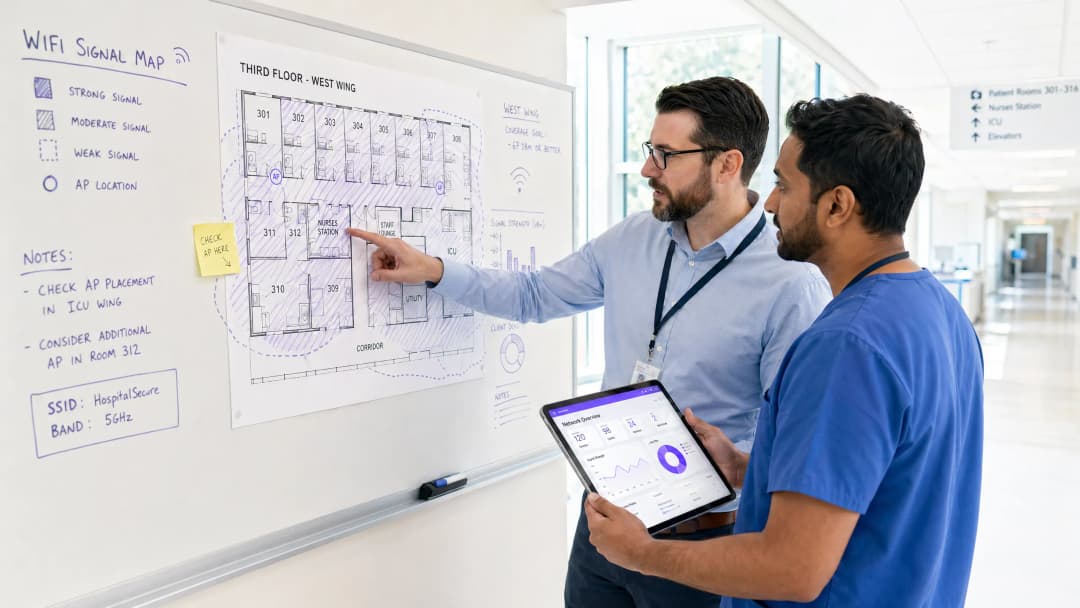
Access Point placement in hospitals presents unique RF challenges. Lead-lined radiology suites, reinforced concrete floors between wards, and high-density patient room clusters all create attenuation profiles that differ significantly from office environments. The design target for patient areas should be a minimum RSSI of -67 dBm with at least 20 dB signal-to-noise ratio. Critically, design for capacity, not just coverage. A ward with 30 beds may have 60-90 active devices at peak visiting hours — each potentially streaming video. AP selection should target devices supporting Wi-Fi 6 (802.11ax) or Wi-Fi 6E to handle that density efficiently.
Spectrum management is equally important. The 2.4 GHz band is heavily contested in hospital environments by legacy telemetry equipment, nurse call systems, and Bluetooth devices. Band steering should be configured to push capable devices to 5 GHz or 6 GHz bands. Automatic channel selection algorithms should be reviewed manually after deployment — they rarely produce optimal results in high-interference healthcare environments.
Captive Portal Architecture and Identity Management
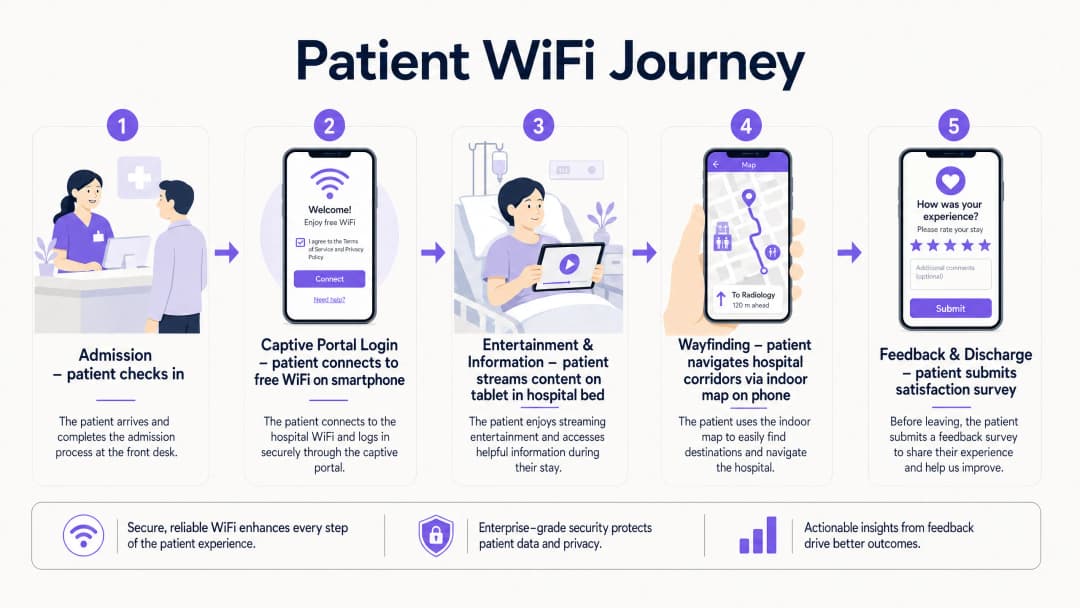
The captive portal is the patient's first interaction with the hospital's digital services layer. It must be fast, reliable, and accessible across a wide range of devices — from the latest iPhone to a five-year-old Android tablet running a legacy browser. A poorly designed portal that fails to redirect correctly on certain devices will generate immediate complaints and support tickets.
Modern deployments move away from pre-shared keys entirely. The recommended approach is a social login or email-based captive portal that presents the hospital's terms of service and privacy notice, collects explicit consent for marketing communications (separately from network access consent, per GDPR Article 7), and authenticates the session. This flow, when integrated with a platform like Purple's Guest WiFi solution, simultaneously onboards the patient into a CRM-compatible data layer, enabling post-discharge communications and feedback surveys.
DNS-level security filtering should be applied to all guest traffic at the resolver level. This prevents access to known malicious domains, blocks inappropriate content categories, and provides an audit trail for compliance purposes. See Protect Your Network with Strong DNS and Security for implementation guidance on DNS filtering in guest network contexts.
WPA3-SAE (Simultaneous Authentication of Equals) should be the target encryption standard for any new SSID deployment. For legacy device compatibility, a WPA2/WPA3 transition mode is acceptable in the short term, but a migration timeline to WPA3-only should be planned. Client Isolation must be enabled on the guest SSID — this prevents device-to-device communication on the same network segment, which is critical for both security and GDPR compliance.
WiFi Analytics and Location Intelligence
The analytics layer is where patient WiFi transitions from a cost centre to a strategic asset. A properly instrumented network, feeding data into a platform like Purple's WiFi Analytics , provides three categories of actionable intelligence.
Network Performance Monitoring delivers real-time visibility into AP health, channel utilisation, client association rates, and throughput per SSID. This enables proactive fault resolution before patients experience degraded service. Threshold-based alerting on RSSI drops or AP disassociation events is standard practice.
Footfall and Dwell Analytics work by analysing probe request data and association patterns to generate footfall heatmaps showing patient and visitor movement through the facility. This data is directly applicable to staffing decisions — if analytics show a consistent 45-minute queue build-up in the outpatient waiting area between 10:00 and 11:30, that is an operational insight with a direct staffing solution.
Feedback and Satisfaction Loops are enabled through automated post-discharge survey triggers, delivered via the email address captured at captive portal login, providing real-time HCAHPS-relevant data. Response rates for WiFi-triggered surveys consistently outperform paper-based alternatives because the contact is timely and the channel is already established.

Implementation Guide
A phased deployment approach reduces risk and allows for iterative optimisation.
Phase 1 — Discovery and Design (Weeks 1-4)
Commission a professional predictive RF design using the hospital's architectural drawings, followed by an active site survey of any existing infrastructure. Document all sources of RF interference. Define VLAN architecture, firewall policy, and internet uplink strategy. Engage the Information Governance team early to align the captive portal data collection with GDPR and DSPT requirements.
Phase 2 — Infrastructure Deployment (Weeks 5-10)
Deploy and configure switching infrastructure, ensuring PoE++ budget is sufficient for high-density APs. Install APs per the validated RF design. Configure SSIDs, VLAN tagging, and QoS policies. Implement QoS markings to prioritise voice (DSCP EF) and video (DSCP AF41) traffic over best-effort bulk data. This ensures telemedicine sessions and video calls remain stable even under network load.
Phase 3 — Captive Portal and Analytics Integration (Weeks 9-12)
Deploy and brand the captive portal. Integrate with the hospital's CRM or patient engagement platform. Configure the analytics platform with custom venue maps. Establish baseline metrics: daily active users, average session duration, peak concurrent connections, and portal completion rate. Set up automated reporting dashboards for the IT and operations teams.
Phase 4 — Wayfinding Integration (Weeks 12-16)
Integrate indoor positioning with the WiFi infrastructure. Publish the hospital's indoor map to the guest portal or a dedicated patient app. Configure points of interest (wards, departments, cafeteria, car parks). Measure wayfinding adoption rates and correlate with missed appointment data.
Best Practices
| Practice | Rationale | Standard Reference |
|---|---|---|
| Strict VLAN segmentation (clinical vs. guest) | Prevents lateral movement from compromised guest devices | HIPAA Security Rule, NHS DSPT |
| WPA3-SAE encryption | Protects against offline dictionary attacks on guest credentials | IEEE 802.11-2020 |
| Client Isolation on guest SSID | Prevents inter-device communication and data exposure | GDPR Article 25 (Privacy by Design) |
| Band Steering to 5/6 GHz | Reduces congestion and interference from legacy 2.4 GHz devices | Wi-Fi Alliance best practices |
| QoS for voice and video | Maintains call quality under network load | IEEE 802.11e / WMM |
| DNS filtering on guest traffic | Blocks malicious domains and inappropriate content | NCSC network security guidance |
| Dedicated internet uplink for guest traffic | Guarantees clinical network performance is unaffected | NHS DSPT, HIPAA |
| Automated post-discharge feedback surveys | Provides timely, actionable HCAHPS-relevant data | NHS Friends and Family Test guidance |
Troubleshooting & Risk Mitigation
RF Interference from Medical Equipment: Conduct regular spectrum analysis using a dedicated spectrum analyser tool. Legacy nurse call systems and patient monitoring equipment operating on 2.4 GHz are common culprits. The solution is typically a combination of channel reassignment and power reduction on affected APs, combined with a migration plan for the interfering equipment.
Captive Portal Redirect Failures: Modern operating systems use Captive Network Assistant (CNA) probes to detect captive portals. Ensure the portal server responds correctly to HTTP requests to known probe URLs (e.g., connectivitycheck.gstatic.com, captive.apple.com). HTTPS-only portal configurations frequently break CNA detection — maintain an HTTP redirect path even if the portal itself is served over HTTPS.
Coverage Gaps in Shielded Areas: Radiology suites, MRI rooms, and some operating theatres use RF shielding that creates complete signal blackouts. The only solution is to deploy APs inside the shielded space, connected via a penetrating cable entry point. Coordinate with the medical physics team before any cabling work in these areas.
GDPR Compliance Risk: The most common compliance failure is collecting marketing consent as part of the terms of service acceptance, rather than as a separate, explicit opt-in. This is a clear GDPR violation. Audit your captive portal flow to ensure consent for network access and consent for marketing communications are presented as separate, independent choices.
Bandwidth Contention: Without per-user bandwidth policies, a small number of heavy users can degrade the experience for everyone. Implement a per-device rate limit of 5-10 Mbps on the guest SSID. This is sufficient for HD streaming while preventing any single device from monopolising capacity.
ROI & Business Impact
The business case for investing in patient WiFi infrastructure rests on four measurable pillars.
HCAHPS Score Improvement: Patient satisfaction scores directly influence hospital reimbursement rates under value-based care models. Hospitals that have implemented automated WiFi-triggered feedback surveys report response rate improvements of 3-5x over paper-based methods, providing a statistically significant data set for quality improvement programmes.
Reduced Missed Appointments: Indoor wayfinding reduces the rate of patients arriving late or missing appointments due to navigation difficulties. A typical 500-bed hospital with 10% of outpatient appointments affected by navigation issues, at an average appointment cost of £150, represents a significant recoverable revenue opportunity.
Operational Efficiency: Footfall analytics from the WiFi network enable data-driven staffing decisions. Correlating waiting area dwell times with staffing levels allows operations managers to reduce average wait times without increasing headcount — simply by optimising shift patterns against actual demand data.
First-Party Data Asset: Every patient who connects to the guest WiFi and completes the captive portal flow represents a consented first-party data record. For a 500-bed hospital with an average length of stay of 4 days, this generates thousands of new, compliant data records per month — a valuable asset for patient engagement, health promotion communications, and service improvement research.
The Healthcare sector is increasingly recognising that the network is not just IT infrastructure — it is a patient experience platform. Organisations that treat it as such are consistently outperforming peers on satisfaction metrics and operational efficiency.
Schlüsseldefinitionen
Captive Portal
Eine Webseite, die einem Benutzer angezeigt wird, bevor ihm Zugriff auf ein öffentliches WiFi-Netzwerk gewährt wird. Sie dient dazu, Nutzungsbedingungen anzuzeigen, Anmeldedaten oder Einwilligungen zu erfassen und zum Internet weiterzuleiten.
Der primäre Patienten-Touchpoint in einem Krankenhaus-Gäste-WiFi-Netzwerk. Die Designqualität beeinflusst direkt die Abschlussraten des Portals und die Qualität der Datenerfassung. Muss auf allen gängigen mobilen Betriebssystemen getestet werden.
VLAN (Virtual Local Area Network)
Ein logisches Netzwerksegment, das innerhalb einer physischen Switch-Infrastruktur mittels 802.1Q-Tagging erstellt wird. Es ermöglicht die Isolierung des Datenverkehrs verschiedener Benutzergruppen auf Layer 2, ohne dass eine separate physische Verkabelung erforderlich ist.
Unerlässlich für die Trennung des Datenverkehrs von Patienten und Gästen von klinischen EHR- und Verwaltungsnetzwerken. Das Fehlen einer ordnungsgemäßen VLAN-Segmentierung ist der häufigste Befund bei Netzwerksicherheitsprüfungen in der IT des Gesundheitswesens.
Band Steering
Eine Methode zur Verwaltung drahtloser Netzwerke, die Dualband-fähige Client-Geräte dazu bewegt, sich mit dem weniger ausgelasteten 5-GHz- oder 6-GHz-Frequenzband anstelle des 2,4-GHz-Bands zu verbinden.
Besonders wertvoll in Krankenhausumgebungen, in denen ältere medizinische Geräte erhebliche Störungen im 2,4-GHz-Bereich verursachen. Reduziert Überlastungen und verbessert den Durchsatz für Streaming-Anwendungen.
Client Isolation
Eine Sicherheitsfunktion für drahtlose Netzwerke, die verhindert, dass mit derselben SSID verbundene Geräte auf Layer 2 direkt miteinander kommunizieren, wodurch der gesamte Datenverkehr über das Gateway erzwungen wird.
Zwingend erforderlich für SSIDs von Gästen im Gesundheitswesen. Verhindert, dass Malware auf dem Gerät eines Patienten andere Geräte im selben Netzwerksegment scannt oder angreift. Hat zudem Auswirkungen auf die GDPR im Hinblick auf die Offenlegung von Daten.
WPA3-SAE (Simultaneous Authentication of Equals)
Das in WPA3-zertifizierten drahtlosen Netzwerken verwendete Authentifizierungsprotokoll, das den Pre-Shared-Key-Handshake von WPA2 durch einen Dragonfly-Schlüsselaustausch ersetzt, der resistent gegen Offline-Wörterbuchangriffe ist.
Der derzeit empfohlene Verschlüsselungsstandard für neue SSID-Bereitstellungen. Schützt Patientendaten und Sitzungsdaten vor dem Abfangen, selbst in offenen oder nur schwach gesicherten Netzwerken.
RSSI (Received Signal Strength Indicator)
Ein Maß für den Leistungspegel eines empfangenen Funksignals, ausgedrückt in dBm (Dezibel bezogen auf ein Milliwatt). Negativere Werte weisen auf ein schwächeres Signal hin.
Wird bei Standortvermessungen zur Validierung der AP-Platzierung verwendet. Der Zielwert für Patientenbereiche liegt bei -67 dBm oder besser. Werte unter -75 dBm führen in der Regel zu Verbindungsinstabilität und schlechter Streaming-Leistung.
QoS (Quality of Service)
Richtlinien zur Verwaltung des Netzwerkverkehrs, die verschiedene Arten von Datenpaketen klassifizieren und priorisieren, um sicherzustellen, dass latenzempfindliche Anwendungen (Sprache, Video) gegenüber Best-Effort-Verkehr bevorzugt behandelt werden.
Entscheidend für die Aufrechterhaltung der Qualität von Telemedizin-Anrufen und der Stabilität von Patienten-Videoanrufen in Zeiten hoher Netzwerkauslastung. Implementiert mittels DSCP-Markierungen: EF für Sprache, AF41 für Video.
Location Analytics
Der Prozess der Ableitung von Bewegungs-, Verweilzeit- und Besucherstromdaten aus den WiFi-Probe-Requests und Assoziierungsereignissen, die von mobilen Geräten erzeugt werden, wenn sie sich durch ein Gebäude bewegen.
Ermöglicht es Betriebsteams in Krankenhäusern, Heatmaps der Besucherströme zu erstellen, Engpässe im Patientenfluss zu identifizieren und den Personaleinsatz auf der Grundlage tatsächlicher Bedarfsdaten statt geplanter Annahmen zu optimieren.
HCAHPS (Hospital Consumer Assessment of Healthcare Providers and Systems)
Eine standardisierte, öffentlich berichtete Umfrage zur Patientenperspektive auf die Krankenhausversorgung, die zur Messung und zum Vergleich der Patientenerfahrung bei verschiedenen Gesundheitsdienstleistern dient.
Die WiFi-Qualität und die Verfügbarkeit digitaler Dienste korrelieren zunehmend mit den HCAHPS-Bewertungen für Kommunikation und Reaktionsfähigkeit. Automatisierte, durch WiFi ausgelöste Umfragen verbessern die Rücklaufquoten und die Aktualität der Daten.
DNS Filtering
Eine Sicherheitsmaßnahme, die DNS-Auflösungsanfragen abfängt und Abfragen an Domänen blockiert, die als bösartig, unangemessen oder richtlinienverletzend eingestuft sind, bevor eine Verbindung hergestellt wird.
Wird auf Resolver-Ebene für den gesamten Gäste-WiFi-Datenverkehr angewendet. Bietet eine schlanke, aber effektive Schutzschicht gegen die Verbreitung von Malware, Phishing und den Zugriff auf unangemessene Inhalte in Patientennetzwerken.
Ausgearbeitete Beispiele
Ein regionales NHS-Krankenhaus mit 500 Betten verzeichnet während der abendlichen Besuchszeiten (18:00–20:00 Uhr) eine starke Netzwerküberlastung im Patienten-WiFi, was zu Beschwerden über puffernde Videostreams und abgebrochene Videoanrufe mit Familienmitgliedern führt.
- Führen Sie während der Stoßzeiten eine Spektrumanalyse durch, um festzustellen, ob es sich um eine HF-Überlastung oder eine Backhaul-Sättigung handelt. 2. Bei HF-Problemen: Aktivieren Sie Band Steering, um 5-GHz-fähige Geräte aus dem 2.4-GHz-Band zu zwingen; überprüfen Sie die AP-Kanalbelegungen und reduzieren Sie die Sendeleistung, um die Zellgrenzen zu verengen und Gleichkanalstörungen zu minimieren. 3. Bei Backhaul-Problemen: Überprüfen Sie die Auslastung des Internet-Uplinks während der Stoßzeiten — wenn eine gemeinsam genutzte Verbindung ausgelastet ist, implementieren Sie Traffic Shaping, um Echtzeitverkehr (DSCP EF für Sprache, DSCP AF41 für Video) gegenüber Massendownloads zu priorisieren. 4. Richten Sie eine Bandbreitenbegrenzung von 8 Mbps pro Gerät auf der Gäste-SSID ein, um einen fairen Zugriff zu gewährleisten. 5. Installieren Sie zusätzliche APs auf den Stationen mit der höchsten Dichte, wenn die Anzahl der Clients pro AP während der Stoßzeiten 30 übersteigt. 6. Analysieren Sie das Analytics-Dashboard für die spezifischen Stationen, die die meisten Beschwerden verursachen — das Problem ist selten in der gesamten Einrichtung einheitlich.
Eine private Krankenhausgruppe richtet eine neue ambulante Klinik ein und möchte das Captive Portal des Gäste-WiFi nutzen, um Patientendaten für Feedback-Umfragen nach dem Besuch und Marketingkommunikation zu erfassen. Gleichzeitig muss eine strikte Trennung vom klinischen Netzwerk mit EHR-Daten gewährleistet sein.
- Erstellen Sie ein dediziertes VLAN (z. B. VLAN 100) für die Gäste-SSID mit einem separaten DHCP-Bereich und ohne Routing-Nachbarschaft zu klinischen VLANs. 2. Leiten Sie den gesamten Gästeverkehr über eine separate Firewall-Zone an einen dedizierten Internet-Uplink weiter — nutzen Sie nicht dieselbe Perimeter-Firewall, die die klinischen Systeme schützt. 3. Aktivieren Sie die Client-Isolierung auf der Gäste-SSID. 4. Gestalten Sie das Captive Portal mit zwei separaten Zustimmungs-Checkboxen: eine für die Akzeptanz der Nutzungsbedingungen des Netzwerks (erforderlich für den Zugang) und eine für die Anmeldung zur Marketingkommunikation (optional, klar gekennzeichnet). Dies ist eine Anforderung gemäß GDPR Artikel 7 — die Einwilligung für Marketingzwecke muss freiwillig erteilt werden und unabhängig von der Dienstleistungserbringung sein. 5. Integrieren Sie das Portal mit der Guest WiFi-Plattform von Purple, um die eingewilligten Daten in einem CRM-kompatiblen Format zu erfassen. 6. Konfigurieren Sie automatisierte Trigger für Umfragen nach dem Besuch, die 24 Stunden nach dem Ende der Sitzung des Patienten ausgelöst werden. 7. Implementieren Sie DNS-Filterung im Gäste-VLAN, um schädliche Domains zu blockieren.
Übungsfragen
Q1. Ein Krankenhausadministrator schlägt vor, das Gäste-WiFi-Netzwerk zu nutzen, um den Echtzeit-Standort teurer mobiler medizinischer Geräte (Infusionspumpen, tragbare EKG-Monitore) zu verfolgen. Wie reagieren Sie als IT-Leiter und welche Alternative empfehlen Sie?
Hinweis: Berücksichtigen Sie die architektonische Trennung zwischen der Infrastruktur für Gäste und der klinischen Infrastruktur sowie die Zuverlässigkeitsanforderungen für die Asset-Verfolgung im klinischen Kontext.
Musterlösung anzeigen
Ich würde davon abraten, das Gäste-WiFi-Netzwerk für die klinische Asset-Verfolgung zu nutzen, und zwar aus zwei Gründen. Erstens ist die Gäste-SSID architektonisch von den klinischen Systemen getrennt – alle Daten zur Asset-Verfolgung müssten eine Firewall-Grenze passieren, um die klinischen Managementsysteme zu erreichen, was unnötige Komplexität und potenzielle Sicherheitsrisiken mit sich bringt. Zweitens ist die Standortgenauigkeit des Gäste-WiFi (typischerweise 5–15 Meter mittels RSSI-Triangulation) für eine zuverlässige Asset-Verfolgung auf Raumebene in einer klinischen Umgebung unzureichend. Die empfohlene Alternative ist ein dediziertes RTLS unter Verwendung aktiver BLE-Tags an den Geräten, wobei in jedem Raum dedizierte BLE-Lesegeräte installiert werden. Dies bietet eine Genauigkeit im Submeterbereich, arbeitet unabhängig vom Gästenetzwerk und lässt sich direkt in klinische Asset-Management-Systeme integrieren. Die BLE-Infrastruktur kann oft dieselbe physische Verkabelung wie die WiFi-APs nutzen, was die Bereitstellungskosten senkt.
Q2. Bei einem Audit nach der Bereitstellung stellen Sie fest, dass das Captive Portal des Krankenhauses ein einziges Kontrollkästchen anzeigt mit dem Text: „Ich akzeptiere die Nutzungsbedingungen und stimme dem Erhalt von Mitteilungen des Krankenhauses zu.“ Was ist das Compliance-Risiko und wie sieht die Behebung aus?
Hinweis: Berücksichtigen Sie die Anforderungen von Artikel 7 GDPR für eine wirksame Einwilligung, insbesondere die Bedingungen, unter denen eine Einwilligung als freiwillig erteilt gilt.
Musterlösung anzeigen
Dies ist ein klarer Verstoß gegen Artikel 7 GDPR. Die Einwilligung für Marketingkommunikation muss freiwillig erteilt werden. Das bedeutet, dass sie nicht mit der Einwilligung für den Netzwerkzugang als Bedingung für den Dienst gekoppelt werden darf. Die Behebung besteht darin, das Captive Portal in zwei separate Einwilligungsmechanismen aufzuteilen: (1) eine obligatorische Akzeptanz der Netzwerk-Nutzungsbedingungen (erforderlich für den Zugang) und (2) ein separates, optionales Opt-in-Kontrollkästchen für Marketingkommunikation, das klar gekennzeichnet und standardmäßig nicht ausgewählt ist. Alle bestehenden Datensätze, die unter der gekoppelten Einwilligung erfasst wurden, sollten mit dem DPO überprüft werden – sie müssen möglicherweise für Marketingzwecke als nicht eingewilligt behandelt werden, bis eine erneute Einwilligung eingeholt wurde.
Q3. Ein bestehendes Krankenhaus wird um einen neuen Onkologietrakt mit 200 Betten erweitert. Der Projektleiter fragt, ob die bestehende Gäste-WiFi-Infrastruktur einfach erweitert werden kann, um den neuen Trakt abzudecken. Welche Fragen stellen Sie, bevor Sie eine Empfehlung abgeben?
Hinweis: Denken Sie an Kapazitätsplanung, Backhaul und die spezifischen HF-Herausforderungen einer neuen Gebäudestruktur, bevor Sie davon ausgehen, dass die bestehende Infrastruktur skaliert werden kann.
Musterlösung anzeigen
Bevor ich eine Empfehlung ausspreche, würde ich folgende Fragen stellen: (1) Wie hoch ist die aktuelle Auslastung des bestehenden Backhaul-Uplinks während der Hauptverkehrszeiten? Wenn sie bereits über 70 % liegt, wird das Hinzufügen von 200 Betten zu Engpässen führen. (2) Wie sieht die bauliche Spezifikation des neuen Trakts aus – gibt es insbesondere bleiverkleidete Räume oder Stahlbetondecken, die APs in abgeschirmten Bereichen erfordern? (3) Wie hoch ist die Anzahl der Clients pro AP auf der bestehenden Infrastruktur während der Hauptverkehrszeiten? Wenn bestehende APs bereits mehr als 40 Clients verarbeiten, reicht die vorhandene AP-Hardware selbst mit zusätzlichen Einheiten möglicherweise nicht aus. (4) Ist die bestehende Switching-Infrastruktur PoE++-fähig oder werden neue Switches benötigt? (5) Wurde ein prädiktives HF-Design anhand der Architekturzeichnungen des neuen Trakts durchgeführt? Ich würde nicht empfehlen, die bestehende Infrastruktur ohne eine formelle Kapazitätsbewertung und ein prädiktives Design einfach zu erweitern.
Weiterlesen in dieser Reihe
Messung des geschäftlichen ROI von Gäste-WiFi und Location Analytics
Dieser Leitfaden bietet ein technisches und betriebliches Framework zur Messung des geschäftlichen ROI von Gäste-WiFi und Location Analytics. Er beschreibt detailliert, wie sich der Wert von Hardware-Investitionen durch längere Verweilzeiten, betriebliche Effizienz und die Erfassung von First-Party-Daten in Einzelhandel, Hotellerie und öffentlichen Einrichtungen berechnen lässt. IT-Manager, Netzwerkarchitekten, CTOs und Betriebsleiter finden hier konkrete Messmodelle, Praxisbeispiele und Compliance-Richtlinien, um ihre WiFi-Investitionen zu rechtfertigen und zu maximieren.
Privacy by Design: Anonymisierung von WiFi-Daten für die GDPR-Konformität
Dieser maßgebliche Leitfaden beschreibt die technische Architektur und die Implementierungsstrategien für die Anonymisierung von WiFi-Daten zur Gewährleistung der GDPR-Konformität. Er bietet IT-Leitern und Netzwerkarchitekten praxisnahe Frameworks, um robuste Standort-Analysen mit strengen Datenschutzanforderungen in Einklang zu bringen.
Heatmapping vs. Presence Analytics: Technische Unterschiede
Dieser fundierte technische Leitfaden beschreibt die entscheidenden architektonischen und betrieblichen Unterschiede zwischen WiFi Heatmapping und Presence Analytics für Betreiber von Großunternehmen. Er bietet IT-Leitern, Netzwerkarchitekten und Betriebsleitern praxisnahe Bereitstellungsmodelle, reale Implementierungsszenarien und herstellerunabhängige Best Practices, um einen maximalen ROI aus ihrer bestehenden drahtlosen Infrastruktur zu erzielen.