
WiFi Guest Portal: Was es ist und wie man es optimiert
Dieser maßgebliche Leitfaden beschreibt die Architektur, Implementierung und Optimierung von WiFi-Gastportalen. Er bietet umsetzbare Strategien für IT-Führungskräfte, um die Anmeldequoten zu erhöhen, die GDPR-Konformität sicherzustellen und hochwertige Erstanbieterdaten zu erfassen.
Diesen Leitfaden anhören
Podcast-Transkript ansehen
📚 Part of our core series: The Ultimate Guide to Captive Portals →
Zusammenfassung für Führungskräfte
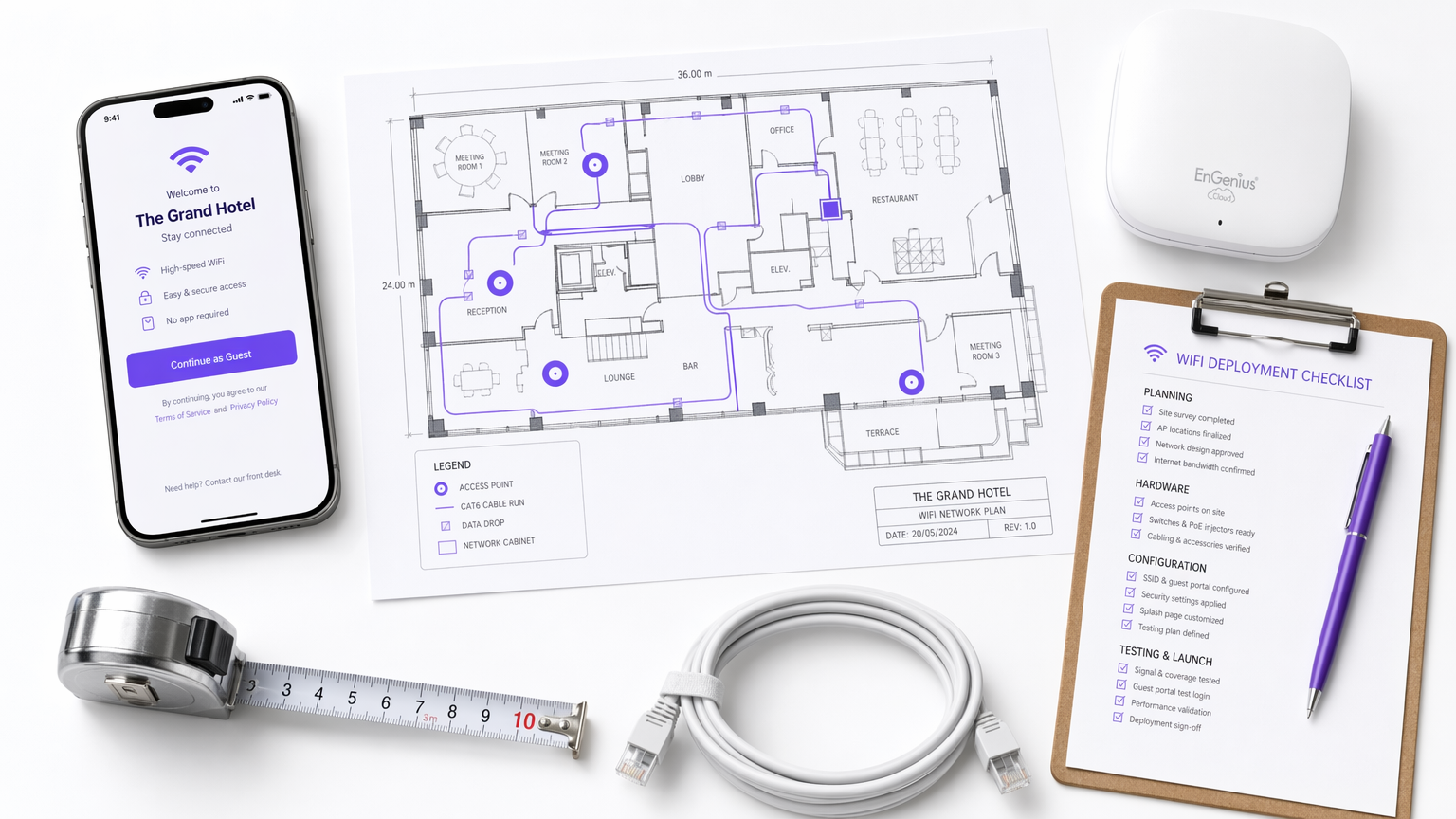
Das WiFi-Gastportal – häufig als Captive Portal oder Splash Page bezeichnet – ist die kritische Schnittstelle zwischen Netzwerkzugangskontrolle, User Experience und Unternehmensdatenstrategie. Für IT-Manager, Netzwerkarchitekten und Direktoren für Veranstaltungsabläufe geht es bei der Bereitstellung eines Gastportals nicht mehr nur darum, Internetzugang bereitzustellen. Es geht darum, ein sicheres, konformes Gateway zu entwerfen, das hochwertige Erstanbieterdaten erfasst und gleichzeitig die User Friction minimiert.
Dieser Leitfaden bietet eine umfassende technische Referenz dazu, was ein Gastportal ist, wie die zugrunde liegenden Authentifizierungsprotokolle funktionieren und welche präzisen Hebel zur Optimierung der Login Journey zur Verfügung stehen. Ob Sie es in einer Einzelhandelskette, einem Stadion oder einer globalen Hotelmarke einsetzen, die Prinzipien bleiben konsistent: Sichern Sie das Netzwerk, reduzieren Sie Form Fatigue und integrieren Sie die erfassten Daten in nachgelagerte Geschäftssysteme. Indem Unternehmen über den einfachen Click-Through-Zugang hinausgehen, können sie ihre Guest WiFi -Infrastruktur von einem Kostenfaktor in einen messbaren Treiber für Kundenbindung und Umsatz verwandeln.
Technischer Einblick
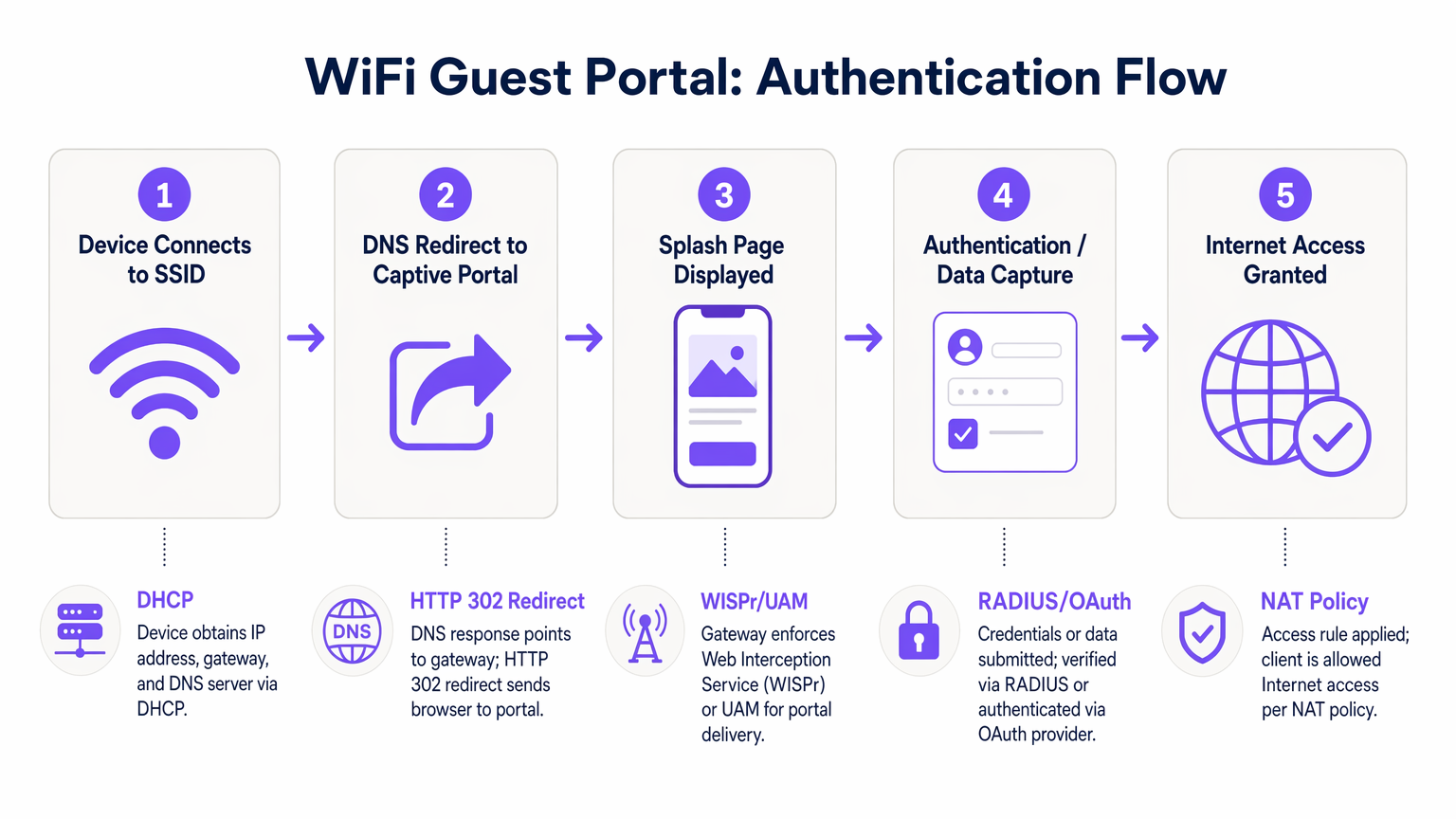
Das Verständnis der Mechanik eines Gast-WiFi-Portals erfordert die Untersuchung der Abfolge von Ereignissen, die vom Moment der Verbindung eines Geräts mit einer SSID bis zum Zeitpunkt der Gewährung des vollständigen Internetzugangs stattfinden. Dieser Prozess basiert auf einer Kombination von Netzwerkprotokollen und Web-Umleitungsmechanismen.
Wenn sich ein Client-Gerät mit dem Gastnetzwerk verbindet, verhandelt es zunächst eine IP-Adresse, Subnetzmaske und einen Standard-Gateway über DHCP. In diesem Stadium wird das Gerät vom Access Controller in einen „Walled Garden“-Zustand versetzt. Der Walled Garden ist eine eingeschränkte Netzwerkumgebung, in der der gesamte ausgehende HTTP- und HTTPS-Verkehr abgefangen wird. Der Controller erlaubt den Zugriff nur auf explizit whitelisted Domains – wie die Hosting-Server des Portals, Authentifizierungsanbieter und notwendige CDN-Ressourcen.
Sobald der Benutzer einen Browser öffnet oder der native Captive Network Assistant (CNA) des Geräts den Walled Garden erkennt, sendet der Controller eine HTTP 302-Umleitung. Diese Umleitung leitet den Client zur Splash Page URL weiter. Dieses Abfangen wird durch das Wireless Internet Service Provider roaming (WISPr)-Protokoll oder die Universal Access Method (UAM) geregelt.
Die Authentifizierung erfolgt dann auf der Splash Page. Die primären Methoden umfassen:
- Click-Through: Der Benutzer akzeptiert die Geschäftsbedingungen, ohne persönliche Daten anzugeben.
- Form-Based Registration: Der Benutzer übermittelt Details wie Name und E-Mail.
- Social Login: Authentifizierung über OAuth 2.0 unter Verwendung von Anbietern wie Google, Facebook oder Apple.
- SMS Verification: Der Benutzer erhält einen One-Time Passcode (OTP) per SMS, um seine Identität zu überprüfen.
Sobald der Benutzer sich erfolgreich authentifiziert hat, kommuniziert das Portal mit dem Access Controller, typischerweise über RADIUS (Remote Authentication Dial-In User Service) oder eine proprietäre API. Der Controller aktualisiert dann seine NAT-Richtlinien oder Firewall-Regeln und versetzt die MAC-Adresse des Clients vom Walled Garden in einen autorisierten Zustand, wodurch der vollständige Internetzugang gewährt wird.
Implementierungsleitfaden
Die Bereitstellung eines robusten Gastportals erfordert einen systematischen Ansatz, der Sicherheit, User Experience und Datenintegration priorisiert. Die folgenden Schritte skizzieren eine herstellerneutrale Bereitstellungsmethodik.
Zuerst etablieren Sie die Netzwerksegmentierung. Die Gast-SSID muss vom Unternehmensnetzwerk mithilfe dedizierter VLANs isoliert werden. Dies verhindert, dass Gastgeräte auf interne Ressourcen, Point-of-Sale-Systeme oder Verwaltungsschnittstellen zugreifen. Implementieren Sie die Client-Isolation innerhalb des Gast-VLANs, um zu verhindern, dass Geräte miteinander kommunizieren, und mindern Sie so das Risiko einer lateralen Bewegung durch böswillige Akteure.
Zweitens konfigurieren Sie den Walled Garden präzise. Die häufigste Ursache für Portalfehler ist eine unvollständige Walled Garden Whitelist. Stellen Sie sicher, dass alle Ressourcen, die zum Rendern der Splash Page erforderlich sind – einschließlich CSS-Dateien, Schriftarten und Authentifizierungsanbieter-Endpunkte (z. B. accounts.google.com) – vor der Authentifizierung zugänglich sind. Andernfalls führt dies zu einer fehlerhaften Seitenwiedergabe oder fehlgeschlagenen Social Logins.
Drittens entwerfen Sie das Datenmodell und den Authentifizierungsfluss. Bestimmen Sie die minimal benötigten Daten vom Benutzer. Für die meisten kommerziellen Implementierungen sind eine E-Mail-Adresse und eine explizite Marketing-Einwilligung für die erste Anmeldung ausreichend. Implementieren Sie Social Login-Optionen, um die Friction zu reduzieren und die Datenqualität zu verbessern. Bei der Integration mit WiFi Analytics -Plattformen stellen Sie sicher, dass das Datenmodell mit dem Schema Ihres CRMs übereinstimmt.
Viertens integrieren Sie nachgelagerte Systeme. Der Wert eines Gastportals wird vollständig realisiert, wenn die erfassten Daten nahtlos in Marketing-Automatisierungsplattformen oder CRM-Systeme fließen. Konfigurieren Sie Webhooks oder API-Integrationen, um Profildaten in Echtzeit zu übertragen, was eine automatisierte Post-Login-Interaktion ermöglicht, wie z. B. Willkommens-E-Mails oder Einladungen zu Treueprogrammen.
Best Practices
Die Optimierung der Gastportal-Experience ist ein fortlaufender Prozess. Branchenübliche Best Practices konzentrieren sich auf Geschwindigkeit, Mobile Responsiveness und Progressive Profiling.
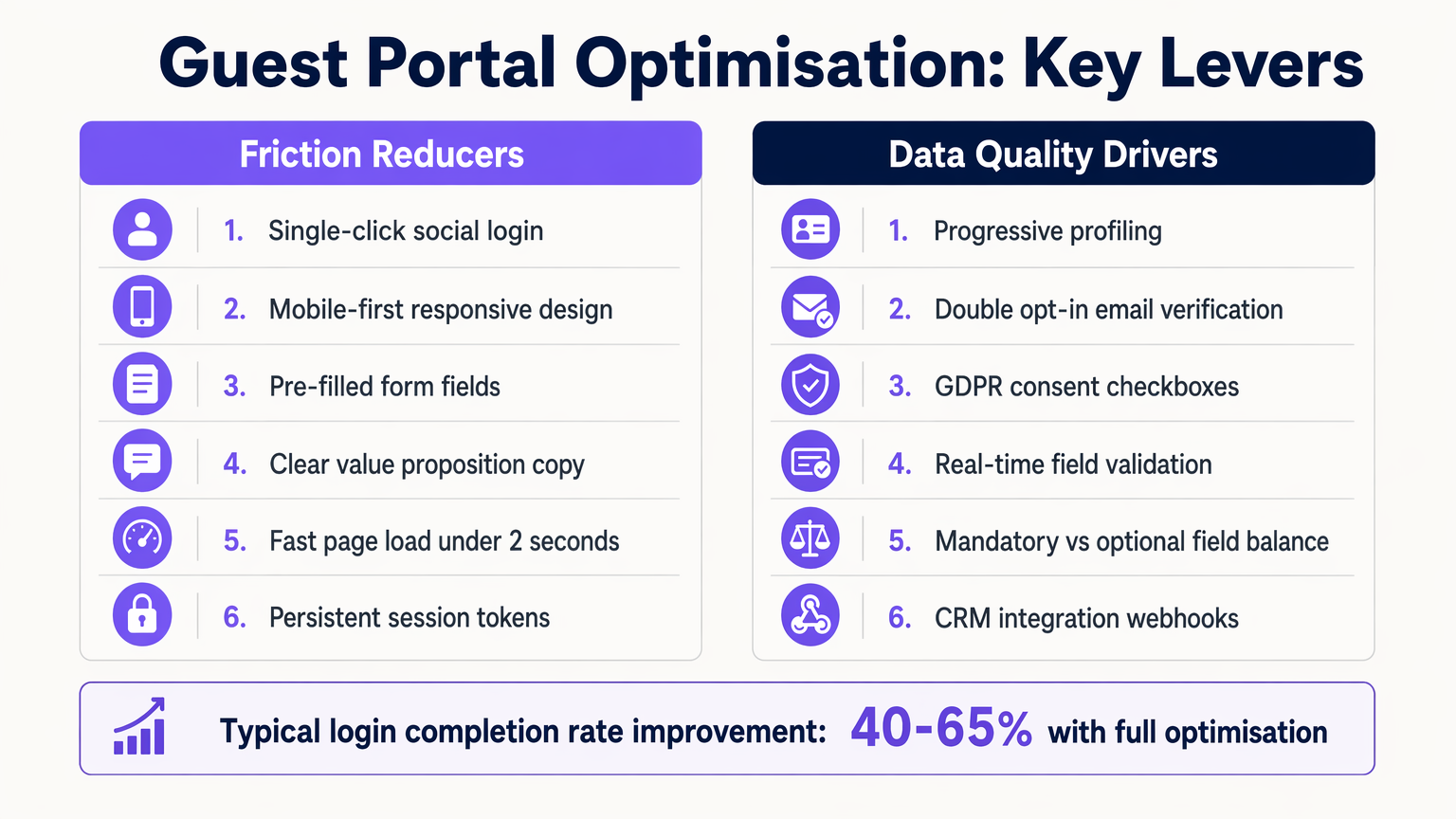
1. Mobile-First Design Die überwiegende Mehrheit der Gastportal-Interaktionen findet auf mobilen Geräten statt. Stellen Sie sicher, dass die Splash Page vollständig responsive ist, mit entsprechend dimensionierten Touch Targets (mindestens 44x44 Pixel) und Formfeldern, die die richtige virtuelle Tastatur auslösen (z. B. die E-Mail-Tastatur für E-Mail-Felder).
2. Progressive Profiling Vermeiden Sie Form Fatigue, indem Sie bei der ersten Verbindung nur wesentliche Daten erfassen. Bei späteren Besuchen verwenden Sie MAC-Adressenerkennung oder persistente Session Tokens, um wiederkehrende Benutzer zu identifizieren und sie aufzufordern zusätzliche Informationen, wie Geburtsdatum oder Präferenzen. Dieser Ansatz erhöht die Gesamt-Abschlussrate erheblich.
3. Klarer Wertetausch Der Text auf der Splash-Seite muss den Nutzen für den Benutzer klar formulieren. Ersetzen Sie generische Formulierungen wie „Registrieren Sie sich, um auf das Netzwerk zuzugreifen“ durch überzeugende Wertversprechen wie „Genießen Sie High-Speed-WiFi – verbinden Sie sich in Sekundenschnelle.“
Fehlerbehebung & Risikominderung
Selbst gut konzipierte Implementierungen können auf Probleme stoßen. Das Verständnis gängiger Fehlerursachen ist entscheidend für die Aufrechterhaltung der Betriebszeit und der Benutzerzufriedenheit.
Captive Network Assistant (CNA) Fehler
Moderne Betriebssysteme verwenden CNAs, um Captive Portals automatisch zu erkennen. Wenn der Access Controller nicht korrekt auf die anfängliche Abfrage des Betriebssystems (z. B. Apples captive.apple.com) reagiert, kann der CNA möglicherweise nicht starten, was den Benutzer verwirrt. Stellen Sie sicher, dass die Firmware des Controllers aktuell ist und diese Abfragen korrekt verarbeitet.
Fehlkonfiguration des Session Timeout Ein zu kurzer Session Timeout zwingt Benutzer zu häufiger Re-Authentifizierung, was die Erfahrung beeinträchtigt. Umgekehrt kann ein zu langer Timeout die Metriken für gleichzeitige Benutzer aufblähen und IP-Adresspools erschöpfen. Ein typischer kommerzieller Veranstaltungsort sollte einen Session Timeout von 8 bis 24 Stunden konfigurieren, wobei wiederkehrende Benutzer nahtlos über MAC-Caching authentifiziert werden.
Compliance-Risiken Unter GDPR und ähnlichen Rahmenwerken ist eine explizite Zustimmung für Marketingkommunikation erforderlich. Vorausgewählte Kästchen oder gebündelte Zustimmungen (z. B. die Kombination von Nutzungsbedingungen mit Marketing-Opt-in) sind nicht konform. Stellen Sie sicher, dass das Portal ein unveränderliches Audit-Log der Zustimmungsdatensätze führt, einschließlich Zeitstempeln und der akzeptierten spezifischen Privacy Policy-Version.
ROI & Geschäftsauswirkungen
Das ultimative Maß für den Erfolg eines Gastportals ist sein Beitrag zu den Geschäftszielen. Durch den Übergang von einem einfachen Zugangsmechanismus zu einer intelligenten Datenerfassungsplattform können Unternehmen einen messbaren ROI erzielen.
In Retail -Umgebungen ermöglicht die Erfassung von E-Mail-Adressen gezielte Re-Marketing-Kampagnen, die den Kundenstrom erhöhen und den Customer Lifetime Value steigern. Im Hospitality -Bereich ermöglicht die Integration des Portals mit Property Management Systemen personalisierte Gästeerlebnisse und automatisierte TripAdvisor-Bewertungsanfragen.
Die Auswirkungen werden durch Metriken wie die Login Completion Rate (der Prozentsatz der Benutzer, die das Portal sehen und sich erfolgreich authentifizieren), die Opt-In Rate (der Prozentsatz der Benutzer, die Marketing-Zustimmung erteilen) und den Data Quality Score (der Prozentsatz gültiger, zustellbarer E-Mail-Adressen) quantifiziert. Plattformen wie Purple bieten die notwendigen Analysen, um diese KPIs zu verfolgen und den greifbaren Wert der WiFi-Infrastruktur zu demonstrieren.
Schlüsseldefinitionen
Captive Portal
A web page that the user of a public-access network is obliged to view and interact with before access is granted.
The fundamental mechanism for controlling guest access and capturing data.
Walled Garden
A restricted network environment that allows access only to explicitly permitted IP addresses or domains prior to authentication.
Critical for allowing the splash page and authentication providers to load before the user has full internet access.
WISPr
Wireless Internet Service Provider roaming. A protocol that allows users to roam between different wireless providers.
The underlying standard that enables the HTTP redirect to the captive portal.
RADIUS
Remote Authentication Dial-In User Service. A networking protocol that provides centralized Authentication, Authorization, and Accounting (AAA) management.
The backend system that verifies credentials and tells the controller to grant access.
MAC Caching
The process of storing a device's Media Access Control address after initial authentication to automatically recognize and authorize it on subsequent visits.
Essential for providing a seamless experience for returning visitors without requiring re-login.
Progressive Profiling
A method of gradually gathering information about a user across multiple interactions rather than asking for all data upfront.
Used to balance the need for detailed marketing data with the necessity of high login completion rates.
Captive Network Assistant (CNA)
A feature in modern operating systems (like iOS and Android) that automatically detects a captive portal and opens a pseudo-browser for login.
IT teams must ensure their controllers respond correctly to CNA probes to trigger the automatic popup.
VLAN Segmentation
The practice of dividing a physical network into multiple logical networks. Guest traffic is placed on a separate VLAN from corporate traffic.
A non-negotiable security requirement to protect internal enterprise systems from guest devices.
Ausgearbeitete Beispiele
A 200-room hotel is experiencing a 60% drop-off rate on their guest WiFi portal. The current portal requires guests to input their First Name, Last Name, Room Number, Email Address, and Date of Birth on a single screen before granting access. How should the IT Director redesign this flow to improve completion rates?
The IT Director should implement a progressive profiling strategy. The initial login screen should be reduced to two options: 'Connect with Google/Apple' (Social Login) or a simple form requiring only 'Email Address' and an unchecked GDPR consent box. The Room Number requirement should be removed unless PMS integration is actively used for tiered bandwidth billing. The Date of Birth field should be moved to a post-login email campaign ('Tell us your birthday for a free drink at the bar'). Finally, MAC address caching should be enabled so returning guests bypass the form entirely for the duration of their stay.
A large stadium IT team is deploying a new guest portal for 50,000 concurrent users. During testing, users report that the splash page takes over 8 seconds to load, and many abandon the process. The portal features a 3MB high-resolution background image and loads three external tracking scripts. What immediate technical remediations are required?
The IT team must immediately optimize the portal payload. First, the 3MB background image must be compressed and resized, ideally replaced with a CSS-based gradient or an optimized WebP image under 200KB. Second, all non-essential third-party tracking scripts must be removed from the critical rendering path; only essential scripts should load asynchronously. Third, the team must verify the Walled Garden configuration on the access controllers to ensure the CDN hosting the portal assets is explicitly whitelisted, preventing the controller from throttling or blocking the asset delivery.
Übungsfragen
Q1. You are designing the portal for a busy transport hub. The marketing team wants to collect Name, Email, Phone Number, and Destination. The network team is concerned about throughput and user complaints. What is the optimal approach?
Hinweis: Consider the impact of form length on completion rates and the principle of progressive profiling.
Musterlösung anzeigen
Push back on the marketing team's request for all four fields upfront. Implement a portal requiring only Email Address and marketing consent, or offer Social Login. Use post-login email automation to ask for the Destination data once the user is connected and settled. This satisfies marketing's need for data over time while addressing the network team's concern about immediate throughput and user friction.
Q2. After deploying a new guest portal, users report that the splash page appears, but when they click 'Login with Facebook', the page times out and fails to authenticate. What is the most likely technical cause?
Hinweis: Think about the network state the device is in before authentication is complete.
Musterlösung anzeigen
The Walled Garden whitelist is incomplete. The access controller is blocking the device from reaching Facebook's OAuth servers (e.g., graph.facebook.com) because the device is not yet authenticated. The IT team must add the necessary Facebook domains to the Walled Garden whitelist so the authentication handshake can complete.
Q3. Your organisation is updating its guest WiFi to comply with GDPR. The current portal has a single checkbox that says 'I agree to the Terms of Service and to receive marketing emails'. Why is this problematic, and how must it be fixed?
Hinweis: Review the requirements for lawful consent under GDPR regarding 'bundling'.
Musterlösung anzeigen
This is non-compliant because it relies on 'bundled consent'. Under GDPR, consent for marketing must be freely given, specific, informed, and unambiguous. You cannot make access to the service (WiFi) conditional on accepting marketing. The fix is to separate this into two actions: a mandatory acceptance of the Terms of Service, and an optional, unticked checkbox for marketing consent.
Weiterlesen in dieser Reihe
Mitarbeiter-WiFi Captive Portal: Onboarding und Authentifizierung von Mitarbeitern
Eine umfassende technische Referenz für IT-Leiter zur Konzeption und Bereitstellung von Mitarbeiter-WiFi Captive Portals. Dieser Leitfaden behandelt EAP-TLS-Authentifizierung, BYOD-Onboarding, VLAN-Segmentierung und Bandbreitenmanagement zur Steigerung der betrieblichen Effizienz und Minimierung von Sicherheitsrisiken.
So richten Sie einen WiFi Hotspot für Ihr Unternehmen ein
Dieser maßgebliche Leitfaden bietet IT-Führungskräften, Netzwerkarchitekten und Direktoren für Veranstaltungsbetrieb eine praktische, herstellerunabhängige Blaupause für die Bereitstellung sicherer, konformer und geschäftsfördernder Gast-WiFi-Hotspots. Er behandelt kritische Architektur-Entscheidungen – von VLAN-Segmentierung und Captive Portal-Konfiguration bis hin zu GDPR-Konformität und Traffic Shaping – und zeigt, wie Netzwerkinfrastruktur von einem Kostenfaktor in eine umsatzsteigernde Analyseplattform umgewandelt werden kann, unter Nutzung der Gast-WiFi- und Analysefunktionen von Purple.
Purple vs. Cisco Spaces (DNA Spaces): Wann man sich für welches entscheiden sollte
Dieser technische Referenzleitfaden bietet einen umfassenden Vergleich von Purple und Cisco Spaces (ehemals DNA Spaces) für die Bereitstellung von Enterprise Captive Portals und Gast-WiFi. Er bewertet architektonische Unterschiede, die Tiefe der Marketingautomatisierung und die kritische Frage der Hardware-Herstellerbindung, um IT-Führungskräften zu helfen, fundierte Infrastruktur-Entscheidungen zu treffen.