
WPA, WPA2 und WPA3: Was ist der Unterschied und welches sollten Sie verwenden?
Dieser maßgebliche technische Leitfaden untersucht die architektonischen Unterschiede zwischen den Sicherheitsprotokollen WPA, WPA2 und WPA3. Er bietet umsetzbare Bereitstellungsempfehlungen für IT-Manager und Netzwerkarchitekten, um Unternehmens- und Gast-WiFi-Umgebungen zu sichern und gleichzeitig Compliance und optimale Leistung zu gewährleisten.
Diesen Leitfaden anhören
Podcast-Transkript ansehen
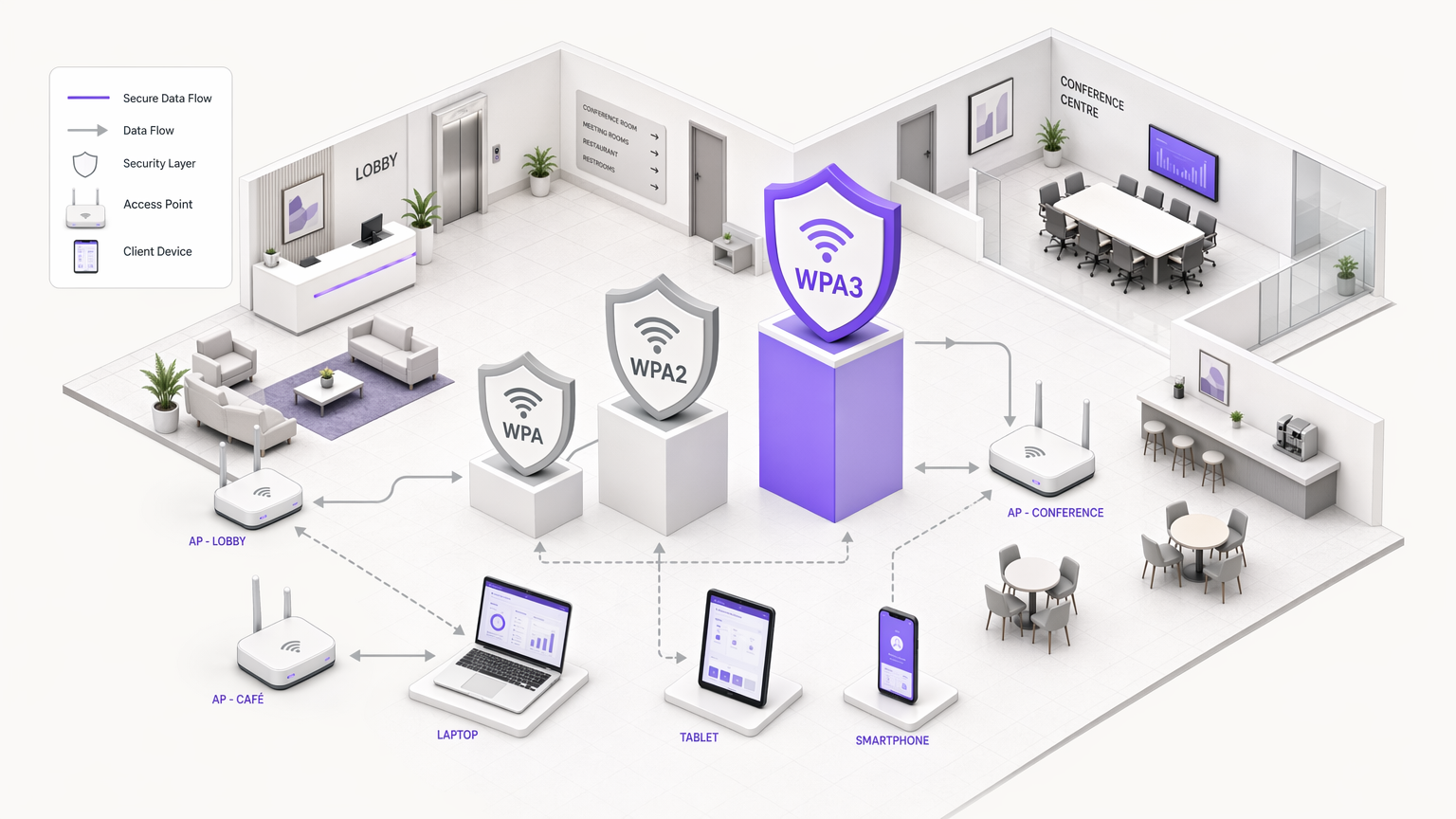
Zusammenfassung für Führungskräfte
Für IT-Manager, Netzwerkarchitekten und CTOs, die Unternehmensumgebungen betreiben, ist die Wahl des WiFi-Sicherheitsprotokolls eine kritische Risikomanagemententscheidung. Da Standorte in den Bereichen Gastgewerbe , Einzelhandel , Gesundheitswesen und Transport ihre drahtlosen Netzwerke erweitern, führt die Abhängigkeit von veralteten Sicherheitsstandards zu erheblichen Schwachstellen. Dieser technische Leitfaden bietet einen definitiven Vergleich der Architekturen von WPA, WPA2 und WPA3, wobei ihre kryptografischen Grundlagen und betrieblichen Auswirkungen detailliert beschrieben werden.
Obwohl WPA2 fast zwei Jahrzehnte lang als Industriestandard diente, haben seine strukturellen Schwachstellen – insbesondere Offline-Wörterbuchangriffe gegen den Four-Way-Handshake – den Übergang zu WPA3 erforderlich gemacht. WPA3 führt Simultaneous Authentication of Equals (SAE) ein, um diese Risiken zu eliminieren, sowie Enhanced Open (OWE), um nicht authentifizierte Gastnetzwerke zu sichern. Für Unternehmensbetreiber ist das Mandat klar: WPA muss aus der Umgebung entfernt werden, WPA2-Enterprise bleibt eine praktikable Grundlage für den Unternehmenszugang, und WPA3 muss schrittweise eingeführt werden, um die langfristige Einhaltung der PCI DSS- und GDPR-Vorgaben zu gewährleisten. Dieser Leitfaden beschreibt die technischen Mechanismen hinter diesen Protokollen und bietet eine herstellerneutrale Bereitstellungsstrategie zur Modernisierung Ihrer drahtlosen Infrastruktur.
Technischer Deep-Dive: Architektonische Evolution
Die Entwicklung von WiFi Protected Access (WPA) spiegelt das anhaltende Wettrüsten zwischen kryptografischer Sicherheit und Rechenleistung wider. Das Verständnis der zugrunde liegenden Mechanismen jedes Protokolls ist für die Entwicklung widerstandsfähiger Netzwerkarchitekturen unerlässlich.
WPA: Der Notfall-Patch
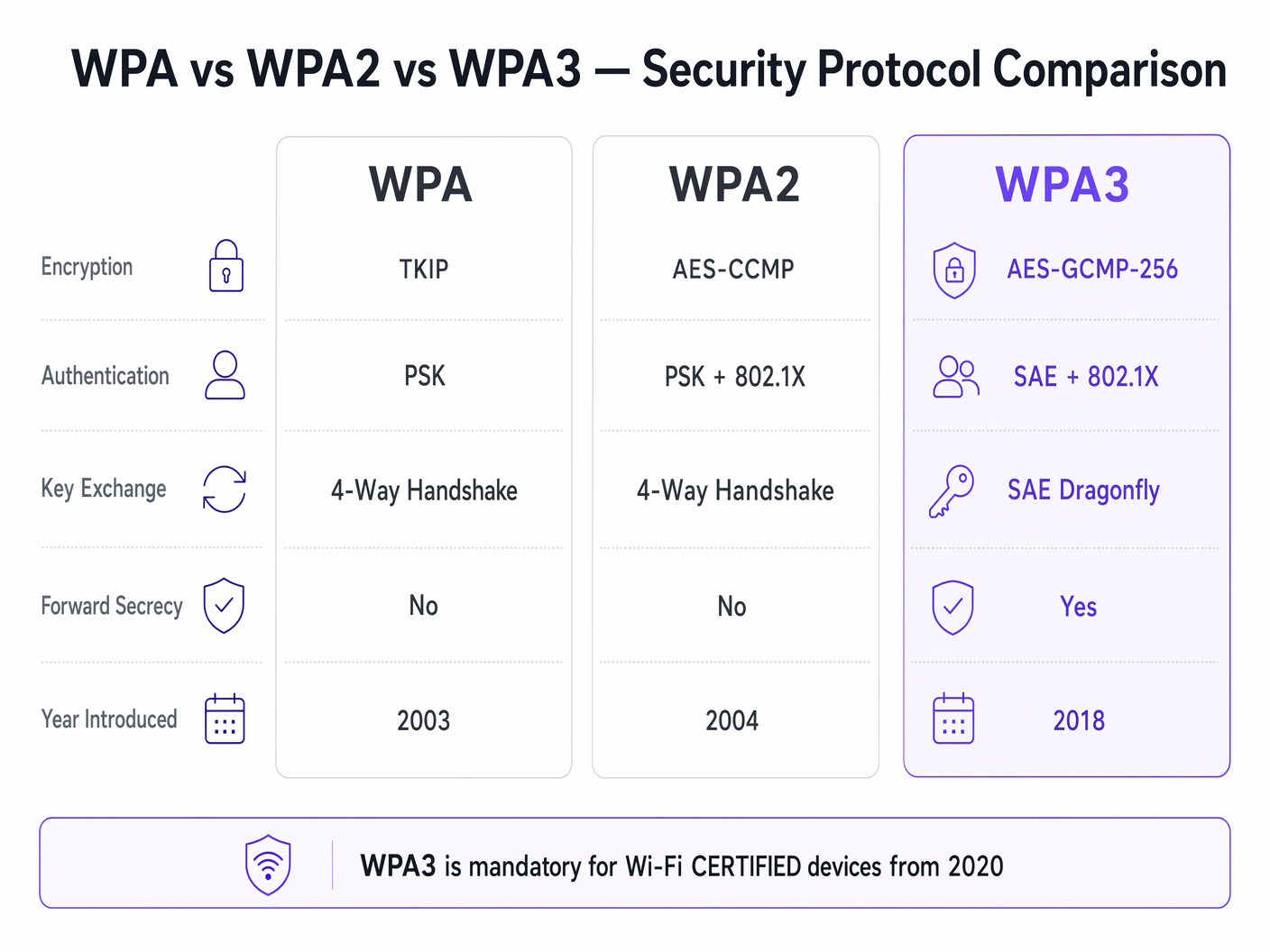
Im Jahr 2003 eingeführt, wurde WPA als schnelle Reaktion auf das katastrophale Versagen von Wired Equivalent Privacy (WEP) entwickelt. Die primäre Innovation von WPA war das Temporal Key Integrity Protocol (TKIP), das dynamisch einen neuen 128-Bit-Verschlüsselungsschlüssel für jedes Paket generierte. Dies behob die Schwachstelle der statischen Schlüsselwiederverwendung von WEP. Da WPA jedoch auf älterer WEP-Hardware laufen musste, basierte TKIP auf derselben RC4-Stromchiffre. Bis 2009 hatte die kryptografische Forschung praktische Angriffe gegen TKIP demonstriert, wodurch WPA grundlegend unsicher wurde. In modernen Unternehmensumgebungen stellt WPA eine kritische Sicherheitslücke dar und muss aktiv veraltet werden.
WPA2: Die Unternehmensgrundlage
Im Jahr 2004 ratifiziert, führte WPA2 eine strukturelle Verschiebung ein, indem TKIP durch den Advanced Encryption Standard (AES) ersetzt wurde, der im Counter Mode mit Cipher Block Chaining Message Authentication Code Protocol (CCMP) arbeitet. AES ist eine robuste Blockchiffre, und CCMP bietet gleichzeitige Verschlüsselung und Datenintegritätsprüfung. Diese Architektur etablierte WPA2 als den dominierenden Standard für Unternehmensnetzwerke.
WPA2 ist jedoch in zwei verschiedene Betriebsmodi unterteilt:
WPA2-Personal (PSK): Dieser Modus basiert auf einem Pre-Shared Key (PSK). Jedes Gerät auf dem Service Set Identifier (SSID) verwendet dieselbe Passphrase, um Sitzungsschlüssel während des Four-Way-Handshakes abzuleiten. Die kritische Schwachstelle hierbei ist, dass der Four-Way-Handshake passiv erfasst werden kann. Angreifer können den erfassten Handshake dann Offline-Wörterbuchangriffen unterziehen, indem sie Hochleistungs-GPU-Cluster verwenden. Folglich bietet WPA2-Personal minimale Sicherheit gegen gezielte Angriffe, wenn die Passphrase nicht über ausreichende Entropie verfügt.
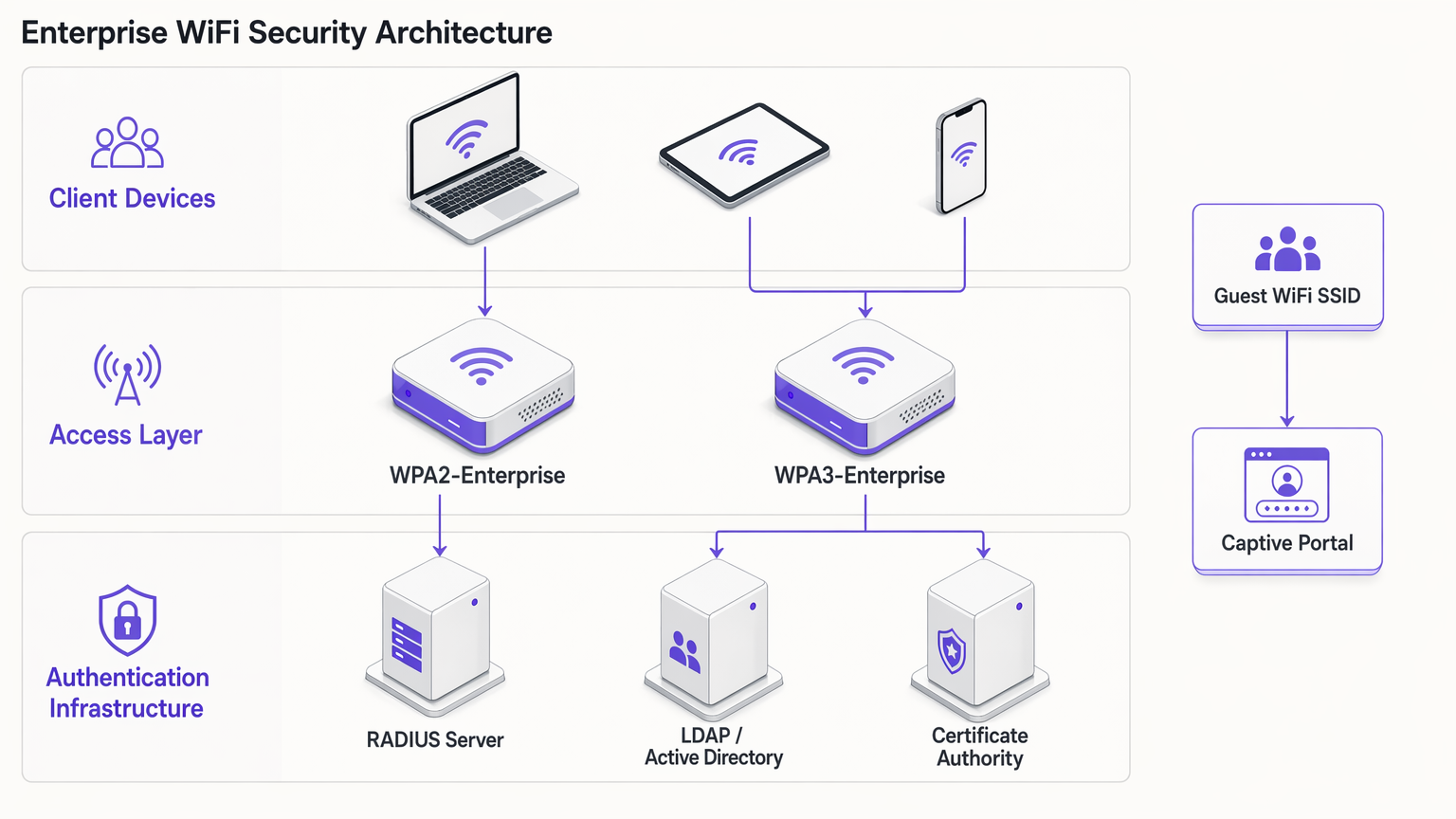
WPA2-Enterprise (802.1X): Im Gegensatz dazu nutzt WPA2-Enterprise IEEE 802.1X für die portbasierte Netzwerkzugriffskontrolle. Geräte teilen keine gemeinsame Passphrase; stattdessen authentifizieren sie sich einzeln mithilfe des Extensible Authentication Protocol (EAP). Die Authentifizierung wird von einem RADIUS-Server vermittelt, der mit einem Verzeichnisdienst (z. B. Active Directory oder LDAP) kommuniziert. Jede authentifizierte Sitzung erhält einzigartiges kryptografisches Schlüsselmaterial. Diese Architektur mindert die Risiken, die mit gemeinsam genutzten Passphrasen verbunden sind, und bleibt der Basisstandard für den Unternehmensnetzwerkzugang.
WPA3: Der moderne Standard
Seit Juli 2020 für Wi-Fi CERTIFIED-Geräte obligatorisch, behebt WPA3 die kryptografischen Schwachstellen, die in WPA2 während seiner Lebensdauer aufgedeckt wurden.
WPA3-Personal (SAE): Das entscheidende Merkmal von WPA3-Personal ist der Ersatz des anfälligen Four-Way-Handshakes durch Simultaneous Authentication of Equals (SAE), auch bekannt als Dragonfly-Handshake. SAE ist ein Zero-Knowledge-Proof-Protokoll. Es erfordert eine aktive Interaktion mit dem Access Point bei jedem Authentifizierungsversuch, wodurch Offline-Wörterbuchangriffe rechnerisch undurchführbar werden. Dies neutralisiert effektiv die KRACK (Key Reinstallation Attacks)-Schwachstellenklasse.
WPA3-Enterprise: WPA3-Enterprise verbessert die Unternehmenssicherheit durch die Einführung einer optionalen 192-Bit-Sicherheitssuite. Dieser Modus verwendet AES-GCMP-256 für die Verschlüsselung und HMAC-SHA-384 für die Nachrichtenintegrität, in Übereinstimmung mit der Commercial National Security Algorithm (CNSA)-Suite, die für Hochsicherheits-Regierungs- und Finanzbereitstellungen erforderlich ist.
Forward Secrecy: WPA3 implementiert Forward Secrecy, indem es ephemere Sitzungsschlüssel über den SAE-Handshake generiert. Wenn ein Angreifer verschlüsselten Datenverkehr aufzeichnet und später die Netzwerkanmeldeinformationen kompromittiert, kann er den historischen Datenverkehr nicht rückwirkend entschlüsseln. Dies ist ein entscheidender Mechanismus zur Risikominderung für Standorte, die sensible Daten verarbeiten.
Enhanced Open (OWE): Für Gastnetzwerke führt WPA3 Opportunistic Wireless Encryption (OWE) ein. OWE bietet unauthentifizierte Verschlüsselung – Geräte verbinden sich ohne Passwort, aber der Datenverkehr zwischen dem Gerät und dem Access Point wird individuell verschlüsselt. Dies eliminiert passives Abhören in offenen Gastnetzwerken ohne Einführung von Verbindungshemmnissen.
Implementierungsleitfaden: Absicherung der Unternehmensumgebung
Der Einsatz moderner WiFi-Sicherheit erfordert einen segmentierten Ansatz, der die strengen Anforderungen des Unternehmenszugangs mit den operativen Realitäten von Gastnetzwerken und älteren IoT-Geräten in Einklang bringt.
Unternehmens- und Mitarbeiternetzwerke
Für interne Netzwerke ist das Ziel eine starke Identitätsvalidierung und eine robuste Verschlüsselung.
- 802.1X-Authentifizierung vorschreiben: Setzen Sie WPA2-Enterprise oder WPA3-Enterprise ein. Verwenden Sie niemals WPA2-Personal für Mitarbeiternetzwerke.
- Starke EAP-Methoden implementieren: Verwenden Sie nach Möglichkeit EAP-TLS (Transport Layer Security), da es sowohl Client- als auch Serverzertifikate erfordert und somit das höchste Maß an Sicherheit bietet. Ist die Zertifikatsbereitstellung unpraktisch, kann PEAP-MSCHAPv2 verwendet werden, vorausgesetzt, das RADIUS-Serverzertifikat wird von den Clients streng validiert.
- WPA3-Übergangsmodus aktivieren: Wenn Ihre Access Points WPA3 unterstützen, aktivieren Sie den Übergangsmodus. Dies ermöglicht WPA3-fähigen Clients, von SAE und Forward Secrecy zu profitieren, während die Konnektivität für ältere WPA2-Clients erhalten bleibt. Überwachen Sie die RADIUS-Protokolle, um die Migrationsrate der Client-Geräte zu verfolgen.
Gast-WiFi und öffentlicher Zugang
Gastnetzwerke stellen eine einzigartige Herausforderung dar: die Balance zwischen Sicherheit, Compliance und Benutzererfahrung. Der traditionelle Ansatz, ein gemeinsames WPA2-Personal-Passwort zu verbreiten, ist sowohl unsicher als auch nicht konform mit Datenschutzbestimmungen, da er keine Sichtbarkeit der Benutzeridentität bietet.
- Captive Portals einsetzen: Implementieren Sie eine offene SSID oder eine WPA2/WPA3-Personal SSID, die in ein Captive Portal integriert ist. Dies stellt sicher, dass Benutzer sich authentifizieren und die Geschäftsbedingungen akzeptieren müssen, bevor sie Netzwerkzugang erhalten.
- Identitätsanbieter nutzen: Verwenden Sie Plattformen wie Purple, um die Gastauthentifizierung zu verwalten. Purple kann als kostenloser Identitätsanbieter für Dienste wie OpenRoaming unter der Connect-Lizenz fungieren, den Zugang optimieren und gleichzeitig zugestimmte Erstanbieterdaten für WiFi Analytics erfassen.
- OWE aktivieren: Wenn Ihre Infrastruktur dies unterstützt, aktivieren Sie Opportunistic Wireless Encryption (OWE) auf der offenen Gast-SSID. Dies verschlüsselt den Gastverkehr gegen passives Sniffing, ohne dass Benutzer ein Passwort eingeben müssen, und verbessert die Sicherheitslage der Guest WiFi -Umgebung erheblich.
IoT- und Legacy-Gerätesegmentierung
Viele IoT-Geräte – wie ältere Kassenterminals, Gebäudemanagementsysteme und IP-Kameras – unterstützen WPA3 oder 802.1X-Authentifizierung nicht.
- Legacy-Geräte isolieren: Stufen Sie die Sicherheit Ihrer primären Netzwerke nicht herab, um ältere Geräte aufzunehmen. Erstellen Sie stattdessen dedizierte VLANs und SSIDs speziell für IoT-Hardware.
- MPSK/PPSK implementieren: Verwenden Sie, wo vom Anbieter unterstützt, Multi Pre-Shared Key (MPSK) oder Private Pre-Shared Key (PPSK) für IoT-Netzwerke. Dies weist jedem einzelnen IoT-Gerät eine eindeutige WPA2-Passphrase zu und begrenzt den Schaden, falls ein einzelnes Gerät kompromittiert wird.
- Laterale Bewegung einschränken: Wenden Sie strenge Firewall-Regeln auf die IoT-VLANs an, die nur die notwendige ausgehende Kommunikation zulassen und laterale Bewegungen zu Unternehmens-Subnetzen blockieren.
Best Practices und Compliance
Die Aufrechterhaltung einer sicheren drahtlosen Umgebung erfordert eine kontinuierliche operative Disziplin.
- Zertifikats-Lebenszyklus-Management: Bei WPA2/WPA3-Enterprise-Bereitstellungen sind abgelaufene RADIUS-Zertifikate eine Hauptursache für Netzwerkausfälle. Implementieren Sie eine automatisierte Zertifikatserneuerung und überwachen Sie Ablaufdaten rigoros.
- Erkennung von Rogue APs: Nutzen Sie die WIPS-Funktionen (Wireless Intrusion Prevention System) Ihrer Access Points, um Rogue Access Points zu erkennen und zu neutralisieren, die Ihre Unternehmens-SSIDs senden.
- PCI DSS 4.0 Compliance: Für Umgebungen, die Zahlungskartendaten verarbeiten, ist WPA2-Personal im Allgemeinen unzureichend. PCI DSS schreibt starke Kryptographie und Zugriffskontrolle vor. WPA2-Enterprise oder WPA3-Enterprise mit robusten EAP-Methoden ist erforderlich, um die Compliance aufrechtzuerhalten.
- Regelmäßige Audits: Führen Sie vierteljährliche Audits Ihrer drahtlosen Infrastruktur durch, um Firmware-Versionen, kryptographische Konfigurationen und die Segmentierung von IoT-Geräten zu überprüfen.
Fehlerbehebung & Risikominderung
Beim Übergang zu WPA3 oder der Verwaltung gemischter Umgebungen treten häufig spezifische Fehler auf:
- Client-Kompatibilitätsprobleme: Einige ältere Clients können aufgrund einer schlechten Treiberimplementierung keine Verbindung zu einer im WPA3-Übergangsmodus betriebenen SSID herstellen. In diesem Fall müssen Sie möglicherweise eine separate WPA2-only SSID für Legacy-Geräte beibehalten, bis diese außer Betrieb genommen werden können.
- 802.1X-Timeout-Fehler: Authentifizierungs-Timeouts in WPA2/WPA3-Enterprise werden oft durch Latenzzeiten zwischen dem RADIUS-Server und dem Verzeichnisdienst oder durch falsch konfigurierte Client-Supplicants verursacht, die das Serverzertifikat nicht validieren können. Stellen Sie sicher, dass RADIUS-Server geografisch nahe an den Access Points liegen und dass Client-Trust-Stores ordnungsgemäß konfiguriert sind.
- PMF-Inkompatibilität: Protected Management Frames (PMF) sind in WPA3 obligatorisch und in WPA2 dringend empfohlen, um Deauthentifizierungsangriffe zu verhindern. Einige ältere WPA2-Clients unterstützen PMF jedoch nicht und können keine Verbindung herstellen, wenn PMF auf 'Required' gesetzt ist. Setzen Sie PMF während der Übergangsphase auf 'Optional'.
ROI & Geschäftsauswirkungen
Die Aktualisierung drahtloser Sicherheitsprotokolle ist nicht nur eine technische Übung; sie liefert einen greifbaren Geschäftswert:
- Risikominderung: Der Übergang zu WPA3 und WPA2-Enterprise reduziert die Wahrscheinlichkeit eines erfolgreichen drahtlosen Angriffs erheblich und mindert den finanziellen und reputativen Schaden, der mit Datenexfiltration verbunden ist.
- Compliance-Sicherheit: Die Einhaltung moderner kryptographischer Standards gewährleistet die Compliance mit PCI DSS, GDPR und branchenspezifischen Vorschriften, wodurch behördliche Bußgelder und Vereinfachungen vermieden werden.Vereinfachung von Audit-Prozessen.
- Operative Effizienz: Die Implementierung von automatisiertem Zertifikatsmanagement und 802.1X-Authentifizierung reduziert den operativen Aufwand, der mit der Verwaltung gemeinsamer Passwörter und der Behebung von Konnektivitätsproblemen verbunden ist.
- Verbessertes Gästeerlebnis: Der Einsatz von OWE und nahtloser Captive Portal-Authentifizierung über Plattformen wie Purple verbessert das Gästeerlebnis durch die Bereitstellung sicherer, reibungsloser Konnektivität, was zu höheren Akzeptanzraten und einer reichhaltigeren Datenerfassung für Marketinginitiativen führt. Siehe Die 10 besten WiFi Splash Page Beispiele (und was sie erfolgreich macht) für Einblicke in die Optimierung des Authentifizierungsflusses.
Hören Sie unser umfassendes Briefing zu WPA, WPA2 und WPA3 für weitere Einblicke:
Schlüsseldefinitionen
802.1X
An IEEE standard for port-based network access control that provides an authentication mechanism to devices wishing to attach to a LAN or WLAN.
The foundation of WPA2/WPA3-Enterprise, requiring a RADIUS server to validate individual user or device credentials before granting network access.
AES-CCMP
Advanced Encryption Standard with Counter Mode CBC-MAC Protocol. A robust encryption protocol introduced in WPA2.
The standard encryption mechanism that replaced the vulnerable TKIP, providing both data confidentiality and integrity.
EAP-TLS
Extensible Authentication Protocol - Transport Layer Security. An authentication method that requires both client and server certificates.
Considered the gold standard for enterprise WiFi authentication, as it eliminates reliance on passwords and prevents credential theft.
Four-Way Handshake
The process used in WPA2-Personal to derive encryption keys from the Pre-Shared Key (PSK) and establish a secure session.
The primary vulnerability point in WPA2-Personal, as it can be captured and subjected to offline dictionary attacks.
Opportunistic Wireless Encryption (OWE)
A WPA3 feature that provides unauthenticated encryption for open WiFi networks.
Crucial for securing guest WiFi environments, preventing passive eavesdropping without requiring users to enter a password.
RADIUS
Remote Authentication Dial-In User Service. A networking protocol that provides centralised Authentication, Authorization, and Accounting (AAA) management.
The core infrastructure component required to deploy WPA2-Enterprise or WPA3-Enterprise, brokering authentication between the access point and the directory service.
Simultaneous Authentication of Equals (SAE)
A secure key establishment protocol used in WPA3-Personal, replacing the four-way handshake.
Prevents offline dictionary attacks by requiring active interaction for every authentication attempt, securing networks even with weak passwords.
TKIP
Temporal Key Integrity Protocol. An older encryption protocol introduced with WPA to replace WEP.
Now considered highly vulnerable and deprecated. Its presence on a network indicates a severe security risk.
Ausgearbeitete Beispiele
A 200-room hotel needs to upgrade its wireless infrastructure. The current setup uses a single WPA2-Personal SSID for both guests and hotel staff (housekeeping tablets, maintenance devices). Guests are given a password printed on their keycard sleeve. How should the IT manager redesign this architecture for security and compliance?
The IT manager must segment the network into distinct SSIDs mapped to separate VLANs.
- Staff Network: Create a hidden SSID for staff devices using WPA2-Enterprise or WPA3-Enterprise (802.1X). Housekeeping tablets and maintenance devices should authenticate using client certificates (EAP-TLS) managed via a Mobile Device Management (MDM) solution. This eliminates shared passwords and allows individual device revocation.
- Guest Network: Create an open SSID utilising WPA3 Enhanced Open (OWE) if hardware permits, ensuring encrypted transit without a password. Integrate this with a captive portal via a platform like Purple to handle terms of service acceptance and capture consented identity data for marketing analytics.
- IoT Network: Create a dedicated SSID for legacy hotel systems (e.g., smart thermostats) using WPA2-Personal with Multi Pre-Shared Key (MPSK), assigning a unique password to each device type, and restricting this VLAN from accessing the internet or corporate subnets.
A large retail chain is deploying new point-of-sale (POS) terminals across 50 locations. The network architect must ensure the wireless deployment complies with PCI DSS 4.0 requirements. The existing network uses WPA2-Personal with a complex, frequently rotated passphrase. Is this sufficient?
No, relying on WPA2-Personal is insufficient for PCI DSS compliance in a modern retail environment, regardless of password complexity or rotation frequency. The network architect must deploy WPA2-Enterprise or WPA3-Enterprise for the POS network.
- Authentication: Implement 802.1X authentication using a RADIUS server. Each POS terminal must be provisioned with a unique client certificate (EAP-TLS) to authenticate to the network.
- Encryption: Ensure the network is configured to use AES-CCMP (WPA2) or AES-GCMP (WPA3). TKIP must be explicitly disabled on the wireless controller.
- Segmentation: The POS SSID must be mapped to a highly restricted VLAN that only permits traffic to the payment processing gateways. It must be completely isolated from the store's corporate and guest networks.
Übungsfragen
Q1. Your organisation is migrating from WPA2-Personal to WPA3-Enterprise for the corporate network. During the rollout, several older laptops running outdated wireless drivers are unable to connect to the new SSID, even when configured with the correct certificates. What is the most secure interim solution?
Hinweis: Consider the impact of downgrading the primary corporate network versus isolating the problem devices.
Musterlösung anzeigen
Create a temporary, hidden WPA2-Enterprise SSID specifically for the legacy laptops, mapped to the same corporate VLAN. Do not downgrade the primary SSID to WPA2-Personal or disable WPA3. Prioritise updating the wireless drivers or replacing the network cards on the legacy laptops to fully decommission the temporary WPA2-Enterprise SSID as quickly as possible.
Q2. A hospital IT director wants to secure the public guest WiFi network. They propose implementing WPA2-Personal with a password displayed on digital signage in the waiting areas to prevent drive-by eavesdropping. Why is this approach flawed, and what is the recommended alternative?
Hinweis: Evaluate the security value of a publicly broadcast password and the compliance requirements for guest identity.
Musterlösung anzeigen
Broadcasting a WPA2-Personal password provides negligible security, as anyone in range can capture the four-way handshake and decrypt traffic if they know the password (which is publicly displayed). Furthermore, it provides no visibility into user identity, complicating incident response and compliance. The recommended alternative is to deploy an open SSID with WPA3 Enhanced Open (OWE) to encrypt transit traffic without a password, integrated with a captive portal to authenticate users, accept terms of service, and capture identity data.
Q3. You are auditing a retail environment and discover that the wireless barcode scanners in the warehouse are connecting via WPA (TKIP) because their firmware cannot be updated to support WPA2. The warehouse manager refuses to replace the scanners due to budget constraints. How do you mitigate this risk?
Hinweis: Focus on network segmentation and access control when dealing with insecure legacy hardware.
Musterlösung anzeigen
The risk must be contained through strict network segmentation. Move the barcode scanners to a dedicated, isolated VLAN with its own hidden SSID. Implement stringent firewall rules on the router/firewall that only permit the scanners to communicate with the specific inventory management server on the required ports. Block all internet access and all lateral movement to other corporate subnets from the scanner VLAN.
Weiterlesen in dieser Reihe
Wi-Fi 7 (802.11be) Erklärt: Was sich für Enterprise WiFi ändert
Dieser Leitfaden bietet eine umfassende technische Referenz zu Wi-Fi 7 (IEEE 802.11be) für IT-Manager, Netzwerkarchitekten und CTOs, die Infrastruktur-Upgrades in den Jahren 2026–2027 planen. Er behandelt die vier zentralen architektonischen Fortschritte – Multi-Link Operation (MLO), 320 MHz Kanäle, 4K-QAM-Modulation und Multi-RU – mit einem klaren Vergleich zu Wi-Fi 6E, realen Einsatzszenarien aus dem Gastgewerbe und Einzelhandel sowie einer ehrlichen Bewertung der erforderlichen Hardware- und Switching-Upgrades. Purple ist hardwareunabhängig und unterstützt jede Wi-Fi 7-Bereitstellung, was diesen Leitfaden zu einem natürlichen Einstiegspunkt für Teams macht, die ihr Guest WiFi und ihren Analyse-Stack parallel zu einem AP-Refresh bewerten.
Wi-Fi 6E vs Wi-Fi 7: Sollten Sie 6E überspringen und direkt zu 7 wechseln?
Ein umfassender Entscheidungsleitfaden für IT-Leiter und Netzwerkarchitekten, die eine Aktualisierung der drahtlosen Hardware im Jahr 2026 evaluieren. Er bietet einen technischen Vergleich von Wi-Fi 6E und Wi-Fi 7, eine aktuelle Anbieter-Preisübersicht und umsetzbare Bereitstellungsempfehlungen für Standorte mit hoher Dichte in den Bereichen Gastgewerbe, Einzelhandel und öffentlicher Sektor – um Teams dabei zu helfen, zu beurteilen, ob der Wi-Fi 7-Aufpreis für ihre spezifischen betrieblichen Anforderungen gerechtfertigt ist.
Wi-Fi 7 für Veranstaltungsorte mit hoher Dichte: Stadien, Konferenzhallen und Terminals
Dieser technische Leitfaden bietet IT-Führungskräften und Netzwerkarchitekten umsetzbare Strategien für die Bereitstellung von Wi-Fi 7 an Veranstaltungsorten mit hoher Dichte wie Stadien und Verkehrsterminals. Er untersucht, wie Multi-Link Operation (MLO), 4K-QAM und das Design von APs unter Sitzen die Kapazität drastisch verbessern, Hardwareanforderungen reduzieren und einen messbaren ROI liefern.