
Zoo- und Freizeitpark-WiFi: Konnektivitätsleitfaden für stark frequentierte Veranstaltungsorte
Dieser Leitfaden bietet IT-Führungskräften und Netzwerkarchitekten einen umfassenden Rahmen für die Bereitstellung von Hochleistungs-WiFi in Zoos und Freizeitparks. Er behandelt die HF-Planung im Außenbereich, die Bereitstellung von Captive Portals, familienfreundliche Inhaltsfilterung und Strategien zur Umwandlung von Konnektivität in umsetzbare Betriebsanalysen.
Diesen Leitfaden anhören
Podcast-Transkript ansehen
Zusammenfassung
Für große Freizeiteinrichtungen wie Zoos und Freizeitparks ist die Bereitstellung von zuverlässigem Guest WiFi kein Luxus mehr, sondern eine grundlegende betriebliche Anforderung. Besucher erwarten nahtlose Konnektivität, um auf digitale Karten zuzugreifen, Fahrzeiten zu buchen und ihre Erlebnisse in sozialen Medien zu teilen. Gleichzeitig verlassen sich die Betreiber der Veranstaltungsorte auf diese Infrastruktur, um Kassensysteme, mobiles Ticketing und Echtzeit-Besuchermanagement zu betreiben.
Außeninstallationen stellen jedoch einzigartige technische Herausforderungen dar. Unvorhersehbare Besucherdichten, komplexe HF-Umgebungen mit Wasser und Vegetation sowie die Notwendigkeit einer robusten Inhaltsfilterung erfordern einen strategischen Ansatz beim Netzwerkdesign. Dieser Leitfaden bietet IT-Managern, Netzwerkarchitekten und CTOs umsetzbare, herstellerneutrale Empfehlungen für die Architektur von drahtlosen Hochdichte-Netzwerken in stark frequentierten Außenbereichen. Wir werden die Auswahl von Access Points, Backhaul-Strategien, die Optimierung von Captive Portals und die Nutzung von WiFi Analytics zur Erzielung eines messbaren ROI untersuchen.
Technischer Einblick
HF-Planung im Außenbereich und Auswahl von Access Points
Die Bereitstellung drahtloser Infrastruktur in weitläufigen Außenbereichen erfordert Hardware, die für raue Bedingungen ausgelegt ist. Indoor-Access Points (APs) fallen bei Feuchtigkeit, Temperaturschwankungen und UV-Strahlung schnell aus.
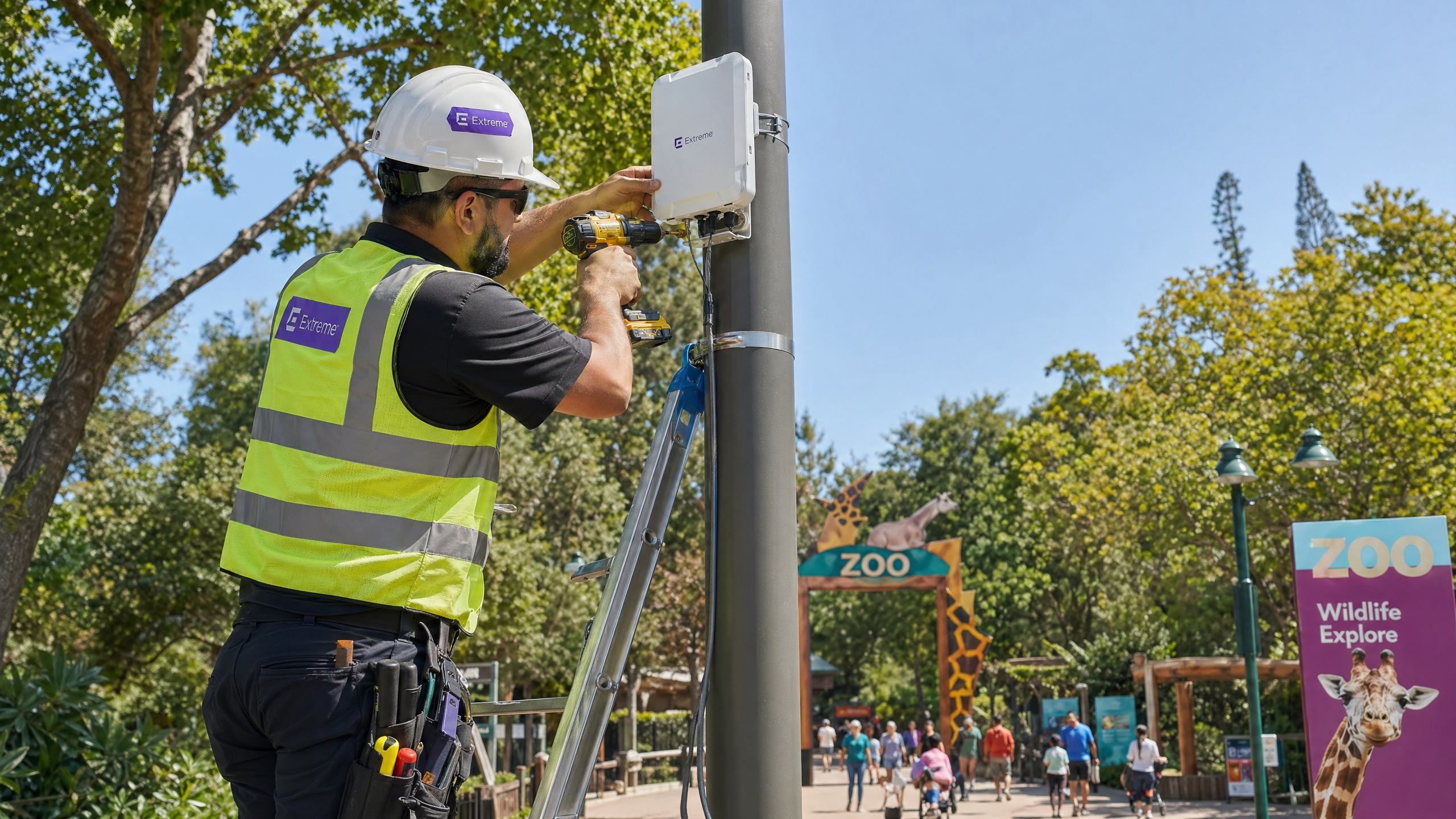
Für Außenbereiche müssen IT-Teams APs mit einer IP66- oder IP67-Schutzart spezifizieren, die vollständigen Schutz gegen Staubeintritt und Hochdruckwasserstrahlen gewährleistet. Darüber hinaus muss die Hardware einen Betriebstemperaturbereich unterstützen, der für das lokale Klima geeignet ist, typischerweise -20°C bis +60°C. In öffentlich zugänglichen Bereichen, wie Warteschlangen oder niedrig hängenden Strukturen, sind vandalismusgeschützte Gehäuse zwingend erforderlich, um die Investition zu schützen.
Aus Protokollsicht ist IEEE 802.11ax (Wi-Fi 6) der Basisstandard für neue Installationen. Der entscheidende Vorteil von Wi-Fi 6 in stark frequentierten Umgebungen ist Orthogonal Frequency Division Multiple Access (OFDMA). OFDMA ermöglicht die Unterteilung eines einzelnen AP-Kanals in kleinere Ressourceneinheiten, wodurch die gleichzeitige Übertragung an mehrere Clients ermöglicht wird. Dies reduziert die Latenz erheblich und verbessert die Effizienz in dichten Bereichen wie Food Courts oder Tiergehegen, wo Hunderte von Geräten um Sendezeit konkurrieren können. Während Wi-Fi 6E das 6-GHz-Band einführt, ist der Hardware-Aufpreis für die meisten Outdoor-Installationen derzeit schwer zu rechtfertigen, was Wi-Fi 6 zur pragmatischen Wahl für das Gleichgewicht zwischen Leistung und Budget macht.
Backhaul-Architektur und Redundanz
Ein robustes HF-Design ist irrelevant, wenn die Backhaul-Infrastruktur den aggregierten Durchsatz nicht unterstützen kann. Zoos und Freizeitparks erstrecken sich oft über Dutzende oder Hunderte von Hektar, wodurch herkömmliche Kupferverkabelung für die Verbindung von Edge-Switches mit dem Core unrentabel wird.
Ein hybrider Backhaul-Ansatz ist typischerweise erforderlich:
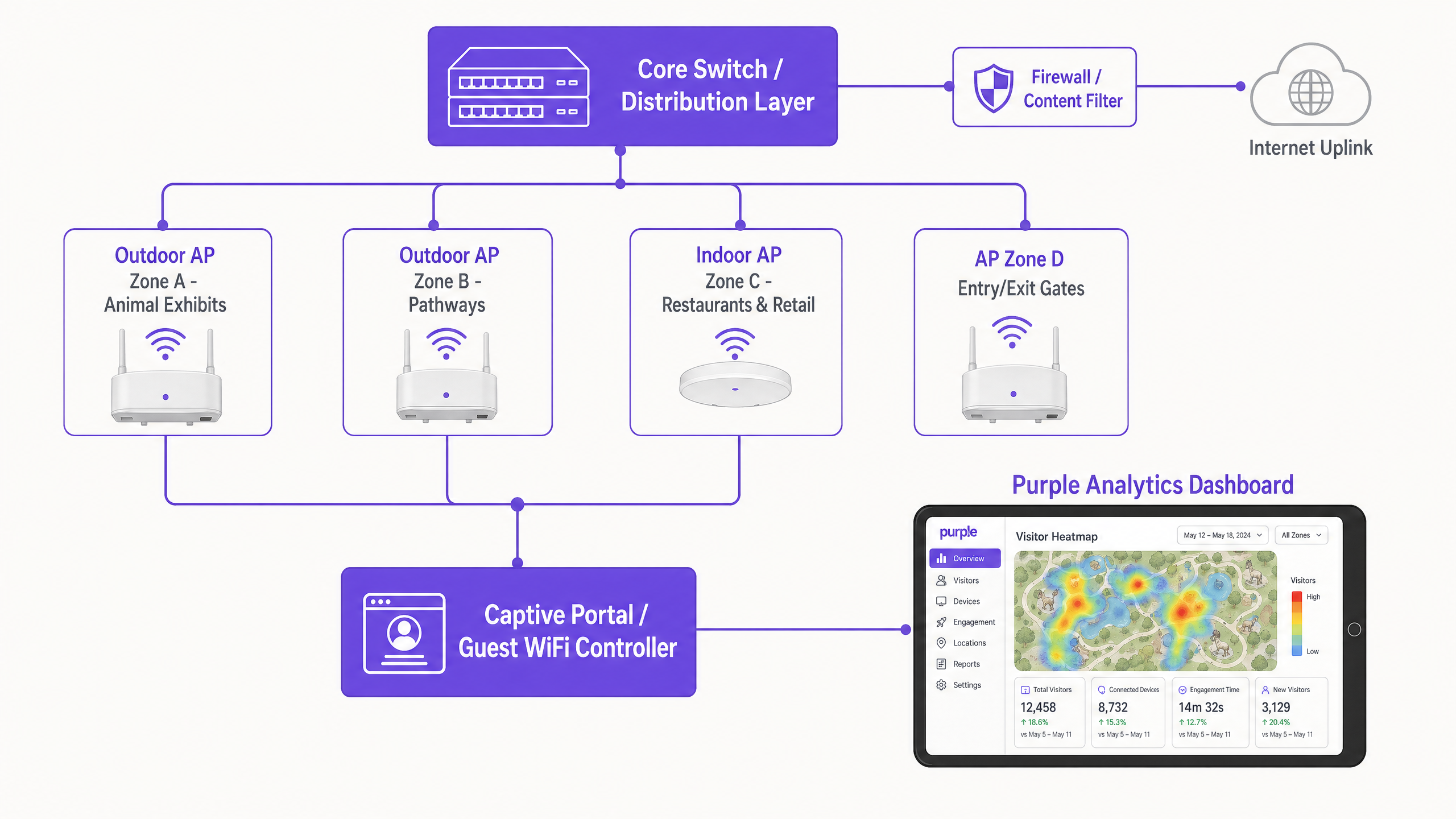
- Glasfaserringe: Implementieren Sie Singlemode-Glasfaserringe, um Verteilungs-Switches über den gesamten Standort zu verbinden. Dies bietet hohe Bandbreite und Ausfallsicherheit; wird ein Pfad unterbrochen (z. B. bei Erdarbeiten), kann der Datenverkehr in die entgegengesetzte Richtung geleitet werden.
- Punkt-zu-Punkt-Wireless: In Bereichen, in denen das Verlegen von Glasfaser umweltsensibel oder unerschwinglich teuer ist (z. B. über einen See oder durch ein dichtes Waldgebiet), bieten Hochleistungs-Punkt-zu-Punkt- oder Punkt-zu-Multipunkt-Wireless-Brücken zuverlässige Konnektivität.
- Power over Ethernet (PoE): Von den Verteilungs-Switches aus verlegen Sie Cat6A-Kabel, um sowohl Daten als auch Strom für die einzelnen APs bereitzustellen, wobei sicherzustellen ist, dass die Leitungen den 100-Meter-Standard nicht überschreiten.
Für den primären Internet-Uplink ist Consumer-Breitband unzureichend. Veranstaltungsorte müssen eine dedizierte Standleitung beschaffen, wie in unserem Leitfaden Was ist eine Standleitung? Dediziertes Business Internet beschrieben, um symmetrische Bandbreite und strenge Service Level Agreements (SLAs) zu gewährleisten.
Netzwerksegmentierung und Sicherheit
Sicherheit ist von größter Bedeutung, wenn öffentlicher Gastzugang mit kritischen Betriebsfunktionen des Veranstaltungsortes gemischt wird. Das Netzwerk muss mithilfe von Virtual Local Area Networks (VLANs) logisch segmentiert werden.
- Gastnetzwerk: Konfiguriert mit WPA3-Personal (oder WPA2/WPA3-Mischmodus für die Unterstützung älterer Geräte) und streng von allen internen Ressourcen isoliert. Client-Isolation sollte auf AP-Ebene aktiviert werden, um zu verhindern, dass Gastgeräte miteinander kommunizieren.
- Betriebsnetzwerk: Dedizierte VLANs für Point-of-Sale (POS)-Terminals, Digital Signage und IoT-Geräte. Der Zugriff sollte mithilfe von IEEE 802.1X mit zertifikatbasierter Authentifizierung gesichert werden, um sicherzustellen, dass nur unternehmenseigene Geräte eine Verbindung herstellen können.
Weitere Einblicke zur Sicherung der Infrastruktur von Veranstaltungsorten finden Sie in unserem Artikel: Schützen Sie Ihr Netzwerk mit starkem DNS und Sicherheit .
Implementierungsleitfaden
Schritt 1: Umfassende Standortanalyse
Verlassen Sie sich niemals ausschließlich auf prädiktive Modellierung für Außenbereiche. Führen Sie eine aktive HF-Standortanalyse mit Spektrumanalyse-Tools durch. Bäume, Wasserspiele und Metallgehäuse (wie Käfige oder Fahrgeschäftstrukturen) absorbieren und reflektieren HF-Signale unvorhersehbar. Die Analyse muss die Abdeckungsanforderungen Zone für Zone abbilden und Störquellen sowie optimale AP-Montageorte identifizieren.
Schritt 2: Captive Portal und Authentifizierungsablauf
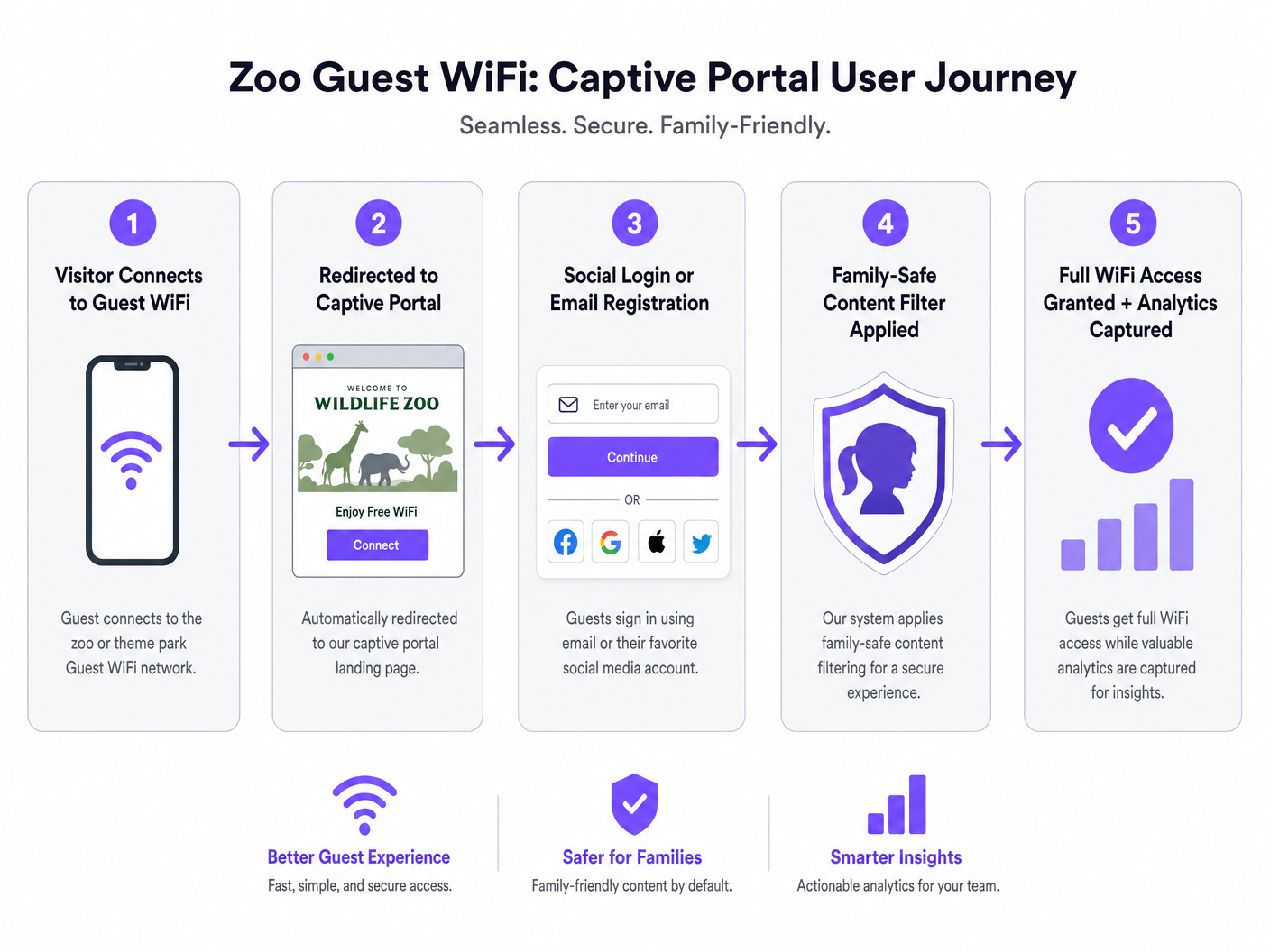
Das Captive Portal ist das Gateway zum Gastnetzwerk und der primäre Mechanismus zur Datenerfassung. Ein nahtloses Onboarding-Erlebenz ist entscheidend für die Maximierung der Verbindungsraten.
- Authentifizierungsoptionen: Bieten Sie Social Login (Facebook, Google, Apple) neben der traditionellen E-Mail-Registrierung an. Veranstaltungsorte, die Social Login anbieten, verzeichnen in der Regel 30-40% höhere Verbindungsraten als solche, die sich ausschließlich auf Formularausfüllungen verlassen.
- Compliance: Stellen Sie sicher, dass das Portal die Zustimmung zur Datenverarbeitung und Marketingkommunikation explizit erfasst und dabei die GDPR oder lokale Datenschutzbestimmungen strikt einhält.
- Reibungslose Re-Authentifizierung: Nutzen Sie MAC-Adress-Caching oder Plattformen wie OpenRoaming, um wiederkehrende Besucher automatisch wieder zu verbinden, ohne dass diese den Captive Portal-Flow erneut durchlaufen müssen.
Schritt 3: Implementierung familienfreundlicher Inhaltsfilterung
Zoos und Freizeitparks haben eine Fürsorgepflicht, eine sichere digitale Umgebung zu bieten. DNS-basierte Inhaltsfilterung ist die effizienteste Methode, dies in großem Maßstab zu erreichen. Durch das Abfangen von DNS-Anfragen und das Blockieren der Auflösung für Domains, die als Inhalte für Erwachsene, Glücksspiel oder Gewalt kategorisiert sind, können Veranstaltungsorte akzeptable Nutzungsrichtlinien durchsetzen, ohne die durch Deep Packet Inspection (DPI) verursachte Latenz. Diese Filterung muss standardmäßig auf die Gast-SSID angewendet werden.
Best Practices
- Design für Spitzendichte, nicht für Durchschnittswerte: Veranstaltungsorte unterschätzen häufig die Anzahl der Geräte während Spitzenzeiten (z.B. Feiertage). Gehen Sie von 2-3 Geräten pro Besucher (Smartphone, Smartwatch, Tablet) aus und planen Sie die AP-Dichte entsprechend. Eine Faustregel ist ein AP pro 500 Quadratmeter in Zonen mit hoher Dichte (Food Courts, Show-Arenen) und einer pro 1.000 Quadratmeter in Transitbereichen mit geringerer Dichte.
- Priorisieren Sie die User Journey: Das Captive Portal muss mobiloptimiert sein und schnell laden. Jede Verzögerung beim Rendern des Portals führt zum Abbruch.
- Bestehende Infrastruktur nutzen: Bei der Montage von Outdoor-APs nutzen Sie bestehende Beleuchtungsmasten, CCTV-Masten oder Gebäudefassaden, um Installationskosten und visuelle Auswirkungen zu minimieren.
Fehlerbehebung & Risikominderung
| Fehlermodus | Grundursache | Minderungsstrategie |
|---|---|---|
| Netzwerkkollaps unter Last | Unzureichende AP-Dichte; fehlende OFDMA-Unterstützung. | Upgrade auf Wi-Fi 6-Infrastruktur; Neugestaltung der Abdeckungskarten basierend auf Schätzungen der gleichzeitigen Spitzenbenutzer. |
| Captive Portal lädt nicht | DNS-Fehlkonfiguration; aggressive mobile OS-Sicherheitseinstellungen. | Stellen Sie sicher, dass der Walled Garden alle notwendigen Domains für Social Login APIs und Captive Portal-Erkennungs-URLs (z.B. captive.apple.com) enthält. |
| Schlechte Roaming-Leistung | AP-Sendeleistung zu hoch eingestellt, wodurch Clients an entfernten APs "kleben" bleiben. | Implementieren Sie dynamisches Funkmanagement; senken Sie die TX-Leistung, um Client-Geräte zum Roaming zu näheren APs zu ermutigen; aktivieren Sie 802.11k/v/r. |
ROI & Geschäftsauswirkungen
Der Business Case für die Bereitstellung von Hochleistungs-WiFi geht weit über die grundlegende Konnektivität hinaus. Wenn das Netzwerk in eine robuste Analyseplattform integriert wird, wird es zu einem strategischen Asset.
- Operative Intelligenz: Durch die Verfolgung von MAC-Adressen (auch anonymisiert) können Veranstaltungsorte Heatmaps erstellen und den Besucherfluss analysieren. Diese Daten identifizieren Engpässe, messen Verweildauern an bestimmten Exponaten und informieren über Personal- und Sicherheitseinsätze.
- Marketing und Umsatzgenerierung: Über das Captive Portal erfasste Erstanbieterdaten fließen direkt in das CRM des Veranstaltungsortes ein. Dies ermöglicht gezielte E-Mail-Kampagnen nach dem Besuch, die Anmeldung zu Treueprogrammen und personalisierte Angebote, was zu wiederholten Besuchen führt und den Lifetime Value erhöht.
- Verbessertes Gästeerlebnis: Zuverlässige Konnektivität ermöglicht die Nutzung veranstaltungsortspezifischer mobiler Anwendungen für Wegfindung, mobile Essensbestellung und virtuelles Anstehen, was die Gästezufriedenheit direkt verbessert und die operative Reibung reduziert.
Wie bei ähnlichen Implementierungen in den Sektoren Hospitality und Retail zu sehen ist, verwandelt die Integration von Konnektivität und Analysen die IT-Infrastruktur von einem Kostenfaktor in eine umsatzgenerierende Plattform. Für weitere Informationen zu temporären Implementierungen siehe unseren Leitfaden zu Event WiFi: Planung und Bereitstellung temporärer drahtloser Netzwerke .
Schlüsseldefinitionen
Captive Portal
A web page that intercepts a user's initial HTTP request on a public network, requiring authentication or acceptance of terms before granting internet access.
The primary mechanism for capturing visitor data and enforcing acceptable use policies in venue deployments.
OFDMA (Orthogonal Frequency Division Multiple Access)
A feature of Wi-Fi 6 that allows an AP to divide a wireless channel into smaller sub-channels (Resource Units), enabling simultaneous data transmission to multiple devices.
Critical for maintaining network performance in high-density areas like queues and food courts by reducing latency and overhead.
IP67 Rating
An ingress protection standard indicating a device is completely protected against dust and can withstand temporary immersion in water.
The minimum required environmental protection rating for hardware deployed in outdoor zoo and theme park environments.
Walled Garden
A limited environment that controls the user's access to web content and services prior to full authentication.
Must be configured to allow access to social media login APIs and captive portal detection URLs before the guest is fully connected.
DNS-Based Content Filtering
A security technique that blocks access to inappropriate websites by preventing the Domain Name System (DNS) from resolving restricted URLs into IP addresses.
The standard method for ensuring family-safe browsing on venue guest networks without impacting performance.
Client Isolation
A wireless security feature that prevents devices connected to the same AP or VLAN from communicating directly with one another.
Mandatory on guest networks to prevent lateral movement of malware and protect visitor devices from unauthorized access.
VLAN (Virtual Local Area Network)
A logical grouping of network devices that behave as if they are on the same physical network, regardless of their actual location.
Used to securely segment guest traffic from critical operational systems (e.g., point-of-sale, CCTV).
MAC Caching
A feature that remembers the Media Access Control (MAC) address of a previously authenticated device, allowing it to bypass the captive portal on subsequent visits.
Significantly improves the guest experience by providing frictionless connectivity for returning visitors.
Ausgearbeitete Beispiele
A regional zoo spanning 40 acres is upgrading its legacy Wi-Fi 4 network. The IT Director notes that during the summer holidays, the network in the main food court (a 2,000 sq metre outdoor plaza) completely fails, with guests unable to load the captive portal. How should the team architect the food court coverage?
- Upgrade to Wi-Fi 6 (802.11ax) APs with IP67 ratings to leverage OFDMA for high-density client handling.
- Deploy high-density directional antennas (patch antennas) rather than omnidirectional antennas to create smaller, focused RF cells. This minimizes co-channel interference.
- Install 4-6 APs around the perimeter of the food court, pointing inward, ensuring transmit power is lowered to encourage roaming and prevent cell overlap.
- Ensure the backhaul switch supporting this zone has at least a 10Gbps uplink to the core to handle the aggregated traffic.
A theme park marketing team wants to increase the number of email addresses captured via the guest WiFi. Currently, visitors must fill out a 5-field form (Name, Email, Phone, Postcode, DOB). The connection rate is only 12%. What technical and strategic changes should be implemented?
- Implement Social Login (Facebook, Google, Apple) on the captive portal to provide a one-click authentication option.
- Reduce the manual form fields to just Name and Email for users who prefer not to use social login.
- Enable 'Seamless Mac Authentication' (MAC caching) so returning visitors are automatically reconnected without seeing the portal again, improving the user experience.
- Ensure the walled garden configuration allows traffic to the social network authentication APIs before the user is fully authorized.
Übungsfragen
Q1. You are designing the WiFi coverage for a new 5-acre outdoor primate enclosure. The landscape architect has specified dense tree planting and a large central water feature. What are the primary RF considerations, and how should you position the APs?
Hinweis: Consider how water and foliage interact with RF signals, particularly at 5GHz.
Musterlösung anzeigen
Foliage (which contains water) and the central water feature will heavily absorb and reflect RF signals, particularly in the 5GHz band. Predictive modeling will be inaccurate here. You must conduct an active site survey. APs should be positioned at the perimeter facing inward using directional antennas to punch through the foliage, rather than relying on omnidirectional APs in the center. Ensure all hardware is IP67 rated due to the outdoor environment.
Q2. During a busy bank holiday weekend, the IT helpdesk receives reports that guests in the main plaza can connect to the WiFi network but cannot reach the internet. The captive portal does not load. The APs show high utilization but are online. What is the most likely cause, and how do you resolve it?
Hinweis: Think about the IP addressing process before a device can reach the captive portal.
Musterlösung anzeigen
The most likely cause is DHCP pool exhaustion. The sheer volume of devices (including those just passing through and probing the network) has consumed all available IP addresses in the guest VLAN. The mitigation is to reduce the DHCP lease time (e.g., to 30 minutes or 1 hour) to quickly reclaim IP addresses from devices that have left the area, and to expand the subnet size for the guest VLAN (/22 or /21 instead of a standard /24).
Q3. The venue's operations director wants to use WiFi analytics to track visitor dwell times at various exhibits to optimize staffing. However, they are concerned about GDPR compliance, as they are tracking MAC addresses. How do you architect the solution to provide analytics while maintaining compliance?
Hinweis: Consider the difference between anonymized location data and personally identifiable information (PII).
Musterlösung anzeigen
To maintain compliance, the WiFi analytics platform must anonymize or pseudonymize MAC addresses (e.g., via cryptographic hashing) immediately upon collection if the user has not authenticated. For users who do authenticate via the captive portal, explicit consent must be obtained to link their location data with their PII (email/social profile). The privacy policy must clearly state that location analytics are being gathered and provide an opt-out mechanism.
Weiterlesen in dieser Reihe
Was ist eine Probe Request? Verstehen, wie Geräte Netzwerke entdecken
Dieser technische Leitfaden bietet einen tiefen Einblick in IEEE 802.11 Probe Requests, aktives versus passives Scannen und die Auswirkungen der MAC randomisation auf Standortanalysen. Er liefert umsetzbare Implementierungsstrategien für Netzwerkarchitekten zur Optimierung von High-Density-Bereitstellungen, zur Minderung von Probe Storms und zur Sicherstellung einer genauen, GDPR-konformen Datenerfassung mithilfe authentifizierter Identitätsschichten.
Wie man langsames WiFi behebt, ohne Ihr Internetpaket zu aktualisieren
Ein umfassender technischer Leitfaden für IT-Manager und Netzwerkarchitekten zur Optimierung der Unternehmens-WiFi-Leistung, ohne die ISP-Bandbreite zu erhöhen. Behandelt HF-Tuning, Client-Dichte-Management, QoS-Implementierung und wie man WiFi-Analysen nutzt, um Engpässe zu diagnostizieren und zu beheben.
Die Checkliste für die Migration von Legacy NAC zu Cloud-Native NAC
Dieser maßgebliche technische Leitfaden bietet eine strukturierte, dreiphasige Checkliste für die Migration von der traditionellen Netzwerkzugriffskontrolle (NAC) zu einer Cloud-nativen Architektur. Er stattet IT-Manager und Netzwerkarchitekten mit umsetzbaren Strategien aus, um die Identitätsintegration, Richtlinienkonsistenz und Compliance zu gewährleisten, ohne den Veranstaltungsbetrieb zu stören.