Most retail WiFi marketing advice starts with the wrong question: how can we collect more email addresses through a captive portal? That approach treats connectivity as a form-filling exercise, creates friction at the door, and often produces a contact list that nobody can connect to a purchase or a return visit.
A stronger model treats WiFi as a first-party identity and event layer. The network should record authenticated connections, consent state, store zone, visit timing, dwell estimates, offer exposure and redemption, then pass those events into the systems where marketing and commercial teams already work. The objective isn't raw login volume. It's usable identity, clean consent and an attribution path that can withstand scrutiny.
UK shoppers have long treated connectivity as part of the retail experience. A 2015 YouGov study of UK retail technology found that 35% of consumers wanted free in-store WiFi as standard, while 30% called it the most persuasive technology when choosing one retailer over another. That makes retail WiFi marketing more than a promotional add-on. It can support the experience that attracts shoppers and the data model that helps retailers understand what happens after they arrive.
Moving Beyond the Captive Portal
The captive portal became popular because it made guest WiFi easy to explain internally. A shopper connects, sees a branded splash page, enters an email address and receives internet access. Marketing gets a new contact, IT retains control of the network, and the project appears complete.
In practice, the model often stops there. A long form, a vague value exchange and repeated login requests discourage connection. The resulting email address may sit in a WiFi dashboard without a consent history, visit context or link to a CRM profile. A database full of disconnected identities isn't a marketing asset. It's an operational liability.
Practical rule: Design the WiFi journey backwards from the decision you want to make, not from the field you want to collect.
Connectivity should create events
A useful retail WiFi marketing programme begins by defining the event model. A connection isn't merely a session start. It can include:
- Authenticated identity: The customer record or identifier associated with the connection.
- Consent state: What the shopper agreed to, when they agreed and which notice applied.
- Physical context: Store, zone or venue area, provided the measurement is appropriate and lawful.
- Visit timing: Entry, connection, return and disconnection signals.
- Engagement: Offer exposure, interaction and redemption.
- Commercial linkage: A CRM match or POS event that helps test whether marketing influenced action.
This approach turns WiFi from a utility into an observable customer touchpoint. The same stream can support footfall estimation, zone-level dwell analysis and lifecycle messaging, but only if the retailer decides in advance how each event will be activated.
The first-party data approach to guest WiFi is useful here because it frames the network as part of the organisation's owned data estate. That doesn't mean collecting everything. It means collecting only the signals that have a clear destination, owner and retention rule.
Friction is a data-quality problem
A difficult onboarding flow doesn't just reduce participation. It changes the composition of the dataset. Shoppers who tolerate several fields and unclear consent aren't necessarily representative of the wider audience, so teams can mistake portal completion for customer insight.
UK retail evidence reinforces the commercial stakes. Retail Systems reported that poor WiFi and 4G connectivity was the biggest mobile frustration for shoppers, while 87% had used a connected smartphone on their last shopping trip. The same UK shopping-centre connectivity coverage summarised survey findings that 55% would shop elsewhere without free WiFi and 66% would be driven away by poor in-store connectivity.
The lesson is straightforward. Deliver a reliable connection first, ask for proportionate information second, and make the value exchange visible. A portal that maximises form fields while degrading access undermines both customer experience and the quality of the data it was meant to create.
The Architecture of Passwordless Access
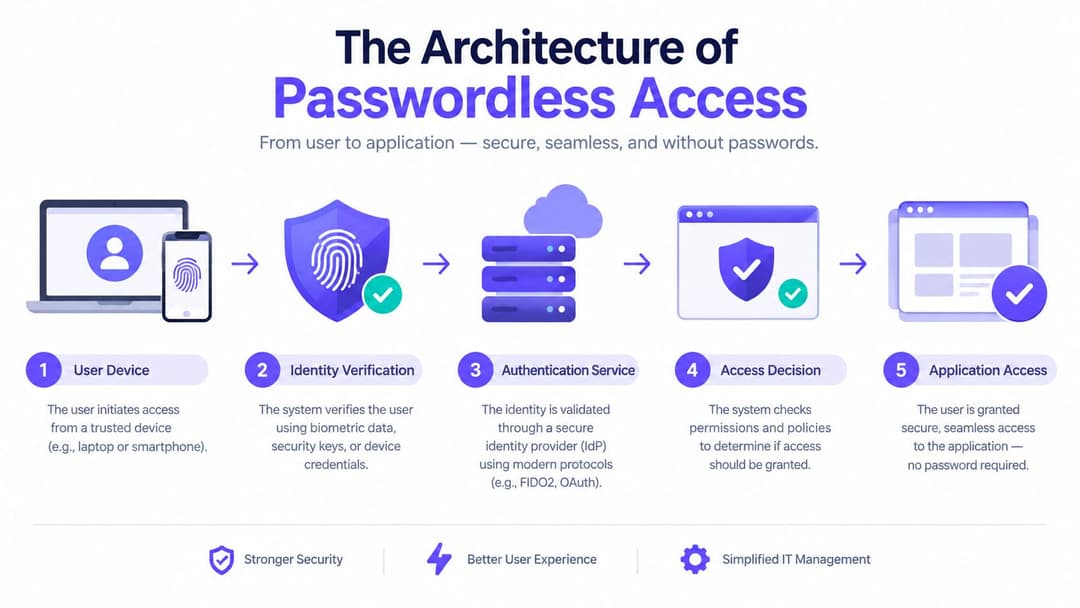
Passwordless access changes the role of the portal. Instead of making every visit begin with a web form, the retailer establishes a secure trust relationship that lets a device or identity authenticate automatically when it returns. The customer experiences continuity. IT gets stronger access control. Marketing receives a dependable connection event without forcing a repeat interaction.
The key technologies are Passpoint, also known as Hotspot 2.0, and OpenRoaming. Passpoint allows compatible devices to discover and authenticate to trusted WiFi networks automatically. OpenRoaming extends that principle through participating identity providers and network operators, so a recognised profile can work across supported venues.
What happens without the splash page
A typical passwordless flow separates the customer interaction from the network authentication process:
- Discovery: The device identifies a compatible, trusted network.
- Credential selection: It selects an installed profile or an available identity provider.
- Authentication: The network validates the identity through the appropriate secure exchange.
- Policy application: The access service assigns the correct network permissions and segmentation.
- Event delivery: The platform records the authenticated connection and sends relevant events to downstream systems.
The important distinction is between web authentication and network authentication. A captive portal can be useful for an initial consent or registration experience, but it isn't the only way to authenticate a customer. Passpoint can establish encrypted access from the first packet, avoiding the open, pre-authentication experience associated with many conventional guest networks.
The passwordless WiFi model also makes return visits more useful. Once the customer has an approved profile, the network can recognise the connection without demanding another password or a repeated form. That reduces abandonment and improves the continuity of visit records across stores or tenants, subject to the retailer's consent and identity rules.
Multi-tenant environments need policy, not shared passwords
Shopping centres, department stores and mixed-use venues expose the limits of a single shared guest password. Tenants may need separate reporting, brand experiences and data responsibilities, while the venue operator still needs consistent security and network governance.
A passwordless architecture can separate those concerns. The network team controls access policy and segmentation. Each tenant can receive only the event data and customer permissions relevant to its role. Marketing can analyse a visit journey without giving every business unrestricted access to raw network records.
This is also where legacy compatibility matters. Some devices, kiosks and operational equipment won't support modern onboarding, so the architecture may need mechanisms such as individual pre-shared keys or tightly scoped service identities. The design should preserve isolation rather than forcing every device into the same access pattern.
The commercial benefit isn't just a smoother login. It is a cleaner relationship between identity, access and event capture. When those layers work together, the retailer can reduce customer friction without sacrificing security or the evidence needed to measure engagement.
Navigating Privacy and Compliance
WiFi analytics in a physical store can reveal presence, movement and repeat behaviour. That makes privacy design a core product requirement, not a legal review added after the network has been installed. Device identifiers can remain relevant to privacy analysis even when phones randomise MAC addresses, especially when signals are combined with other information.
UK programmes need to account for UK GDPR and PECR, with the exact basis and communication obligations determined by the processing activity. The practical mistake is to treat every signal as equally valuable. Most retailers don't need unrestricted raw logs to understand campaign performance, and retaining them indefinitely increases exposure without necessarily improving decisions.
Start with a purpose map
Before deployment, document each proposed field against a business purpose:
- Identity fields: Capture only the information required to authenticate, match or communicate with the customer.
- Location signals: Define the store zones that support a real merchandising, staffing or campaign decision.
- Engagement events: Record exposure and redemption only where the team can act on the result.
- Technical records: Restrict access to operational data needed for security, troubleshooting or service management.
- Aggregated outputs: Use summaries for reporting when individual-level detail adds no value.
The UK retail WiFi guidance from Lever describes how these programmes can expose new and returning visitor splits, logged-on users, footfall, mobile behaviour and demographic signals. Those capabilities are useful precisely because they can influence targeting and store decisions. They're also a reminder to define the purpose and access boundary for every category before collection begins.
Consent must be useful and defensible
A customer should understand what happens when they connect. Separate the terms required for network access from optional marketing permissions, use clear notices and make withdrawal practical. Record the wording and version presented at the time of consent, not just a yes or no value.
A defensible operating model should also include:
- A documented lawful basis: Legal, privacy and marketing owners should agree how each processing activity is justified.
- A DPIA where appropriate: Location or presence analytics may require a structured assessment of risks and safeguards.
- Role-based access: Store teams, marketing analysts and network administrators shouldn't all see the same raw data.
- Retention controls: Delete, aggregate or anonymise information when it no longer supports the stated purpose.
- Processor governance: Contracts should define security, sub-processors, deletion support and incident responsibilities.
Better consent design often improves marketing utility. Clear choices reduce ambiguous records, preserve the customer's trust and make the identity association more reliable. In contrast, bundled consent can produce a larger apparent audience while leaving the retailer uncertain about who can lawfully receive which message.
The right question isn't whether compliance slows retail WiFi marketing. It's whether the organisation has designed a signal that can be trusted, activated and defended.
Integrating WiFi Data with CRM Systems
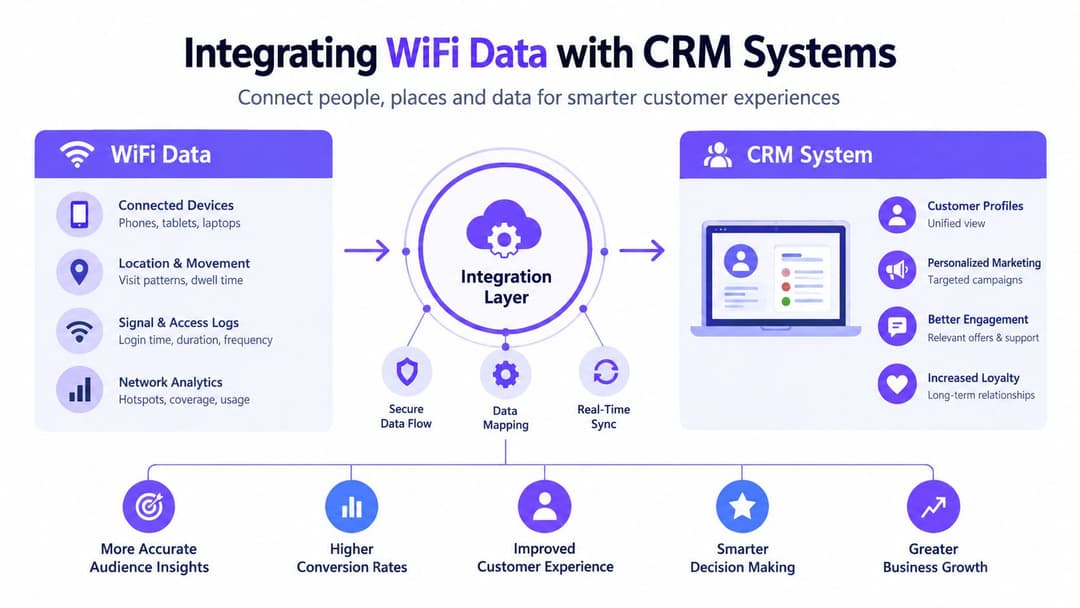
A network dashboard can tell an engineer that a device connected. It can't, by itself, tell a marketer whether the person is a loyalty member, whether an offer was appropriate or whether a purchase followed the visit. That value appears only when authenticated WiFi events enter the CRM, marketing automation, customer data platform and POS ecosystem with their context intact.
Build the event contract before the connector
Teams often start by asking whether a vendor has a Salesforce, HubSpot or email connector. That matters, but the harder question is what the connector sends. Define an event contract covering the event name, identifier, timestamp, store, zone, consent state, source, confidence and retention category.
A practical event might look conceptually like this:
| Event | Useful context | Possible action |
|---|---|---|
| Authenticated connection | Store, identity status, consent version | Create or update a profile |
| Zone presence | Zone, timing, measurement confidence | Segment a journey or investigate layout |
| Offer exposure | Campaign, location, timestamp | Suppress duplicate messages |
| Redemption | Offer, POS reference, store | Attribute a commercial outcome |
| Repeat visit | Return signal, identity match, timing | Trigger retention or loyalty messaging |
The identity-match rate should be the primary technical KPI. Raw connection volume can grow while the proportion linked to a known customer remains weak. If the match rate is poor, downstream segments become unreliable and POS attribution becomes selective in ways that can distort reporting.
Send events where teams already work
The integration pattern should support both batch reporting and operational triggers. A consented connection may update a CRM profile. A return visit may place a customer into a lifecycle segment. An offer redemption may write back to the campaign record and POS-linked customer history.
Teams evaluating their wider customer-data stack may find this small business CRM Brisbane guide useful as a plain-language reference for how CRM systems organise customer information and workflows. Enterprise retailers should apply the same principle at greater scale: the system needs a clear source of truth, controlled field mapping and ownership for data quality.
Don't send every raw network record to every platform. A better pattern is to process events centrally, publish approved attributes and expose only what each system needs. Marketing may need a visit segment and consent status. IT may need authentication diagnostics. A data science team may need aggregated movement patterns. Those are different access requirements.
Connect identity to commercial truth
POS linkage is where retail WiFi marketing becomes accountable. Use a stable, permitted identifier such as a loyalty reference or CRM customer ID, then define how the organisation treats unmatched purchases, shared accounts, offline transactions and delayed synchronisation.
The result won't be perfect attribution. It will be a more honest measurement layer than a network report showing logins without outcomes. Store, consent, visit, campaign and purchase events should be traceable enough for teams to explain what happened and cautious enough to avoid claiming that every correlated transaction was caused by WiFi.
Campaign Activation and Measurement
A retailer with clean events can do more than send a generic welcome email. It can design an activation sequence around context. A returning loyalty customer entering a relevant department might receive a permitted offer. A new visitor can see a store-specific welcome journey. A shopper who has seen an offer but hasn't redeemed it can be handled differently from someone who already used it.
Those actions should begin with a hypothesis, not a novelty trigger. For example, a retailer might test whether a zone-specific message is more useful than a broad store promotion for customers who have opted into marketing. The control group receives the existing journey, while the test group receives the contextual version. The measurement window and eligible audience are defined before launch.
Treat metrics as baselines, not universal targets
Retail formats differ. A compact shop, a department store and a mixed-use shopping centre create different movement patterns, coverage conditions and opportunities for connection. A single opt-in or dwell benchmark can hide those differences.
The WiFi analytics guidance from Purple highlights footfall, dwell duration and movement between zones, while also pointing to privacy controls such as hashed MAC rotation, DPIAs and visible signage. Those measures are useful only when the retailer understands how accurately they reflect the physical environment.
Validate analytics against a ground-truth source:
- Choose an independent reference: Use an existing door counter, manually observed sample, POS traffic pattern or another approved operational measure.
- Compare by format: Test entrances, floors, departments and mixed-use areas separately rather than averaging the entire estate.
- Record error and confidence: Report where the WiFi estimate diverges and under which conditions.
- Investigate causes: Look for coverage overlap, device non-connection, staff devices, queueing areas and repeated signals.
- Set a decision threshold: Agree what level of confidence is sufficient for budget, staffing or layout decisions.
Measure the complete journey
Track splash opt-in rate, dwell time by zone, identity-match rate, offer exposure, redemption and repeat visits as relative metrics. Baseline them per store format, then improve the journey through controlled changes to onboarding, messaging, signage and offer design.
A retail team might find that a shorter registration flow increases authenticated connections but reduces the proportion of visitors who accept marketing. That isn't a failure. It is a trade-off that should be evaluated against the value of permissioned reach, identity quality and subsequent redemption.
For financial planning, a WiFi marketing ROI calculator can help teams structure assumptions before committing budget. The output should support, not replace, an experiment plan. Report incremental results conservatively, distinguish correlation from causation and keep the original baseline visible.
Vendor Selection and Deployment Realities
Legacy retail WiFi projects often centre on an on-premises RADIUS server, a controller-specific portal and manual configuration at each site. That setup can satisfy basic authentication, but it places a heavy operational burden on network teams when the estate spans many stores, tenants or brands.
Cloud-native identity platforms shift policy, identity and event management into a centrally governed service. The access points still enforce the network connection, but the platform can coordinate authentication, directory changes, consent records and marketing integrations without turning each store into a separate engineering project.
Compare the operating models
| Requirement | Legacy RADIUS approach | Cloud-native identity approach |
|---|---|---|
| Guest onboarding | Often portal-led and site-specific | Can combine portal, Passpoint and OpenRoaming |
| Staff access | Manual credentials or local administration | SSO through Entra ID, Okta or Google Workspace |
| Multi-tenant control | More configuration at venue level | Central policy with tenant-specific boundaries |
| Legacy devices | Requires separate network design | May support iPSK or equivalent isolated access |
| Marketing data | Often exported from a network tool | Designed around events, connectors and APIs |
| Rollout | Dependent on local infrastructure work | Central templates can accelerate deployment |
The choice isn't purely technical. A platform that offers a polished portal but weak network isolation creates risk for IT. A secure access product with no usable CRM or POS path leaves marketing with another silo. Procurement should require both network controls and downstream activation.
Test the integration edge cases
Ask vendors to demonstrate more than a successful first login. Test returning users, consent withdrawal, duplicate identities, tenant boundaries, offline POS activity, directory deprovisioning and a failed authentication event. Confirm who owns the data, how it can be exported and how deletion propagates through connected systems.
Purple can be evaluated as an option for passwordless guest and staff access, multi-tenant networking, first-party WiFi data and retail analytics. Its stated network compatibility includes vendors such as Meraki, Aruba, Ruckus, Mist and UniFi, but the retailer should validate its own hardware, identity providers and security policies during a technical pilot.
Deployment claims should also be tested against reality. “Fast rollout” means little if site surveys, backhaul changes, legal review, CRM mapping and staff training remain unplanned. The strongest vendors help teams standardise the repeatable parts while making exceptions visible before they reach production.
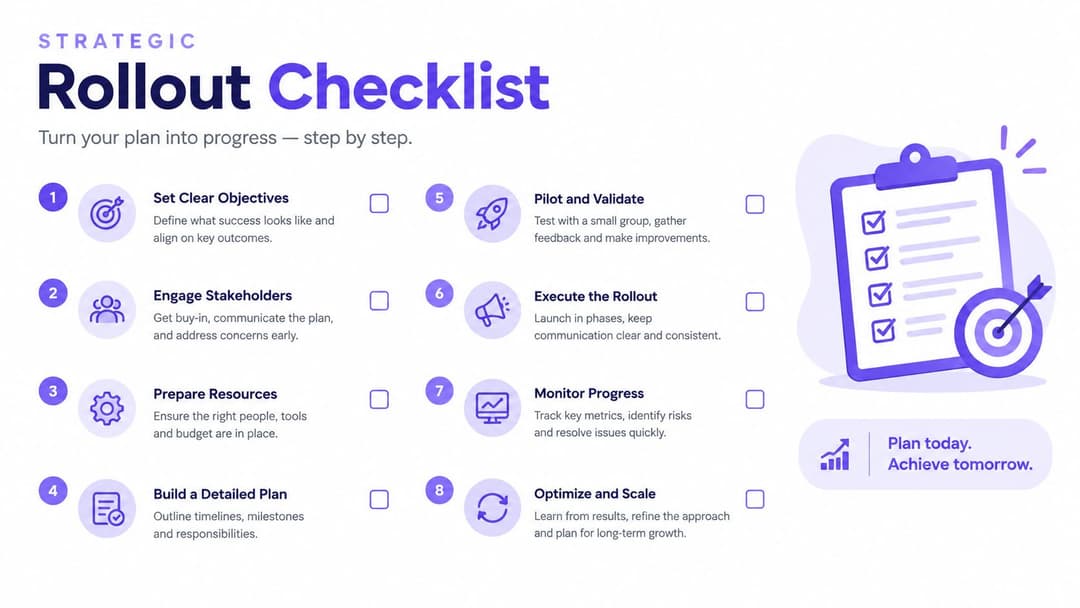
Strategic Rollout Checklist
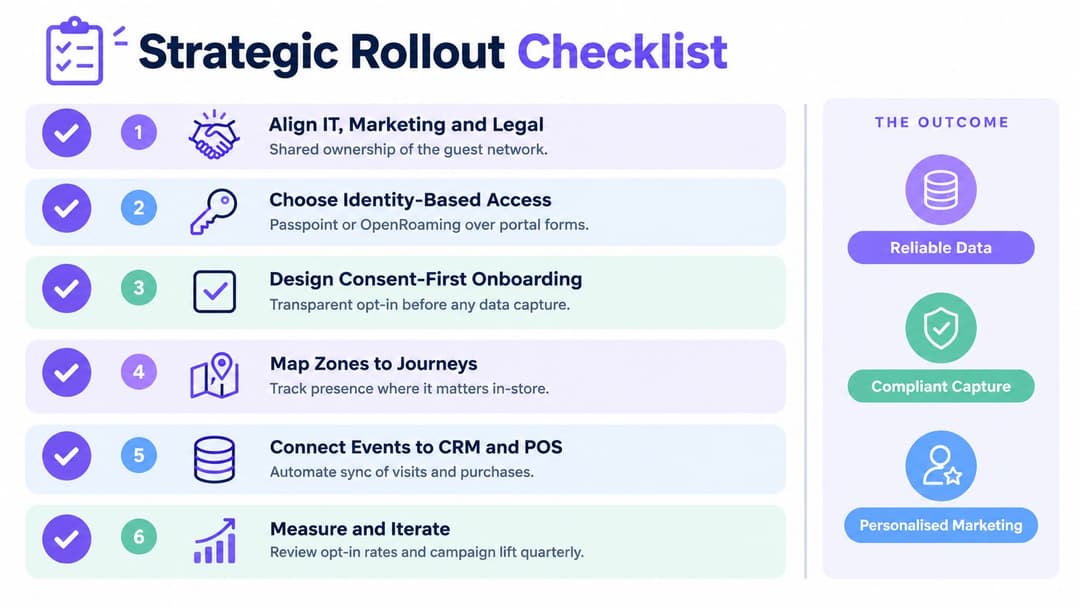
Retail WiFi marketing succeeds when IT, marketing and legal share ownership from the beginning. Marketing defines the journeys and commercial outcomes. IT controls security, availability and integration. Legal and privacy teams establish the boundaries that make the data usable.
Use a pilot to prove the operating model, not just the network signal. Select a representative store or venue, document the current customer journey and agree which outcomes matter before changing the experience.
Align the work before launch
- Audit the network: Check coverage, segmentation, capacity and supported access technologies.
- Define the identity model: Decide what counts as a known customer and how identities are matched.
- Write the consent experience: Separate access from marketing permissions and document retention.
- Map meaningful zones: Track only areas connected to a real merchandising or operational decision.
- Specify events: Name the fields, owners, destinations and quality checks for each event.
- Connect CRM and POS: Test profile creation, updates, redemptions, unmatched records and deletion.
- Baseline the analytics: Compare WiFi measures with an independent operational reference.
- Run controlled activation: Start with a small journey, define a control and review the result with finance and privacy stakeholders.
The executive test is simple: can the team explain who connected, what permission applied, what happened in the store, which message followed and whether a commercial outcome was observed? If the answer depends on exporting spreadsheets from separate systems, the programme isn't ready to scale.
Purple provides passwordless guest and staff WiFi, consent-based first-party data capture, analytics and integrations that can connect in-store events with retail marketing workflows. Visit Purple to assess how an identity-led WiFi architecture could support a secure pilot with measurable customer and commercial outcomes.