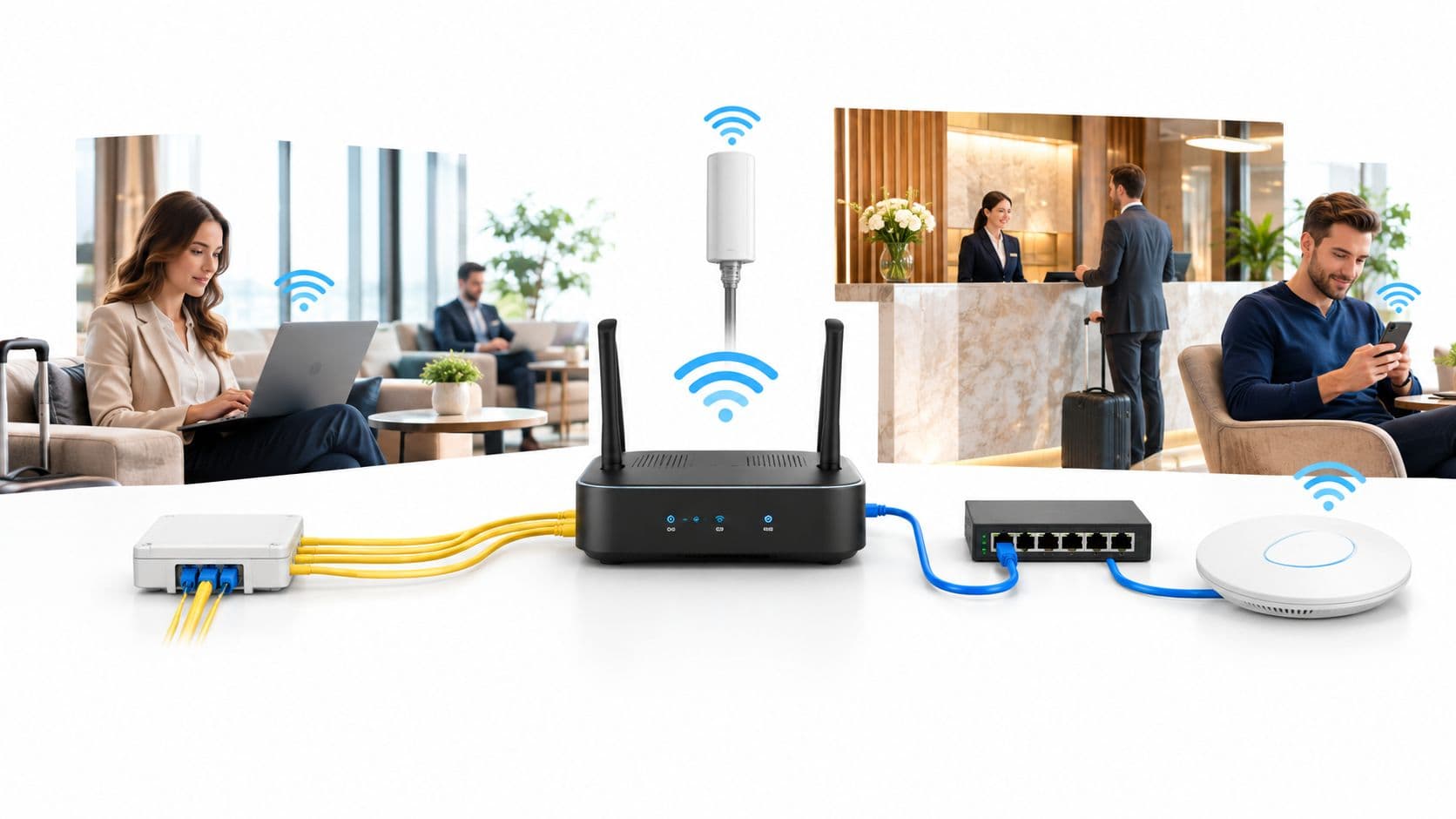
A guest checks into her room, opens a video call, and watches it freeze. Reception insists the signal is strong, and on a phone she's seeing full bars. That gap between visible coverage and usable service is exactly why WiFi site surveys exist. They test whether a network will work for real people, real devices, and real applications, rather than assuming an access point on a ceiling is proof of performance.
Why WiFi Site Surveys Matter More Than Ever
The hotel lobby tells the story clearly. At breakfast, guests are streaming, joining calls, and uploading photos while staff run point of sale terminals and housekeeping tablets roam between floors. The bars look fine. Calls still break up, card terminals stall, and someone in the restaurant can't load a boarding pass. Nothing is completely down, which makes the problem harder to escalate and harder to fix.

That pattern repeats in hospitals, student accommodation, retail centres, and multi-tenant offices because coverage isn't capacity. A strong signal tells you a client can hear an access point. It doesn't tell you whether forty other clients are competing for the same airtime, whether a neighbouring tenant's network is consuming the channel, or whether a device will roam cleanly at the exact moment a nurse or guest walks through a doorway.
Coverage Claims Versus Measured Behaviour
Manufacturer range figures assume open space and no interference. Real buildings have lift shafts, glazed meeting rooms, metal racking, kitchens, and bodies absorbing signal at the busiest times. Ofcom has treated this as a measurement problem, publishing datasets that include 2.4 GHz Wi-Fi airborne measurements and combined 2.4 GHz and 5 GHz measurements over Northampton, associated with reports published on 13 May 2016 in its UK radiowave propagation measurement datasets. The two bands propagate differently, so a design that looks adequate on a floor plan can misrepresent usable service on the ground.
A proper survey answers three practical questions before you commit to cabling and hardware. Where should access points go, and at what power? Which channels and widths will survive neighbouring networks? How will you prove, after installation, that voice, payment, IoT, and guest traffic all meet their own thresholds?
A heatmap that only shows signal strength is a starting point for a conversation, not evidence that the service works.
The same evidence mindset supports wider operational planning. Teams coordinating field visits and follow up actions need reliable access to survey outputs on site, which is where a tool such as the Planstone mobile platform fits naturally alongside the engineering work. The point isn't more software for its own sake. It's keeping findings, photos, and remediation decisions attached to the place where the measurements were taken, so the next engineer isn't starting from anecdotes.
Choosing the Right Survey Type for Your Site
Picking the wrong survey type usually costs more than picking an expensive one. A team that only runs a predictive model on a troubled live site will miss the neighbour's access points causing the pain. A team that only walks a live site before a refurbishment will measure a building that's about to change. Match the method to the question you're trying to answer.
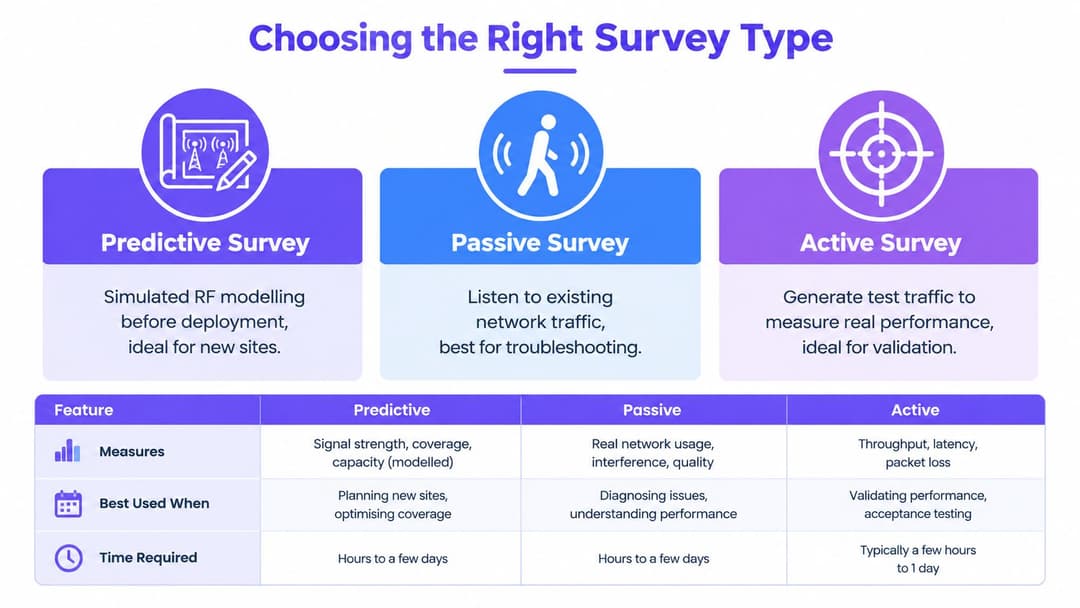
| Survey type | What it measures | Best used when |
|---|---|---|
| Predictive | Modelled signal based on floor plans and materials | Budgeting and designing a new or refurbished site |
| Passive | Existing RF conditions without joining the network | Troubleshooting interference and neighbouring networks |
| Active | Real association, roaming, and application behaviour | Validating a deployment or a proposed fix |
What Each Method Can't Tell You
Predictive surveys are simulations. They're excellent for estimating access point counts, testing placement options, and pricing a job before anyone drills a ceiling. They're only as honest as the floor plan and the wall attenuation values you feed them, and they know nothing about the café next door or the wireless cameras someone installed last month.
Passive surveys listen rather than transmit. You walk the site while unaffiliated to any SSID and record what the air contains, including neighbouring networks and channel occupancy. That makes passive work the right tool for diagnosing a live problem, but it won't prove a client can associate, authenticate, and roam under load.
Active surveys close that gap by behaving like a user. The survey device joins the network, moves through the space, and records association and roaming behaviour. You get evidence about experience, not just environment.
- Choose predictive first when the network doesn't exist yet or the layout is changing materially.
- Choose passive first when users complain but nobody knows whether interference or poor placement is to blame.
- Choose active always before sign off, because clients pay for applications working, not for models passing.
Most sound projects combine all three in sequence. Skipping the middle step is the classic error. A model gets approved, hardware goes in, and the first real measurement happens when guests or staff start complaining.
The Three-Stage Survey Workflow
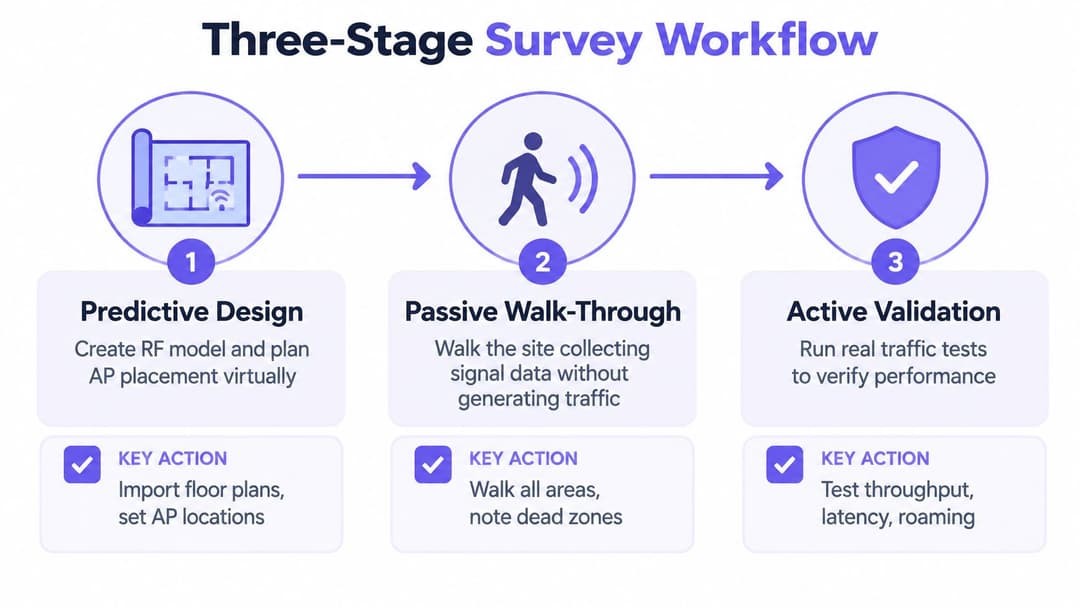
Good WiFi site surveys follow a sequence, and the sequence matters because each stage corrects the assumptions of the one before it. Treat the predictive design as a hypothesis, the passive walk as field evidence, and the active validation as the test that decides whether you hand the site over.
Stage One Predictive Design
Start with accurate, scaled floor plans. An out of date plan corrupts everything downstream, so confirm dimensions, ceiling heights, and the construction of walls, floors, and glazing before modelling. Then place candidate access points, set proposed channels and transmit power, and model expected coverage for each service the site runs.
Define the success criteria now, not in the corridor later. A UK three stage approach described in Jisc guidance on predictive and passive wireless surveying supports setting service specific minimum RSSI and SNR thresholds for voice, point of sale, IoT, or general data before anyone walks the site. The same verified workflow notes UK government guidance favouring centrally managed access points supporting at least 5 GHz and 802.11ac, which reinforces why the design should be planned as a managed system rather than a set of isolated radios.
Stage Two Passive Walk Through
Walk every area where people will use the network, at user height, without associating to an SSID. Record received signal strength, signal to noise ratio, neighbouring access points, channel occupancy, and non Wi-Fi interference. Walk both sides of walls and obstructions so you measure real attenuation rather than trusting the value typed into the model.
- Calibrate the plan at known reference points so distances in the tool match the building.
- Note physical constraints such as ducting, racking, lift shafts, and mounting restrictions that force placement changes.
- Photograph candidate locations so installers aren't guessing from a dot on a PDF.
Stage Three Active Validation
After installation, join the network with representative client devices and test what users do. Measure association success, roaming behaviour, latency, packet loss, and application performance while moving at walking pace through doorways, stairwells, and floor transitions. Where a proposed placement is uncertain, an access point on a stick test at the intended height and orientation beats another hour of debate over the model.
Field rule: If you didn't measure it at user height with a device like the ones your users carry, you measured your survey laptop, not their experience.
Document deviations as you find them. A wall that attenuates far more than modelled isn't a failure of the process. It's the process working, provided the design changes before cabling is finalised.
Interpreting Heatmaps and RF Data
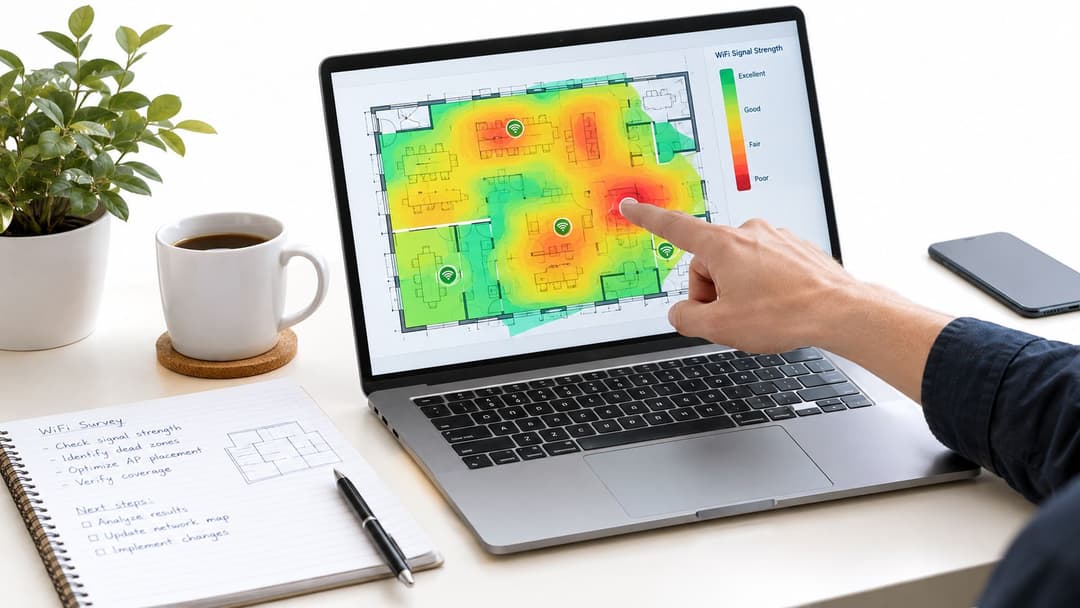
Heatmaps persuade people quickly, which is precisely why they mislead. A floor washed in green feels finished. Engineers read the same image differently, because a standard RSSI heatmap shows only how loudly a client hears the nearest access point. It says nothing about noise, contention, or whether the channel is already busy with someone else's traffic.
Signal Strength Is Not Signal Quality
Start with SNR, the gap between signal and the noise floor. A strong signal over a high noise floor produces retransmissions, lower data rates, and applications that feel sluggish despite full bars. Then look at secondary coverage. Voice and roaming dependent devices need a viable second access point to move to, so a single strong cell edged by nothing is a roaming failure waiting to happen.
Overlap cuts both ways. Too little and clients cling to a distant radio at a low rate. Too much, especially with excessive transmit power, and cells hear each other constantly, which raises co-channel interference and wastes airtime on contention. Read the channel utilisation view alongside the signal view every time. For a deeper grounding in these measurements, work through a practical guide to WiFi RF engineering principles before signing off a design on RSSI alone.
Two numbers deserve particular attention because they expose how optimistic models can be. A UK survey source warns environmental conditions can create discrepancies of roughly 6 to 10 dB between prediction and reality, and identifies channel utilisation above 50% on 2.4 GHz or 40% on 5 GHz as a congestion warning, as set out in guidance on predictive Wi-Fi survey limitations.
Interference Your WiFi Tool Cannot See
Wi-Fi adapters report Wi-Fi. They don't reliably show microwaves, DECT phones, Bluetooth, industrial equipment, security cameras, or poorly shielded LED drivers, all of which can wreck performance in kitchens, wards, and warehouses. That's why UK guidance on using spectrum analysers in site surveys points engineers toward spectrum analysis to detect non Wi-Fi energy that Wi-Fi only tools may not reveal adequately.
- Look for duty cycle patterns that match kitchen equipment or shift changes rather than constant congestion.
- Compare busy and quiet periods before recommending new hardware for what may be an interference problem.
- Test with representative devices at desk and trolley height, since a phone and a scanner don't experience the cell identically.
Documenting AP Placement and Channel Plans
A survey that ends as a folder of heatmaps leaves the installer to improvise, and improvisation is where good designs die. The deliverable should let a competent engineer who never visited the site install exactly what was designed, then let a different engineer audit it two years later.
What to Record for Every Access Point
Each access point entry needs more than a dot on a plan. Record the precise location referenced to fixed features, mounting height, antenna orientation, cable route constraints, and a photograph of the intended position. Add the planned channel, channel width, and transmit power, because two access points in the right places with the wrong power settings still produce a bad network.
- Location evidence covering room name, mounting surface, height, and orientation.
- Radio settings covering band, channel, width, transmit power, and EIRP.
- Local constraints covering nearby metalwork, heritage restrictions, infection control rules, or access limitations.
- Expected footprint showing the primary and secondary coverage the placement is meant to deliver.
UK Channel Planning in Practice
UK and ETSI rules shape what you can legally and sensibly deploy. The 5 GHz plan includes lower channels 36 to 48, DFS dependent channels 52 to 64, and further DFS channels 100 to 140, with different power and indoor or outdoor constraints across those ranges. DFS channels carry a real trade off. They expand your channel reuse options, but an access point that detects radar must vacate the channel, which can interrupt voice and video at an awkward moment.
Wide channels are the other common trap. Bonding looks attractive in a datasheet, yet there are only five non overlapping 80 MHz channels and two 160 MHz channels in the EU and UK context, according to UK channel planning guidance for 802.11ac deployments. In dense venues that arithmetic forces reuse of the same wide channel within earshot, which usually performs worse than narrower channels with cleaner separation.
In a high density design, more usable channels almost always beat wider channels.
Document the reasoning, not just the result. Note where you've chosen 20 MHz channels for capacity, where a wider channel is justified by low density, which cells sit on DFS channels, and what the fallback behaviour should be. A structured WiFi channel planner helps keep those decisions consistent across floors and phases. Finish each area with measured channel utilisation, noise floor, and agreed remediation actions so the next change starts from evidence.
Turning Survey Results into a Deployment Plan
The jump from survey report to working network is where programmes lose weeks. Cabling contractors, electricians, network engineers, and venue operations all read the same document with different questions. A deployment plan has to answer all of them, sequence the work around a trading or clinical environment, and connect the physical design to how people will sign in.
From Heatmaps to a Phased Installation
Translate every access point position into a cabling schedule with switch ports, patching, and containment routes confirmed against the building. Ceiling access in a listed hotel or a live ward is rarely as simple as the plan suggests, so walk the routes with the installer before the first fix. Where mounting points shift for practical reasons, feed the new position back into the design and check the effect on neighbouring cells rather than accepting the change without review.
Sequence the work around operations. Hotels and retail sites usually mean night work or floor by floor phases. Hospitals add infection control and restricted area permits. Student accommodation concentrates work into vacation windows, which compresses testing time exactly when you can least afford to skip it. Build validation time into each phase, not as a single block at the end when the scaffolding has gone.
Use an access point calculator to sanity check AP counts against area and capacity as one cross check against the predictive model. If the two disagree sharply, find out why before ordering hardware. The discrepancy usually points to an assumption about density, wall loss, or device numbers that somebody hasn't stated out loud.
Designing the Physical Layer for Authentication
Survey decisions shape authentication behaviour more than most project plans admit. A device that must complete a secure onboarding exchange at the edge of a weak cell will fail intermittently, and users will blame the login rather than the radio design. Roaming becomes a session continuity problem too. If a guest or clinician reauthenticates awkwardly every time they cross a floor, they'll perceive the network as broken even when throughput is respectable.
This link between radio design and identity isn't new. Early UK academic work documented a University of Southampton deployment involving approximately 40 wireless access points with an 802.1X based security architecture, described in the University of Southampton wireless LAN deployment study. Centrally managed, authenticated WLANs were already the direction of travel then. Modern venues have raised the stakes by mixing guests, staff, tenants, and headless devices on shared infrastructure.
So design the cell plan with the onboarding methods in mind. Ask which populations will use certificate or identity based access, which will use a one time enrolment such as Passpoint style provisioning, and which legacy devices still need a simpler key based method. Each group roams and rejoins differently, and each needs coverage in the places where authentication happens, including entrances, lifts, stairwells, and check in desks where people first pull out a phone.
Design check: Test the complete join, authenticate, and roam journey for each user group on the walk routes they really take, not just at a desk beside an access point.
Platforms such as Purple sit on this logical layer, providing identity based access for guests, staff, and multi tenant environments across common enterprise wireless vendors. Whatever platform you choose, it can only perform as well as the radio design underneath it. Weak secondary coverage will turn an elegant passwordless experience into repeated prompts and dropped sessions.
Planning for Tenants Sharing One Infrastructure
Multi tenant buildings add an isolation requirement that a single organisation site doesn't face. Residents, retail units, or office tenants expect a home like experience where their devices see each other, while remaining invisible to the flat or unit next door. That expectation has to be tested during validation, on real floors, with neighbouring units live and transmitting.
Your deployment plan should therefore specify how isolation will be verified, which SSIDs or identity groups exist, and how bandwidth and airtime contention between tenants will be observed after launch. Record the agreed baseline at handover, including survey files, configuration exports, and the as built access point register. That baseline is what makes future troubleshooting a comparison against evidence instead of a fresh investigation.
Validating Performance After Deployment
Here's the uncomfortable part. A clean survey and a tidy installation still don't guarantee a good network. They guarantee a network that matched a model on the days you tested it. Occupancy, neighbouring tenants, stock, furniture, and seasons all move the target afterwards.
Test at the Busiest Moment, Not the Quietest
Run active validation during peak occupancy, because that's when airtime runs out. For a hotel that's breakfast and evening check in. For a hospital it's visiting hours and ward rounds. For a venue it's the interval, when everyone reaches for a phone at once. Measure association success, latency, packet loss, and roaming on representative devices, then compare the results against the service thresholds you defined before installation.
- Concurrent clients per access point to spot cells absorbing far more load than designed.
- Airtime utilisation and retry rates to separate capacity problems from coverage problems.
- Roaming failures logged against the physical routes where they occur.
- Application performance by device type so a scanner or handset problem isn't hidden by healthy laptop results.
This evidence also helps teams share findings clearly with stakeholders who'll never open a survey tool. Publishing a simple internal results page for each site, along the lines of the static hosting benefits for teams, keeps validation reports fast to load and easy to distribute to operators, landlords, and support desks. The format matters less than the habit. Results that sit in one engineer's inbox don't improve the next deployment.
Set a repeat cadence and honour it. Resurvey after refits, tenant changes, and seasonal occupancy swings, and treat every survey as a baseline for the next one. Capacity is an operational problem that changes as the building changes. The sites that stay reliable are the ones where someone keeps measuring after the installers leave.
If your venue needs WiFi that performs under peak load and authenticates guests, staff, and tenants without shared passwords or repeated logins, Purple combines identity based access, OpenRoaming and Passpoint connectivity, and built in analytics on the infrastructure you already run. Visit Purple to see how a properly surveyed network and a passwordless access layer work together in hospitality, healthcare, retail, and residential environments.