By 2021, the UK Government had around 121 separate single sign-on solutions, showing why SSO is more than a convenience feature. SSO is federated identity consolidation: it centralises authentication through a trusted identity provider while each application keeps control of what an authenticated user is authorised to do.
You may recognise the problem from an ordinary working day. A member of staff needs email, a cloud application, a property-management system, internal WiFi and an administrative portal. Each service has its own login, password policy and account owner. When someone joins, changes role or leaves, administrators must update several systems, and users must remember which credentials belong to which service.
That is the practical reason organisations search for SSO explained. The question isn't just how to reduce the number of login screens. It's how to create a reliable identity control plane without weakening application-level permissions or introducing a more dangerous central target.
Why Fragmented Identity Creates Real Access Problems
The UK Government's experience provides a useful starting point. A 2021 GOV.UK service-standard review estimated that central government had approximately 121 different SSO solutions because service teams had built separate authentication systems instead of using one shared government-wide identity platform. People using multiple public services could therefore hold several sets of sign-in details and might not know which account was required for a particular transaction. (UK Government authentication and digital identity review)
The lesson isn't that government systems are uniquely complicated. Large enterprises, healthcare organisations, hospitality groups, property operators and public-sector networks face the same pattern. Each application can create an identity silo, and each silo can develop its own password rules, recovery process, group model and offboarding workflow.
Authentication and authorisation are different jobs
Authentication answers, “Who are you?” Authorisation answers, “What may you access here?” SSO consolidates the first question through a trusted identity provider. The target application still decides whether that identity can view records, administer a system, join a network segment or use a particular feature.
A useful mental model looks like this:
User
  |
  | authenticates once
  v
Identity provider
  |
  | sends trusted identity information
  v
Application or network
  |
  | applies local permissions
  v
Authorised session
This distinction matters during joiner, mover and leaver processes. A central identity can be disabled when a person leaves, while each connected service still needs a clear authorisation model and a reliable way to remove entitlements.
Practical rule: Treat SSO as a way to control identity centrally, not as a replacement for application permissions.
The same principle applies when designing wireline and wireless deployment. Network access is part of the identity estate, so teams should decide which directory groups can reach which network roles rather than attaching access to a shared password.
For staff WiFi and identity-aware access, Purple's identity-based networking shows how network policy can be connected to individual identity rather than a common credential. The result is a clearer relationship between a person, their directory status and the access they receive.
How Single Sign-On Works in Enterprise Federation
In an enterprise federation, an identity provider, a relying party and a signed identity message perform separate jobs. The identity provider authenticates the user, while the relying party, such as an application or network service, verifies the resulting identity information.
Authentication may use a password, multifactor authentication, device conditions or another approved method. The provider then issues a signed assertion or token for the requested service. The service validates that message and creates its own session, so credentials remain with the identity provider.
The federation flow
- The user requests a service. They open an application, administrative portal or protected network service.
- The service checks for an existing session. Without one, it redirects the user to the identity provider.
- The identity provider authenticates the user. It applies configured controls, such as MFA or conditional access.
- The identity provider issues a signed message. The integration commonly uses a SAML assertion or an OpenID Connect token.
- The service validates the message. It checks the issuer, signature, audience, expiry and relevant claims.
- The application creates its own session. It maps the verified identity to local permissions and records the authentication event.
Validation protects the trust relationship. The UK National Cyber Security Centre advises that SAML assertions received over untrusted networks must be checked against the expected certificate authority. An unverified assertion can provide an account-takeover path through a trusted identity-provider connection. (NCSC guidance on identity and access management)
A valid identity check grants an authenticated identity, not every permission in the target service. The application should consume only the claims required for authorisation, then apply its own role and resource rules. This separation also lets the same federation pattern support staff applications, administrative portals and identity-aware network services.
SAML, OIDC, and OAuth in Enterprise Context
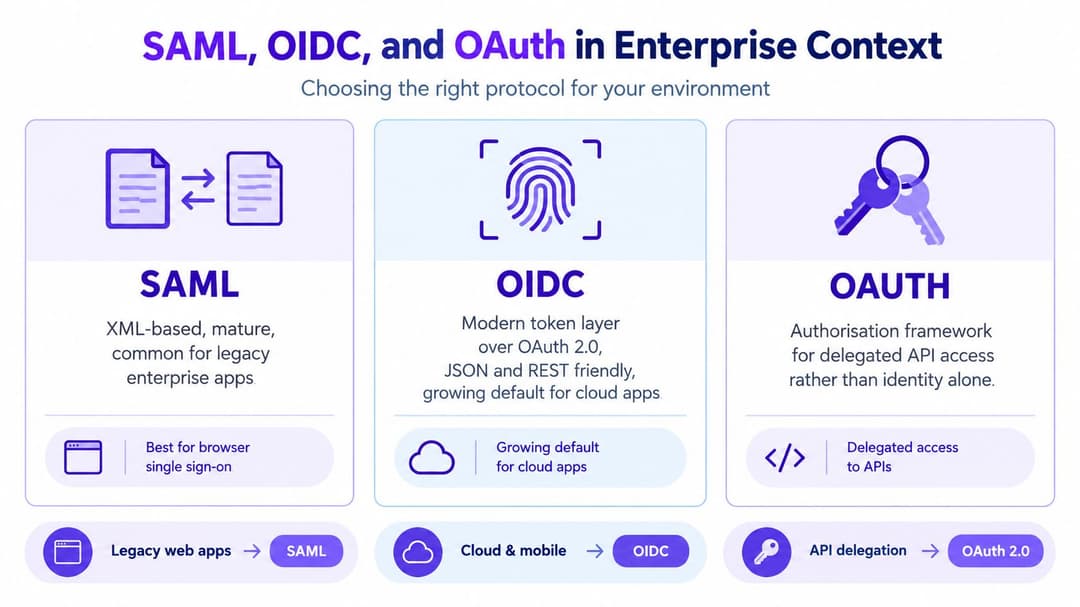
Once the federation model is clear, protocol selection becomes easier. SAML and OpenID Connect are common standards for enterprise SSO, while OAuth is primarily an authorisation framework for delegated access to APIs. Confusing OAuth with authentication can lead teams to build an identity flow that doesn't answer the security question they have.
| Standard | Practical role | Typical fit |
|---|---|---|
| SAML | Exchanges signed identity assertions | Established enterprise and browser-based applications |
| OpenID Connect | Adds an identity layer using tokens | Modern SaaS, web and mobile-oriented services |
| OAuth | Delegates access to protected resources | API access on behalf of a user or service |
SAML often appears in mature enterprise software because it uses a well-established browser federation model. OIDC is generally more natural for modern services designed around JSON, REST and token-based interactions. The right choice depends on what the application supports and how the service validates identity information.
What the service must verify
Regardless of the standard, the relying party must validate the received identity material before it creates a session. Core checks include:
- Issuer: Confirm that the message came from the expected identity provider.
- Signature: Verify that the message was signed by the trusted key or certificate.
- Audience: Check that the message was intended for this service.
- Expiry: Reject stale assertions or tokens.
- Claims: Use only relevant, validated identity and group information.
The identity provider can centralise policies such as MFA, conditional access, password bans and group membership. The application then receives the claims required for its own authorisation decision, rather than maintaining a complete copy of the user's authentication process.
That separation is useful when integrating platforms such as Microsoft Entra ID, Okta or Google Workspace. The provider handles the authentication policy, while the connected application remains responsible for its access model and session controls. For network operators evaluating Okta integration for RADIUS-based access, the same principle applies: identity validation and network authorisation must work together, but they aren't the same control.
The Concentration Risk That SSO Introduces
A single compromised identity-provider account can open several connected services at once. SSO reduces password sprawl, while concentrating trust in the identity provider, making it a high-value control plane. Organisations therefore need to assess how federation affects their blast radius and recovery options. The NCSC guidance on choosing authentication methods highlights this concentration of trust as a risk that requires deliberate assessment.
SSO consolidates sign-in events. Phishing resistance, device trust and least-privilege access must come from the controls wrapped around the federation architecture. A strong design protects the provider, the sessions it creates and the recovery processes that can restore access.

Build layers around the provider
Controls should cover routine sign-in and the less visible paths used during account recovery:
- Strong MFA for privileged users: Use phishing-resistant methods where the environment supports them, particularly for administrators.
- Conditional access: Assess device state, location, session risk and other available signals before granting access.
- Separate administrator identities: Keep privileged administration separate from ordinary day-to-day activity.
- Authentication monitoring: Investigate impossible travel, token-replay indicators, repeated failures and unexpected privilege escalation.
- Recovery protection: Treat help-desk resets and emergency accounts as sensitive identity operations, with approval and monitoring.
The NCSC recommends combining enterprise SSO with strong user and device authentication, including MFA or conditional access. It also recommends SSO for SaaS because centralised controls make user and group management more consistent and prevent credentials being synchronised into every application. Its cloud security principle on identity and authentication sets out this approach.
SSO lowers the number of credentials you must govern. It leaves the credential and session governing connected services requiring strong protection.
Network teams should separate workforce identity from guest identity. A staff federation can support least-privilege access and prompt revocation. Guest authentication must not inherit employee directory privileges just because both flows use a captive portal or wireless infrastructure.
Passwordless WiFi and Directory-Based Network Access
A staff member joining WiFi should not need a shared password that remains valid after they leave. A directory-backed design starts with authentication through the organisation's identity provider, then maps the verified identity or group to a network role. The wireless service therefore applies the same employment and access decisions used elsewhere, rather than maintaining a separate list of WiFi passwords.
Purple supports this model for enterprise WiFi through integrations with Microsoft Entra ID, Google Workspace and Okta. Its passwordless WiFi approach avoids shared credentials and on-premises RADIUS management. Directory changes can trigger provisioning or revocation. A staff member's group membership determines network access, while disabling a leaver's directory account can remove that access without waiting for anyone to change a common password.
Apply federation controls to the network
The identity provider, network policy and monitoring should agree on the same access decision. Map directory groups to distinct network roles, so staff, contractors and administrators do not receive identical access by default. Keep assertion or token lifetimes short, limiting the usefulness of stale identity material. Require MFA at the identity provider, because wireless SSO does not become MFA just by using SSO.
Record successful and failed authentication events, and connect each identity decision with the resulting network authorisation. Test certificate rollover before expiry, since federation trust failures can interrupt otherwise healthy WiFi access.
Multi-tenant sites require a separate boundary. Residential properties, student accommodation, hotels and mixed-use venues may offer simple access to residents or guests while isolating tenant traffic and staff systems. iPSK can support legacy devices, while workforce SSO supplies a distinct staff identity path.
Guest WiFi also creates decisions about consent, retention and customer profiles. This guide to guest data for venues provides a useful reference alongside the network design, while Purple connects identity-based authentication with the wireless access experience.
Measurable Outcomes for UK Enterprises and Venues
A practical SSO business case starts with the credentials an organisation no longer needs to administer. An April 2024 Institution of Engineering and Technology survey of 2,000 UK residents aged 16 and over found that only 20% could correctly identify a secure password. The same survey reported that one-fifth reused a password across multiple websites or devices, while 21% used a significant date and 20% used a pet's name. It also found that 38% believed replacing letters with numbers improved password security, 65% believed passwords should never be written down, and 77% thought frequent password changes increased security. (IET password security survey)
These findings show the limits of asking users to create and remember separate credentials for every application and network. Centralised identity changes where the organisation applies controls and how quickly administrators can act, even though phishing and account compromise remain live risks.
For an operator, the outcomes are practical:
- Fewer unmanaged credentials: Users create, remember and reuse fewer separate application passwords.
- Consistent policy: The identity provider can apply MFA, conditional access and password restrictions across connected services.
- Faster revocation: Disabling an organisational identity can become the central access-removal action, provided connected services process lifecycle changes correctly.
- Clearer audit trails: Logs can link a person's identity with authentication and network authorisation decisions.
- Less duplicated administration: Teams maintain identity policy centrally instead of recreating equivalent controls in every service.
The value extends beyond reducing sign-in prompts. A healthcare provider can assign access by role, a hotel group can separate staff and guest services, and a property operator can maintain clearer ownership of tenant and workforce entitlements. In each case, the measurable result is a smaller credential estate, more reliable leaver processing and stronger evidence of who received access to an application or network role.
Implementing SSO Without Creating New Risk
A safe rollout starts with the identity model, not the login button. Choose SAML or OIDC where they fit the application, rather than copying passwords into an application or network platform. Establish the identity provider as the authentication authority, then make each connected service validate the issuer, signature, audience, expiry and claims before creating a session.
Use an operational checklist
- Start with authoritative groups: Provision access from directory groups owned by the right business or IT team.
- Define mover rules: A role change should remove old entitlements as well as add new ones.
- Process leavers centrally: Disable the organisational identity and verify that connected applications and network roles respond correctly.
- Protect break-glass access: Keep emergency accounts separate from ordinary administration, monitor them closely and test their recovery process.
- Separate staff and guests: Workforce SSO can support least-privilege access and revocation. Guest authentication must not inherit employee permissions.
- Test trust changes: Validate certificate rollover, token expiry, session termination and provider outages before production reliance.
- Review monitoring: Confirm that authentication events, administrative actions and network authorisation decisions are available for investigation.
A venue may also need to support several network vendors rather than replace its existing wireless estate. Purple is designed to work with Meraki, Aruba, Ruckus, Mist and UniFi, and its stated deployment model is measured in weeks rather than months. Treat those capabilities as implementation considerations, not substitutes for architecture review. For a broader view of how technology providers describe security safeguards, AdManage.ai's trust and controls offers a useful comparison point.
The central decision is whether the organisation can explain, for every connected service, who authenticates the user, which claims are trusted, how permissions are assigned and what happens when the identity changes. SSO is one layer in an identity and access management programme. It doesn't replace MFA, conditional access, authentication monitoring, recovery controls or lifecycle governance.
Purple connects workforce identity with passwordless WiFi, directory-based network roles and separate guest access, supporting integrations with Entra ID, Google Workspace and Okta. Visit Purple to assess how its identity-based networking model could fit your existing wireless environment and SSO rollout.