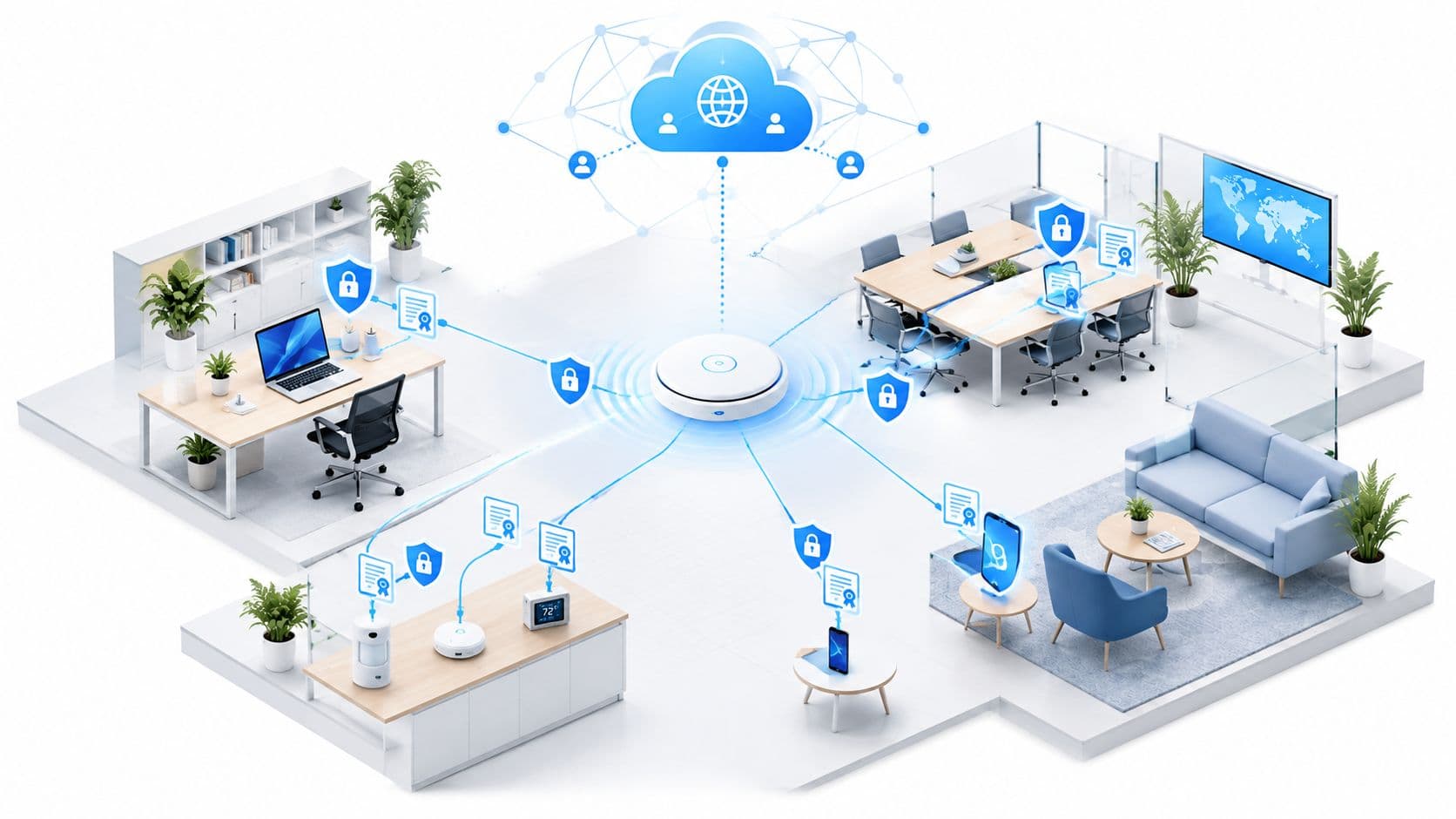
A hotel guest reaches the reception desk with a phone that won't complete the captive portal. A retail colleague has lost the shared staff password. In a hospital, a clinical device keeps dropping connection as it moves between access points. The access points may be healthy, the broadband circuit may be online, and the dashboard may still show a reassuring average throughput figure.
This is the uncomfortable reality of Wi-Fi for enterprise. Connectivity failures rarely arrive as one obvious outage. They appear as abandoned check-ins, failed payments, delayed workflows, support tickets, and staff workarounds. A practical strategy must therefore identify whether the problem sits with the ISP, the wired LAN, radio frequency conditions, authentication, roaming, device density, or the application itself.
The Hidden Cost of Traditional Enterprise WiFi
The shared password model looks simple until the first busy day. A hotel prints the guest key on reception cards, a restaurant writes it on a board, and an office adds it to a welcome email. Then the password spreads beyond the intended audience, former contractors retain access, and every rotation creates another support task.
Captive portals add a different kind of friction. A guest connects to the SSID, waits for a redirect, accepts terms on a small screen, and repeats the process when the session expires or the device changes its network state. A visitor who can't complete that sequence doesn't describe the experience as an authentication problem. They conclude that the Wi-Fi doesn't work.

Where the operational cost appears
In hospitality, a slow or failed onboarding flow can hold up check-in and push guests towards mobile data. In retail, unstable connectivity at a payment point or stock terminal affects the transaction journey, even when other devices in the shop report acceptable speeds. In healthcare, a weak signal or delayed reauthentication can interrupt access to a clinical application at the point where staff need it.
The security consequences are just as practical. A shared credential doesn't identify the person or device using it, so an administrator can't confidently revoke one employee without changing access for everyone. A guest network that isn't properly isolated can also create a path towards internal services, printers, management interfaces, or operational devices.
The UK Government's Cyber Security Breaches Survey 2025/2026 found that 85% of large UK businesses had separate Wi-Fi networks for staff and visitors, down from 93% in 2024/2025. The same survey reported a formal cyber-security strategy at 74% of large businesses and 57% of medium-sized businesses, while 43% of UK businesses observed at least one breach or attack during the previous 12 months.
Practical rule: If a network cannot distinguish staff, guests, contractors, and managed devices, it can't apply meaningful policy to them.
Why manual infrastructure doesn't scale
On-premise RADIUS can provide stronger authentication, but it also introduces certificate lifecycle management, server maintenance, redundancy planning, firewall dependencies, and troubleshooting across several teams. A certificate expiry can look like a Wi-Fi outage to the user. A directory change can fail to reach the access policy in time. The network team then investigates symptoms instead of enforcing a clear identity decision.
This isn't a new lesson. A Computing report on early UK wireless security concerns described wireless network growth of 770% between 2001 and 2004, while reporting that only about one-fifth of UK firms used encryption for wireless networks. It also cited research in which 28% of European businesses with wireless networks had audited their WLANs for vulnerabilities. The technology has moved on, but the operational pattern remains familiar: deployment grows faster than governance.
Understanding Modern WiFi Architecture and Security
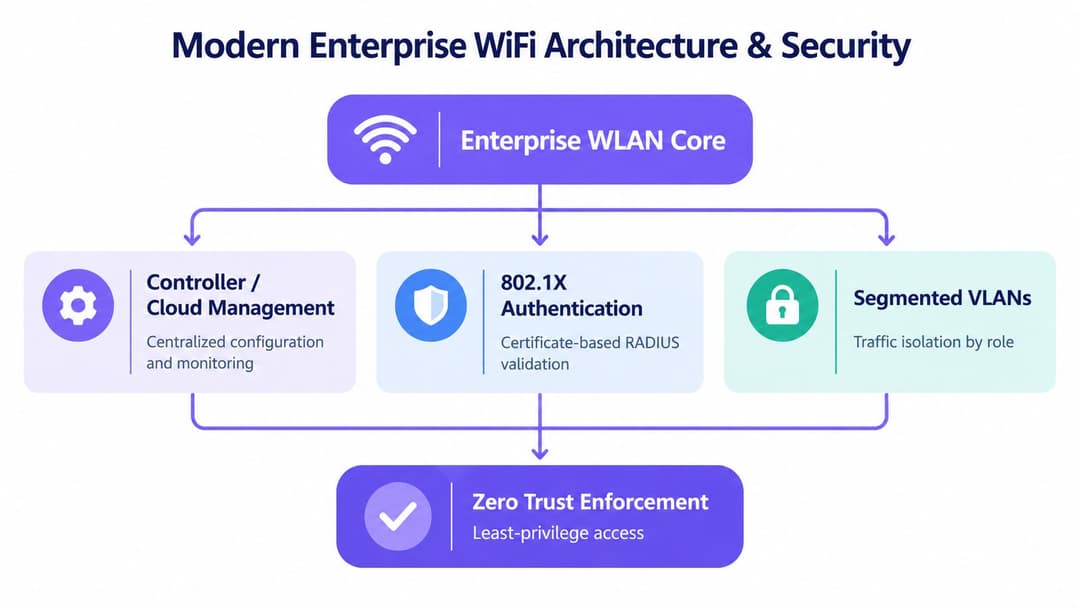
A modern enterprise WLAN is not a collection of access points connected to a switch. It is an enforcement layer between a person or device and the applications that person or device is allowed to use. That requires four coordinated capabilities: central management, strong authentication, traffic segmentation, and continuous policy enforcement.
The first architectural shift is away from WPA2-Personal and shared secrets. WPA2-Enterprise and WPA3-Enterprise use 802.1X to place an authentication exchange between the endpoint and the network. In a mature design, a certificate identifies the device, an identity service validates the user or machine, and policy determines the resulting access. A compromised or departed user's shared password no longer represents the whole workforce.
The control plane and the data plane
Cloud management platforms and controllers provide the control plane. They distribute SSIDs, radio settings, firmware policies, access rules, and telemetry across sites. The data plane still carries user traffic through switches, firewalls, gateways, and application services, so cloud management doesn't remove the need for sound LAN design or resilient backhaul.
Segmentation determines what happens after authentication. A staff member may receive access to internal collaboration tools, a guest may receive internet-only access, and a scanner or clinical device may be restricted to the services it needs. Dynamic VLAN assignment, role-based policies, private pre-shared keys for legacy equipment, and firewall rules can work together, but the design must document the trust boundary rather than assume that an SSID alone provides isolation.
For teams evaluating the wider design, this business wireless design resource is useful because it frames coverage, capacity, authentication, and operational requirements as one engineering problem. A separate enterprise Wi-Fi security guide can help structure the security discussion around identity, encryption, segmentation, and monitoring.
Zero Trust changes the question
Zero Trust doesn't mean that every packet is blocked forever. It means the network doesn't grant broad trust merely because a device has joined a familiar SSID. The policy engine should use identity, device state, role, location, and application requirements to grant the least access needed.
That model also improves troubleshooting. An authentication failure, a posture failure, and an RF failure produce different evidence. If the architecture logs those decisions separately, engineers can stop treating every user complaint as a generic signal problem.
Integrating Identity Providers and Zero Trust
Identity integration works best when the network team treats it as a lifecycle project, not as a one-off RADIUS configuration. The aim is to connect the organisation's source of truth for people and groups with the service that makes wireless access decisions.
A practical implementation sequence looks like this:
Define identities first. Separate employees, contractors, guests, shared devices, IoT equipment, and service accounts. Each category should have a documented owner, onboarding method, access scope, and removal process.
Connect the identity provider. Microsoft Entra ID and Okta can provide the directory context and group membership used by a cloud service or access policy engine. SAML commonly handles the administrative federation and user identity exchange, while RADIUS and 802.1X remain part of the network authentication path.
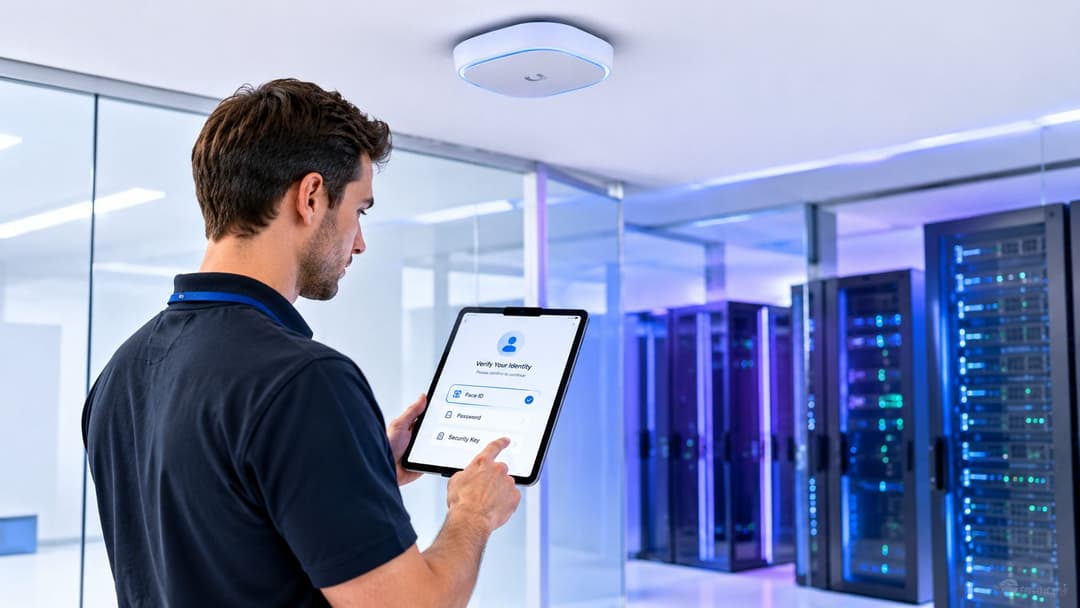
Issue device credentials. Managed laptops and mobile devices should receive certificates through the organisation's device management process. The certificate proves that the endpoint belongs to an approved device population, while the associated user or group determines what access it receives.
Map policy to network outcomes. A policy decision should result in a clear role, VLAN, firewall posture, or application permission. If the result is ambiguous, troubleshooting becomes a search through controller settings rather than a review of an explicit rule.
Automate the joiner and leaver process
The strongest benefit appears when the identity lifecycle is automated. When an employee changes role or leaves, the directory event should remove or change access without waiting for an administrator to find every local Wi-Fi record. That doesn't eliminate the need for revocation lists, certificate expiry controls, and periodic access reviews, but it reduces the gap between an HR change and a network policy change.
Guest access needs a different workflow. A guest may receive a time-limited identity, an approval from a host, or a federation credential from a trusted organisation. The important point is that the guest shouldn't inherit staff access just because both devices use the same building.
Identity should be the input to the access decision, not a password that the network team has to chase.
Test the integration before a broad rollout. Verify first connection, certificate renewal, offline directory behaviour, policy changes, failed authentication, device replacement, and revocation. Test on every major endpoint type, because a successful laptop pilot doesn't prove that handheld scanners, tablets, medical devices, or printers will behave correctly.
For teams that want to reduce the operational burden of maintaining local RADIUS infrastructure, cloud RADIUS for enterprise Wi-Fi is one model to evaluate alongside existing identity and network controls.
Passpoint and OpenRoaming: Authentication That Travels
A failed connection at a hotel, branch office, or transport site can look like an ISP outage, even when the WAN is healthy. Roaming introduces another possible fault domain. A device may authenticate correctly, then lose service because radio coverage, client behaviour, or handoff settings are wrong.
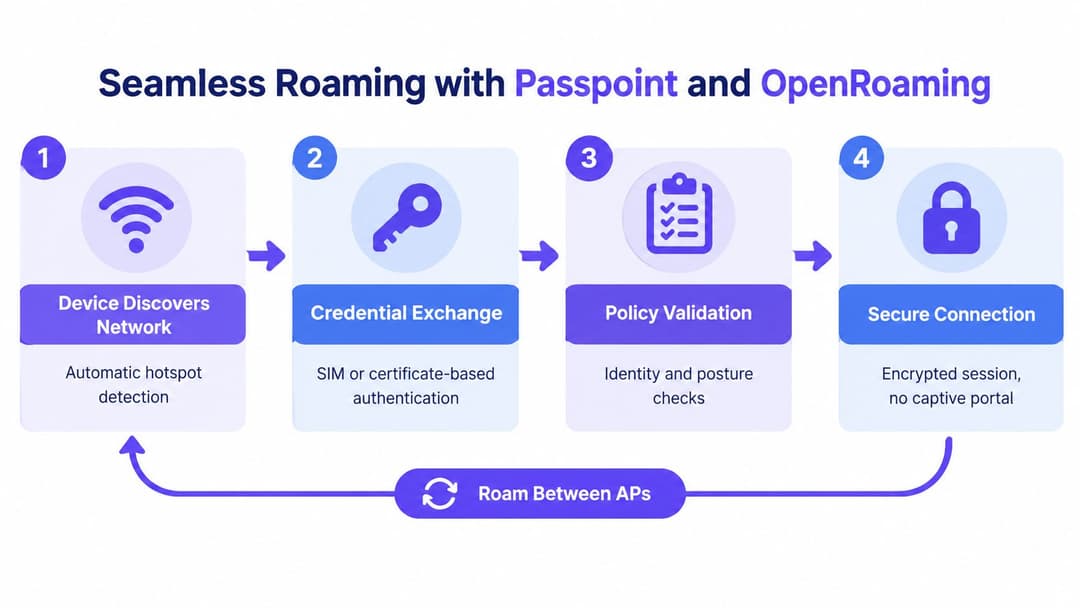
Captive portals solve a narrow problem: presenting a web page before access is allowed. They do not establish a reliable identity relationship between the device and the network. Passpoint, also known as Hotspot 2.0, takes a different approach. A compatible device discovers network capabilities, checks for a suitable credential, and authenticates through a secure profile. The user does not need to select a familiar SSID or complete a splash screen.
OpenRoaming extends this model across participating organisations and venues. A user or managed device carries a trusted identity, while the visited network validates it through the federation. For businesses operating offices, hotels, transport sites, retail branches, or event venues, this reduces the need to configure every location separately.
What the device does behind the scenes
The process is automatic, but each stage needs testing:
- Discovery: The device identifies a compatible network and checks its advertised authentication methods.
- Credential exchange: A SIM-based credential, certificate, or another trusted identity is presented through the supported enterprise method.
- Policy validation: The network checks the identity, authorisation, and required device or posture conditions.
- Encrypted connection: The device receives an encrypted session without using a conventional captive portal.
This removes several common failure points. A hotel guest does not need to enter a room-specific password. A travelling employee does not need to accept a new splash page at every branch. A shopper can return to a participating venue without repeating a lengthy sign-in process.
Roaming depends on radio and policy
Successful authentication does not guarantee a good handoff. RF design must provide overlapping coverage, sensible transmit power, consistent SSID and security settings, and a wired path that can carry the traffic. Fast transition methods can reduce interruption, but they cannot compensate for a distant access point, a congested channel, or a client that stays attached to a weak signal.
OpenRoaming also requires governance. The visited network should map the federated identity to guest, staff, or device policy. Logs should record the accepted identity, applied rule, and session location while limiting unnecessary personal data.
Troubleshooting should separate the evidence. A federation authentication failure points to credentials, certificates, policy, or the identity provider. An RF handoff failure points to signal levels, channel conditions, access point placement, or client decisions. If both succeed but applications still fail, check the wired path and ISP separately. That classification helps engineers avoid treating every roaming complaint as a hardware or broadband fault.
Deployment Best Practices and Spectrum Strategy
Hardware selection matters, but it shouldn't lead the design. Start with user density, application behaviour, building materials, mobility, device capability, and failure tolerance. Then select access points, switching, cloud management, authentication, and security controls that interoperate cleanly.
A vendor may offer excellent radio performance but create friction at the identity layer. Another may provide a smooth cloud dashboard but impose limitations on third-party authentication or policy export. The useful comparison is not a feature checklist. It is whether the complete service can provision a site, apply a role, recover from an outage, expose useful telemetry, and support a mixed endpoint population.
Treat 6 GHz as a capacity layer
Ofcom made the UK lower 6 GHz band, 5925 to 6425 MHz, available for licence-exempt radio local area networks. Its rules permit indoor operation up to 250 mW EIRP and very-low-power outdoor operation up to 25 mW EIRP. The allocation provides 500 MHz of contiguous spectrum, supporting 24 non-overlapping 20 MHz channels, six 80 MHz channels, or three 160 MHz channels, as set out in Ofcom's 6 GHz Wi-Fi statement.
That capacity is attractive in hospitals, hotels, offices, shopping centres, and transport facilities where many compatible clients compete for airtime. Wider channels can support high-throughput work, but they also consume more spectrum and don't automatically improve the experience for a device that is distant from the access point.
6 GHz has weaker propagation and poorer wall penetration than lower-frequency bands. Reusing the existing 5 GHz placement without a new survey can therefore create gaps. A sensible design keeps 5 GHz available for broader coverage and legacy clients, while using 6 GHz where compatible devices need additional capacity.
Plan for regulation and backhaul
Ofcom's proposed standard-power model allows operation up to 4 W EIRP, or 36 dBm, with automated frequency coordination required for outdoor use and indoor operation above 24 dBm. The Ofcom consultation on expanding access to 6 GHz explains how database-driven coordination protects incumbent users while enabling higher-power operation.
Before buying equipment, confirm UK regulatory mode support, location and antenna data requirements, AFC behaviour during loss of authorisation, and the fallback profile. Also verify that the switch uplinks and internet edge can handle the traffic. A high-capacity radio connected to an under-sized wired path only moves the bottleneck.
Use a Wi-Fi channel planner as one input to the survey process, not as a replacement for measurements taken in the actual building. Validate roaming, voice or video calls, application latency, onboarding, and high-density performance with representative devices.
Measuring ROI and Operational Impact
The business case for enterprise Wi-Fi shouldn't begin with the fastest access point available. It should begin with the failure that costs the organisation money or time, then identify which part of the service caused it.
A broadband speed test can show that a circuit is capable of a certain rate. It can't tell you why a guest's authentication took too long, why a payment terminal lost its session, or why a clinician's device stayed attached to a distant access point. Those cases require telemetry from the WAN, LAN, RF environment, authentication service, DHCP or addressing layer, roaming events, and the application.
UK research cited in a business connectivity analysis found that 20% of businesses considered their internet speeds insufficient for day-to-day operations, rising to 25% in rural areas compared with 18.2% in urban areas. Separate UK SME research cited in the same source found that 86% reported poor connectivity had negatively affected operations during the previous 12 months, rising to 89% among London businesses. These figures concern connectivity broadly, not Wi-Fi alone, which is why diagnosis matters.
Build a failure taxonomy
Record incidents against the layer that failed:
| Observed symptom | Evidence to collect | Likely investigation |
|---|---|---|
| Every device loses service | WAN alarms, gateway health, switch events | ISP, edge, power, or upstream LAN |
| One area performs badly | Channel utilisation, noise, retries, signal levels | RF interference, coverage, or cell design |
| Users connect but applications stall | Latency, packet loss, DNS, application timing | Wired path, WAN, service dependency, or policy |
| Devices disconnect while moving | Association history, roaming decisions, client capability | RF overlap, sticky clients, transition settings |
| Login fails for a group | RADIUS responses, certificates, IdP events | Identity, certificate, policy, or directory integration |
| Payments or scanners fail intermittently | Session logs, device power state, application errors | Device behaviour, roaming, or application timeout |
This method prevents an expensive but common mistake, adding access points to fix an ISP outage or increasing bandwidth to fix interference. More radio capacity won't correct a broken certificate chain, and a new circuit won't make a client leave a weak access point.
Tie metrics to operational outcomes
Hospitality teams can compare authentication failures and session abandonment with check-in queues, repeat support requests, or guest complaints. Retail teams can associate wireless incidents with failed transactions, stock delays, or lost staff productivity. Healthcare teams should track application availability and mobility in the clinical workflow, rather than judging success by an average speed result.
Set service objectives for availability, authentication time, roaming continuity, recovery, and application responsiveness. Then establish a baseline before changing the network. That gives finance and operations a defensible view of what the investment fixed, and it gives engineering a way to reject upgrades that solve the wrong layer.
Building Your Future-Ready WiFi Strategy
A future-ready wireless strategy is a governance model supported by radio infrastructure. It tells the organisation who may connect, what each identity may reach, how the network behaves when conditions change, and which evidence proves that the service is working.
Start with an inventory that includes people, devices, sites, applications, and dependencies. Don't limit it to access points. Include payment terminals, scanners, printers, building systems, medical equipment, meeting-room devices, contractor endpoints, and guest journeys. Mark which devices support modern enterprise authentication and which require a controlled exception.
Use a staged migration
Stage one is discovery. Map the current SSIDs, shared credentials, VLANs, RADIUS servers, certificates, firewall rules, controller settings, and support processes. Capture real incidents and classify them by ISP, LAN, RF, authentication, roaming, device, or application layer.
Stage two is separation. Create distinct trust zones for staff, guests, contractors, and devices. Apply internet-only access where appropriate, restrict management interfaces, and document the exceptions that legacy equipment needs. The UK Government survey's finding that staff and visitor networks are not universally separated makes this a governance priority, not merely a configuration preference.
Stage three is identity. Move staff access to 802.1X with certificate-based authentication where endpoint management supports it. Connect policy to the organisation's directory, automate joiner and leaver events, and give guests a separate onboarding path. Test revocation and certificate renewal before changing every site.
Stage four is mobility. Introduce Passpoint or an equivalent automated onboarding model where repeated venue access matters. Validate the complete journey from discovery through authentication and roaming, including devices that have older client software or limited enterprise support.
Stage five is optimisation. Survey coverage, capacity, interference, channel use, client distribution, and backhaul. Use 6 GHz for compatible high-capacity areas, retain appropriate lower-band coverage, and check regulatory requirements for each deployment type.
Make operations part of the design
Cloud management can centralise configuration and visibility, but centralisation isn't the same as automation. Define alert thresholds, escalation ownership, maintenance windows, and rollback procedures. Keep an evidence trail for policy changes and access decisions. Review unused identities, failed authentication patterns, unmanaged devices, and segmentation exceptions on a regular schedule.
A useful operating dashboard should answer practical questions:
- Can guests complete onboarding without staff intervention?
- Can a departing employee lose access through the normal identity lifecycle?
- Can a device roam while using its critical application?
- Can engineers distinguish an RF problem from an ISP problem?
- Can the organisation show which trust zone a device entered and why?
- Can a site continue safely if a cloud or coordination dependency is unavailable?
The right migration doesn't replace every access point on day one. It establishes a repeatable control model, pilots it in a representative site, measures operational outcomes, and expands only after the failure modes are understood.
Purple offers passwordless guest and staff access, cloud RADIUS, identity integrations, Passpoint and OpenRoaming support, and separate networks for guests, staff, and devices over existing access points. Visit Purple to evaluate how its enterprise Wi-Fi platform could support a more secure, measurable connectivity strategy across your sites.