
Managing Bandwidth for Staff WiFi: Shaping, QoS and Reducing Traffic
This guide details practical methods for managing bandwidth for staff WiFi in enterprise venues. It covers traffic shaping, QoS implementation, and how deploying Purple Shield reduces network load without requiring infrastructure upgrades.
Listen to this guide
View podcast transcript
Part of our core series: Enterprise WiFi Security Guide →
Executive Summary
Managing bandwidth for staff WiFi requires far more than simply increasing line speed. Enterprise venues constantly face network congestion as business-critical applications compete with background tasks and non-essential traffic. This guide outlines the technical implementation of traffic shaping and Quality of Service (QoS) to guarantee performance for essential systems. Crucially, it demonstrates how deploying Purple Shield for DNS-layer ad-blocking eliminates up to 30% of non-essential traffic before it even consumes bandwidth. By combining application-aware QoS with network-level threat protection, you optimise existing infrastructure and defer costly line upgrades.
Technical Deep Dive: Architecture and Standards
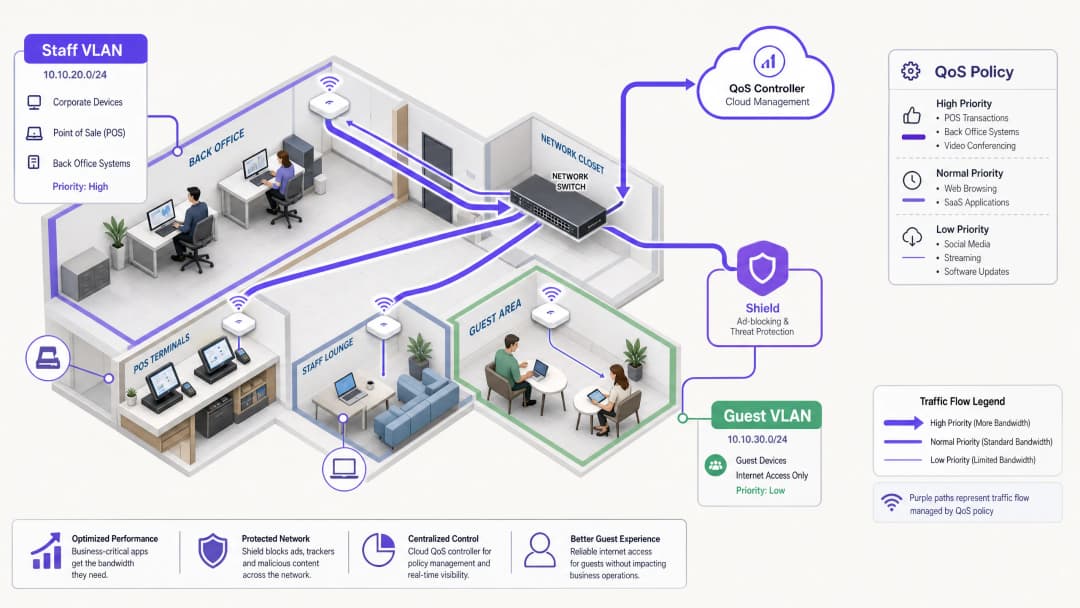
A robust network architecture segregates traffic types to apply specific policies. Staff WiFi must run on a dedicated VLAN, completely isolated from Guest WiFi and IoT devices. This segmentation is a fundamental requirement for compliance with standards such as PCI DSS and GDPR, and it forms the foundation for effective traffic management.
The Role of QoS and WMM
Quality of Service (QoS) ensures that latency-sensitive traffic receives priority. In wireless environments, this is governed by the IEEE 802.11e standard, which introduced Wireless Multimedia (WMM). WMM categorises traffic into four access tiers: Voice, Video, Best Effort, and Background. Enterprise hardware from Cisco Meraki, HPE Aruba, Ruckus, Juniper Mist, Ubiquiti UniFi, Cambium, Extreme, and Fortinet fully supports WMM.
On wired infrastructure, QoS relies on Differentiated Services Code Point (DSCP) markings in the IP header.
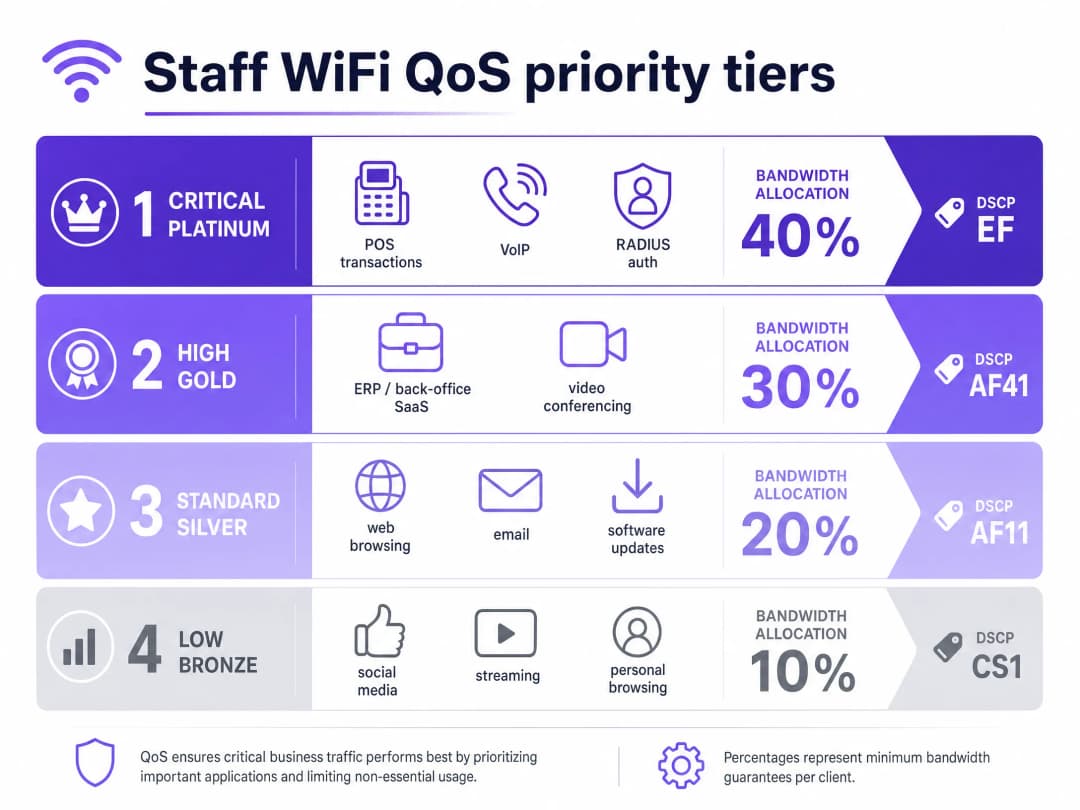
- DSCP EF (Expedited Forwarding) is assigned to critical systems such as voice traffic and POS transactions.
- DSCP AF41 handles video conferencing and ERP applications.
- DSCP CS1 manages background tasks like software updates.
Identity and Access Management
Staff devices must authenticate using 802.1X with EAP-TLS or PEAP against a RADIUS server. Purple integrates directly with Microsoft Entra ID, Okta, and Google Workspace. This ensures network access is tied to the central identity provider. When you revoke access in Entra ID, network access is terminated instantly.
Got questions about your specific setup?
Our team works with venue operators, IT managers, and network engineers across 80,000 venues. Book a 20-minute call and we will show you how others like you solved it.
Implementation Guide: Shaping and Reduction
1. Network Segmentation
Deploy separate VLANs for staff, guests, and operational hardware. Apply per-user rate limits (e.g., 5 Mbps downstream) on the guest VLAN to prevent individual users from saturating connections. On the staff VLAN, allocate a guaranteed minimum bandwidth percentage to critical applications.
2. Application-Aware QoS Configuration
Map your business applications to appropriate DSCP markings. Ensure your core switches and access points are configured to respect these markings across the entire network path. Verify that your ISP does not strip DSCP tags at the gateway.
3. Deploying Purple Shield for Traffic Reduction
A large portion of staff web traffic consists of third-party ad networks and tracking pixels. This traffic consumes bandwidth, increases DNS query loads, and poses security risks. Purple Shield operates as a DNS-layer filter. By pointing your DHCP servers to Purple's DNS resolvers, Shield blocks requests to known ad networks and malicious domains before connections are established.
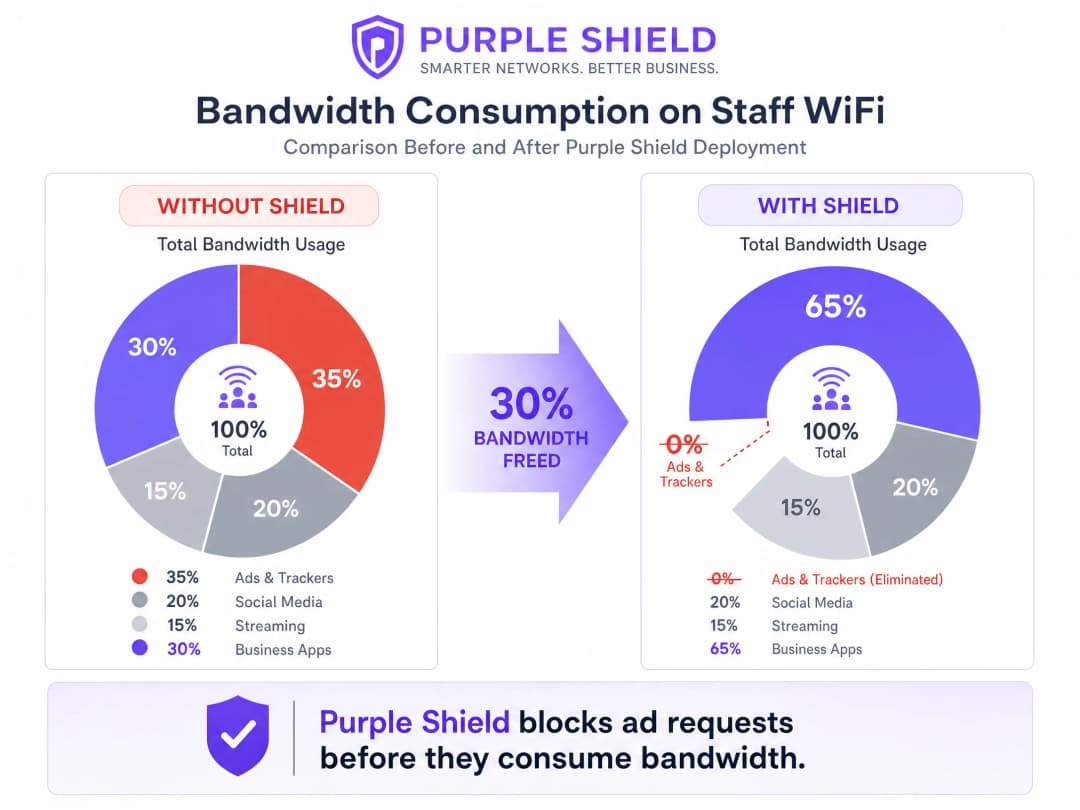
Locations deploying Shield typically see a 30% reduction in overall DNS query volume. This effectively frees up bandwidth for business applications, working like a line upgrade without the associated costs.
Best Practices
- Use Token Bucket Shaping: Instead of strict rate limits, use token bucket shaping with a burst allowance. This accommodates brief spikes in traffic, such as sudden software updates, without impacting sustained performance.
- Audit Legacy Devices: Older shared terminals may not support WMM properly. Identify these devices and apply port-based QoS policies if necessary.
- Monitor and Adjust: Regularly review peak utilisation metrics and DNS query volumes using WiFi Analytics. Adjust rate limits as staff headcount and application needs change.
Troubleshooting and Risk Mitigation
- DSCP Remarking: If QoS policies seem ineffective, capture packets at the gateway. Some enterprise switches remark DSCP values to default settings, rendering your configuration useless.
- DNS-over-HTTPS Bypass: If staff devices use DNS-over-HTTPS, they bypass the local DNS resolver, rendering Shield ineffective. Block DNS-over-HTTPS at the firewall or configure managed devices via MDM to use internal resolvers.
ROI and Business Impact
The primary business impact of effective bandwidth management is cost avoidance. By implementing QoS and deploying Shield, a venue can defer expensive leased line upgrades. For a mid-sized Retail chain, avoiding line upgrades across 50 stores can save thousands of pounds annually. Furthermore, prioritising POS and ERP traffic directly improves operational efficiency and reduces downtime during peak trading periods.
Listen to our technical briefing podcast for more details:
Key Definitions
QoS (Quality of Service)
A set of technologies that manage network traffic to guarantee performance for critical applications.
Essential for ensuring VoIP and POS systems function reliably during network congestion.
DSCP (Differentiated Services Code Point)
A field in the IP header used to classify network traffic for QoS purposes.
Used by network switches to determine which packets get priority in the queue.
WMM (Wireless Multimedia)
A WiFi Alliance certification based on the IEEE 802.11e standard that provides QoS features for wireless networks.
Ensures access points prioritise voice and video traffic over general data.
VLAN (Virtual Local Area Network)
A logical subnetwork that groups a collection of devices, isolating their traffic from the rest of the network.
Used to separate staff devices from guest networks for security and traffic management.
DNS-layer filtering
The process of blocking access to specific domains by intercepting and denying DNS resolution requests.
The mechanism Purple Shield uses to prevent devices from connecting to ad networks and malicious sites.
Token bucket shaping
A bandwidth management algorithm that allows short bursts of traffic while enforcing a long-term average rate limit.
Provides a better user experience than strict rate limiting by accommodating brief spikes like page loads.
802.1X
An IEEE standard for port-based network access control, providing an authentication mechanism to devices wishing to attach to a LAN or WLAN.
The standard method for securing enterprise staff WiFi, often integrated with RADIUS.
RADIUS (Remote Authentication Dial-In User Service)
A networking protocol that provides centralised authentication, authorisation, and accounting management.
Used in conjunction with 802.1X to verify staff credentials against identity providers like Microsoft Entra ID.
Worked Examples
A 200-room hotel needs to ensure property management software and VoIP phones remain stable during peak check-in periods, while staff also use the network for general browsing.
Segment the network by placing staff on a dedicated VLAN. Apply DSCP EF to the property management system and VoIP traffic. Apply DSCP CS1 to general browsing and background updates. Deploy Purple Shield on the staff VLAN to eliminate ad and tracker traffic, freeing up baseline capacity.
A retail chain with 50 stores experiences POS timeouts during busy periods because staff devices saturate the shared 100 Mbps broadband connection.
Isolate POS terminals on a dedicated VLAN with strict QoS priority. On the staff WiFi VLAN, implement a per-user rate limit of 10 Mbps downstream and 2 Mbps upstream using token bucket shaping. Deploy Purple Shield to block non-business ad traffic.
Practice Questions
Q1. You manage a [Hospitality](/industries/hotels) venue where the guest network frequently saturates the 500 Mbps connection, causing the back-office ERP system to drop connections. You have a single flat network. What is the first step to resolve this?
Hint: Consider the prerequisites for applying effective QoS policies.
View model answer
The first step is network segmentation. You must separate the staff devices and the ERP system onto a dedicated VLAN, isolated from the guest network. Once segmented, you can apply a strict per-user rate limit to the guest VLAN and configure QoS on the staff VLAN to prioritise the ERP traffic.
Q2. After configuring DSCP EF markings for your VoIP traffic on the staff VLAN, users still report poor call quality during peak hours. What is the most likely cause?
Hint: Think about what happens to packet headers as they traverse different network equipment.
View model answer
The most likely cause is DSCP remarking. Either an intermediate enterprise switch or the ISP gateway is stripping or resetting the DSCP values to default (best effort). You need to perform a packet capture at the gateway to verify if the QoS markings are surviving the full path.
Q3. You need to reduce overall bandwidth consumption on the staff network without impacting business applications. What is the most effective approach?
Hint: Consider what non-essential traffic consumes significant bandwidth automatically.
View model answer
Deploy Purple Shield to filter traffic at the DNS layer. By blocking requests to ad networks and tracking pixels before the connections are established, Shield eliminates a significant portion of non-business traffic, typically reducing total DNS query volume and bandwidth consumption by up to 30%.
Continue reading in this series
How to Reduce the Number of WiFi SSIDs Using Per-Device PSK (iPSK, DPSK, MPSK)
This authoritative technical reference guide explains how IT teams can eliminate WiFi performance degradation caused by SSID beacon overhead by collapsing multiple purpose-built networks into a single SSID using per-device PSK (xPSK). It covers the vendor landscape across Cisco iPSK, HPE Aruba MPSK, Ruckus DPSK, Juniper Mist PPSK, and Ubiquiti UniFi PPSK, with practical implementation guidance on dynamic VLAN assignment, IoT onboarding, and PCI DSS compliance. Venue operators in hospitality, retail, stadiums, and public-sector organisations will find actionable architecture guidance and real-world worked examples.
The Checklist for Migrating from Legacy NAC to Cloud-Native NAC
This authoritative technical reference guide provides a structured, three-phase checklist for migrating from legacy Network Access Control (NAC) to a cloud-native architecture. It equips IT managers and network architects with actionable strategies to handle identity integration, policy parity, and compliance without disrupting venue operations.
How to Implement Post-Admission NAC for Continuous Trust Monitoring
This guide provides an authoritative technical blueprint for implementing Post-Admission Network Access Control (NAC) with Continuous Trust Monitoring across enterprise venues including hospitality, retail, healthcare, and public-sector environments. It details the architectural shift from static pre-admission checks to dynamic, session-aware enforcement using RADIUS CoA, behavioural baselining, and telemetry integration. IT architects and network operations teams will find actionable deployment guidance, real-world case studies, compliance alignment notes, and measurable ROI frameworks.
Got questions about your specific setup?
Our team works with venue operators, IT managers, and network engineers across 80,000 venues. Book a 20-minute call and we will show you how others like you solved it.