
Captive Portal Architecture: Security, Redirection, and Best Practices
A definitive technical reference on enterprise captive portal architecture. This guide unpacks network isolation, DNS redirection, RADIUS authentication, and security compliance for IT leaders deploying secure, data-rich guest WiFi networks.
Video overview
Listen to this guide
View podcast transcript
Part of our core series: Captive Portal Guide →
Executive summary
For enterprise venues, guest WiFi is critical infrastructure that demands strict architectural discipline. Bridging the gap between open public access and secure corporate networking requires precise configuration of VLAN isolation, DNS interception, and identity management. This guide dissects the mechanics of enterprise captive portal architecture, stripping away the marketing jargon to explain exactly how it works at the packet level. We cover the core technical components: VLAN segmentation, DHCP pool management, HTTP redirection, RADIUS authentication, and bandwidth shaping.
Whether you are deploying a new network for a Hospitality chain or upgrading legacy infrastructure in Healthcare, understanding these mechanics is essential for mitigating risk, ensuring PCI DSS and GDPR compliance, and capturing actionable first-party data via our WiFi Analytics platform.
Listen to the technical briefing podcast:
Technical deep-dive: how captive portals work
At a fundamental level, an enterprise guest WiFi network operates by deceiving the client device just enough to intercept its traffic, force authentication, and then route it securely to the internet without ever touching the corporate LAN.
1. Logical isolation via VLANs
The foundation of any secure Guest WiFi network is logical separation. When a venue user connects to the guest SSID, the access point tags their traffic with a specific Virtual Local Area Network (VLAN) ID (e.g., VLAN 20), while corporate traffic operates on a separate VLAN (e.g., VLAN 10).
This tagging ensures that at the switch and firewall level, guest traffic is physically incapable of routing to internal subnets containing point-of-sale systems or patient records. The firewall is configured with explicit deny rules for inter-VLAN routing, forcing guest traffic directly out the WAN interface.

2. DHCP and the IP address pool
Upon connection, the client device broadcasts a DHCP Discover packet. The network responds by assigning an IP address from a dedicated guest subnet. A critical technical distinction here is the lease time. While corporate devices might retain an IP for eight days, guest networks must use aggressive lease times (30 to 60 minutes) to prevent IP pool exhaustion in high-turnover environments like Transport hubs.
3. DNS interception and the captive portal
This is where the user experience begins. When the newly connected device attempts to reach a website (or when the OS performs its captive portal detection check, like Apple's captive.apple.com), the network intercepts the DNS request.
Instead of resolving the actual IP address of the requested site, the gateway returns the IP address of the captive portal. The client's browser is then HTTP-redirected to the splash page hosted by Purple.
4. Authentication and RADIUS
Once the user interacts with the captive portal - whether by accepting terms and conditions, entering an email, or using a social login - the platform must inform the local network controller to allow the traffic.
This is handled via the RADIUS (Remote Authentication Dial-In User Service) protocol. Purple acts as the cloud RADIUS server, sending an Access-Accept message back to the local WiFi controller or gateway. The controller then changes the user's state from 'unauthorised' (walled garden access only) to 'authorised', opening the firewall ports for standard internet access.
Got questions about your specific setup?
Our team works with venue operators, IT managers, and network engineers across 80,000 venues. Book a 20-minute call and we will show you how others like you solved it.
Implementation guide: building for scale
Deploying guest WiFi requires balancing user friction with security and data capture requirements. Our cloud overlay integrates natively with Cisco Meraki, HPE Aruba, Ruckus, Juniper Mist, Ubiquiti UniFi, Cambium, Extreme, and Fortinet hardware.
Step 1: Architect the network topology
Ensure your core switches and firewalls support 802.1Q VLAN tagging. Configure your guest VLAN to terminate at a DMZ interface on the firewall, completely bypassing internal routing tables.
Step 2: Configure the walled garden
A walled garden is a list of IP addresses and domains that unauthenticated users are allowed to access. This must include the URLs required to load the captive portal, CDN assets for logos, and the authentication endpoints for social logins (e.g., Microsoft Entra ID, Okta, Google Workspace). If the walled garden is misconfigured, the splash page will fail to load, resulting in a dead end for the user.
Step 3: Implement client isolation
Enable client isolation on your access points. This prevents connected guest devices from communicating directly with one another over the wireless medium, effectively mitigating peer-to-peer attacks and malware propagation within the guest subnet.
Step 4: Integrate identity management
Move away from shared PSKs. Implement a managed captive portal that captures first-party data through conscious-choice opt-ins. For seamless, secure onboarding, consider implementing OpenRoaming. Purple acts as a free identity provider for OpenRoaming under the Connect plan, allowing devices to authenticate securely via certificates without a traditional splash page. For more on designing multi-network environments, read our guide: Three SSIDs to rule them all: the WiFi design for guest, staff, and IoT.
Best practices and compliance
Compliance is not optional. A properly engineered captive portal protects your organisation from liability and regulatory fines.
GDPR and data privacy
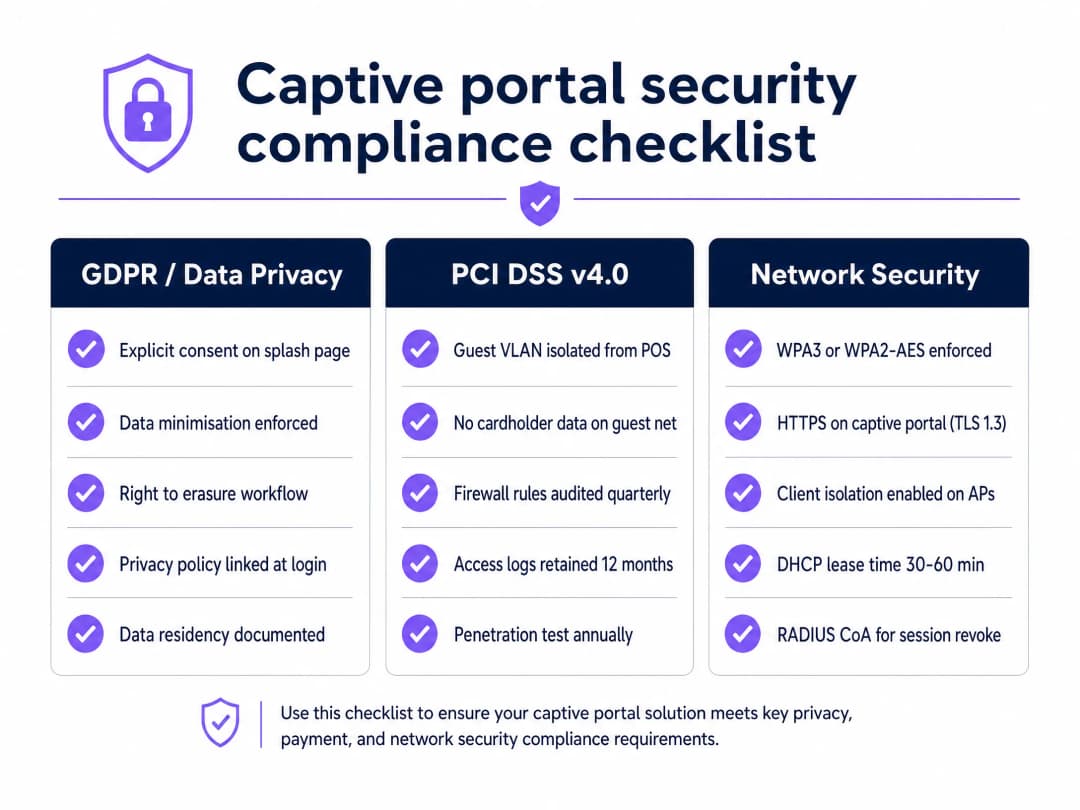
A captive portal collects personal data from the moment a user connects. To meet GDPR requirements, you must capture explicit consent before processing this data. Purple's platform handles the Layer 7 identity and consent requirements necessary for GDPR compliance, ensuring that data is collected legally, stored securely, and can be erased upon request via automated workflows.
PCI DSS v4.0 compliance
If your organisation processes credit cards, your network is subject to PCI DSS. Guest WiFi networks that run on the same network as POS systems can drag the guest network into PCI DSS scope, which creates significant audit burdens. Strict VLAN segmentation is mandatory to ensure guest traffic never touches the cardholder data environment.
Network security standards
Enforce WPA3 or WPA2-AES encryption on the wireless transport layer. Ensure your captive portal is served over HTTPS using TLS 1.2 or TLS 1.3 to protect user credentials during the authentication phase.
Troubleshooting and risk mitigation
Even well-designed networks encounter issues. Here are the most common failure modes and how to avoid them.
Failure mode: IP address exhaustion In a busy Retail environment, devices constantly probe and connect to open networks. If your DHCP lease time is 24 hours, a shopper who walks past your store for five minutes consumes an IP address for the entire day. Mitigation: Reduce DHCP lease times to 30 minutes on the guest VLAN.
Failure mode: Walled garden blocks Cloud services frequently change their IP addresses. If your walled garden uses static IP whitelisting for social login endpoints, authentication will break when those IPs rotate. Mitigation: Use domain-based whitelisting for walled garden entries wherever your hardware controller supports it.
Failure mode: Stale sessions Users leave the venue without disconnecting, but their session remains active on the controller, consuming resources. Mitigation: Implement aggressive idle timeouts (e.g., 30 minutes) and use RADIUS Change of Authorisation (CoA) to actively revoke sessions when time limits are reached.
ROI and business impact
A secure captive portal transforms a traditional IT cost centre into a revenue-generating asset. By capturing verified first-party data, venues can build detailed visitor profiles. Purple processed 440 million logins in 2024 across 80,000+ live venues, proving the scale and reliability of this approach.
For example, McDonald's uses captive portal data to understand diner dwell times and visit frequency, while Manchester Airports Group optimises passenger flow based on connection analytics. The ROI is measured not just in marketing database growth, but in the operational insights derived from the 29 billion data points collected by the platform.
Key Definitions
Captive Portal
A web page that intercepts network traffic and requires user interaction (such as accepting terms or logging in) before granting full internet access.
The primary mechanism for capturing first-party data and enforcing terms of use on guest networks.
RADIUS
Remote Authentication Dial-In User Service. A networking protocol that provides centralised Authentication, Authorization, and Accounting management.
The protocol Purple uses to tell your local WiFi hardware that a guest is allowed to access the internet.
Walled Garden
A restricted list of IP addresses or domains that a user can access before they have authenticated through the captive portal.
Essential for allowing the splash page and social login providers to load while the device is still in a pre-authentication state.
VLAN
Virtual Local Area Network. A logical subnetwork that groups a collection of devices from different physical LANs.
Used to securely segment guest traffic away from corporate traffic, ensuring PCI DSS compliance.
Client Isolation
A wireless security setting that prevents devices connected to the same access point from communicating directly with each other.
Crucial for protecting guests from peer-to-peer attacks and malware spreading across the public network.
DHCP Lease Time
The duration for which an IP address is assigned to a device before it expires and returns to the available pool.
Must be kept short (30-60 mins) on guest networks to prevent running out of IP addresses as visitors come and go.
RADIUS CoA
Change of Authorisation. An extension to RADIUS that allows the server to alter the session state of an active client.
Used by Purple to instantly disconnect users when their time limit expires or if they request data erasure under GDPR.
OpenRoaming
A roaming federation service that allows devices to connect automatically and securely to participating WiFi networks using certificates.
The next generation of seamless connectivity, where Purple acts as a free identity provider under the Connect plan.
Worked Examples
A 200-room hotel needs to deploy guest WiFi across its property. They currently use a single flat network (192.168.1.0/24) for the front desk, back office, and guest access via a shared password. They want to capture guest email addresses for marketing while ensuring the front desk systems are secure.
- Implement network segmentation: Create VLAN 10 for the front desk/office and VLAN 20 for guests.
- Configure the firewall: Block all routing from VLAN 20 to VLAN 10. Route VLAN 20 directly to the WAN.
- Remove the shared password: Deploy an open SSID named 'Hotel_Guest'.
- Set up the captive portal: Configure the WiFi controller to redirect unauthenticated HTTP traffic to Purple's captive portal URL.
- Configure the walled garden: Whitelist the Purple portal domains and CDN assets so the splash page loads.
- Configure RADIUS: Add Purple's RADIUS server IP addresses and shared secrets to the WiFi controller.
- Adjust DHCP: Set the VLAN 20 DHCP pool to a /22 subnet with a 60-minute lease time to handle high device turnover.
A large stadium expects 40,000 attendees for a match. They have deployed a captive portal but are concerned about network performance and IP exhaustion during the 3-hour event.
- DHCP Sizing: Deploy a /16 subnet for the guest VLAN to provide over 65,000 available IP addresses.
- Lease Times: Set the DHCP lease time to 30 minutes to rapidly reclaim IPs from fans who leave early.
- Bandwidth Shaping: Apply a per-user rate limit of 5 Mbps down / 2 Mbps up at the controller level to prevent a few users from saturating the 10 Gbps internet pipe.
- Client Isolation: Enable AP-level client isolation to prevent broadcast storms and peer-to-peer traffic from degrading wireless performance in the dense stadium environment.
Practice Questions
Q1. You are deploying a captive portal in a hospital waiting room. The splash page loads successfully on Android devices, but iOS devices display a blank white screen. What is the most likely architectural cause?
Hint: Consider how different operating systems detect captive portals and what resources they need to reach.
View model answer
The walled garden is likely misconfigured. iOS devices attempt to reach specific Apple domains (like captive.apple.com) to trigger the portal mini-browser. If these domains or the specific CDN assets required by the splash page are not whitelisted in the walled garden, the page will fail to render correctly in the Apple CNA (Captive Network Assistant).
Q2. A retail chain wants to offer free WiFi but requires users to log in using their Microsoft Entra ID credentials. During testing, users are redirected to the splash page, click the 'Log in with Microsoft' button, but the page times out. Why?
Hint: Think about the state of the firewall before RADIUS authentication completes.
View model answer
The Microsoft Entra ID authentication endpoints have not been added to the walled garden. Because the user is in a pre-authentication state, the firewall blocks all traffic to the internet. To fix this, the specific Microsoft login domains and IP ranges must be whitelisted so the device can communicate with the identity provider to complete the OAuth flow.
Q3. A venue is running out of IP addresses on their guest network every afternoon, despite having fewer concurrent users than their DHCP pool size. What configuration change is required?
Hint: Think about how long a device retains an IP address after it leaves the building.
View model answer
The DHCP lease time is set too high (likely the default of 12 or 24 hours). Devices that connect briefly and leave are holding onto their IP addresses, preventing new devices from connecting. The lease time should be reduced to 30 to 60 minutes to quickly recycle IPs from departed guests.
Continue reading in this series
Ubiquiti UniFi guest portal not redirecting: causes and fixes
This guide isolates a UniFi guest portal redirect failure by following the guest state, redirect, pre-authorisation route and controller authorisation in sequence. It gives venue IT teams a sourced method to address guest-network versus Hotspot confusion, external portal hand-offs, current UniFi OS account requirements and DNS isolation testing.
Cisco Meraki splash page not working: a troubleshooting flowchart
This practical day-two guide isolates where a Cisco Meraki splash flow has failed: client authorisation, HTTP redirect initiation, walled-garden reachability or RADIUS sign-on. It gives venue IT teams a controlled evidence path, so they can restore Guest WiFi without making broad changes to a live estate.
Enterprise Guest WiFi Setup Guide: VLAN Segmentation, Security, and Captive Portals
This technical guide shows IT teams how to set up Guest WiFi as a controlled internet-access service, using VLAN segmentation, firewall policy and a captive portal. It also explains how Purple's registration forms and onboarding controls support a proportionate visitor experience without weakening the boundary around staff, payment and operational systems.
Got questions about your specific setup?
Our team works with venue operators, IT managers, and network engineers across 80,000 venues. Book a 20-minute call and we will show you how others like you solved it.