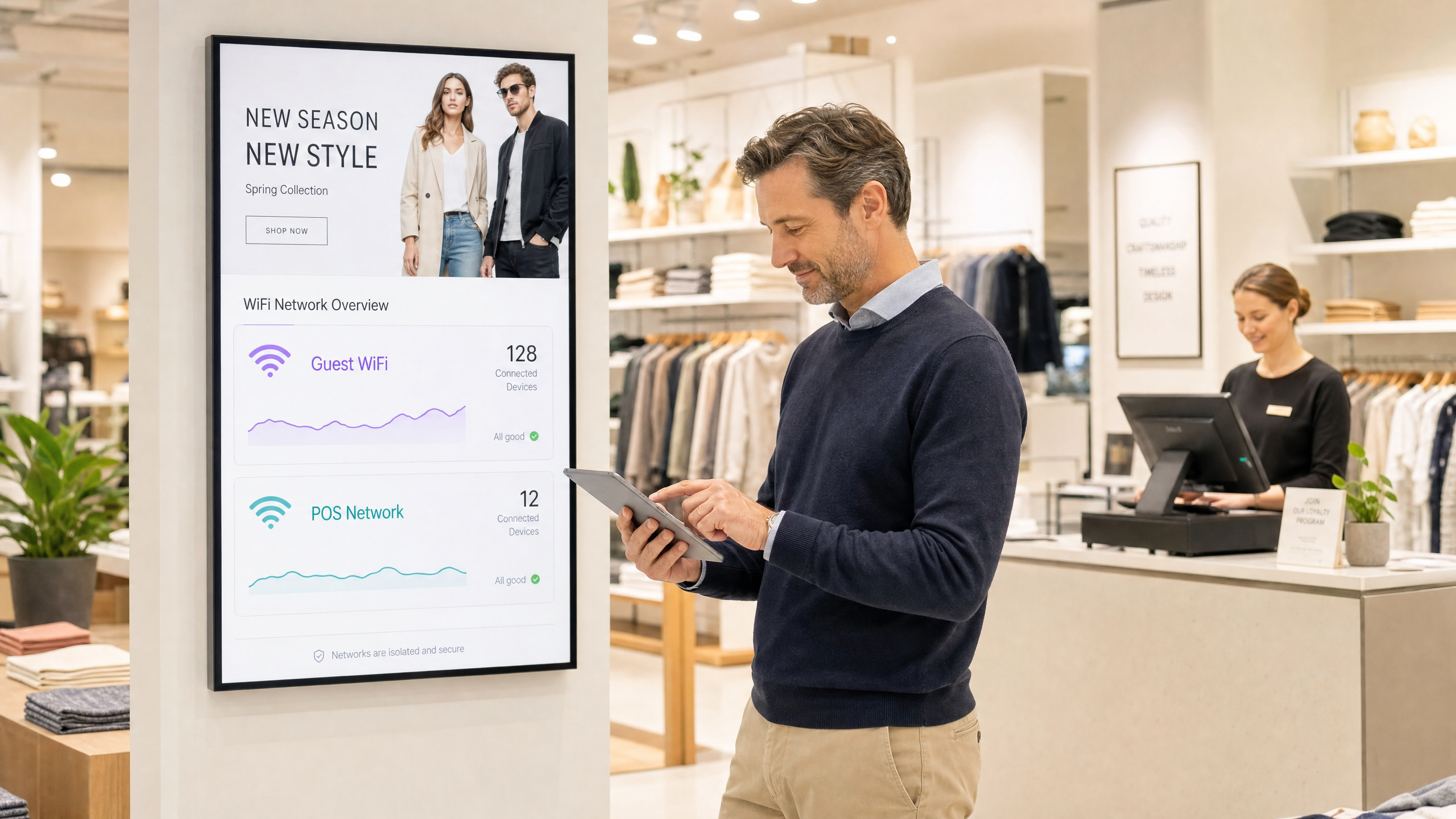
Micro-Segmentation Best Practices for Shared WiFi Networks

This technical reference guide provides actionable strategies for implementing micro-segmentation on shared WiFi infrastructure. It details how IT managers and network architects can securely isolate guest, IoT, and staff traffic to mitigate risk, ensure compliance, and optimise network performance.

📖 4 min read📝 899 words🔧 2 worked examples3 practice questions📚 8 key definitions

Listen to this guide

View podcast transcript
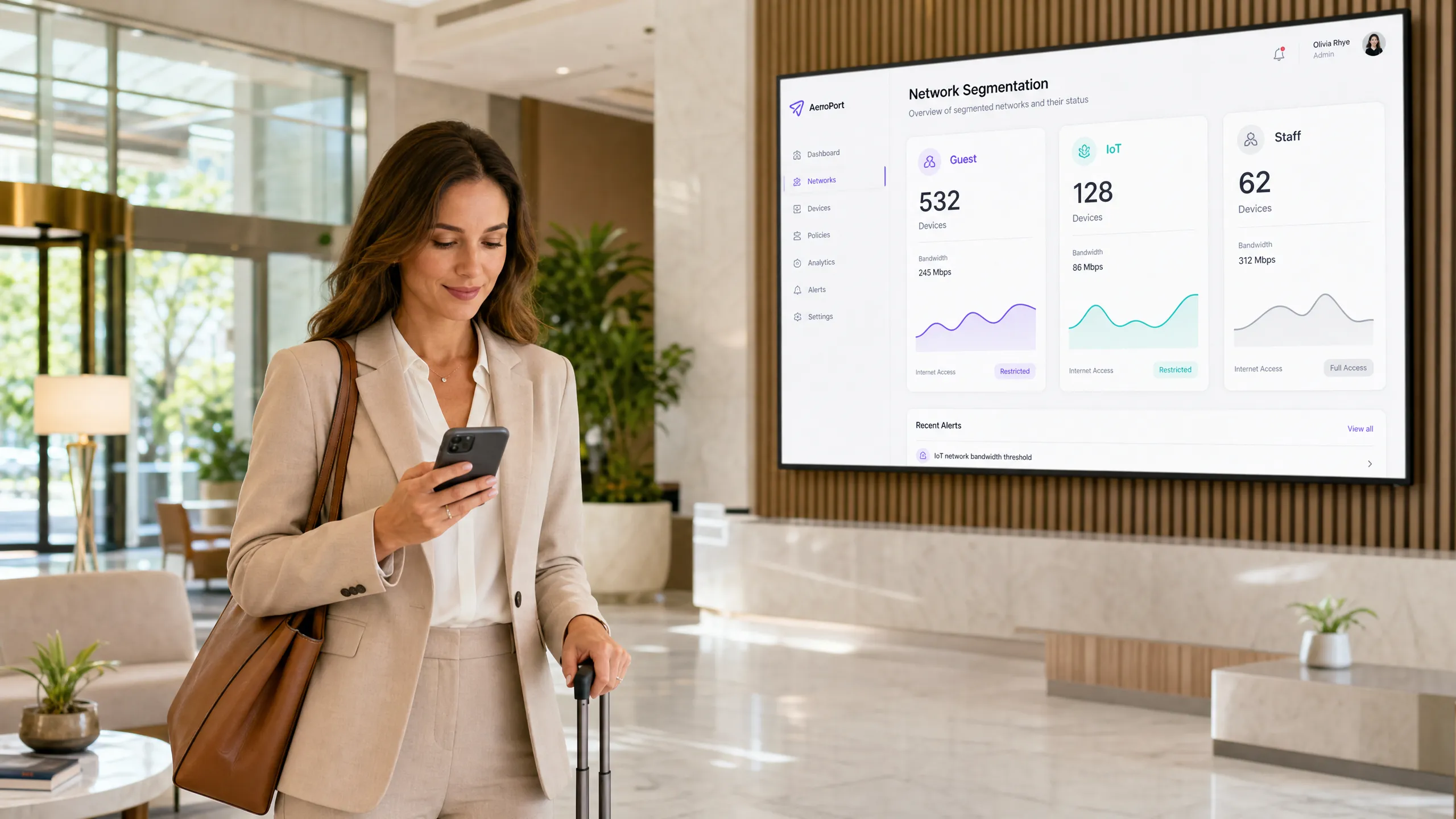
Micro-Segmentation Best Practices for Shared WiFi Networks — A Purple Technical Briefing [INTRODUCTION — approximately 1 minute] Welcome to the Purple Technical Briefing series. I'm your host, and today we're getting into one of the most operationally critical topics for any venue running shared WiFi infrastructure: wifi micro-segmentation. If you're managing network infrastructure across a hotel, a retail estate, a stadium, or a conference centre, you are almost certainly running guest devices, IoT systems, and staff endpoints on the same physical access layer. That is a significant security and compliance exposure — and micro-segmentation is the architectural response to it. Over the next ten minutes, we're going to cover the technical architecture, the implementation sequence, the compliance implications, and the real-world outcomes you should expect. This is a practitioner briefing, not a theory lecture — so let's get straight into it. [TECHNICAL DEEP-DIVE — approximately 5 minutes] Let's start with the fundamentals. Micro-segmentation, in the context of a shared WLAN, means enforcing granular, policy-driven isolation between device classes and user groups — at the network layer, not just at the application layer. The key distinction from traditional VLAN-based segmentation is granularity and dynamism. Traditional VLANs give you broad separation. Micro-segmentation gives you per-device, per-session, per-role policy enforcement. The foundational standards here are IEEE 802.1X for port-based network access control, and WPA3-Enterprise for the wireless authentication layer. When you combine 802.1X with a RADIUS back-end, you get dynamic VLAN assignment — meaning a device's network segment is determined at authentication time based on its credentials, certificate, or device profile. That is the engine of micro-segmentation on a WLAN. Now, let's talk about the three primary traffic classes you need to isolate in a venue environment. First: guest traffic. This is your highest-volume, lowest-trust segment. Guests connect via a captive portal — typically using email, social login, or SMS OTP — and they should receive internet-only access with no visibility of any internal network resources whatsoever. The guest segment should be a hard network boundary. Client isolation must be enabled within the segment so that guest devices cannot communicate with each other, which is critical for both security and GDPR compliance. Purple's guest WiFi platform handles this authentication and policy enforcement layer, and integrates directly with your RADIUS and access point infrastructure. Second: IoT devices. This is where most venue networks have their biggest exposure. Smart TVs, IP cameras, door access controllers, HVAC sensors, digital signage players, POS peripherals — these devices typically run embedded firmware with minimal security hardening, they rarely support 802.1X, and they are high-value targets for lateral movement attacks. The correct approach is to place all IoT devices on a dedicated, isolated segment with egress-only policies. IoT devices should only be able to reach their specific management platform — whether that's a building management system, a cloud IoT hub, or a vendor-specific controller. They should have zero access to guest segments, zero access to staff segments, and ideally no inbound connectivity from any other segment. MAC-based authentication or certificate-based onboarding via a dedicated IoT SSID is the standard deployment pattern here. Third: staff and corporate traffic. This segment carries your highest-trust, highest-sensitivity data — POS transactions, HR systems, back-office applications. It must be completely isolated from both guest and IoT segments. IEEE 802.1X with EAP-TLS — that is, certificate-based mutual authentication — is the gold standard for staff device onboarding. This eliminates credential-based attacks entirely. Staff devices should be enrolled via your MDM platform, with certificates provisioned automatically, so the authentication is transparent to the end user. Now, a word on the physical layer. One of the most common architectural mistakes I see is operators running separate SSIDs for each segment and assuming that provides isolation. It does not. SSID separation without proper VLAN tagging, firewall policy enforcement, and client isolation is security theatre. The access point must tag traffic to the correct VLAN at the radio level, and your upstream switching and firewall infrastructure must enforce inter-VLAN routing policies. If your firewall is permitting any-to-any traffic between VLANs because someone forgot to update the ACLs after a network change, your segmentation is worthless. For bandwidth management, each segment should have QoS policies applied. IoT devices typically need very low bandwidth — two to five megabits per second is sufficient for most sensor and signage workloads. Guest traffic should be rate-limited per device — ten megabits per second is a reasonable ceiling for most hospitality deployments — to prevent any single device from saturating the uplink. Staff traffic should be prioritised and uncapped, or at minimum given a guaranteed minimum bandwidth allocation. Let's also address WPA3. If you are deploying new infrastructure in 2025 or 2026, WPA3-Personal with Simultaneous Authentication of Equals — SAE — should be your baseline for guest SSIDs. SAE eliminates the offline dictionary attack vulnerability that plagued WPA2-PSK, which is particularly important for shared-password guest networks. For staff networks, WPA3-Enterprise with 192-bit mode is the appropriate configuration where your hardware supports it. Finally on the technical side: DNS filtering. Every guest segment should have DNS filtering applied at the resolver level. This gives you content policy enforcement, malware domain blocking, and an audit trail for compliance purposes. Purple's DNS filtering integration allows you to apply category-based blocking policies per network segment — so your guest segment blocks adult content and known malicious domains, while your IoT segment only resolves the specific domains required by your device fleet. [IMPLEMENTATION RECOMMENDATIONS AND PITFALLS — approximately 2 minutes] Let me give you the implementation sequence that works in practice. Start with a network audit. Before you touch a single configuration, document every device class on your network, every SSID, every VLAN, and every firewall rule. You cannot segment what you haven't inventoried. Use a network discovery tool — NMAP, your controller's built-in discovery, or a dedicated NAC solution — to build a complete device register. Step two: define your segmentation policy before you configure anything. Map each device class to a segment, define the inter-segment routing rules — which should almost always be deny-all with explicit permit exceptions — and get sign-off from your security and compliance teams before implementation. Step three: deploy in a test environment first. If you have a lab or a staging SSID, validate your VLAN tagging, RADIUS integration, and firewall policies before rolling out to production. The most common production incident I see is a misconfigured RADIUS server that drops all 802.1X authentications, taking down staff connectivity across a site. Step four: roll out by device class, not by location. Start with IoT isolation — it has the highest security impact and the lowest operational risk, since IoT devices don't have users complaining when they lose connectivity for ten minutes. Then roll out guest segmentation. Then staff. Step five: monitor and iterate. Deploy flow monitoring — NetFlow or sFlow — on your inter-VLAN routing points so you can detect any unexpected cross-segment traffic. Set up alerts for any traffic that violates your policy matrix. Review your segmentation policy quarterly. The pitfalls to avoid: number one, forgetting to enable client isolation within the guest segment. Number two, leaving management interfaces — access point admin consoles, switch management VLANs — reachable from guest or IoT segments. Number three, using the same pre-shared key across multiple SSIDs and calling it segmentation. And number four, failing to document your VLAN-to-segment mapping, which makes troubleshooting a nightmare six months later when the original engineer has left. [RAPID-FIRE Q AND A — approximately 1 minute] Let me run through some of the questions I get most frequently from network architects. "Do I need separate access points for each segment?" No. A single access point can broadcast multiple SSIDs, each mapped to a separate VLAN. The isolation happens at the switching and firewall layer, not at the radio layer. "How many SSIDs should I run?" Keep it to four or fewer per access point. Each additional SSID adds management overhead and consumes airtime for beacon frames. Consolidate where possible. "Can I use dynamic segmentation without 802.1X?" Yes — MAC-based RADIUS authentication or device fingerprinting via a NAC solution can assign devices to segments based on their MAC address or device profile. It's less secure than certificate-based auth but practical for IoT fleets. "Does micro-segmentation satisfy PCI DSS scope reduction?" Yes, if implemented correctly. A properly segmented cardholder data environment — where POS systems are on an isolated segment with no connectivity to guest or IoT networks — can significantly reduce your PCI DSS audit scope. Get your QSA involved early to confirm your architecture meets their requirements. [SUMMARY AND NEXT STEPS — approximately 1 minute] To summarise: wifi micro-segmentation on a shared WLAN is not optional for any venue operating at scale in 2025. It is the foundational security and compliance control that separates a professionally managed network from a liability. The three segments you must implement are guest, IoT, and staff — each with distinct authentication, routing, and bandwidth policies. The standards to build on are IEEE 802.1X, WPA3-Enterprise, and dynamic VLAN assignment via RADIUS. The compliance frameworks you satisfy are PCI DSS for payment systems and GDPR for guest data. Your next steps: conduct a device inventory this week, define your segmentation policy matrix, and engage your access point vendor and firewall team to validate your current infrastructure's capability to support dynamic VLAN assignment. Purple's platform provides the guest authentication, analytics, and DNS filtering layers that sit on top of your segmented infrastructure — giving you visibility and policy control across all your guest-facing segments from a single management console. Thanks for listening. For the full technical reference guide, architecture diagrams, and worked examples, visit purple dot ai.

header_image.png

執行摘要

在沒有精細微分割的情況下運營共享 WLAN 基礎設施,對現代場所來說是一項重大的安全責任。隨著邊界消失,內部網路成為主要攻擊面。本指南詳細說明了在統一實體接入層上,對訪客流量、IoT 設備群和企業終端實施零信任隔離所需的架構原則和部署方法。

對於在 餐旅業零售業醫療保健運輸業 工作的 CTO 和網路架構師而言,這個要求很明確:傳統的 VLAN 已經不夠了。透過使用 IEEE 802.1X 和 RADIUS 實施動態的、策略驅動的微分割,組織可以大幅減少其 PCI DSS 和 GDPR 合規範圍,同時降低來自受損嵌入式設備的橫向移動風險。

收聽技術簡報播客,獲取音頻摘要:

技術深度探討

在共享 WLAN 上進行微分割需要超越靜態的 SSID 到 VLAN 映射。它要求在邊緣進行動態的、以身份為導向的策略執行。

認證層:IEEE 802.1X 和 WPA3

有效分割的基礎是強大的認證。僅依賴跨多個 SSID 的預共享密鑰 (PSK) 會造成分離的假象。真正的微分割利用 IEEE 802.1X 對設備或用戶進行 RADIUS 後端認證,根據身份動態地將客戶端分配到合適的 VLAN 並應用特定的存取控制清單 (ACL)。

對於現代部署,WPA3 是不可或缺的。訪客網路應使用具有對等同時認證 (SAE) 的 WPA3-Personal,以防止離線字典攻擊,而企業網段必須強制使用 WPA3-Enterprise(在硬體允許的情況下,使用 192 位元模式)。

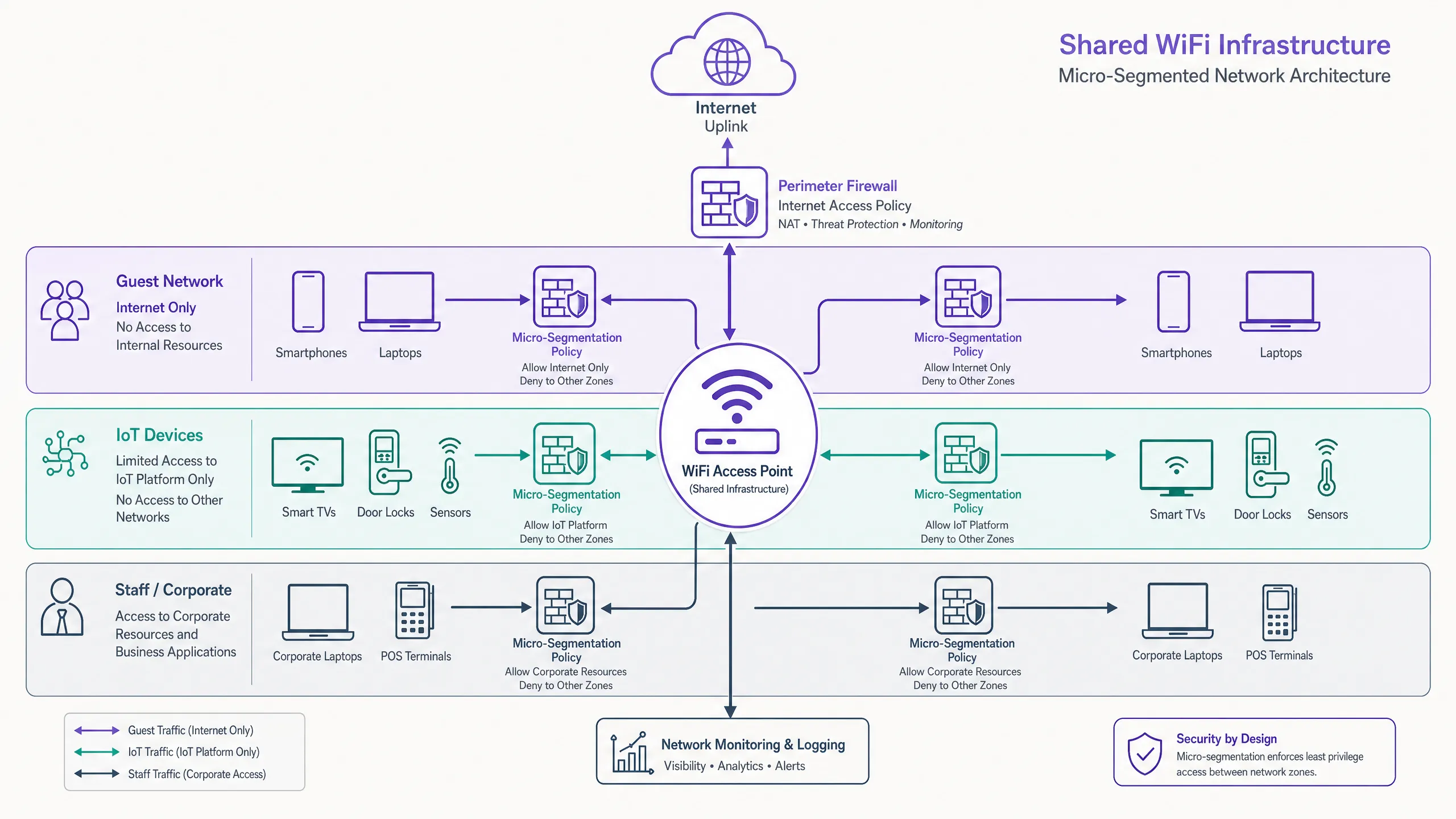
三個核心網段

  1. 訪客流量(不可信任的): 訪客是流量最高且信任度最低的網段。通常透過強制門戶( 訪客 WiFi )使用電子郵件、簡訊或社交登入進行認證。這裡的關鍵控制是用戶端隔離(Layer 2 隔離),以防止訪客設備之間的點對點通訊。流流量必須嚴格限制為僅限網際網路,並應用 DNS 過濾來阻止惡意域名。有關實施細節,請參閱我們的指南: 什麼是 DNS 過濾?如何在訪客 WiFi 上封鎖有害內容

  2. IoT 設備(半信任的,高風險): IoT 設備——從智慧電視到 HVAC 感測器——以安全衛生差聞名。它們必須位於具有僅出口策略的隔離網段中。IoT 設備僅應能與其特定的管理平台通訊。實施 企業級 BLE Low Energy 說明 追蹤或感測器網路需要這種嚴格的隔離,以防止橫向移動。

  3. 員工和企業(可信任的): 此網段處理敏感資料,包括 POS 交易和 HR 系統。存取必須要求基於憑證的相互認證 (EAP-TLS)。企業設備應透過 MDM 註冊,確保無縫且安全的連接。
architecture_overview.png

實施指南

在分散的場所環境中部署微分割需要一個分階段、有條不紊的方法。

階段一:網路發現與稽核

您無法對看不見的部分進行分割。首先對所有連接的設備進行全面稽核,將它們對應到所需的網路存取級別。利用流量監控 (NetFlow/sFlow) 來建立正常通訊模式的基線。

階段二:策略定義

定義您的分割矩陣。將每個設備類別對應到特定的 VLAN,並定義 VLAN 間的路由規則。預設策略必須是全部拒絕,僅在絕對必要的地方設定明確的允許例外。

階段三:基礎設施設定

設定您的 RADIUS 伺服器,以返回正確的供應商特定屬性 (VSA) 來進行動態 VLAN 分配。確保您的接入點和上游交換器設定正確,能夠對這些 VLAN 進行標記和主幹傳輸。

階段四:分階段推出

不要試圖進行「大爆炸」式的遷移。先從隔離 IoT 設備群開始——這樣可以帶來最高的即時安全回報,同時對使用者的干擾最小。接著處理訪客網段,最後將企業設備遷移到安全的 802.1X 網段。
comparison_chart.png

最佳實踐

  • 強制執行用戶端隔離: 始終在訪客 SSID 上啟用用戶端隔離,以防止不可信任設備之間的橫向攻擊。
  • 利用動態 VLAN 分配: 擺脫靜態 SSID 對應。使用 RADIUS 根據使用者角色或設備分析來分配 VLAN。
  • 實施 DNS 過濾: 應用特定網段的 DNS 過濾策略,以防止惡意軟體通訊並強制執行可接受的使用政策。
  • 針對您的環境進行最佳化: 根據您的特定場所類型調整 RF 設計和分割策略。進一步閱讀 辦公室 Wi-Fi:最佳化您的現代辦公室 Wi-Fi 網路 並了解 Wi-Fi 頻率:2026 年 Wi-Fi 頻率指南 的影響。
  • 利用分析功能: 使用 WiFi 分析 來監控網段使用情況並識別異常行為。

retail_segmentation_scene.png

故障排除與風險緩解

微分割部署中最常見的故障模式是 VLAN 間路由設定錯誤。如果防火牆規則意外地允許 IoT 和企業網段之間的流量,分割就會受到損害。

常見陷阱:

  • 管理介面暴露: 讓 AP 或交換器的管理介面可從訪客或 IoT 網段存取。管理流量必須位於一個專用、高度受限的帶外 VLAN 上。
  • RADIUS 故障: 設定錯誤的 RADIUS 伺服器丟棄 802.1X 認證將導致企業設備大範圍的連線失敗。實施備援的 RADIUS 基礎設施。
  • 非對稱路由: 確保在防火牆策略中正確定義回程流量路徑,以防止連線中斷。

投資回報率與業務影響

實施強大的微分割可帶來可衡量的業務價值:

  1. 降低合規範圍: 透過對 POS 終端和支付系統進行加密隔離,您可以大幅減少 PCI DSS 稽核的範圍和成本。
  2. 風險緩解: 將潛在的漏洞控制在單一網段內(例如,受損的數位看板播放器),可防止災難性的橫向移動進入核心企業系統。
  3. 營運效率: 動態 VLAN 分配減少了手動設定交換器埠和管理多個靜態 SSID 的管理開銷。

Key Definitions

Micro-Segmentation

The practice of dividing a network into granular, isolated zones to enforce strict security policies and contain potential breaches.

Essential for venue operators running diverse device types (Guest, IoT, Staff) on a single physical network infrastructure.

IEEE 802.1X

A standard for port-based network access control that provides an authentication mechanism to devices wishing to attach to a LAN or WLAN.

The engine for dynamic VLAN assignment and robust corporate device onboarding.

Dynamic VLAN Assignment

The process where a RADIUS server instructs the access point or switch which VLAN a client should be placed in upon successful authentication.

Allows a single SSID to securely serve multiple user roles without static configuration.

Client Isolation

A wireless network feature that prevents connected clients from communicating directly with each other.

A mandatory configuration for any guest WiFi network to prevent peer-to-peer attacks and ensure privacy.

MAC Authentication Bypass (MAB)

A technique used to authenticate devices that do not support 802.1X by using their MAC address as the credential.

Commonly used to onboard headless IoT devices like smart TVs or sensors onto a segmented network.

EAP-TLS

Extensible Authentication Protocol-Transport Layer Security; a highly secure authentication method requiring client and server certificates.

The gold standard for authenticating corporate devices and POS systems to prevent credential theft.

WPA3-Enterprise

The latest WiFi security standard for enterprise networks, offering stronger encryption and robust authentication.

Should be mandated for all new deployments to protect sensitive corporate and staff traffic.

Quality of Service (QoS)

Technologies that manage data traffic to reduce packet loss, latency, and jitter on the network.

Used in conjunction with segmentation to ensure critical applications (like POS) are prioritised over guest or IoT traffic.

Worked Examples

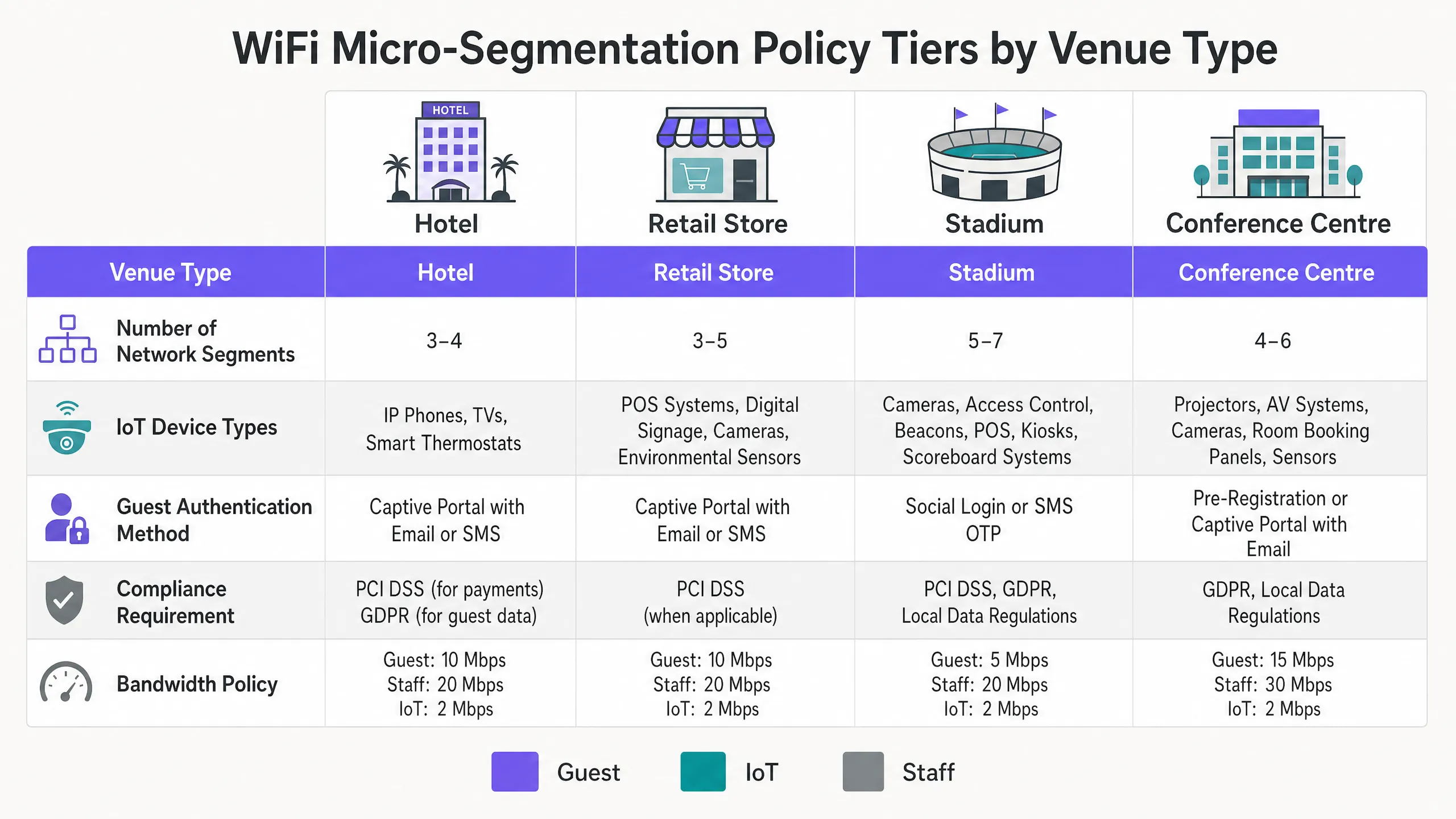
A 200-room hotel needs to deploy new smart TVs in every guest room, upgrade their POS systems in the restaurant, and provide high-speed guest WiFi, all on the existing physical network infrastructure. How should they architect the segmentation?

  1. Implement three distinct VLANs: Guest (VLAN 10), IoT (VLAN 20), and Corporate/POS (VLAN 30).
  2. Configure the APs to broadcast two SSIDs: 'Hotel_Guest' (Open with Captive Portal, mapped to VLAN 10) and 'Hotel_Secure' (802.1X).
  3. Enable Client Isolation on the 'Hotel_Guest' SSID.
  4. Use MAC-based RADIUS authentication (MAB) for the Smart TVs to dynamically assign them to VLAN 20.
  5. Use EAP-TLS certificate authentication for the POS terminals to assign them to VLAN 30.
  6. Configure the perimeter firewall to deny all inter-VLAN traffic, permitting VLAN 10 and 20 internet-only access, and restricting VLAN 30 to the corporate VPN tunnel.
Examiner's Commentary: This approach minimises SSID overhead while ensuring strict isolation. Using MAB for the TVs is a pragmatic solution since most embedded devices lack 802.1X supplicants. The strict firewall rules ensure PCI DSS compliance for the POS systems.

A large retail chain is experiencing network congestion and suspects their digital signage media players (IoT) are saturating the uplink, impacting the performance of their mobile POS tablets.

  1. Audit the current network configuration to confirm if digital signage and POS tablets share the same segment.
  2. Implement micro-segmentation by moving the digital signage players to a dedicated IoT VLAN.
  3. Apply Quality of Service (QoS) policies at the access switch or AP level: rate-limit the IoT VLAN to 5 Mbps per device, and prioritise traffic from the POS VLAN.
  4. Ensure the IoT VLAN has a strict egress-only firewall policy to the specific content delivery network (CDN) used by the signage vendor.
Examiner's Commentary: This scenario highlights that micro-segmentation is not just for security; it is essential for traffic engineering. By isolating and rate-limiting the IoT devices, the critical path for revenue-generating POS traffic is protected.

Practice Questions

Q1. You are deploying a new WiFi network for a large conference centre. The venue requires a public guest network, a dedicated network for AV equipment (projectors, digital signage), and a secure network for venue staff. You have been instructed to minimise the number of broadcasted SSIDs. How do you architect the wireless access layer?

Hint: Consider how different device types authenticate and how RADIUS can dynamically assign VLANs.

View model answer

Broadcast two SSIDs. SSID 1 ('Conference_Guest'): Open network with a captive portal for guest access, mapped to a Guest VLAN with client isolation and internet-only firewall rules. SSID 2 ('Conference_Secure'): 802.1X enabled. Venue staff authenticate via EAP-TLS (certificates) and are dynamically assigned to the Staff VLAN. AV equipment authenticates via MAC Authentication Bypass (MAB) against the RADIUS server and is dynamically assigned to the isolated AV/IoT VLAN.

Q2. During a security audit, a penetration tester successfully compromises a smart thermostat in the hotel lobby. From the thermostat, they are able to access the hotel's reservation database server. What architectural failure allowed this, and how should it be remediated?

Hint: Consider inter-VLAN routing policies and the principle of least privilege.

View model answer

The architectural failure is a lack of micro-segmentation and permissive inter-VLAN routing. The IoT device (thermostat) was either placed on the same VLAN as the corporate servers, or the firewall separating the VLANs allowed inbound traffic from the IoT segment to the corporate segment. Remediation: Move all thermostats to a dedicated IoT VLAN. Configure the perimeter firewall with a default-deny policy between VLANs. The IoT VLAN should only be permitted egress traffic to the specific cloud controller required for the thermostats, with no access to internal corporate resources.

Q3. A retail client complains that their guest WiFi is extremely slow during peak hours, and they notice that the POS systems are also experiencing latency. Both are running on the same physical access points. What is the most likely cause, and what are the recommended steps to resolve it?

Hint: Think about bandwidth contention and traffic prioritization.

View model answer

The likely cause is bandwidth contention on the shared uplink, with guest traffic saturating the connection and impacting critical POS traffic. Resolution: Implement Quality of Service (QoS) and rate-limiting. 1. Ensure POS and Guest traffic are on separate VLANs. 2. Apply a rate-limit policy to the Guest VLAN (e.g., 5 Mbps per client) to prevent any single guest from hogging bandwidth. 3. Configure QoS rules on the switch and firewall to prioritise traffic originating from the POS VLAN over the Guest VLAN.

Continue reading in this series

Managing Bandwidth in Student Accommodation Networks

This guide provides IT managers, network architects, and property operations directors with a vendor-neutral technical reference for managing WiFi bandwidth in high-density student accommodation environments. It covers VLAN segmentation, Quality of Service (QoS) policy design, identity-based traffic shaping, and application-layer visibility — the four pillars of a scalable, fair-access network. With real-world deployment scenarios, measurable outcomes, and decision frameworks, this is the operational playbook for any team responsible for residential network infrastructure at scale.

Read the guide →

Managing Bandwidth in Student Accommodation Networks

This guide provides IT managers, network architects, and property operations directors with a vendor-neutral technical reference for managing WiFi bandwidth in high-density student accommodation environments. It covers VLAN segmentation, Quality of Service (QoS) policy design, identity-based traffic shaping, and application-layer visibility — the four pillars of a scalable, fair-access network. With real-world deployment scenarios, measurable outcomes, and decision frameworks, this is the operational playbook for any team responsible for residential network infrastructure at scale.

Read the guide →

WPA2-Enterprise vs Personal for Apartments and Co-Working

This authoritative technical reference guide evaluates WPA2-Enterprise against WPA2-Personal for multi-tenant environments like apartments and co-working spaces. It provides network architects and IT managers with actionable insights into 802.1X authentication, dynamic VLAN assignment, and security compliance, demonstrating why shared passwords introduce unacceptable risk in modern shared venues. Venue operators will find concrete implementation guidance, real-world case studies, and ROI analysis to support a migration decision this quarter.

Read the guide →