
How to Configure 802.1X WiFi Authentication: A Step-by-Step Guide
This technical guide provides a step-by-step walkthrough for configuring 802.1X enterprise WiFi authentication. It covers RADIUS server setup, certificate deployment, and practical deployment strategies for IT leaders across high-footfall venues.
Video overview
Listen to this guide
View podcast transcript
Part of our core series: Enterprise WiFi Security Guide →
Executive Summary
For enterprise networks, a shared PSK (pre-shared key) is no longer sufficient to protect corporate infrastructure. As organisations face stricter compliance requirements (PCI DSS, GDPR) and an expanding attack surface, transitioning to 802.1X authentication has become a critical security imperative.
This guide provides a practical, vendor-agnostic deployment walkthrough for configuring 802.1X on enterprise access points. We cover the core architecture—supplicant, authenticator, and authentication server—as well as certificate management, RADIUS configuration, and common deployment pitfalls. For IT managers and network architects operating in retail, hospitality, or public sector environments, this reference provides the actionable steps required to implement robust, identity-based network access control while keeping corporate and guest traffic strictly separated.
Listen to our companion podcast briefing below for a 10-minute overview of the architecture and implementation strategies.
Deep Dive: 802.1X Architecture
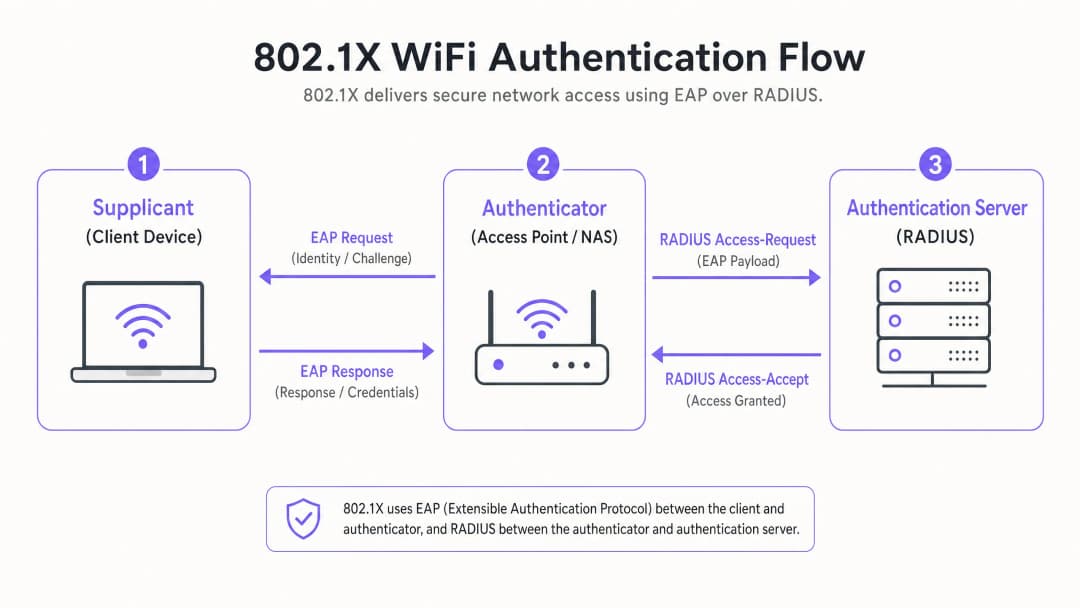
The IEEE 802.1X standard defines port-based network access control. In a wireless environment, it prevents client devices from sending or receiving data traffic until they have successfully authenticated against a central directory.
The Three Core Components
- Supplicant (Client Device): The software on the laptop, smartphone, or IoT device requesting access. It must support the chosen EAP (Extensible Authentication Protocol) method.
- Authenticator (Access Point/WLC): The network device acting as the gatekeeper. It opens a "controlled port" that only permits EAP traffic until authentication is successful.
- Authentication Server (RADIUS): The central server (e.g., Microsoft NPS, FreeRADIUS, Cisco ISE) that validates credentials against an identity store (like Active Directory) and returns an Access-Accept or Access-Reject message.
EAP Methods: Choosing the Right Security Posture
The choice of EAP method determines your level of security and deployment complexity.
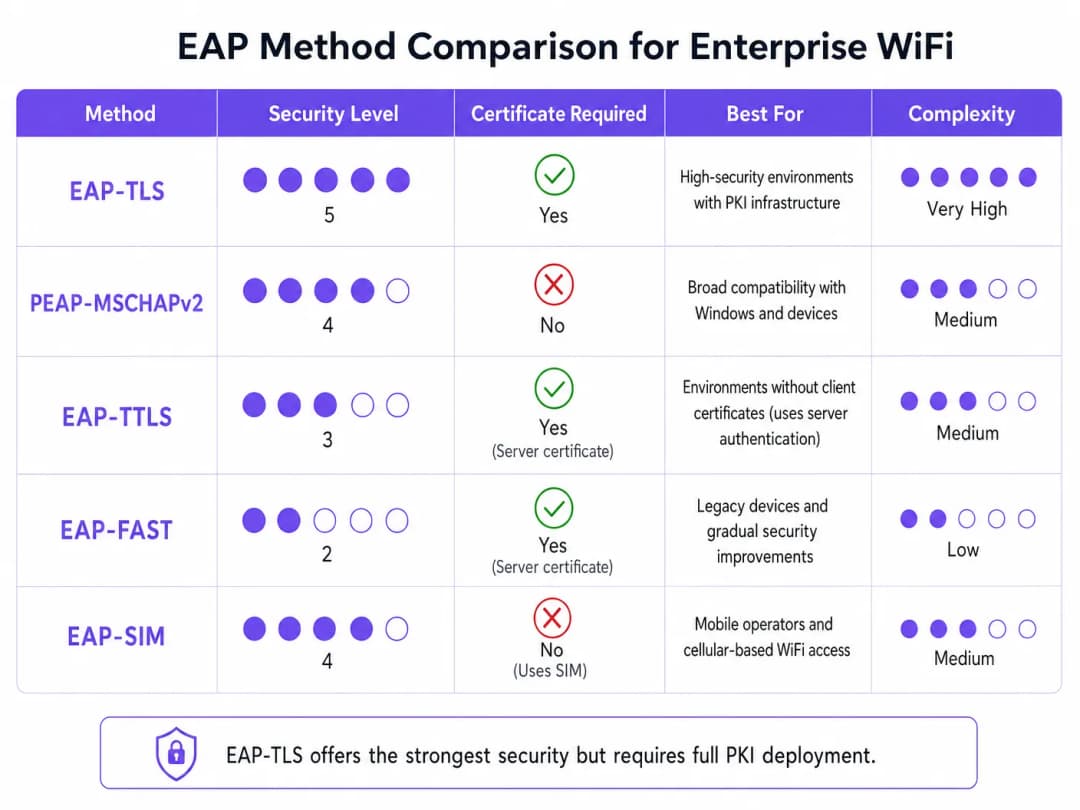
- EAP-TLS (Transport Layer Security): The gold standard. Requires certificates on both the server and client. No passwords are transmitted. Critical for high-security environments, but requires a full Public Key Infrastructure (PKI).
- PEAP-MSCHAPv2 (Protected EAP): The most common enterprise deployment. Uses a server-side certificate to create a secure TLS tunnel within which the client sends a username and password. Simpler to deploy, but vulnerable to credential harvesting if client devices are not configured to strictly validate the server certificate.
- EAP-SIM/AKA: Utilises SIM card credentials for authentication. Increasingly relevant in transport hubs and large public venues for seamless onboarding.
Got questions about your specific setup?
Our team works with venue operators, IT managers, and network engineers across 80,000 venues. Book a 20-minute call and we will show you how others like you solved it.
Implementation Guide: Step-by-Step Configuration
Deploying 802.1X requires coordinated configuration across your RADIUS server, access points, and client devices.
Step 1: RADIUS Server Preparation
Whether you are using Microsoft Network Policy Server (NPS) or an alternative, the core principles remain the same.
- Define RADIUS Clients: Register each access point (or wireless controller) in the RADIUS server. Assign a strong, randomly generated shared secret (at least 22 characters) to secure the communication between the AP and the RADIUS server.
- Install Server Certificate: For PEAP or EAP-TLS, install an X.509 certificate on the RADIUS server. Using a certificate from a trusted public Certificate Authority (CA) simplifies BYOD deployments, as the root certificate is already trusted by client operating systems.
Step 2: Policy Configuration
Configure network policies to dictate access based on identity.
- Connection Request Policies: Define how the RADIUS server handles incoming requests. Typically, this involves matching the NAS-Port-Type (Wireless - IEEE 802.11) and authenticating requests locally.
- Network Policies: Map Active Directory groups to network access privileges. For example, map the "Domain Computers" group to the corporate VLAN. Use RADIUS attributes (
Tunnel-Type=VLAN,Tunnel-Medium-Type=802,Tunnel-Private-Group-ID=[VLAN_ID]) to dynamically assign VLANs upon successful authentication.
Step 3: Access Point Configuration
Configure the SSID on your wireless infrastructure (e.g., Meraki, Aruba, Cisco).
- Create a new SSID and select WPA2-Enterprise or WPA3-Enterprise as the security type.
- Enter the IP addresses of your primary and secondary RADIUS servers.
- Enter the shared secret defined in Step 1.
- Enable Dynamic VLAN Assignment if your RADIUS server is pushing VLAN attributes.
Step 4: Client Supplicant Configuration
This is the most critical and often overlooked step. Do not rely on users to manually configure their devices.
- Corporate Devices: Use Group Policy Objects (GPO) or your Mobile Device Management (MDM) platform to push WiFi profiles. Profiles must specify the trusted root CA and the exact server names of the RADIUS servers to prevent man-in-the-middle (evil twin) attacks.
- BYOD: Implement an onboarding portal or MDM solution to push secure profiles to employee-owned devices.
Best Practices & Industry Standards
To ensure a robust deployment, follow these architectural best practices:
- Enforce Strict Certificate Validation: Never allow clients to blindly accept any server certificate. This is the primary vector for PEAP credential harvesting.
- Isolate Guest Traffic: Your 802.1X infrastructure is for corporate access. Guest traffic must remain completely isolated. Deploy a dedicated Guest WiFi platform, equipped with its own Captive Portal and analytics layer. As discussed in our Securing Your Network: Robust DNS and Security guide, logical isolation is fundamental to network defence.
- Implement Redundancy: RADIUS is a critical path service. Deploy primary and secondary RADIUS servers. In distributed environments, such as large retail chains, consider local RADIUS proxies to maintain survivability if the WAN link drops.
Troubleshooting and Risk Mitigation
When deployments fail, it usually comes down to a few common configuration errors:
- RADIUS Timeout Errors: Usually caused by a shared secret mismatch between the AP and the RADIUS server, or firewall rules blocking UDP ports 1812 (authentication) and 1813 (accounting).
- Client Rejections: Check the RADIUS event logs (e.g., Windows Event Viewer -> Custom Views -> Server Roles -> Network Policy and Access Services). Look for Event ID 6273. Common causes include expired client certificates or the client failing to trust the server's certificate chain.
- VLAN Assignment Failures: If authentication is successful but the client does not get an IP address, verify that the switch port connected to the AP is configured as a trunk port, allowing dynamically assigned VLANs.
ROI and Business Impact
Implementing 802.1X delivers significant operational and security ROI:
- Risk Mitigation: Eliminates the risk of a single compromised PSK jeopardising the entire corporate network, directly supporting PCI DSS and GDPR compliance efforts.
- Operational Efficiency: Centralises access control. When an employee leaves, disabling their Active Directory account immediately revokes their WiFi access. No need to rotate PSKs enterprise-wide.
- Network Visibility: Provides granular visibility into exactly who is on the network and what devices they are using, enabling superior capacity planning and threat hunting.
For high-density, complex environments like sports stadiums or the hospitality sector, managing corporate security whilst providing guest access is a challenge. By securing corporate assets with 802.1X and leveraging a robust WiFi analytics platform to handle guest traffic, IT leaders can deliver secure, scalable connectivity that serves both the enterprise and its customers. For insights on managing high-density environments, consult our Zoo and Theme Park WiFi: Connectivity Guide for High-Footfall Venues.
Key Definitions
802.1X
An IEEE standard for port-based network access control that provides an authentication mechanism to devices wishing to attach to a LAN or WLAN.
The foundational protocol for enterprise WiFi security, replacing vulnerable shared passwords.
Supplicant
The client device or software application requesting access to the network.
IT teams must manage supplicant configuration via MDM to ensure secure connections.
Authenticator
The network device (Access Point or Switch) that facilitates the authentication process by acting as a proxy between the Supplicant and the Authentication Server.
Configured with the RADIUS server IP and a shared secret to securely forward EAP traffic.
RADIUS
Remote Authentication Dial-In User Service; a networking protocol that provides centralised Authentication, Authorisation, and Accounting (AAA) management.
The backend server (like Microsoft NPS) that actually validates the user's credentials against a directory.
EAP (Extensible Authentication Protocol)
An authentication framework frequently used in wireless networks and point-to-point connections, supporting multiple authentication methods.
The 'language' spoken between the Supplicant and the RADIUS server.
EAP-TLS
An EAP method that uses Transport Layer Security, requiring both server and client-side certificates for mutual authentication.
The most secure method available, often mandated for high-security or classified environments.
PEAP
Protected Extensible Authentication Protocol; encapsulates EAP within an encrypted and authenticated TLS tunnel.
The most widely deployed enterprise method, balancing security with ease of deployment by only requiring a server-side certificate.
Dynamic VLAN Assignment
The process where a RADIUS server instructs the Access Point to place an authenticated user onto a specific VLAN based on their directory group membership.
Crucial for segmenting network traffic (e.g., separating HR, Engineering, and IoT devices) while broadcasting only a single corporate SSID.
Worked Examples
A 300-room luxury hotel needs to secure its back-of-house operational network (staff tablets, VoIP phones, management laptops) while keeping it entirely separate from the guest network. They currently use a single PSK for staff.
- Deploy Microsoft NPS linked to the hotel's existing Active Directory.
- Configure PEAP-MSCHAPv2, using a public certificate (e.g., DigiCert) on the NPS server to simplify tablet onboarding.
- Create an 802.1X SSID ('Hotel_Ops') on the APs.
- Use the hotel's MDM platform to push the 'Hotel_Ops' WiFi profile to all staff tablets and laptops, explicitly configuring the profile to trust the DigiCert root CA and validate the NPS server name.
- Maintain the existing open guest SSID, routing it through Purple's captive portal for terms acceptance and analytics, ensuring guest VLANs cannot route to the operational VLANs.
A university campus is migrating to 802.1X and needs to support a massive BYOD environment for 15,000 students across various operating systems.
- Deploy a robust RADIUS cluster (e.g., FreeRADIUS or Cisco ISE) with load balancing.
- Implement PEAP-MSCHAPv2 for broad device compatibility.
- Deploy an onboarding portal (e.g., SecureW2) that automatically configures the student's device supplicant to use the correct EAP settings and trust the university's RADIUS server certificate.
- Use dynamic VLAN assignment via RADIUS attributes to place students into appropriate subnets based on their campus location to manage broadcast domains.
Practice Questions
Q1. Your organisation is deploying 802.1X using PEAP-MSCHAPv2. During testing, users report they are prompted to 'Accept a Certificate' when connecting for the first time. How should you address this?
Hint: Consider the security implications of allowing users to make trust decisions regarding network infrastructure.
View model answer
You must configure the client supplicant profiles (via MDM or Group Policy) to explicitly trust the Root CA that issued the RADIUS server's certificate, and to validate the specific server name. Relying on users to manually accept certificates trains them to ignore security warnings and leaves the network vulnerable to Evil Twin (credential harvesting) attacks.
Q2. You need to secure a fleet of warehouse barcode scanners. They support WPA2-Enterprise but do not have a mechanism to install client certificates or join Active Directory. What is the most secure deployment approach?
Hint: Evaluate the EAP methods that do not require client-side certificates but still provide encrypted authentication.
View model answer
Deploy PEAP-MSCHAPv2. Create a dedicated service account in your directory for the scanners. Configure the RADIUS server with a server certificate to establish the TLS tunnel, and configure the scanners to authenticate using the service account credentials inside the tunnel. Ensure the RADIUS policy restricts this service account to a specific, isolated warehouse VLAN.
Q3. After configuring the APs and the RADIUS server, client devices successfully authenticate (verified in RADIUS logs with an Access-Accept), but they fail to receive an IP address and cannot access the network. What is the most likely infrastructure issue?
Hint: Authentication has succeeded, meaning the 802.1X phase is complete. The issue lies in the subsequent network provisioning phase.
View model answer
The most likely issue is a VLAN misconfiguration on the wired network. If the RADIUS server is using dynamic VLAN assignment to place the client on a specific VLAN (e.g., VLAN 20), the switch port connecting the Access Point must be configured as an 802.1Q trunk port that allows VLAN 20. If the VLAN is not trunked to the AP, the client's DHCP requests will be dropped.
Continue reading in this series
A Network Administrator’s Guide to Configuring RADIUS Authentication for Guest WiFi
A comprehensive technical reference for network administrators on deploying RADIUS authentication for guest WiFi. Covers architecture, vendor-neutral configuration steps, security best practices, and troubleshooting common deployment failures.
Implementing SCEP for Secure BYOD and 802.1X WiFi in Higher Education
This technical guide details how higher education IT teams can automate 802.1X certificate enrollment for thousands of BYOD devices using SCEP. It covers the architecture, security benefits, and practical deployment steps to replace manual onboarding with a secure, zero-touch network access model.
Configuring RADIUS Authentication for Guest and Staff WiFi Networks
This technical reference guide outlines the architecture, configuration, and deployment of RADIUS authentication for enterprise guest and staff WiFi networks. It provides network architects and IT managers with the exact protocols, security standards, and troubleshooting methodologies required to build secure, scalable wireless access control systems.
Got questions about your specific setup?
Our team works with venue operators, IT managers, and network engineers across 80,000 venues. Book a 20-minute call and we will show you how others like you solved it.