Enterprise Certificate Lifecycle and PKI Expiry Risk Advisor
Model digital certificate sprawl, calculate unmonitored outage risk, evaluate automated enrollment protocols (ACME vs SCEP), and size EAP-TLS 802.1X handshake overhead across enterprise wireless networks.
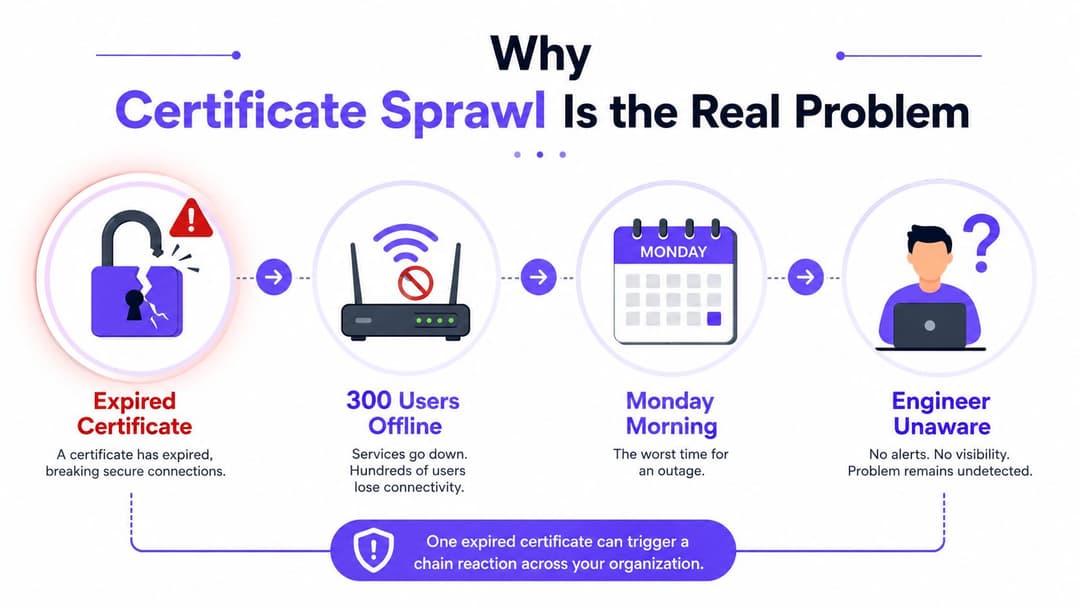
A Monday morning outage rarely starts with a dramatic PKI failure. It starts with a certificate that nobody knew existed. The RADIUS certificate on a WiFi authentication server expires over the weekend, the first shift arrives, and hundreds of users can't connect. The engineer on call searches through dashboards, vendor portals, old spreadsheets, and server stores before discovering the actual cause.
That incident changes the question. How to manage certificates isn't mainly a question about generating keys or clicking renew. It's a question of visibility, ownership, dependencies, and reliable action across network, identity, application, and device teams. A certificate lifecycle only works when someone can identify every certificate, understand what depends on it, and reach the person or automation responsible for replacing it.
Why Certificate Sprawl Is the Real Problem
Certificate sprawl grows naturally in organizations with mixed infrastructure. Network engineers manage RADIUS and VPN certificates. Security teams oversee SAML and OIDC signing certificates. DevOps teams issue application TLS certificates through cloud platforms or CI/CD pipelines. IT administrators provision device enrollment certificates through endpoint management systems.
Each team can operate sensibly in isolation and still create an estate nobody can see as a whole.
Practical rule: Treat every certificate as a production dependency, not as a file that happens to sit on a server.
Spreadsheets fail because they record what someone remembers, not what the environment is using. They rarely discover certificates automatically, they don't reliably represent the chain from leaf certificate to intermediate and root CA, and they can't tell you whether a certificate has been copied to a second load balancer, appliance, or vendor-managed service. A spreadsheet can support a review, but it shouldn't be the system that warns you about an outage.
The operational risk is well documented in US reporting. Only 34% of surveyed respondents had a complete, up-to-date view of their digital certificates, while 74% were very or extremely concerned about outages caused by expired certificates. The same reporting found that 51% cited siloed tools as a major challenge, and 47% of surveyed leaders still relied on spreadsheets for manual tracking. These figures come from the US certificate visibility and sprawl reporting.
The trade-off between long and short lifetimes
Long-lived certificates reduce maintenance work. They also leave a larger window in which a compromised private key can remain useful, and a forgotten certificate can sit unnoticed until an unrelated system change exposes it.
Short-lived certificates reduce that exposure, but they demand dependable automation. Renewal must generate a fresh key, obtain the replacement certificate, distribute the complete chain, deploy it to the right endpoints, and verify that clients trust the new result. The US DWP PKI standard sets different maximum lifetimes for root, policy, subordinate, and end-entity keys, illustrating why one blanket policy rarely works across every certificate class.
The first practical step is therefore not automation. It's a unified inventory that combines discovery, ownership, dependencies, risk classification, and evidence of deployment. Without that foundation, automation renews the certificates that one tool can see while shadow certificates continue to age elsewhere.
Building a Complete Certificate Inventory
A production inventory starts with discovery, not manual data entry. Run authenticated scans against the services your organization operates, including TLS and directory service endpoints, then query the platforms that issue or store certificates. Network scans can identify exposed certificates on ports such as 443, 636, 8443, and 1812. Server-side collection should inspect Windows certificate stores, Linux filesystem locations, Java keystores, reverse proxies, load balancers, firewalls, wireless controllers, and managed appliances.
Treat directory services as a separate discovery source. Query certificate objects and profiles in Microsoft Entra ID, Active Directory, Google Workspace, Okta, and endpoint management platforms. A certificate may never appear on a listening port while still controlling device authentication or WiFi access. Network vendors create another blind spot: wireless controllers, firewalls, VPN gateways, and RADIUS platforms may each hold their own copy, with separate renewal procedures and ownership.
Normalize before you assign
Discovery tools return incompatible formats. Convert their results into one record per certificate, then deduplicate using serial number, fingerprint, and public-key identity where appropriate. Keep enough context to distinguish an unused file from an active production dependency. Record the provider and discovery method as well, so a missing result can be traced to a source system rather than mistaken for absence.
| Field | Example Value | Purpose |
|---|---|---|
| Subject | Service or device identity | Identifies the certificate subject |
| Issuer | Intermediate CA name | Shows which authority signed it |
| SANs | DNS, email, URI, or device identifiers | Records the identities clients validate |
| Key usage | Server authentication or client authentication | Prevents use in the wrong role |
| Expiration | Validity end date | Drives renewal planning |
| Serial number | CA-issued identifier | Supports audit and revocation |
| Storage location | Server store, appliance, directory profile, or vault | Shows where replacement must occur |
| Owner and contact | Named team and escalation contact | Makes action possible |
| Dependency chain | Intermediate and root relationships | Reveals shared failure points |
| Status | Active, staged, expired, revoked, or unused | Separates risk from historical clutter |
Ownership determines whether an inventory can drive action. “Network” or “IT” does not identify who approves a change, performs deployment, or responds to failure. Assign a service owner, operational team, escalation contact, and business criticality. If a RADIUS certificate supports staff WiFi, record the network service, backup operator, platform owner, and change process authorizing deployment.
Map chains and classify risk
A leaf certificate can fail because its validity ended, the server omitted an intermediate, or a client no longer trusts the root. Map every leaf to its intermediate and each intermediate to its root. Then flag shared dependencies. One intermediate CA may support unrelated services, turning its replacement into a coordinated change across directory services, servers, and network vendors.
Use classifications that reflect operational consequences:
- Production-critical: WiFi authentication, VPN access, identity gateways, payment services, and systems with immediate user impact.
- Application-facing: Public web TLS, APIs, reverse proxies, ingress controllers, and customer portals.
- Internal: Service-to-service mTLS, machine identities, administrative interfaces, and development environments.
Shadow certificates require a separate reconciliation pass. Ask application teams, managed service providers, and network vendors where private keys are stored, which provider issued each certificate, and how renewal is performed. Compare those answers with directory-service records, appliance exports, and scanning results.
A complete inventory is a maintained control record, not a one-time list. It connects certificates to systems, people, providers, dependencies, and deployment evidence, giving lifecycle automation a reliable source instead of allowing each tool to manage only the certificates it can see.
Issuing and Provisioning Certificates with Directory Services
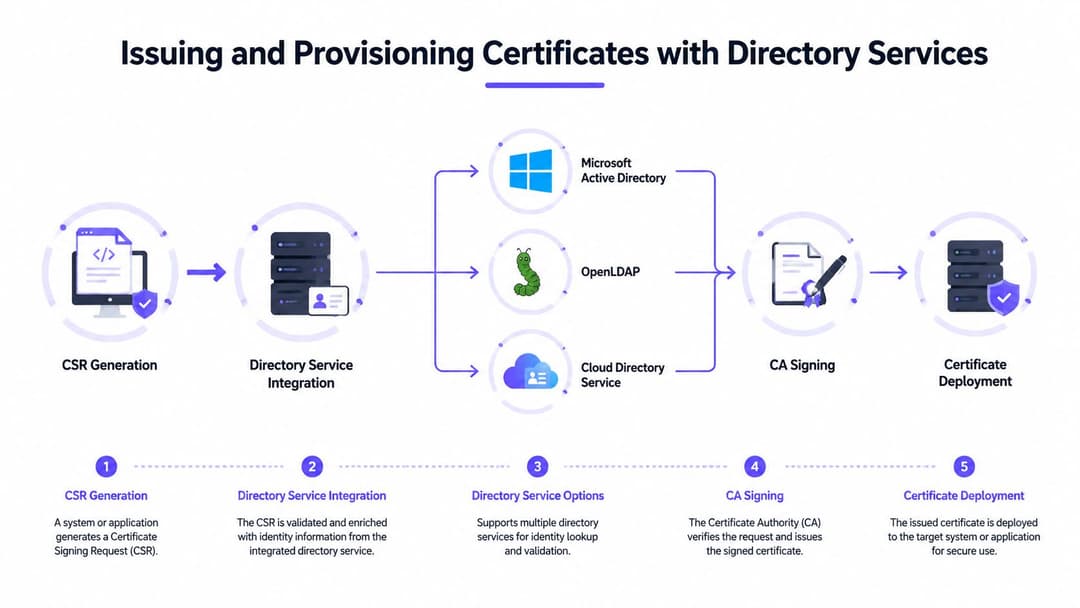
A device can show as managed while certificate-based access still fails. In production, the break usually sits between identity, key generation, trust installation, and service deployment. Treat issuance as one controlled workflow: generate the key pair, create the CSR, validate identity and policy, sign through the approved CA, then install the certificate with its chain. Keep private-key generation on or near the endpoint whenever possible. The CSR proves possession of that key, so the key should not pass through email, ticketing systems, or shared administrator folders.
Microsoft Entra ID deployments commonly use Intune certificate profiles with SCEP or PKCS12. SCEP suits managed devices that generate their own keys and request certificates through a controlled connector. PKCS12 can package a certificate and private key when the provisioning model requires it, but transporting or storing that package demands tighter controls. Bind each profile to the device or user identity, define key usage, and record the issuing CA and trust chain in the central inventory. That record is what prevents one provider's certificate view from becoming the only source of truth.
Google Workspace environments require the same separation between identity and certificate material. Use Google Endpoint Management for managed-device policy, then use the Directory API and organizational-unit context to associate each certificate with its device or user and the policy that governs it. An exported certificate file does not prove successful provisioning. Confirm that the endpoint received the profile, installed the trusted root, and can present the client certificate to the relying service.
Okta can contribute to certificate-based device-trust decisions, but certificate presence alone does not complete authentication. Combine certificate validation and device posture with the applicable sign-on and multi-factor policies. If a device leaves the managed population, connect the directory event to certificate disablement or revocation. Manual discovery leaves orphaned credentials in place and creates gaps between directory records, CA consoles, and network appliances.
Choose the CA by use case
Use a public CA for internet-facing names and services that need broad client trust. Use a private CA for internal device identities, mTLS, and controlled enterprise trust. A hybrid model keeps public web certificates separate from internal identity certificates, while each PKI follows suitable issuance and revocation controls. Document ownership and deployment interfaces for every provider so renewal automation can reach servers, directory services, and network vendors.
Key storage also affects recovery and incident response. Hardware-backed keys in TPMs make extraction harder and suit managed laptops and fixed-purpose devices where the platform provides a stable hardware identity. Software keystores are easier across varied hardware and recovery workflows, but require stronger endpoint protection and access controls.
WiFi introduces a practical trade-off. A device certificate must survive routine operating system maintenance without interrupting access, while the organization still needs a way to replace it after compromise or ownership changes. Test renewal on Windows, macOS, iOS, and Android, including how the supplicant behaves after a profile update. Teams reducing on-premises RADIUS administration can evaluate RADIUS as a service for certificate-based WiFi alongside a self-managed deployment.
Managing Rotation Renewal and Revocation
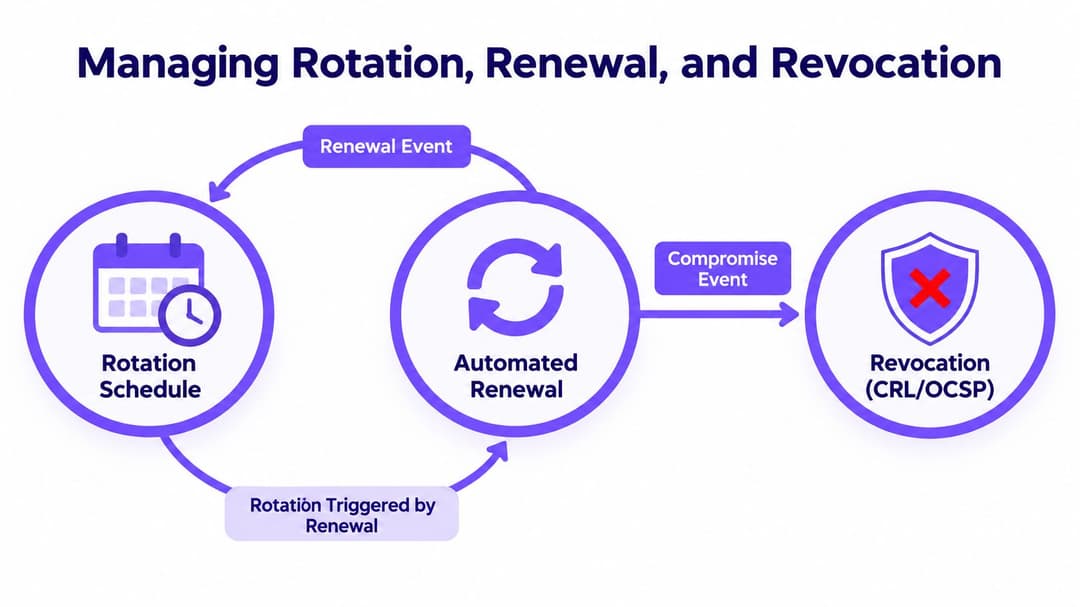
At 2 a.m., a certificate can renew successfully at the CA and still leave a service offline. The appliance may reject the chain, the private key may not match, or the application may need a manual restart. Rotation, renewal, and revocation therefore belong to one operational workflow, not three separate tickets. Renewal replaces an expiring certificate. Rotation should usually create a fresh key, because retaining the old private key preserves its exposure. Revocation handles compromise, decommissioning, or a policy decision that invalidates a certificate before expiry.
Set the renewal window early enough to diagnose deployment failures before expiration. Track CA approval separately from installation and service reload status. That distinction is where certificate sprawl becomes visible: different providers, directory services, appliances, and application owners often report different parts of the same lifecycle.
Design renewal as a deployment workflow
A dependable workflow should:
- Detect the renewal window: Assess validity, service criticality, provider, and deployment complexity.
- Regenerate the CSR and key: Create a new private key and follow PKI lifecycle requirements.
- Apply an approval gate: Require service-owner confirmation for high-impact systems, while allowing policy-compliant low-risk renewals to proceed automatically.
- Stage the replacement: Install the certificate and complete chain on a secondary endpoint, node, listener, or test profile.
- Validate before cutover: Check the name, key usage, chain building, client trust, and application behavior.
- Perform a controlled switch: Move traffic or authentication to the renewed endpoint without taking the service offline.
- Record evidence: Update the shared inventory with serial number, fingerprint, provider, storage location, owner, approval, and deployment result.
For high-availability services, replace one node at a time. Validate real client behavior before continuing through the remaining nodes. Keep the previous certificate for rollback only where policy allows it, then remove obsolete private keys after the transition. The inventory should also record whether each vendor supports automated installation and reloads, because a CA renewal alone does not complete the change.
Make revocation observable
Revocation works only when relying clients can retrieve and enforce status. Host revocation information centrally with high availability, then manage CRL distribution, OCSP responders, or both according to the environment. Test failure behavior as well. Legacy clients may continue operating when status services are unavailable, leaving incident responders with a misleading sense of control.
Treat orphaned certificates as an investigation, not a cleanup task. Confirm that no service, device, backup process, directory workflow, or vendor integration still depends on the certificate before marking it decommissioned. Removing a revoked certificate from one endpoint does not resolve the incident if another system still trusts it or an alternative certificate with the same identity remains active.
The US digital identity certification model also ties certificate management to evidence and review cadence. Services in the US Digital Identity and Attributes Trust Framework require certification by an approved conformity assessment body. Certificates are generally valid for three years, with surveillance expected every 12 months, typically within 30 days either side of the certification anniversary. The US certification scheme requirements state that services must be re-certified before certificate expiry. Certification applies to the evaluated service, not automatically to the entire organization.
Deploying Certificate-Based WiFi Access in Real Venues
Certificate-based WiFi works well in venues when the identity, trust chain, and supplicant configuration are designed together. EAP-TLS removes the shared-password problem, but it replaces one secret with a lifecycle that must provision client certificates, install the correct root CA, configure the wireless profile, and revoke access when the directory identity or device relationship changes.
On a corporate campus, the cleanest pattern is usually a staff SSID using EAP-TLS with directory-backed device certificates and a separate guest experience. Passpoint can let managed devices discover and join the appropriate network without repeatedly entering credentials. For older equipment that can't complete the required certificate flow, an iPSK segment can provide device-specific keys while the main staff network retains stronger identity controls.
A hospital has a harder mix. Managed clinical workstations may support EAP-TLS, while specialist devices, scanners, pumps, and vendor-maintained equipment may have limited supplicant capabilities. Put those devices into tightly scoped network segments, document their trust model, and define a compensating control rather than weakening the staff SSID for every client.
In a retail chain, central policy must coexist with local switching and wireless variations. Meraki, Aruba, Ruckus, and other vendors expose different certificate, RADIUS, Passpoint, and onboarding controls. Keep the certificate policy vendor-neutral, then test the exact profile on each hardware family. Aruba-compatible WiFi hardware options can be assessed as part of that multi-vendor design.
| Vendor | EAP Method | RADIUS Integration | Passpoint Support | Onboarding Complexity |
|---|---|---|---|---|
| Cisco Meraki | EAP-TLS, subject to platform configuration | Cloud-managed wireless with external RADIUS options | Available through supported wireless features | Moderate |
| Aruba | EAP-TLS and other enterprise EAP methods | Controller or cloud-managed RADIUS integration | Available through supported WLAN features | Moderate |
| Ruckus | EAP-TLS and vendor-supported enterprise methods | RADIUS integration through WLAN management | Available through supported deployments | Moderate |
| Mixed estate | Standardize on EAP-TLS where clients support it | Centralize policy, test each vendor's attributes | Validate roaming and profile behavior per platform | High |
Test the failures, not only the join
A successful first connection proves very little. Test a certificate with the wrong SAN, a missing intermediate, an expired root in the device trust store, a revoked client certificate, a RADIUS timeout, and a device returning after an operating system update. Confirm the user sees a useful recovery path rather than an endless authentication loop.
Keep a fallback for devices that cannot support EAP-TLS, but isolate it by role and enforce a replacement plan. The common production mistake is allowing the exception network to become the default network because onboarding was rushed.
Automating Monitoring and Multi-Provider Governance
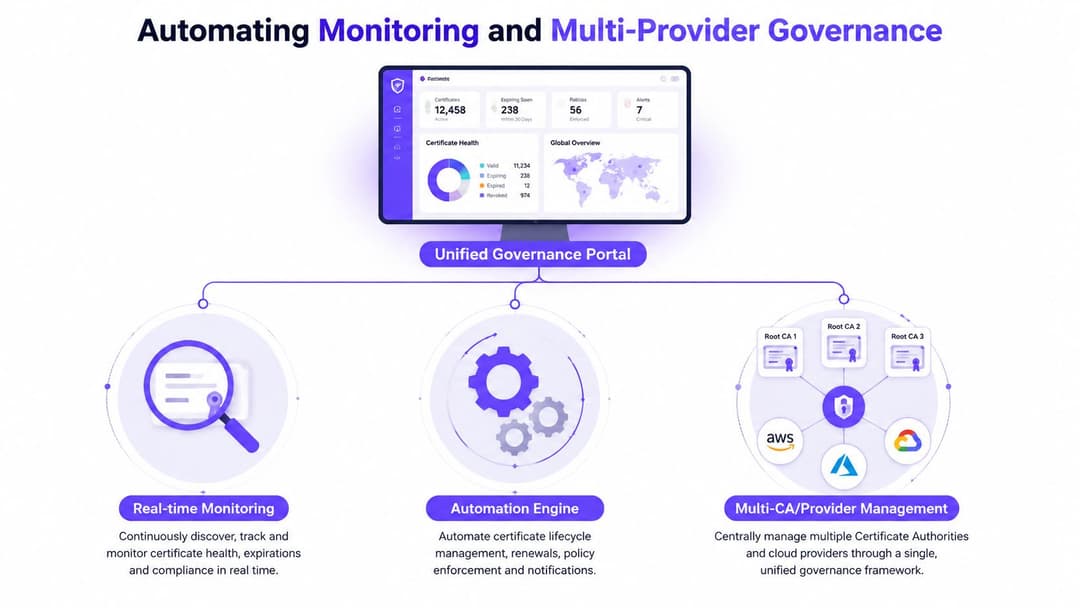
A central dashboard should answer four questions for every certificate: what is it, where is it used, who owns it, and what happens next. It should ingest state from public CAs, private PKI, cloud-native services such as AWS ACM, Google Certificate Manager, and Azure Key Vault, plus directory platforms, network controllers, load balancers, and application stores.
Monitoring needs more than an expiration date. Check chain completeness, key and certificate matching, SAN coverage, key usage, revocation reachability, deployment consistency, and whether the certificate observed on the endpoint matches the certificate recorded in the inventory. Alert owners through the system they already use, then escalate only when the owner doesn't acknowledge or the remaining time crosses a higher-risk threshold.
The operational case for automation is strong in US certification workloads. SOC 2 Type II evaluation data recorded 132,094 certificates awarded since the scheme began, 27,027 unique certified organizations in the US during the prior 12 months, and 35,434 total certifications in that period. In 2022, the scheme recorded 24,300 certifications, including 16,554 recertifications and 7,746 new certifications, according to the US SOC 2 Type II scheme evaluation. The workload is renewal-heavy, so calendars, evidence collection, assessor tasks, and reminders should be designed around recertification rather than one-time issuance.
Govern providers without creating a new silo
Consolidating on one CA can simplify policy, contracts, templates, and support. It can also create concentration risk and make migration expensive. A multi-provider model improves resilience and may suit different use cases, but only if the organization standardizes inventory fields, ownership rules, approval gates, key-generation policy, and reporting.
A practical maturity path looks like this:
- Reactive: Teams find expired certificates after an incident.
- Recorded: A shared inventory exists, but discovery and updates remain manual.
- Monitored: Endpoint scans and provider integrations detect change and send owner-based alerts.
- Orchestrated: Approved automation generates keys, requests certificates, deploys replacements, validates services, and updates records.
- Governed: Policy-as-code, audit evidence, provider redundancy, exception handling, and lifecycle analytics operate across the estate.
Don't automate every renewal on the first day. Start with discovery and ownership, automate low-risk certificates, and keep approval gates for authentication infrastructure and shared intermediates. For teams managing wireless endpoints, a WiFi SSL certificate checker can support targeted validation, but it should complement rather than replace the authoritative inventory.
Purple provides identity-based WiFi authentication, certificate-grade staff access, directory integrations, Passpoint, and iPSK support across mixed network environments, helping teams connect certificate provisioning and revocation to real venue operations. Review how Purple fits your WiFi certificate lifecycle, then visit Purple to discuss an implementation based on your directory services, network vendors, and onboarding requirements.