
The most common advice about WiFi auto connect is to switch it off. That is sensible for open public hotspots, but it's incomplete advice for an enterprise network. A managed device joining a trusted, certificate-based service automatically can be safer than asking a member of staff to select an SSID, accept a portal, and type a shared password.
The important question isn't whether automatic connection is enabled. It's what the device is authorized to join, how the network proves its identity, and how administrators revoke access. Open auto-join relies on user judgment. Secure roaming relies on identity, encryption, policy, and infrastructure. Those are very different operating models.
Rethinking the Auto Connect Security Myth
Consumer guidance usually treats automatic association as the problem. In reality, the risk comes from allowing a device to join an unknown or unencrypted network merely because its name looks familiar. The same cell phone can be dangerous when it automatically joins an open hotspot and highly controlled when it automatically joins a managed WPA-Enterprise service.
Public-sector guidance explains that devices continually search for available networks while WiFi is enabled. The government property agency's WiFi privacy guidance also highlights why permissive settings can lead devices toward unintended open networks. The the FTC and state attorneys general's practical recommendation is to disable auto-connect for open WiFi, not to reject secure, authenticated roaming as a category.
That distinction matters for venue operators. “Turn it off” is a useful consumer workaround when the alternative is a cell phone joining a cloned cafe or hotel SSID. It isn't a complete enterprise strategy. Staff need connectivity while moving between reception areas, wards, floors, buildings, or transportation facilities, and guests expect access to resume without repeating an onboarding process every time they return.
The security boundary belongs in the network
A secure auto-connect design makes the network prove itself before the device trusts it. The device validates the authentication server's certificate, presents its own credential, and receives access only when the identity policy allows it. With EAP-TLS, that credential can be a certificate rather than a reusable password.
This approach changes the operator's responsibility. You're no longer relying on every visitor to identify a fake SSID or remember whether a network was legitimate. You're defining which identities, devices, and authentication methods are allowed to roam.
Practical rule: Never make “auto-connect enabled” the security decision. Make authenticated, encrypted, policy-controlled auto-connect the decision.
That's why this enterprise WiFi security guide is more useful than a blanket instruction to disable the setting. The architecture determines whether convenience expands the attack surface or removes risky user actions from the connection process.
What works and what doesn't
Open networks with a familiar name, a shared password printed on a wall, and a captive portal fallback are easy to deploy. They're also poor foundations for trusted auto-roaming. They leave too much responsibility with the user and make access difficult to audit when a credential is shared beyond its intended audience.
A managed profile, certificate validation, encrypted association, and central revocation process take more planning. They deliver a stronger result because the device doesn't have to make a visual guess about the network. It follows a policy created by the operator.
The Evolution of Seamless Network Access
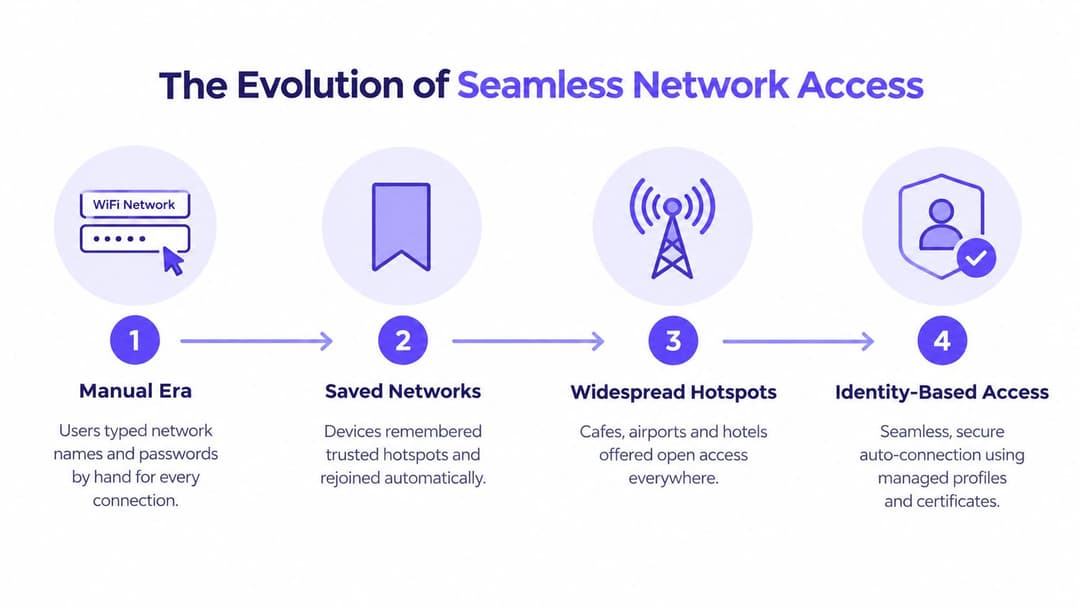
Public WiFi didn't begin as an identity system. Early deployments asked users to choose a network name, enter a password, and often complete a browser-based portal. That model worked for occasional access, but it placed every connection step in the hands of the customer.
The US hotspot market expanded rapidly during the early 2010s. Public hotspots rose from about 16,000 to 34,000 in the year to June 2013, while later estimates placed the total at 44,804 by 2015, alongside 3.3 petabytes of public WiFi data usage in June of that year. These figures are reported in coverage of the public hotspot expansion.
More networks meant more saved profiles. A cell phone that had remembered a hotel, station, cafe, or retail network could attempt to reconnect whenever it saw the same name. In a separate US consumer survey cited in 2013, 58% of mobile devices used by American WiFi hotspot users automatically connected to public hotspots, while only one-third of users said they considered security before connecting. The survey covered 1,641 US adults, as described in the US public WiFi security overview.
Why the old model created friction
Captive portals solved a commercial and operational problem. Venues could present terms, collect an email address, or ask a visitor to authenticate through a third party. But the portal also introduced a fragile interruption into the connection process. Users had to find the right SSID, wait for a redirect, complete a form, and repeat the process when the device forgot the session or moved between access points.
A portal can still have a place for guest engagement, but it shouldn't be confused with strong network authentication. It often starts with an open association and applies the meaningful access decision later in a browser. That sequence is awkward for roaming and can expose users to misleading network names before they reach the portal.
Why identity became the logical next step
The growth of hotspot estates made repeated manual entry impractical. Operators needed devices to discover network capabilities, determine whether their credentials were accepted, and authenticate in the background. Users needed the experience to resemble cell phone roaming, where service continues as they move rather than stopping at every access point.
The result is a shift from network-name trust to identity-based trust. A saved SSID says, "I've seen this name before." A managed Passpoint profile says, "I have credentials for this service, and I'll join only when the network meets the required authentication conditions." That is a materially stronger basis for automatic access.
EE describes a UK WiFi-Auto service in which compatible iOS 13 or later and Android 11 or later devices can detect supported hotspots and connect across more than 150,000 UK hotspots, as stated in its WiFi coverage and automatic connection guidance. The implementation illustrates the commercial value of background authentication, but enterprise operators still need to control which profiles are issued and which networks are trusted.
Core Technologies Behind Zero Click Roaming
Three technologies often appear in the same conversation, but they solve different parts of the access problem. Passpoint handles automated discovery and authentication. OpenRoaming provides a federation model for identities and participating networks. iPSK brings individual credentials to environments that still need a pre-shared-key approach.
Passpoint and ANQP
Passpoint, also known as Hotspot 2.0, uses 802.11u network discovery and the Access Network Query Protocol, or ANQP. Before associating, a compatible device can query the access network for information such as supported authentication methods, domain details, venue information, and roaming relationships.
The device compares those network details with its installed credentials. If the policy matches, it authenticates through EAP over 802.1X and joins an encrypted WPA2-Enterprise or WPA3-Enterprise service without presenting a conventional captive portal. Administrators should review the Passpoint implementation guidance alongside their wireless controller and identity platform documentation.
OpenRoaming and iPSK
OpenRoaming extends the idea beyond one organization. A participating identity provider can allow a user or managed device to authenticate across participating networks, subject to the federation's trust and policy arrangements. That model suits airports, transportation centers, hospitality groups, education networks, and other environments where users cross organizational boundaries.
iPSK takes a different route. The network can broadcast a common SSID while the administrator assigns distinct pre-shared keys to individual users, devices, rooms, tenants, or operational groups. Those keys can be revoked independently, which is a clear improvement over one password shared by an entire venue. iPSK remains less expressive than certificate-based EAP because the credential is still a key, but it can provide practical identity separation for legacy devices that don't support a full certificate workflow.
| Protocol | Authentication method | Best use case | Client setup |
|---|---|---|---|
| Passpoint | EAP credentials, including certificates or SIM-based identity | Secure automatic roaming across managed or participating venues | Install a Passpoint profile or use a supported identity entitlement |
| OpenRoaming | Federated identity with Passpoint-based network authentication | Multi-venue access across participating operators and identity providers | User or device obtains a compatible roaming credential |
| iPSK | Individual, revocable pre-shared keys | Guest, tenant, IoT, and legacy-device segmentation | Distribute a unique key through onboarding or device management |
Choosing the right stack
Use Passpoint with EAP-TLS when the organization controls the device fleet and needs strong device identity. Consider OpenRoaming when the service must extend beyond one estate and federation is part of the user experience. Use iPSK where equipment cannot support certificate-based authentication, but don't treat it as equivalent to mutual certificate validation.
The wireless hardware must also support the selected features. Confirm compatibility in the access point, controller, RADIUS or cloud authentication service, device management system, and client operating systems before promising zero-click roaming.
Neutralizing the Spoofed Network Threat
The classic evil twin attack succeeds because users and devices often treat an SSID as an identity. An attacker can copy a legitimate network name, increase the transmit power, or position a rogue access point where visitors expect the genuine service. A device that automatically joins open networks has no reliable way to distinguish the copy from the original.
The problem isn't theoretical from a user-experience perspective. Recent reporting says 32% of US adults were not confident they could identify a secure public WiFi network from a fake one, according to the survey coverage on public WiFi identification. A venue shouldn't make security depend on visitors interpreting subtle network details that many people cannot confidently assess.
Mutual authentication changes the decision
A certificate-based design gives the client a way to validate the network before it sends sensitive credentials. With EAP-TLS, the authentication service validates the device certificate while the device validates the server certificate. The device doesn't join just because the SSID matches. It joins because the authentication exchange satisfies its trust policy.
WPA3-Enterprise can provide the encryption and authentication framework, while EAP-TLS supplies the certificate-based identity exchange. The exact combination must match the client fleet and network equipment, but the principle remains consistent: the device must authenticate the service, and the service must authenticate the device.
That removes the weakest link in open auto-join environments - the user's ability to spot a fake network. It also makes access revocation operationally meaningful. If an employee leaves, an administrator can revoke the certificate or remove the identity from the directory instead of chasing a shared password across access points, bulletin boards, and personal devices.
Don't confuse encryption with complete protection
Wireless encryption protects the connection between the client and the access point. It doesn't replace endpoint security, application-layer encryption, network segmentation, logging, or sensible data handling. A certificate-based WiFi service is a strong access control, not a complete security program.
For venue operators, the practical design is layered. Use authenticated enterprise wireless for staff and managed endpoints. Keep guest access isolated from operational systems. If a captive portal remains necessary for marketing or terms acceptance, place it on a deliberately segmented guest service rather than using an open network as the foundation for trusted access.
Deploying Identity Platforms with Network Hardware
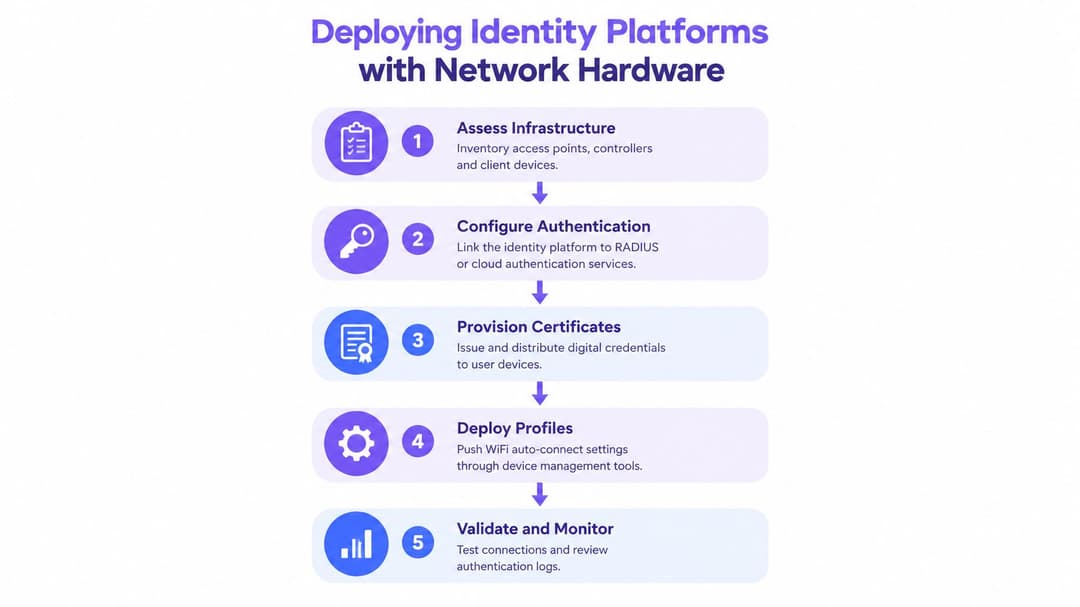
A successful deployment begins with the identity flow, not the SSID name. Decide who needs access, which devices they use, how credentials are issued, and what event revokes access. Only then should the wireless team map those policies to access points, controllers, and network segments.
Start with an inventory
Record the access point models, controller versions, authentication services, device management tools, and client operating systems. Meraki, Aruba, Ruckus, Mist, and UniFi environments can differ in how they expose Passpoint, RADIUS, VLAN assignment, certificate handling, and roaming controls. Don't assume that a feature shown in a product datasheet is enabled in the current controller release or available to every client type.
Separate the device populations early:
- Managed staff devices: These are the best candidates for EAP-TLS and centrally pushed profiles.
- Guest smartphones: These may use Passpoint or a federated service where the user has a compatible credential.
- Legacy equipment: iPSK can provide individual keys and segmentation where certificates aren't practical.
- Operational and IoT devices: These need restrictive policies, predictable onboarding, and clear ownership.
Link identity to access policy
Connect the identity service to the organization's directory, such as Entra ID, Google Workspace, or Okta, or use a RADIUS service that can enforce the relevant EAP method. Define which groups receive which profile and what network access each group receives. A hospital employee, a contractor, a resident, and a visitor shouldn't inherit the same permissions merely because they enter through the same access point.
The wireless controller should receive the authentication result and apply the appropriate VLAN, role, firewall policy, or micro-segment. Keep that mapping documented. Troubleshooting becomes difficult when the identity platform says "accepted" but the controller assigns an unexpected role.
Provision, test, and revoke
Use device management to install the profile, trusted certificate chain, and auto-join policy. Test onboarding on every important client category, including devices that have previously saved the same SSID with different security settings. A stale open profile can cause confusing behavior even when the new enterprise service is configured correctly.
Pilot the service in one controlled area before extending it across a hotel, campus, shopping center, or healthcare estate. Test handovers between access points, authentication during peak occupancy, certificate renewal, directory changes, and loss of connectivity to the authentication service.
A practical identity-based networking approach should also include operational visibility. Review authentication failures, profile installation status, certificate expiration, unexpected client types, and roaming behavior. “It connects on my test laptop” isn't enough. The service has to remain reliable when users move, devices sleep, certificates renew, and staff roles change.
Business Impact and Multi Tenant Isolation
Secure auto-connect affects more than the helpdesk. Every extra portal prompt interrupts a visit, delays a member of staff, or encourages a guest to use mobile data instead. In a hotel, retail estate, hospital, transport hub, or residential property, the operator is managing a continuous flow of people rather than a single connection event.
The commercial value comes from removing unnecessary friction without weakening control. A returning guest can reconnect through an approved identity profile. A staff member can move between operational areas without re-entering credentials. A property manager can give residents, contractors, and facilities teams distinct access policies over shared physical infrastructure.
One property, several trust zones
Multi-tenant wireless doesn't mean one flat network with several passwords. It means the operator defines separate identities and traffic policies, then enforces them at the access and network layers.
A useful model might include:
- Residents or long-term guests: Personalized access with isolation from other tenants and building systems.
- Employees and facilities teams: Managed certificates, directory-based revocation, and access to approved internal services.
- Short-term guests: Internet-only access with an appropriate onboarding and terms process.
- Contractors: Time-limited or group-specific credentials that can be removed without changing every other user's access.
- Devices and building systems: Restricted policies based on device identity and approved destinations.
The exact segmentation mechanism depends on the controller, firewall, authentication service, and operational requirements. The principle is stable: identity should determine access, not physical proximity or knowledge of a shared password.
Measure the right outcomes
Avoid evaluating the project only by connection counts. Track whether staff stop requesting password resets, whether guests complete fewer onboarding steps, whether roaming works across the intended property, and whether administrators can revoke access promptly. Review first-party consent and privacy requirements, including the CCPA/CPRA, before using connection data for marketing or occupancy analysis.
A captive portal may remain useful where the operator needs explicit terms acceptance or voluntary guest engagement. It shouldn't be forced onto every user when a trusted identity profile can provide encrypted access without the same friction. A dual-service design can support both needs, provided the operator clearly separates the security policies and doesn't allow a convenient guest path to become a route into internal systems.
Troubleshooting Common Authentication Failures
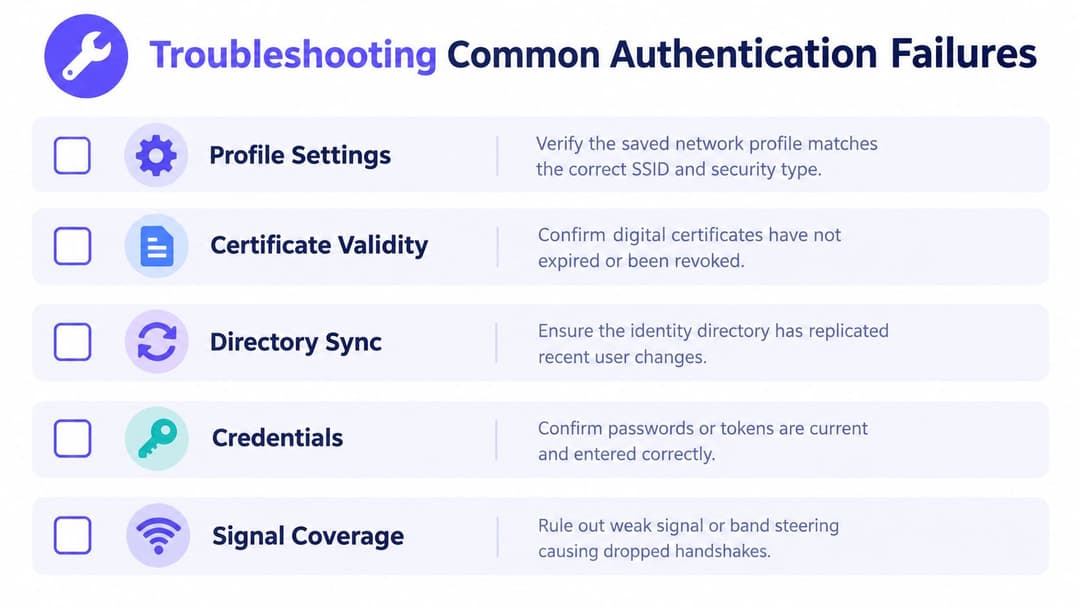
When WiFi auto connect fails, start with the client and identity exchange rather than changing radio settings at random. A device may see the SSID perfectly and still reject it because the profile specifies the wrong security type, the certificate is expired, or the authentication server presents an untrusted chain.
Check the client profile first
Confirm that the installed profile references the intended SSID, domain, authentication method, trusted certificate authority, and server validation rules. Look for old saved profiles that use an open network or a previous WPA setting. On managed devices, check whether a mobile device management policy has overwritten the current profile or blocked automatic association.
If the device sees the network but never starts authentication, inspect the advertised Passpoint and ANQP information. The access point may not be broadcasting the expected roaming consortium, domain, NAI realm, or authentication capability. A controller configuration change can remove those elements even while ordinary WiFi remains available.
Follow the authentication transaction
RADIUS logs should tell you whether the request arrived, which identity was presented, and why the server rejected it. Common causes include an expired or revoked certificate, a missing intermediate certificate, an identity that hasn't synchronized from the directory, an unsupported EAP method, or a device outside the permitted group.
Use a controlled test account and a known-good device. Compare a successful transaction with the failure instead of guessing. If authentication succeeds but the client has no useful connectivity, inspect the returned role, VLAN, firewall policy, and address assignment separately. A successful identity exchange doesn't guarantee a correct network authorization result.
Check roaming and fallback behavior
Repeated timeouts can cause some mobile operating systems to suppress future auto-join attempts. Check whether the device is being steered between bands or access points before the handshake completes, especially at venue edges. Excessively aggressive roaming thresholds can create instability, while overly conservative settings can keep a client attached to a weak access point.
Don't let failed enterprise authentication push users toward an open network with the same name. Give the secure service a distinct policy and monitor fallback attempts. Review battery impact as well, because constant scanning and poorly tuned roaming policies can reduce device efficiency even when authentication is correct.
Administrator's checklist: verify the profile, certificate, directory state, RADIUS response, ANQP advertisement, authorization role, and radio conditions in that order.
The aim isn't to make every failure invisible. It's to make each failure diagnosable, contained, and recoverable without reverting to shared credentials.
Purple provides Passpoint, OpenRoaming, SecurePass, identity integrations, and iPSK options for secure guest, staff, and multi-family WiFi auto connect. Visit Purple to assess how its identity-based networking platform can work with your existing wireless hardware and replace fragile shared-password workflows.