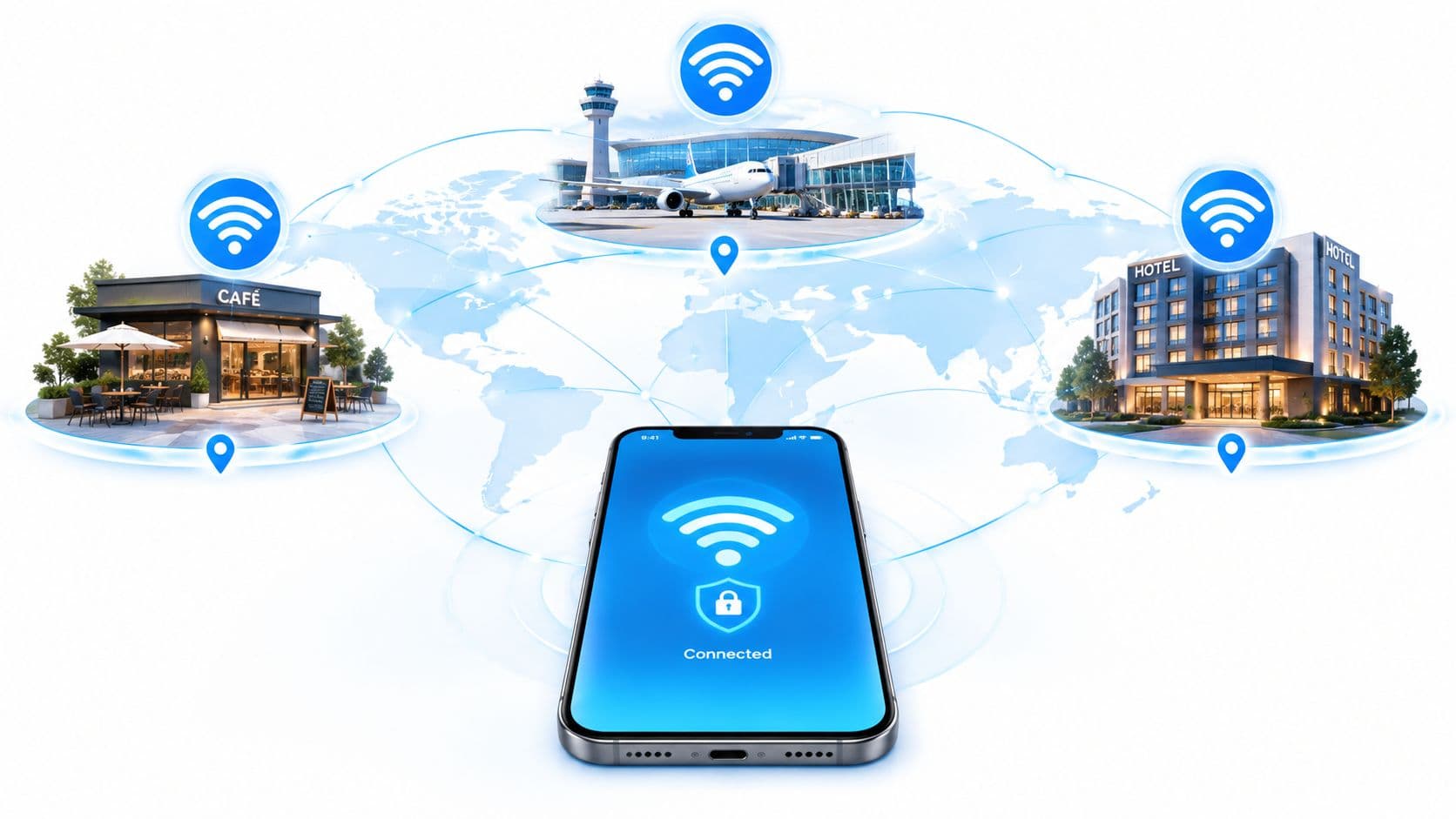
You're in a hotel room, your phone says it's connected, but the login page never appears. The laptop joins the same network, then times out while loading a work portal. Front desk says the broadband is fine, yet streaming stops, video calls break up, and every new device generates another complaint about hotel WiFi not working.
The visible symptom is often misleading. A client can associate with an access point while failing to obtain an address, resolve names, pass the captive portal, roam between radios, or reach the internet reliably. Effective troubleshooting starts by identifying which layer has failed, rather than restarting equipment and hoping the problem disappears.
Why Connected Does Not Mean Usable
A WiFi icon confirms only part of the connection. It usually means the device has exchanged enough radio traffic with an access point to establish an association. It doesn't confirm that the access point has spare capacity, that the network has issued a DHCP address, that DNS is responding, or that the gateway can reach the wider internet.
That distinction matters in hotels because guests move between rooms, hallways, restaurants, meeting areas, and the front desk. Their devices may remain associated with a distant access point, cling to a congested radio, or fail to roam cleanly. Interference and packet loss can make an apparently connected device feel unusable even when a fiber circuit is operating normally.
Independent network guidance identifies dead spots, excessive client load, interference, poor access-point design, and DHCP exhaustion as separate causes of hotel connectivity complaints. It also notes that hotels with 500 Mbps or 1 Gbps internet can still receive complaints because coverage consistency and latency may matter more than headline speed (independent guidance on hotel WiFi design and faults).
What a speed test leaves out
A speed test is useful, but it answers a narrow question. It measures throughput between a particular device and a test service at a particular moment. It may not reveal intermittent packet loss, slow DNS responses, failed roaming, a full DHCP pool, or a captive portal that blocks ordinary browsing.
A guest in a room with weak signal might complete a test during a quiet period, then lose practical usability when neighboring rooms become busy. A second guest may be near an access point but compete with too many clients for airtime. Both experiences can produce the same front-desk report, but they require different fixes.
| What the guest sees | What may actually be failing |
|---|---|
| Connected, no browsing | DHCP, DNS, portal, firewall, or WAN |
| Fast test, unstable video call | Latency, packet loss, interference, or roaming |
| One room affected | RF coverage, cabling, access point, or switch port |
| All rooms affected | Authentication service, gateway, uplink, or provider |
| Works at night, fails at busy times | Capacity, airtime contention, or policy limits |
For a more complete operational view, teams can combine room-level testing with WiFi analytics and client experience monitoring. The important shift is simple: usable connectivity is a service outcome, not a speed-test result.
Immediate Fixes for Guests and Front Desk Staff
When the login page doesn't appear, start with the device rather than repeatedly asking reception for the password. Open a normal, non-HTTPS webpage in a browser. The redirect can trigger captive-portal detection, whereas an HTTPS request may resist interception because the browser expects a valid secure destination.
If nothing happens, temporarily disable a VPN, private DNS feature, or security filter. These tools can prevent the device from detecting or reaching the portal. Reconnect after making the change, and restore the privacy feature once access has been authorized and tested.
A practical guest checklist
- Forget the hotel network. Remove the saved profile, then join the SSID again so an old session or incorrect configuration doesn't persist.
- Use another browser. A browser extension, cached redirect, or device-specific compatibility issue can stop the page rendering.
- Try a second device. If a cell phone joins successfully but a laptop doesn't, the property-wide service is less likely to be the immediate cause.
- Check authorization. Ask the front desk to confirm that the room or device session has been approved and, where supported, reset the session.
- Record the failure. Note the room, device, time, SSID, and exact message. “The WiFi is poor” gives staff little to investigate.
Hospitality guidance identifies portal pages that fail to render on some devices, require too many steps, or don't redirect correctly as recurring causes of front-desk calls. It also warns that an open SSID can expose radio traffic and create a false sense of security because a portal is not the same as encryption (guidance on guest WiFi and portal behavior).

A portal should make access easier, not turn the front desk into a manual authentication queue. The same principle applies when assessing accommodation for a trip. Readers comparing serviced apartments should consider whether the property explains its connectivity process clearly, especially if work, streaming, or multiple devices are part of the stay.
For operators, a controlled verification workflow can help staff confirm whether a guest has authenticated and whether the correct device is associated with the expected session. A guest WiFi verification workflow should complement, not replace, network-layer checks.
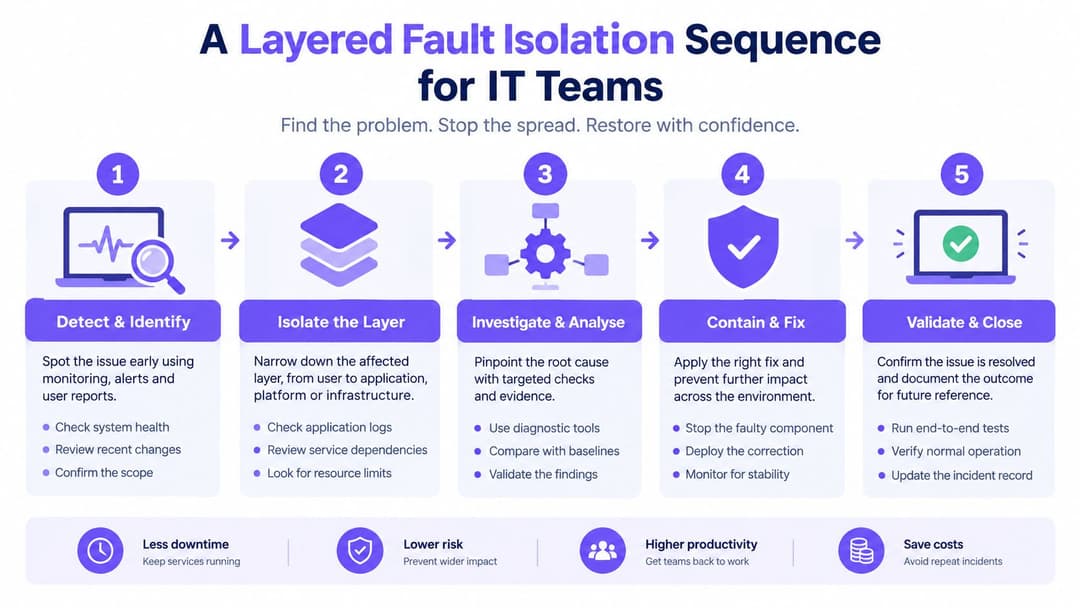
A Layered Fault Isolation Sequence for IT Teams
Randomly rebooting access points often removes useful evidence. A better response begins by recording the failure precisely, then testing from the guest's actual location.
Write down the room, SSID, device type, time, and scope. Establish whether the issue affects one device, one room, a floor, or the whole property. Test a second device in the same room, then test the original device elsewhere if possible. This quickly separates a client-specific problem from a location or service problem.
Follow the failure through the stack
- Confirm association. Check the controller for the client's association, signal quality, radio, roaming history, and authentication event. A client that never associates has an RF, device, or SSID problem.
- Verify addressing. Inspect whether the client received a DHCP address, default gateway, and DNS server. Association without an address points towards DHCP or VLAN problems.
- Test the gateway. Test gateway reachability before testing public websites. Failure here keeps the focus on the local network rather than the broadband provider.
- Test DNS separately. If the gateway responds but names don't resolve, inspect the resolver path, walled-garden rules, and portal policy. A valid IP with failed DNS points towards resolver or walled-garden configuration (US hotel WiFi troubleshooting guidance).
- Test HTTPS access. Successful DNS with no external reachability points towards firewall, WAN, or account-policy issues. Capture the time and affected client so upstream teams can correlate logs.
Compare conditions, not assumptions
Repeat the checks during a quiet period and a busy period. If addressing and DNS work off-peak but fail during breakfast or evening use, investigate exhaustion and capacity. If the same room fails consistently while nearby rooms work, inspect the access point, cabling, switch port, channel conditions, and building materials.
Avoid common test contamination. Disable a VPN temporarily, remove custom DNS settings, and check that the device isn't using a manually configured network profile. A portal redirect failure can look like an RF outage when the radio connection is perfectly healthy.
A multi-function diagnostic toolkit can help staff record client, gateway, DNS, and reachability results consistently. The value comes from producing comparable evidence for each incident, not from collecting more screenshots. A network testing toolkit can support that evidence-gathering process alongside controller and gateway logs.
Auditing Capacity and Network Design Bottlenecks
Recurring complaints rarely disappear just because a hotel buys a larger broadband package. The limiting resource may be airtime, access-point placement, uplink capacity, DHCP availability, or the policy that allows one client to consume too much of the shared service.
Audit the network where guests use it. Measure simultaneous clients per access point during breakfast, evening streaming, and checkout. Map RSSI and channel utilization room by room, then compare per-client throughput, retransmissions, DHCP-lease availability, DNS latency, and WAN utilization.
Look beyond the circuit
A property may have generous internet capacity but still provide poor room-level service. Thick walls can weaken coverage, neighboring radios can create contention, and poorly placed access points can leave guests attached to a distant radio. Adding more access points without an RF survey can make the situation worse by increasing co-channel contention.
Use the measurements to answer specific questions:
- Is the radio congested? High channel utilization and retransmissions indicate an airtime problem, not necessarily a broadband problem.
- Is the access point overloaded? Client counts and per-client performance reveal whether demand is concentrated in particular rooms or public areas.
- Is addressing available? DHCP-lease availability should be checked alongside client counts, especially when devices connect but never receive an address.
- Is the WAN being consumed fairly? Compare guest demand with the needs of payment terminals, booking platforms, property-management systems, staff devices, and building controls.
A practical design target is to keep guest traffic within roughly 60 to 80 percent of total broadband capacity, retaining 20 to 40 percent headroom for operational services (capacity guidance for hospitality networks). That isn't a universal performance guarantee. Streaming behavior, radio conditions, building construction, and client capability can dominate the result.
Isolate guests from operations
Place guest devices on a dedicated VLAN with client isolation. Validate the policy from a guest device, confirming that it can't reach payment, booking, property-management, or building-control networks. This prevents a performance incident from becoming a security incident.
Apply per-client or per-room rate limits and QoS where appropriate. The objective isn't to make every device identical. It's to stop a single client from monopolizing WAN capacity or airtime while preserving a predictable service for the rest of the property.
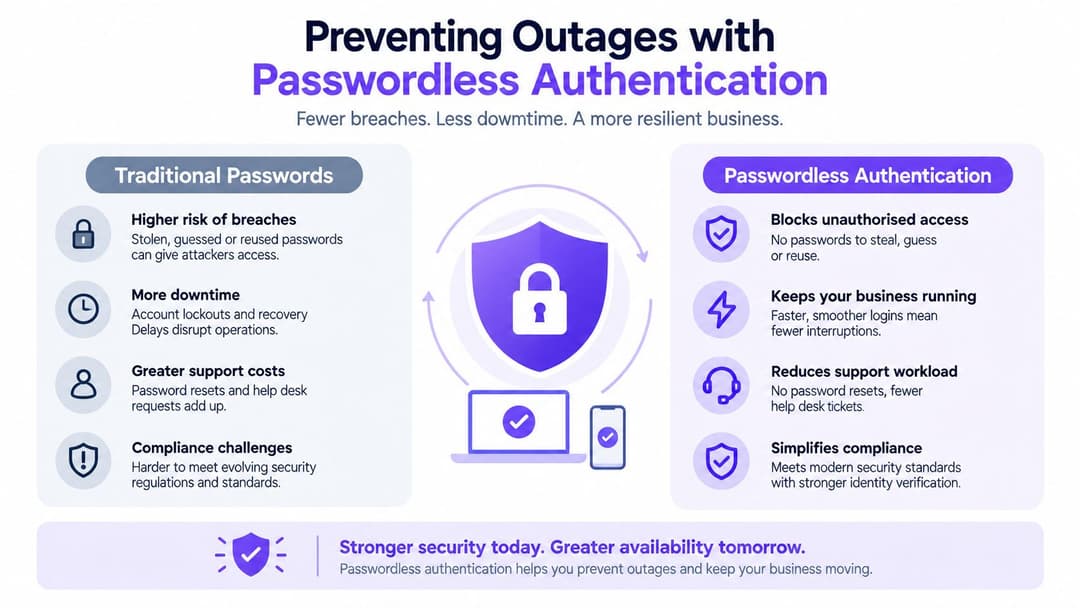
Preventing Outages with Passwordless Authentication
Captive portals are convenient when they work, but they create a fragile dependency on browser redirects, device detection, DNS behavior, certificates, and session state. A guest may have a perfectly healthy radio connection and still be unable to start browsing because the authentication layer has failed.
Passwordless standards such as Hotspot 2.0, Passpoint, and OpenRoaming offer a different model. The device discovers a trusted network, evaluates its credentials, and establishes an encrypted connection without asking the guest to type a shared password into a web form. In suitable deployments, that removes splash-screen compatibility from the critical path.
Why the authentication layer matters
A traditional portal has to work across phones, laptops, tablets, smart TVs, and other guest equipment. It must also handle private DNS, VPNs, browser restrictions, certificate validation, and operating-system-specific captive-network behavior. Every additional step creates another point at which the guest can become stuck.
Passpoint and related approaches shift much of that work into the device and network relationship. Encrypted access begins as part of the network connection rather than after a guest has passed through an open SSID. That distinction matters because a portal doesn't encrypt an otherwise open wireless link.
For staff and managed environments, identity integration adds control. Directory services can provision access automatically, apply role-based policies, and revoke access when a user leaves or their status changes. That is more manageable than rotating shared passwords across departments, contractors, and tenants.
Where portals still fit
Passwordless access isn't a reason to ignore portal design. Some visitors won't have a supported profile, some devices need a fallback, and some properties require consent or registration before granting service. A fallback portal should be short, accessible, clearly branded, and tested on the device types guests typically bring.
Purple provides a hotel guest WiFi platform that supports passwordless access models including Passpoint and OpenRoaming, while also offering captive-portal workflows and identity-based networking for guest and staff environments. It can integrate with directory services and network vendors, but operators still need to validate coverage, policy, failover, and device compatibility themselves.
The right aim is not to eliminate every web page. It is to ensure that authentication failure doesn't masquerade as a radio failure or generate unnecessary front desk work.
Building a Resilient Hospitality Connectivity Strategy
Reliable hotel connectivity begins with treating WiFi as operational infrastructure rather than a guest amenity that can be checked only when someone complains. The connection supports payment systems, booking platforms, staff workflows, online ordering, building services, and guest communication. A failure in any of those paths can create pressure far beyond a slow download.
UK hospitality businesses experienced an estimated average of 26.8 to 27 hours of internet downtime in 2023, with restoration taking roughly 7.9 to 8 hours per failure, according to Beaming's UK downtime report. The figures cover wider business connectivity, not guest WiFi alone, but they show why hotels need monitoring, resilience, escalation, and clear communications.
Build an operator's checklist
- Measure availability. Track whether the SSID is visible, clients can associate, authentication succeeds, DHCP completes, DNS responds, and external HTTPS access works.
- Measure experience. Record latency, packet loss, roaming behavior, and time to resolution, not just advertised broadband speed.
- Test peak periods. Run checks when guest demand is highest, then compare them with quiet-period results.
- Protect operations. Keep guest traffic within the planned capacity envelope, isolate it from operational VLANs, and confirm that QoS policies behave under load.
- Maintain a secondary path. Use a secondary fixed, 4G, or 5G connection where losing internet access would affect hotel operations. Test failover under load, not merely while the backup circuit is enabled.
- Prepare communications. Give front desk a short diagnostic script and an escalation form that captures room, device, time, SSID, authentication state, and observed symptoms.
A failover circuit that has never carried production traffic is an assumption, not a resilience plan. The same applies to a portal that was tested only on one staff handset. Hotels should test the combinations guests use, including different operating systems, browsers, VPN settings, private DNS configurations, and room locations.
Connectivity also affects experiences outside the property. Operators arranging excursions or transfers may find this practical guide on why tours need reliable WiFi and SIMs useful when planning communication with travelers and staff.
The strongest incident process ends with evidence. After resolution, record the failed layer, the corrective action, and the monitoring signal that should detect it next time. That turns “hotel WiFi not working” from a recurring complaint into a diagnosable service condition.
Purple helps hospitality operators replace fragile shared-password and captive-portal journeys with passwordless guest access, identity-based staff networking, verification workflows, and connectivity analytics. Visit Purple to assess how a more observable and resilient hotel WiFi experience could fit your existing network.